lock SMART FORTWO COUPE 2014 Workshop Manual
[x] Cancel search | Manufacturer: SMART, Model Year: 2014, Model line: FORTWO COUPE, Model: SMART FORTWO COUPE 2014Pages: 222, PDF Size: 16.17 MB
Page 197 of 222

Wheel change
Preparing the vehicle
X Park the vehicle on a hard, flat surface
when possible.
X Turn on the hazard warning flasher.
X Turn the steering wheel so that the front
wheels are in a straight-ahead position.
X Engage the parking brake.
X Move the gear selector lever to park
position P.
X Switch off the drive system.
X Have any passenger exit the vehicle at a
safe distance from the roadway. Removing the wheel
G
WARNING
When jacking up the vehicle, only use a
suitable jack. Observe the manufacturer’s
safety instructions.
The jack must be designed for jacking up
this vehicle at the jack take-up brackets
built into both sides of the vehicle.
The jack is intended only for lifting the
vehicle briefly for wheel changes. It is not
suited for performing maintenance work
under the vehicle. To help avoid personal
injury, use the jack only to lift the vehicle
during a wheel change.
Never get beneath the vehicle while it is
supported by the jack. Keep hands and feet
away from the area under the lifted vehicle.
Always lower the vehicle onto sufficient
capacity jackstands before working under
the vehicle.
Always firmly engage the parking brake and
block the wheels with wheel chocks or other
sizeable objects before raising the vehi-
cle with the jack. Do not release the parking
brake while the vehicle is raised.
Make sure the ground on which the vehicle
is standing and where you place the jack is solid, level and not slippery. If necessary,
use a large underlay. On slippery surfaces,
such as tiled floors, you should use a non-
slip underlay, for example a rubber mat.
Do not use wooden blocks or similar objects
to support the jack. Otherwise the jack may
not be able to achieve its load-bearing
capacity if it is not at its full height.
The jack must always be vertical when in
use. Always try to use the jack on level sur-
face. If you do not position the jack cor-
rectly, the vehicle can fall off the jack and
seriously or fatally injure you or others.
Never switch on the drive system when the
vehicle is raised.
Also observe the notes on the jack.
X Make sure to have a suitable jack 10
, wheel
wrench 10
and wheel chock 10
.
Contact an authorized electric drive
smart center for information on which
jack and wheel wrench are required.
X Prepare the vehicle as described
(Y page 195).
X Make sure the surface is level.
Prevent the vehicle from rolling away by
blocking wheels with wheel chocks or other
sizeable objects:
X Place one wheel chock or other sizeable
object in front of and another wheel
chock or other sizeable object behind
the wheel that is diagonally opposite to
the wheel being changed.
X On wheel to be changed, loosen but do not
yet remove the wheel bolts (approx-
imately one full turn with wheel wrench).
! Only position the jack on the desig-
nated take-up brackets.
You must not position the jack under the
high-voltage battery. Otherwise, the
high-voltage battery could be damaged.
10 Not included and not available as factory equipment. Wheel change
195>> Practical hints. Z
Page 201 of 222
Disconnecting, removing, charging,
reinstalling and reconnecting 12‑volt
battery
Disconnecting the 12-volt battery i
If the 12-volt battery is disconnected
or discharged
R turning the key in the starter switch
will have no effect
R the transmission will remain in park
position P
For more information see “Jump start-
ing” (Y page 200).
X Engage the parking brake.
X Move the gear selector lever to park
position P.
X Turn off all electrical accessories.
X Switch off the drive system.
X Open the passenger door.
X Move the passenger seat to the rear as far
as possible.
X Unscrew the carpet holder in the
passenger footwell (Y page 160).
X Lift the carpet. X
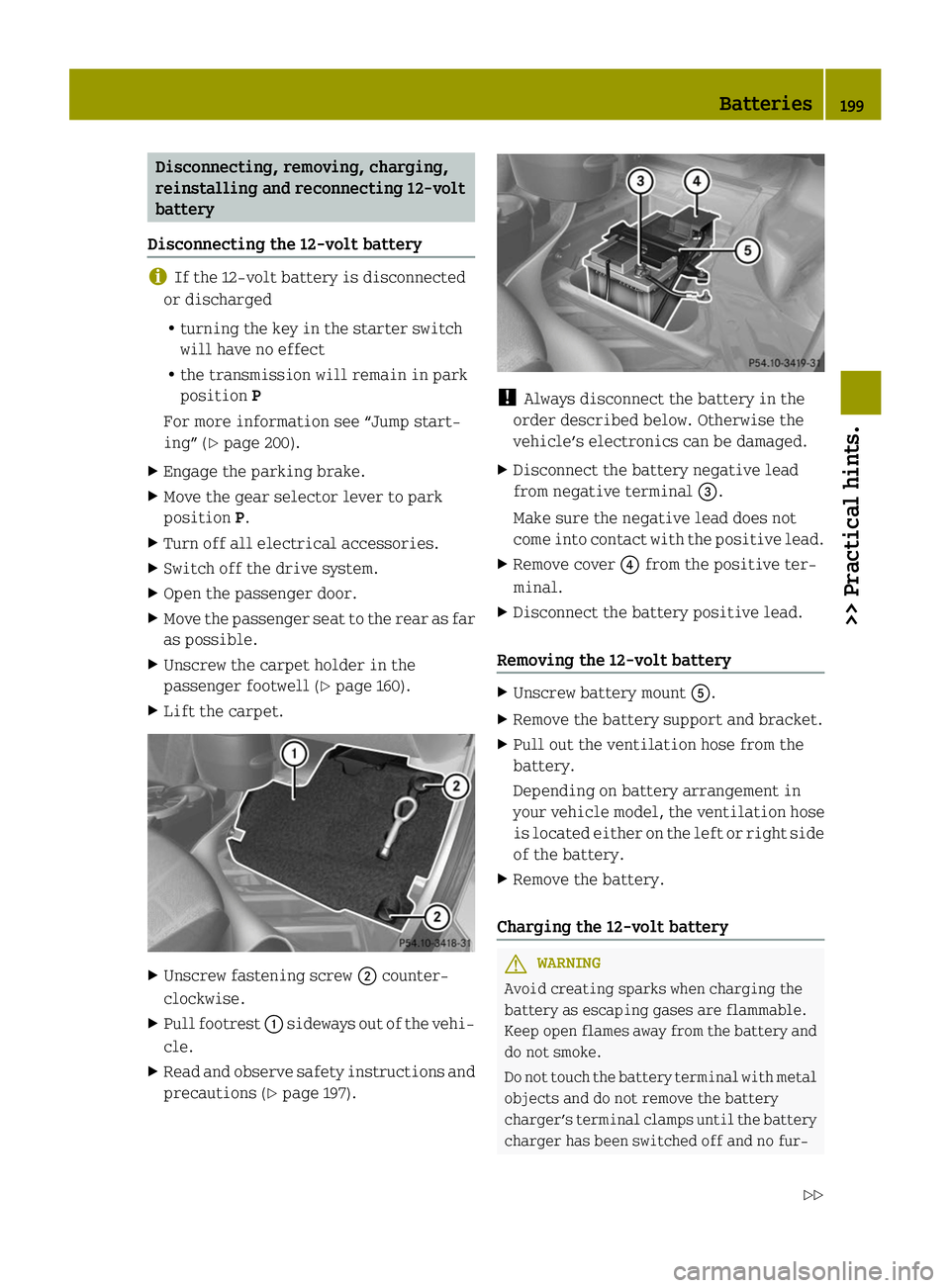
Unscrew fastening screw 0044counter-
clockwise.
X Pull footrest 0043sideways out of the vehi-
cle.
X Read and observe safety instructions and
precautions (Y page 197). !
Always disconnect the battery in the
order described below. Otherwise the
vehicle’s electronics can be damaged.
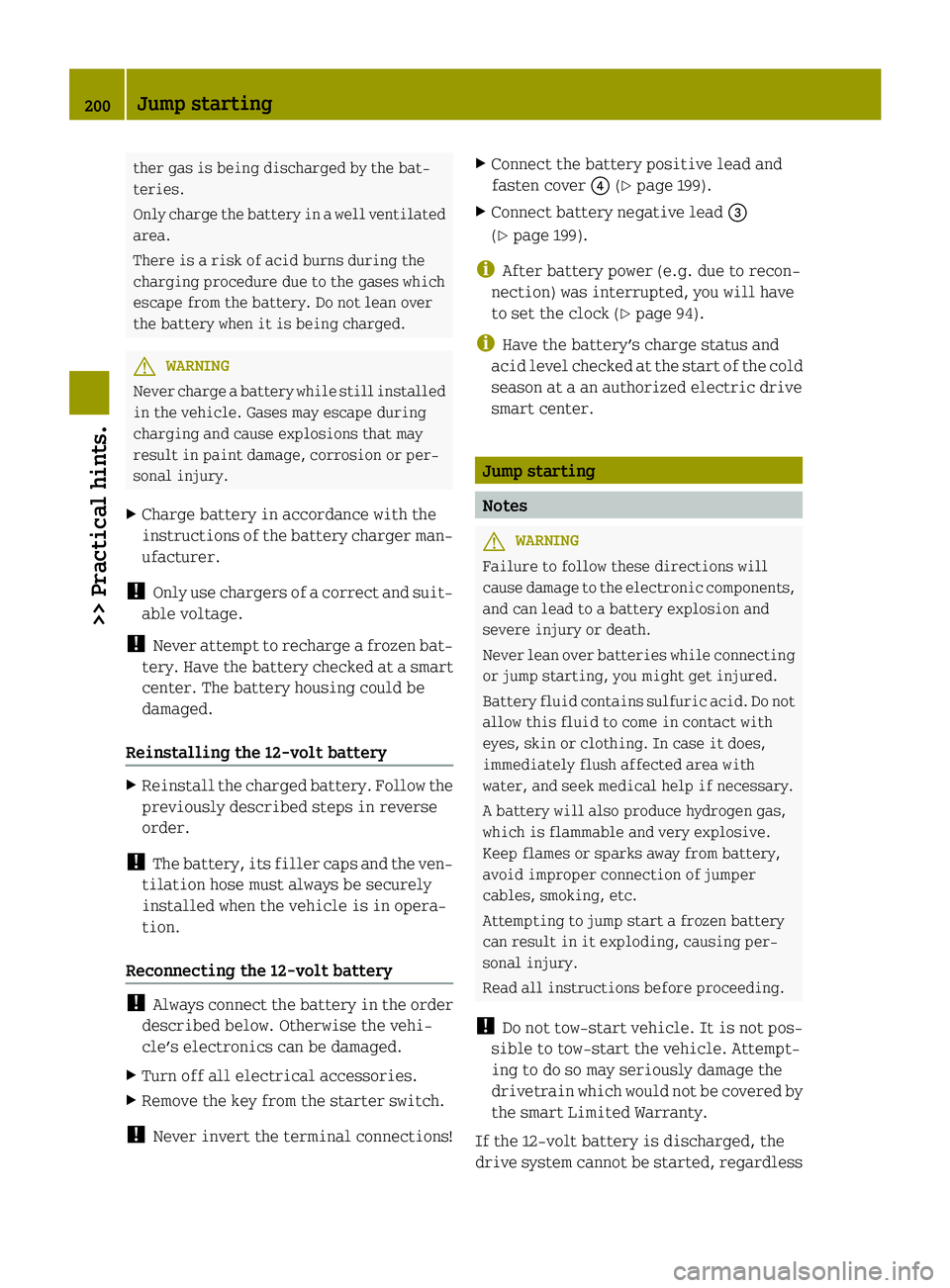
X Disconnect the battery negative lead
from negative terminal 0087.
Make sure the negative lead does not
come into contact with the positive lead.
X Remove cover 0085from the positive ter-
minal.
X Disconnect the battery positive lead.
Removing the 12-volt battery X
Unscrew battery mount 0083.
X Remove the battery support and bracket.
X Pull out the ventilation hose from the
battery.
Depending on battery arrangement in
your vehicle model, the ventilation hose
is located either on the left or right side
of the battery.
X Remove the battery.
Charging the 12-volt battery G
WARNING
Avoid creating sparks when charging the
battery as escaping gases are flammable.
Keep open flames away from the battery and
do not smoke.
Do not touch the battery terminal with metal
objects and do not remove the battery
charger’s terminal clamps until the battery
charger has been switched off and no fur- Batteries
199>> Practical hints.
Z
Page 202 of 222
ther gas is being discharged by the bat-
teries.
Only charge the battery in a well ventilated
area.
There is a risk of acid burns during the
charging procedure due to the gases which
escape from the battery. Do not lean over
the battery when it is being charged. G
WARNING
Never charge a battery while still installed
in the vehicle. Gases may escape during
charging and cause explosions that may
result in paint damage, corrosion or per-
sonal injury.
X Charge battery in accordance with the
instructions of the battery charger man-
ufacturer.
! Only use chargers of a correct and suit-
able voltage.
! Never attempt to recharge a frozen bat-
tery. Have the battery checked at a smart
center. The battery housing could be
damaged.
Reinstalling the 12-volt battery X
Reinstall the charged battery. Follow the
previously described steps in reverse
order.
! The battery, its filler caps and the ven-
tilation hose must always be securely
installed when the vehicle is in opera-
tion.
Reconnecting the 12-volt battery !
Always connect the battery in the order
described below. Otherwise the vehi-
cle’s electronics can be damaged.
X Turn off all electrical accessories.
X Remove the key from the starter switch.
! Never invert the terminal connections! X
Connect the battery positive lead and
fasten cover 0085(Ypage 199).
X Connect battery negative lead 0087
(Y page 199).
i After battery power (e.g. due to recon-
nection) was interrupted, you will have
to set the clock (Y page 94).
i Have the battery’s charge status and
acid level checked at the start of the cold
season at a an authorized electric drive
smart center. Jump starting
Notes
G
WARNING
Failure to follow these directions will
cause damage to the electronic components,
and can lead to a battery explosion and
severe injury or death.
Never lean over batteries while connecting
or jump starting, you might get injured.
Battery fluid contains sulfuric acid. Do not
allow this fluid to come in contact with
eyes, skin or clothing. In case it does,
immediately flush affected area with
water, and seek medical help if necessary.
A battery will also produce hydrogen gas,
which is flammable and very explosive.
Keep flames or sparks away from battery,
avoid improper connection of jumper
cables, smoking, etc.
Attempting to jump start a frozen battery
can result in it exploding, causing per-
sonal injury.
Read all instructions before proceeding.
! Do not tow‑start vehicle. It is not pos-
sible to tow-start the vehicle. Attempt-
ing to do so may seriously damage the
drivetrain which would not be covered by
the smart Limited Warranty.
If the 12-volt battery is discharged, the
drive system cannot be started, regardless 200
Jump starting>> Practical hints.
Page 206 of 222
A tow bar is necessary to adequately control
the towed vehicle.
Prior to towing the vehicle with all wheels
on the ground, make sure the gear selector
lever is in neutral position Nand the igni-
tion is switched on. G
WARNING
With the drive system inactive, there is no
power assistance for the brake and steering
systems. In this case, it is important to
keep in mind that a considerably higher
degree of effort is necessary to brake and
steer the vehicle. Adapt your driving
accordingly.
! The vehicle may be towed only for dis-
tances up to 30 miles (50 km) and at a
speed not to exceed 30 mph (50 km/h).
Otherwise, the electric drive or the
high-voltage system could be damaged.
! Do not tow other vehicles.
Otherwise, the drive system or compo-
nents of the high-voltage system could be
damaged.
! Do not tow the vehicle with the front
axle raised. Doing so may cause serious
damage to the brake system which is not
covered by the smart Limited Warranty.
! Before towing the vehicle observe the
following instructions:
R Do not tow with sling-type equipment
attached to suspension parts. This may
cause damage to the supports if towing
on a bumpy road.
R Towing the vehicle should only be done
using the properly installed towing
eye bolt. Never attach a tow cable, tow
rope, or tow rod to the vehicle chassis,
frame, or suspension parts.
! Make sure the gear selector lever is in
neutral position Nwhile towing the
vehicle. Doing otherwise may result in
significant drive train damage. !
Towing the vehicle with a luggage
rack* mounted is not permissible. The
vehicle must not be towed by the luggage
rack*.
i If the 12-volt battery is disconnected
or discharged, the gear selector lever
will remain locked in park position P.
Contact an authorized electric drive
smart center for assistance or call Road-
side Assistance.
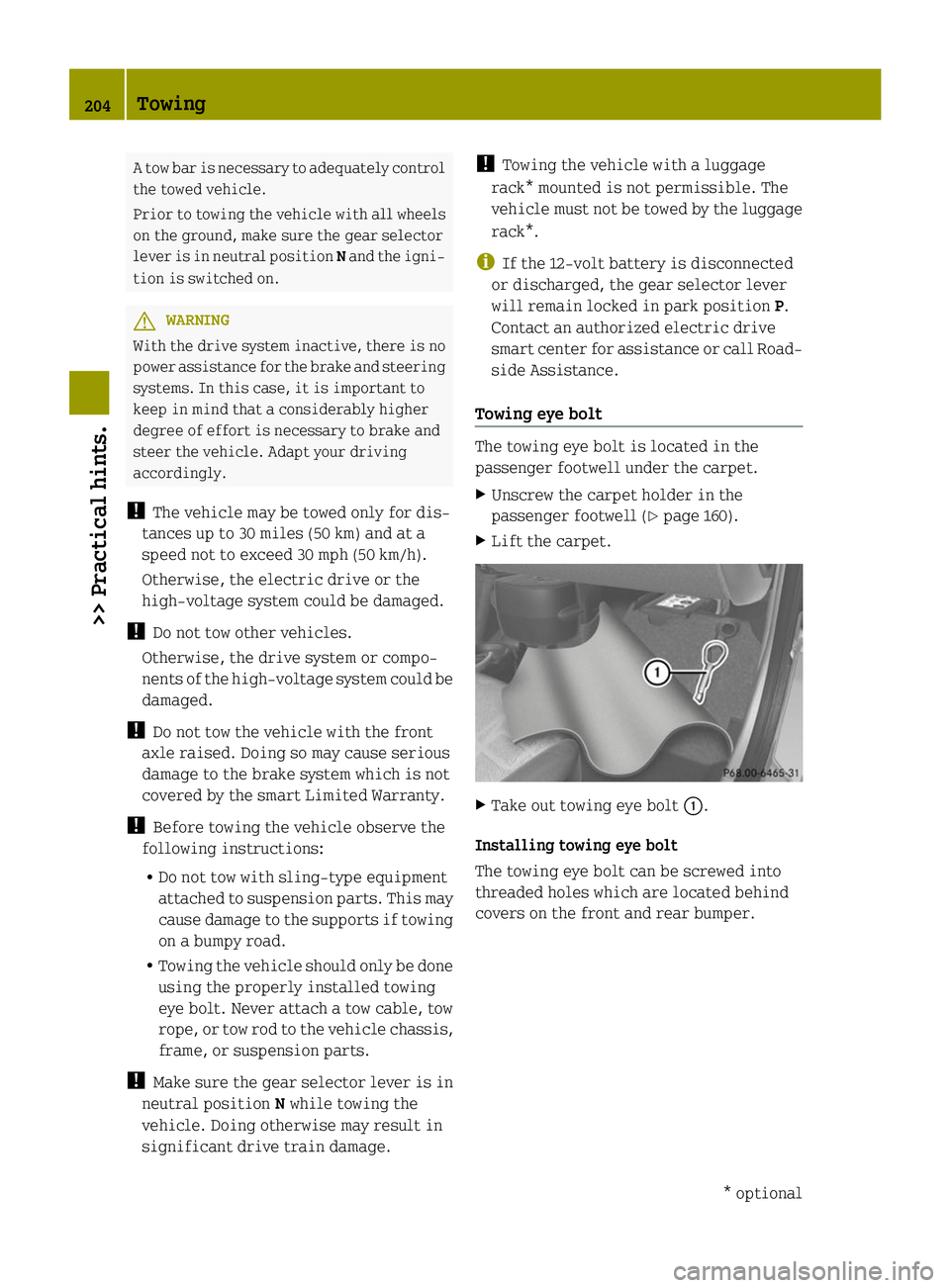
Towing eye bolt The towing eye bolt is located in the
passenger footwell under the carpet.
X
Unscrew the carpet holder in the
passenger footwell (Y page 160).
X Lift the carpet. X
Take out towing eye bolt 0043.
Installing towing eye bolt
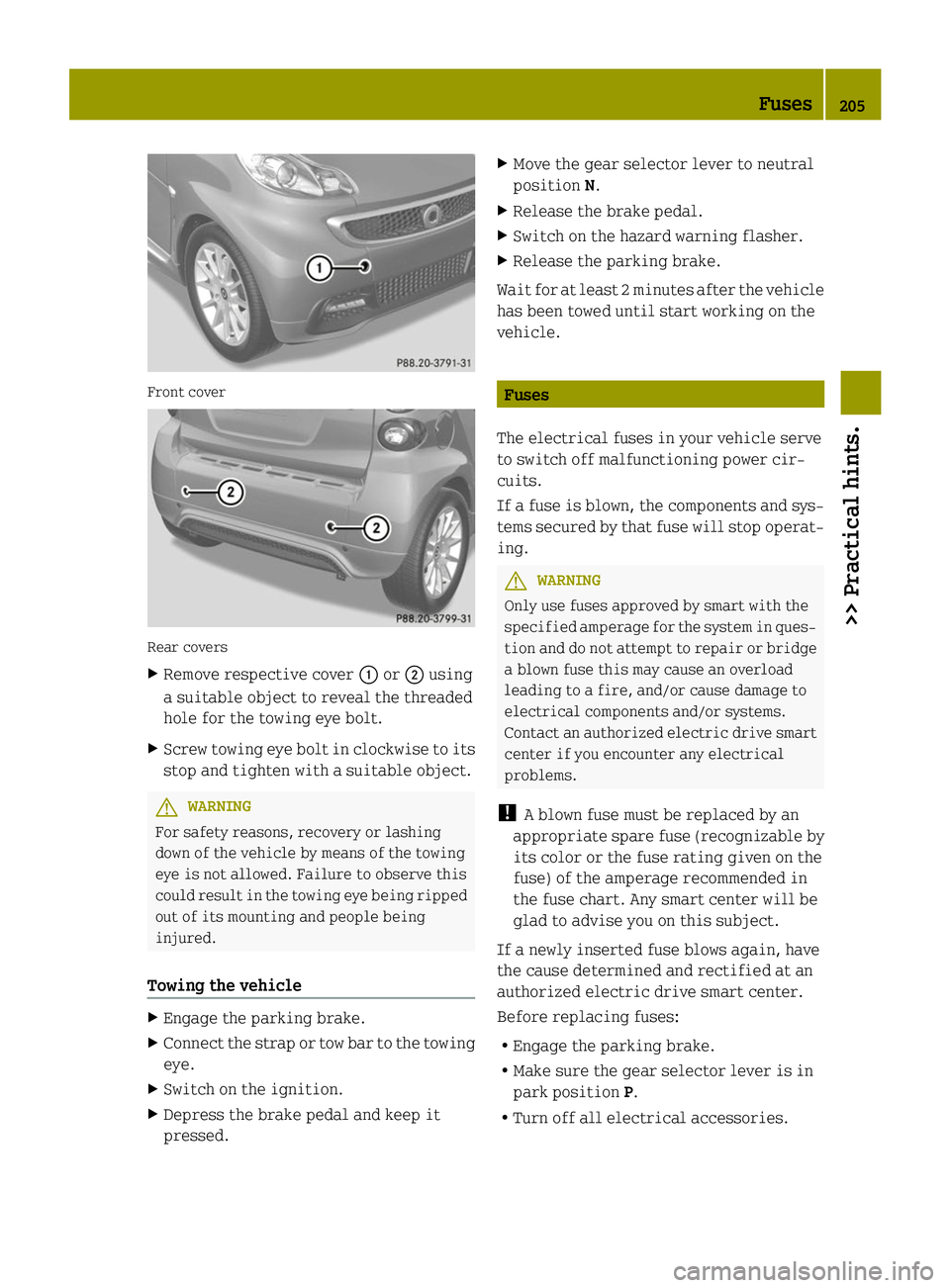
The towing eye bolt can be screwed into
threaded holes which are located behind
covers on the front and rear bumper. 204
Towing>> Practical hints.
* optional
Page 207 of 222
Front cover
Rear covers
X
Remove respective cover 0043or0044 using
a suitable object to reveal the threaded
hole for the towing eye bolt.
X Screw towing eye bolt in clockwise to its
stop and tighten with a suitable object. G
WARNING
For safety reasons, recovery or lashing
down of the vehicle by means of the towing
eye is not allowed. Failure to observe this
could result in the towing eye being ripped
out of its mounting and people being
injured.
Towing the vehicle X
Engage the parking brake.
X Connect the strap or tow bar to the towing
eye.
X Switch on the ignition.
X Depress the brake pedal and keep it
pressed. X
Move the gear selector lever to neutral
position N.
X Release the brake pedal.
X Switch on the hazard warning flasher.
X Release the parking brake.
Wait for at least 2 minutes after the vehicle
has been towed until start working on the
vehicle. Fuses
The electrical fuses in your vehicle serve
to switch off malfunctioning power cir-
cuits.
If a fuse is blown, the components and sys-
tems secured by that fuse will stop operat-
ing. G
WARNING
Only use fuses approved by smart with the
specified amperage for the system in ques-
tion and do not attempt to repair or bridge
a blown fuse this may cause an overload
leading to a fire, and/or cause damage to
electrical components and/or systems.
Contact an authorized electric drive smart
center if you encounter any electrical
problems.
! A blown fuse must be replaced by an
appropriate spare fuse (recognizable by
its color or the fuse rating given on the
fuse) of the amperage recommended in
the fuse chart. Any smart center will be
glad to advise you on this subject.
If a newly inserted fuse blows again, have
the cause determined and rectified at an
authorized electric drive smart center.
Before replacing fuses:
R Engage the parking brake.
R Make sure the gear selector lever is in
park position P.
R Turn off all electrical accessories. Fuses
205>> Practical hints. Z
Page 211 of 222

No. Accessory/Component Amperage Color
006D
CPC, shifter, brake force booster vacuum
pump 7.5 A Brown
006E
Coolant pumps 1 and 2, high-voltage battery 15 A Blue
006F
ESP
®
control unit 25 A Neutral
0070
Exterior lamp switch, turn signal lamp
switch, cockpit switch module, on-board
diagnostics socket, exterior rear view mir-
ror heating, anti-theft warning system,
rain-light sensor, charge level and power
gauges, central locking system, instrument
cluster, Tire Pressure Monitoring System
(TPMS), brake and turn signal lamps (left and
right) 10 A Red
0071
— — —
0072
— — —
0073
Safety circuit high-voltage battery 15 A Blue
0074
— — —
0075
Rear window wiper (coupé only) 15 A Blue
0076
ESP
®
control unit, EPS control unit, restraint
systems 10 A Red
0077
Electric drive components, engine control
unit, transmission control unit, on-board
diagnostics socket, sound generator 7.5 A Brown
0078
Air conditioning system, exterior rear view
mirror adjustment, washer pump, audio, seat
heating, wiper switch, cruise control, soft
top switch (cabriolet only), backup lamp 10 A Red
0079
Auxiliary power outlet 15 A Blue
007A
Left low‑beam headlamp 7.5 A Brown
007B
Right low‑beam headlamp 7.5 A Brown
007C
— — —
007D
Right high‑beam headlamp 7.5 A Brown
007E
Left high‑beam headlamp 7.5 A Brown
007F
Electric drive components 7.5 A Brown Fuses
209>> Practical hints. Z
Page 212 of 222

No. Accessory/Component Amperage Color
0080
Rear window defroster 40 A Orange
0081
Soft top (cabriolet only) 30 A Green
0082
Radiator cooling fan 40 A Orange
006A
Horn, central locking system 20 A Yellow
0069
— — —
0068
Starter switch (ignition) 50 A Red
0066
ESP
®
control unit 40 A Orange
00B7
EPS control unit 30 A Green
009A
Exterior rear view mirror heating 7.5 A Brown
009B
Brake lamps 7.5 A Brown
009C
— — —
009D
Tire pressure monitor control unit 7.5 A Brown
009E
Coolant pump, electric drive components, HV
interior PTC heater passenger compartment,
windshield unit car2go 10 A Red
009F
Audio, subwoofer, sound system, soft top
(cabriolet only) 15 A Blue
00A0
Interior lighting 5 A Light brown
00A1
Surround sound system 20 A Yellow
00A2
Seat heating control unit 25 A Neutral210
Fuses>> Practical hints.