battery SMART FORTWO COUPE 2015 User Guide
[x] Cancel search | Manufacturer: SMART, Model Year: 2015, Model line: FORTWO COUPE, Model: SMART FORTWO COUPE 2015Pages: 222, PDF Size: 5.02 MB
Page 47 of 222

X
Thread top tether strap Athrough top
tether guide :down the back of
passenger seat ;to top tether anchor-
age =.
X Attach top tether hook ?to top tether
anchorage =on the floor of the cargo
compartment.
i If you are using divider plus*, the
hooks of the top tether and the divider
plus* are attached to the same anchorage.
X Install the child restraint system and
tighten top tether strap Aaccording to
the child restraint manufacturer’s
instructions. G
WARNING
After installing top tether straps, make
sure the seat backrests are in an upright
position and are properly locked. Push and pull on the seat backrests to ensure they are
properly secured in the locked position. If
a seat backrest is not properly locked, the
seat backrest could fold. The child seat
would no longer be properly supported or
positioned to provide its intended bene-
fit. That could cause serious or even fatal
injuries. Panic alarm X
Activating: Press and hold button :for
at least 1 second.
An audible alarm and flashing exterior
lamps will operate briefly.
X Deactivating: Press button:once more.
or
X Insert the key in the starter switch.
i USA only:
This device complies with Part 15 of the
FCC Rules. Operation is subject to the
following two conditions:
1. This device may not cause harmful
interference, and
2. this device must accept any interfer-
ence received, including interference
that may cause undesired operation.
Any unauthorized modification to this
device could void the user’s authority to
operate the equipment.
The product label with FCC ID and IC cer- tification number can be found in the
battery case.
i Canada only:
This device complies with RSS‑210 of
Industry Canada. Operation is subject to
the following two conditions:
1. This device may not cause interfer-
ence, and
2. this device must accept any interfer-
ence received, including interference
that may cause undesired operation of
the device.
Any unauthorized modification to this
device could void the user’s authority to
operate the equipment.
The product label with FCC ID and IC cer-
tification number can be found in the
battery case. Panic alarm
45>> Safety.
* optional Z
Page 54 of 222

Opening and closing
Key
Key with remote control
:
*Lock button
; $Opening the retractable soft top 3
/
unlocking the upper tailgate 4
= #Unlock button
The remote control centrally locks and
unlocks:
R the driver’s door
R the charge socket flap
R the passenger door
R the upper tailgate G
WARNING
When leaving the vehicle, always remove the key from the starter switch, take it with
you, and lock the vehicle. Do not leave chil- dren unattended in the vehicle, or with
access to an unlocked vehicle. It is possi-
ble for children to open a locked door from
the inside, which could result in an acci-
dent and/or serious personal injury.
! To prevent possible malfunction, avoid
exposing the remote control to high lev-
els of electromagnetic radiation.
If you can no longer lock or unlock the vehi- cle with the remote control, the batteries
in the remote control are discharged, or
the remote control is malfunctioning. X
Check the batteries in the remote control
and replace them if necessary.
X If you do not have a spare transmitter
battery at hand, use the key to open the
driver’s door and the charge socket flap
(Y page 177).
i USA only:
This device complies with Part 15 of the
FCC Rules. Operation is subject to the
following two conditions:
1. This device may not cause harmful
interference, and
2. this device must accept any interfer-
ence received, including interference
that may cause undesired operation.
Any unauthorized modification to this
device could void the user’s authority to
operate the equipment.
The product label with FCC ID and IC cer- tification number can be found in the
battery case.
i Canada only:
This device complies with RSS‑210 of
Industry Canada. Operation is subject to
the following two conditions:
1. This device may not cause interfer-
ence, and
2. this device must accept any interfer-
ence received, including interference
that may cause undesired operation of
the device.
Any unauthorized modification to this
device could void the user’s authority to
operate the equipment.
The product label with FCC ID and IC cer-
tification number can be found in the
battery case.
! The remote control has an operating
range of approximately 50 ft (15 meters).
This can fluctuate greatly as a conse-
quence of local conditions (reflective or
3 cabriolet only.
4 coupé only. 52
Opening and closing>> Controls.
Page 70 of 222
X
Make sure the parking lamps or the
low‑beam headlamps are switched on.
X Switching on: Press switch:.
The front fog lamps come on.
The indicator lamp in the switch comes
on.
X Switching off: Press switch:once
more.
The front fog lamps go out.
The indicator lamp in the switch goes
out. Hazard warning flasher
The hazard warning flasher can be switched on at all times, even with the key removed
from the starter switch. X
Switching on: Press hazard warning
flasher switch :.
All turn signal lamps are flashing.
X Switching off: Press hazard warning
flasher switch :once more. Interior lighting
The interior lamp comes on for a period of
time when you open the doors, or lock or
unlock the vehicle with the key.
It goes out
R immediately after switching off the
ignition with all doors closed
R after 30 seconds if the doors are not
opened R
after 15 seconds if all doors are closed
R after 10 minutes if at least one door is
open
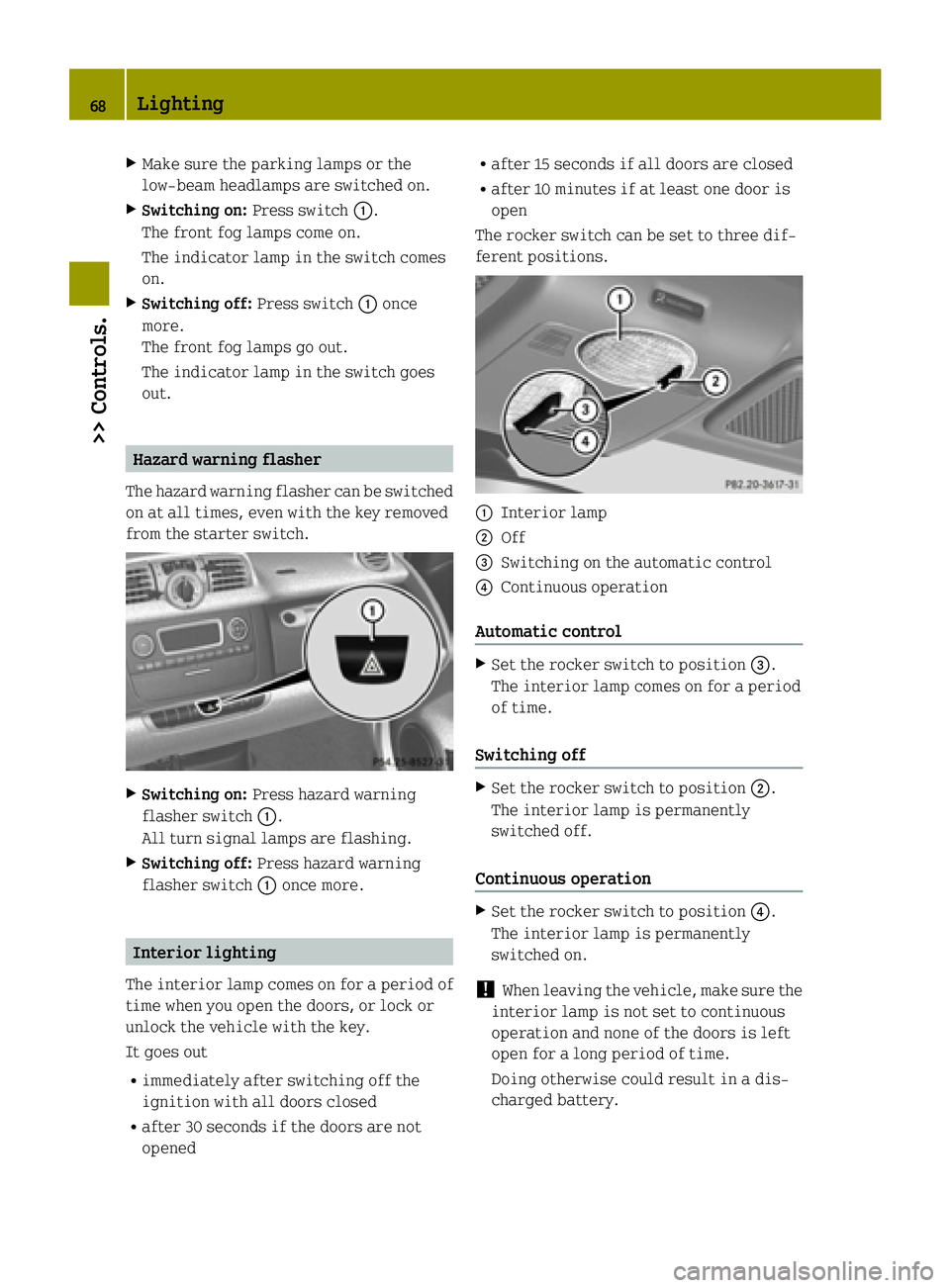
The rocker switch can be set to three dif-
ferent positions. :
Interior lamp
; Off
= Switching on the automatic control
? Continuous operation
Automatic control X
Set the rocker switch to position =.
The interior lamp comes on for a period
of time.
Switching off X
Set the rocker switch to position ;.
The interior lamp is permanently
switched off.
Continuous operation X
Set the rocker switch to position ?.
The interior lamp is permanently
switched on.
! When leaving the vehicle, make sure the
interior lamp is not set to continuous
operation and none of the doors is left
open for a long period of time.
Doing otherwise could result in a dis-
charged battery. 68
Lighting>> Controls.
Page 73 of 222

When loading, make sure no sharp objects
come into contact with the soft top or the
rear window.
Do not place any evenly distributed loads with a weight of more than 165 lbs (75 kg)
on the rear soft top when folded down.
Make sure the high-mounted brake lamp
is not concealed.
! Do not block the soft top system’s lock-
ing apertures.
Only place the side rails in the desig-
nated storage space of the tailgate.
! Do not sit on the folded-down rear soft
top.
Do not fold down the rear soft top at tem-
peratures below 14¦ (-10¥).
Do not place any pointed, sharp-edged,
hot (above 176¦ [80¥]), incandescent or
burning objects on the soft top’s lining.
Do not apply wax to the soft top fabric and select only wax-free washing products
when using an automatic car wash.
Only drive with the retaining clips
closed, as exhaust fumes could otherwise
reach the vehicle’s interior.
! Please keep in mind that weather con-
ditions can sometimes change rapidly.
Make sure to close the retractable soft
top and the rear soft top when leaving the
vehicle. If water enters the vehicle inte- rior, vehicle electronics could be dam-
aged which is not covered by the smart
Limited Warranty. Opening and closing the retractable
soft top
You can open and close the retractable soft
top when the vehicle is either stationary or in motion. G
WARNING
Never operate the retractable soft top if
there is the possibility of anyone being harmed by the opening or closing proce-
dure.
G
WARNING
The retractable soft top is made out of fab- ric. In the event of an accident, the fabric
may tear. This may result in an opening in
the roof.
In a vehicle rollover, occupants not wear-
ing their seat belts or not wearing them
properly may be thrown out of the opening.
Such an opening also presents a potential
for injury for occupants wearing their seat
belts properly as entire body parts or por- tions of them may protrude from the
passenger compartment. G
WARNING
When leaving the vehicle, always remove the key from the starter switch, take it with
you, and lock the vehicle. Do not leave chil- dren unattended in the vehicle, or with
access to an unlocked vehicle. A child’s
unsupervised access to a vehicle could
result in an accident and/or serious per-
sonal injury.
! To avoid damaging the seals, do not
transport any objects with sharp edges
which can stick out of the retractable
soft top.
Do not open the retractable soft top if
there is snow or ice on the roof, as this
could result in malfunctions.
If you cannot open or close the retracta-
ble soft top due to a malfunction contact
Roadside Assistance or an authorized
electric drive smart center.
i To avoid draining the battery, leave the
drive system running when opening and
closing the retractable soft top.
Opening from outside You can open the retractable soft top com-
pletely with the key. Soft top system (cabriolet only)
71>> Controls. Z
Page 81 of 222

Make sure the drive system is active when-
ever the vehicle is rolling. Have the brake system repaired at an authorized electric
drive smart center, if there is a fault in the
brake system. If a brake circuit has failed (Y
page 167),
you must depress brake pedal :further
down to achieve the same effect and the
braking distance is increased.
i The brake servo will only function with
the ignition switched on. Switching off the drive system
G
WARNING
Do not turn off the drive system before the
vehicle has come to a complete stop. With
the drive system not running, there is no
power assistance for the brake and steering systems. In this case, it is important to
keep in mind that a considerably higher
degree of effort is necessary to brake and
steer the vehicle.
X Depress the brake pedal.
X Move the gear selector lever to park
position P.
The transmission position indicator
should be on P
P
! Always engage the parking brake in
addition to shifting to park position P.X
Release the brake pedal.
X Turn the key to starter switch position 0.
X Remove the key from the starter switch.
The electronic immobilizer is activa-
ted. Transmission
Shifting procedure
Gearshift pattern for transmission
j
Park position
k
Reverse gear
i
Neutral position
h
Drive position
Select a gear:
X
Switch on the ignition.
X Depress the brake pedal.
X Move the gear selector lever to the
desired position. Steering wheel paddle shifters* (for
recuperation)
G
WARNING
The operating condition of the high-volt-
age battery (e.g. not yet at normal operat-
ing temperature or fully charged) influen- ces the braking effect of the electric
motor. Transmission
79>> Controls.
* optional Z
Page 83 of 222

case if the high-voltage battery is
already fully charged or has not reached
operating temperature. Driving tips
Driving on uphill grades G
WARNING
The hill-start assist system is not
designed to function as a parking brake and
does not prevent the vehicle from moving
when parked on an incline.
Always engage the parking brake in addi-
tion to shifting to park position P.
! When the hill‑start assist system stops
braking the vehicle, it can roll back-
wards.
If you open the driver’s door, the
hill‑start assist system is deactivated
and a warning signal sounds.
Your vehicle has a hill‑start assist system. On uphill grades the hill‑start assist sys-
tem maintains the pressure in the brake
system for approximately one second after
you have released the brake pedal. There-
fore, you can start off smoothly without the
vehicle moving immediately after releas-
ing the brake pedal.
X Release the brake pedal.
X Apply sufficient pressure to the accel-
erator pedal to drive off.
On uphill grades with higher inclination,
the hill-start assist system will release
the pressure in the brake system after
approximately two seconds. A warning sig-
nal sounds and the transmission position
indicator shows a flashing N
N in order to
warn you of the vehicle rolling backwards.
X Press the brake pedal.
X Release the brake pedal.
X Apply sufficient pressure to the accel-
erator pedal to drive off. i
The hill‑start assist system is inactive
if you start off with the parking brake
engaged.
Recuperation If the high-voltage battery is fully
charged or too cold, only limited recuper-
ation power will be available.
The vehicle can not be decelerated or limi-
ted in being decelerated by using the
accelerator pedal, if
R the gearshift selector lever is in posi-
tion Dand the vehicle is rolling back-
wards
R the gearshift selector lever is in posi-
tion Rand the vehicle is rolling for-
wards.
On uphill grades, the vehicle could possi- bly be not or only restricted being held
from the crawler function. Instrument cluster
Charge level and power gauges
:
Charge level gauge
; Power gauge
The gauges can be turned by approximately
90°.
The illumination for both gauges comes on when you switch on the ignition and the
exterior lighting. Instrument cluster
81>> Controls. Z
Page 84 of 222

Charge level gauge
!
Do not hang any objects on the charge
level gauge.
This could cause the charge level gauge
to be torn from its mountings and be dam-
aged.
The charge level gauge :displays charge
status of the high-voltage battery as a per-
centage.
When the High-voltage Battery at High-voltage Battery at
Reserve Level
Reserve Level message appears in the
multifunction display while the drive sys- tem is in operation, the high-voltage bat-
tery has reached the reserve level.
i If the charge level of the high-voltage
battery has dropped below 20 %, recharge it at:
R an AC power socket (Y page 114)
R a private wall box (Y page 115)
R a public charging station
(Y page 117)
Power gauge G
WARNING
The operating condition of the high-volt-
age battery (e.g. not yet at normal operat-
ing temperature or fully charged) influen- ces the braking effect of the electric
motor.
In overrun or braking mode, the motor's
braking effect may therefore be reduced or
may not be present at all.
As a result of the reduced engine braking
effect, you may cause an accident and
injure yourself or others.
Compensate for the reduced engine braking effect by pressing the brake pedal accord-
ingly, as required.
! Do not hang any objects on the power
gauge.
This could cause the power gauge to be
torn from its mountings and be damaged. Power gauge
;contains two segments:
R Section right of 0
Power gauge ;indicates the current
power that the drive system delivers to
the rear wheels. 100 % correspond to 55 kW peak power.
R Section left of 0
When you release the accelerator pedal
or when you depress the brake pedal, the
electric motor operates as a generator.
Electric current is produced and stored
in the high-voltage battery. As long as
the high-voltage battery is being
charged, the electric motor simulates an
engine brake.
When the pointer of power gauge ;is in
the "OFF“ position, the vehicle is not ready to drive, because:
R the drive system has not been started
R the gear selector lever has not been
moved to position Nor Pwhen starting
the drive system
R the charging cable is connected to the
vehicle
R there is not enough power from the high-
voltage battery
R a problem occured in the high-voltage
system
After the drive system has been started, the pointer of power gauge ;moves to posi-
tion 0.READY
READY appears in the multifunction
display (Y page 87). The vehicle is ready
to drive. Adjusting instrument cluster illumi-
nation
You can adjust the illumination of R the switches and dials in the instrument
cluster
R the radio
R the climate control panel
R the charge level and power gauges
Five illumination levels are available. 82
Instrument cluster>> Controls.
Page 87 of 222

No recuperation (level 0)
:
Symbol for no recuperation
When this mode is set, there is no recuper-
ation. When you release the accelerator
pedal, the vehicle rolls on unbraked.
Use this mode in situations when driving
without frequent braking, for example on
highways.
Moderate recuperation (level 1) Moderate recuperation occurs when this
mode is set. When you release the acceler-
ator pedal, the vehicle is slightly braked. Gained kinetic energy is converted into
electrical energy by the electric motor.
This energy is stored in the high-voltage
battery.
This mode is set as standard when starting
the drive system.
Use this mode in situations of well-bal-
anced relationship between accelerating
and braking, for example on cross-country
rides. High recuperation (level 2) :
Symbol for high recuperation
High recuperation occurs when this mode is
set. When you release the accelerator
pedal, the vehicle is deeply braked. Energy conversion of kinetic energy to electrical
energy is most effective in this mode.
Use this mode in situations in which you
need to brake frequently, for example while
driving stop-and-go in city traffic. Maximum available power
G
WARNING
When the indicator for the maximum avail- able power is not at its maximal range, the
power output is reduced noticeably. Adapt
your speed and driving accordingly. Oth-
erwise, you could cause an accident. Exer-
cise particular care when passing or accel-
erating. The indicator for the maximum available
power of the drive system contains three
segments
:. The number of dark segments
indicates power that is currently availa-
ble. Control system
85>> Controls. Z
Page 88 of 222

R
Three segments: maximum power is
available.
R Two segments: Less than 66 % amount of
power is available.
R One segment: Less than 33 % amount of
power is available.
Under normal operating conditions the
indicator for the maximum power is at the
maximum range :.
The available amount of power can vary
from the the maximum range due to:
R very high or low outside temperatures
R very high power demand over a long time
period
R very low charge level of the high-voltage
battery
By charging the high-voltage battery, the
reduced availability of power can be
improved (Y page 114). ECO indicator
ECO indicator
:helps you to optimize
your driving style. The energy consumption of your vehicle can be reduced and the
cruising range can be increased.
The calculated ECO value in percent indi-
cates if and how your driving style differs
from an ideal driving style (100 %).
It is calculated from the dynamic factors
R acceleration
R braking behavior
R constant driving Feedback is provided by:
R
your driving style when accelerating and
coasting
- If you accelerate evenly and moder-
ately, the ECO value increases. If you
accelerate hard, the ECO value decrea-
ses.
- Anticipatory, constant driving and
coasting without sudden braking
increases the ECO value.
R the uniformity of your driving style
- If you accelerate moderately, take your
foot off the accelerator pedal early
and avoid frequent braking, your driv- ing style is constant and uniform.
Thus, the ECO value increases.
The ECO indicator summarizes the driving
characteristics from the start of the jour- ney to its completion. For this reason, it
changes dynamically at the beginning of
the journey.
After a prolonged standstill of the vehicle, ECO indicator display :always starts at a
value of 50 %.
Re setting the YSTARTSTART menu (Y page 90),
sets the value of the ECO indicator back to
50 %.
The ECO-value is displayed:
R while driving
R if the key is in starter switch position 2. In place of the ECO display, battery charge
level :and charging time ;appear , if:
R the high‑voltage battery is being
charged
R the key is in starter switch position 1.86
Control system>> Controls.
Page 92 of 222

Odometer
Odometer
menu appears in the multi-
function display.
X To switch between submenus: Press the OK
button on the control lever briefly.
X To reset the trip odometer: Select the
trip odometer display.
X Press button Bon the instrument cluster
until the trip odometer is reset to 0
(Y page 23).
If the remaining cruise range of the charge level of the high-voltage battery has drop-
ped below 10 %, Low Battery
Low Battery is displayed
on position =. Start menu
The YSTARTSTART menu shows you the trip statis-
tics since start. :
Average speed since start
; Time elapsed since start
= Distance driven since start
? Average energy consumption
X Press the control switch on the control
lever (Y page 83) up or down until the
YSTART START menu appears in the multifunc-
tion display.
X To reset: Press button Bon the instru-
ment cluster until the YSTARTSTART menu is
reset to 0(Y page 23).
i The YSTARTSTART menu is reset to 0 automat-
ically
R when the ignition has been switched
off for more than 4 hours
R after driving more than 9999 miles or
kilometers Reset menu
The YRESETRESET menu menu shows you the trip
statistics since the last reset. :
Average speed since last reset
; Time elapsed since since last reset
= Distance driven since last reset
? Average energy consumption
X Press the control switch on the control
lever (Y page 83) up or down until the
YRESET RESET menu appears in the multifunc-
tion display.
X To reset: Press button Bon the instru-
ment cluster until the YRESETRESET menu is
reset to 0(Y page 23). Charge and depart menu
In the Charge and Depart Charge and Depart menu you can
change the following settings:
R set a departure time
R switch on/off the "Air conditioning
before start" function
R instant charge of the high‑voltage bat-
tery
R set the maximum charge current.
X Press the control switch on the control
lever up or down until Charge and Charge and
Depart
Depart appears in the multifunction
display.
X Press the OK button on the control lever
briefly.
Setting the departure time With this function, you can preset a depar-
ture time. 90
Control system>> Controls.