ignition SMART FORTWO COUPE 2015 User Guide
[x] Cancel search | Manufacturer: SMART, Model Year: 2015, Model line: FORTWO COUPE, Model: SMART FORTWO COUPE 2015Pages: 222, PDF Size: 5.02 MB
Page 67 of 222

To minimize risk to you and to others, acti-
vate headlamps by turning exterior lamp
switch to position Lwhen driving or
when traffic and/or ambient lighting con-
ditions require you to do so.
In low ambient lighting conditions, only
switch from position ÃtoL with the
vehicle at a standstill in a safe location.
Switching from position ÃtoL will
briefly switch off the headlamps. Doing so
while driving in low ambient lighting con- ditions may result in an accident.
The automatic headlamp feature is only an
aid to the driver. The driver is responsible
for the operation of the vehicle’s lights at
all times.
X Turn the exterior lamp switch to position
Ã.
With the key in starter switch position 1,
the tail and parking lamps, the license
plate lamps, and the side marker lamps
will come on and go out automatically
depending on the brightness of the ambi-
ent light.
With the engine running, the low‑beam
headlamps, the tail and parking lamps,
the license plate lamps and the side
marker lamps will come on and go out
automatically depending on the bright-
ness of the ambient light.
Daytime running lamp mode* In USA, the daytime running lamp mode can
be deactivated.
In Canada, the daytime running lamp mode
is mandatory and therefore in a constant
mode.
Depending on the vehicle equipment, your
vehicle comes either with low-beam day-
time running lamps or with LED daytime
running lamps. Switching on:
X Start the drive system.
The daytime running lamps are switched
on.
On vehicles with low beam daytime run-
ning lamps the parking lamps also come
on.
Switching off - vehicles without rain-
light sensor*:
X Switch on the parking lamps Tor the
low‑beam headlamps M.
The daytime running lamps are switched
off.
Switching off - vehicles with rain-light
sensor*:
X Switch on the parking lamps Tor the
low‑beam headlamps M.
The daytime running lamps are switched
off.
or
X Turn the exterior lamp switch to position
Ã.
With the engine running, the low‑beam
headlamps, the tail and parking lamps,
the license plate lamps and the side
marker lamps will come on and go out
automatically depending on the bright-
ness of the ambient light.
Deactivating (USA only):
X Switch off the ignition.
X Remove the key from the starter switch.
X Switch on the high-beam flasher and
press button #on the key simultane-
ously.
An acoustic signal sounds.
The daytime running lamp mode is deac-
tivated. Lighting
65>> Controls.
* optional Z
Page 68 of 222
Reactivating (USA only):
X Switch off the ignition.
X Remove the key from the starter switch.
X Switch on the high-beam flasher and
press button #on the key simultane-
ously.
An acoustic signal sounds.
The daytime running lamp mode is reac-
tivated. Combination switch (high beam, high
beam flasher and turn signals)
X Make sure the key is in starter switch
position 1.
High‑beam headlamps and high-beam
flasher X
Make sure the low‑beam headlamps are
switched on (Y page 64).
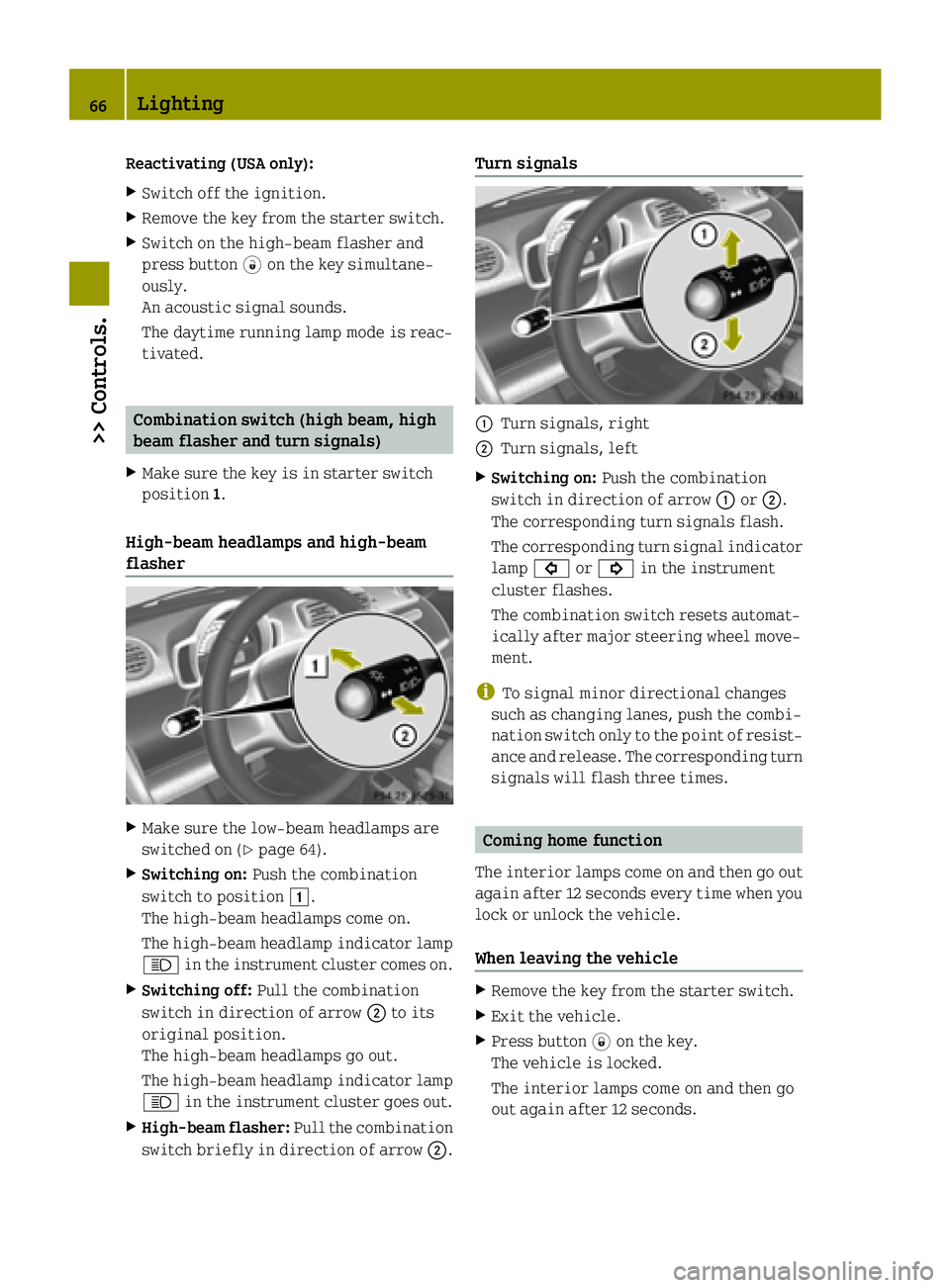
X Switching on: Push the combination
switch to position 1.
The high‑beam headlamps come on.
The high‑beam headlamp indicator lamp
K in the instrument cluster comes on.
X Switching off: Pull the combination
switch in direction of arrow ;to its
original position.
The high‑beam headlamps go out.
The high‑beam headlamp indicator lamp
K in the instrument cluster goes out.
X High-beam flasher: Pull the combination
switch briefly in direction of arrow ;.Turn signals
:
Turn signals, right
; Turn signals, left
X Switching on: Push the combination
switch in direction of arrow :or;.
The corresponding turn signals flash.
The corresponding turn signal indicator lamp # or! in the instrument
cluster flashes.
The combination switch resets automat-
ically after major steering wheel move-
ment.
i To signal minor directional changes
such as changing lanes, push the combi-
nation switch only to the point of resist-
ance and release. The corresponding turn signals will flash three times. Coming home function
The interior lamps come on and then go out
again after 12 seconds every time when you lock or unlock the vehicle.
When leaving the vehicle X
Remove the key from the starter switch.
X Exit the vehicle.
X Press button *on the key.
The vehicle is locked.
The interior lamps come on and then go
out again after 12 seconds. 66
Lighting>> Controls.
Page 70 of 222
X
Make sure the parking lamps or the
low‑beam headlamps are switched on.
X Switching on: Press switch:.
The front fog lamps come on.
The indicator lamp in the switch comes
on.
X Switching off: Press switch:once
more.
The front fog lamps go out.
The indicator lamp in the switch goes
out. Hazard warning flasher
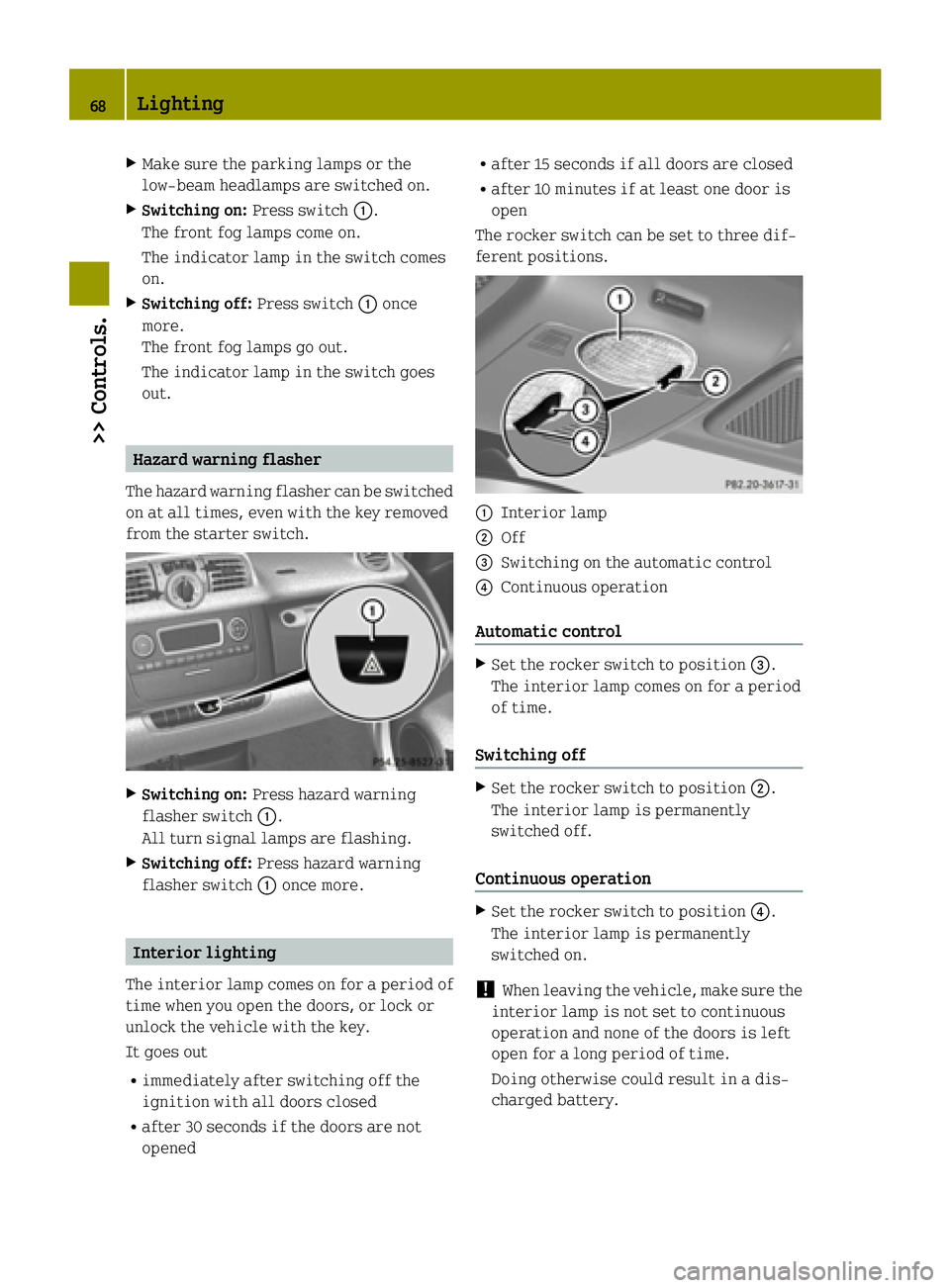
The hazard warning flasher can be switched on at all times, even with the key removed
from the starter switch. X
Switching on: Press hazard warning
flasher switch :.
All turn signal lamps are flashing.
X Switching off: Press hazard warning
flasher switch :once more. Interior lighting
The interior lamp comes on for a period of
time when you open the doors, or lock or
unlock the vehicle with the key.
It goes out
R immediately after switching off the
ignition with all doors closed
R after 30 seconds if the doors are not
opened R
after 15 seconds if all doors are closed
R after 10 minutes if at least one door is
open
The rocker switch can be set to three dif-
ferent positions. :
Interior lamp
; Off
= Switching on the automatic control
? Continuous operation
Automatic control X
Set the rocker switch to position =.
The interior lamp comes on for a period
of time.
Switching off X
Set the rocker switch to position ;.
The interior lamp is permanently
switched off.
Continuous operation X
Set the rocker switch to position ?.
The interior lamp is permanently
switched on.
! When leaving the vehicle, make sure the
interior lamp is not set to continuous
operation and none of the doors is left
open for a long period of time.
Doing otherwise could result in a dis-
charged battery. 68
Lighting>> Controls.
Page 79 of 222

appears in the multifunction display
(Y
page 87).
The pointer of the power gauge moves
from "OFF“ to "0“ (Y page 81).Driving
i The vehicle has a crawler function. The
vehicle moves forward when the brake
pedal is released.
X Depress the brake pedal.
X Move the gear selector lever to drive
position D.
D
D appears in the transmission position
indicator.
X Release the brake pedal.
The vehicle moves forward.
X Depress the accelerator pedal smoothly.
The vehicle accelerates. Reversing the vehicle
! Shift the transmission into reverse
gear Ronly when the vehicle is stopped
in order to avoid damaging the trans-
mission.
You can drive in reverse gear at a speed
of up to 9 mph (15 km/h).
i The vehicle has a crawler function.
Thevehicle moves forward when the
brakepedal is released.
X Depress the brake pedal.
X Move the gear selector lever to reverse
gear R.
R R appears in the transmission position
indicator.
X Release the brake pedal.
The vehicle moves forward.
X Depress the accelerator pedal smoothly.
The vehicle accelerates. Parking
G
WARNING
With the drive system inactive, there is no power assistance for the brake and steering
systems. In this case, it is important to
keep in mind that a considerably higher
degree of effort is necessary to brake and
steer the vehicle. Adapt your driving
accordingly. G
WARNING
Vehicle movement can cause serious per-
sonal injury. Therefore, always do the fol-
lowing before exiting and leaving the
vehicle: R Keep right foot on the brake pedal.
R Engage the parking brake.
R Move the gear selector lever to park
position P.
R Slowly release the brake pedal.
R When parked on an incline, always turn
the front wheels towards the curb.
R Turn the key to starter switch position 0
and remove the key from the starter
switch.
R Take the key with you and lock the vehicle
when leaving.
X Properly stop and park the vehicle.
X Depress the brake pedal.
X Engage the parking brake (Y page 77).
When the ignition is switched on, the
brake warning lamp $(USA only) or
J (Canada only) in the instrument
cluster comes on.
X Release the brake pedal.
Parking brake The parking brake serves to secure the
vehicle against rolling away when it is
stationary or parked. Driving and parking
77>> Controls. Z
Page 80 of 222

G
WARNING
Engaging the parking brake while the vehi- cle is in motion can cause the rear wheels tolock up. You could lose control of the vehi- cle and cause an accident. In addition, the
vehicle’s brake lights do not light up when
the parking brake is engaged. X
Releasing: Depress the brake pedal.
X Pull up slightly on parking brake
lever ;and press release button :.
X Push parking brake lever ;down as far
as it will go.
When the ignition is switched on, the
brake warning lamp $(USA only) or
J (Canada only) in the instrument
cluster goes out.
X Engaging: Pull up parking brake lever ;
firmly.
When the ignition is switched on, the
brake warning lamp $(USA only) or
J (Canada only) in the instrument
cluster comes on. G
WARNING
Getting out of your vehicle with the trans-
mission not fully engaged in park position P is dangerous. When the drive system is
switched off and the brakes are released,
the vehicle can be moved freely with the
gear selector lever in all positions except
park position P. Also, when parked on an
incline, park position Palone may not pre-
vent your vehicle from moving, possibly
hitting people or objects. Always engage the parking brake in addi-
tion to shifting to park position P.
When parked on an incline, always turn the
front wheels towards the curb. G
WARNING
When leaving the vehicle, always remove the key from the starter switch, take it with
you, and lock the vehicle. Do not leave chil- dren unattended in the vehicle, or with
access to an unlocked vehicle. Children
could release the parking brake and/or
move the gear selector lever from park
position P, either of which could result in
an accident and/or serious personal
injury.
Brake pedal The brake pedal has two brake circuits
independent of each other. When the igni-
tion is switched on, a brake servo is used
during braking to increase pedal force. G
WARNING
Make sure absolutely no objects are
obstructing the pedals’ range of motion.
Keep the driver’s footwell clear of all
obstacles. If there are any floormats* or
carpets in the footwell, make sure the ped- als still have sufficient clearance.
During sudden acceleration or braking
maneuvers, the objects could get caught
between or beneath the pedals and restrictyour ability to brake or accelerate. This
could lead to accidents and/or injury. G
WARNING
Considerably more effort will be required
to apply the brakes if
R the brake servo has failed
R a brake circuit has failed
R the ignition is switched off, e.g. for tow-
ing the vehicle
The braking distance is likewise greater. 78
Driving and parking>> Controls.
* optional
Page 81 of 222

Make sure the drive system is active when-
ever the vehicle is rolling. Have the brake system repaired at an authorized electric
drive smart center, if there is a fault in the
brake system. If a brake circuit has failed (Y
page 167),
you must depress brake pedal :further
down to achieve the same effect and the
braking distance is increased.
i The brake servo will only function with
the ignition switched on. Switching off the drive system
G
WARNING
Do not turn off the drive system before the
vehicle has come to a complete stop. With
the drive system not running, there is no
power assistance for the brake and steering systems. In this case, it is important to
keep in mind that a considerably higher
degree of effort is necessary to brake and
steer the vehicle.
X Depress the brake pedal.
X Move the gear selector lever to park
position P.
The transmission position indicator
should be on P
P
! Always engage the parking brake in
addition to shifting to park position P.X
Release the brake pedal.
X Turn the key to starter switch position 0.
X Remove the key from the starter switch.
The electronic immobilizer is activa-
ted. Transmission
Shifting procedure
Gearshift pattern for transmission
j
Park position
k
Reverse gear
i
Neutral position
h
Drive position
Select a gear:
X
Switch on the ignition.
X Depress the brake pedal.
X Move the gear selector lever to the
desired position. Steering wheel paddle shifters* (for
recuperation)
G
WARNING
The operating condition of the high-volt-
age battery (e.g. not yet at normal operat-
ing temperature or fully charged) influen- ces the braking effect of the electric
motor. Transmission
79>> Controls.
* optional Z
Page 82 of 222

In overrun or braking mode, the motor's
braking effect may therefore be reduced or may not be present at all.
As a result of the reduced engine braking
effect, you may cause an accident and
injure yourself or others.
Compensate for the reduced engine braking
effect by pressing the brake pedal accord-
ingly, as required.
Using the steering wheel paddle shifters*, you can increase or decrease the recuper-
ation in overrun phases. Recuperation
takes place when you release the acceler-
ator pedal. The electric motor will then be
used as a generator and energy will be
regained while driving. The regained
energy is stored in the high-voltage bat-
tery. High recuperation decelerates your
vehicle stronger.
In overrun phases, there are three levels of recuperation:
R no recuperation (level 0, coasting)
R moderate recuperation (level 1)
R high-level recuperation (level 2)
The amount of recuperation in overrun
mode is displayed in the power gauge
(Y page 81).
The set mode for recuperation is shown in
the recuperation display (Y page 84).
When you switch on the ignition, level 1 is
automatically preset. :
Left steering wheel paddle shifter
(minus)
; Right steering wheel paddle shifter
(plus)
X Decrease recuperation: Pull left steer-
ing wheel paddle shifter :.
X Increase recuperation: Pull right steer-
ing wheel paddle shifter ;.
Use the different levels 0 to 2 for condi-
tions as described below: Level 0 Driving without frequent
breaking. No sharp bends on
the road ahead.
Maximum kinetic energy
remains for the vehicle.
Level 1 Normal driving, standard set-
ting. Level 2 Sporty driving.
The break pedal has to be
depressed less often, as the
deceleration due to recuper-
ation is higher than in level
1.
The energy efficiency is sub-
stantially higher than if the
vehicle is decelerated by
depressing the brake pedal. At levels 1 and 2 the vehicle can be step-
lessly decelerated by depressing the brake
pedal.
i Under certain circumstances, in over-
run phases recuperation does not work as
described above. This may be e. g the 80
Transmission>> Controls.
* optional
Page 83 of 222

case if the high-voltage battery is
already fully charged or has not reached
operating temperature. Driving tips
Driving on uphill grades G
WARNING
The hill-start assist system is not
designed to function as a parking brake and
does not prevent the vehicle from moving
when parked on an incline.
Always engage the parking brake in addi-
tion to shifting to park position P.
! When the hill‑start assist system stops
braking the vehicle, it can roll back-
wards.
If you open the driver’s door, the
hill‑start assist system is deactivated
and a warning signal sounds.
Your vehicle has a hill‑start assist system. On uphill grades the hill‑start assist sys-
tem maintains the pressure in the brake
system for approximately one second after
you have released the brake pedal. There-
fore, you can start off smoothly without the
vehicle moving immediately after releas-
ing the brake pedal.
X Release the brake pedal.
X Apply sufficient pressure to the accel-
erator pedal to drive off.
On uphill grades with higher inclination,
the hill-start assist system will release
the pressure in the brake system after
approximately two seconds. A warning sig-
nal sounds and the transmission position
indicator shows a flashing N
N in order to
warn you of the vehicle rolling backwards.
X Press the brake pedal.
X Release the brake pedal.
X Apply sufficient pressure to the accel-
erator pedal to drive off. i
The hill‑start assist system is inactive
if you start off with the parking brake
engaged.
Recuperation If the high-voltage battery is fully
charged or too cold, only limited recuper-
ation power will be available.
The vehicle can not be decelerated or limi-
ted in being decelerated by using the
accelerator pedal, if
R the gearshift selector lever is in posi-
tion Dand the vehicle is rolling back-
wards
R the gearshift selector lever is in posi-
tion Rand the vehicle is rolling for-
wards.
On uphill grades, the vehicle could possi- bly be not or only restricted being held
from the crawler function. Instrument cluster
Charge level and power gauges
:
Charge level gauge
; Power gauge
The gauges can be turned by approximately
90°.
The illumination for both gauges comes on when you switch on the ignition and the
exterior lighting. Instrument cluster
81>> Controls. Z
Page 89 of 222

READY indicator
READY
READY
appears for two seconds in the mul-
tifunction display, if:
R the key is turned to starter switch posi-
tion 2
R there is no malfunction in the drive sys-
tem
The vehicle is ready to drive. Charging mode display
When you switch off the ignition, you see
the display of the charging mode which is
currently set.
The charging mode is not changed after the
ignition has been switched off.
i If the multifunction display has
already gone out, you must turn the key to starter switch position 1. Afterwards,
you can change the setting in the Charge
Charge
and Depart and Depart menu (Ypage 90).
If you do not make a change, the last selec- ted entry is activated. If you have not made
any departure time settings in the last 24
hours, the Instant Charge Instant Charge menu is acti-
vated. Example illustration: Departure time selected
: Preset departure time
; Instant Charge
Instant Charge menu X
To change the setting: press and hold the
control switch on the control lever up or down until the desired mode is selected
in the multifunction display (Y page 83).
Additional information:
R Setting the departure time (Y page 90)
R Starting the charging process immedi-
ately (Y page 92) Outside temperature
G
WARNING
The outside temperature display is not
designed as an ice-warning device and is
therefore unsuitable for that purpose.
Indicated temperatures just above the
freezing point do not guarantee that the
road surface is free of ice. The road may
still be icy, especially in wooded areas or on bridges. Your vehicle could start to skid if you do not adjust your driving style
accordingly.
Therefore, always adjust your driving style
to the prevailing road and weather condi-
tions. Example illustration (U.S. vehicles)
i
Canada vehicles: The outside tempera-
ture display shows °C °Cinstead of °F
°F.
The outside temperature display :
appears in the multifunction display con-
tinuously.
A change of the outside temperature will be displayed with delay. Control system
87>> Controls. Z
Page 92 of 222

Odometer
Odometer
menu appears in the multi-
function display.
X To switch between submenus: Press the OK
button on the control lever briefly.
X To reset the trip odometer: Select the
trip odometer display.
X Press button Bon the instrument cluster
until the trip odometer is reset to 0
(Y page 23).
If the remaining cruise range of the charge level of the high-voltage battery has drop-
ped below 10 %, Low Battery
Low Battery is displayed
on position =. Start menu
The YSTARTSTART menu shows you the trip statis-
tics since start. :
Average speed since start
; Time elapsed since start
= Distance driven since start
? Average energy consumption
X Press the control switch on the control
lever (Y page 83) up or down until the
YSTART START menu appears in the multifunc-
tion display.
X To reset: Press button Bon the instru-
ment cluster until the YSTARTSTART menu is
reset to 0(Y page 23).
i The YSTARTSTART menu is reset to 0 automat-
ically
R when the ignition has been switched
off for more than 4 hours
R after driving more than 9999 miles or
kilometers Reset menu
The YRESETRESET menu menu shows you the trip
statistics since the last reset. :
Average speed since last reset
; Time elapsed since since last reset
= Distance driven since last reset
? Average energy consumption
X Press the control switch on the control
lever (Y page 83) up or down until the
YRESET RESET menu appears in the multifunc-
tion display.
X To reset: Press button Bon the instru-
ment cluster until the YRESETRESET menu is
reset to 0(Y page 23). Charge and depart menu
In the Charge and Depart Charge and Depart menu you can
change the following settings:
R set a departure time
R switch on/off the "Air conditioning
before start" function
R instant charge of the high‑voltage bat-
tery
R set the maximum charge current.
X Press the control switch on the control
lever up or down until Charge and Charge and
Depart
Depart appears in the multifunction
display.
X Press the OK button on the control lever
briefly.
Setting the departure time With this function, you can preset a depar-
ture time. 90
Control system>> Controls.