light SMART FORTWO COUPE 2015 Owner's Manual
[x] Cancel search | Manufacturer: SMART, Model Year: 2015, Model line: FORTWO COUPE, Model: SMART FORTWO COUPE 2015Pages: 222, PDF Size: 5.02 MB
Page 68 of 222
Reactivating (USA only):
X Switch off the ignition.
X Remove the key from the starter switch.
X Switch on the high-beam flasher and
press button #on the key simultane-
ously.
An acoustic signal sounds.
The daytime running lamp mode is reac-
tivated. Combination switch (high beam, high
beam flasher and turn signals)
X Make sure the key is in starter switch
position 1.
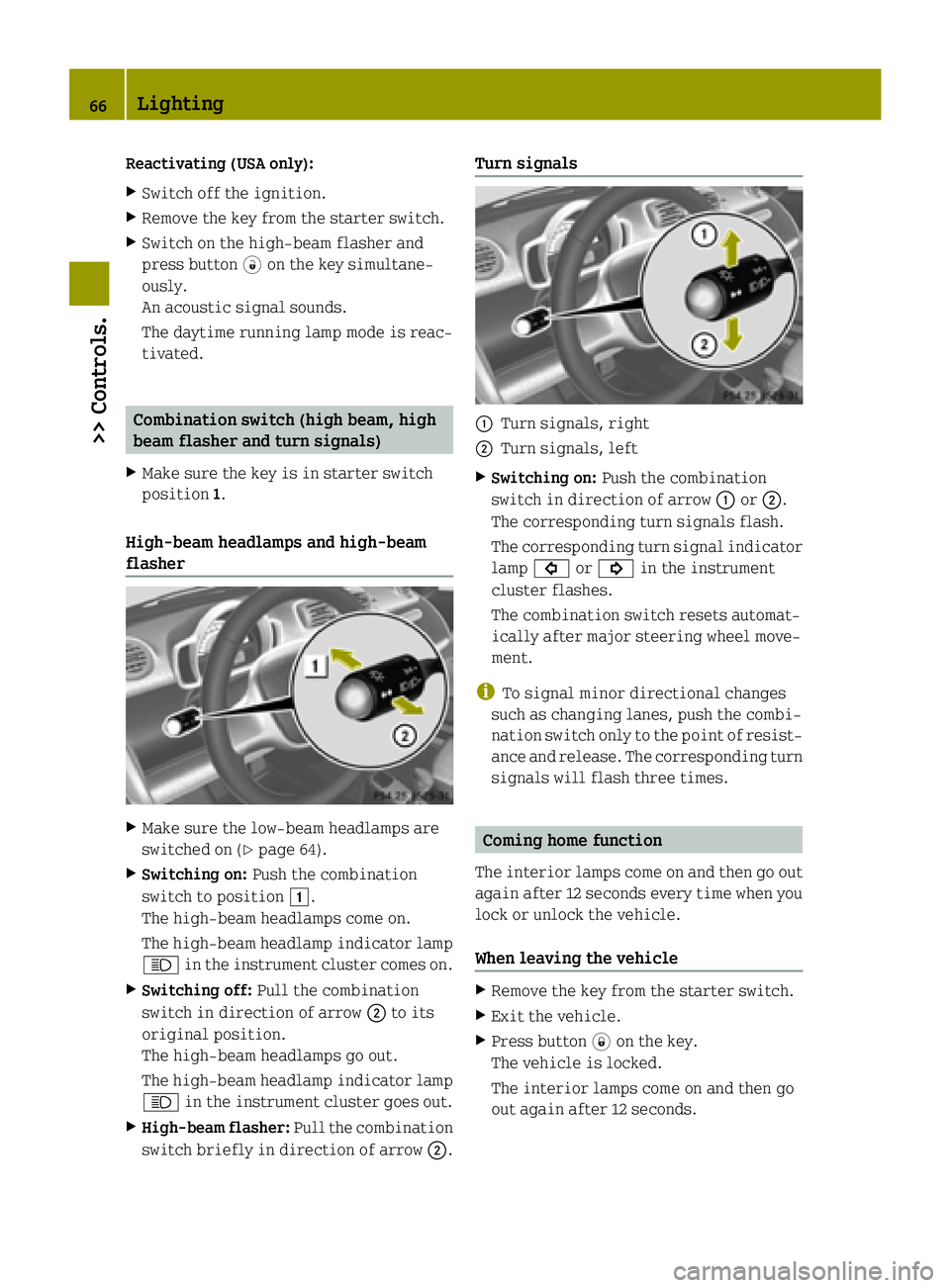
High‑beam headlamps and high-beam
flasher X
Make sure the low‑beam headlamps are
switched on (Y page 64).
X Switching on: Push the combination
switch to position 1.
The high‑beam headlamps come on.
The high‑beam headlamp indicator lamp
K in the instrument cluster comes on.
X Switching off: Pull the combination
switch in direction of arrow ;to its
original position.
The high‑beam headlamps go out.
The high‑beam headlamp indicator lamp
K in the instrument cluster goes out.
X High-beam flasher: Pull the combination
switch briefly in direction of arrow ;.Turn signals
:
Turn signals, right
; Turn signals, left
X Switching on: Push the combination
switch in direction of arrow :or;.
The corresponding turn signals flash.
The corresponding turn signal indicator lamp # or! in the instrument
cluster flashes.
The combination switch resets automat-
ically after major steering wheel move-
ment.
i To signal minor directional changes
such as changing lanes, push the combi-
nation switch only to the point of resist-
ance and release. The corresponding turn signals will flash three times. Coming home function
The interior lamps come on and then go out
again after 12 seconds every time when you lock or unlock the vehicle.
When leaving the vehicle X
Remove the key from the starter switch.
X Exit the vehicle.
X Press button *on the key.
The vehicle is locked.
The interior lamps come on and then go
out again after 12 seconds. 66
Lighting>> Controls.
Page 69 of 222

When returning to the vehicle
X
Press button #on the key either once or
twice.
The vehicle is either selectively or
globally unlocked.
The interior lamps come on and then go
out again after 12 seconds. Ambient lighting*
The ambient lighting illuminates the
vehicle interior with 6 LEDs when the low- beam headlamps are switched on. The LEDs
can be dimmed.
The LEDS are located
R in the overhead control panel
R in the door pockets, driver’s and
passenger side
R in the storage trays to the left and right
of the steering wheel
In addition to the ambient lighting, the
footwells on the driver’s and passenger
side are also illuminated by separate
lamps.
i When you open a door, the interior
lighting comes on and the brightness of
lamps in the footwells increases. X
Make sure the key is in starter switch
position 1.
X Switch on the parking lamps.
X To brighten or dim ambient lighting:
Press button :on the instrument cluster repeatedly until the desired setting is
reached.
The current setting is stored.
i When adjusting the ambient lighting,
the illumination level for instrument
cluster is also changed (Y page 82). Front fog lamps
G
WARNING
Vehicles with rain-light sensor*:
In low ambient lighting or foggy condi-
tions, only switch from position Ãto
L with the vehicle at a standstill in a
safe location. Switching from ÃtoL
will briefly switch off the headlamps.
Doing so while driving in low ambient
lighting conditions may result in an acci- dent.
i Fog lamps will operate with the parking
lamps and/or the low‑beam headlamps on.
Fog lamps should only be used in con-
junction with low‑beam headlamps. Con- sult your State or Province Motor Vehicle
Regulations regarding permissible
lamp operation.
i Vehicle with rain-light sensor*:
Fog lamps cannot be switched on manually
with the exterior lamp switch in posi-
tion Ã. To switch on the fog lamps,
turn the exterior lamp switch to position
L first. Lighting
67>> Controls.
* optional Z
Page 70 of 222
X
Make sure the parking lamps or the
low‑beam headlamps are switched on.
X Switching on: Press switch:.
The front fog lamps come on.
The indicator lamp in the switch comes
on.
X Switching off: Press switch:once
more.
The front fog lamps go out.
The indicator lamp in the switch goes
out. Hazard warning flasher
The hazard warning flasher can be switched on at all times, even with the key removed
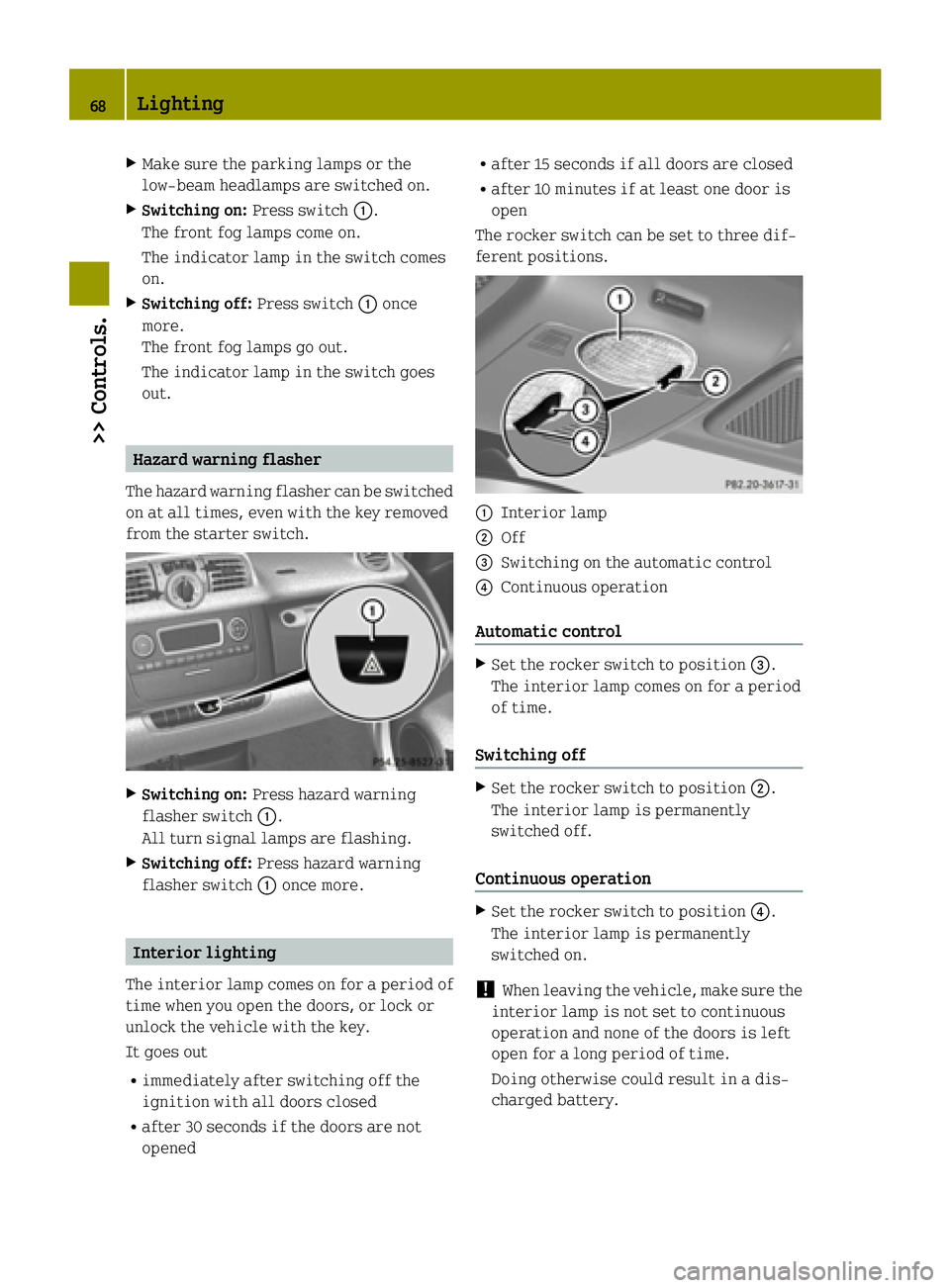
from the starter switch. X
Switching on: Press hazard warning
flasher switch :.
All turn signal lamps are flashing.
X Switching off: Press hazard warning
flasher switch :once more. Interior lighting
The interior lamp comes on for a period of
time when you open the doors, or lock or
unlock the vehicle with the key.
It goes out
R immediately after switching off the
ignition with all doors closed
R after 30 seconds if the doors are not
opened R
after 15 seconds if all doors are closed
R after 10 minutes if at least one door is
open
The rocker switch can be set to three dif-
ferent positions. :
Interior lamp
; Off
= Switching on the automatic control
? Continuous operation
Automatic control X
Set the rocker switch to position =.
The interior lamp comes on for a period
of time.
Switching off X
Set the rocker switch to position ;.
The interior lamp is permanently
switched off.
Continuous operation X
Set the rocker switch to position ?.
The interior lamp is permanently
switched on.
! When leaving the vehicle, make sure the
interior lamp is not set to continuous
operation and none of the doors is left
open for a long period of time.
Doing otherwise could result in a dis-
charged battery. 68
Lighting>> Controls.
Page 71 of 222

Windshield wipers
Switching windshield wipers on and off
Example illustration coupé
X Make sure the key is in starter switch
position 1.
X Switching on: Turn the wiper switch to
position 2or3, depending on the
intensity of the rain.
! Do not operate the windshield wipers
when the windshield is dry. Dust that
accumulates on a windshield might
scratch the glass and/or damage the
wiper blades when wiping occurs on a dry
windshield. If it is necessary to operate the windshield wipers in dry weather
conditions, always operate the wind-
shield wipers with windshield washer
fluid.
! If anything blocks the windshield wip-
ers (leaves, snow, etc.), switch them off
immediately.
For safety reasons, stop the vehicle in a
safe location and
R -
remove the key from the starter
switch
- engage the parking brake
before attempting to remove any
blockage.
R Remove blockage.
R Turn the windshield wipers on again.
X Switching off: Turn the wiper switch to
position g. Intermittent wiping
Only switch on intermittent wiping under
wet weather conditions or in the presence
of precipitation.
Vehicles with rain-light sensor*: When you select intermittent wiping, the sensor is
activated. The sensor automatically sets a
suitable wiping interval depending on thewetness of the sensor surface.
! Vehicles with rain-light sensor*:
Do not leave windshield wipers in inter-
mittent setting when the vehicle is taken to an automatic car wash or during wind-
shield cleaning. Windshield wipers will operate in the presence of water sprayedon the windshield, and windshield wip-
ers may be damaged as a result.
! Vehicles with rain-light sensor*:
If you have set intermittent wiping, dirt
on the surface of the sensor or optical
effects may cause the windshield wipers
to wipe in an undesired fashion. This
could then damage the windshield wiper
blades or scratch the windshield. You
should therefore switch off the wind-
shield wipers when weather conditions
are dry.
X Make sure the key is in starter switch
position 1.
X Activating intermittent wiping: Turn the
wiper switch to position 1.
After the initial wipe, pauses between
wipes are automatically controlled
depending on the vehicle speed and by the
rain-light sensor*.
X Deactivating intermittent wiping: Turn
the wiper switch to position g. Windshield wipers
69>> Controls.
* optional Z
Page 80 of 222

G
WARNING
Engaging the parking brake while the vehi- cle is in motion can cause the rear wheels tolock up. You could lose control of the vehi- cle and cause an accident. In addition, the
vehicle’s brake lights do not light up when
the parking brake is engaged. X
Releasing: Depress the brake pedal.
X Pull up slightly on parking brake
lever ;and press release button :.
X Push parking brake lever ;down as far
as it will go.
When the ignition is switched on, the
brake warning lamp $(USA only) or
J (Canada only) in the instrument
cluster goes out.
X Engaging: Pull up parking brake lever ;
firmly.
When the ignition is switched on, the
brake warning lamp $(USA only) or
J (Canada only) in the instrument
cluster comes on. G
WARNING
Getting out of your vehicle with the trans-
mission not fully engaged in park position P is dangerous. When the drive system is
switched off and the brakes are released,
the vehicle can be moved freely with the
gear selector lever in all positions except
park position P. Also, when parked on an
incline, park position Palone may not pre-
vent your vehicle from moving, possibly
hitting people or objects. Always engage the parking brake in addi-
tion to shifting to park position P.
When parked on an incline, always turn the
front wheels towards the curb. G
WARNING
When leaving the vehicle, always remove the key from the starter switch, take it with
you, and lock the vehicle. Do not leave chil- dren unattended in the vehicle, or with
access to an unlocked vehicle. Children
could release the parking brake and/or
move the gear selector lever from park
position P, either of which could result in
an accident and/or serious personal
injury.
Brake pedal The brake pedal has two brake circuits
independent of each other. When the igni-
tion is switched on, a brake servo is used
during braking to increase pedal force. G
WARNING
Make sure absolutely no objects are
obstructing the pedals’ range of motion.
Keep the driver’s footwell clear of all
obstacles. If there are any floormats* or
carpets in the footwell, make sure the ped- als still have sufficient clearance.
During sudden acceleration or braking
maneuvers, the objects could get caught
between or beneath the pedals and restrictyour ability to brake or accelerate. This
could lead to accidents and/or injury. G
WARNING
Considerably more effort will be required
to apply the brakes if
R the brake servo has failed
R a brake circuit has failed
R the ignition is switched off, e.g. for tow-
ing the vehicle
The braking distance is likewise greater. 78
Driving and parking>> Controls.
* optional
Page 83 of 222

case if the high-voltage battery is
already fully charged or has not reached
operating temperature. Driving tips
Driving on uphill grades G
WARNING
The hill-start assist system is not
designed to function as a parking brake and
does not prevent the vehicle from moving
when parked on an incline.
Always engage the parking brake in addi-
tion to shifting to park position P.
! When the hill‑start assist system stops
braking the vehicle, it can roll back-
wards.
If you open the driver’s door, the
hill‑start assist system is deactivated
and a warning signal sounds.
Your vehicle has a hill‑start assist system. On uphill grades the hill‑start assist sys-
tem maintains the pressure in the brake
system for approximately one second after
you have released the brake pedal. There-
fore, you can start off smoothly without the
vehicle moving immediately after releas-
ing the brake pedal.
X Release the brake pedal.
X Apply sufficient pressure to the accel-
erator pedal to drive off.
On uphill grades with higher inclination,
the hill-start assist system will release
the pressure in the brake system after
approximately two seconds. A warning sig-
nal sounds and the transmission position
indicator shows a flashing N
N in order to
warn you of the vehicle rolling backwards.
X Press the brake pedal.
X Release the brake pedal.
X Apply sufficient pressure to the accel-
erator pedal to drive off. i
The hill‑start assist system is inactive
if you start off with the parking brake
engaged.
Recuperation If the high-voltage battery is fully
charged or too cold, only limited recuper-
ation power will be available.
The vehicle can not be decelerated or limi-
ted in being decelerated by using the
accelerator pedal, if
R the gearshift selector lever is in posi-
tion Dand the vehicle is rolling back-
wards
R the gearshift selector lever is in posi-
tion Rand the vehicle is rolling for-
wards.
On uphill grades, the vehicle could possi- bly be not or only restricted being held
from the crawler function. Instrument cluster
Charge level and power gauges
:
Charge level gauge
; Power gauge
The gauges can be turned by approximately
90°.
The illumination for both gauges comes on when you switch on the ignition and the
exterior lighting. Instrument cluster
81>> Controls. Z
Page 87 of 222

No recuperation (level 0)
:
Symbol for no recuperation
When this mode is set, there is no recuper-
ation. When you release the accelerator
pedal, the vehicle rolls on unbraked.
Use this mode in situations when driving
without frequent braking, for example on
highways.
Moderate recuperation (level 1) Moderate recuperation occurs when this
mode is set. When you release the acceler-
ator pedal, the vehicle is slightly braked. Gained kinetic energy is converted into
electrical energy by the electric motor.
This energy is stored in the high-voltage
battery.
This mode is set as standard when starting
the drive system.
Use this mode in situations of well-bal-
anced relationship between accelerating
and braking, for example on cross-country
rides. High recuperation (level 2) :
Symbol for high recuperation
High recuperation occurs when this mode is
set. When you release the accelerator
pedal, the vehicle is deeply braked. Energy conversion of kinetic energy to electrical
energy is most effective in this mode.
Use this mode in situations in which you
need to brake frequently, for example while
driving stop-and-go in city traffic. Maximum available power
G
WARNING
When the indicator for the maximum avail- able power is not at its maximal range, the
power output is reduced noticeably. Adapt
your speed and driving accordingly. Oth-
erwise, you could cause an accident. Exer-
cise particular care when passing or accel-
erating. The indicator for the maximum available
power of the drive system contains three
segments
:. The number of dark segments
indicates power that is currently availa-
ble. Control system
85>> Controls. Z
Page 98 of 222

Audio system basic
The audio system basic contains the fol-
lowing functions:
R Radio (FM/AM)
R Radio Broadcast Data System (RBDS) and
radio text
R AUX and USB socket (Y page 96)
! Please be sure to read the operating
instructions for the audio system basic
before using the unit. Familiarize your- self with the various functions of the
unit so that you are able to operate it
easily, reliably and correctly at any
time. :
On/off and volume switch
; Display
= Skip/Scroll/Frequency search switches
? Tone settings/Mute/Back control panel
A Stored station buttons
B Radio/Media/System control panel Audio system navigation/multimedia*
The audio system navigation/multimedia
contains the following functions:
R Radio (FM/AM)
R Radio Broadcast Data System (RBDS)
R AUX and USB-socket
R Bluetooth ®
hands-free device
R Navigation
R Audio operation from CD/DVD or SD Card,
via AUX/USB/iPod ®
, or Bluetooth ®
Audio R
Video operation from CD/DVD or SD Card,
via AUX/USB/iPod ®
R Image display from CD/DVD or SD Card,
via USB/iPod ®
! Please be sure to read the operating
instructions for the audio system navi-
gation/multimedia before using the
unit. Familiarize yourself with the var-
ious functions of the unit so that you are able to operate it easily, reliably and
correctly at any time. :
Bluetooth ®
connection indicator lamp
; Display
= Microphone
? Light sensor
A Eject button
B Rotary/Push button
C Menu button AUX and USB sockets
You can connect mobile audio devices such as an MP3 player via the AUX and USB sock-
ets using commercially available 3.5 mm
socket plug (AUX) or USB connector cable
(USB).
The AUX and USB sockets are located in the glove box. 96
Audio system*>> Controls.
* optional
Page 106 of 222
X
Switching on: Press air recirculation
switch ?.
The indicator lamp in air recirculation
switch ?comes on.
X Switching off: Press air recirculation
switch ?once more.
The indicator lamp in air recirculation
switch ?goes out. Loading and storing
Cargo compartment cover blind with
parcel net bag G
WARNING
The cargo compartment cover blind is not
intended to secure heavy objects in the
event of an accident. For this reason, heavy objects must be tied down.
Vehicle occupants could be injured by
objects being thrown around in the vehicle in the event of
R hard braking
R a change of direction
R an accident G
WARNING
Do not place any objects on the mounted
cargo compartment cover blind.
Vehicle occupants could be injured by
objects being thrown around in the vehicle in the event of
R hard braking
R a change of direction
R an accident G
WARNING
Only place light loads in the parcel net
bag. Do not transport heavy, sharp-edged or fragile objects in the parcel net bag. The
parcel net bag cannot sufficiently secure
loads in an accident. Vehicle occupants could be injured by
objects being thrown around in the vehicle in the event of
R hard braking
R a change of direction
R an accident
Observe the loading guidelines.
The cargo compartment cover blind
R serves to protect objects that are stored
in the vehicle’s cargo compartment from
prying eyes
R prevents smaller objects from penetrat-
ing into the passenger compartment from
the cargo compartment; however, it is not
intended to act as a load restraining
device
The parcel net bag
R is for storing small, lightweight objects
R prevents small objects from sliding
around inside the passenger compart-
ment
! If objects are placed on the cargo com-
partment cover blind when mounted, the
cover may be damaged.
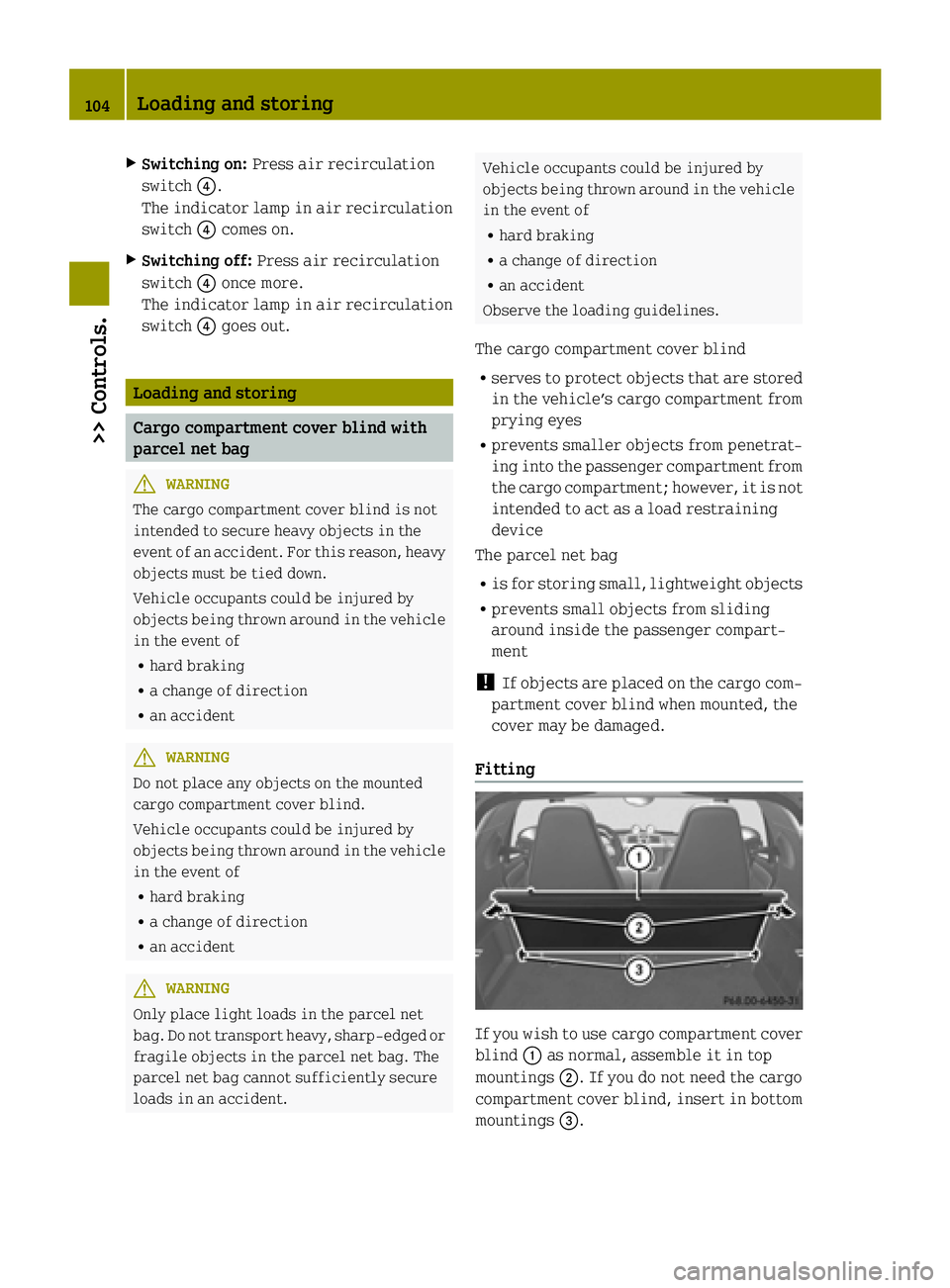
Fitting If you wish to use cargo compartment cover
blind :as normal, assemble it in top
mountings ;. If you do not need the cargo
compartment cover blind, insert in bottom
mountings =. 104
Loading and storing>> Controls.
Page 107 of 222
X
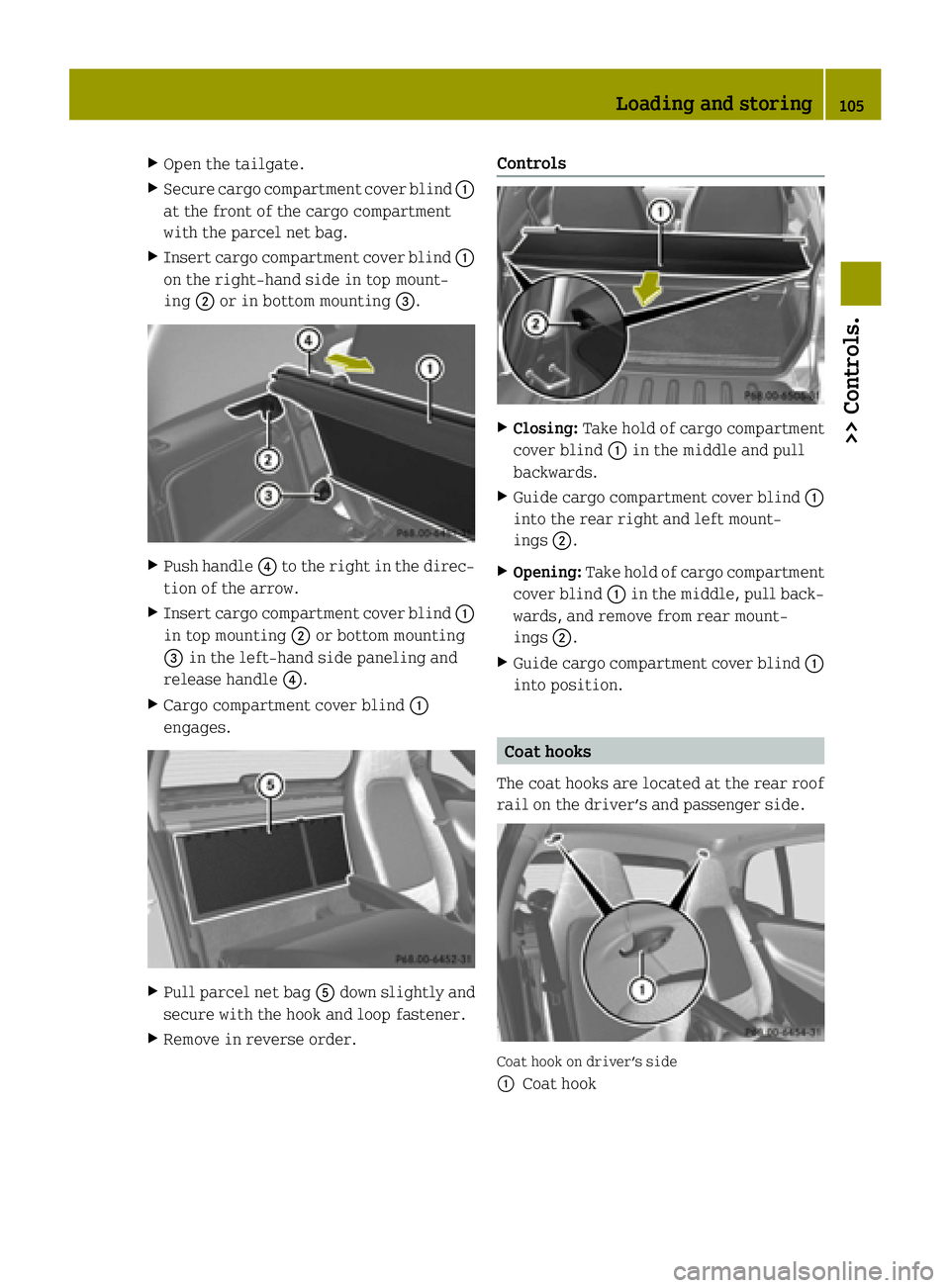
Open the tailgate.
X Secure cargo compartment cover blind :
at the front of the cargo compartment
with the parcel net bag.
X Insert cargo compartment cover blind :
on the right-hand side in top mount-
ing ;or in bottom mounting =.X
Push handle ?to the right in the direc-
tion of the arrow.
X Insert cargo compartment cover blind :
in top mounting ;or bottom mounting
= in the left-hand side paneling and
release handle ?.
X Cargo compartment cover blind :
engages. X
Pull parcel net bag Adown slightly and
secure with the hook and loop fastener.
X Remove in reverse order. Controls
X
Closing: Take hold of cargo compartment
cover blind :in the middle and pull
backwards.
X Guide cargo compartment cover blind :
into the rear right and left mount-
ings ;.
X Opening: Take hold of cargo compartment
cover blind :in the middle, pull back-
wards, and remove from rear mount-
ings ;.
X Guide cargo compartment cover blind :
into position. Coat hooks
The coat hooks are located at the rear roof
rail on the driver’s and passenger side. Coat hook on driver’s side
:
Coat hook Loading and storing
105>> Controls. Z