key battery SMART FORTWO COUPE ELECTRIC DRIVE 2014 User Guide
[x] Cancel search | Manufacturer: SMART, Model Year: 2014, Model line: FORTWO COUPE ELECTRIC DRIVE, Model: SMART FORTWO COUPE ELECTRIC DRIVE 2014Pages: 222, PDF Size: 16.17 MB
Page 112 of 222
Auxiliary power outlet
The auxiliary power outlet supplies power
to the following electrical accessories
when the key is turned to starter switch
position 1:
R the electric air pump, available in con-
junction with the tire repair kit*
R other consumers which operate up to a
maximum of 60 W
! The auxiliary power outlet can accom-
modate 12V DC electrical accessories
designed for use with the standard “cig-
arette lighter” plug type.
Keep in mind, however, that connecting
accessories to the auxiliary power outlet
(for example extensive connecting and
disconnecting, or using plugs that do not
fit properly) can damage the auxiliary
power outlet.
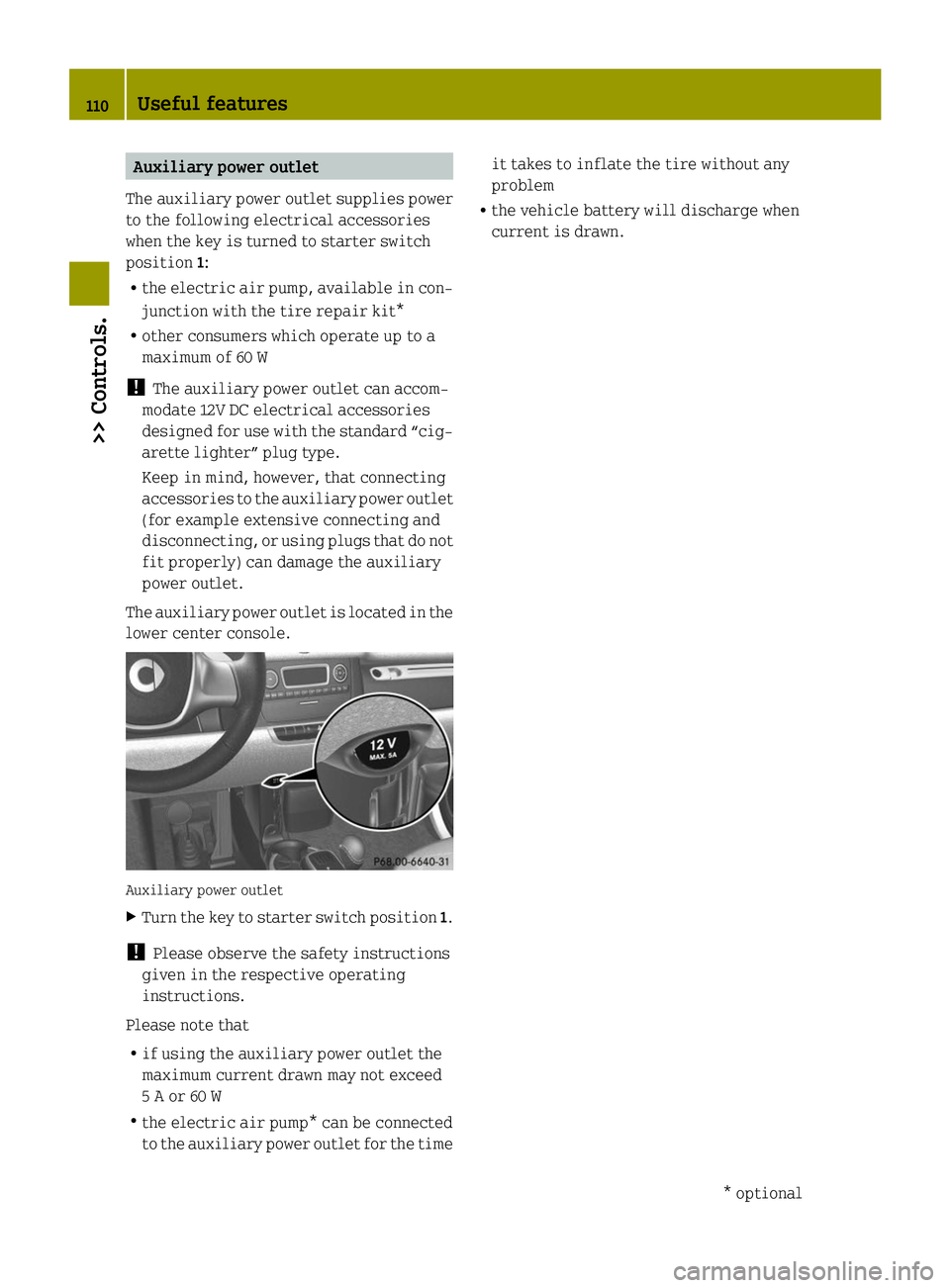
The auxiliary power outlet is located in the
lower center console. Auxiliary power outlet
X
Turn the key to starter switch position 1.
! Please observe the safety instructions
given in the respective operating
instructions.
Please note that
R if using the auxiliary power outlet the
maximum current drawn may not exceed
5 A or 60 W
R the electric air pump* can be connected
to the auxiliary power outlet for the time it takes to inflate the tire without any
problem
R the vehicle battery will discharge when
current is drawn. 110
Useful features>> Controls.
* optional
Page 122 of 222
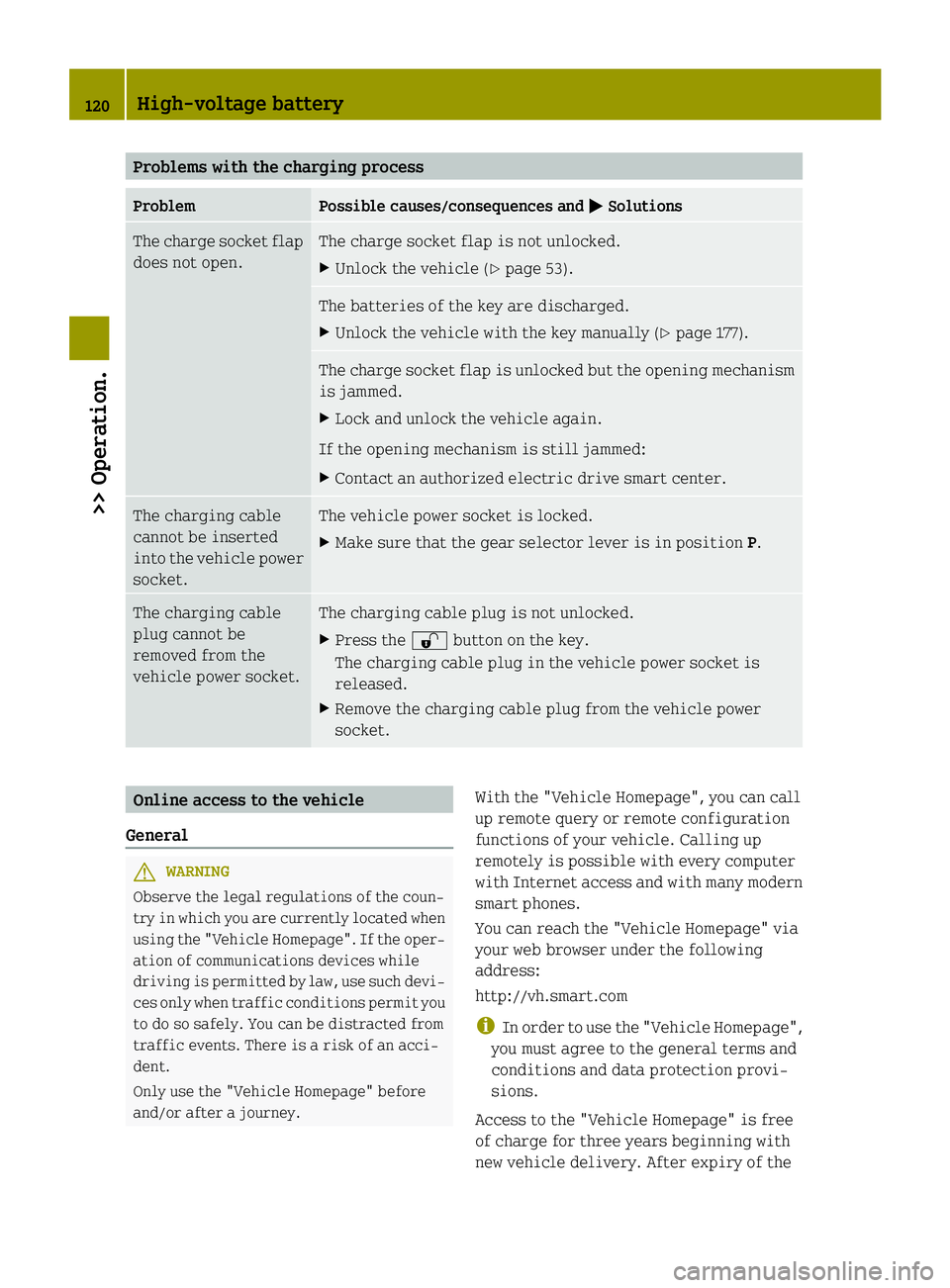
Problems with the charging process
Problem Possible causes/consequences and
0050
0050Solutions The charge socket flap
does not open. The charge socket flap is not unlocked.
X
Unlock the vehicle (Y page 53). The batteries of the key are discharged.
X
Unlock the vehicle with the key manually (Y page 177).The charge socket flap is unlocked but the opening mechanism
is jammed.
X
Lock and unlock the vehicle again.
If the opening mechanism is still jammed:
X Contact an authorized electric drive smart center. The charging cable
cannot be inserted
into the vehicle power
socket. The vehicle power socket is locked.
X
Make sure that the gear selector lever is in position P.The charging cable
plug cannot be
removed from the
vehicle power socket. The charging cable plug is not unlocked.
X
Press the 0036button on the key.
The charging cable plug in the vehicle power socket is
released.
X Remove the charging cable plug from the vehicle power
socket. Online access to the vehicle
General G
WARNING
Observe the legal regulations of the coun-
try in which you are currently located when
using the "Vehicle Homepage". If the oper-
ation of communications devices while
driving is permitted by law, use such devi-
ces only when traffic conditions permit you
to do so safely. You can be distracted from
traffic events. There is a risk of an acci-
dent.
Only use the "Vehicle Homepage" before
and/or after a journey. With the "Vehicle Homepage", you can call
up remote query or remote configuration
functions of your vehicle. Calling up
remotely is possible with every computer
with Internet access and with many modern
smart phones.
You can reach the "Vehicle Homepage" via
your web browser under the following
address:
http://vh.smart.com
i
In order to use the "Vehicle Homepage",
you must agree to the general terms and
conditions and data protection provi-
sions.
Access to the "Vehicle Homepage" is free
of charge for three years beginning with
new vehicle delivery. After expiry of the 120
High-voltage battery>> Operation.
Page 125 of 222
X
Set the value of the charge current to
12 A and confirm.
X Press the encryption button on the pow-
erline adapter within three minutes.
When the powerline adapter shows a con-
nection, the connection process was suc-
cessful.
i Observe the separate operating
instructions of the powerline adapter.
i Contact an authorized electric drive
smart center if you have any questions.
X Next, set the value of the charge current
to the desired value once again.
As soon as the vehicle establishes an Inter-
net connection, you can also use the "Vehi-
cle Homepage" at home during the charging
process. Changes you have made via the
"Vehicle Homepage" are adopted after the
charging process is complete. This data
transmission ends after approximately
three days. Intelligent charging management
If you wish to charge economically and with
minimal damage to the battery, you must set
a departure time ( Ypage 90). This option
to optimize the charging process depends
on your electricity contract and the local
power supplier. Your vehicle detects this
option automatically. Depending on the
departure time which is set, the charging
process of the high-voltage battery may not
be started immediately or may be inter-
rupted during the process. Front compartment
Service flap
Remove the service flap to check the bat-
tery coolant level, windshield washer res-
ervoir level, and brake fluid level. Insert the service flap on the front of the
vehicle so that it does not get damaged or
dirty.
i
The service flap has a strap on the rear
side that ties it to the vehicle body. G
WARNING
Always turn the key to starter switch posi-
tion 0and remove the key from the starter
switch before opening the service flap.
If the windshield wipers should inadver-
tently be switched on, you could be ser-
iously injured by the wiper washer drive,
which is located just below the service
flap. G
WARNING
Make sure the service flap is locked while
driving. Otherwise, the service flap could
become detached and pose a hazard to you
or others.
! Check the fill levels at regular inter-
vals.
! Carefully remove ice, snow, and any
other deposits from the air intake
grilles above the service flap to ensure
air intake at all times.
X Park the vehicle on level ground.
X Switch off the ignition.
X Engage the parking brake. Front compartment
123>> Operation. Z
Page 179 of 222

Problem Possible causes/consequences and
0050
0050Solutions A warning signal
sounds when parking. You have not engaged the parking brake before releasing the
brake pedal and switching off the drive system.
X
Switch on the ignition to deactivate the acoustic warning.
X Engage the parking brake.
X Make sure the gear selector lever is in park position P.
X Turn the key to starter switch position 0.
X Remove the key from the starter switch.
For safety, it is important that you perform the parking pro-
cedure as described (Y page 77).You can hear a contin-
uous noise from the
front axle when brak-
ing. The vehicle is equipped with a mechanical/acoustic brake pad
indicator.
X
Have the brake pads checked at an authorized electric drive
smart center. Unlocking/locking manually
Unlocking the vehicle
You can unlock the driver’s door and the
charge socket flap by unlocking the
driver’s door using the key. The lock cyl-
inder is fitted with a cap.
X Press button 0034on the key.
i For replacing the transmitter battery
(Y page 178). X
Remove cap 0043from lock cylinder 0044.
X Unlock the driver’s door.
The driver’s door and the charge socket
flap are unlocked. i
To unlock the vehicle centrally press
the central unlocking switch in the upper
center console (Y page 27). Locking the vehicle
If you can no longer lock the vehicle using
the remote control and you do not have a
spare transmitter battery at hand, please
proceed as follows:
X Open the driver’s door.
X Press the central locking switch
(Y page 53).
The indicator lamp on the central lock-
ing switch comes on, when the starter
switch is in position 1.
The indicator lamp on the central lock-
ing switch flashes, when the starter
switch is in position 0.
X Remove the key from the starter switch,
take it with you, and close all doors.
The vehicle is now locked. Unlocking/locking manually
177>> Practical hints. Z
Page 180 of 222
Closing the rear soft top
If the rear soft top does not lock properly
after being closed, proceed as follows:
X Stop the vehicle in a safe location.
X Engage the parking brake.
X Make sure the key is in starter switch
position 1.
X Fold up the rear soft top completely.
The rear soft top stops in the unlocked
position.
X Within one minute, press and hold symbol
0055 on the retractable soft top switch
for 15 seconds twice.
The rear soft top closes the locking
hooks.
X Close the retractable soft top com-
pletely.
X Have the rear soft top checked at an
authorized electric drive smart center. Replacing transmitter battery
Notes
The remote control’s transmitter battery is
almost spent when the turn signals flash
rapidly nine times in a row when locking
the vehicle.
i If you do not replace the transmitter
battery, after about 100 more times you
will no longer be able to lock or unlock
the vehicle using the remote control.
X Replace the transmitter battery.
or
X Have the transmitter battery replaced at
an authorized electric drive smart
center. G
WARNING
Batteries contain poisonous and corrosive
substances. Therefore keep the batteries
out of reach of children.
If a battery is swallowed, seek medical help
immediately. Batteries contain materials that can harm
the environment if disposed of improperly.
Recycling of batteries is the preferred
method of disposal. Many states/provinces
require sellers of batteries to accept old
batteries for recycling. Replacing battery
Replacement battery: CR 2016 button cell
! Replace the remote control’s transmit-
ter battery every two years at the latest.
Otherwise there is a danger of leakage.
The remote control could be damaged. X
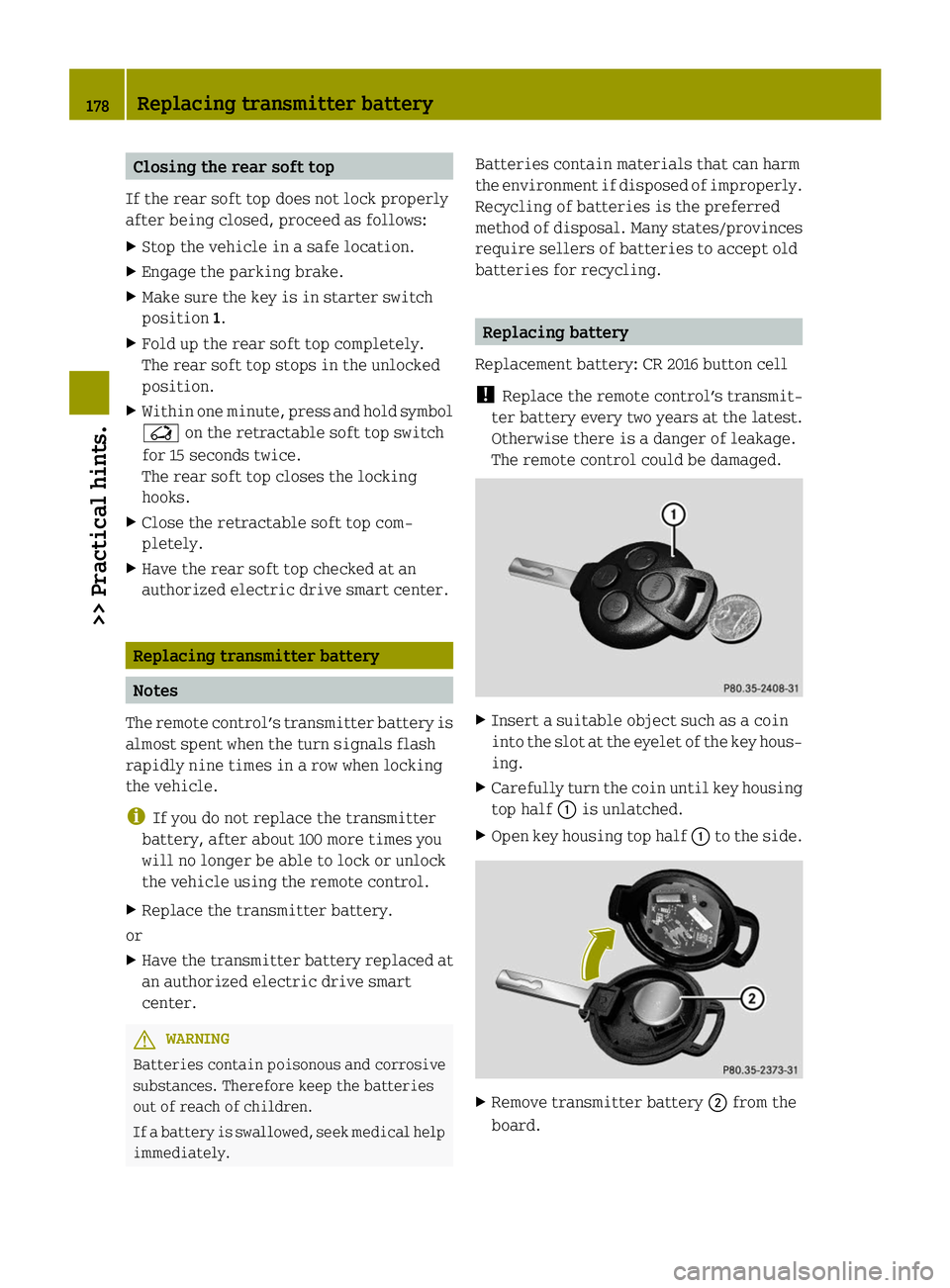
Insert a suitable object such as a coin
into the slot at the eyelet of the key hous-
ing.
X Carefully turn the coin until key housing
top half 0043is unlatched.
X Open key housing top half 0043to the side. X
Remove transmitter battery 0044from the
board. 178
Replacing transmitter battery>> Practical hints.
Page 181 of 222
!
Check the polarity when inserting the
new transmitter battery. You could oth-
erwise damage parts of the electrical
system. When inserting the batteries,
make sure they are clean and free of lint.
X Insert the new transmitter battery.
X Press both halves of the key housing
together again.
X Check the operation of the remote
control. Replacing bulbs
About replacing bulbs
Safe vehicle operation depends on proper
exterior lighting and signaling. It is
therefore essential that all bulbs and lamp
assemblies are in good working order at all
times.
Correct headlamp adjustment is extremely
important. Have headlamps checked and
readjusted at regular intervals and when a
bulb has been replaced. Contact an author-
ized electric drive smart center for head-
lamp adjustment. G
WARNING
Bulbs and bulb sockets can be very hot.
Allow the lamp to cool down before changing
a bulb. Otherwise you could be burned if you
touch them.
Keep bulbs out of the reach of children.
Halogen lamps contain pressurized gas. A
bulb can explode if you:
R touch or move it when hot
R drop the bulb
R scratch the bulb
Wear eye and hand protection.
i If the headlamps or front fog lamps* are
fogged up on the inside as a result of
high humidity, driving the vehicle a
distance with the lights on should clear
up the fogging. Notes on bulb replacement:
R
Only use bulbs of the same type and with
the specified watt rating.
R Switch the lights off before replacing a
bulb to prevent short circuits.
R Always use a clean lint-free cloth when
handling bulbs.
R Your hands should be dry and free of oil
and grease.
R Avoid touching the glass of the bulb with
bare fingers.
R If the newly installed bulb does not come
on, contact an authorized electric drive
smart center.
R Have the bulbs for the front fog lamps*
and the LED daytime running lamps*
replaced at an authorized electric drive
smart center. Replacing bulbs
179>> Practical hints.
* optional Z
Page 192 of 222
X
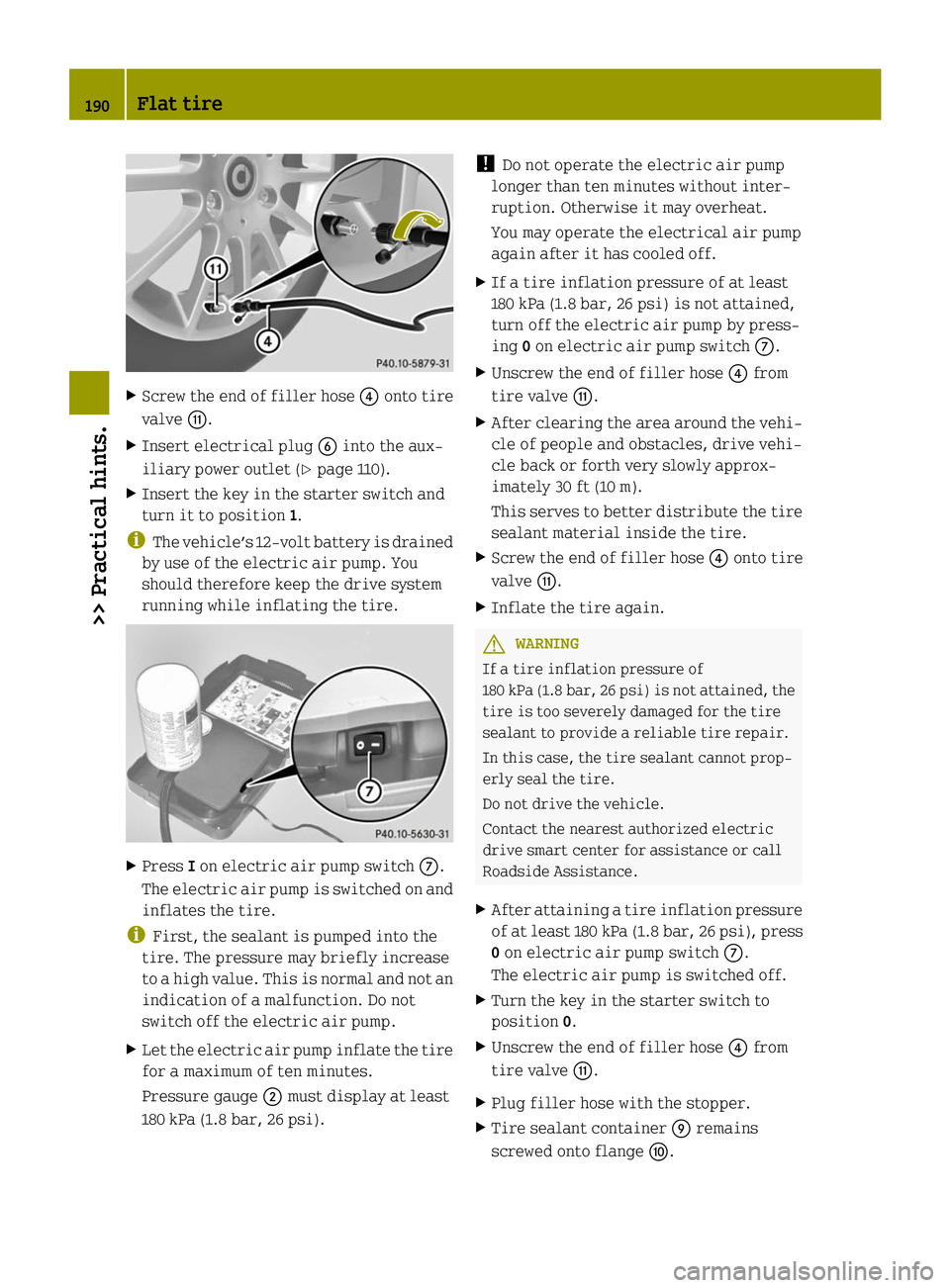
Screw the end of filler hose 0085onto tire
valve 006F.
X Insert electrical plug 0084into the aux-
iliary power outlet (Y page 110).
X Insert the key in the starter switch and
turn it to position 1.
i The vehicle’s 12‑volt battery is drained
by use of the electric air pump. You
should therefore keep the drive system
running while inflating the tire. X
Press Ion electric air pump switch 006B.
The electric air pump is switched on and
inflates the tire.
i First, the sealant is pumped into the
tire. The pressure may briefly increase
to a high value. This is normal and not an
indication of a malfunction. Do not
switch off the electric air pump.
X Let the electric air pump inflate the tire
for a maximum of ten minutes.
Pressure gauge 0044must display at least
180 kPa (1.8 bar, 26 psi). !
Do not operate the electric air pump
longer than ten minutes without inter-
ruption. Otherwise it may overheat.
You may operate the electrical air pump
again after it has cooled off.
X If a tire inflation pressure of at least
180 kPa (1.8 bar, 26 psi) is not attained,
turn off the electric air pump by press-
ing 0on electric air pump switch 006B.
X Unscrew the end of filler hose 0085from
tire valve 006F.
X After clearing the area around the vehi-
cle of people and obstacles, drive vehi-
cle back or forth very slowly approx-
imately 30 ft (10 m).
This serves to better distribute the tire
sealant material inside the tire.
X Screw the end of filler hose 0085onto tire
valve 006F.
X Inflate the tire again. G
WARNING
If a tire inflation pressure of
180 kPa (1.8 bar, 26 psi) is not attained, the
tire is too severely damaged for the tire
sealant to provide a reliable tire repair.
In this case, the tire sealant cannot prop-
erly seal the tire.
Do not drive the vehicle.
Contact the nearest authorized electric
drive smart center for assistance or call
Roadside Assistance.
X After attaining a tire inflation pressure
of at least 180 kPa (1.8 bar, 26 psi), press
0 on electric air pump switch 006B.
The electric air pump is switched off.
X Turn the key in the starter switch to
position 0.
X Unscrew the end of filler hose 0085from
tire valve 006F.
X Plug filler hose with the stopper.
X Tire sealant container 006Dremains
screwed onto flange 006E.190
Flat tire>> Practical hints.
Page 194 of 222
X
Drive to the nearest authorized electric
drive smart center, to have the damaged
tire replaced.
X Contact an authorized electric drive
smart center as soon as possible to
obtain a new filler hose and a new tire
sealant container.
X Bring used tire sealant materials to an
authorized electric drive smart center
for proper disposal.
X Replace your tire sealant container
every 4 years. Replacement containers
are available at any authorized electric
drive smart center. G
WARNING
After changing a tire, contact an author-
ized electric drive smart center to make
sure the bolts holding the wheel to the car
are tight enough. Otherwise, the wheels
could come off. Each bolt should be tight-
ened to a torque of 81 lb‑ft (110 Nm). Sealing a tire (Version 2)
X Take the tire repair kit from the
passenger footwell (Y page 160).X
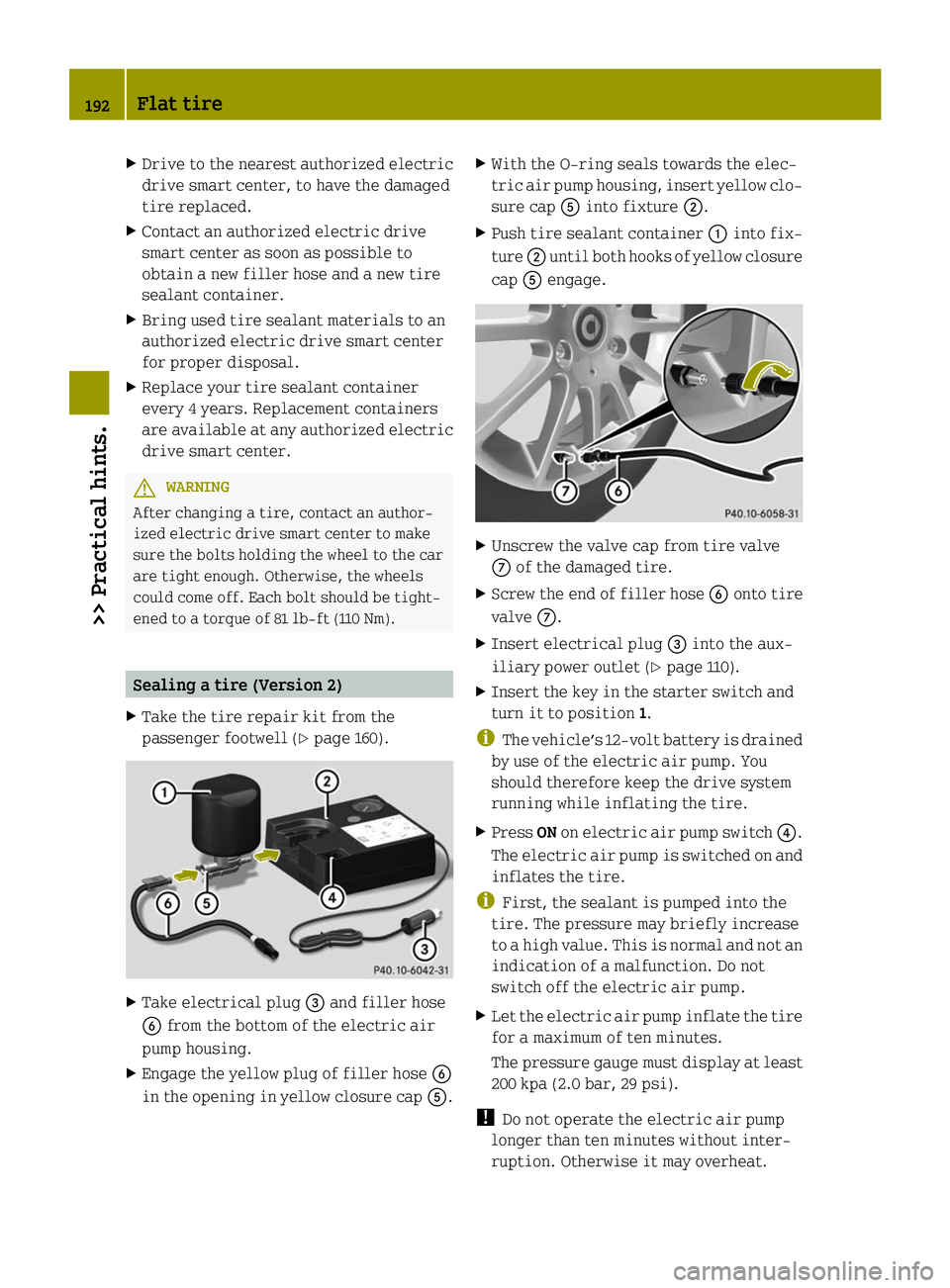
Take electrical plug 0087and filler hose
0084 from the bottom of the electric air
pump housing.
X Engage the yellow plug of filler hose 0084
in the opening in yellow closure cap 0083.X
With the O-ring seals towards the elec-
tric air pump housing, insert yellow clo-
sure cap 0083into fixture 0044.
X Push tire sealant container 0043into fix-
ture 0044until both hooks of yellow closure
cap 0083engage. X
Unscrew the valve cap from tire valve
006B of the damaged tire.
X Screw the end of filler hose 0084onto tire
valve 006B.
X Insert electrical plug 0087into the aux-
iliary power outlet ( Ypage 110).
X Insert the key in the starter switch and
turn it to position 1.
i The vehicle’s 12‑volt battery is drained
by use of the electric air pump. You
should therefore keep the drive system
running while inflating the tire.
X Press ONon electric air pump switch 0085.
The electric air pump is switched on and
inflates the tire.
i First, the sealant is pumped into the
tire. The pressure may briefly increase
to a high value. This is normal and not an
indication of a malfunction. Do not
switch off the electric air pump.
X Let the electric air pump inflate the tire
for a maximum of ten minutes.
The pressure gauge must display at least
200 kpa (2.0 bar, 29 psi).
! Do not operate the electric air pump
longer than ten minutes without inter-
ruption. Otherwise it may overheat. 192
Flat tire>> Practical hints.
Page 200 of 222
Battery fluid contains sulfuric acid. Do not
allow this fluid to come in contact with
eyes, skin or clothing. In case it does,
immediately flush affected area with water
and seek medical help if necessary.
A battery will also produce hydrogen gas,
which is flammable and explosive. Keep
flames or sparks away from battery, avoid
improper connection of jumper cables,
smoking, etc. G
WARNING
Do not place any metal objects on a battery.
You could otherwise cause a short circuit
and the battery’s highly flammable chemi-
cals could ignite.
Never allow any metal object to contact both
battery terminals or the positive terminal
and the vehicle body at the same time. This
might short circuit the battery and ignite
the highly flammable and explosive hydro-
gen gas generated by the battery, causing
serious personal injury. G
WARNING
Keep flames or sparks away from battery,
avoid improper connection of jumper
cables, smoking, etc.
R When disconnecting the battery, always
disconnect the negative terminal first,
followed by positive terminal.
R When connecting the battery, always con-
nect the positive terminal first, fol-
lowed by the negative terminal.
R Do not loosen or disconnect the battery
terminal clips while the drive system is
running or the key is in the starter
switch.
! Never loosen or detach battery terminal
clamps while the drive system is running
or the key is in the starter switch. Oth-
erwise, electronic components could be
severely damaged.
Have the battery checked regularly at an
authorized electric drive smart center. Refer to Maintenance Booklet for main-
tenance intervals or contact an author-
ized electric drive smart center for fur-
ther information.
! Never invert the terminal connections! Notes on the high‑voltage battery
Have work on the high-voltage battery per-
formed by an authorized electric drive
smart center only. Observe the safety notes
on (Y page 16) as well as the notes on the 12-
volt battery (Y page 197). G
WARNING
The electrolyte of the high-voltage bat-
tery, i.e. the battery fluid, is toxic and
caustic. Do not allow this fluid to come in
contact with eyes, skin or clothing, for
example in case of an accident.
In case it does, immediately flush affected
area with water and seek medical help
immediately.
The high-voltage battery is located in the
vehicle underbody. Keep this in mind when
jacking up the vehicle. The vehicle has
designated take-up brackets for the jack.
For more information, see (Y page 196).
! Only position the jack on the desig-
nated take-up brackets.
You must not position the jack under the
high-voltage battery. Otherwise, the
high-voltage battery could be damaged. 198
Batteries>> Practical hints.
Page 201 of 222
Disconnecting, removing, charging,
reinstalling and reconnecting 12‑volt
battery
Disconnecting the 12-volt battery i
If the 12-volt battery is disconnected
or discharged
R turning the key in the starter switch
will have no effect
R the transmission will remain in park
position P
For more information see “Jump start-
ing” (Y page 200).
X Engage the parking brake.
X Move the gear selector lever to park
position P.
X Turn off all electrical accessories.
X Switch off the drive system.
X Open the passenger door.
X Move the passenger seat to the rear as far
as possible.
X Unscrew the carpet holder in the
passenger footwell (Y page 160).
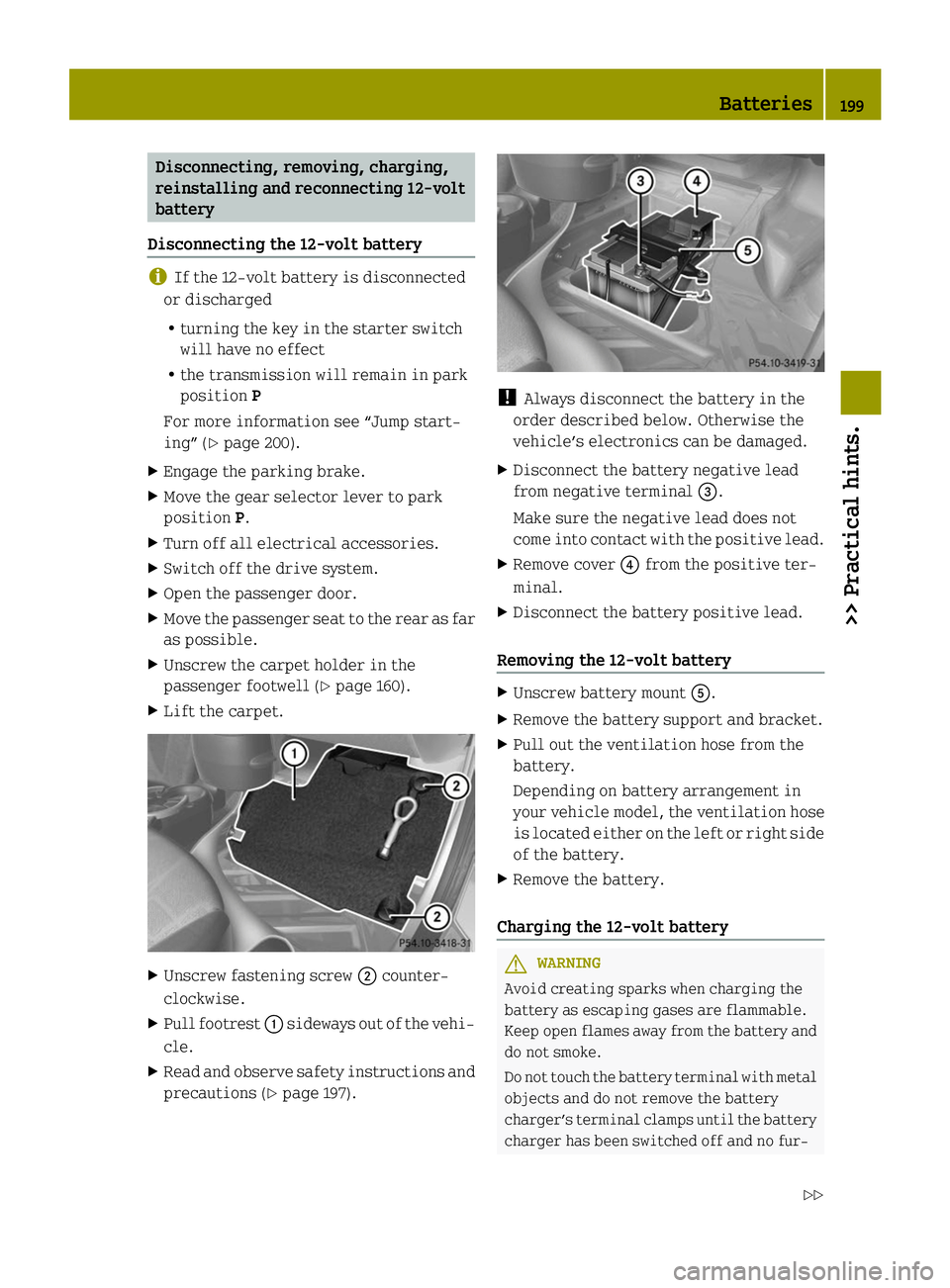
X Lift the carpet. X
Unscrew fastening screw 0044counter-
clockwise.
X Pull footrest 0043sideways out of the vehi-
cle.
X Read and observe safety instructions and
precautions (Y page 197). !
Always disconnect the battery in the
order described below. Otherwise the
vehicle’s electronics can be damaged.
X Disconnect the battery negative lead
from negative terminal 0087.
Make sure the negative lead does not
come into contact with the positive lead.
X Remove cover 0085from the positive ter-
minal.
X Disconnect the battery positive lead.
Removing the 12-volt battery X
Unscrew battery mount 0083.
X Remove the battery support and bracket.
X Pull out the ventilation hose from the
battery.
Depending on battery arrangement in
your vehicle model, the ventilation hose
is located either on the left or right side
of the battery.
X Remove the battery.
Charging the 12-volt battery G
WARNING
Avoid creating sparks when charging the
battery as escaping gases are flammable.
Keep open flames away from the battery and
do not smoke.
Do not touch the battery terminal with metal
objects and do not remove the battery
charger’s terminal clamps until the battery
charger has been switched off and no fur- Batteries
199>> Practical hints.
Z