radio SUBARU BAJA 2006 1.G User Guide
[x] Cancel search | Manufacturer: SUBARU, Model Year: 2006, Model line: BAJA, Model: SUBARU BAJA 2006 1.GPages: 487, PDF Size: 5.55 MB
Page 187 of 487
5-10
Audio
seconds to store the frequency. At this time, there will
momentarily be no sound from the radio. If the button
is pressed for less than 2 seconds, the preceding se-
lection will remain in memory.
NOTE y
If the connection between the radio and battery
is broken for any reason such as vehicle mainte-
nance or radio removal, all stations stored in the
preset buttons are cleared. If this occurs, it is nec-
essary to reset the preset buttons. y If a cell phone is placed near the radio, it may
cause the radio to emit noise when it receives
calls. This noise does not indicate a radio fault.
Page 192 of 487
5-15
Audio
– CONTINUED –
TTo start playback
Press the “CD” button (16). The “CD” indicator will
come on and the disc number will appear on the dis-
play and the CD changer will start playback.
NOTE y If the “CD” button is pressed during a radio
broadcast, the CD changer will interrupt the
broadcast. y At the end of the disc, playback automatically
continues with the next disc. y After playback on the last disc finishes, the play-
er will automatically re turn to the first disc.
y If you have loaded fewer than 6 discs, any miss-
ing disc is automatically skipped. T Selection of a desired disc
Discs cannot be selected using the main audio unit. To
select a disc, press one of the “Disc select” buttons
(these are numbered from 1 to 6) on the CD changer
unit. The disc will begin to play. T To select a song from its beginning
Briefly press the “ ” side of the track selection but-
ton (17) to skip to the beginning of the next track and
briefly press the “ ” side of the button to skip to the
beginning of the current track. T
Fast-forwarding and fast-reversing
Press the “ ” side of the track selection button (17)
continuously to fast-forward the disc.
Press the “ ” side of t he button continuously to
fast-reverse the disc.
Release the button to stop fast-forwarding or fast-re-versing. T Repeat playback
Press the “RPT” button (19) while a song is playing to
play the song repeatedly. The “RPT” indicator will
come on and the song will be played continuously. To
cancel the repeat mode, press the button again. Then
the “RPT” indicator goes out, and normal playbackmode is restored. T Random playback
Press the “RAND” button (18) while a disc is being
played back to play all songs on the disc in a random
order. The “RAND” indicator will come on and all
songs on the disc will be played in a random order.
To cancel the random mode, press the button again.
Then the “RAND” indicator goes out, and normal play-
back mode is restored. T Scan (a convenient way to become familiar with
a disc)
1. Press the “SCAN” button (20).
Page 193 of 487

5-16
Audio
– The display shows “SCAN” and the track number
being scanned.
– You hear the first 10 seconds of each track.
– The operation is automatically cleared after play-
ing all programs. Then, normal playback starts.
2. Press the “SCAN” button again when you hear a
track you like.
– Normal playback resumes.
T To stop playback
To stop playback and switch over to the radio mode,
press the “BAND” button.
Page 194 of 487
5-17
Audio
– CONTINUED –
Type B audio set (if equipped)
The radio will operate only when the igni tion switch is in the “ACC” or “ON”
position. „ Radio operation
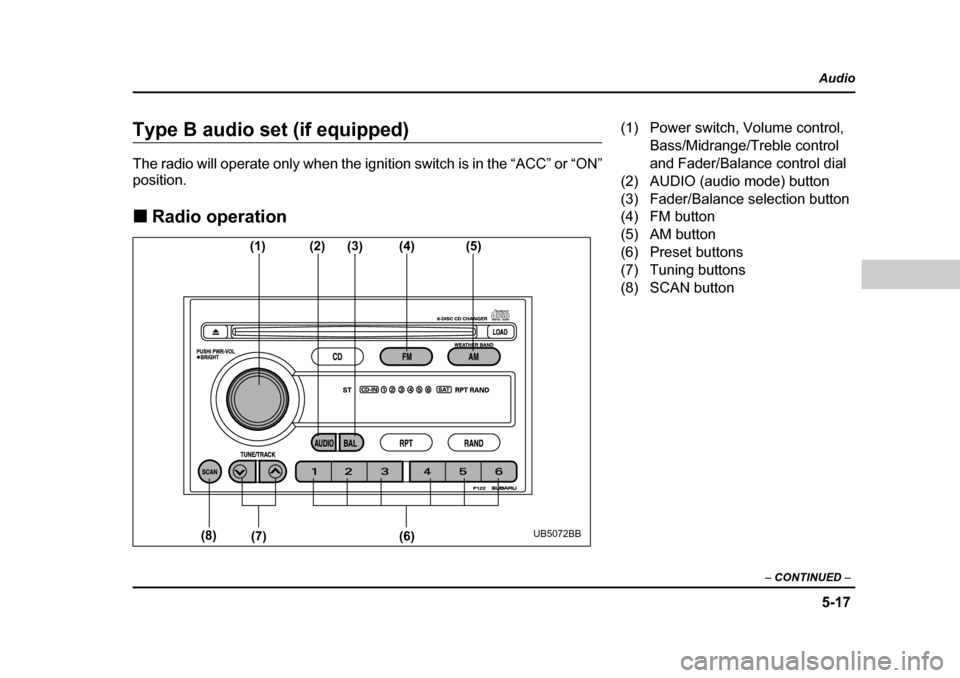
(1) (2)(3)(4) (5)
(6)
(7)
(8)
UB5072BB
(1) Power switch, Volume control,
Bass/Midrange/Treble control
and Fader/Balance control dial
(2) AUDIO (audio mode) button
(3) Fader/Balance selection button
(4) FM button
(5) AM button
(6) Preset buttons
(7) Tuning buttons
(8) SCAN button
Page 195 of 487

5-18
Audio
T
Power switch and volume/bass/treble/fader/
balance control (PWR/VOL)
The dial (1) is used for both power (ON/OFF) and vol-
ume control. The radio is turned ON and OFF by push-
ing the dial and the volume is controlled by turning the
dial.
This dial is used for ba ss/midrange/treble controls
when the “AUDIO” button (2) is in the depressed posi-
tion. It is also used for fader/balance controls when the
“BAL” button (3) is in the depressed position.
Page 197 of 487
5-20
Audio
V
Tone control
The volume control dial (1) normally function as vol-
ume control. The dial become a control for Bass,
Midrange or Treble when you select the appropriate
tone control mode. Choose desired volume level for each mode by turning
the volume control dial. The control function returns to
volume control mode after approximately 5 seconds.
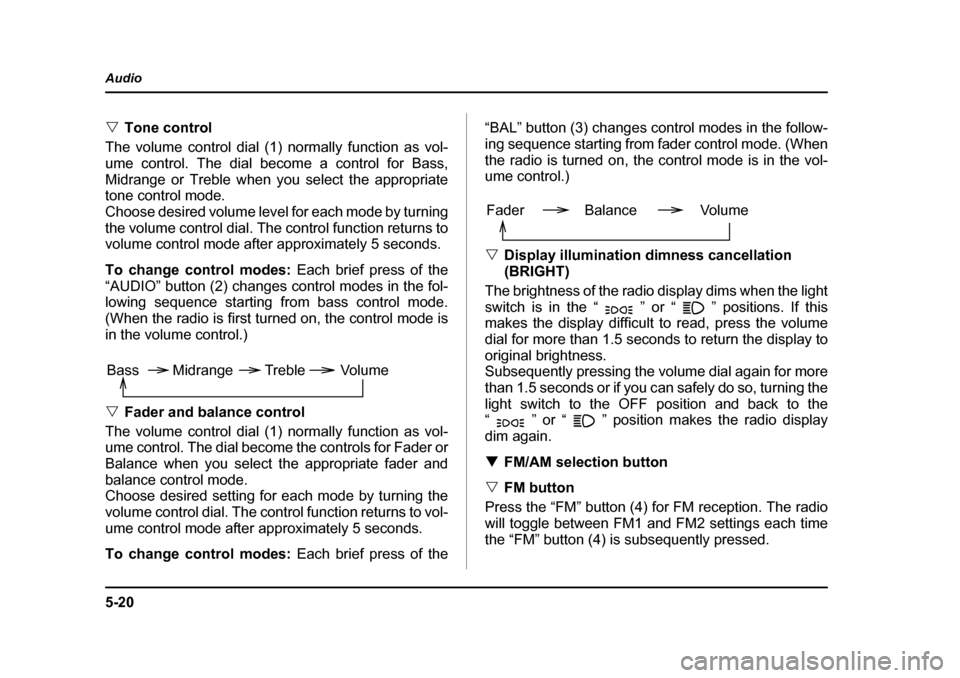
To change control modes: Each brief press of the
“AUDIO” button (2) changes control modes in the fol-
lowing sequence starting from bass control mode.
(When the radio is first turned on, the control mode is
in the volume control.) V Fader and balance control
The volume control dial (1) normally function as vol-
ume control. The dial become the controls for Fader or
Balance when you select the appropriate fader and
balance control mode.
Choose desired setting for each mode by turning the
volume control dial. The control function returns to vol-
ume control mode after approximately 5 seconds.
To change control modes: Each brief press of the “BAL” button (3) changes control modes in the follow-
ing sequence starting from
fader control mode. (When
the radio is turned on, the control mode is in the vol-
ume control.) V Display illumination dimness cancellation (BRIGHT)
The brightness of the radio display dims when the light
switch is in the “ ” or “ ” positions. If this
makes the display difficult to read, press the volume
dial for more than 1.5 seconds to return the display to
original brightness.
Subsequently pressing the volume dial again for more
than 1.5 seconds or if you c an safely do so, turning the
light switch to the OFF position and back to the
“ ” or “ ” position makes the radio display
dim again. T FM/AM selection button
V FM button
Press the “FM” button (4) for FM reception. The radio
will toggle between FM1 and FM2 settings each time
the “FM” button (4) is subsequently pressed.
Volume
Bass Midrange Treble
Volume
Fader Balance
Page 198 of 487
5-21
Audio
– CONTINUED –
VAM button
Press the “AM” button (5) for AM reception. T Stereo indicator
The stereo indicator “ST” will come on when an FM
stereo broadcast is received. T Manual tuning (TUNE)
V Manual tuning for AM and FM
Push the “ ” side of the tuning button (7) to in-
crease the tuning frequency and press the “ ” side
of the button to decrease it.
Each time the button is pr essed, the frequency chang-
es 10 KHz in the AM waveband and 0.2 MHz in the FM
waveband. V Seek tuning (SEEK)
If the tuning button (7) is pressed for longer than half
of a second, the radio will begin to automatically
search for receivable frequencies and will stop at the
first one found. This function may not be available,
however, when radio signals are weak. In such a situ-
ation, perform manual tuning to select the desired sta-
tion. T Automatic tuning (SCAN)
Press the “SCAN” button (8) to change the radio to the SCAN mode. In this mode, the radio scans through the
radio band until a station is
found. The radio will stop
at the station for five seconds while displaying the fre-
quency, after which scanning will continue until the en-
tire band has been scanned from the low end to the
high end.
Press the “SCAN” button again to cancel the SCAN
mode and to stop on any displayed frequency.
When the “SCAN” button is pressed for automatic tun-
ing, stations are scanned in the direction of low fre-
quencies to high frequencies only.
Automatic tuning may not function properly if the sta-
tion reception is weakened by distance from the sta-
tion or proximity to tall buildings and hills. T Selecting preset stations
Presetting a station with a “Preset” button (6) allows
you to select that station in a single operation. Up to
six AM, FM1 and FM2 stations each may be preset. T How to preset stations
1. Press the “FM/AM” selection button to select AM,
FM1 or FM2 reception.
2. Press the “SCAN” button (8) or tune the radio man-
ually until the desired stat ion frequency is displayed.
3. Press one of the “Preset” buttons (6) for at least 1.5
seconds to store the frequency. The frequency of the
station will flash once on the display at this time. If the
Page 199 of 487
5-22
Audio
button is pressed for less than 1.5 seconds, the pre-
ceding selection will remain in memory.
NOTE y
If the connection between the radio and battery
is broken for any reason such as vehicle mainte-
nance or radio removal, all stations stored in the
preset buttons are cleared. If this occurs, it is nec-
essary to reset the preset buttons. y If a cell phone is placed near the radio, it may
cause the radio to emit noise when it receives
calls. This noise does not indicate a radio fault.
Page 206 of 487

5-29
Audio
– CONTINUED –
2. Press the “Eject” button (4). The selected disc will
be ejected and the indicator light will begin blinking.
3. To remove another disc, repeat Steps 1 and 2
choosing a different “Disc select” button.
(To remove discs when the ig nition switch is in the
“Lock” position, press the “Eject” button, and the first
disc will be ejected. Press the “Eject” button again,
and the next disc will be ejected and so on. At this
time, the “Disc select” buttons are disabled.) T To remove all discs at one time
1. Press and hold the “Eject” button (4) until all “Disc”
indicators begin blinking (approximately 1.5 seconds),
and the first disc will be ejected.
2. When the disc is removed, the next one will be
ejected, and so on. T To replace a playing disc with another
Simply press the desired one of “Disc select” buttons
(3) (numbered from 1 to 6) or press the “DISC UP” or
“DISC DOWN” button on the ra dio unit to select the
desired disc, and the disc will begin to play. T Disc indicators
Lit: when the corresponding storage tray is occupied
by a disc.
Blinking: Disc player is either in loading, eject or
changing mode. OFF: No disc is loaded or the ignition switch is in the
“LOCK” position. T
Function control
Refer to CD player control operating instructions de-
scribed in the “AM/FM radio with CD player” section.
Page 302 of 487
8-9
Driving tips
– CONTINUED –
Off road driving
yAlways maintain a safe driving speed accord-
ing to the road and weather conditions in order
to avoid having an accident on a sharp turn,
during sudden braking or under other similar
conditions.y Always use the utmost care in driving – over-
confidence because you are driving an All-
Wheel Drive vehicle could easily lead to a seri-
ous accident.
Because of the AWD feature and higher ground clear-
ance, your SUBARU can be driven on ordinary roads
or off-road. But please keep in mind that an AWD
SUBARU is neither a conventional off-road vehicle nor
an all-terrain vehicle. If you do take your SUBARU off-
road, certain common sense precautions such as the
following should be taken: y Make certain that you and all of your passengers
are wearing seatbelts. y Carry some emergency equipment, such as a tow-
ing rope or chain, a shovel, wheel blocks, first aid kit
and cell phone or citizens band radio. y
Drive carefully. Do not take unnecessary risks by
driving in dangerous areas or over rough terrain.y Slow down and employ extra caution at all times.
When driving off-road, you will not have the benefit of
marked traffic lanes, banked curves, traffic signs and
the like. y Do not drive across steep slopes. Instead, drive ei-
ther straight up or straight down the slopes. A vehicle
can much more easily tip over sideways than it can
end over end. Avoid driving straight up or down slopes
that are too steep.y Avoid sharp turning maneuvers, especially at higher
speeds. y Do not grip the inside or spokes of the steering
wheel. A bad bump could jerk the wheel and injure
your hands. Instead dr ive with your fingers and
thumbs on the outside of the rim. y If driving through water, such as when crossing
shallow streams, first check the depth of the water and
the bottom of the stream bed for firmness and ensure
that the bed of the stream is flat. Drive slowly and com-
pletely through the stream. The water should be shal-
low enough that it does not reach the vehicle’s under-
carriage. Water entering the engine air intake or the
exhaust pipe or water splashing onto electrical parts
may damage your vehicle and may cause it to stall.
Never attempt to drive through rushing water; regard-