instrument panel SUBARU BRZ 2014 1.G User Guide
[x] Cancel search | Manufacturer: SUBARU, Model Year: 2014, Model line: BRZ, Model: SUBARU BRZ 2014 1.GPages: 488, PDF Size: 6.41 MB
Page 202 of 488
202
2-3. Operating the lights and windshield wipers
Headlight switch
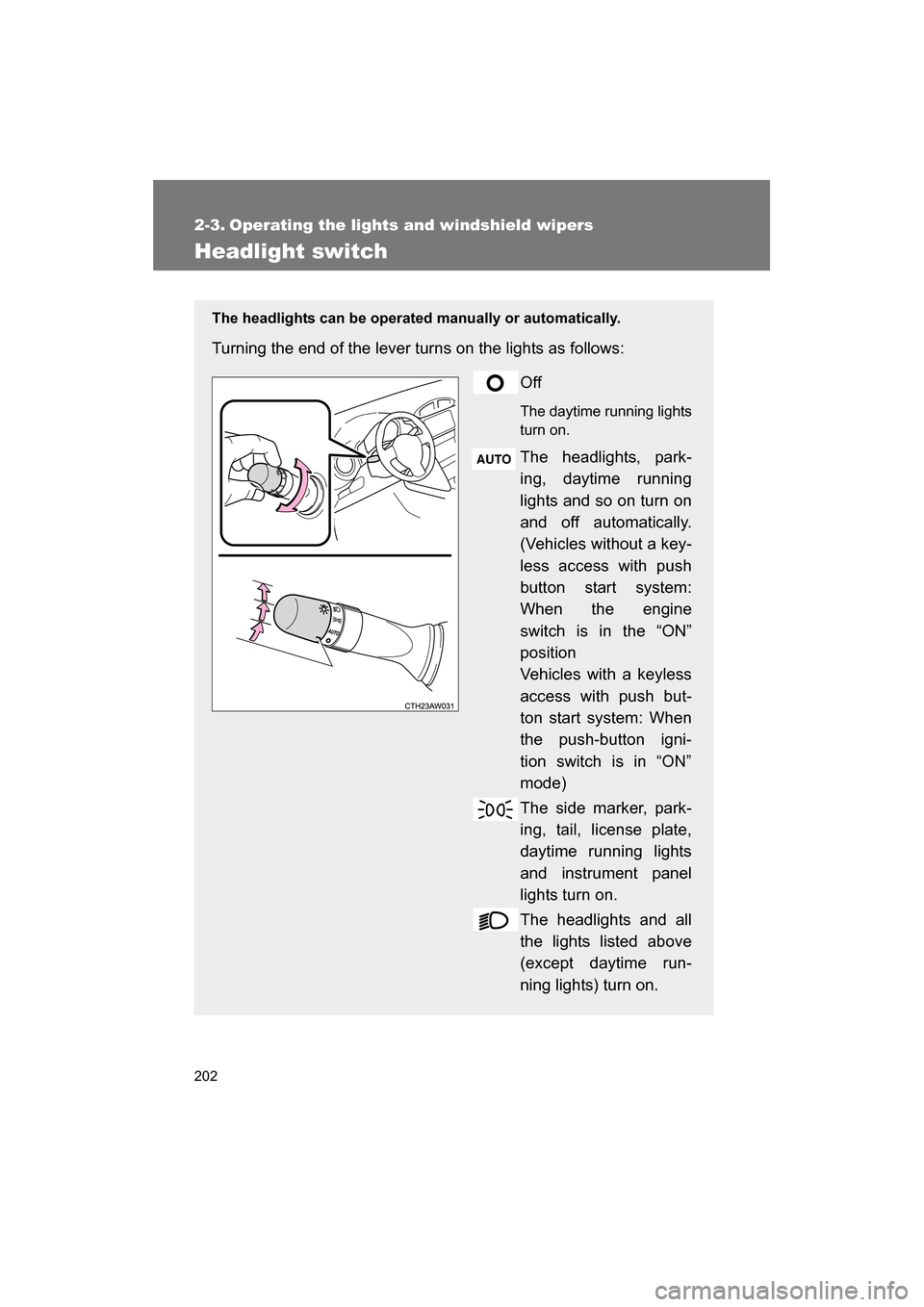
The headlights can be operated manually or automatically.
Turning the end of the lever turns on the lights as follows:Off
The daytime running lights turn on.
The headlights, park-
ing, daytime running
lights and so on turn on
and off automatically.
(Vehicles without a key-
less access with push
button start system:
When the engine
switch is in the “ON”
position
Vehicles with a keyless
access with push but-
ton start system: When
the push-button igni-
tion switch is in “ON”
mode)
The side marker, park-
ing, tail, license plate,
daytime running lights
and instrument panel
lights turn on.
The headlights and all
the lights listed above
(except daytime run-
ning lights) turn on.
Page 279 of 488
279
4-1. Maintenance and care
4
Maintenance and care
■Caring for leather areas
SUBARU recommends cleaning the interior of the vehicle at least twice a
year to maintain the quality of the vehicle’s interior.
■Shampooing the carpets
There are several commercial foaming-type cleaners available. Use a
sponge or brush to apply the foam. Rub in overlapping circles. Do not apply
water. Excellent results are obtained by keeping the carpet as dry as possi-ble.
■Seatbelts
Clean with mild soap and lukewarm water using a cloth or sponge. Also
check the belts periodically for excessive wear, fraying or cuts.
WARNING
■Water in the vehicle
●Do not splash or spill liquid in the vehicle.
Doing so may cause electrical components etc. to malfunction or catchfire.
●Do not get any of the SRS components or wiring in the vehicle interior wet. (→ P. 93)
Electrical malfunction may cause the airbags to deploy or not function
properly, resulting in death or severe injury.
■Cleaning the interior (especially instrument panel)
Do not use polish wax or polish cleaner. The instrument panel may reflect off
the windshield, obstructing the driver's view and leading to an accident,
resulting in death or serious injury.
Page 280 of 488
280
4-1. Maintenance and care
CAUTION
■Cleaning detergents
●Do not use organic substances such as benzene or gasoline, acidic or
alkaline solutions, dye, bleach or other detergent. Doing so may discolor
the vehicle interior or cause streaks or damage to painted surfaces.
●Do not use polish wax or polish cleaner. The instrument panel's or other
interior part’s painted surface may be damaged.
●Do not use a chemical agent containing silicone (highly-polymerized sili-
con compound) when cleaning any of the electrical appliances such as the
air conditioning, all switches and their surrounding areas.
If silicon (highly-polymerized silicon compound) contacts these compo-
nents, it may cause the electrical appliances to malfunction.
■Preventing damage to leather surfaces
Observe the following precautions to avoid damage to and deterioration of
leather surfaces.
●Remove any dust, dirt, sand, oil spots etc. on leather surfaces immedi-
ately.
●Do not expose the vehicle to direct sunlight for extended periods of time.
Park the vehicle in the shade, especially during summer.
●Do not place items made of vinyl, plastic, or that contain wax on the uphol-
stery, as they may stick to the leather surface if the vehicle interior heats
up significantly.
■Water on the floor
Do not wash the vehicle floor with water.
Vehicle systems such as the audio system may be damaged if water comes
into contact with electrical components under the floor of the vehicle, and
may also cause the body to rust.
Page 281 of 488
281
4-1. Maintenance and care
4
Maintenance and care
CAUTION
■Cleaning the inside of the rear window
●Be careful not to scratch or damage the heater wires.
●Do not use glass cleaner to clean the rear window, as this may cause
damage to the rear window defogger heater wires. Use a cloth dampened
with lukewarm water to gently wipe the window clean. Wipe the window in
strokes running parallel to the heater wires.
■When cleaning the instrument panel
When small grains of sand and so forth have gotten into instrument panel’s
surface and cannot be wiped away using a cloth, use a clay bar without add-
ing water. Forcibly trying to wipe the surface clean with a brush or sponge
may scratch the surface or fragments of the cloth may be left in the surface.
Page 332 of 488
332
4-3. Do-it-yourself maintenance
Checking and replacing fuses
If any of the electrical components do not operate, a fuse may have
blown. If this happens, check and replace the fuses as necessary.Vehicles without a keyless access with push button
start system
Turn the engine switch off.
Vehicles with a keyless access with push button start
system
Turn the push-button ignition switch off.
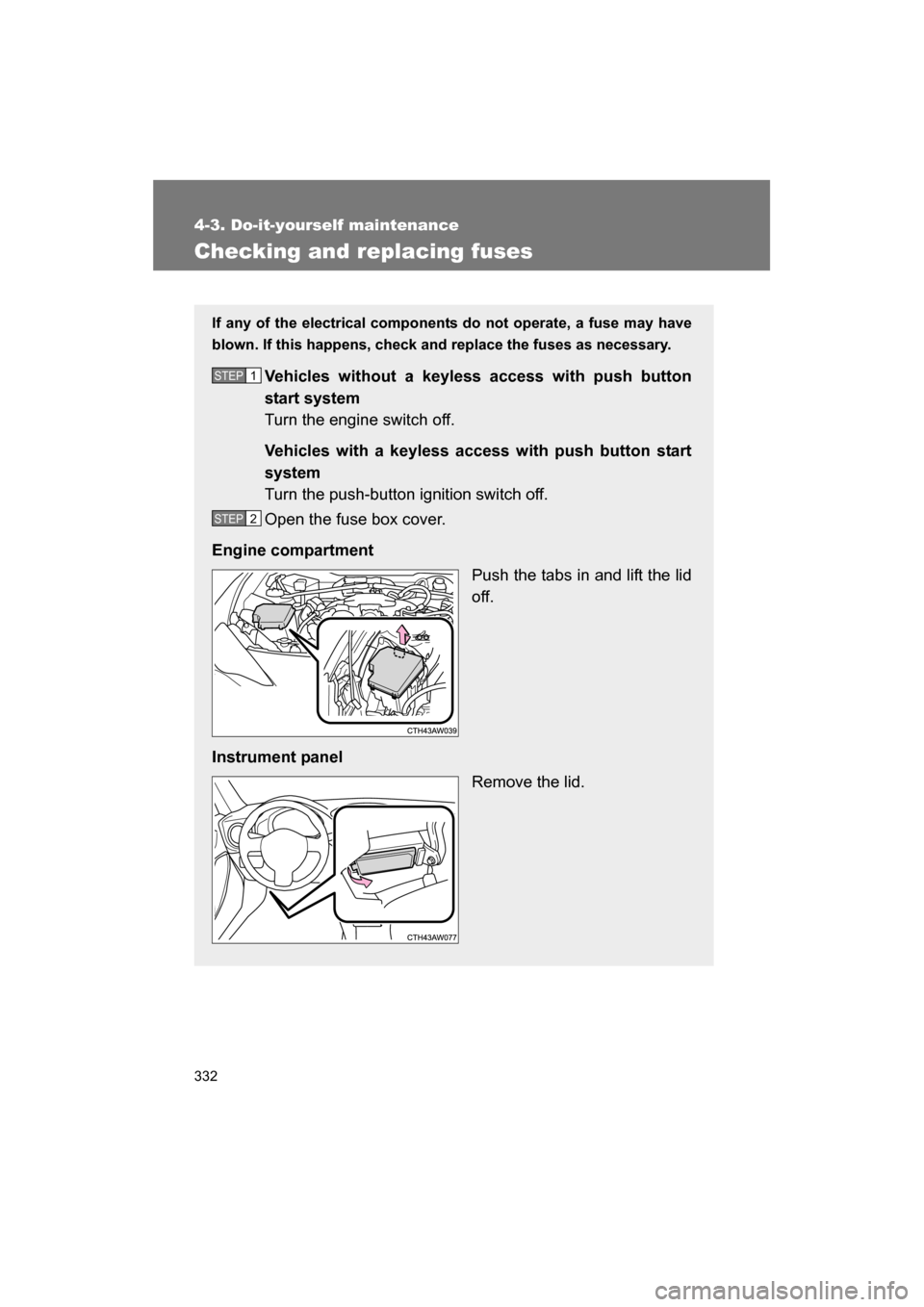
Open the fuse box cover.
Engine compartment Push the tabs in and lift the lid
off.
Instrument panel Remove the lid.
STEP 1
STEP 2
Page 338 of 488
338
4-3. Do-it-yourself maintenance
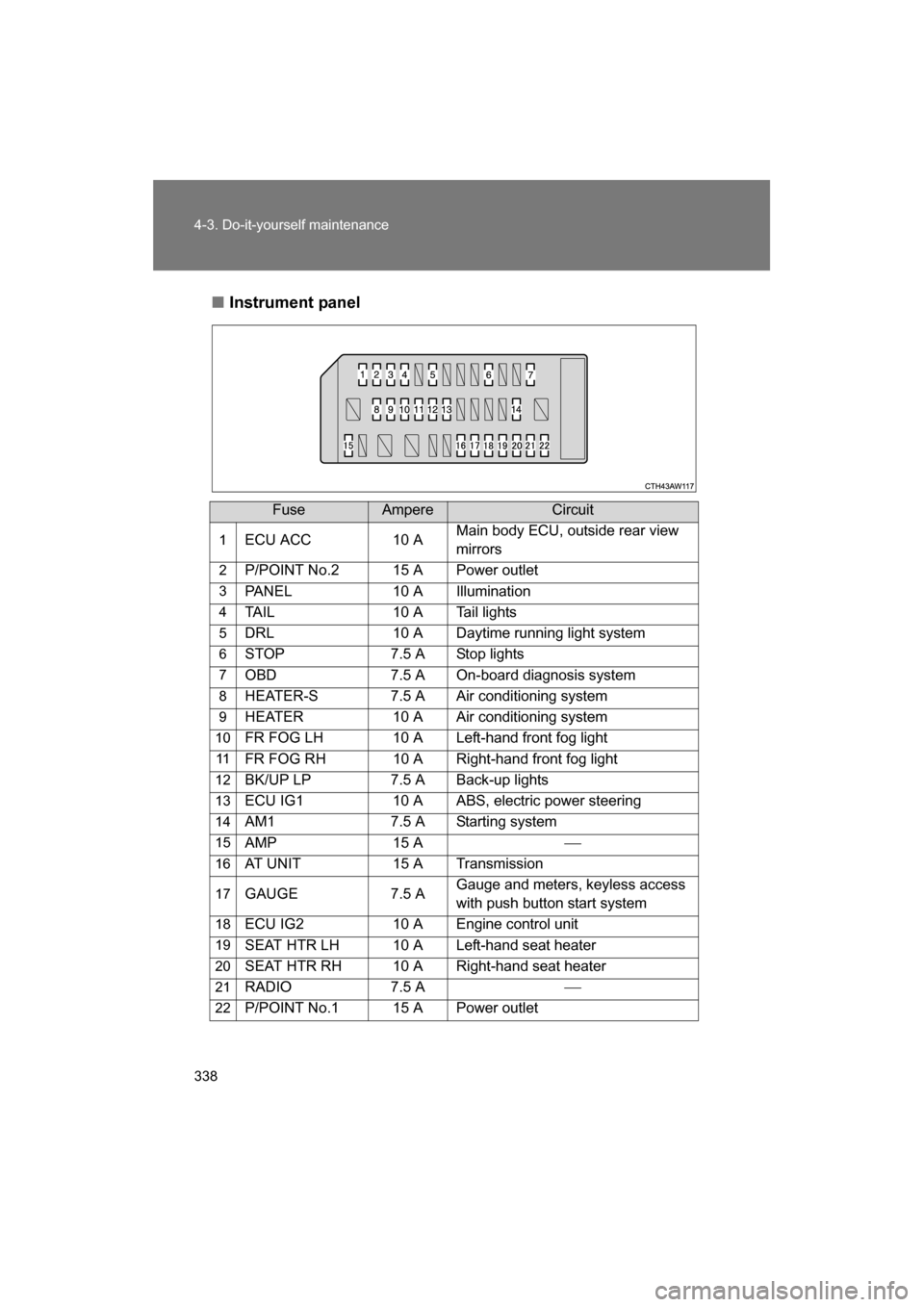
■Instrument panel
FuseAmpereCircuit
1 ECU ACC 10 A Main body ECU, outside rear view
mirrors
2 P/POINT No.2 15 A Power outlet
3 PANEL 10 A Illumination
4 TAIL 10 A Tail lights
5 DRL 10 A Daytime running light system
6 STOP 7.5 A Stop lights
7 OBD 7.5 A On-board diagnosis system
8 HEATER-S 7.5 A Air conditioning system
9 HEATER 10 A Air conditioning system
10 FR FOG LH 10 A Left-hand front fog light
11 FR FOG RH 10 A Right-hand front fog light
12 BK/UP LP 7.5 A Back-up lights
13 ECU IG1 10 A ABS, electric power steering
14 AM1 7.5 A Starting system
15 AMP 15 A
16 AT UNIT 15 A Transmission
17 GAUGE 7.5 A Gauge and meters, keyless access
with push button start system
18 ECU IG2 10 A Engine control unit
19 SEAT HTR LH 10 A Left-hand seat heater
20 SEAT HTR RH 10 A Right-hand seat heater
21 RADIO 7.5 A
22 P/POINT No.1 15 A Power outlet
Page 474 of 488
474
Alphabetical index
Back-up lightsReplacing light bulbs ............. 340
Wattage.................................423
Battery
Checking ............................... 304
If the vehicle has a discharged battery ..............400
Preparing and checking
before winter ....................... 229
Bottle holders ........................... 259
Brake Fluid ...................................... 302
Parking brake ........................ 185
Brake assist ..............................217
Break-in tips ............................. 151
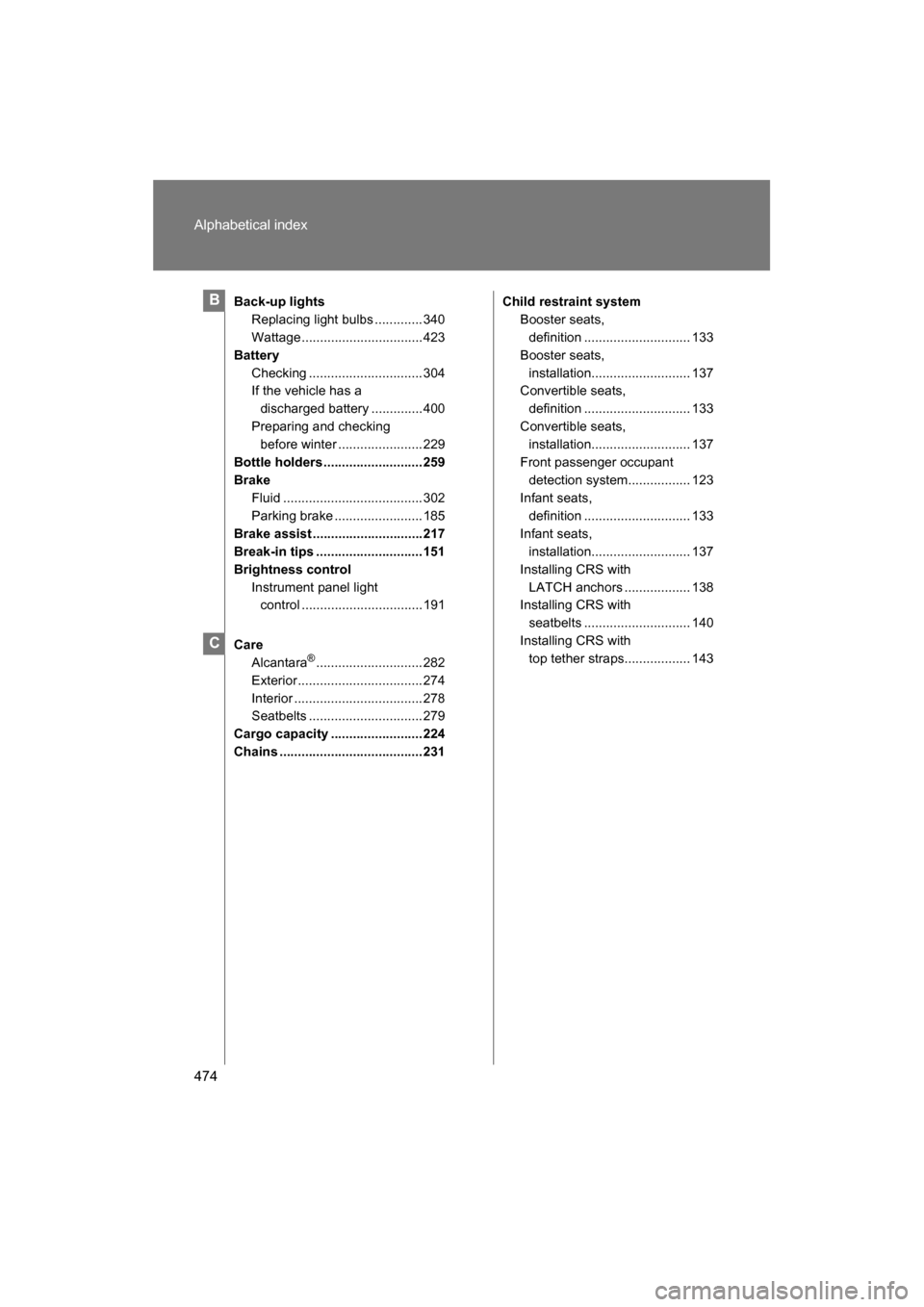
Brightness control Instrument panel light control .................................191
Care Alcantara ®
............................. 282
Exterior.................................. 274
Interior ................................... 278
Seatbelts ............................... 279
Cargo capacity ......................... 224
Chains ....................................... 231 Child restraint system
Booster seats, definition ............................. 133
Booster seats,
installation........................... 137
Convertible seats,
definition ............................. 133
Convertible seats,
installation........................... 137
Front passenger occupant detection system................. 123
Infant seats,
definition ............................. 133
Infant seats,
installation........................... 137
Installing CRS with
LATCH anchors .................. 138
Installing CRS with
seatbelts ............................. 140
Installing CRS with
top tether straps.................. 143B
C
Page 479 of 488
479
Alphabetical index
Keyless access with push button start systemAntenna location..................... 25
“Keyless access” entry function ................................ 23
Starting the engine ............... 162
Keyless entry............................. 37
Keys Access key ............................. 20
Engine switch ............... 162, 171
If you lose your keys............. 395
If your access key battery is discharged .......... 396
Key number ............................ 20
Keyless entry.......................... 37
Keys ....................................... 20
Mechanical key....................... 21
Transmitter ............................. 37
License plate lights Replacing light bulbs ............ 340
Wattage ................................ 423
Light bulbs Replacing ............................. 340
Wattage ................................ 423
Lights
Door courtesy lights.............. 255
Engine switch light................ 255
Fog light switch..................... 208
Hazard light switch ............... 356
Hazard warning flasher switch ................................. 356
Headlights switch ................. 202
Interior light switch................ 256
Replacing light bulbs ............ 340
Turn signal lever ................... 184
Vanity lights .......................... 263
Wattage ................................ 423
Load capacity .......................... 228 Maintenance
Do-it-yourself
maintenance .......................291
General maintenance ............287
Maintenance data..................412
Maintenance requirements.... 284
Manual air conditioning system ....................................236
Manual transmission ...............181
Meter Instrument panel light control .........................191
Meters ...................................187
Mirrors Inside rear view mirror.............66
Side mirror heater .................252
Side mirrors .............................67
Vanity mirrors ........................263
Multi-information display ........197
Noise from under vehicle ..........14K
L
M
N