starting SUBARU BRZ 2015 1.G User Guide
[x] Cancel search | Manufacturer: SUBARU, Model Year: 2015, Model line: BRZ, Model: SUBARU BRZ 2015 1.GPages: 492, PDF Size: 6.53 MB
Page 169 of 492
169
2-1. Driving procedures
2
When driving
WARNING
■When starting the engine
●Always start the engine while sitting in the driver’s seat. Do not depress
the accelerator pedal while starting the engine under any circumstances.
Doing so may cause an accident resulting in death or serious injury.
●If the keyless access with push button start system indicator light flashes
in green after the engine has started, never drive the vehicle. The steering
wheel is still locked, and it may result in an accident.
■Caution while driving
If engine failure occurs while the vehicle is moving, do not lock or open the
doors until the vehicle reaches a safe and complete stop. Activation of the
steering lock in this circumstance may lead to an accident, resulting in death
or serious injury.
■Stopping the engine
Do not touch the push-button ignition switch during driving.
When the push-button ignition switch is pressed for 2 seconds or longer or
pressed 3 times successively, the engine will stop. When the engine stops,
the brake booster will not function. A greater foot pressure will be required
on the brake pedal.
The power steering system will not operate either. A greater force will be
required to steer, and it may result in an accident.
Page 170 of 492
170
2-1. Driving procedures
CAUTION
■To prevent battery discharge
●Do not leave the push-button ignition switch in “ACC” or “ON” mode for
long periods of time without the engine running.
●If the keyless access with push button start system indicator light (green)
is illuminated, the push-button ignition switch is not off. When exiting the
vehicle, always check that the push-button ignition switch is off.
●Vehicles with an automatic transmission: Do not stop the engine when the
select lever is in a position other than P. If the engine is stopped in another
select lever position, the push-button ignition switch will not be turned off
but instead be turned to “ACC” mode. If the vehicle is left in “ACC” mode,
battery discharge may occur.
■When starting the engine
●Do not race a cold engine.
●If the engine becomes difficult to start or stalls frequently, have your vehi-
cle checked by your SUBARU dealer immediately.
■Symptoms indicating a malfunction with the push-button ignition
switch
If the push-button ignition switch seems to be operating somewhat differently
than usual, such as the switch sticking slightly, there may be a malfunction.
Contact your SUBARU dealer immediately.
Page 171 of 492
171
2-1. Driving procedures
2
When driving
Engine (ignition) switch (vehicles without a keyless access with push button start system)
■Starting the engine
Vehicles with an automatic transmission Check that the parking brake is set.
Check that the select lever is set in P.
Firmly depress the brake pedal.
Turn the engine switch to the “START” position to start the
engine.
Vehicles with a manual transmission Check that the parking brake is set.
Check that the shift lever is set in neutral.
Firmly depress the clutch pedal.
Turn the engine switch to the “START” position to start the
engine.
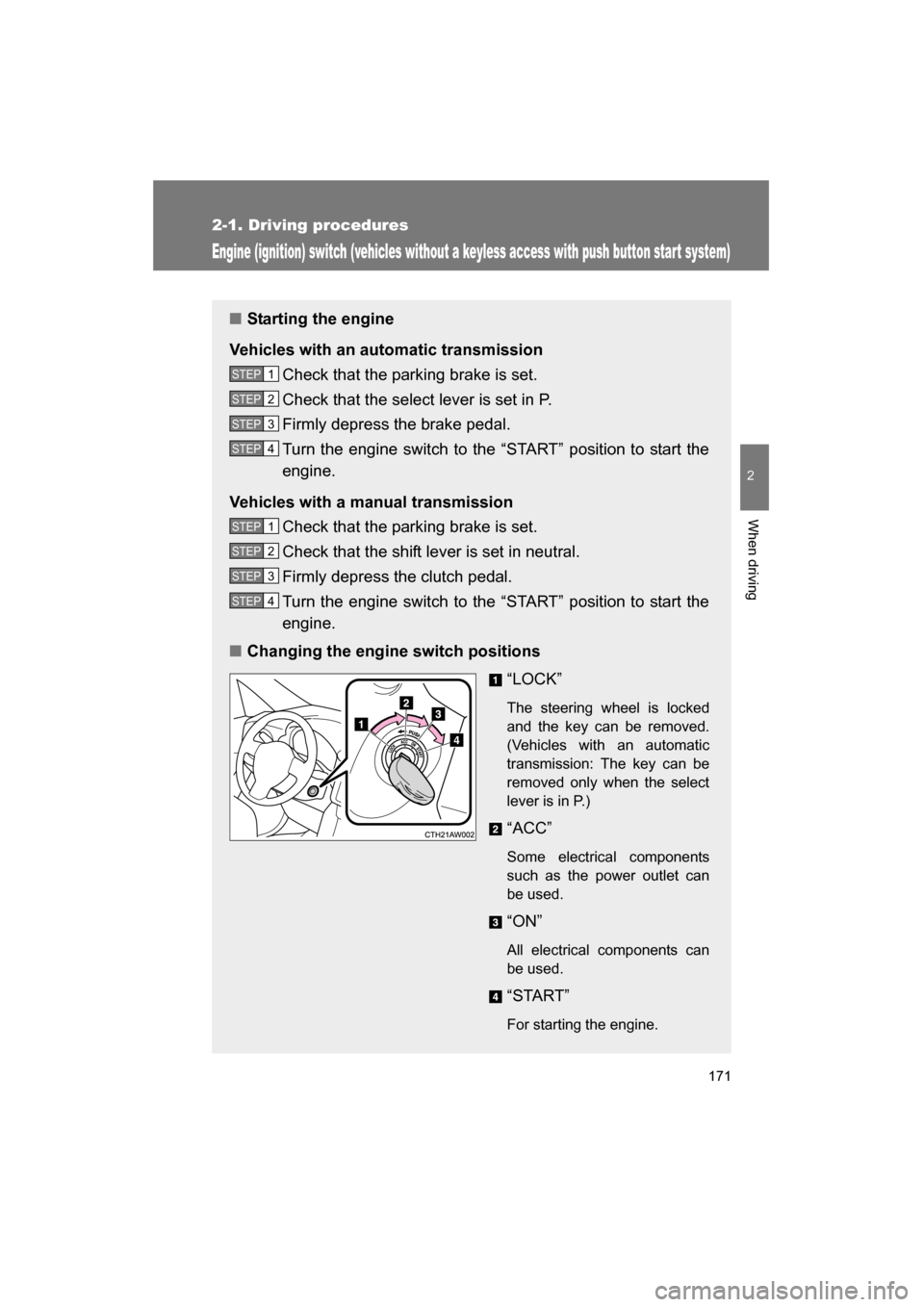
■Changing the engine switch positions
“LOCK”
The steering wheel is locked
and the key can be removed.
(Vehicles with an automatic
transmission: The key can be
removed only when the select
lever is in P.)
“ACC”
Some electrical components
such as the power outlet can
be used.
“ON”
All electrical components can
be used.
“START”
For starting the engine.
STEP 1
STEP 2
STEP 3
STEP 4
STEP 1
STEP 2
STEP 3
STEP 4
Page 172 of 492
172
2-1. Driving procedures
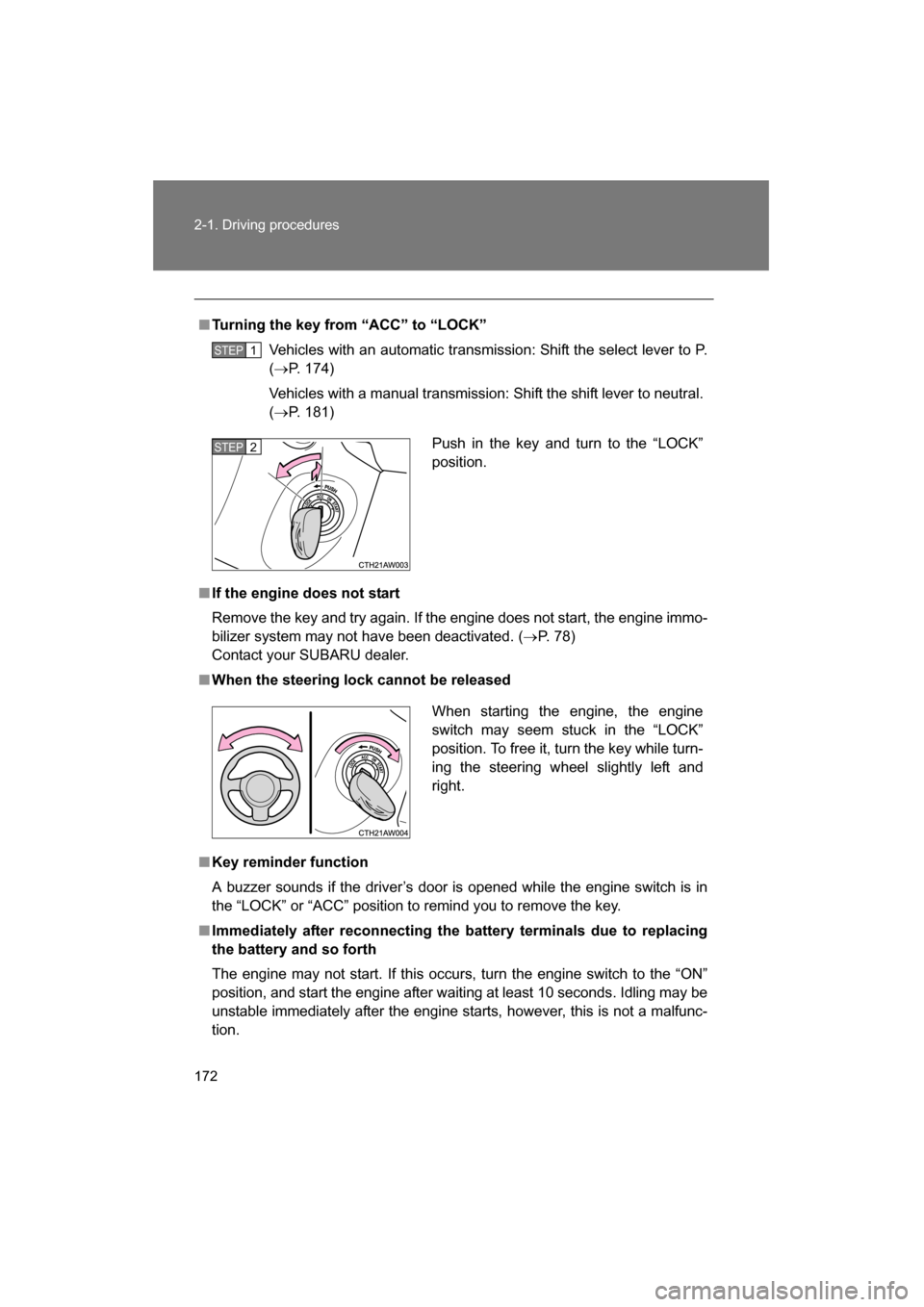
■Turning the key from “ACC” to “LOCK”Vehicles with an automatic transmission: Shift the select lever to P. (→ P. 174)
Vehicles with a manual transmission: Shift the shift lever to neutral. ( → P. 181)
■If the engine does not start
Remove the key and try again. If the engine does not start, the engine immo-
bilizer system may not have been deactivated. ( →P. 78)
Contact your SUBARU dealer.
■When the steering lock cannot be released
■Key reminder function
A buzzer sounds if the driver’s door is opened while the engine switch is in
the “LOCK” or “ACC” position to remind you to remove the key.
■Immediately after reconnecting the battery terminals due to replacing
the battery and so forth
The engine may not start. If this occurs, turn the engine switch to the “ON”
position, and start the engine after waiting at least 10 seconds. Idling may be
unstable immediately after the engine starts, however, this is not a malfunc-
tion.
STEP 1
Push in the key and turn to the “LOCK”
position.STEP 2
When starting the engine, the engine
switch may seem stuck in the “LOCK”
position. To free it, turn the key while turn-
ing the steering wheel slightly left andright.
Page 173 of 492
173
2-1. Driving procedures
2
When driving
WARNING
■When starting the engine
Always start the engine while sitting in the driver's seat. Do not depress the
accelerator pedal while starting the engine under any circumstances.
Doing so may cause an accident resulting in death or serious injury.
■Caution when driving
Do not turn the engine switch to the “LOCK” position while driving. If, in an
emergency, you must turn the engine off while the vehicle is moving, turn the
engine switch only to the “ACC” position to stop the engine. An accident may
result if the engine is stopped while driving.
CAUTION
■To prevent battery discharge
Do not leave the engine switch in the “ACC” or “ON” position for long periods
of time without the engine running.
■When starting the engine
●Do not crank the engine for more than 10 seconds at a time. This may
overheat the starter and wiring system.
If the engine does not start, turn the engine switch to the “LOCK” position
and try to start the engine again after waiting for 10 seconds or more.
●Do not race a cold engine.
●If the engine becomes difficult to start or stalls frequently, have your vehi-
cle checked by your SUBARU dealer immediately.
Page 175 of 492
175
2-1. Driving procedures
2
When driving
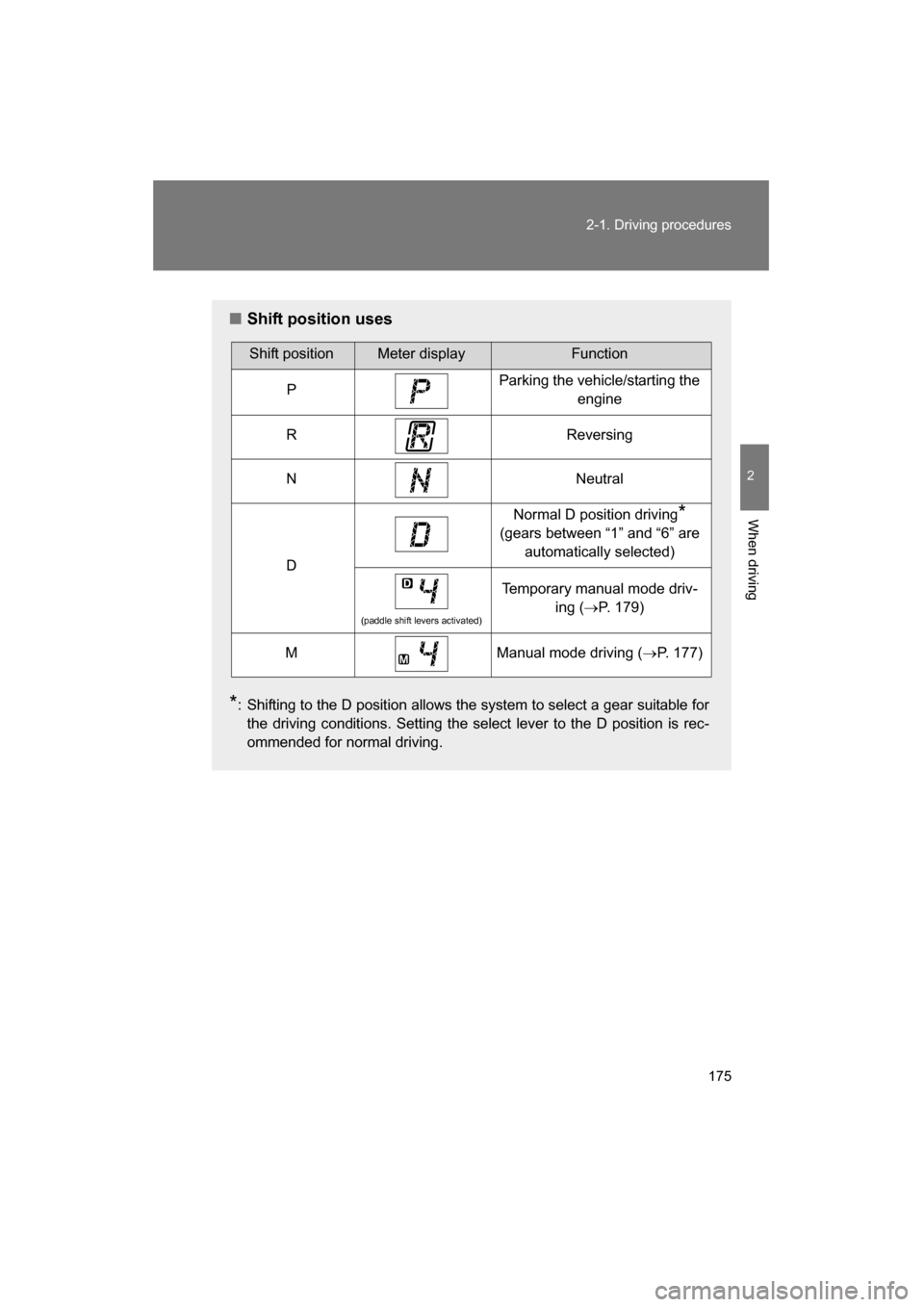
■Shift position uses
* : Shifting to the D position allows the system to select a gear suitable for
the driving conditions. Setting the select lever to the D position is rec-
ommended for normal driving.
Shift positionMeter displayFunction
PParking the vehicle/starting the engine
RReversing
NNeutral
D
Normal D position driving *
(gears between “1” and “6” are automatically selected)
(paddle shift levers activated)
Temporary manual mode driv- ing (→P. 179)
MManual mode driving ( →P. 177)
Page 179 of 492
179
2-1. Driving procedures
2
When driving
■Automatic gear selection when the vehicle is stopped
When the vehicle is idling at high rpm in order to warm up, and the vehicle is
on a slippery road, the transmission may automatically shift to 2nd
gear for
stopping and starting off.
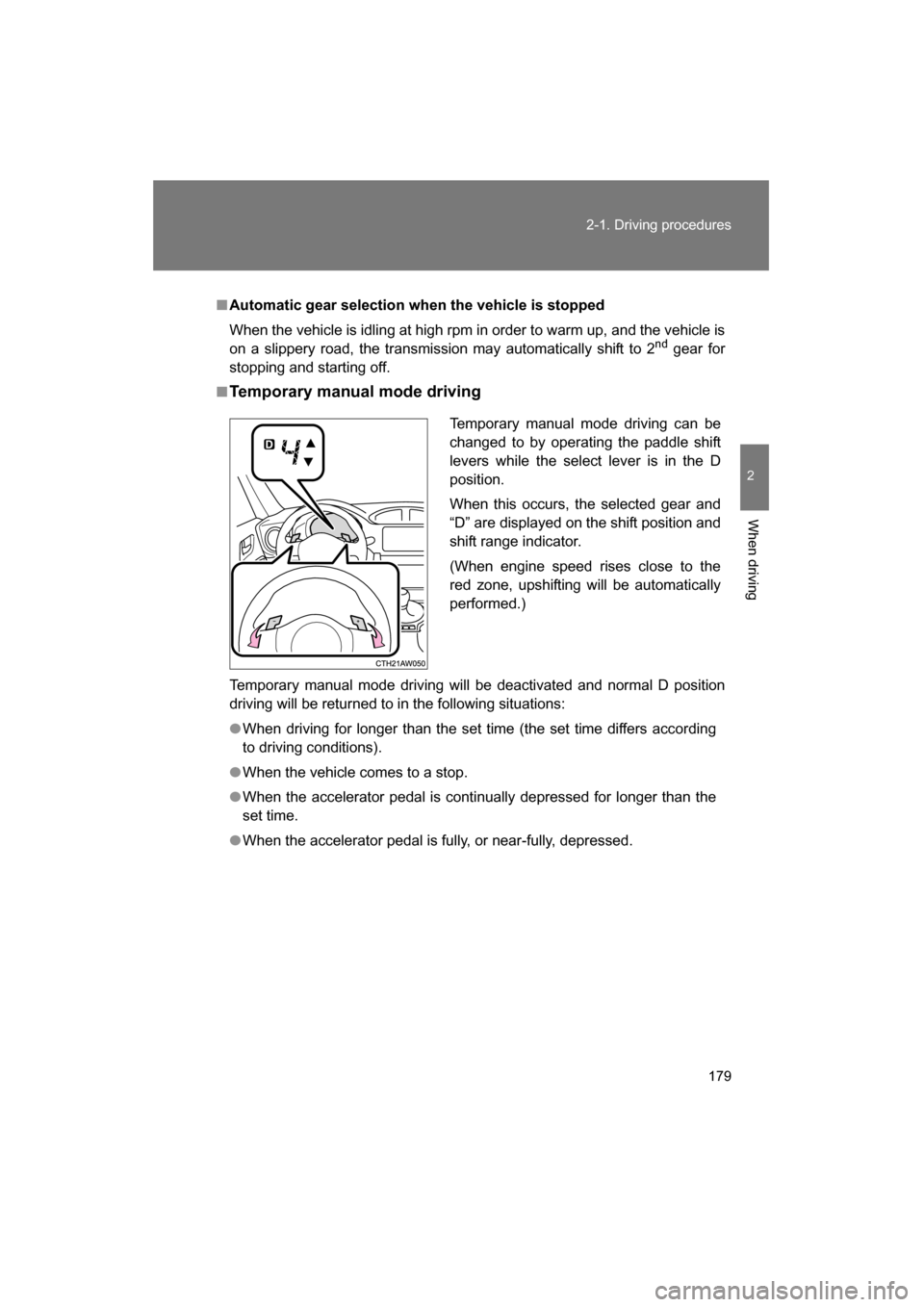
■Temporary manual mode driving
Temporary manual mode driving will be deactivated and normal D position
driving will be returned to in the following situations:
●When driving for longer than the set time (the set time differs according
to driving conditions).
●When the vehicle comes to a stop.
●When the accelerator pedal is continually depressed for longer than the
set time.
●When the accelerator pedal is fully, or near-fully, depressed. Temporary manual mode driving can be
changed to by operating the paddle shift
levers while the select lever is in the D
position.
When this occurs, the selected gear and
“D” are displayed on the shift position and
shift range indicator.
(When engine speed rises close to the
red zone, upshifting will be automaticallyperformed.)
Page 189 of 492
189
2-2. Instrument cluster
2
When driving
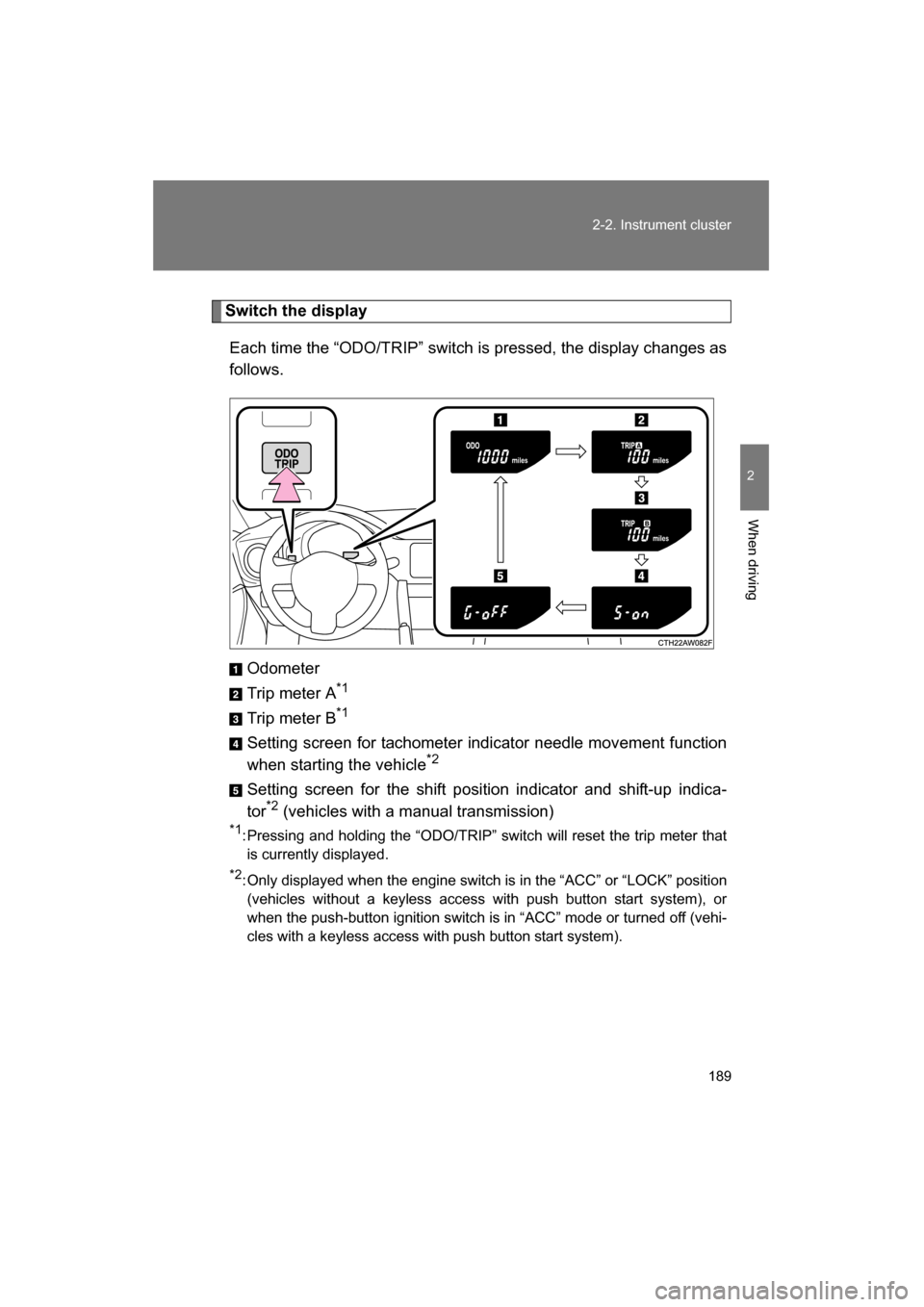
Switch the displayEach time the “ODO/TRIP” switch is pressed, the display changes as
follows.
Odometer
Trip meter A *1
Trip meter B *1
Setting screen for tachometer indicator needle movement function
when starting the vehicle *2
Setting screen for the shift position indicator and shift-up indica-
tor *2
(vehicles with a manual transmission)
*1 : Pressing and holding the “ODO/TRIP” switch will reset the trip meter that
is currently displayed.
*2 : Only displayed when the engine switch is in the “ACC” or “LOCK” position
(vehicles without a keyless access with push button start system), or
when the push-button ignition switch is in “ACC” mode or turned off (vehi-
cles with a keyless access with push button start system).
Page 190 of 492
190
2-2. Instrument cluster
Tachometer indicator needle movement function when starting
the vehicleWhen the engine switch is turned to “ON” position (vehicles without a
keyless access with push button start system), or the push-button
ignition switch is turned to “ON” mode (vehicles with a keyless access
with push button start system), the tachometer indicator needle points
to the highest value once and then quickly returns.
■Changing between activated/deactivated Press the “ODO/TRIP” switch repeatedly until the setting
screen is displayed. ( →P. 189)
Each time the switch is pressed and held, the function
changes between activated/deactivated.
“S-on”: Activated
“S-oFF”: Deactivated
Setting the shift position indicator and shift-up indicator
(vehicles with a manual transmission)
Displaying of the shift position indicator and shift-up indicator can be
turned on/off. Press the “ODO/TRIP” switch repeatedly until the setting
screen is displayed. ( →P. 189)
Each time the switch is pressed and held, the display changes
between on/off.
“G-on”: Display on
“G-oFF”: Display off
STEP 1
STEP 2
STEP 1
STEP 2
Page 217 of 492
217
2-4. Using other driving systems
2
When driving
Driving assist systems
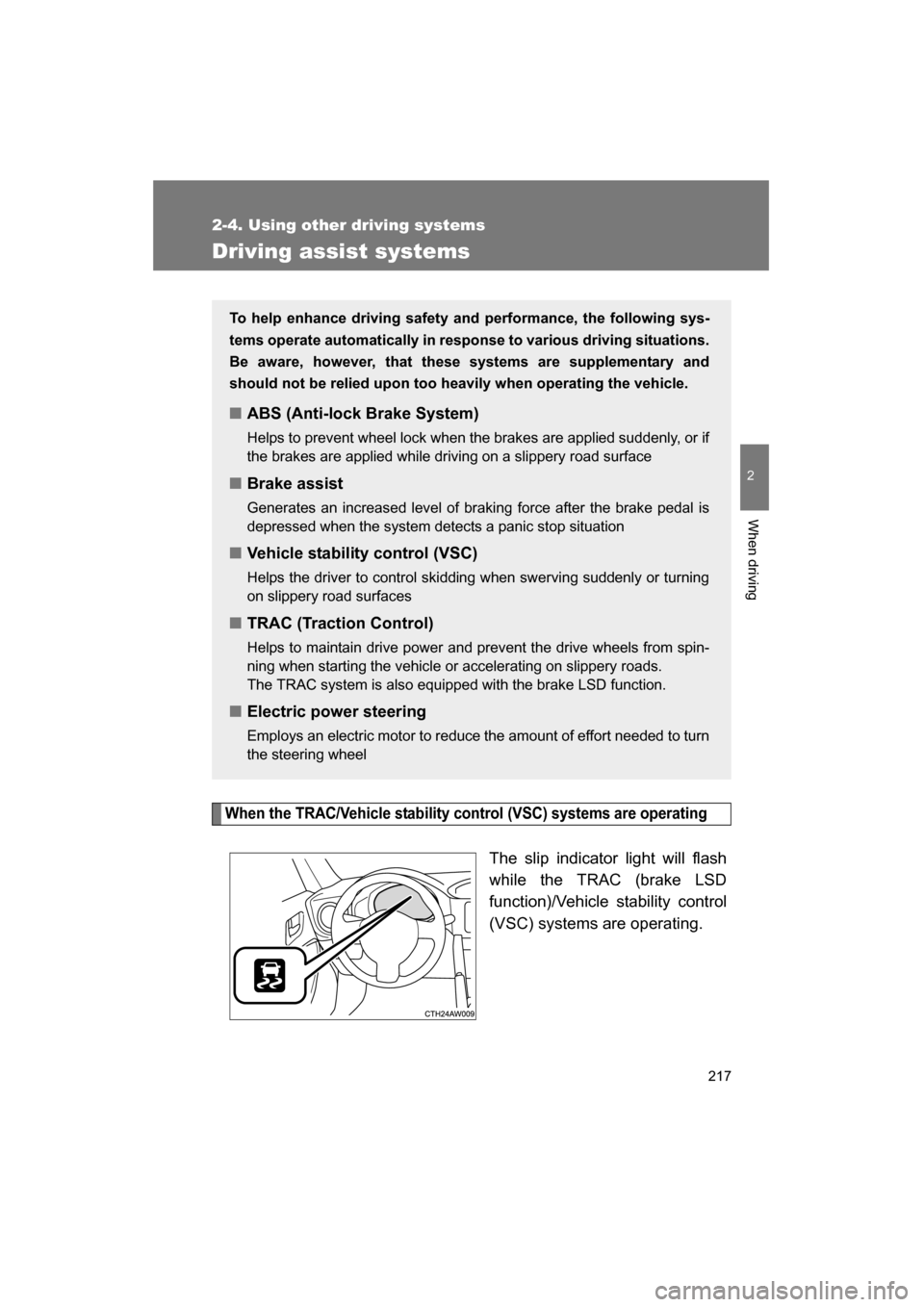
When the TRAC/Vehicle stability control (VSC) systems are operating
The slip indicator light will flash
while the TRAC (brake LSD
function)/Vehicle stability control
(VSC) systems are operating.
To help enhance driving safety and performance, the following sys-
tems operate automatically in response to various driving situations.
Be aware, however, that these systems are supplementary and
should not be relied upon too heavily when operating the vehicle.
■ABS (Anti-lock Brake System)
Helps to prevent wheel lock when the brakes are applied suddenly, or if
the brakes are applied while driving on a slippery road surface
■Brake assist
Generates an increased level of braking force after the brake pedal is
depressed when the system detects a panic stop situation
■Vehicle stability control (VSC)
Helps the driver to control skidding when swerving suddenly or turning
on slippery road surfaces
■TRAC (Traction Control)
Helps to maintain drive power and pr event the drive wheels from spin-
ning when starting the vehicle or accelerating on slippery roads.
The TRAC system is also equipped with the brake LSD function.
■Electric power steering
Employs an electric motor to reduce the amount of effort needed to turn
the steering wheel