light SUBARU BRZ 2015 1.G Workshop Manual
[x] Cancel search | Manufacturer: SUBARU, Model Year: 2015, Model line: BRZ, Model: SUBARU BRZ 2015 1.GPages: 492, PDF Size: 6.53 MB
Page 172 of 492
172
2-1. Driving procedures
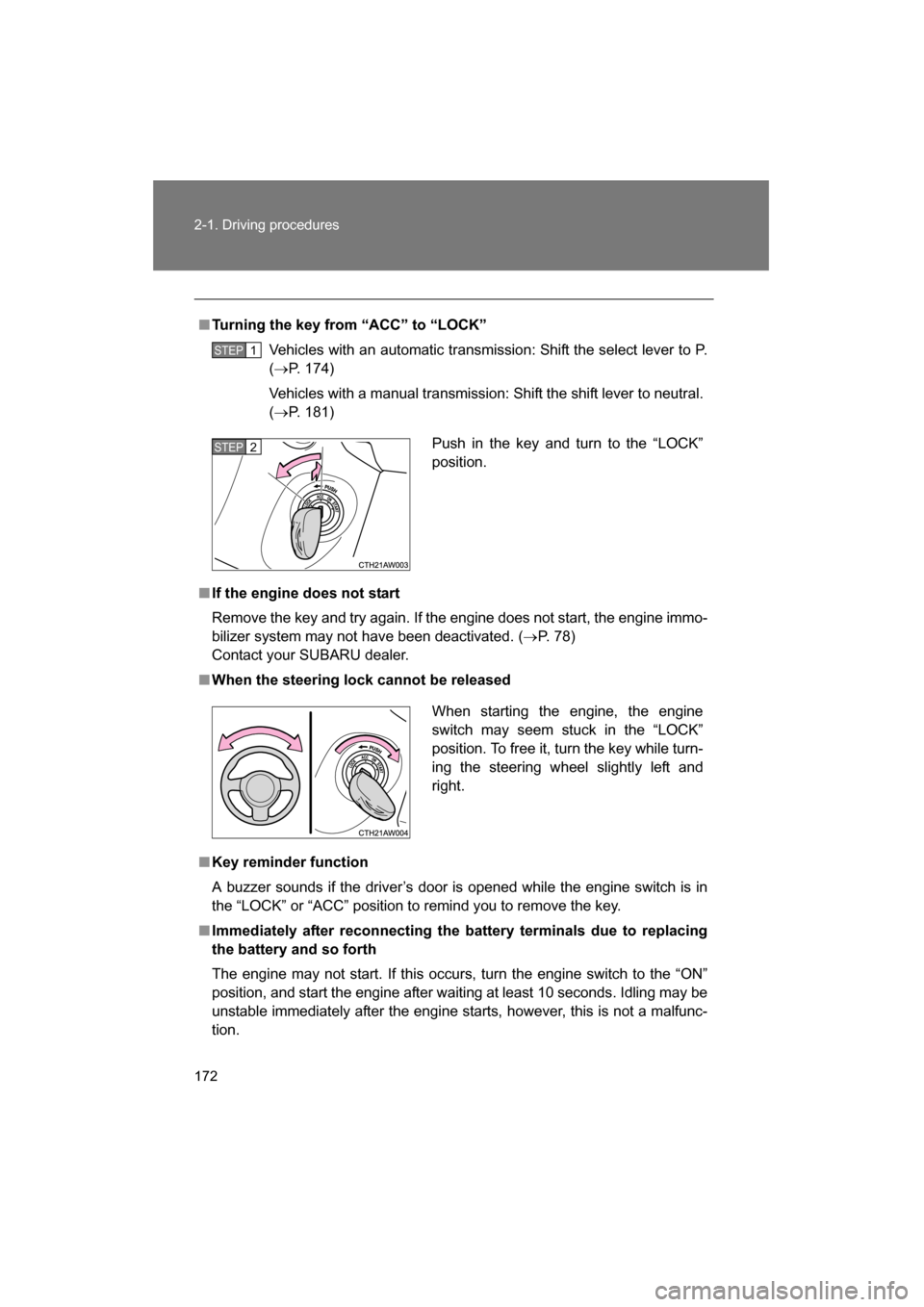
■Turning the key from “ACC” to “LOCK”Vehicles with an automatic transmission: Shift the select lever to P. (→ P. 174)
Vehicles with a manual transmission: Shift the shift lever to neutral. ( → P. 181)
■If the engine does not start
Remove the key and try again. If the engine does not start, the engine immo-
bilizer system may not have been deactivated. ( →P. 78)
Contact your SUBARU dealer.
■When the steering lock cannot be released
■Key reminder function
A buzzer sounds if the driver’s door is opened while the engine switch is in
the “LOCK” or “ACC” position to remind you to remove the key.
■Immediately after reconnecting the battery terminals due to replacing
the battery and so forth
The engine may not start. If this occurs, turn the engine switch to the “ON”
position, and start the engine after waiting at least 10 seconds. Idling may be
unstable immediately after the engine starts, however, this is not a malfunc-
tion.
STEP 1
Push in the key and turn to the “LOCK”
position.STEP 2
When starting the engine, the engine
switch may seem stuck in the “LOCK”
position. To free it, turn the key while turn-
ing the steering wheel slightly left andright.
Page 177 of 492
177
2-1. Driving procedures
2
When driving
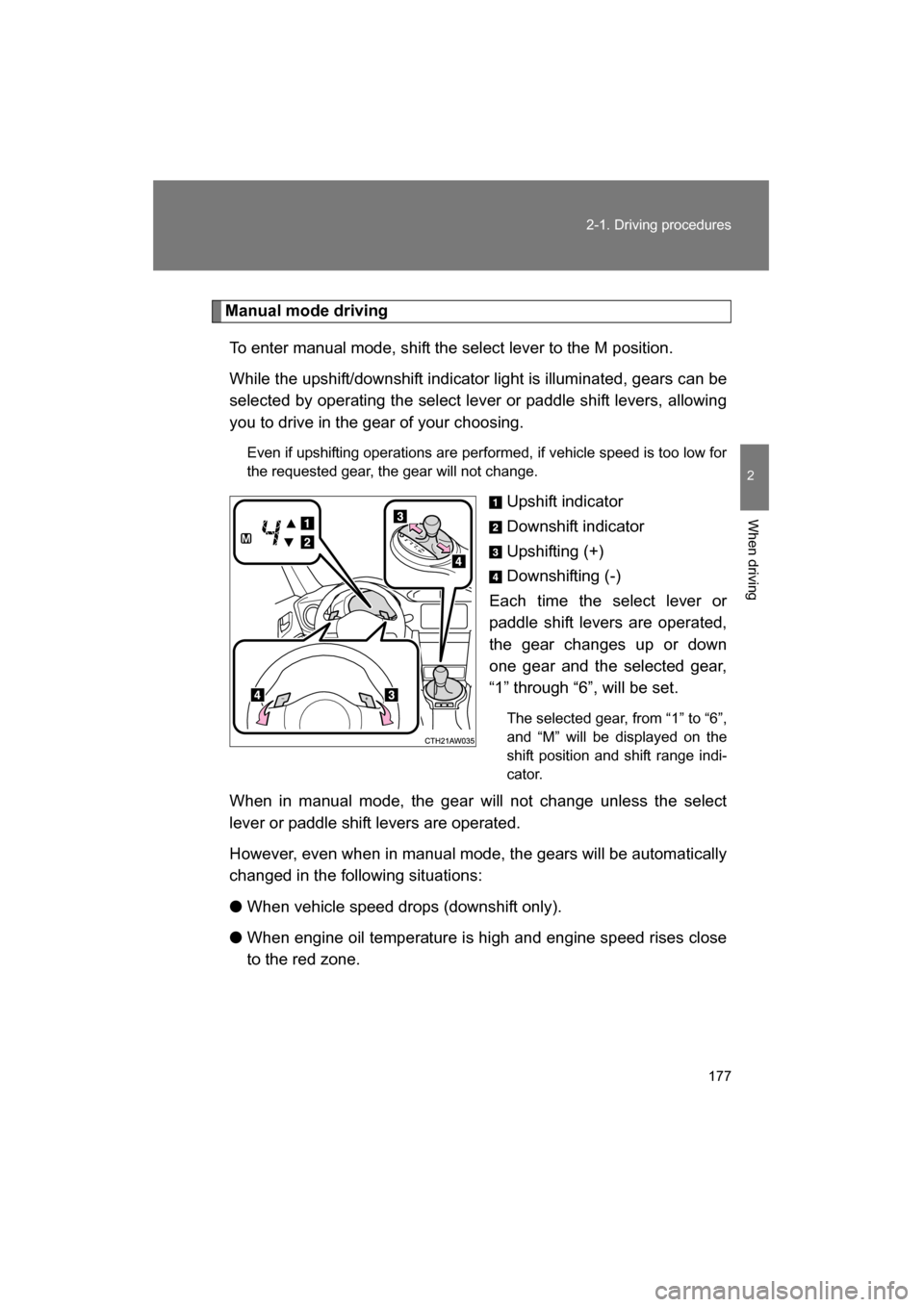
Manual mode drivingTo enter manual mode, shift the select lever to the M position.
While the upshift/downshift indicator light is illuminated, gears can be
selected by operating the select lever or paddle shift levers, allowing
you to drive in the gear of your choosing. Even if upshifting operations are performed, if vehicle speed is too low for
the requested gear, the gear will not change.
Upshift indicator
Downshift indicator
Upshifting (+)
Downshifting (-)
Each time the select lever or
paddle shift levers are operated,
the gear changes up or down
one gear and the selected gear,
“1” through “6”, will be set.
The selected gear, from “1” to “6”,
and “M” will be displayed on the
shift position and shift range indi-
cator.
When in manual mode, the gear will not change unless the select
lever or paddle shift levers are operated.
However, even when in manual mode, the gears will be automatically
changed in the following situations: ● When vehicle speed drops (downshift only).
● When engine oil temperature is high and engine speed rises close
to the red zone.
Page 184 of 492
184
2-1. Driving procedures
Turn signal lever
■Turn signals can be operated when
Vehicles without a keyless access with push button start system
The engine switch is in the “ON” position.
Vehicles with a keyless access with push button start system
The push-button ignition switch is in “ON” mode.
■If the indicators flash faster than usual
Check that a light bulb in the turn signal lights has not burned out.
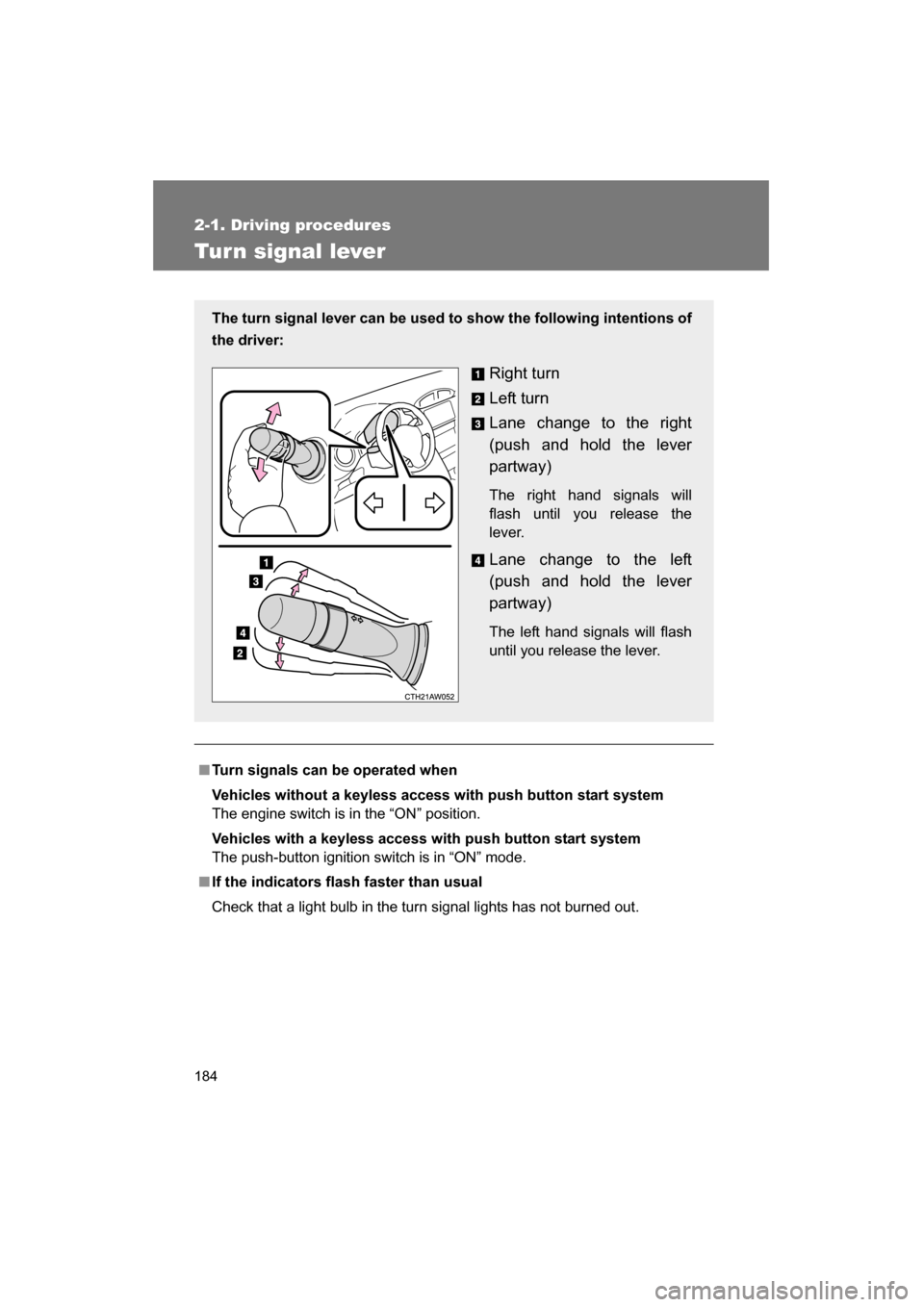
The turn signal lever can be used to show the following intentions of
the driver:
Right turn
Left turn
Lane change to the right
(push and hold the lever
partway)
The right hand signals will
flash until you release the
lever.
Lane change to the left
(push and hold the lever
partway)
The left hand signals will flash
until you release the lever.
Page 185 of 492
185
2-1. Driving procedures
2
When driving
Parking brake
■Usage in winter time
→P. 229
CAUTION
■Before driving
Fully release the parking brake.
Driving the vehicle with the parking brake set will lead to brake components
overheating, which may affect braking performance and increase brake
wear.
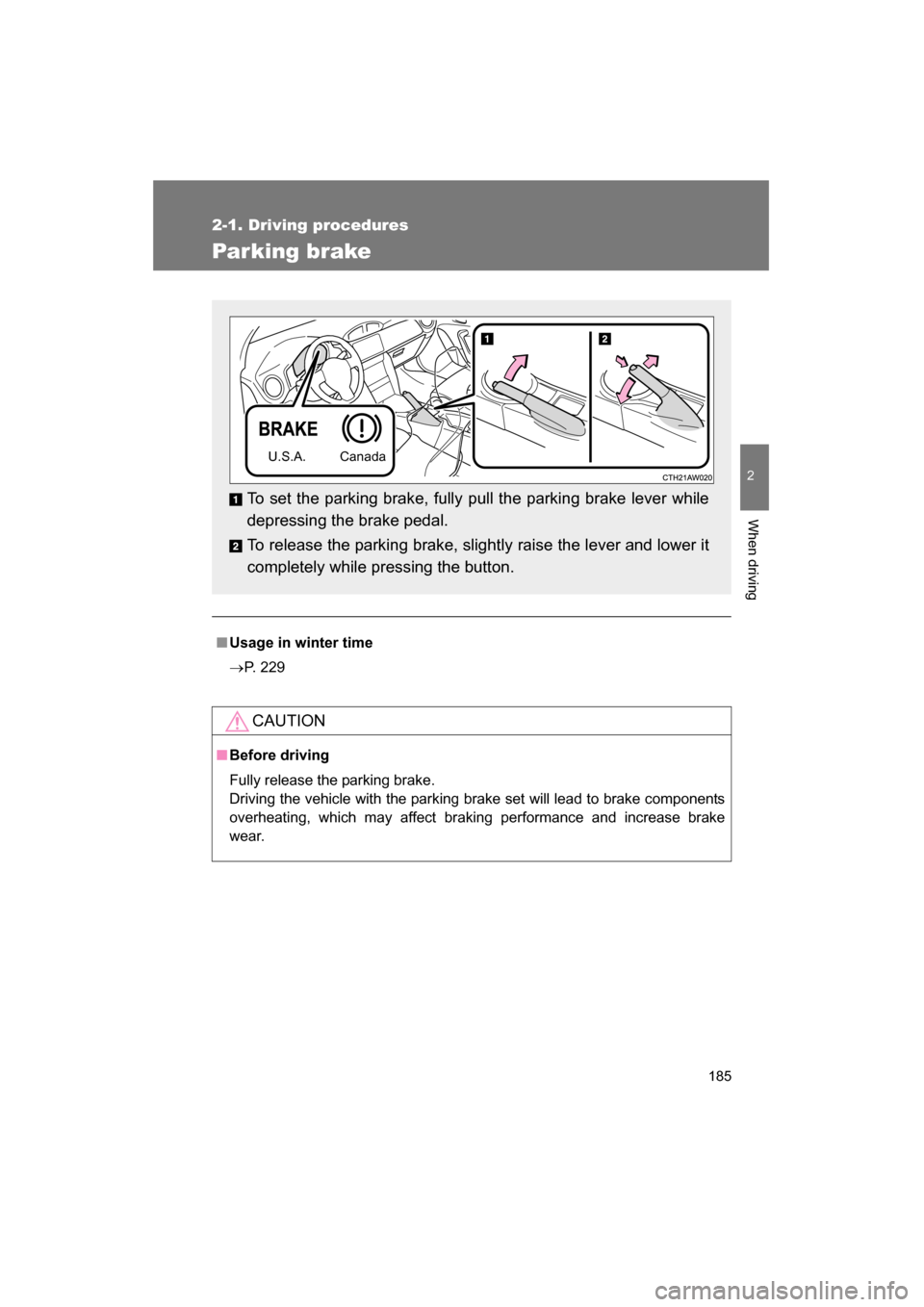
To set the parking brake, fully pull the parking brake lever while
depressing the brake pedal.
To release the parking brake, slightly raise the lever and lower it
completely while pressing the button.
U.S.A. Canada
Page 191 of 492
191
2-2. Instrument cluster
2
When driving
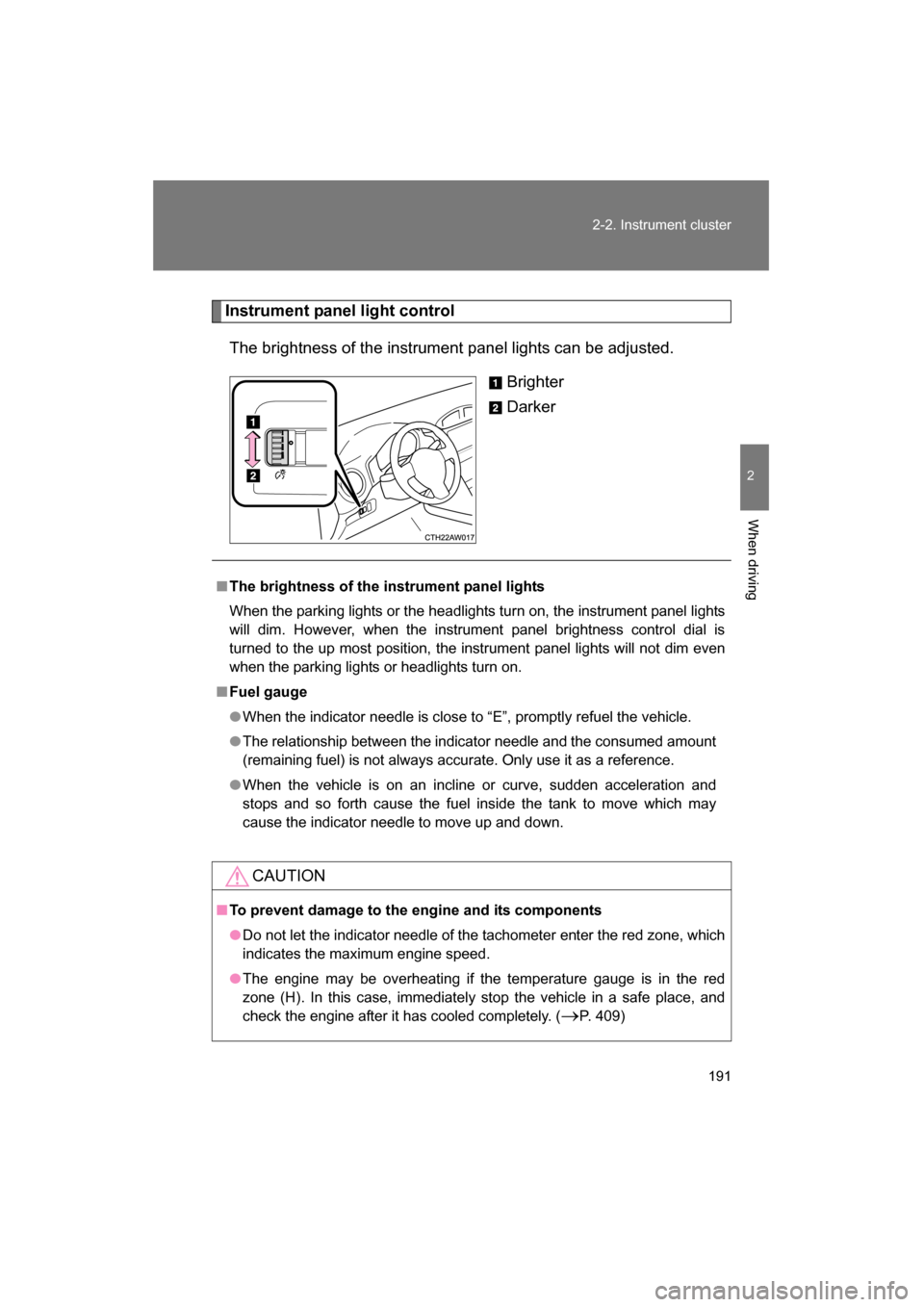
Instrument panel light controlThe brightness of the instrument panel lights can be adjusted. Brighter
Darker
■The brightness of the instrument panel lights
When the parking lights or the headlights turn on, the instrument panel lights
will dim. However, when the instrument panel brightness control dial is
turned to the up most position, the instrument panel lights will not dim even
when the parking lights or headlights turn on.
■Fuel gauge
●When the indicator needle is close to “E”, promptly refuel the vehicle.
●The relationship between the indicator needle and the consumed amount
(remaining fuel) is not always accurate. Only use it as a reference.
●When the vehicle is on an incline or curve, sudden acceleration and
stops and so forth cause the fuel inside the tank to move which may
cause the indicator needle to move up and down.
CAUTION
■To prevent damage to the engine and its components
●Do not let the indicator needle of the tachometer enter the red zone, which
indicates the maximum engine speed.
●The engine may be overheating if the temperature gauge is in the red
zone (H). In this case, immediately stop the vehicle in a safe place, and
check the engine after it has cooled completely. ( →P. 409)
Page 192 of 492
192
2-2. Instrument cluster
Indicators and war ning lights
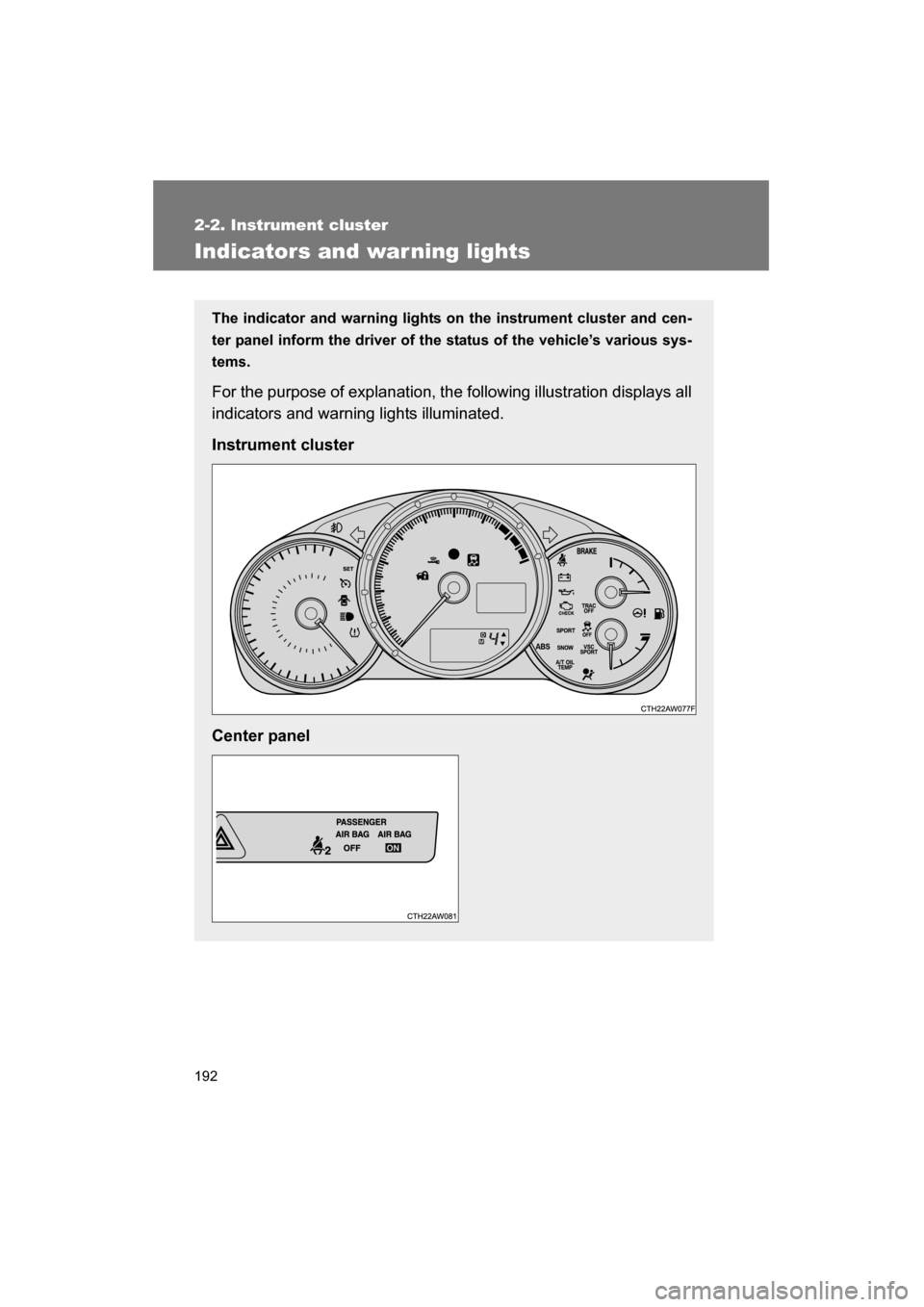
The indicator and warning lights on the instrument cluster and cen-
ter panel inform the driver of the status of the vehicle’s various sys-
tems.
For the purpose of explanation, the following illustration displays all
indicators and warning lights illuminated.
Instrument cluster
Center panel
Page 193 of 492
193
2-2. Instrument cluster
2
When driving
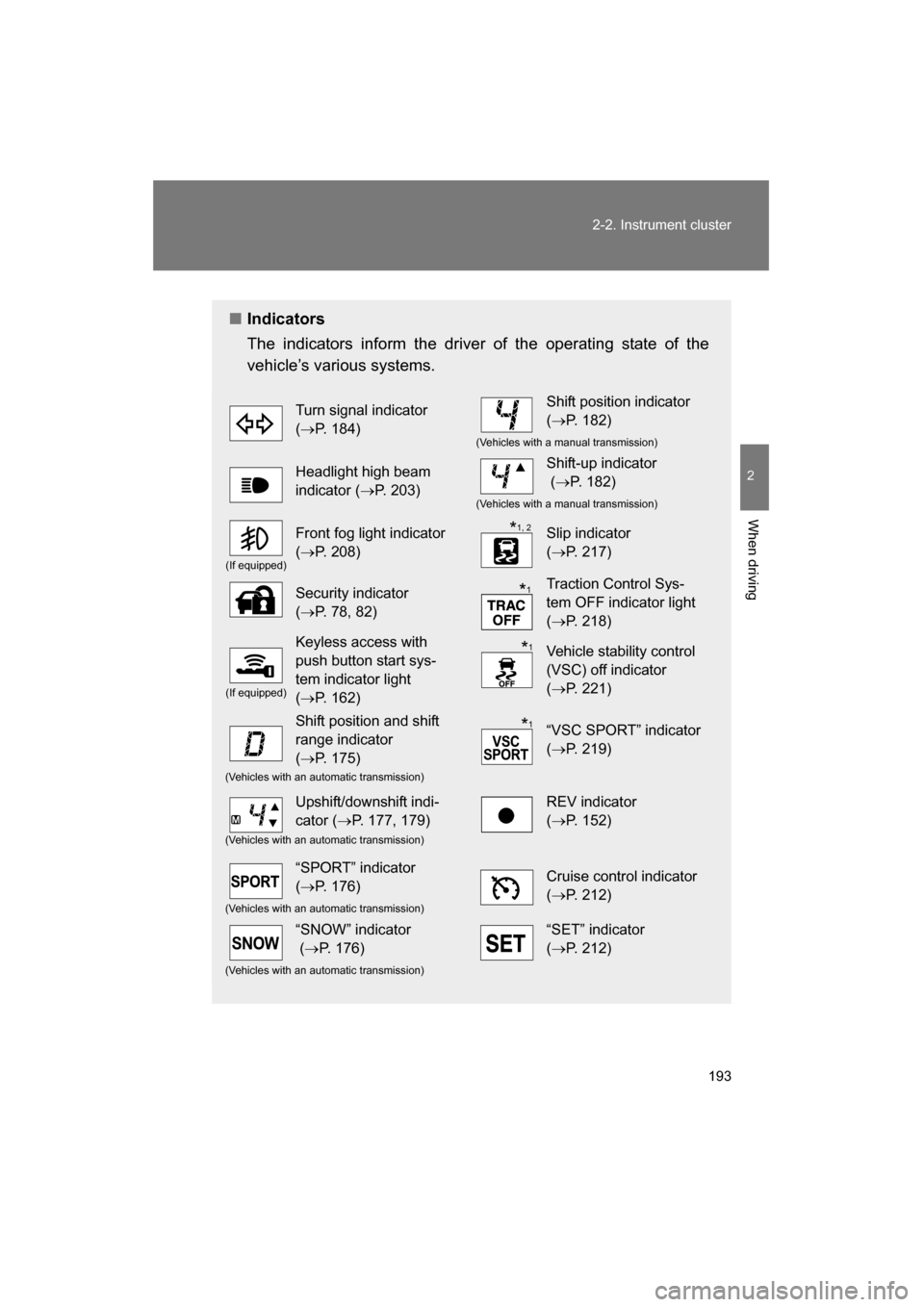
■Indicators
The indicators inform the driver of the operating state of the
vehicle’s various systems.
Turn signal indicator (→ P. 184)Shift position indicator (→ P. 182)
(Vehicles with a manual transmission)
Headlight high beam
indicator ( →P. 203)Shift-up indicator (→ P. 182)
(Vehicles with a manual transmission)
(If equipped)
Front fog light indicator (→ P. 208)Slip indicator (→ P. 217)
Security indicator (→ P. 78, 82)Traction Control Sys-
tem OFF indicator light (→ P. 218)
(If equipped)
Keyless access with
push button start sys-
tem indicator light (→ P. 162)Vehicle stability control
(VSC) off indicator (→ P. 221)
Shift position and shift
range indicator (→ P. 175)“VSC SPORT” indicator (→ P. 219)
(Vehicles with an automatic transmission)
Upshift/downshift indi-
cator ( →P. 177, 179)REV indicator (→ P. 152)
(Vehicles with an automatic transmission)
“SPORT” indicator (→ P. 176)Cruise control indicator (→ P. 212)
(Vehicles with an automatic transmission)
“SNOW” indicator (→ P. 176)“SET” indicator (→ P. 212)
(Vehicles with an automatic transmission)
*1, 2
*
1
*1
*
1
Page 194 of 492
194
2-2. Instrument cluster
*1
: Vehicles without a keyless access with push button start system
These lights turn on when the engine switch is turned to the “ON”
position to indicate that a system check is being performed. They
will turn off after the engine is started, or after a few seconds. There
may be a malfunction in a system if a light does not come on, or if
the lights do not turn off. Have the vehicle inspected by your
SUBARU dealer.
Vehicles with a keyless access with push button start system
These lights turn on when the push-button ignition switch is turned
to “ON” mode to indicate that a system check is being performed.
They will turn off after the engine is started, or after a few seconds.
There may be a malfunction in a system if a light does not come on,
or if the lights do not turn off. Have the vehicle inspected by your
SUBARU dealer.
* 2
: The light flashes to indicate that the system is operating.
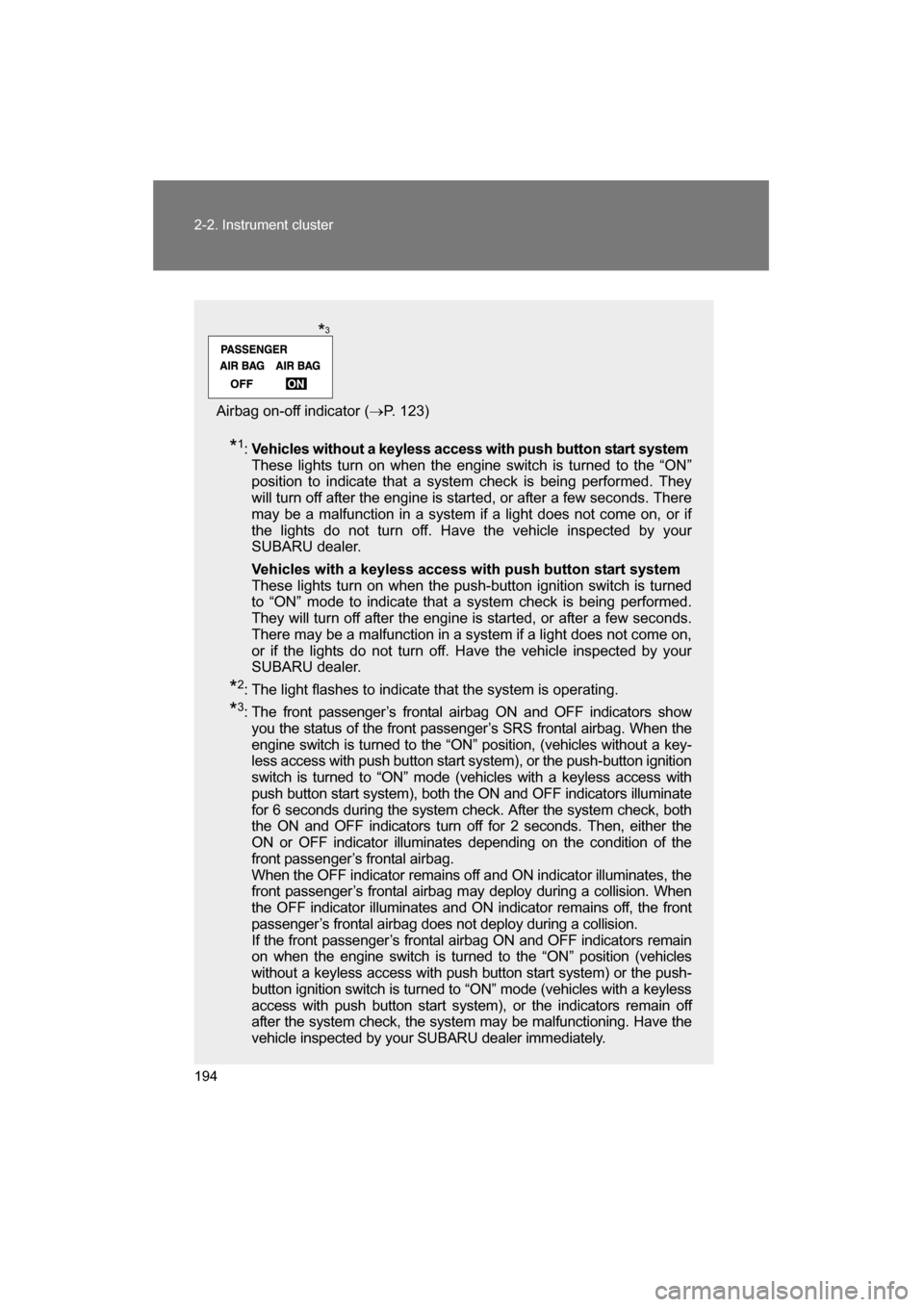
* 3
: The front passenger’s frontal airbag ON and OFF indicators show
you the status of the front passenger’s SRS frontal airbag. When the
engine switch is turned to the “ON” position, (vehicles without a key-
less access with push button start system), or the push-button ignition
switch is turned to “ON” mode (vehicles with a keyless access with
push button start system), both the ON and OFF indicators illuminate
for 6 seconds during the system check. After the system check, both
the ON and OFF indicators turn off for 2 seconds. Then, either the
ON or OFF indicator illuminates depending on the condition of the
front passenger’s frontal airbag.
When the OFF indicator remains off and ON indicator illuminates, the
front passenger’s frontal airbag may deploy during a collision. When
the OFF indicator illuminates and ON indicator remains off, the front
passenger’s frontal airbag does not deploy during a collision.
If the front passenger’s frontal airbag ON and OFF indicators remain
on when the engine switch is turned to the “ON” position (vehicles
without a keyless access with push button start system) or the push-
button ignition switch is turned to “ON” mode (vehicles with a keyless
access with push button start system), or the indicators remain off
after the system check, the system may be malfunctioning. Have the
vehicle inspected by your SUBARU dealer immediately.
Airbag on-off indicator ( →P. 123)
*3
Page 195 of 492
195
2-2. Instrument cluster
2
When driving
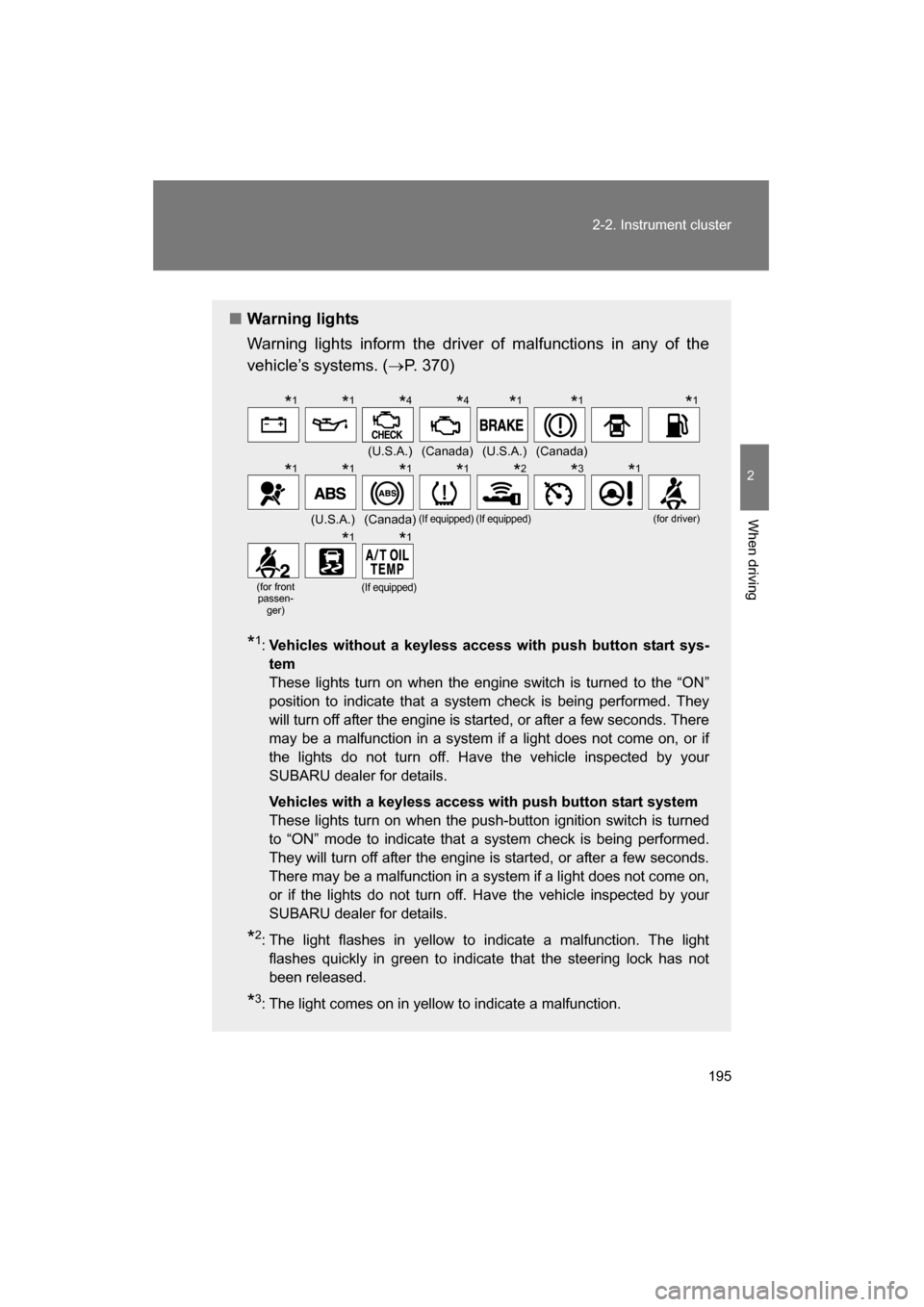
■Warning lights
Warning lights inform the driver of malfunctions in any of the
vehicle’s systems. (→P. 370)
* 1
: Vehicles without a keyless access with push button start sys- tem
These lights turn on when the engine switch is turned to the “ON”
position to indicate that a system check is being performed. They
will turn off after the engine is started, or after a few seconds. There
may be a malfunction in a system if a light does not come on, or if
the lights do not turn off. Have the vehicle inspected by your
SUBARU dealer for details.
Vehicles with a keyless access with push button start system
These lights turn on when the push-button ignition switch is turned
to “ON” mode to indicate that a system check is being performed.
They will turn off after the engine is started, or after a few seconds.
There may be a malfunction in a system if a light does not come on,
or if the lights do not turn off. Have the vehicle inspected by your
SUBARU dealer for details.
* 2
: The light flashes in yellow to indicate a malfunction. The light
flashes quickly in green to indicate that the steering lock has not
been released.
* 3
: The light comes on in yellow to indicate a malfunction.
(U.S.A.)(Canada)(U.S.A.)(Canada)
(U.S.A.)(Canada)(If equipped)(If equipped)(for driver)
(for front
passen-
ger)(If equipped)
*1*1*4*4* 1*1*1
*
1*1*1*1* 2*3*1
*
1*1
Page 196 of 492
196
2-2. Instrument cluster
WARNING
■If a safety system warning light does not come on
Should a safety system light such as the ABS and SRS airbag system warn-
ing light not come on when you start the engine, this could mean that these
systems are not available to help protect you in an accident, which could
result in death or serious injury. Have the vehicle inspected by your
SUBARU dealer immediately if this occurs.
*4
: Vehicles without a keyless access with push button start sys- tem
These lights turn on when the engine switch is turned to the “ON”
position to indicate that a system check is being performed. They
will turn off after the engine is started. There may be a malfunction
in a system if a light does not come on, or if the lights do not turn off.
Have the vehicle inspected by your SUBARU dealer for details.
Vehicles with a keyless access with push button start system
These lights turn on when the push-button ignition switch is turned
to “ON” mode to indicate that a system check is being performed.
They will turn off after the engine is started. There may be a mal-
function in a system if a light does not come on, or if the lights do
not turn off. Have the vehicle inspected by your SUBARU dealer for
details.