phone SUBARU BRZ 2017 1.G Navigation Manual
[x] Cancel search | Manufacturer: SUBARU, Model Year: 2017, Model line: BRZ, Model: SUBARU BRZ 2017 1.GPages: 334, PDF Size: 10.36 MB
Page 274 of 334
272 Audio and Visual
How to Operate Portable Audio Devices
■Selecting from the content item list
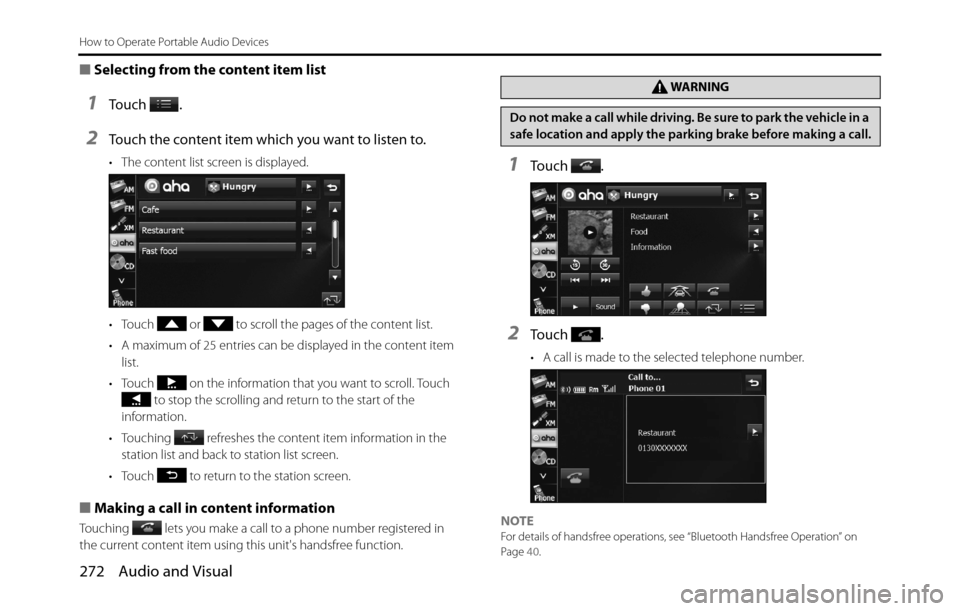
1To u c h .
2Touch the content item which you want to listen to.
• The content list screen is displayed.
• Touch or to scroll the pages of the content list.
• A maximum of 25 entries can be displayed in the content item
list.
• Touch on the information that you want to scroll. Touch
to stop the scrolling and return to the start of the
information.
• Touching refreshes the content item information in the
station list and back to station list screen.
• Touch to return to the station screen.
■Making a call in content information
Touching lets you make a call to a phone number registered in
the current content item using this unit's handsfree function.
1To u c h .
2To u c h .
• A call is made to the selected telephone number.
NOTE
For details of handsfree operations, see “Bluetooth Handsfree Operation” on
Page 40.
WA R N I N G
Do not make a call while driving. Be sure to park the vehicle in a
safe location and apply the parking brake before making a call.
Page 284 of 334
282 Other
Other Operations
MP3/WMA player
operations*1()
()File selection
buttons• Selects the next file, previous file, or start of the
current file.
• Selects the next or previous folder.Press ( ) or ( ) briefly to select the next or previous
file.
Press and hold ( ) or ( ) to select the next or previous
folder.
USB operations
*1()
()File selection
buttons• Selects the next file, previous file, or start of the
current file.
• Selects the next or previous folder.Press ( ) or ( ) briefly to select the next or previous
file.
Press and hold ( ) or ( ) to select the next or previous
folder.
iPod and
BT-Audio
operations
*1
()
()Track selection
buttons• Selects the next track, previous track, or start of the
current track.
• Fast forwarding or fast reversingPress ( ) or ( ) briefly to select the next or previous
track.
Press and hold ( ) or ( ) to fast forward or fast reverse
the track.
Bluetooth
handsfree
operations
*1
()On Hook • Ending a call.
• Canceling a call.
• Refuse the incoming call.
• Holding the incoming call.
*2
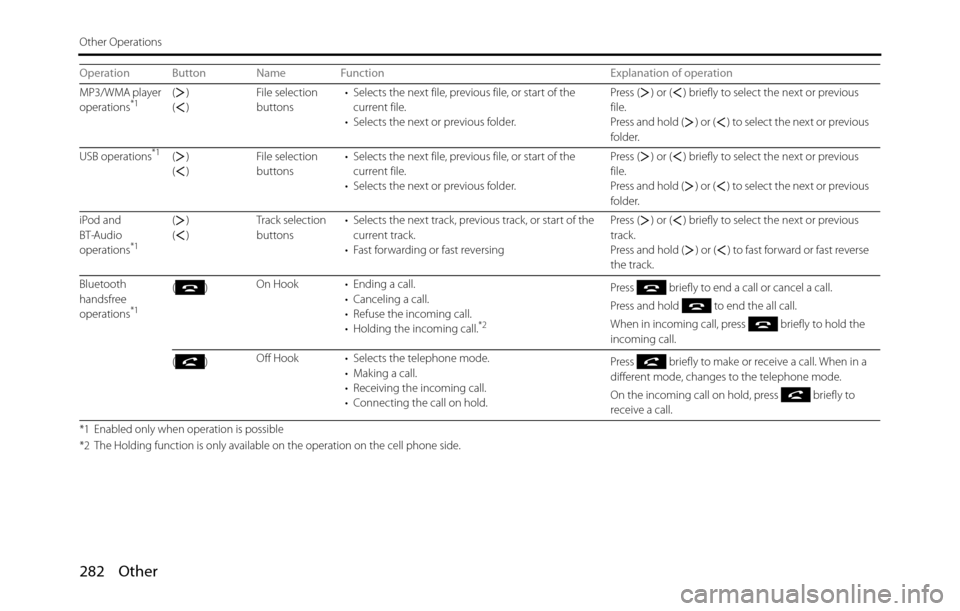
Press briefly to end a call or cancel a call.
Press and hold to end the all call.
When in incoming call, press briefly to hold the
incoming call.
()Off Hook • Selects the telephone mode.
• Making a call.
• Receiving the incoming call.
• Connecting the call on hold.Press briefly to make or receive a call. When in a
different mode, changes to the telephone mode.
On the incoming call on hold, press briefly to
receive a call.
*1 Enabled only when operation is possible
*2 The Holding function is only available on the operation on the cell phone side.
Operation Button Name Function Explanation of operation
Page 285 of 334
Other 283
Other Operations
Voice Control System Operations
About the Voice Control System
By using the voice control system (voice input microphone and
button), you can perform navigation and audio operation by saying
voice commands. This enables you to use functions that are usually
inoperable while driving.
The voice control system may not recognize the voice command if you
do not say it correctly.
Be aware of the following points that will assist correct recognition.
•Speak after you hear the “beep”. If you speak before or at the same
time as the “beep”, your command will not be recognized.
•Speak in a loud and clear voice.
•Some voices may be difficult to recognize.
•Keep the windows closed as much as possible while speaking. Noise
such as wind or other external sounds may prevent correct
recognition. Also, if the air conditioner fan is too loud, it may prevent
correct recognition.
•The system does not support regional variations or alternative
phrases. Be sure to say the specified phrases.Under the following conditions, the voice recognition mode will be
turned off:
•Within 8 seconds after guidance, talkback or help voice finishes
playing, no voice is recognized.
( When the screen is operated, counting of 8 seconds starts again
after the screen is touched.)
•The voice recognition button is pressed and held.
•The Steering button or Hard button (excluding the Voice
Recognition button) is pressed.
•A call is received.
NOTE
When voice recognition is started, the current audio output is muted or paused.
Page 288 of 334
286 Other
Other Operations
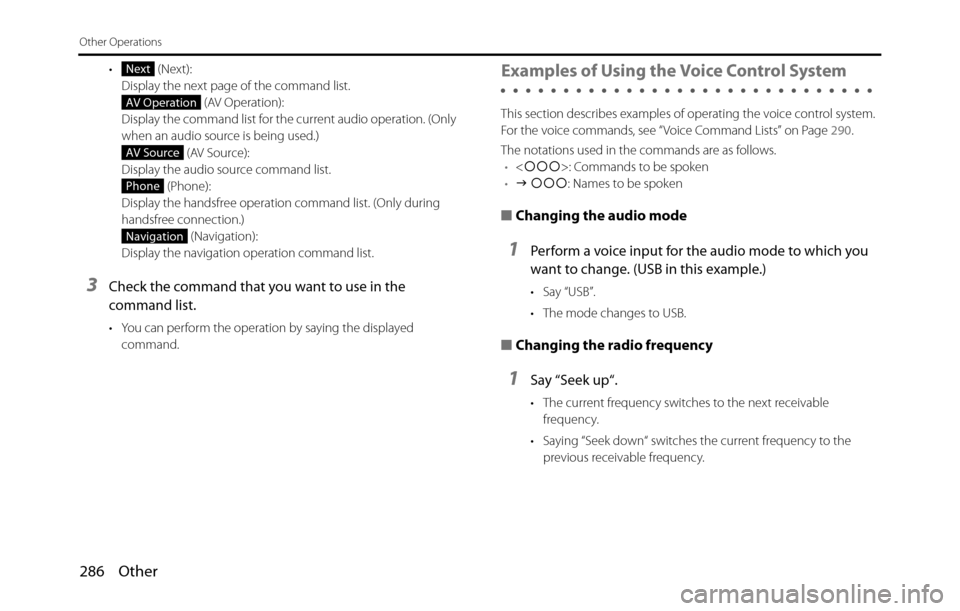
• (Next):
Display the next page of the command list.
(AV Operation):
Display the command list for the current audio operation. (Only
when an audio source is being used.)
(AV Source):
Display the audio source command list.
(Phone):
Display the handsfree operation command list. (Only during
handsfree connection.)
(Navigation):
Display the navigation operation command list.
3Check the command that you want to use in the
command list.
• You can perform the operation by saying the displayed
command.
Examples of Using the Voice Control System
This section describes examples of operating the voice control system.
For the voice commands, see “Voice Command Lists” on Page 290.
The notations used in the commands are as follows.
•
•J ccc: Names to be spoken
■Changing the audio mode
1Perform a voice input for the audio mode to which you
want to change. (USB in this example.)
• Say “USB”.
• The mode changes to USB.
■Changing the radio frequency
1Say “Seek up“.
• The current frequency switches to the next receivable
frequency.
• Saying “Seek down“ switches the current frequency to the
previous receivable frequency.
Next
AV Operation
AV Source
Phone
Navigation
Page 290 of 334
288 Other
Other Operations
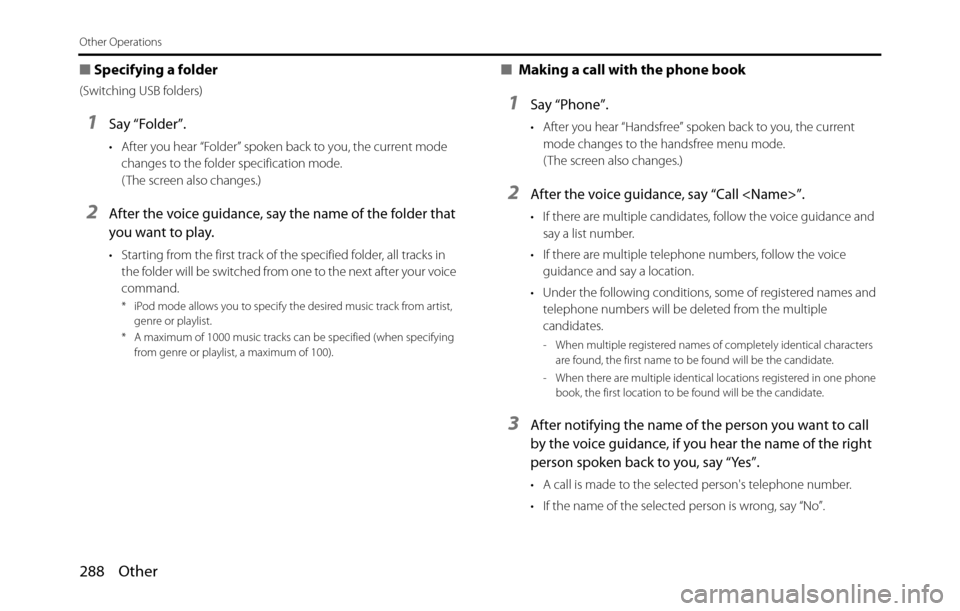
■Specifying a folder
(Switching USB folders)
1Say “Folder”.
• After you hear “Folder” spoken back to you, the current mode
changes to the folder specification mode.
( The screen also changes.)
2After the voice guidance, say the name of the folder that
you want to play.
• Starting from the first track of the specified folder, all tracks in
the folder will be switched from one to the next after your voice
command.
* iPod mode allows you to specify the desired music track from artist,
genre or playlist.
* A maximum of 1000 music tracks can be specified (when specifying
from genre or playlist, a maximum of 100).
■ Making a call with the phone book
1Say “Phone”.
• After you hear “Handsfree” spoken back to you, the current
mode changes to the handsfree menu mode.
( The screen also changes.)
2After the voice guidance, say “Call
• If there are multiple candidates, follow the voice guidance and
say a list number.
• If there are multiple telephone numbers, follow the voice
guidance and say a location.
• Under the following conditions, some of registered names and
telephone numbers will be deleted from the multiple
candidates.
- When multiple registered names of completely identical characters
are found, the first name to be found will be the candidate.
- When there are multiple identical locations registered in one phone
book, the first location to be found will be the candidate.
3After notifying the name of the person you want to call
by the voice guidance, if you hear the name of the right
person spoken back to you, say “Yes”.
• A call is made to the selected person's telephone number.
• If the name of the selected person is wrong, say “No”.
Page 292 of 334
290 Other
Other Operations
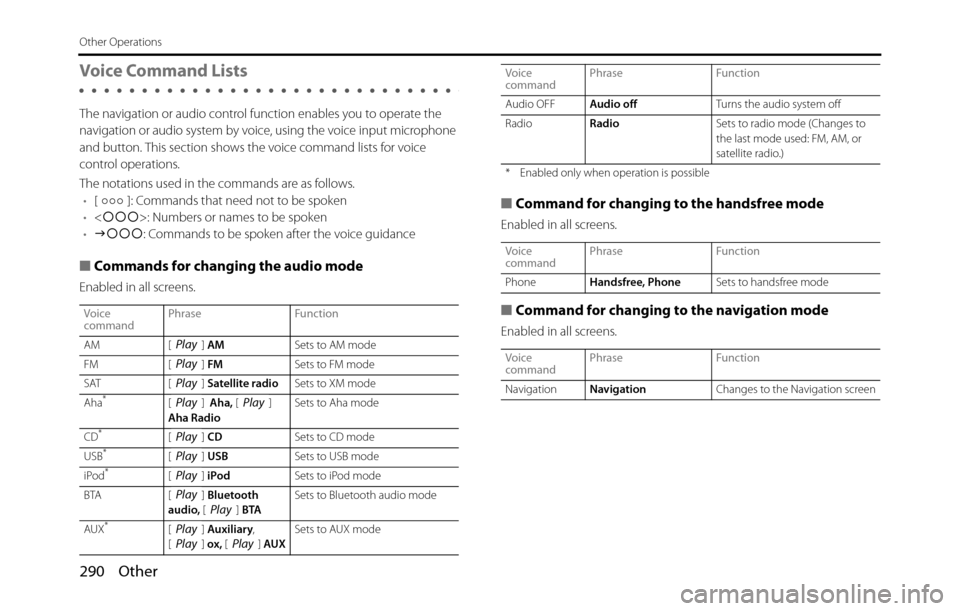
Voice Command Lists
The navigation or audio control function enables you to operate the
navigation or audio system by voice, using the voice input microphone
and button. This section shows the voice command lists for voice
control operations.
The notations used in the commands are as follows.
•[ ]: Commands that need not to be spoken
•
•Jccc: Commands to be spoken after the voice guidance
■Commands for changing the audio mode
Enabled in all screens.
■Command for changing to the handsfree mode
Enabled in all screens.
■Command for changing to the navigation mode
Enabled in all screens.
Voice
commandPhrase Function
AM [ ] AMSets to AM mode
FM [ ] FMSets to FM mode
SAT [ ] Satellite radioSets to XM mode
Aha
*[] Aha, []
Aha RadioSets to Aha mode
CD
*[] CDSets to CD mode
USB*[] USBSets to USB mode
iPod*[] iPodSets to iPod mode
BTA [ ] Bluetooth
audio, [] BTASets to Bluetooth audio mode
AUX
*[] Auxiliary,
[] ox, [] AUXSets to AUX mode
Play
Play
Play
PlayPlay
Play
Play
Play
PlayPlay
PlayPlayPlay
Audio OFFAudio offTurns the audio system off
RadioRadioSets to radio mode (Changes to
the last mode used: FM, AM, or
satellite radio.)
* Enabled only when operation is possible
Voice
commandPhrase Function
PhoneHandsfree, PhoneSets to handsfree mode
Voice
commandPhrase Function
NavigationNavigationChanges to the Navigation screen Voice
commandPhrase Function
Page 296 of 334
294 Other
Other Operations
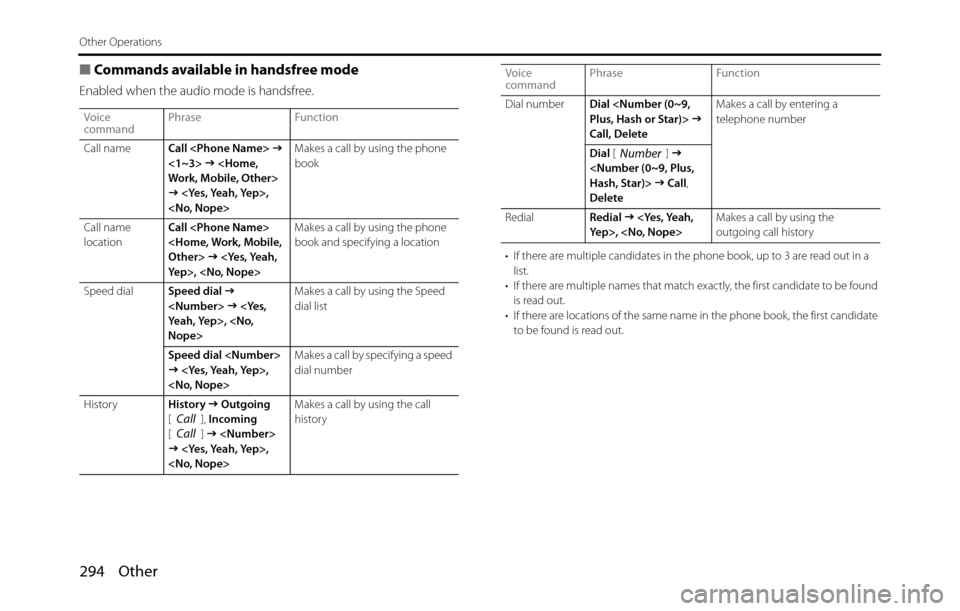
■Commands available in handsfree mode
Enabled when the audio mode is handsfree.
• If there are multiple candidates in the phone book, up to 3 are read out in a
list.
• If there are multiple names that match exactly, the first candidate to be found
is read out.
• If there are locations of the same name in the phone book, the first candidate
to be found is read out. Voice
commandPhrase Function
Call nameCall
J
<1~3> J
J
book
Call name
locationCall
J
book and specifying a location
Speed dialSpeed dial
J
Nope>Makes a call by using the Speed
dial list
Speed dial
J
dial number
HistoryHistory
J Outgoing
[], Incoming
[]
J
history
CallCall
Dial numberDial
Call, DeleteMakes a call by entering a
telephone number
Dial []
J
J Call,
Delete
RedialRedial
J
outgoing call history Voice
commandPhrase Function
Number
Page 320 of 334
318 Other
Reference
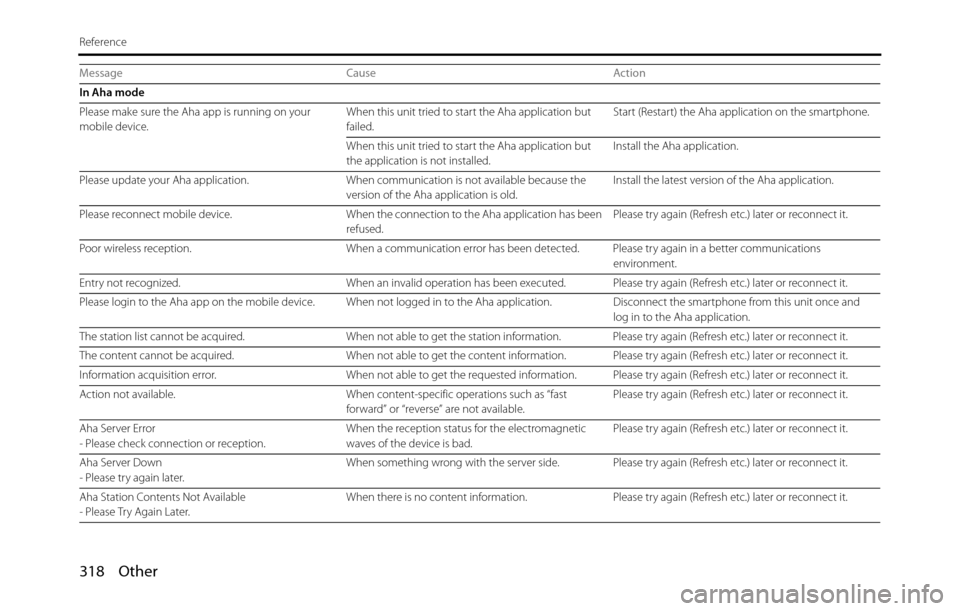
In Aha mode
Please make sure the Aha app is running on your
mobile device.When this unit tried to start the Aha application but
failed.Start (Restart) the Aha application on the smartphone.
When this unit tried to start the Aha application but
the application is not installed.Install the Aha application.
Please update your Aha application. When communication is not available because the
version of the Aha application is old.Install the latest version of the Aha application.
Please reconnect mobile device. When the connection to the Aha application has been
refused.Please try again (Refresh etc.) later or reconnect it.
Poor wireless reception. When a communication error has been detected. Please try again in a better communications
environment.
Entry not recognized. When an invalid operation has been executed. Please try again (Refresh etc.) later or reconnect it.
Please login to the Aha app on the mobile device. When not logged in to the Aha application. Disconnect the smartphone from this unit once and
log in to the Aha application.
The station list cannot be acquired. When not able to get the station information. Please try again (Refresh etc.) later or reconnect it.
The content cannot be acquired. When not able to get the content information. Please try again (Refresh etc.) later or reconnect it.
Information acquisition error. When not able to get the requested information. Please try again (Refresh etc.) later or reconnect it.
Action not available. When content-specific operations such as “fast
forward” or “reverse” are not available.Please try again (Refresh etc.) later or reconnect it.
Aha Server Error
- Please check connection or reception.When the reception status for the electromagnetic
waves of the device is bad.Please try again (Refresh etc.) later or reconnect it.
Aha Server Down
- Please try again later.When something wrong with the server side. Please try again (Refresh etc.) later or reconnect it.
Aha Station Contents Not Available
- Please Try Again Later.When there is no content information. Please try again (Refresh etc.) later or reconnect it. Message Cause Action
Page 321 of 334
Other 319
Reference
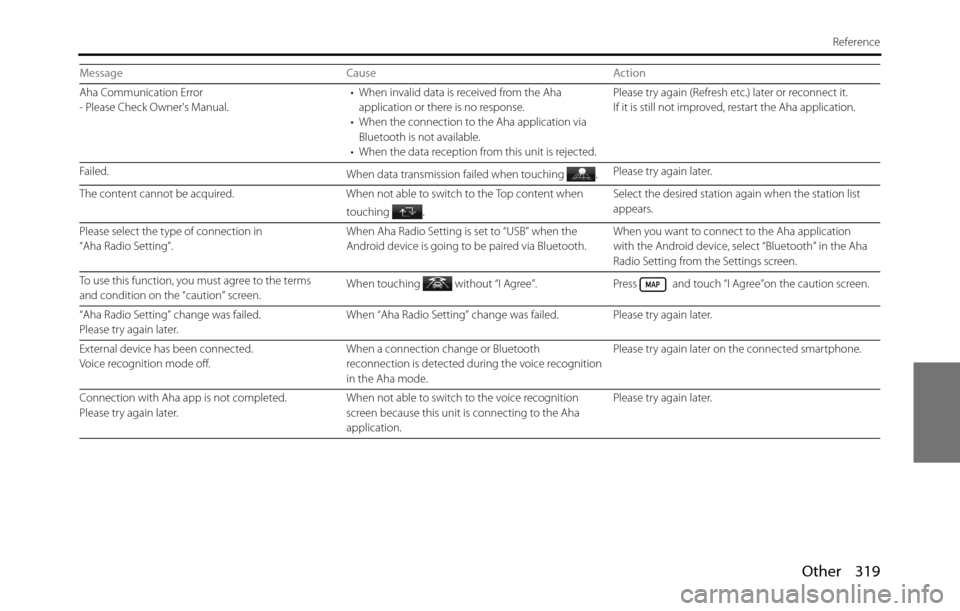
Aha Communication Error
- Please Check Owner's Manual.• When invalid data is received from the Aha
application or there is no response.
• When the connection to the Aha application via
Bluetooth is not available.
• When the data reception from this unit is rejected.Please try again (Refresh etc.) later or reconnect it.
If it is still not improved, restart the Aha application.
Failed.
When data transmission failed when touching .Please try again later.
The content cannot be acquired. When not able to switch to the Top content when
touching .Select the desired station again when the station list
appears.
Please select the type of connection in
“Aha Radio Setting”.When Aha Radio Setting is set to “USB” when the
Android device is going to be paired via Bluetooth.When you want to connect to the Aha application
with the Android device, select “Bluetooth” in the Aha
Radio Setting from the Settings screen.
To use this function, you must agree to the terms
and condition on the “caution” screen.When touching without “I Agree”. Press and touch “I Agree”on the caution screen.
“Aha Radio Setting” change was failed.
Please try again later.When “Aha Radio Setting” change was failed. Please try again later.
External device has been connected.
Voice recognition mode off.When a connection change or Bluetooth
reconnection is detected during the voice recognition
in the Aha mode.Please try again later on the connected smartphone.
Connection with Aha app is not completed.
Please try again later.When not able to switch to the voice recognition
screen because this unit is connecting to the Aha
application.Please try again later. Message Cause Action
Page 325 of 334
Other 323
Reference
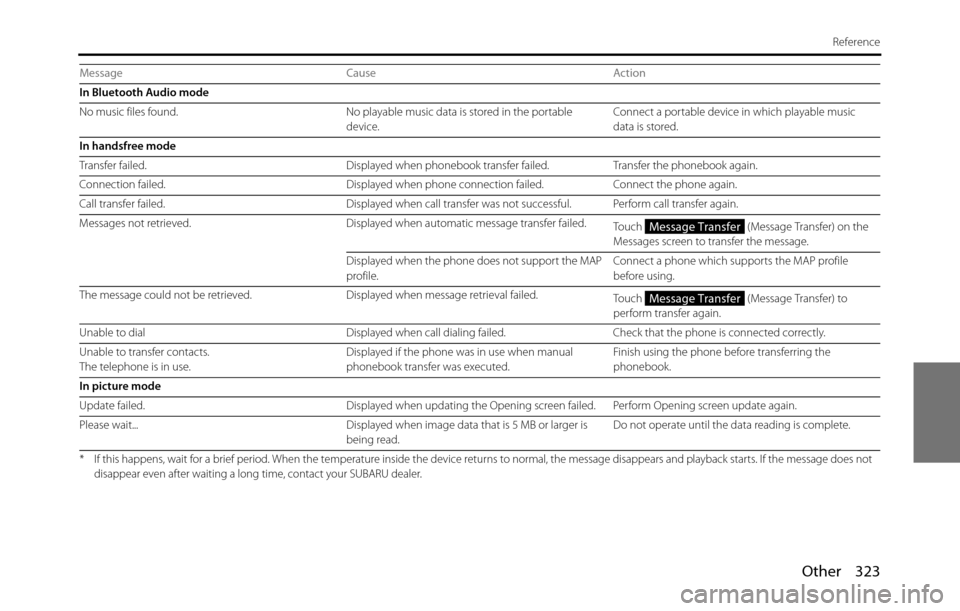
In Bluetooth Audio mode
No music files found. No playable music data is stored in the portable
device.Connect a portable device in which playable music
data is stored.
In handsfree mode
Transfer failed. Displayed when phonebook transfer failed. Transfer the phonebook again.
Connection failed. Displayed when phone connection failed. Connect the phone again.
Call transfer failed. Displayed when call transfer was not successful. Perform call transfer again.
Messages not retrieved. Displayed when automatic message transfer failed.
Touch (Message Transfer) on the
Messages screen to transfer the message.
Displayed when the phone does not support the MAP
profile.Connect a phone which supports the MAP profile
before using.
The message could not be retrieved. Displayed when message retrieval failed.
Touch (Message Transfer) to
perform transfer again.
Unable to dial Displayed when call dialing failed. Check that the phone is connected correctly.
Unable to transfer contacts.
The telephone is in use.Displayed if the phone was in use when manual
phonebook transfer was executed.Finish using the phone before transferring the
phonebook.
In picture mode
Update failed. Displayed when updating the Opening screen failed. Perform Opening screen update again.
Please wait... Displayed when image data that is 5 MB or larger is
being read.Do not operate until the data reading is complete.
* If this happens, wait for a brief period. When the temperature inside the device returns to normal, the message disappears and playback starts. If the message does not
disappear even after waiting a long time, contact your SUBARU dealer.
Message Cause Action
Message Transfer
Message Transfer