indicator light SUBARU BRZ 2017 1.G Owner's Manual
[x] Cancel search | Manufacturer: SUBARU, Model Year: 2017, Model line: BRZ, Model: SUBARU BRZ 2017 1.GPages: 540, PDF Size: 6.88 MB
Page 177 of 540
175 2-1. Driving procedures
2
When driving
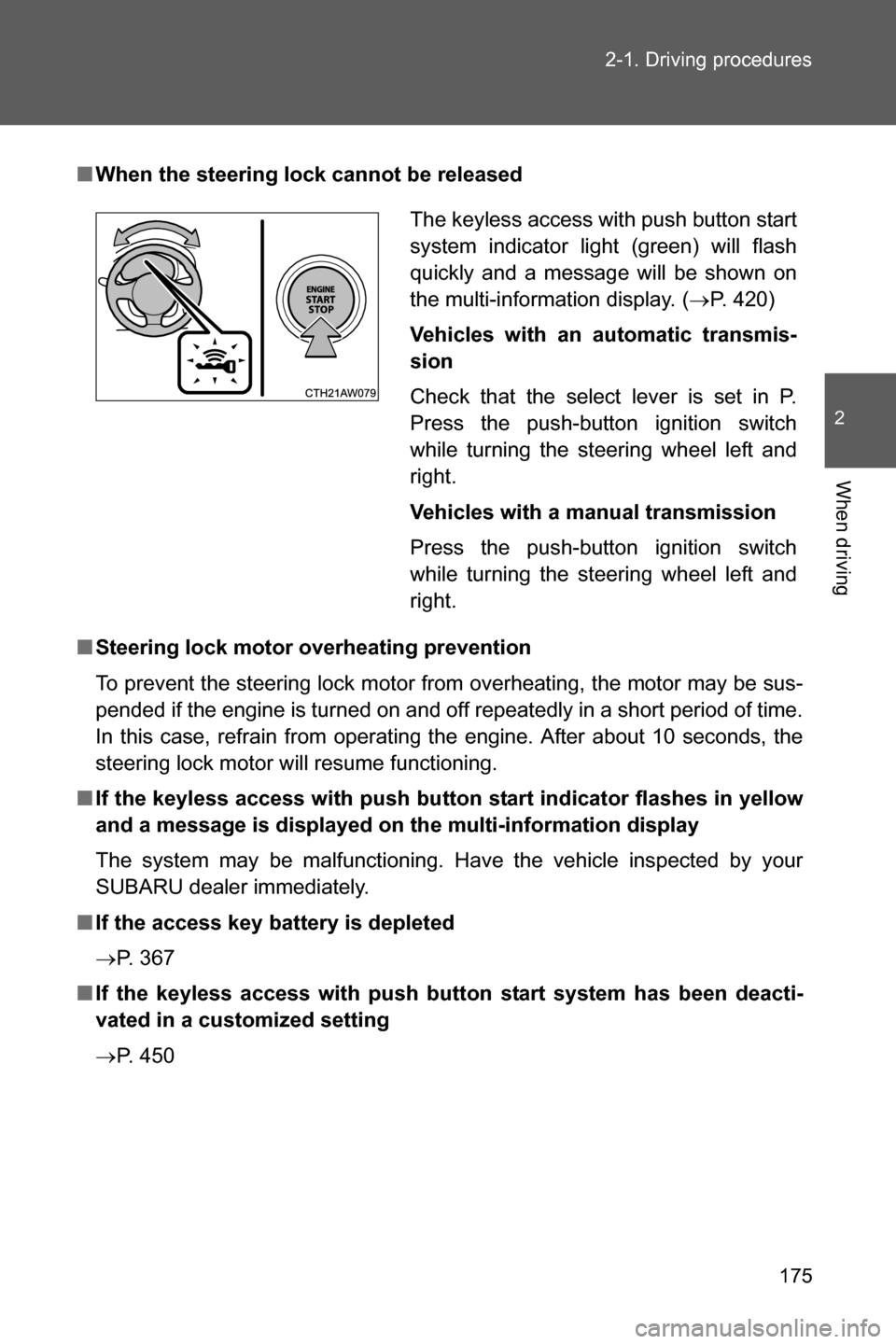
■When the steering lock cannot be released
■Steering lock motor overheating prevention
To prevent the steering lock motor from overheating, the motor may be sus-
pended if the engine is turned on and off repeatedly in a short period of time.
In this case, refrain from operating the engine. After about 10 seconds, the
steering lock motor will resume functioning.
■If the keyless access with push button start indicator flashes in yellow
and a message is displayed on the multi-information display
The system may be malfunctioning. Have the vehicle inspected by your
SUBARU dealer immediately.
■If the access key battery is depleted
oP. 367
■If the keyless access with push button start system has been deacti-
vated in a customized setting
oP. 450The keyless access with push button start
system indicator light (green) will flash
quickly and a message will be shown on
the multi-information display. (oP. 420)
Vehicles with an automatic transmis-
sion
Check that the select lever is set in P.
Press the push-button ignition switch
while turning the steering wheel left and
right.
Vehicles with a manual transmission
Press the push-button ignition switch
while turning the steering wheel left and
right.
Page 178 of 540
176 2-1. Driving procedures
■Immediately after reconnecting the battery terminals due to replacing
the battery and so forth
The engine may not start. If this occurs, turn the push-button ignition switch
to “ON” mode, and start the engine after waiting at least 10 seconds. Idling
may be unstable immediately after the engine starts, however, this is not a
malfunction.
WARNING
■When starting the engine
●Always start the engine while sitting in the driver’s seat. Do not depress
the accelerator pedal while starting the engine under any circumstances.
Doing so may cause an accident resulting in death or serious injury.
●If the keyless access with push button start system indicator light flashes
in green after the engine has started, never drive the vehicle. The steering
wheel is still locked, and it may result in an accident.
■Caution while driving
If engine failure occurs while the vehicle is moving, do not lock or open the
doors until the vehicle reaches a safe and complete stop. Activation of the
steering lock in this circumstance may lead to an accident, resulting in death
or serious injury.
■Stopping the engine
Do not touch the push-button ignition switch during driving.
When the push-button ignition switch is pressed for 2 seconds or longer or
pressed 3 times successively, the engine will stop. When the engine stops,
the brake booster will not function. A greater foot pressure will be required
on the brake pedal.
The power steering system will not operate either. A greater force will be
required to steer, and it may result in an accident.
Page 179 of 540
177 2-1. Driving procedures
2
When driving
CAUTION
■To prevent battery discharge
●Do not leave the push-button ignition switch in “ACC” or “ON” mode for
long periods of time without the engine running.
●If the keyless access with push button start system indicator light (green)
is illuminated, the push-button ignition switch is not off. When exiting the
vehicle, always check that the push-button ignition switch is off.
●Vehicles with an automatic transmission: Do not stop the engine when the
select lever is in a position other than P. If the engine is stopped in another
select lever position, the push-button ignition switch will not be turned off
but instead be turned to “ACC” mode. If the vehicle is left in “ACC” mode,
battery discharge may occur.
■When starting the engine
●Do not race a cold engine.
●If the engine becomes difficult to start or stalls frequently, have your vehi-
cle checked by your SUBARU dealer immediately.
■Symptoms indicating a malfunction with the push-button ignition
switch
If the push-button ignition switch seems to be operating somewhat differently
than usual, such as the switch sticking slightly, there may be a malfunction.
Contact your SUBARU dealer immediately.
Page 186 of 540
184 2-1. Driving procedures
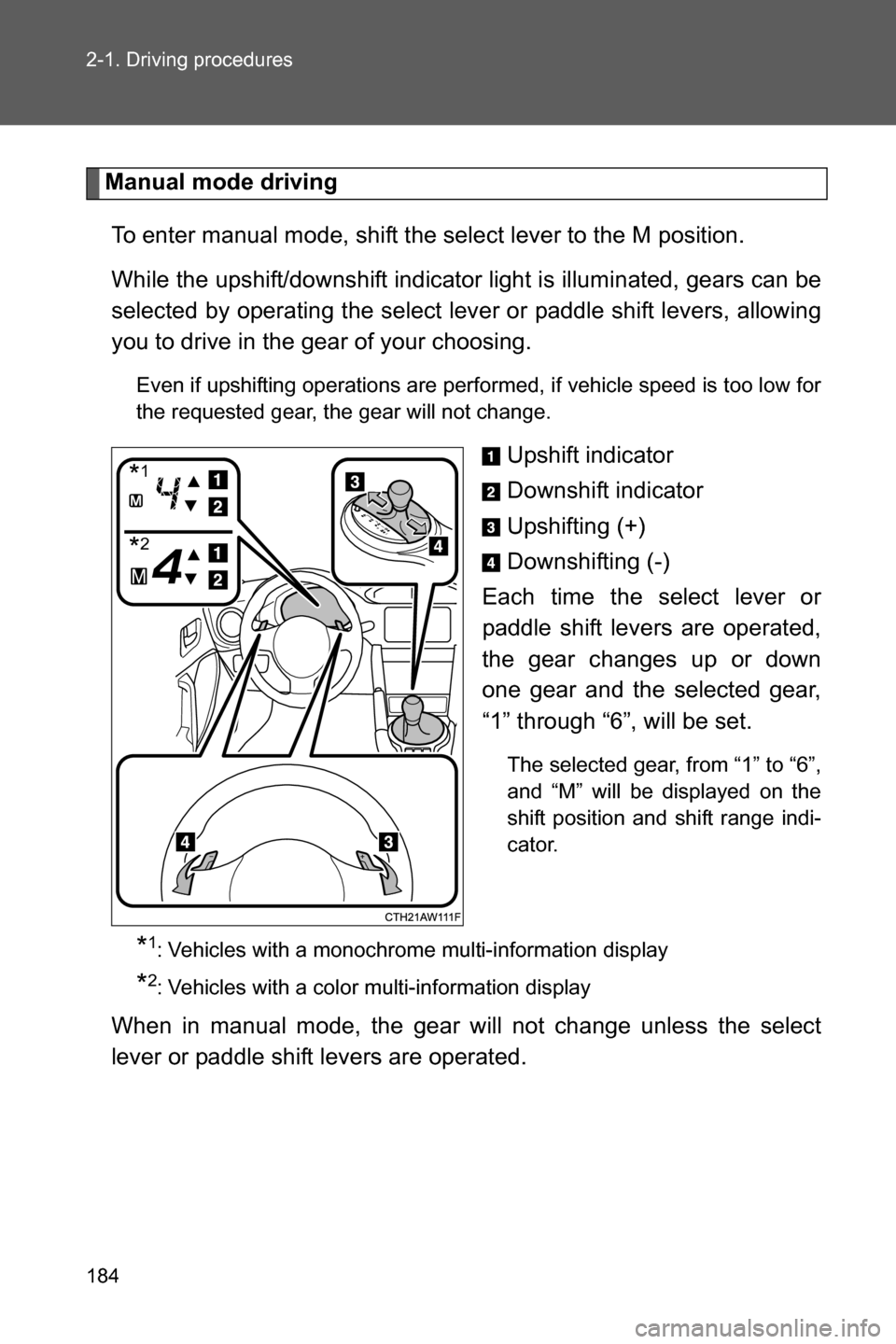
Manual mode driving
To enter manual mode, shift the select lever to the M position.
While the upshift/downshift indicator light is illuminated, gears can be
selected by operating the select lever or paddle shift levers, allowing
you to drive in the gear of your choosing.
Even if upshifting operations are performed, if vehicle speed is too low for
the requested gear, the gear will not change.
Upshift indicator
Downshift indicator
Upshifting (+)
Downshifting (-)
Each time the select lever or
paddle shift levers are operated,
the gear changes up or down
one gear and the selected gear,
“1” through “6”, will be set.
The selected gear, from “1” to “6”,
and “M” will be displayed on the
shift position and shift range indi-
cator.
*1: Vehicles with a monochrome multi-information display
*2: Vehicles with a color multi-information display
When in manual mode, the gear will not change unless the select
lever or paddle shift levers are operated.
*1
*2
Page 193 of 540
191
2-1. Driving procedures
2
When driving
Tur n signal lever
■Turn signals can be operated when
Vehicles without a keyless access with push button start system
The engine switch is in the “ON” position.
Vehicles with a keyless access with push button start system
The push-button ignition switch is in “ON” mode.
■If the indicators flash faster than usual
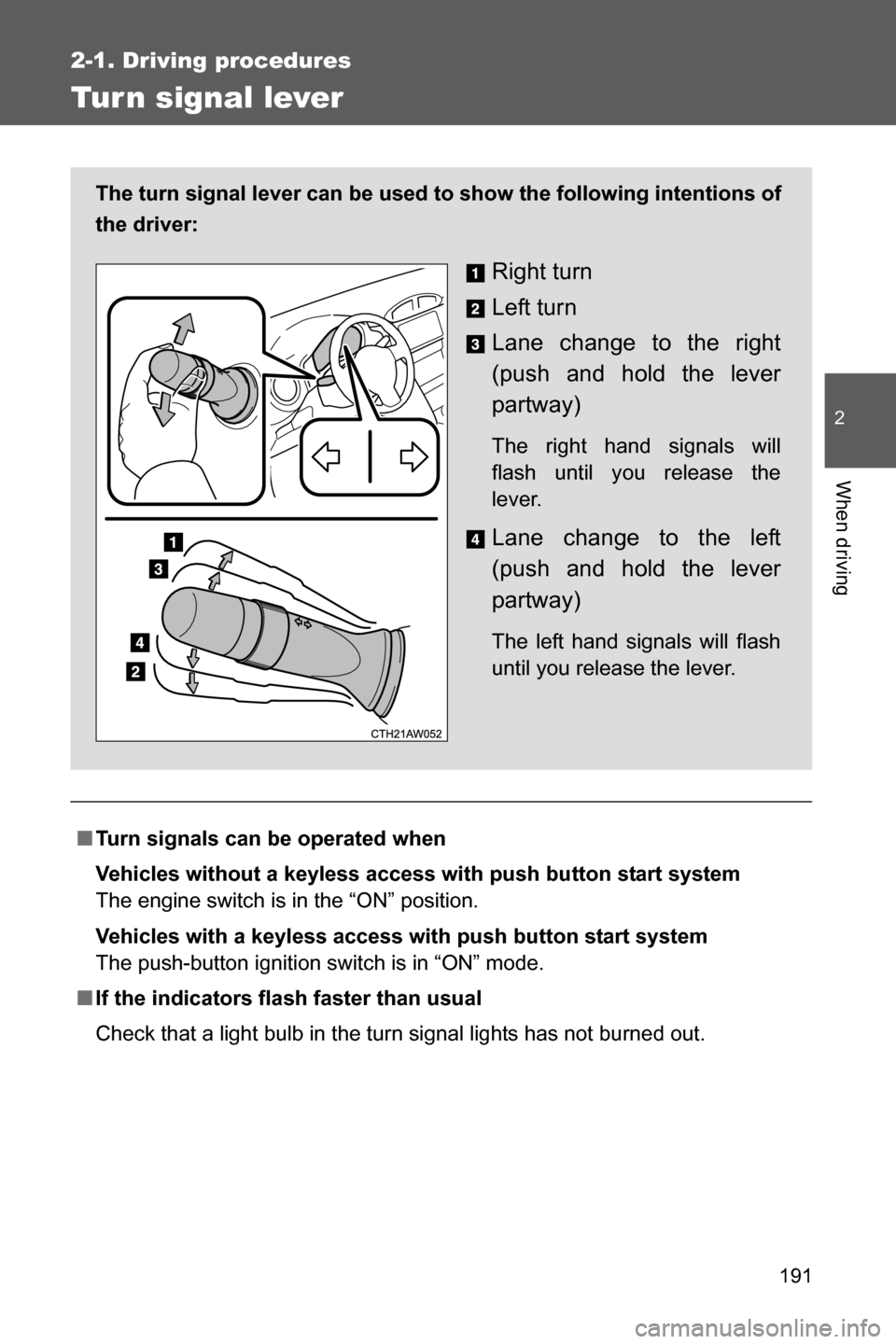
Check that a light bulb in the turn signal lights has not burned out. The turn signal lever can be used to show the following intentions of
the driver:
Right turn
Left turn
Lane change to the right
(push and hold the lever
partway)
The right hand signals will
flash until you release the
lever.
Lane change to the left
(push and hold the lever
partway)
The left hand signals will flash
until you release the lever.
Page 198 of 540
196 2-2. Instrument cluster
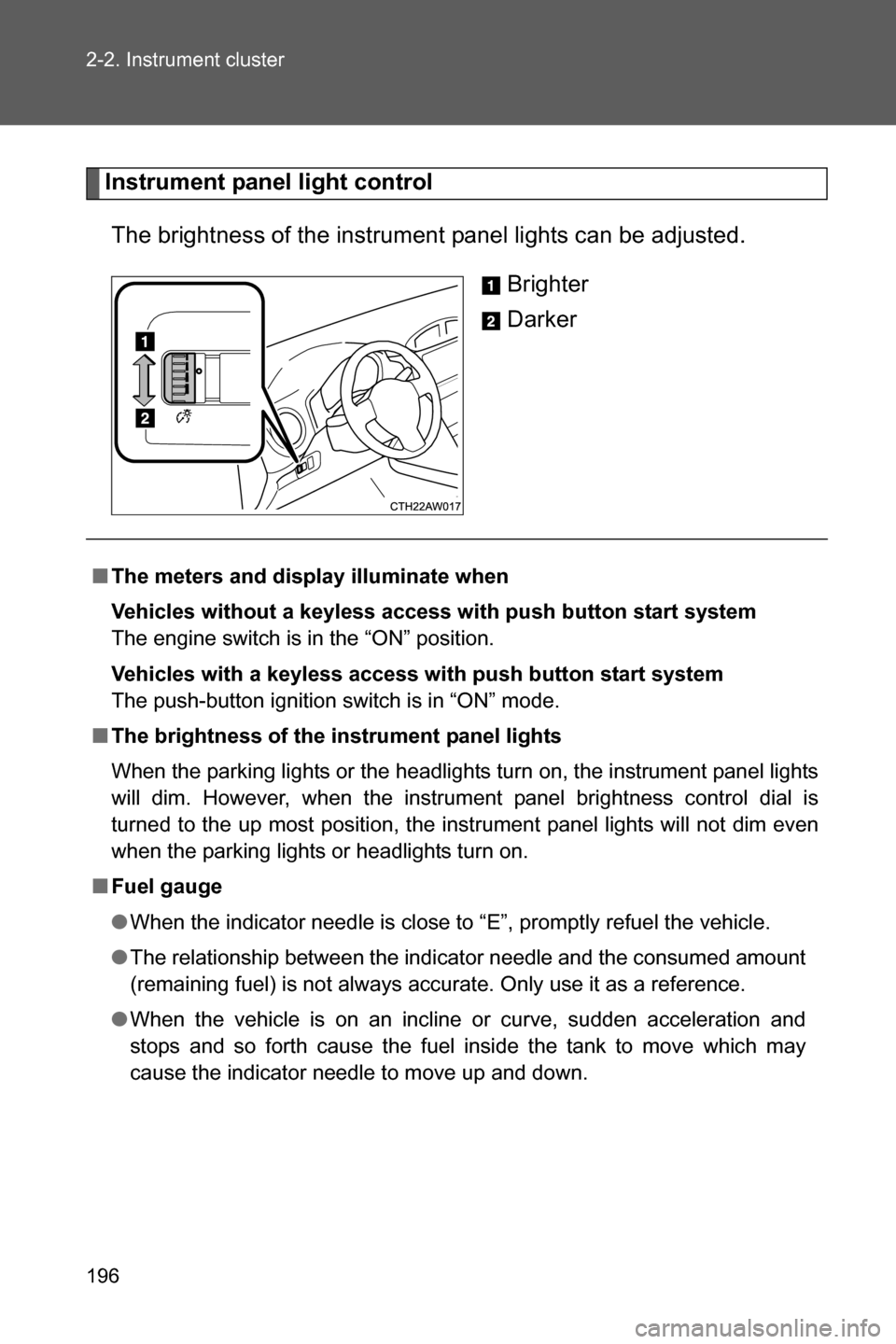
Instrument panel light control
The brightness of the instrument panel lights can be adjusted.
Brighter
Darker
■The meters and display illuminate when
Vehicles without a keyless access with push button start system
The engine switch is in the “ON” position.
Vehicles with a keyless access with push button start system
The push-button ignition switch is in “ON” mode.
■The brightness of the instrument panel lights
When the parking lights or the headlights turn on, the instrument panel lights
will dim. However, when the instrument panel brightness control dial is
turned to the up most position, the instrument panel lights will not dim even
when the parking lights or headlights turn on.
■Fuel gauge
●When the indicator needle is close to “E”, promptly refuel the vehicle.
●The relationship between the indicator needle and the consumed amount
(remaining fuel) is not always accurate. Only use it as a reference.
●When the vehicle is on an incline or curve, sudden acceleration and
stops and so forth cause the fuel inside the tank to move which may
cause the indicator needle to move up and down.
Page 199 of 540
197 2-2. Instrument cluster
2
When driving
CAUTION
■To prevent damage to the engine and its components
●Do not let the indicator needle of the tachometer enter the red zone, which
indicates the maximum engine speed.
●In the following situations, the engine may be overheating. In this case,
immediately stop the vehicle in a safe place, and check the engine after it
has cooled completely. (oP. 458)
• Vehicles with a monochrome multi-information display: The engine
coolant temperature gauge enters the red zone
• Vehicles with a color multi-information display: The high engine coolant
temperature warning light flashes or illuminates
Page 200 of 540
198
2-2. Instrument cluster
Indicators and war ning lights
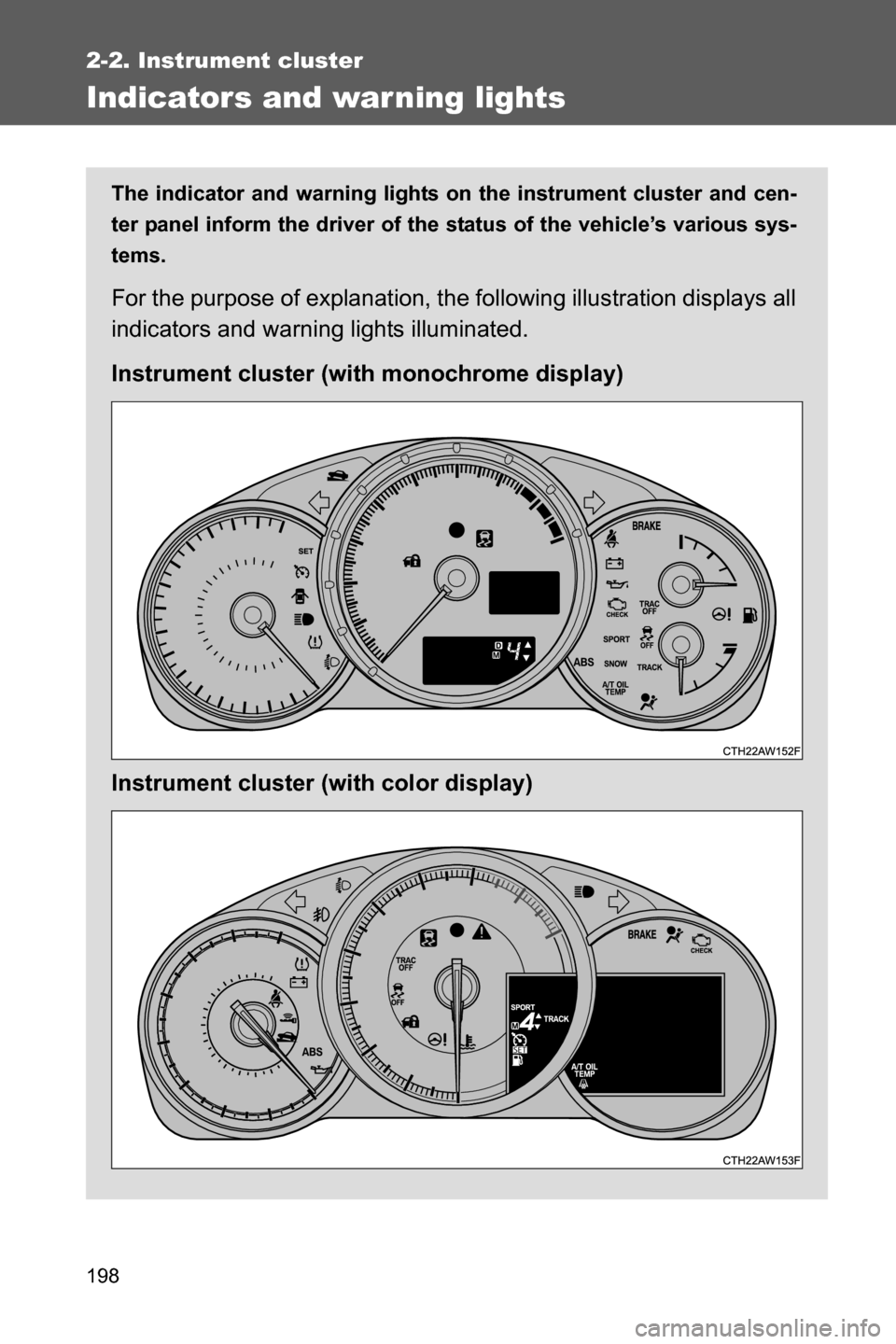
The indicator and warning lights on the instrument cluster and cen-
ter panel inform the driver of the status of the vehicle’s various sys-
tems.
For the purpose of explanation, the following illustration displays all
indicators and warning lights illuminated.
Instrument cluster (with monochrome display)
Instrument cluster (with color display)
Page 202 of 540
200 2-2. Instrument cluster
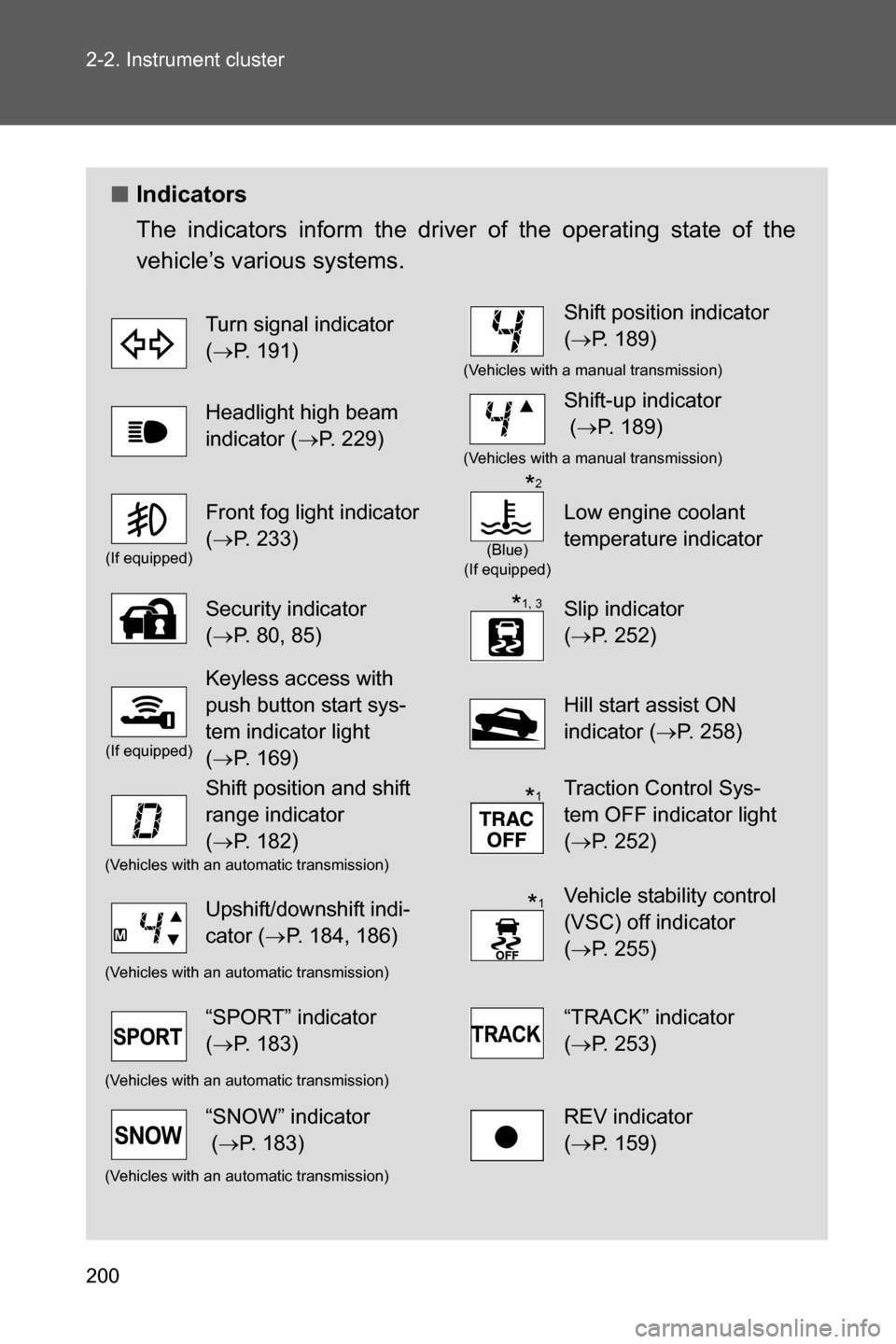
■Indicators
The indicators inform the driver of the operating state of the
vehicle’s various systems.
Turn signal indicator
(oP. 191)Shift position indicator
(oP. 189)
(Vehicles with a manual transmission)
Headlight high beam
indicator (oP. 229)Shift-up indicator
(oP. 189)
(Vehicles with a manual transmission)
(If equipped)
Front fog light indicator
(oP. 233)
(Blue)
(If equipped)
Low engine coolant
temperature indicator
Security indicator
(oP. 80, 85)Slip indicator
(oP. 252)
(If equipped)
Keyless access with
push button start sys-
tem indicator light
(oP. 169)
Hill start assist ON
indicator (oP. 258)
Shift position and shift
range indicator
(oP. 182)Traction Control Sys-
tem OFF indicator light
(oP. 252)
(Vehicles with an automatic transmission)
Upshift/downshift indi-
cator (oP. 184, 186)Vehicle stability control
(VSC) off indicator
(oP. 255)
(Vehicles with an automatic transmission)
“SPORT” indicator
(oP. 183)“TRACK” indicator
(oP. 253)
(Vehicles with an automatic transmission)
“SNOW” indicator
(oP. 183)REV indicator
(oP. 159)
(Vehicles with an automatic transmission)
*2
*1, 3
*1
*1
Page 203 of 540
201 2-2. Instrument cluster
2
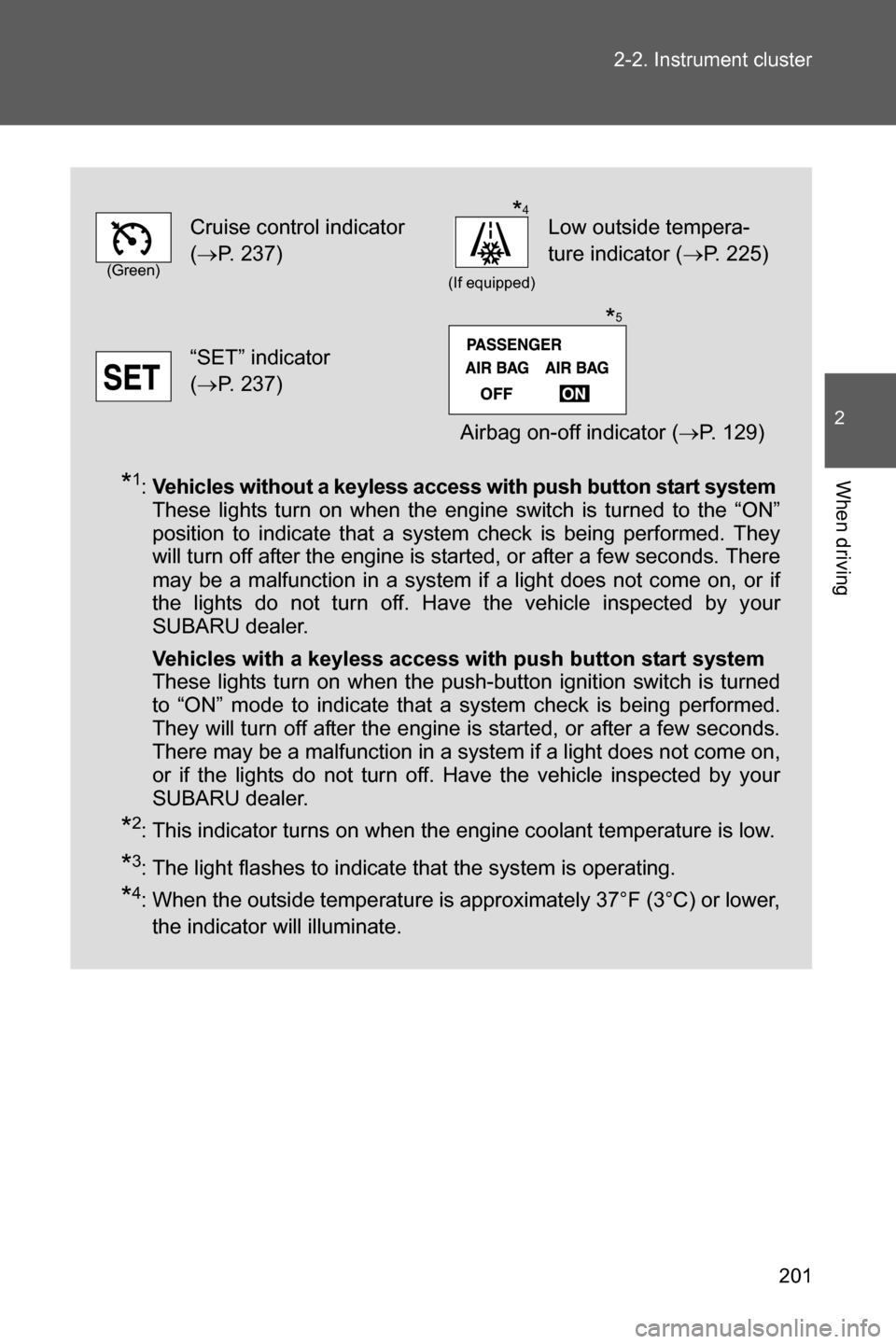
When driving*1:Vehicles without a keyless access with push button start system
These lights turn on when the engine switch is turned to the “ON”
position to indicate that a system check is being performed. They
will turn off after the engine is started, or after a few seconds. There
may be a malfunction in a system if a light does not come on, or if
the lights do not turn off. Have the vehicle inspected by your
SUBARU dealer.
Vehicles with a keyless access with push button start system
These lights turn on when the push-button ignition switch is turned
to “ON” mode to indicate that a system check is being performed.
They will turn off after the engine is started, or after a few seconds.
There may be a malfunction in a system if a light does not come on,
or if the lights do not turn off. Have the vehicle inspected by your
SUBARU dealer.
*2: This indicator turns on when the engine coolant temperature is low.
*3: The light flashes to indicate that the system is operating.
*4: When the outside temperature is approximately 37°F (3°C) or lower,
the indicator will illuminate.
(Green)
Cruise control indicator
(oP. 237)
(If equipped)
Low outside tempera-
ture indicator (oP. 225)
“SET” indicator
(oP. 237)
Airbag on-off indicator (oP. 129)
*4
*5