door lock SUBARU BRZ 2019 Workshop Manual
[x] Cancel search | Manufacturer: SUBARU, Model Year: 2019, Model line: BRZ, Model: SUBARU BRZ 2019Pages: 560, PDF Size: 8.9 MB
Page 442 of 560
442 5-2. Steps to take in an emergency
BRZ_U
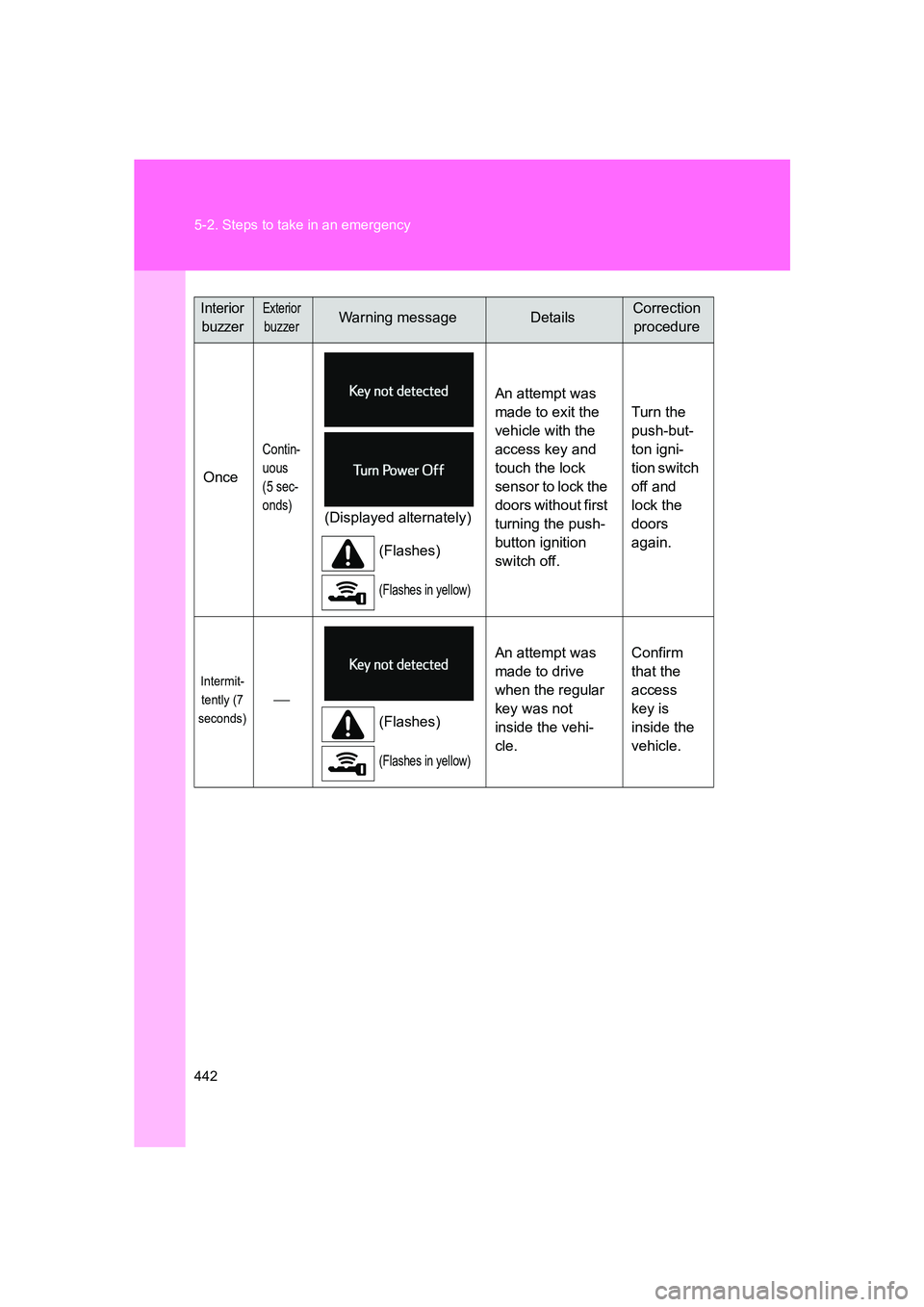
Once
Contin-
uous
(5 sec-
onds)
(Displayed alternately)(Flashes)
(Flashes in yellow)
An attempt was
made to exit the
vehicle with the
access key and
touch the lock
sensor to lock the
doors without first
turning the push-
button ignition
switch off. Turn the
push-but-
ton igni-
tion switch
off and
lock the
doors
again.
Intermit-
tently (7
seconds)
(Flashes)
(Flashes in yellow)
An attempt was
made to drive
when the regular
key was not
inside the vehi-
cle. Confirm
that the
access
key is
inside the
vehicle.
Interior
buzzerExterior
buzzerWarning messageDetailsCorrection procedure
Page 444 of 560
444 5-2. Steps to take in an emergency
BRZ_U
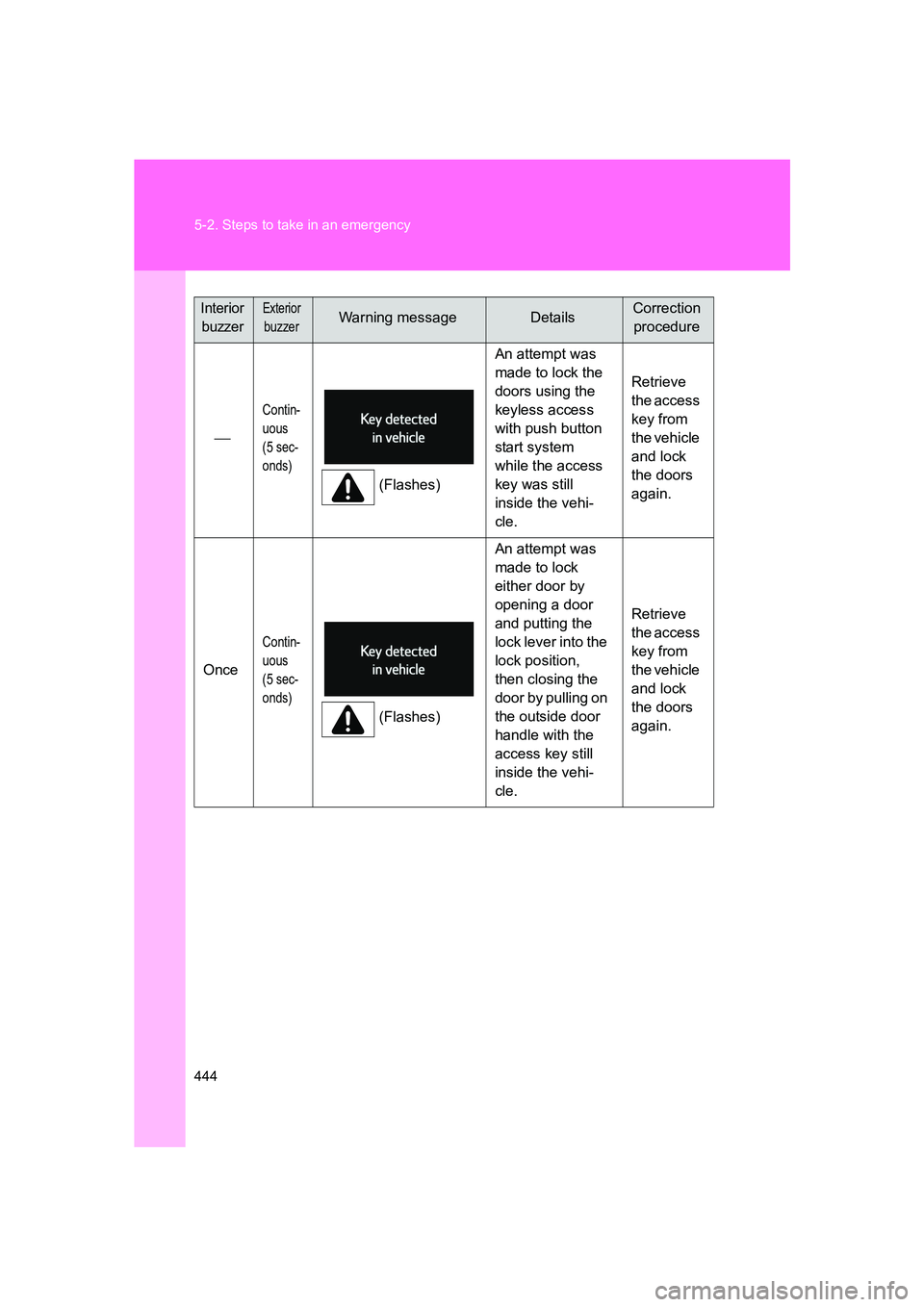
Contin-
uous
(5 sec-
onds)
(Flashes)An attempt was
made to lock the
doors using the
keyless access
with push button
start system
while the access
key was still
inside the vehi-
cle. Retrieve
the access
key from
the vehicle
and lock
the doors
again.
Once
Contin-
uous
(5 sec-
onds)
(Flashes) An attempt was
made to lock
either door by
opening a door
and putting the
lock lever into the
lock position,
then closing the
door by pulling on
the outside door
handle with the
access key still
inside the vehi-
cle. Retrieve
the access
key from
the vehicle
and lock
the doors
again.
Interior
buzzerExterior
buzzerWarning messageDetailsCorrection procedure
Page 445 of 560
5
When trouble arises
445
5-2. Steps to take in an emergency
BRZ_U
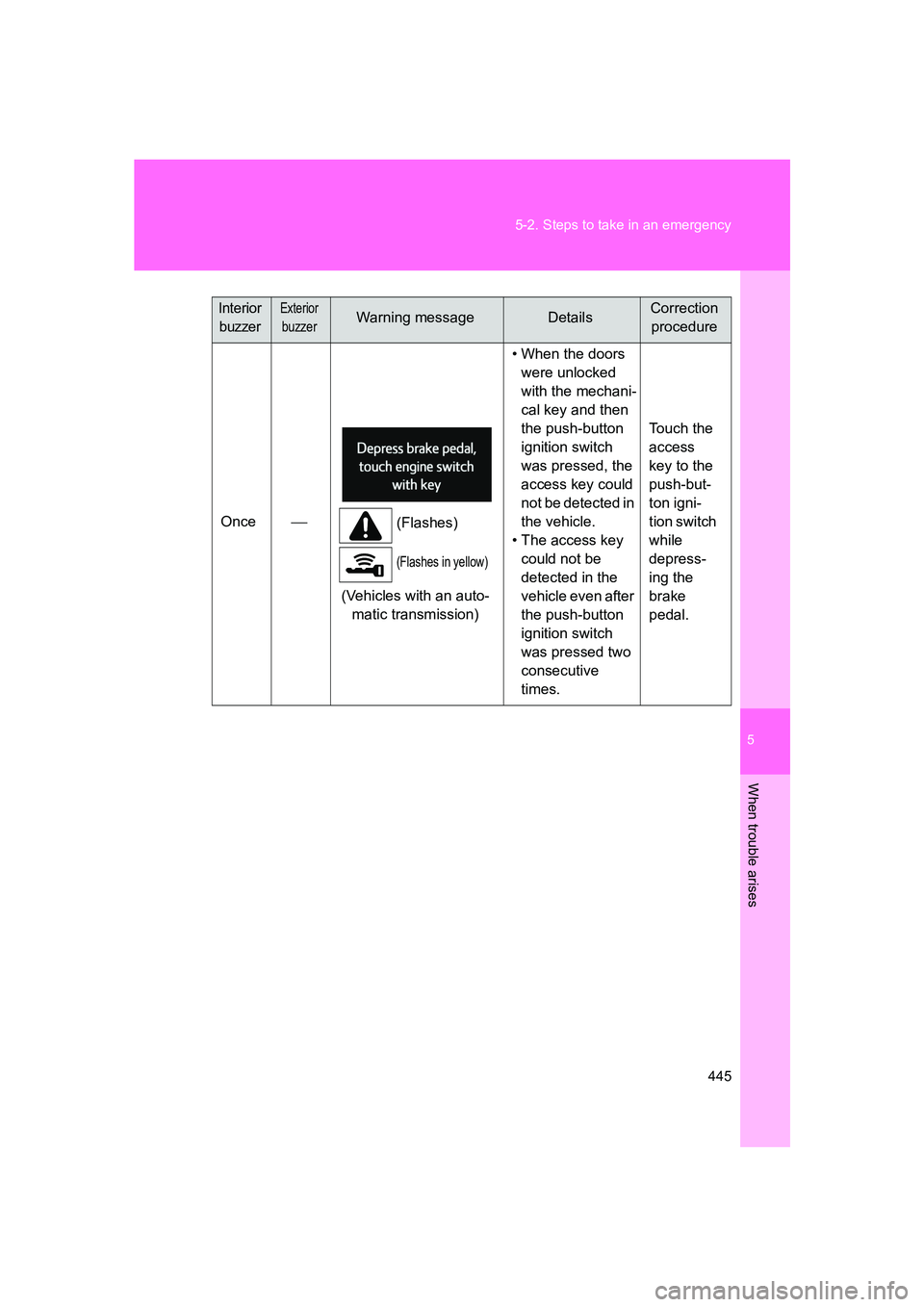
Once
(Flashes)
(Flashes in yellow)
(Vehicles with an auto-
matic transmission) • When the doors
were unlocked
with the mechani-
cal key and then
the push-button
ignition switch
was pressed, the
access key could
not be detected in
the vehicle.
• The access key could not be
detected in the
vehicle even after
the push-button
ignition switch
was pressed two
consecutive
times. Touch the
access
key to the
push-but-
ton igni-
tion switch
while
depress-
ing the
brake
pedal.
Interior
buzzerExterior
buzzerWarning messageDetailsCorrection procedure
Page 446 of 560
446 5-2. Steps to take in an emergency
BRZ_U
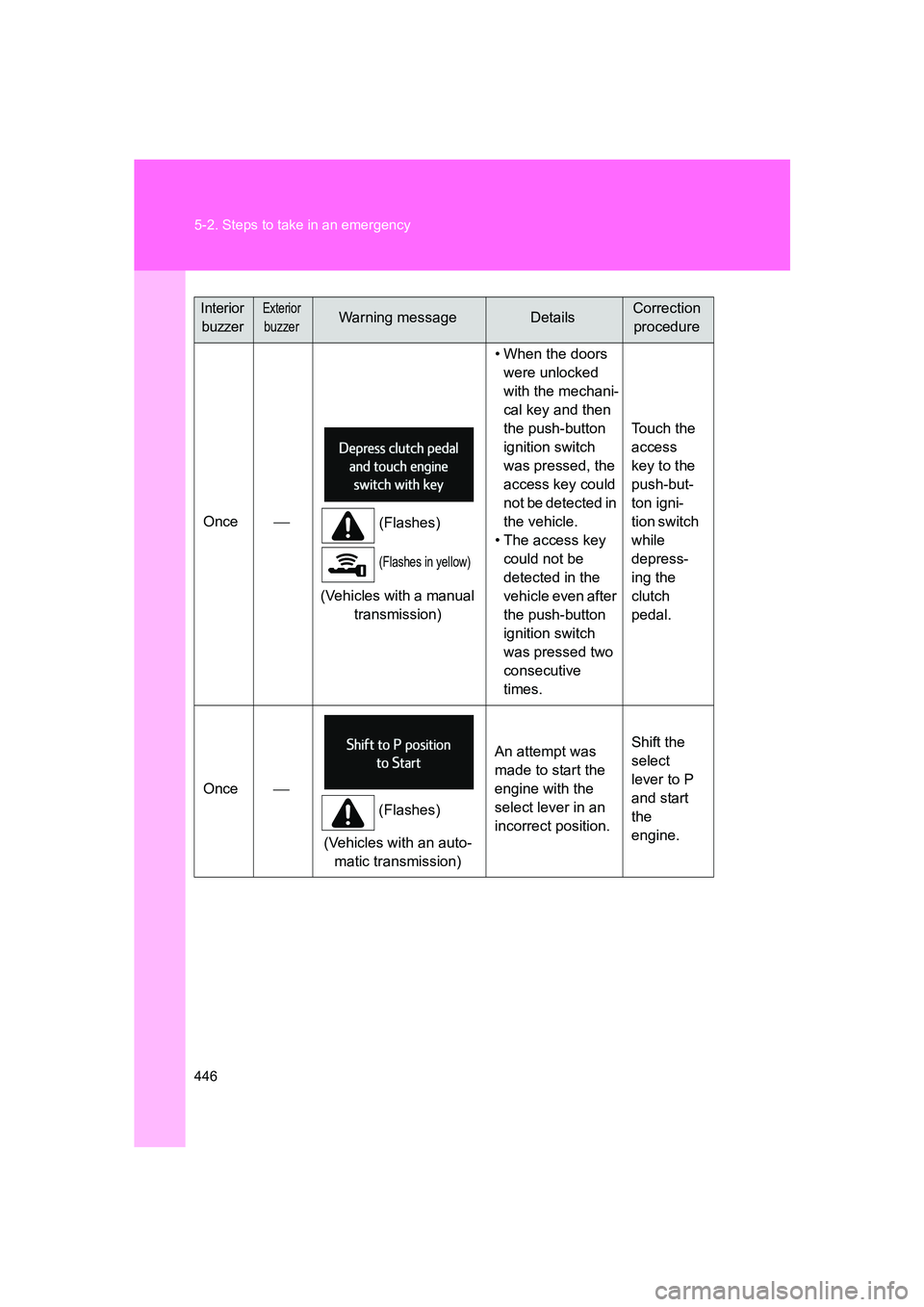
Once
(Flashes)
(Flashes in yellow)
(Vehicles with a manual
transmission) • When the doors
were unlocked
with the mechani-
cal key and then
the push-button
ignition switch
was pressed, the
access key could
not be detected in
the vehicle.
• The access key could not be
detected in the
vehicle even after
the push-button
ignition switch
was pressed two
consecutive
times. Touch the
access
key to the
push-but-
ton igni-
tion switch
while
depress-
ing the
clutch
pedal.
Once
(Flashes)
(Vehicles with an auto- matic transmission) An attempt was
made to start the
engine with the
select lever in an
incorrect position.
Shift the
select
lever to P
and start
the
engine.
Interior
buzzerExterior
buzzerWarning messageDetailsCorrection procedure
Page 449 of 560
5
When trouble arises
449
5-2. Steps to take in an emergency
BRZ_U
Once
(Flashes)
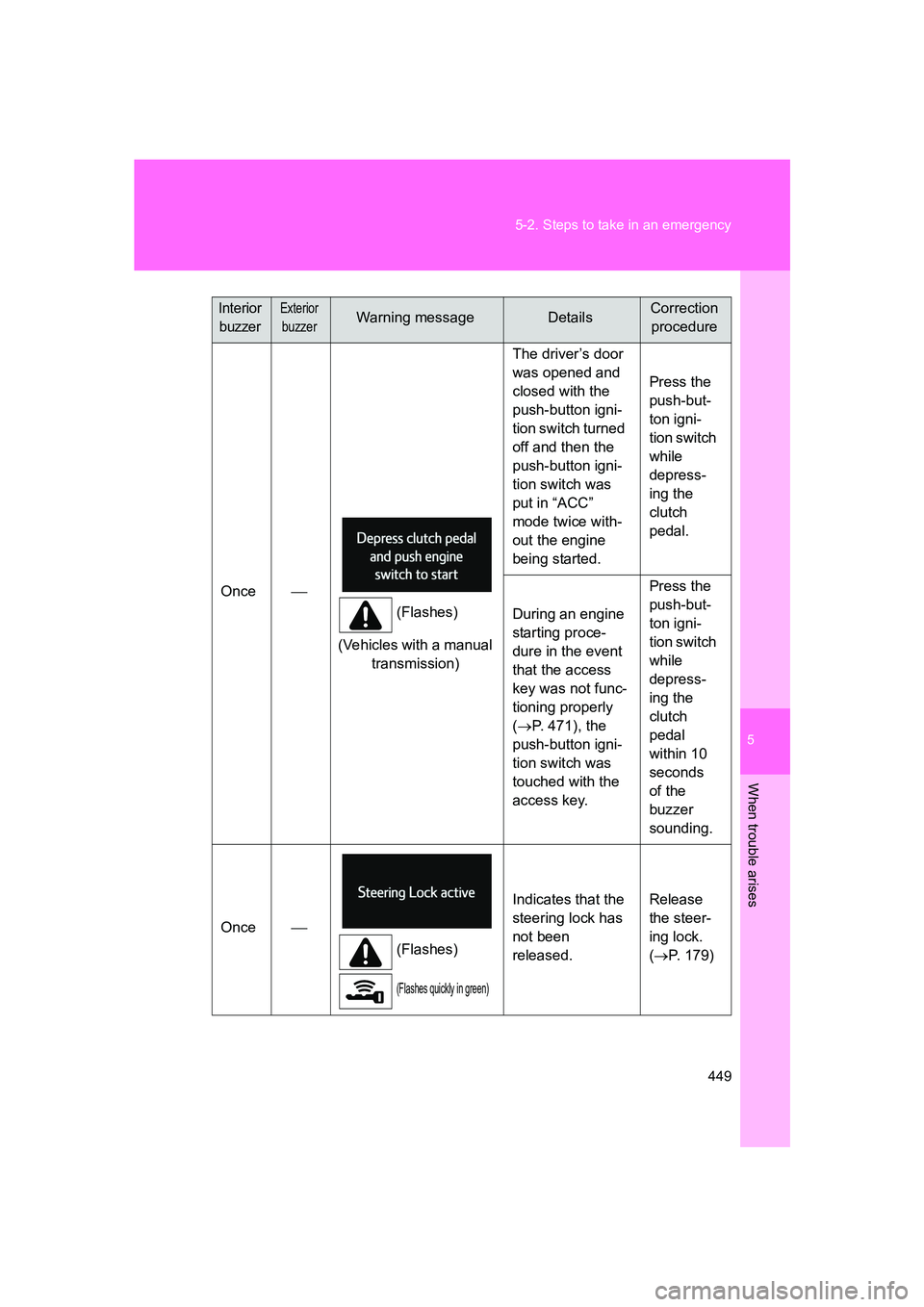
(Vehicles with a manual transmission) The driver’s door
was opened and
closed with the
push-button igni-
tion switch turned
off and then the
push-button igni-
tion switch was
put in “ACC”
mode twice with-
out the engine
being started.
Press the
push-but-
ton igni-
tion switch
while
depress-
ing the
clutch
pedal.
During an engine
starting proce-
dure in the event
that the access
key was not func-
tioning properly
( → P. 471), the
push-button igni-
tion switch was
touched with the
access key. Press the
push-but-
ton igni-
tion switch
while
depress-
ing the
clutch
pedal
within 10
seconds
of the
buzzer
sounding.
Once
(Flashes)
(Flashes quickly in green)
Indicates that the
steering lock has
not been
released. Release
the steer-
ing lock.
(
→ P. 179)
Interior
buzzerExterior
buzzerWarning messageDetailsCorrection procedure
Page 470 of 560
470
5-2. Steps to take in an emergency
BRZ_U
If the access key does not operate properly (vehicles with a keyless access with push button star t system)
Unlocking and locking the doors, unlocking the trunk lidUse the mechanical key built in to the access keys to operate the
doors and trunk lid. ( →P. 23)
The mechanical key is directional. If the key cannot be inserted,
change the direction that the grooved side is facing and insert it
again.
Vehicles with an alarm: An alarm will sound if the alarm is set when the
trunk lid or doors are unlocked. ( →P. 87)
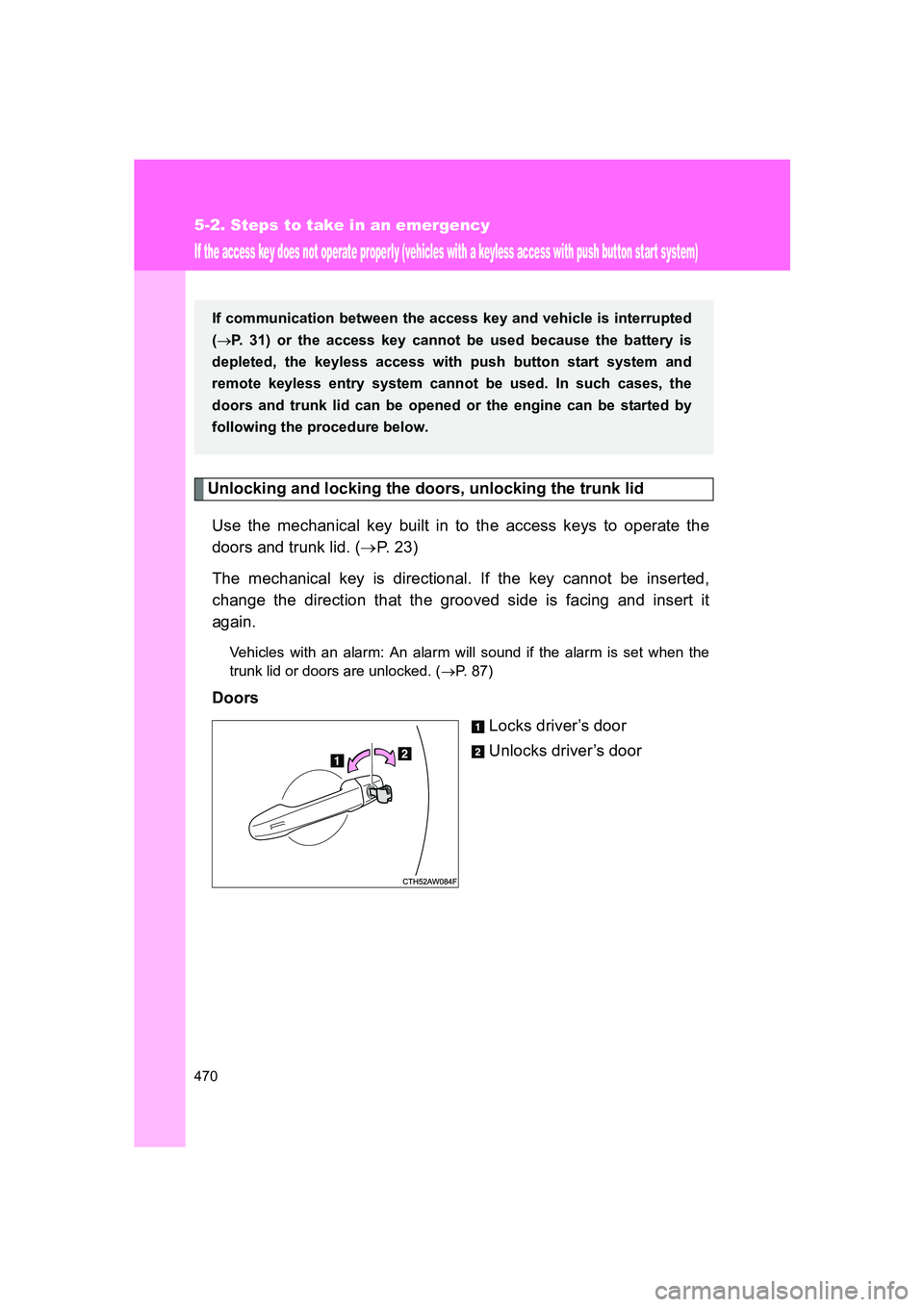
Doors
Locks driver’s door
Unlocks driver’s door
If communication between the access key and vehicle is interrupted
(→ P. 31) or the access key cannot be used because the battery is
depleted, the keyless access with push button start system and
remote keyless entry system canno t be used. In such cases, the
doors and trunk lid can be opened or the engine can be started by
following the procedure below.
Page 473 of 560
5
When trouble arises
473
5-2. Steps to take in an emergency
BRZ_U
■
Stopping the engine
Vehicles with an automatic transmission: Shift the select lever to P and press
the push-button ignition switch as you normally do when stopping the
engine.
Vehicles with a manual transmission: Shift the shift lever to neutral and press
the push-button ignition switch as you normally do when stopping the
engine.
■ Replacing the key battery
As the above procedure is a temporary measure, it is recommended that the
access key battery be replaced immediately when the battery depletes.
(→ P. 387)
■ Alarm (if equipped)
Using the mechanical key to lock the doors will not set the alarm system.
If a door is unlocked using the mechanical key when the alarm system is set,
the alarm may be triggered. ( →P. 87)
■ If the doors cannot be locked or unlocked by the keyless access with
push button start system
Lock and unlock the doors by the mechanical key or remote keyless entry
system.
Page 476 of 560
476 5-2. Steps to take in an emergency
BRZ_U
■Starting the engine when the battery is discharged
The engine cannot be started by push-starting.
■ Avoiding a discharged battery
●Turn off the headlights and the air conditioning system while the engine is
off.
● Turn off any unnecessary electrical components when the vehicle is run-
ning at a low speed for an extended period, such as in heavy traffic, etc.
■ Charging the battery
The electricity stored in the battery will discharge gradually even when the
vehicle is not in use, due to natural discharge and the draining effects of cer-
tain electrical appliances. If the vehicle is left for a long time, the battery may
discharge, and the engine may be unable to start. (The battery recharges
automatically during driving.)
■ Precautions when the battery is discharged (vehicles with a keyless
access with push button start system)
●In some cases, it may not be possible to unlock the doors using the key-
less access with push button start system when the battery is dis-
charged. Use the remote keyless entry system or the mechanical key to
lock or unlock the doors.
● The engine may not start on the first attempt after the battery has
recharged but will start normally after the second attempt. This is not a
malfunction.
● The push-button ignition switch mode is memorized by the vehicle. When
the battery is reconnected, the system will return to the mode it was in
before the battery was discharged. Before disconnecting the battery, turn
the push-button ignition switch off.
If you are unsure what mode the push-button ignition switch was in
before the battery discharged, be especially careful when reconnecting
the battery.
Page 515 of 560
515
6
Vehicle specifications
BRZ_U
6-2. Customization
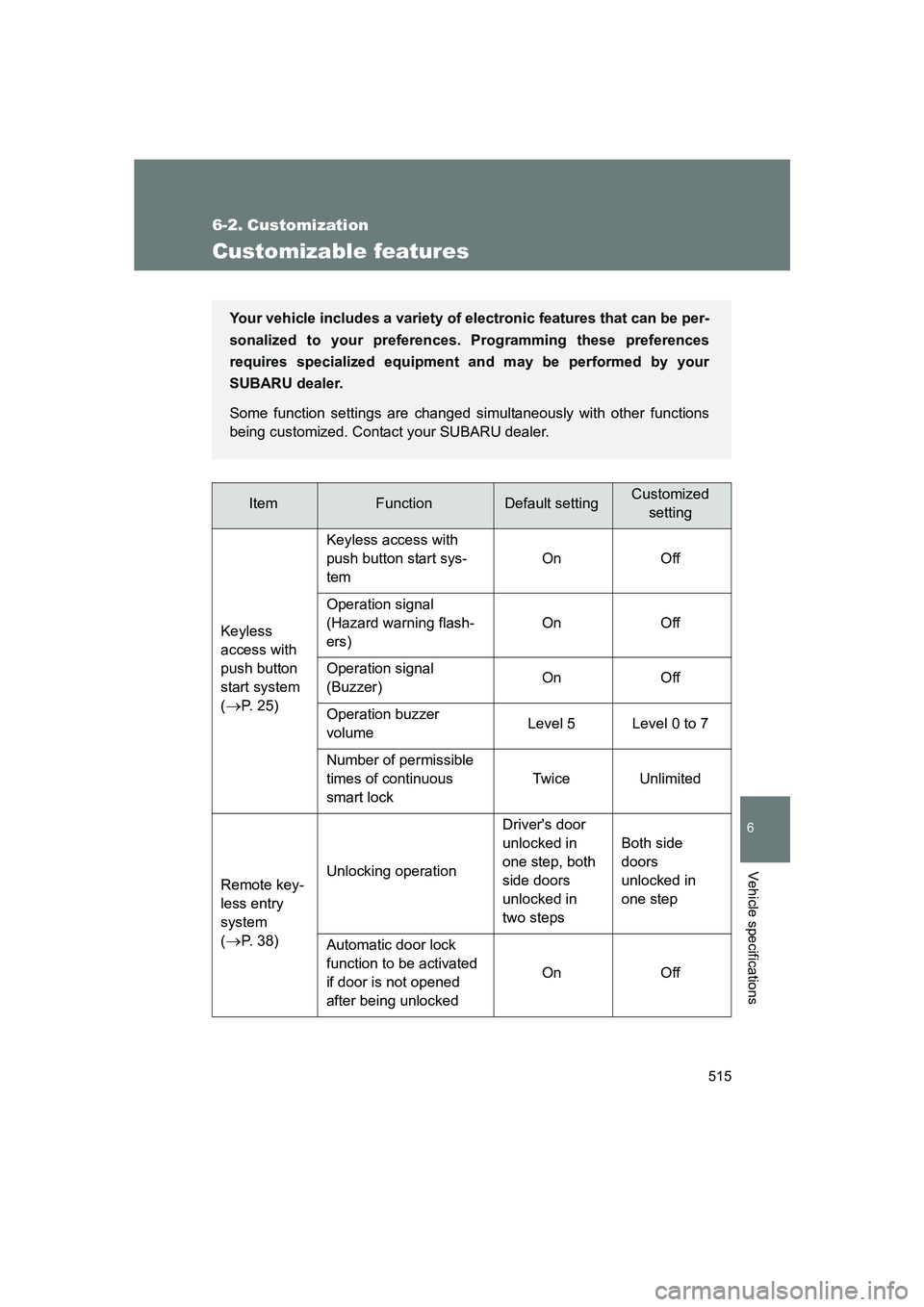
Customizable features
ItemFunctionDefault settingCustomizedsetting
Keyless
access with
push button
start system
(
→P. 25) Keyless access with
push button start sys-
tem
On Off
Operation signal
(Hazard warning flash-
ers) On Off
Operation signal
(Buzzer) On Off
Operation buzzer
volume Level 5 Level 0 to 7
Number of permissible
times of continuous
smart lock Twice Unlimited
Remote key-
less entry
system
(
→P. 38) Unlocking operation
Driver's door
unlocked in
one step, both
side doors
unlocked in
two stepsBoth side
doors
unlocked in
one step
Automatic door lock
function to be activated
if door is not opened
after being unlocked On Off
Your vehicle includes a variety of
electronic features that can be per-
sonalized to your preferences. Programming these preferences
requires specialized equipment and may be performed by your
SUBARU dealer.
Some function settings are changed simultaneously with other functions
being customized. Contact your SUBARU dealer.
Page 516 of 560
516 6-2. Customization
BRZ_U
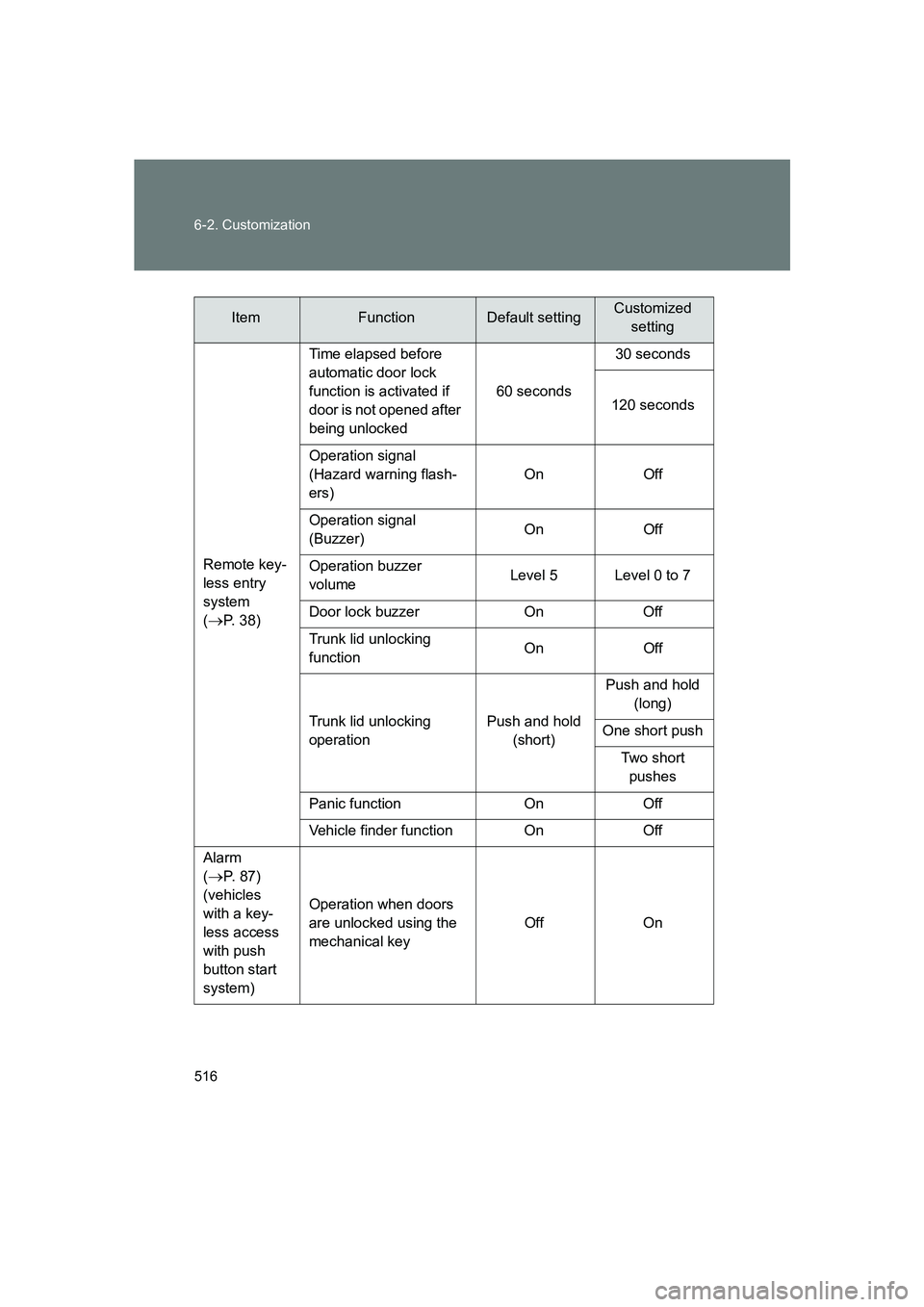
Remote key-
less entry
system
(
→P. 38)Time elapsed before
automatic door lock
function is activated if
door is not opened after
being unlocked
60 seconds30 seconds
120 seconds
Operation signal
(Hazard warning flash-
ers) On Off
Operation signal
(Buzzer) On Off
Operation buzzer
volume Level 5 Level 0 to 7
Door lock buzzer On Off
Trunk lid unlocking
function On Off
Trunk lid unlocking
operation Push and hold
(short) Push and hold
(long)
One short push Two short pushes
Panic function On Off
Vehicle finder function On Off
Alarm
(
→P. 87)
(vehicles
with a key-
less access
with push
button start
system) Operation when doors
are unlocked using the
mechanical key
Off On
ItemFunctionDefault settingCustomized
setting