instrument cluster SUBARU BRZ 2020 User Guide
[x] Cancel search | Manufacturer: SUBARU, Model Year: 2020, Model line: BRZ, Model: SUBARU BRZ 2020Pages: 560, PDF Size: 9.54 MB
Page 207 of 560
207
2-2. Instrument cluster
2
When driving
BRZ_U
*5: The front passenger’s frontal airbag ON and OFF indicators show
you the status of the front passenger’s SRS frontal airbag. When the
engine switch is turned to the “ON” position, (vehicles without a key-
less access with push button start system), or the push-button ignition
switch is turned to “ON” mode (vehicles with a keyless access with
push button start system), both the ON and OFF indicators illuminate
for 6 seconds during the system check. After the system check, both
the ON and OFF indicators turn off for 2 seconds. Then, either the
ON or OFF indicator illuminates depending on the condition of the
front passenger’s frontal airbag.
When the OFF indicator remains off and ON indicator illuminates, the
front passenger’s frontal airbag may deploy during a collision. When
the OFF indicator illuminates and ON indicator remains off, the front
passenger’s frontal airbag does not deploy during a collision.
If the front passenger’s frontal airbag ON and OFF indicators remain
on when the engine switch is turned to the “ON” position (vehicles
without a keyless access with push button start system) or the push-
button ignition switch is turned to “ON” mode (vehicles with a keyless
access with push button start system), or the indicators remain off
after the system check, the system may be malfunctioning. Have the
vehicle inspected by your SUBARU dealer immediately.
Page 208 of 560
208 2-2. Instrument cluster
BRZ_U
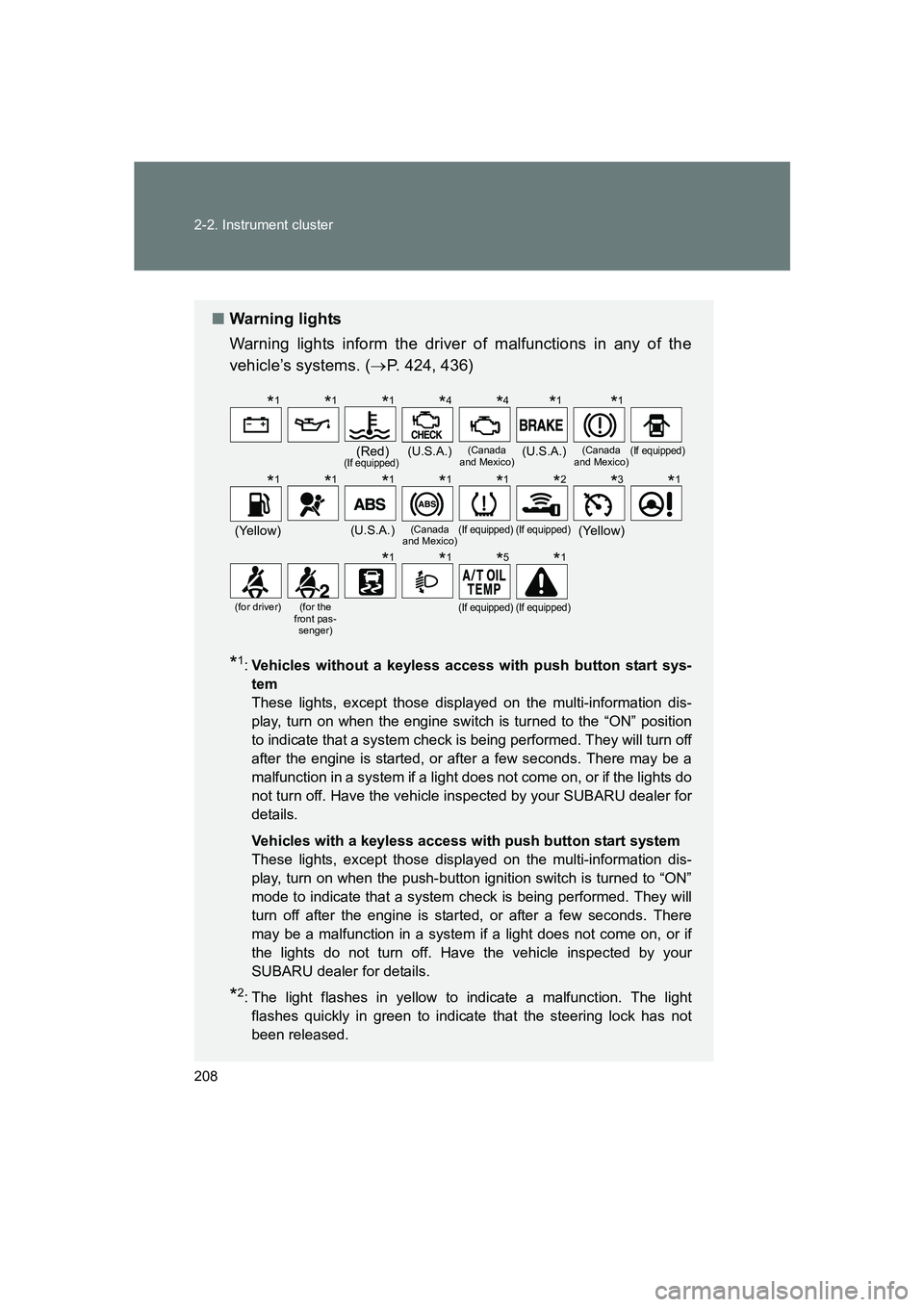
■Warning lights
Warning lights inform the driver of malfunctions in any of the
vehicle’s systems. ( →P. 424, 436)
*1:Vehicles without a keyless access with push button start sys-
tem
These lights, except those displayed on the multi-information dis-
play, turn on when the engine switch is turned to the “ON” position
to indicate that a system check is being performed. They will turn off
after the engine is started, or after a few seconds. There may be a
malfunction in a system if a light does not come on, or if the lights do
not turn off. Have the vehicle inspected by your SUBARU dealer for
details.
Vehicles with a keyless access with push button start system
These lights, except those displayed on the multi-information dis-
play, turn on when the push-button ignition switch is turned to “ON”
mode to indicate that a system check is being performed. They will
turn off after the engine is started, or after a few seconds. There
may be a malfunction in a system if a light does not come on, or if
the lights do not turn off. Have the vehicle inspected by your
SUBARU dealer for details.
*2: The light flashes in yellow to indicate a malfunction. The light flashes quickly in green to indicate that the steering lock has not
been released.
(Red)(If equipped)(U.S.A.)(Canada
and Mexico)(U.S.A.)(Canada
and Mexico)(If equipped)
(Yellow)(U.S.A.)(Canada
and Mexico)(If equipped)(If equipped)(Yellow)
(for driver)(for the
front pas- senger)(If equipped)(If equipped)
*1*1*1*4*4*1*1
*1*1*1*1*1*2*3*1
*1*1*5*1
Page 209 of 560
209
2-2. Instrument cluster
2
When driving
BRZ_U
WARNING
■
If a safety system warning light does not come on
Should a safety system light such as the ABS and SRS airbag system warn-
ing light not come on when you start the engine, this could mean that these
systems are not available to help protect you in an accident, which could
result in death or serious injury. Have the vehicle inspected by your
SUBARU dealer immediately if this occurs.
*3: The light comes on in yellow to indicate a malfunction.
*4:Vehicles without a keyless access with push button start sys-
tem
These lights turn on when the engine switch is turned to the “ON”
position to indicate that a system check is being performed. They
will turn off after the engine is started. There may be a malfunction
in a system if a light does not come on, or if the lights do not turn off.
Have the vehicle inspected by your SUBARU dealer for details.
Vehicles with a keyless access with push button start system
These lights turn on when the push-button ignition switch is turned
to “ON” mode to indicate that a system check is being performed.
They will turn off after the engine is started. There may be a mal-
function in a system if a light does not come on, or if the lights do
not turn off. Have the vehicle inspected by your SUBARU dealer for
details.
*5: Vehicles with a monochrome multi-information display only: This light turns on when the engine switch is turned to the “ON” position
to indicate that a system check is being performed. It will turn off
after the engine is started, or after a few seconds. There may be a
malfunction in a system if the light does not come on or turn off.
Have the vehicle inspected by your SUBARU dealer for details.
Page 210 of 560
210
2-2. Instrument cluster
BRZ_U
Multi-information display (monochrome display)
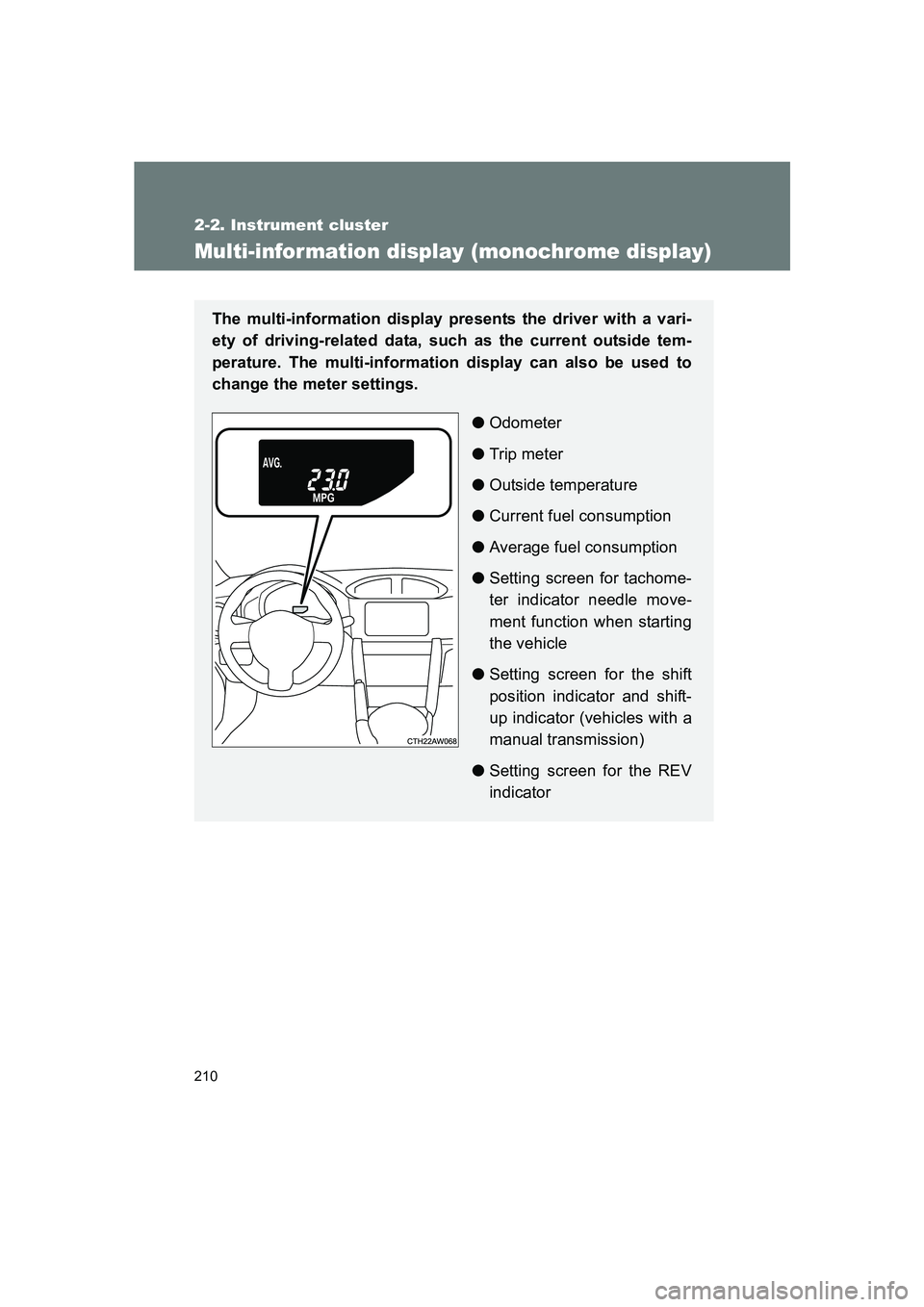
The multi-information display presents the driver with a vari-
ety of driving-related data, such as the current outside tem-
perature. The multi-information display can also be used to
change the meter settings.●Odometer
● Trip meter
● Outside temperature
● Current fuel consumption
● Average fuel consumption
● Setting screen for tachome-
ter indicator needle move-
ment function when starting
the vehicle
● Setting screen for the shift
position indicator and shift-
up indicator (vehicles with a
manual transmission)
● Setting screen for the REV
indicator
Page 211 of 560
211
2-2. Instrument cluster
2
When driving
BRZ_U
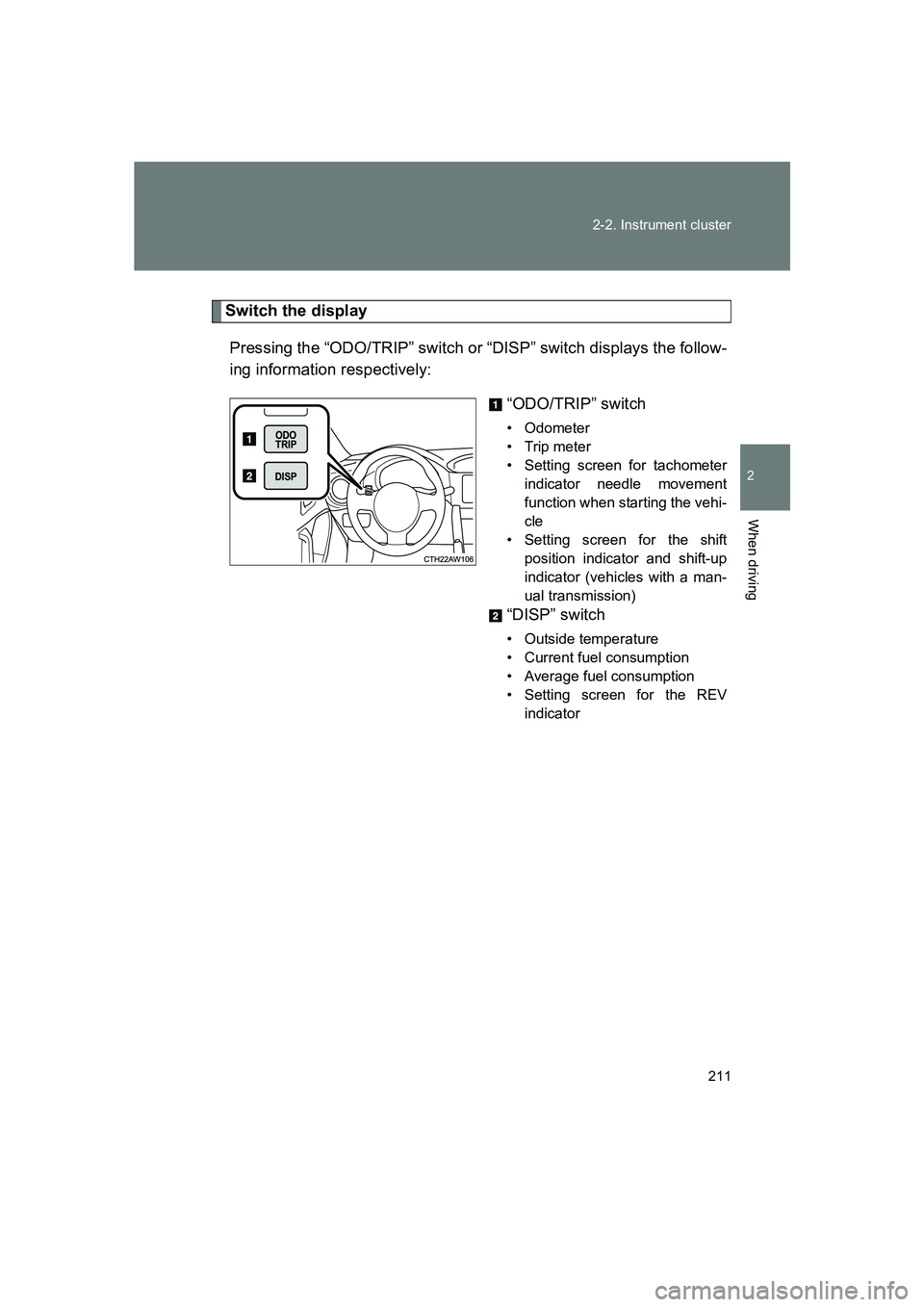
Switch the display
Pressing the “ODO/TRIP” switch or “DISP” switch displays the follow-
ing information respectively: “ODO/TRIP” switch
• Odometer
•Trip meter
• Setting screen for tachometerindicator needle movement
function when starting the vehi-
cle
• Setting screen for the shift position indicator and shift-up
indicator (vehicles with a man-
ual transmission)
“DISP” switch
• Outside temperature
• Current fuel consumption
• Average fuel consumption
• Setting screen for the REVindicator
Page 212 of 560
212 2-2. Instrument cluster
BRZ_U■
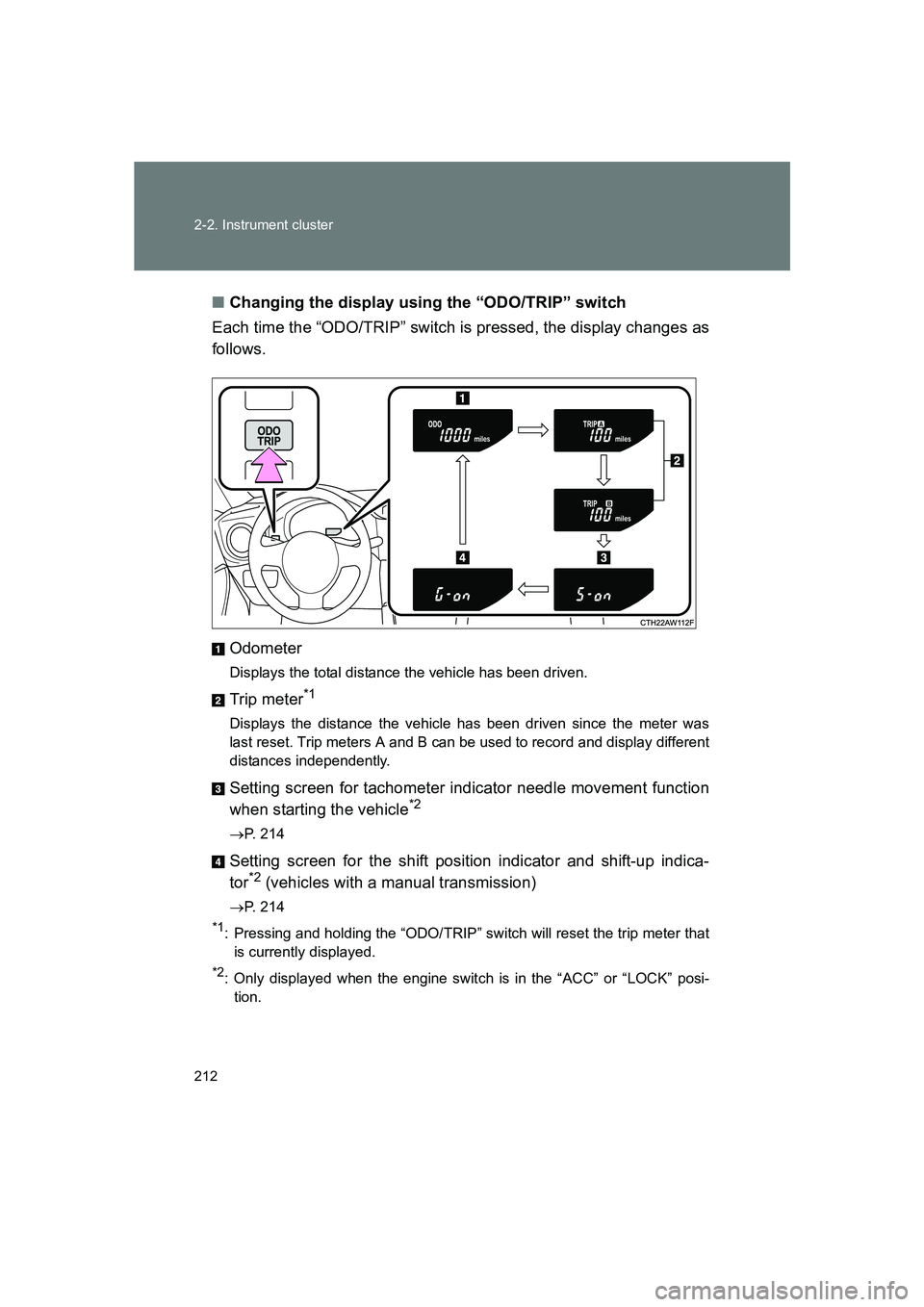
Changing the display using the “ODO/TRIP” switch
Each time the “ODO/TRIP” switch is pressed, the display changes as
follows.
Odometer
Displays the total distance the vehicle has been driven.
Trip meter*1
Displays the distance the vehicle has been driven since the meter was
last reset. Trip meters A and B can be used to record and display different
distances independently.
Setting screen for tachometer indicator needle movement function
when starting the vehicle*2
→P. 214
Setting screen for the shift position indicator and shift-up indica-
tor*2 (vehicles with a manual transmission)
→P. 214
*1: Pressing and holding the “ODO/TRIP” switch will reset the trip meter that
is currently displayed.
*2: Only displayed when the engine switch is in the “ACC” or “LOCK” posi-tion.
Page 213 of 560
213
2-2. Instrument cluster
2
When driving
BRZ_U
■
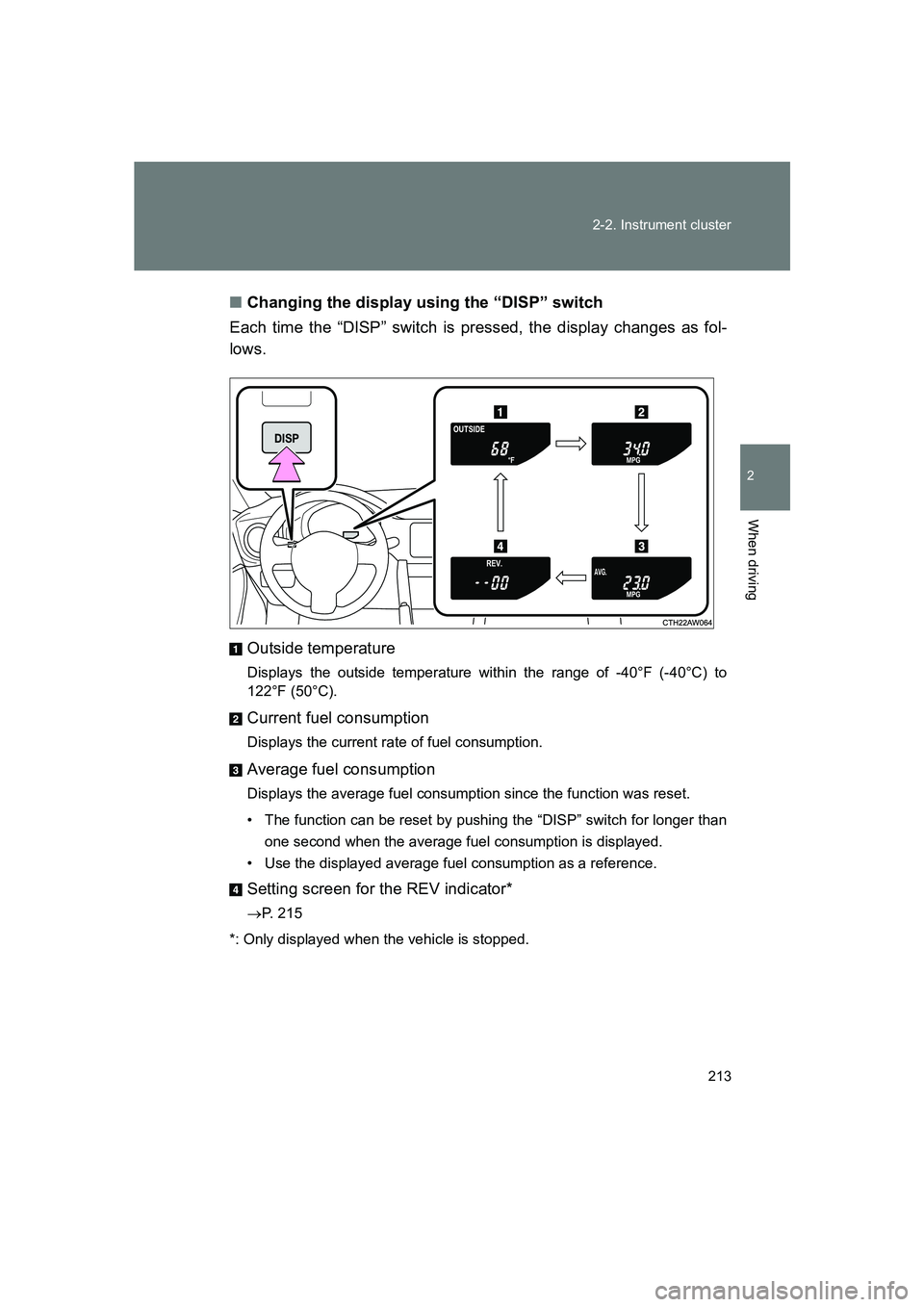
Changing the display using the “DISP” switch
Each time the “DISP” switch is pressed, the display changes as fol-
lows.
Outside temperature
Displays the outside temperature within the range of -40°F (-40°C) to
122°F (50°C).
Current fuel consumption
Displays the current rate of fuel consumption.
Average fuel consumption
Displays the average fuel consumption since the function was reset.
• The function can be reset by pushing the “DISP” switch for longer than one second when the average fuel consumption is displayed.
• Use the displayed average fuel consumption as a reference.
Setting screen for the REV indicator*
→ P. 215
*: Only displayed when the vehicle is stopped.
Page 214 of 560
214 2-2. Instrument cluster
BRZ_U
Tachometer indicator needle movement function when starting
the vehicleWhen the engine switch is turned to “ON” position, the tachometer
indicator needle points to the highest value once and then quickly
returns.
■ Changing between activated/deactivated
Press the “ODO/TRIP” switch repeatedly until the setting
screen is displayed. ( →P. 212)
Each time the switch is pressed and held, the function
changes between activated/deactivated.
“S-on”: Activated
“S-oFF”: Deactivated
Setting the shift position indicator and shift-up indicator
(vehicles with a manual transmission)
Displaying of the shift position indicator and shift-up indicator can be
turned on/off. Press the “ODO/TRIP” switch repeatedly until the setting
screen is displayed. ( →P. 212)
Each time the switch is pressed and held, the display changes
between on/off.
“G-on”: Display on
“G-oFF”: Display off
STEP 1
STEP 2
STEP 1
STEP 2
Page 215 of 560
215
2-2. Instrument cluster
2
When driving
BRZ_U
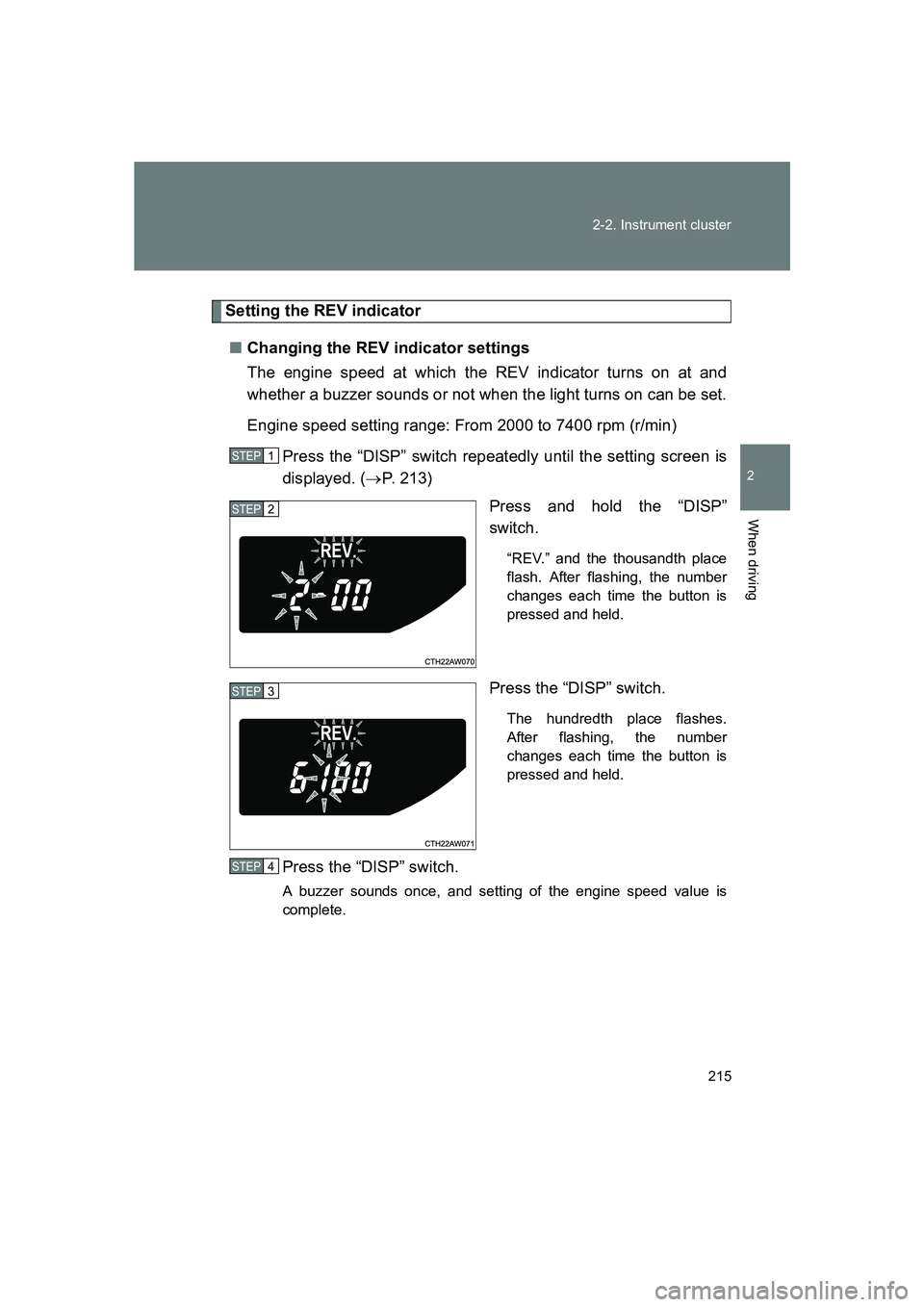
Setting the REV indicator
■ Changing the REV indicator settings
The engine speed at which the REV indicator turns on at and
whether a buzzer sounds or not when the light turns on can be set.
Engine speed setting range: From 2000 to 7400 rpm (r/min)
Press the “DISP” switch repeatedly until the setting screen is
displayed. ( →P. 213)
Press and hold the “DISP”
switch.
“REV.” and the thousandth place
flash. After flashing, the number
changes each time the button is
pressed and held.
Press the “DISP” switch.
The hundredth place flashes.
After flashing, the number
changes each time the button is
pressed and held.
Press the “DISP” switch.
A buzzer sounds once, and setting of the engine speed value is
complete.
STEP 1
STEP 2
STEP 3
STEP 4
Page 216 of 560
216 2-2. Instrument cluster
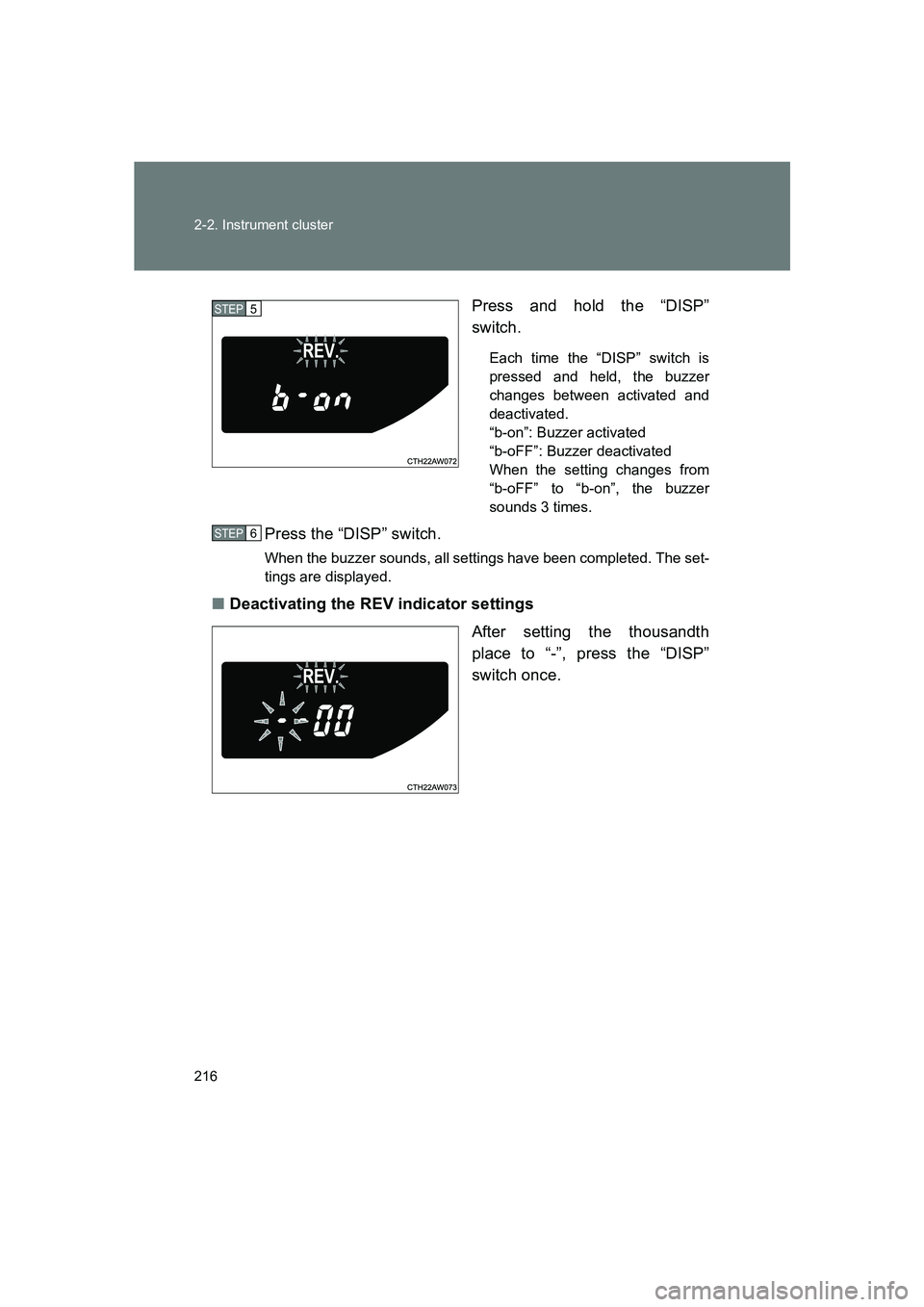
BRZ_UPress and hold the “DISP”
switch.
Each time the “DISP” switch is
pressed and held, the buzzer
changes between activated and
deactivated.
“b-on”: Buzzer activated
“b-oFF”: Buzzer deactivated
When the setting changes from
“b-oFF” to “b-on”, the buzzer
sounds 3 times.
Press the “DISP” switch.
When the buzzer sounds, all settings have been completed. The set-
tings are displayed.
■
Deactivating the REV indicator settings
After setting the thousandth
place to “-”, press the “DISP”
switch once.
STEP 5
STEP 6