warning SUBARU BRZ 2023 Owners Manual
[x] Cancel search | Manufacturer: SUBARU, Model Year: 2023, Model line: BRZ, Model: SUBARU BRZ 2023Pages: 432, PDF Size: 16.56 MB
Page 172 of 432
Center Information Display (CID)
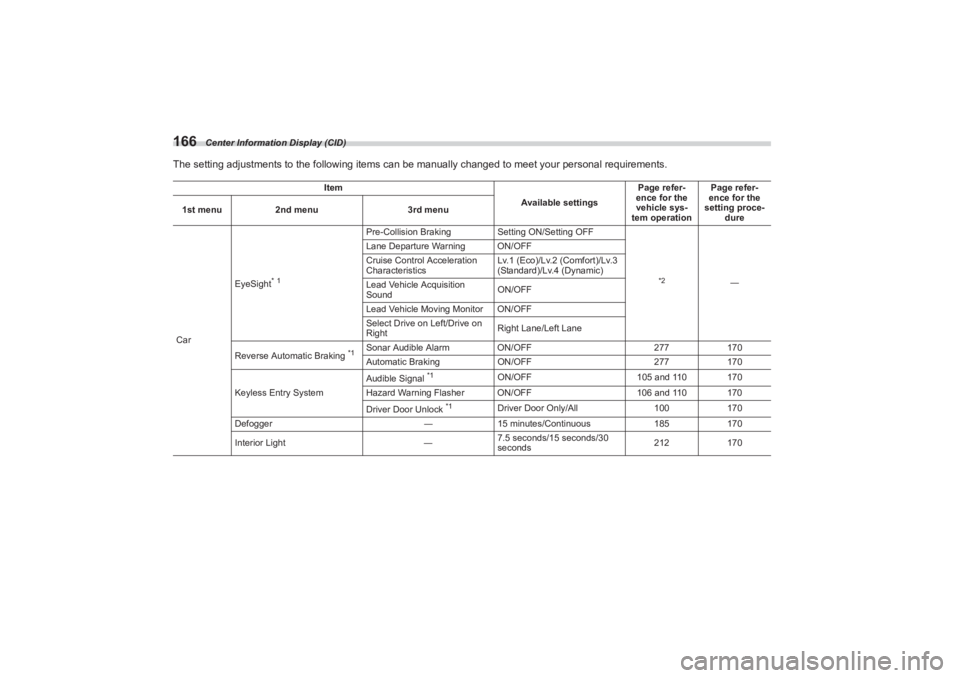
166The setting adjustments to the following items can be manually changed to meet your personal requirements.
Item
Available settingsPage refer-
ence for the
vehicle sys-
tem operation Page refer-
ence for the
setting proce- dure
1st menu
2nd menu 3rd menu
Car EyeSight
* 1
Pre-Collision Braking
Setting ON/Setting OFF
*2
―
Lane Departure Warning ON/OFF
Cruise Control Acceleration
Characteristics
Lv.1 (Eco)/Lv.2 (Comfort)/Lv.3
(Standard)/Lv.4 (Dynamic)
Lead Vehicle Acquisition
Sound ON/OFF
Lead Vehicle Moving Monitor ON/OFF
Select Drive on Left/Drive on
Right Right Lane/Left Lane
Reverse Automatic Braking
*1
Sonar Audible Alarm ON/OFF 277170
Automatic Braking ON/OFF 277170
Keyless Entry System Audible Signal
*1
ON/OFF
105 and 110 170
Hazard Warning Flasher ON/OFF 106 and 110 170
Driver Door Unlock
*1
Driver Door Only/All 100170
Defogger ―15 minutes/Continuous 185170
Interior Light ―7.5 seconds/15 seconds/30
seconds 212
170
BRZ_U.book 166 ページ 2022年3月29日 火曜日 午後3時59分
Page 173 of 432
Center Information Display (CID)
167
Instruments and Controls3
– CONTINUED –
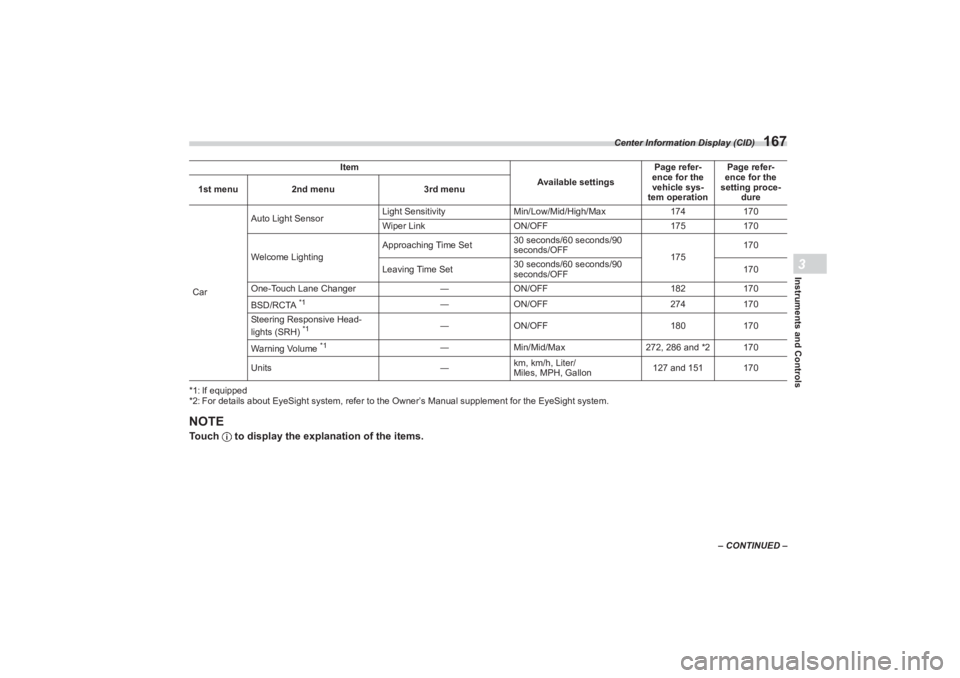
*1: If equipped
*2: For details about EyeSight system, refer to the
Owner’s Manual supplement for the EyeSight system.
NOTETouch to display the explanation of the items.CarAuto Light Sensor
Light Sensitivity
Min/Low/Mid/High/Max 174170
Wiper Link ON/OFF 175170
Welcome Lighting Approaching Time Set
30 seconds/60 seconds/90
seconds/OFF
175170
Leaving Time Set 30 seconds/60 seconds/90
seconds/OFF 170
One-Touch Lane Changer ―ON/OFF 182170
BSD/RCTA
*1
― ON/OFF 274170
Steering Responsive Head-
lights (SRH)
*1
― ON/OFF 180170
Warning Volume
*1
― Min/Mid/Max 272, 286 and *2 170
Units ―km, km/h, Liter/
Miles, MPH, Gallon 127 and 151 170
Item
Available settingsPage refer-
ence for the
vehicle sys-
tem operation Page refer-
ence for the
setting proce-
dure
1st menu
2nd menu 3rd menu
BRZ_U.book 167 ページ 2022年3月29日 火曜日 午後3時59分
Page 175 of 432
Center Information Display (CID)
169
Instruments and Controls3
– CONTINUED –
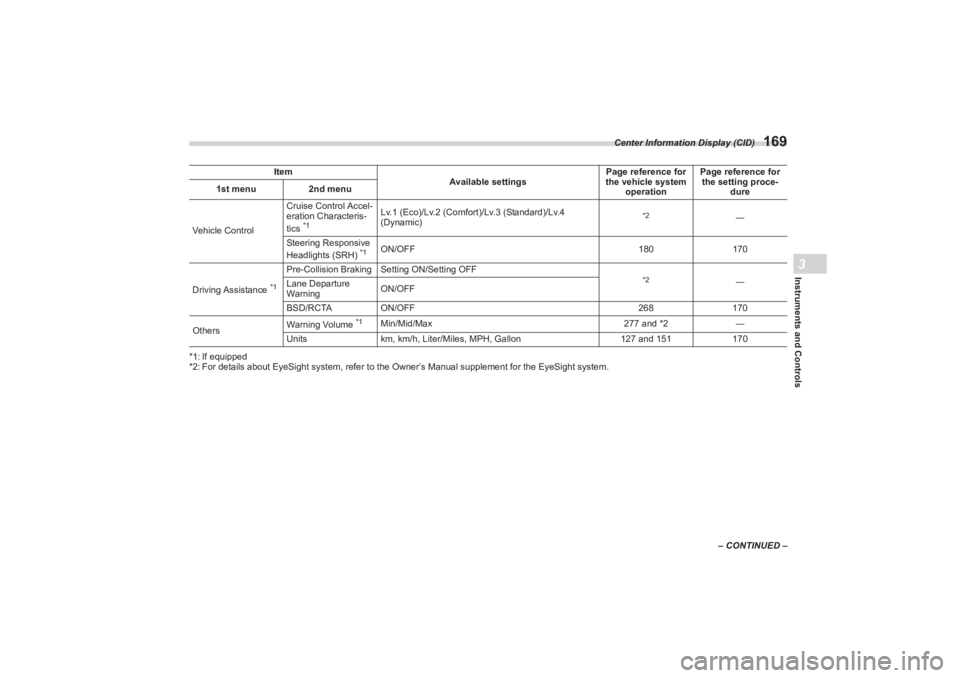
*1: If equipped
*2: For details about EyeSight system, refer to the
Owner’s Manual supplement for the EyeSight system.
Item
Available settingsPage reference for
the vehicle system
operation Page reference for
the setting proce-
dure
1st menu
2nd menu
Vehicle Control Cruise Control Accel-
eration Characteris-
tics
*1
Lv.1 (Eco)/Lv.2 (Comfort)/Lv.3 (Standard)/Lv.4
(Dynamic)
*2
―
Steering Responsive
Headlights (SRH)
*1
ON/OFF 180170
Driving Assistance
*1
Pre-Collision Braking S etting ON/Setting OFF
*2
―
Lane Departure
Warning ON/OFF
BSD/RCTA ON/OFF 268170
Others Warning Volume
*1
Min/Mid/Max
277 and *2―
Units km, km/h, Liter/Miles, MPH, Gallon 127 and 151170
BRZ_U.book 169 ページ 2022年3月29日 火曜日 午後3時59分
Page 184 of 432
Light Control Switch
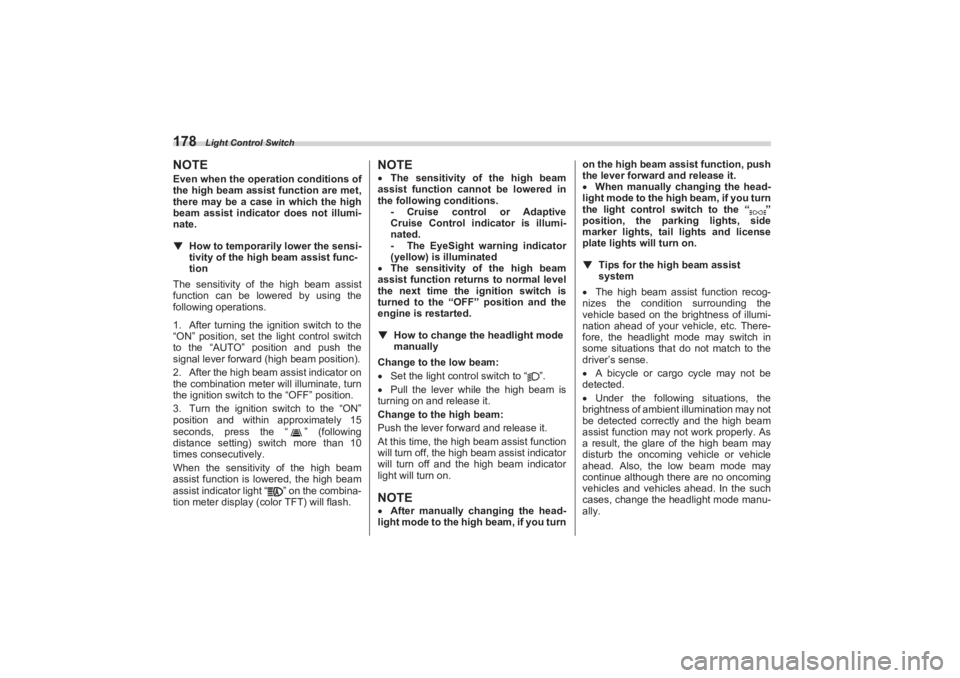
178NOTEEven when the operation conditions of
the high beam assist function are met,
there may be a case in which the high
beam assist indicator does not illumi-
nate.▼ How to temporarily lower the sensi -
tivity of the high beam assist func -
tion
The sensitivity of the high beam assist
function can be lowered by using the
following operations.
1. After turning the ignition switch to the
“ON” position, set the light control switch
to the “AUTO” position and push the
signal lever forward (high beam position).
2. After the high beam assist indicator on
the combination meter will illuminate, turn
the ignition switch to the “OFF” position.
3. Turn the ignition switch to the “ON”
position and within approximately 15
seconds, press the “ ” (following
distance setting) switch more than 10
times consecutively.
When the sensitivity of the high beam
assist function is lowered, the high beam
assist indicator light “ ” on the combina-
tion meter display (col or TFT) will flash.
NOTEThe sensitivity of the high beam
assist function cannot be lowered in
the following conditions. - Cruise control or Adaptive
Cruise Control indicator is illumi-
nated.
- The EyeSight warning indicator
(yellow) is illuminated
The sensitivity of the high beam
assist function retu rns to normal level
the next time the ignition switch is
turned to the “OFF ” position and the
engine is restarted.
▼ How to change the headlight mode
manually
Change to the low beam:
Set the light control switch to “ ”.
Pull the lever while the high beam is
turning on and release it.
Change to the high beam:
Push the lever forward and release it.
At this time, the high beam assist function
will turn off, the high beam assist indicator
will turn off and the high beam indicator
light will turn on.NOTE After manually changing the head-
light mode to the high beam, if you turn on the high beam assist function, push
the lever forward and release it.
When manually changing the head-
light mode to the high beam, if you turn
the light control switch to the “ ”
position, the parking lights, side
marker lights, tail lights and license
plate lights will turn on.
▼ Tips for the high beam assist
system
The high beam assist function recog-
nizes the condition surrounding the
vehicle based on the brightness of illumi-
nation ahead of your vehicle, etc. There-
fore, the headlight mode may switch in
some situations that do not match to the
driver’s sense.
A bicycle or cargo cycle may not be
detected.
Under the following situations, the
brightness of ambient illumination may not
be detected correctly and the high beam
assist function may not work properly. As
a result, the glare of the high beam may
disturb the oncoming vehicle or vehicle
ahead. Also, the low beam mode may
continue although there are no oncoming
vehicles and vehicles ahead. In the such
cases, change the headlight mode manu-
ally.
BRZ_U.book 178 ページ 2022年3月29日 火曜日 午後3時59分
Page 186 of 432
Steering Responsive Headlight (SRH) (If Equipped)
180■Daytime Running Light
SystemThe daytime running lights will automati-
cally illuminate when the following condi-
tions are fulfilled.
The engine is running.
The parking brake is fully released.
The light control switch is in the
“AUTO”, “ ” or “OFF” position.
For AT models, the select lever is in a
position other than the “P” position.NOTE When the light switch is in the “ ”
position, the instrument panel illumina-
tion, side marker lights, tail lights and
license plate lights are also illumi-
nated.
While the headlight switch is in the
“AUTO” position and the headlights
turn on automatically, the daytime
running light is deactivated.
When the turn signal indicators are
flashing, the daytime running light on
the side that the turn signals are
flashing will turn off.
3-11. Steering Responsive
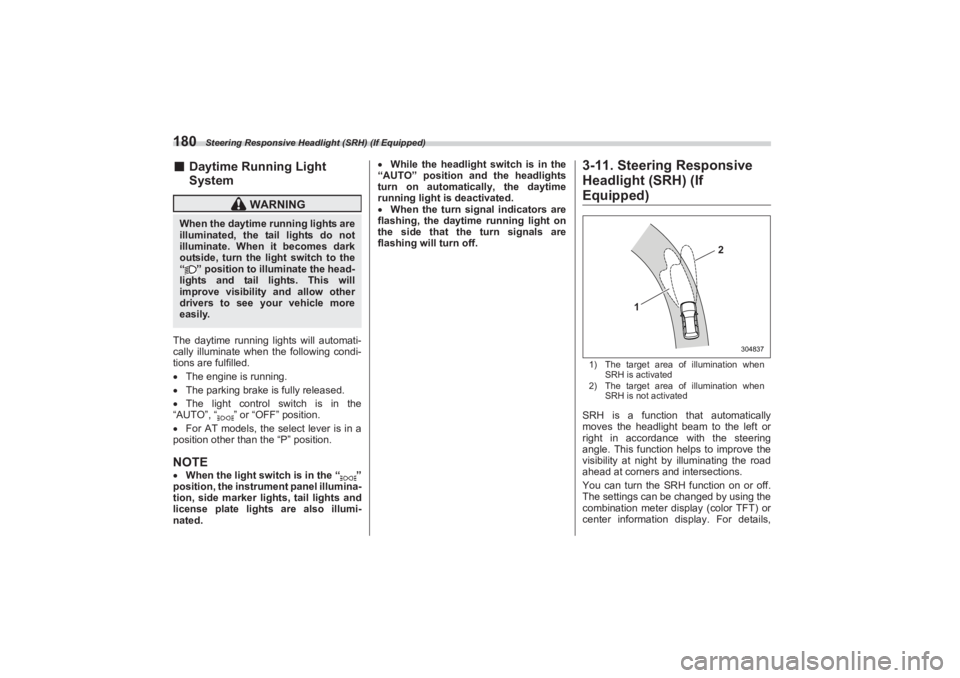
Headlight (SRH) (If Equipped)1) The target area of illumination when
SRH is activated
2) The target area of illumination when
SRH is not activatedSRH is a function that automatically
moves the headlight beam to the left or
right in accordance with the steering
angle. This function helps to improve the
visibility at night by illuminating the road
ahead at corners and intersections.
You can turn the SRH function on or off.
The settings can be changed by using the
combination meter display (color TFT) or
center information display. For details,
WARNING
When the daytime running lights are
illuminated, the tail lights do not
illuminate. When it becomes dark
outside, turn the li ght switch to the
“ ” position to illuminate the head-
lights and tail lights. This will
improve visibility and allow other
drivers to see your vehicle more
easily.
1
2
304837
BRZ_U.book 180 ページ 2022年3月29日 火曜日 午後3時59分
Page 187 of 432
Steering Responsive Headlight (SRH) (If Equipped)
181
Instruments and Controls3
refer to "Driving Support System Settings
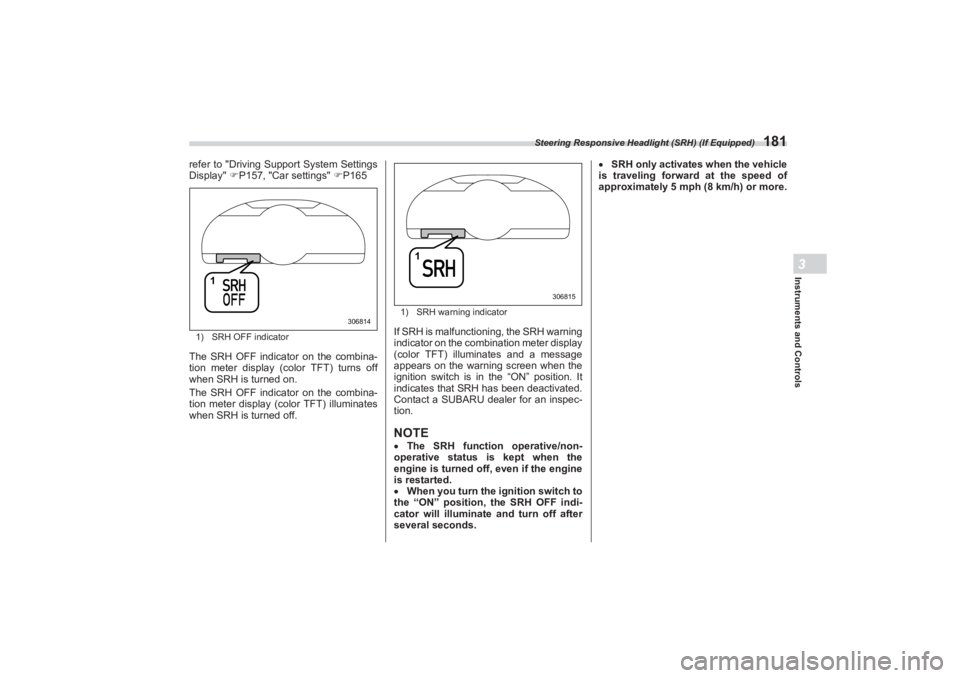
Display" P157, "Car settings" P1651) SRH OFF indicatorThe SRH OFF indicator on the combina-
tion meter display (color TFT) turns off
when SRH is turned on.
The SRH OFF indicator on the combina-
tion meter display (color TFT) illuminates
when SRH is turned off.
1) SRH warning indicatorIf SRH is malfunctioning, the SRH warning
indicator on the combination meter display
(color TFT) illuminates and a message
appears on the warning screen when the
ignition switch is in the “ON” position. It
indicates that SRH has been deactivated.
Contact a SUBARU dealer for an inspec-
tion.NOTE The SRH function operative/non-
operative status is kept when the
engine is turned off, even if the engine
is restarted.
When you turn the ignition switch to
the “ON” position, the SRH OFF indi-
cator will illuminate and turn off after
several seconds.
SRH only activates when the vehicle
is traveling forward at the speed of
approximately 5 mph (8 km/h) or more.
1
306814
1
306815
BRZ_U.book 181 ページ 2022年3月29日 火曜日 午後3時59分
Page 189 of 432
Wiper and Washer
183
Instruments and Controls3
– CONTINUED –
3-14. Wiper and Washer
NOTEThe windshield wiper motor is
protected against overloads by a
circuit breaker. If the motor operates
continuously under an unusually
heavy load, the circuit breaker may trip
to stop the motor temporarily. If this
happens, park your vehicle in a safe
location, turn off th e wiper switch, and
wait for approximately 10 minutes. The
circuit breaker will reset itself, and the
wipers will again operate normally.
Clean your blade rubbers and
window glass periodically with a
washer solution to prevent streaking,
WARNING
In freezing weather, do not use the
windshield washer until the wind-
shield is sufficiently warmed by the
defroster.Otherwise the washer fluid can
freeze on the windshield, blocking
your view.
CAUTION
Do not operate the washer contin-
uously for more than 10 seconds,
or when the washer fluid tank is
empty. This may cause over-
heating of the washer motor.
Check the washer fluid level
frequently, such as at fuel stops. Do not operate the wipers when
the windshield is dry. This may
scratch the glass, damage the
blade rubbers and cause the
wiper motor to bu rn out. Before
operating the wiper on a dry wind-
shield always use the windshield
washer.
In freezing weather, be sure that
the blade rubbers are not frozen
to the windshield before
switching on the wipers.
Attempting to op erate the wiper
with the blade rubbers frozen to
the window glass could cause not
only the blade rubbers to be
damaged but also might cause
the wiper motor to fail. If the blade
rubbers are frozen to the window
glass, be sure to operate the
defroster before turning on the
wiper. If the wipers stop during opera-
tion because of ice or some other
obstruction on the window, this
might cause the wiper motor to
fail even if the wiper switch is
turned off. If this occurs,
promptly stop the vehicle in a
safe location, turn the ignition
switch to the “OFF” position and
clean the window glass to allow
proper wiper operation.
Use clean water if windshield
washer fluid is unavailable. In
areas where water freezes in
winter, use SUBARU Windshield
Washer Fluid or the equivalent.
Refer to "Windshield Washer
Fluid" P366.
Also, when driving the vehicle
when there are freezing tempera-
tures, use non-freezing type
wiper blades. Do not clean the wiper blades
with gasoline or a solvent, such
as paint thinner or benzine. This
will cause deterioration of the
wiper blades.
BRZ_U.book 183 ページ 2022年3月29日 火曜日 午後3時59分
Page 198 of 432
Mirrors
192If the garage door status indicators do not
flash, additional HomeLink
® information
and programming videos can be found
online at www.HomeLink.com and
www.youtube.com/HomeLinkGentex.
▽ Using Two-Way Communication1) Status IndicatorRecall and display (at any time) the last
recorded garage door status message
communicated to HomeLink
® by simulta-
neously pressing HomeLink® buttons 1
and 2 for 2 seconds. HomeLink
® will
display the last recorded status for 3
seconds.
If two-way communication programming is
successful, HomeLink
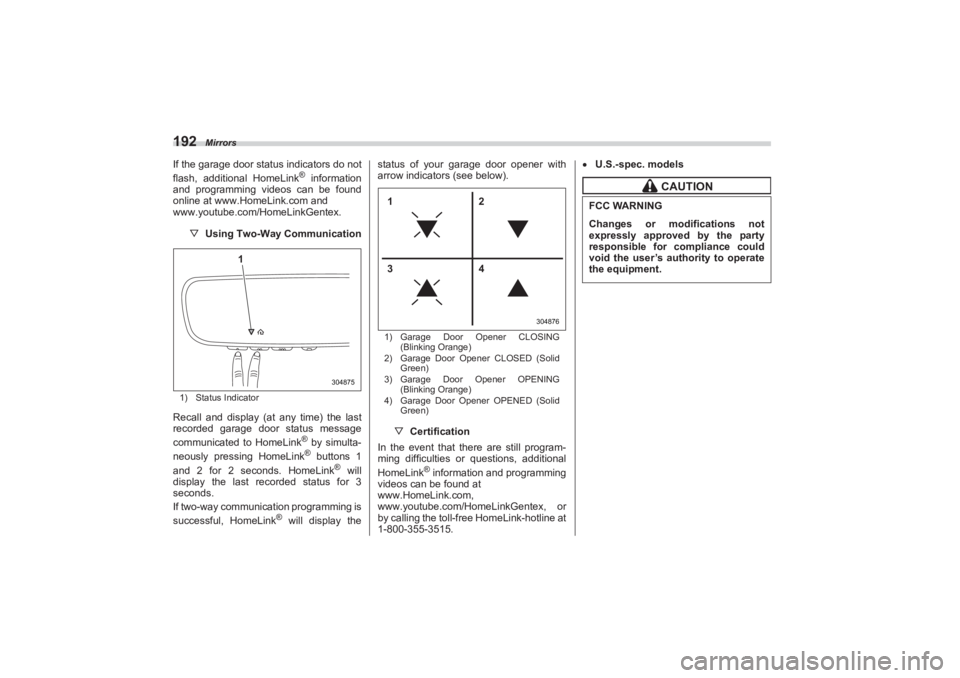
® will display the status of your garage door opener with
arrow indicators (see below).
1) Garage Door Opener CLOSING
(Blinking Orange)
2) Garage Door Opener CLOSED (Solid
Green)
3) Garage Door Opener OPENING
(Blinking Orange)
4) Garage Door Opener OPENED (Solid
Green)▽ Certification
In the event that there are still program-
ming difficulties or questions, additional
HomeLink
® information and programming
videos can be found at
www.HomeLink.com,
www.youtube.com/HomeLinkGentex, or
by calling the toll-free HomeLink-hotline at
1-800-355-3515.
U.S.-spec. models
304875
1
304876
12
34
CAUTION
FCC WARNINGChanges or modifications not
expressly approved by the party
responsible for compliance could
void the user’s authority to operate
the equipment.
BRZ_U.book 192 ページ 2022年3月29日 火曜日 午後3時59分
Page 200 of 432
Mirrors
194
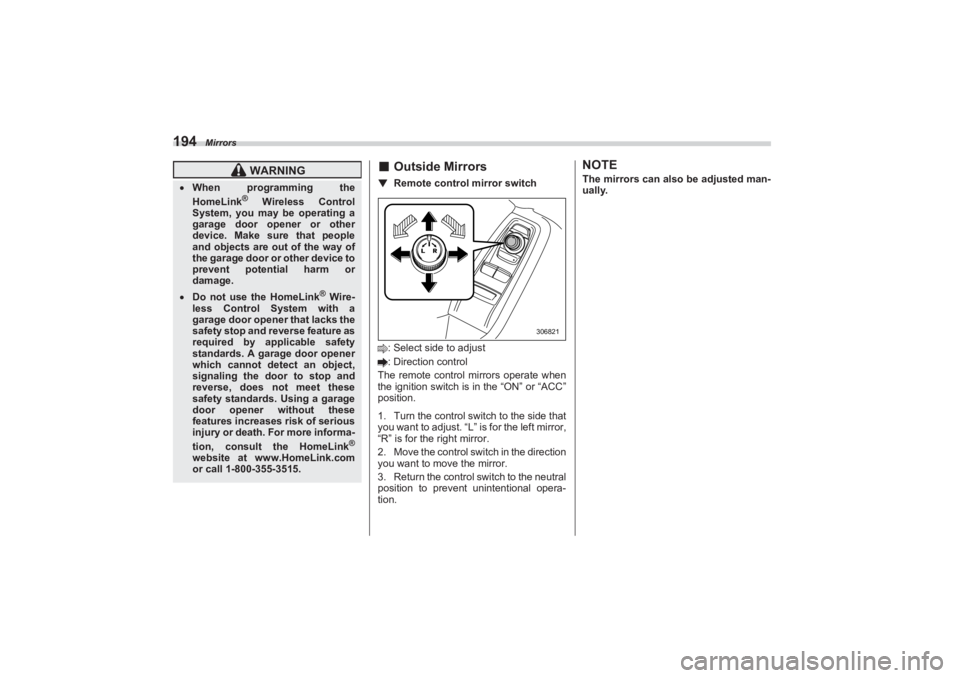
■Outside Mirrors▼ Remote control mirror switch: Select side to adjust
: Direction control
The remote control mirrors operate when
the ignition switch is in the “ON” or “ACC”
position.
1. Turn the control switch to the side that
you want to adjust. “L” is for the left mirror,
“R” is for the right mirror.
2. Move the control swit ch in the direction
you want to move the mirror.
3. Return the control switch to the neutral
position to prevent unintentional opera-
tion.
NOTEThe mirrors can also be adjusted man-
ually.
WARNING
When programming the
HomeLink
® Wireless Control
System, you may be operating a
garage door opener or other
device. Make sure that people
and objects are out of the way of
the garage door or other device to
prevent potential harm or
damage.
Do not use the HomeLink
® Wire-
less Control System with a
garage door opener that lacks the
safety stop and reverse feature as
required by applicable safety
standards. A garage door opener
which cannot detect an object,
signaling the door to stop and
reverse, does not meet these
safety standards. Using a garage
door opener without these
features increases risk of serious
injury or death. For more informa-
tion, consult the HomeLink
®
website at www.HomeLink.com
or call 1-800-355-3515.
306821
BRZ_U.book 194 ページ 2022年3月29日 火曜日 午後3時59分
Page 201 of 432
Tilt/Telescopic Steering Wheel
195
Instruments and Controls3
3-17. Tilt/Telescopic SteeringWheel
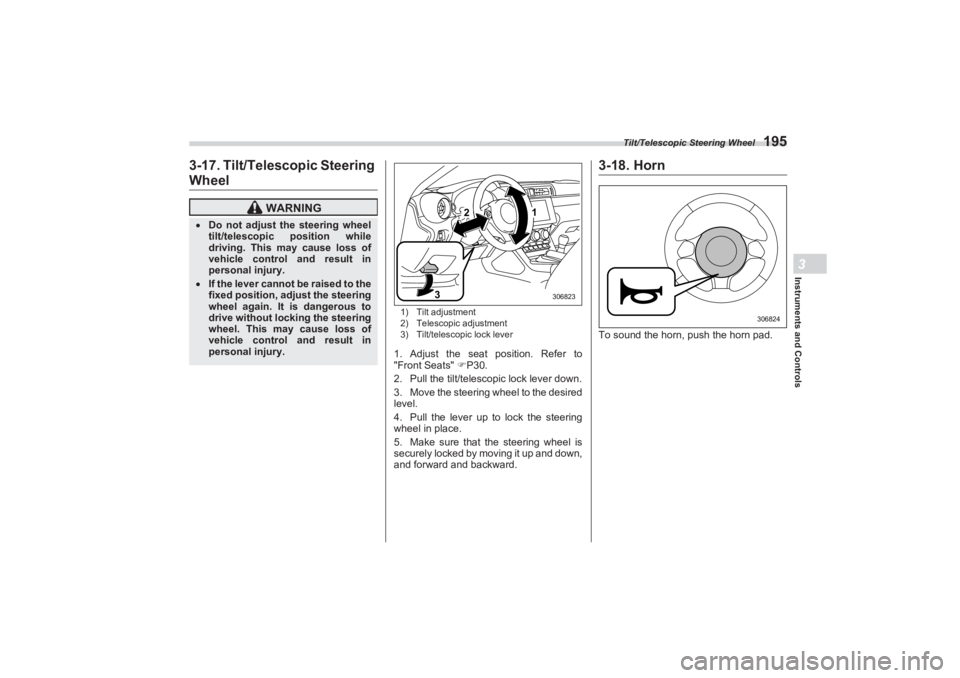
1) Tilt adjustment
2) Telescopic adjustment
3) Tilt/telescopic lock lever1. Adjust the seat position. Refer to
"Front Seats" P30.
2. Pull the tilt/telescopic lock lever down.
3. Move the steering wheel to the desired
level.
4. Pull the lever up to lock the steering
wheel in place.
5. Make sure that the steering wheel is
securely locked by moving it up and down,
and forward and backward.
3-18. HornTo sound the horn, push the horn pad.
WARNING
Do not adjust the steering wheel
tilt/telescopic position while
driving. This may cause loss of
vehicle control and result in
personal injury. If the lever cannot be raised to the
fixed position, adjust the steering
wheel again. It is dangerous to
drive without locking the steering
wheel. This may cause loss of
vehicle control and result in
personal injury.
2
3
1
306823
306824
BRZ_U.book 195 ページ 2022年3月29日 火曜日 午後3時59分