light SUBARU BRZ 2023 Owners Manual
[x] Cancel search | Manufacturer: SUBARU, Model Year: 2023, Model line: BRZ, Model: SUBARU BRZ 2023Pages: 432, PDF Size: 16.56 MB
Page 275 of 432
BSD/RCTA (If Equipped)
269
Starting and Operating7
– CONTINUED –
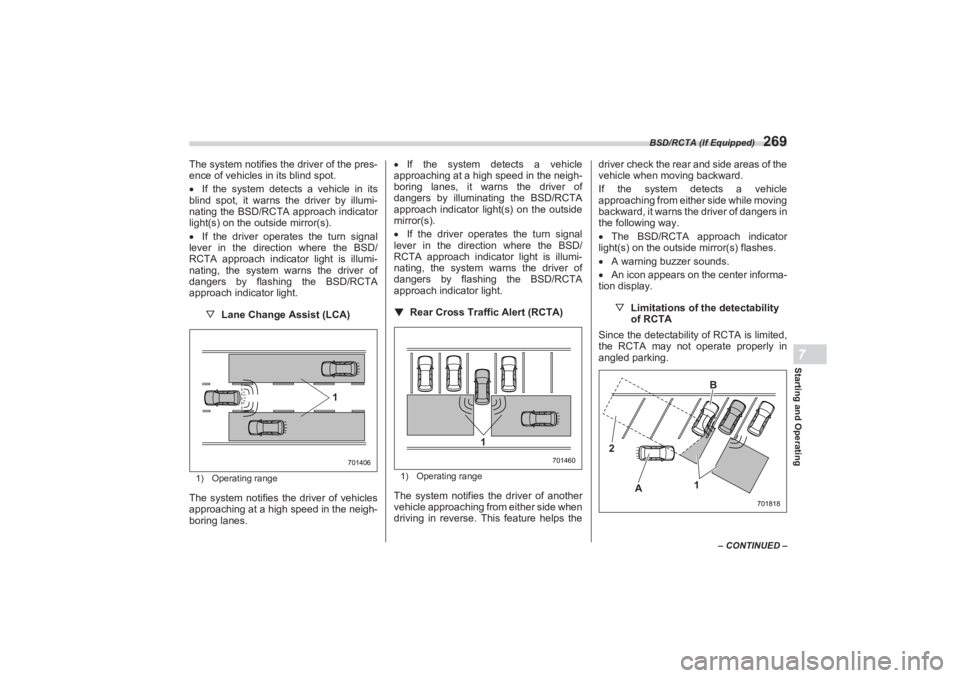
The system notifies the driver of the pres-
ence of vehicles in its blind spot.
If the system detects a vehicle in its
blind spot, it warns the driver by illumi-
nating the BSD/RCTA approach indicator
light(s) on the outside mirror(s).
If the driver operates the turn signal
lever in the direction where the BSD/
RCTA approach indicator light is illumi-
nating, the system warns the driver of
dangers by flashing the BSD/RCTA
approach indicator light.
▽ Lane Change Assist (LCA)1) Operating rangeThe system notifies the driver of vehicles
approaching at a high speed in the neigh-
boring lanes.
If the system detects a vehicle
approaching at a high speed in the neigh-
boring lanes, it warns the driver of
dangers by illuminating the BSD/RCTA
approach indicator light(s) on the outside
mirror(s).
If the driver operates the turn signal
lever in the direction where the BSD/
RCTA approach indicator light is illumi-
nating, the system warns the driver of
dangers by flashing the BSD/RCTA
approach indicator light.
▼ Rear Cross Traffic Alert (RCTA)
1) Operating rangeThe system notifies the driver of another
vehicle approaching from either side when
driving in reverse. This feature helps the driver check the rear and side areas of the
vehicle when moving backward.
If the system detects a vehicle
approaching from either side while moving
backward, it warns the driver of dangers in
the following way.
The BSD/RCTA approach indicator
light(s) on the outside mirror(s) flashes.
A warning buzzer sounds.
An icon appears on the center informa-
tion display.
▽Limitations of the detectability
of RCTA
Since the detectabilit y of RCTA is limited,
the RCTA may not operate properly in
angled parking.
701406
1
701460
1
701818
2
A B
1
BRZ_U.book 269 ページ 2022年3月29日 火曜日 午後3時59分
Page 276 of 432
BSD/RCTA (If Equipped)
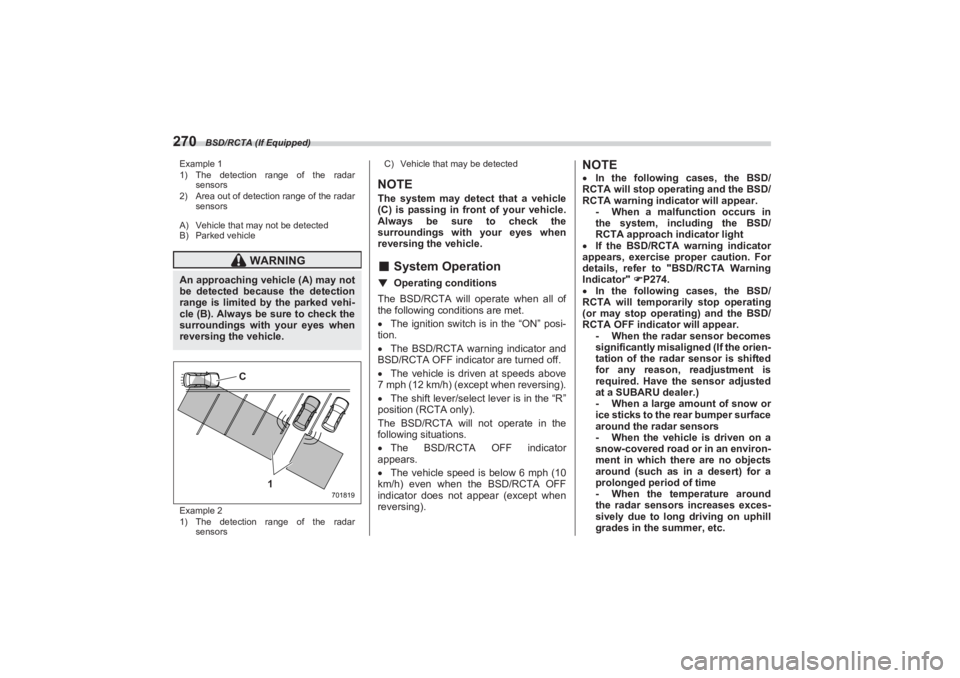
270Example 1
1) The detection range of the radar
sensors
2) Area out of detection range of the radar
sensors
A) Vehicle that may not be detected
B) Parked vehicle
Example 2
1) The detection range of the radar
sensors C) Vehicle that may be detected
NOTEThe system may detect that a vehicle
(C) is passing in front of your vehicle.
Always be sure to check the
surroundings with your eyes when
reversing the vehicle.■ System Operation▼ Operating conditionsThe BSD/RCTA will operate when all of
the following conditions are met.
The ignition switch is in the “ON” posi-
tion.
The BSD/RCTA warning indicator and
BSD/RCTA OFF indicator are turned off.
The vehicle is driven at speeds above
7 mph (12 km/h) (except when reversing).
The shift lever/select lever is in the “R”
position (RCTA only).
The BSD/RCTA will not operate in the
following situations.
The BSD/RCTA OFF indicator
appears.
The vehicle speed is below 6 mph (10
km/h) even when the BSD/RCTA OFF
indicator does not appear (except when
reversing).
NOTE In the following cases, the BSD/
RCTA will stop operating and the BSD/
RCTA warning indicator will appear. - When a malfunction occurs in
the system, including the BSD/
RCTA approach indicator light
If the BSD/RCTA warning indicator
appears, exercise proper caution. For
details, refer to "BSD/RCTA Warning
Indicator" P274.
In the following cases, the BSD/
RCTA will temporarily stop operating
(or may stop operating) and the BSD/
RCTA OFF indicator will appear. - When the radar sensor becomes
significantly misali gned (If the orien-
tation of the radar sensor is shifted
for any reason, readjustment is
required. Have the sensor adjusted
at a SUBARU dealer.)
- When a large amount of snow or
ice sticks to the rear bumper surface
around the radar sensors
- When the vehicle is driven on a
snow-covered road or in an environ-
ment in which there are no objects
around (such as in a desert) for a
prolonged period of time
- When the temperature around
the radar sensors increases exces-
sively due to long driving on uphill
grades in the summer, etc.
WARNING
An approaching vehicle (A) may not
be detected because the detection
range is limited by the parked vehi-
cle (B). Always be sure to check the
surroundings with your eyes when
reversing the vehicle.
701819
1
C
BRZ_U.book 270 ページ 2022年3月29日 火曜日 午後3時59分
Page 277 of 432
BSD/RCTA (If Equipped)
271
Starting and Operating7
– CONTINUED –
- When the temperature around
the radar sensors becomes
extremely low
- When the vehicle battery voltage
lowers
- When the vehicle voltage
exceeds the battery voltage rating
The BSD/RCTA will resume operation
once these conditions are corrected,
and the BSD/RCTA OFF indicator will
disappear. However, if the BSD/RCTA
OFF indicator appears for a prolonged
period of time, have the system
inspected at a SUBARU dealer as soon
as possible.
The detectability of the radar
sensors is restricted. The BSD/RCTA
detection may be impaired and the
system may not operate properly
under the following conditions. - When the rear bumper around
the radar sensors is distorted
- When ice, snow or mud adheres
to the rear bumper surface around
the radar sensors
- When stickers, etc. are affixed on
the areas of the radar sensors on the
rear bumper
- During adverse weather condi-
tions such as rain, snow or fog
- When driving on wet roads such
as snow-covered roads and through
puddles
The radar sensors may not detect or
may have difficulty detecting the
following vehicles and objects. - Small motorcycles, bicycles,
pedestrians, stationary objects on
the road or road side, etc.
- Vehicles with body shapes that
the radar may not reflect (vehicles
with lower body height such as a
trailer with no cargo and sports
cars)
- Vehicles that are not
approaching your vehicle even
though they are in the detection area
(either on a neighboring lane to the
rear or beside your vehicle when
reversing) (The system determines
the presence of approaching vehi-
cles based on data detected by the
radar sensors.)
- Vehicles traveling at signifi-
cantly different speeds
- Vehicles driving in parallel at
almost the same speed as your
vehicle for a prolonged time
- Oncoming vehicles
- Vehicles in a lane beyond the
neighboring lane
- Vehicles travelling at a signifi-
cantly lower speed that you are
trying to overtake
On a road with extremely narrow
lanes, the system may detect vehicles driving in a lane next to the neigh-
boring lane.
■
BSD/RCTA Approach Indi -
cator Light/Warning BuzzerWhile the BSD/RCTA is active, the
following item(s) will operate to alert the
driver:
The BSD/RCTA approach indicator
light (when there are v ehicles in the neigh-
boring lanes).
The BSD/RCTA approach indicator
light and warning buzzer (when a vehicle
is approaching from the left or right side
while your vehicle is reversing)
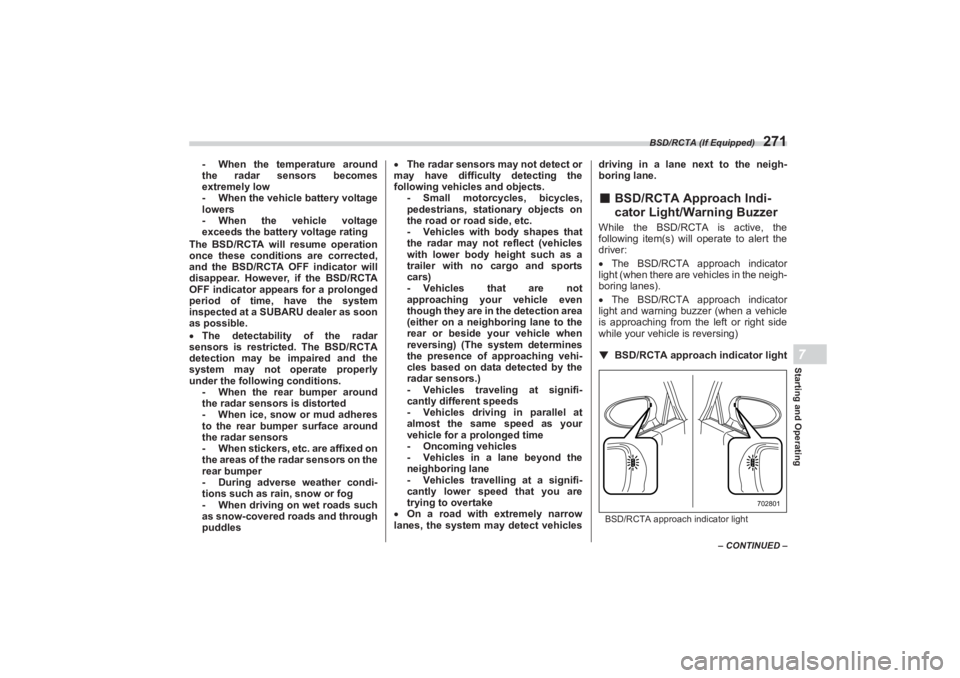
▼ BSD/RCTA approach indicator lightBSD/RCTA approach indicator light
702801
BRZ_U.book 271 ページ 2022年3月29日 火曜日 午後3時59分
Page 278 of 432
BSD/RCTA (If Equipped)
272It is mounted on each side of the outside
mirrors.
The indicator light will illuminate
when a
vehicle approaching from behind is
detected.
The indicator light will flash
to warn the
driver of dangers under the following
conditions.
While the indicator light is illuminating,
if the turn signal lever is operated toward
the side in which this light turned on
When reversing the vehicle while the
system detects a vehicle approaching
from either side
▽ BSD/RCTA approach indicator
light dimming function
When the headlights are turned on, the
brightness of the BSD/RCTA approach
indicator light will be reduced.
NOTE You may have difficulty seeing the
BSD/RCTA approach indicator light
under the following conditions. - When sunlight shines directly on
it
- When the headlight beams from
a vehicle traveling behind shines
directly on it
While the illumination brightness
control dial is in the fully upward posi- tion, even if the headlights are turned
on, the brightness of the BSD/RCTA
approach indicator light will not be
reduced. For details about the illumina-
tion brightness control dial, refer to
"Illumination Brightness Control"
P130.
▼ BSD/RCTA approach warning
buzzer (only when reversing)
A warning buzzer sounds along with
flashing of the BSD/RCTA approach indi-
cator light to warn the driver of dangers.
The setting of the warning buzzer volume
can be changed by operating the center
information display. For details, refer to
"Car settings" P165.
▼ Safety tips regarding the BSD/
RCTA approach indicator light/
warning buzzer
In the following cases, operation of the
BSD/RCTA approach indicator light and
the warning buzzer may be delayed or the
system may fail to issue these warnings.
- When a vehicle moves to the neigh-
boring lane from a lane next to the
neighboring lane
- When driving on a steep incline or
on repeated sharp uphill and downhill
grades
- When going beyond a pass - When both your vehicle and a
vehicle driving on a neighboring lane
are driving on the far side of each lane.
- When several narrowly-spaced
vehicles are approaching in a row
- In low radius bends (tight bends or
when making turns at an intersection)
- When there is a difference in height
between your lane and the neighboring
lane
- Immediately after the BSD/RCTA is
activated by touching “BSD/RCTA”
- Immediately after the shift lever/
select lever is shifted to the “R” position
- When extremely heavy cargo is
loaded in the trunk
During reversing, operation of the BSD/
RCTA approach indicator light and the
warning buzzer may be delayed or the
system may fail to issue these warnings
under the following conditions.
- When backing out of an angled
parking space
- When a large-sized vehicle is
parked next to your vehicle (That
vehicle prevents the propagation of
radar waves.)
- When reversing on sloped roads
- When reversing at a high speedBRZ_U.book 272 ページ 2022年3月29日 火曜日 午後3時59分
Page 279 of 432
BSD/RCTA (If Equipped)
273
Starting and Operating7
– CONTINUED –
The BSD/RCTA approach indicator
light may illuminate when driving close to
solid objects on the road or road side
(such as guardrails, tunnels and side-
walls).
When turning at an intersection in
urban areas, or a multilane intersection,
the BSD/RCTA approach indicator light
may flash.
If a building or a wall exists in the
reversing direction, the BSD/RCTA
approach indicator light may flash and the
warning buzzer may sound.
In the following cases, the system may
detect a vehicle driving two lanes away
from your vehicle.
- When your vehicle drives on the
near side of its lane from the corre-
sponding vehicle - When the vehicle driving two lanes
away drives on the near side of its lane
from your vehicle
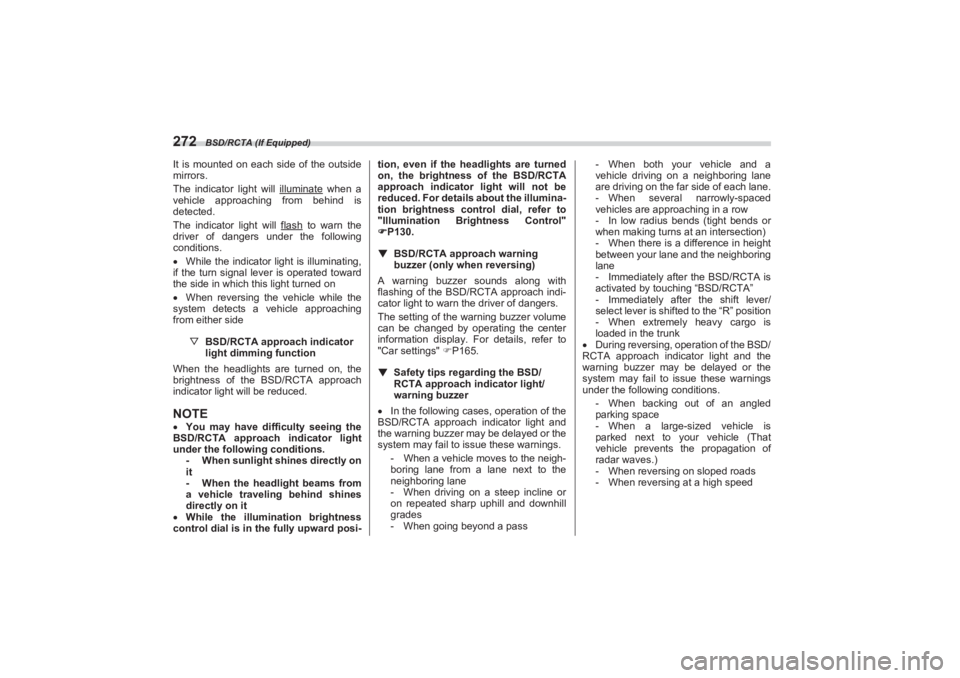
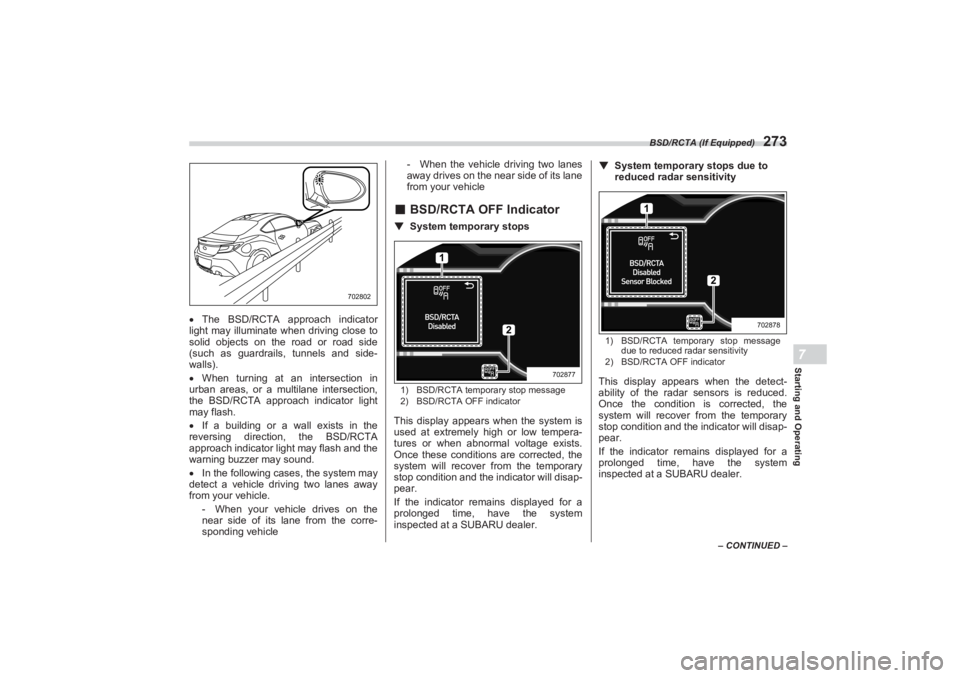
■ BSD/RCTA OFF Indicator▼ System temporary stops1) BSD/RCTA temporary stop message
2) BSD/RCTA OFF indicatorThis display appears when the system is
used at extremely high or low tempera-
tures or when abnormal voltage exists.
Once these conditions are corrected, the
system will recover from the temporary
stop condition and the indicator will disap-
pear.
If the indicator remains displayed for a
prolonged time, have the system
inspected at a SUBARU dealer. ▼
System temporary stops due to
reduced radar sensitivity
1) BSD/RCTA temporary stop message
due to reduced radar sensitivity
2) BSD/RCTA OFF indicatorThis display appears when the detect-
ability of the radar sensors is reduced.
Once the condition is corrected, the
system will recover from the temporary
stop condition and the indicator will disap-
pear.
If the indicator rema ins displayed for a
prolonged time, have the system
inspected at a SUBARU dealer.
702802
1
2
702877
1
2
702878
BRZ_U.book 273 ページ 2022年3月29日 火曜日 午後3時59分
Page 286 of 432
Reverse Automatic Braking (RAB) System (If Equipped)
280
- The rear bumper is exposed to
strong impact, or the rear bumper is
deformed.
On a steep hill, the system’s auto-
matic braking ability will be reduced.
The system is designed to avoid
collisions by automatic hard braking
when the vehicle’s reversing speed is
less than approximately 3 mph (5 km/
h). However, the system does not guar-
antee that the vehicle will be able to
avoid collisions in any situation.
If the vehicle is reversed at an
extremely slow speed, the driver’s
operation may be prioritized. In this
case, automatic braking will not
operate.
The system may not be able to
detect and apply the brake with the
following objects. - Sharp or thin objects such as
poles, fences and ropes which may
not reflect the s ound wave emitted
from the sonar sensor.
- Objects that are too close to the
rear bumper when the select lever is
set to the “R” position.
- Objects with a surface which
may not reflect the sound wave
emitted from the sonar sensor such
as a chain link fence.
Objects the system is not designed
to detect and apply brake. -Pedestrians.
- Moving objects including
moving vehicles.
- Objects which absorbs sound
waves such as cloth or snow.
- Objects whose surface has a
diagonal angle.
- Objects that are low to the
ground such as parking blocks.
- Objects that are high above the
ground such as objects hanging
from above.
- Objects that are out of range of
the center of the vehicle in the hori-
zontal direction.
- Objects that are not perpendic-
ular to the ground.
- The surface of the object is
uneven or wavy.
When reversing the vehicle, the
functions may not be able to work
properly or may cause a system
malfunction if the following conditions
exist.
High frequency sound from other
sources are nearby:
- Horn sound from another
vehicle.
- Engine sound from other vehi-
cles.
- Sound of an air brake.
- Vehicle detection equipment or a
sonar from another vehicle. - A sound wave with a frequency
similar to the vehicle’s system is
transmitted near by.
- A vehicle equipped with the
same system is reversing toward
your reversing direction.
Weather conditions:
- Extremely high or extremely low
temperatures in which the area near
the sonar sensor becomes too hot
or too cold to operate.
- The sonar sensors or the rear
bumper near the sonar sensors are
exposed to heavy rain or a signifi-
cant amount of water.
- Fog, snow or sandstorm, etc.
- Air is moving rapidly such as
when a strong wind is blowing.
Parts attached to the rear bumper
near the sonar sensor:
- Commercial electr onic parts (fog
light, fender pole, radio antenna) or
commercial attachment parts (trailer
hitch, bicycle carrier, bumper guard)
are attached.
- Parts that emit high frequency
sound, such as a horn or speaker,
are attached.
Vehicle conditions:
- Ice, snow or mud is adhered to
the sonar sensors or the rear
bumper near the sonar sensor.
BRZ_U.book 280 ページ 2022年3月29日 火曜日 午後3時59分
Page 288 of 432
Reverse Automatic Braking (RAB) System (If Equipped)
282
- There is an obstacle that is next
to an object.
- Going back along a wall.
- The area where the road starts
touching dirt and snow
- When reversing on an uneven
road.
In circumstances such as the
following, it may not be possible to
avoid a collision even when the system
operates normally. - Roads are slippery.
- The tire air pressure is not
correct.
- The tires have become worn.
- Tire chains are installed.
- Tires which are not the desig-
nated size are installed.
- Emergency repairs were
performed using a puncture repair
kit.
- The suspension was modified.
- Vehicle driving is unstable due to
accident or malfunction.
- The brake warning light is illumi-
nated.
■ Sonar Audible Alarm func -
tionWhen Reverse Automatic Braking (RAB)
system is in operation, an audible warning
beeps will sound in 3 levels to warn the
driver of a potential collision.
NOTEIt may take time to display the wall and
sound warning beeps after the object
was recognized by the Sonar Audible
Alarm function.
BRZ_U.book 282 ページ 2022年3月29日 火曜日 午後3時59分
Page 303 of 432
Loading Your Vehicle
297
Driving Tips8
– CONTINUED –
Remember to drive with care at all times
regardless of the type of tires on your
vehicle.■ Tire Chains
NOTEWhen tire chains cannot be used, use
of another type of traction device
(such as spring chains) may be
acceptable if use on your vehicle is
recommended by the device manufac-
turer, taking into account tire size and
road conditions. Follow the device
manufacturer’s instructions, espe-
cially regarding maximum vehicle
speed.
To help avoid damage to your vehicle,
drive slowly, readjust or remove the
device if it is contacting your vehicle,
and do not spin your wheels. Damage
caused to your vehicle by use of a
traction device is not covered under
warranty.
Make certain that any traction device
you use is an SAE class S device, and use it on the rear wheels only. Always
use the utmost care when driving with
a traction device. Overconfidence
because you are using a traction
device could easily lead to a serious
accident.
■ Rocking the VehicleIf you must rock the v ehicle to free it from
snow, sand, or mud, depress the acceler-
ator pedal slightly and move the shift
lever/select lever back and forth between
“1” (MT model)/“D” (AT model) and “R”
repeatedly. Do not race the engine. For
the best possible traction, avoid spinning
the wheels when trying to free the vehicle.
When the road surface is extremely slip-
pery, you can obtain better traction by
starting the vehicle with the transmission
in 2nd than in 1st (MT models).
If your vehicle is a AT model, Snow mode
can be used. For details about how to use
the mode, refer to "Driving Mode Select
Switch (If Equipped)" P241.
8-9. Loading Your Vehicle
CAUTION
Tire chains cannot be used on your
vehicle because of the lack of clear-
ance between the tires and vehicle
body.
WARNING
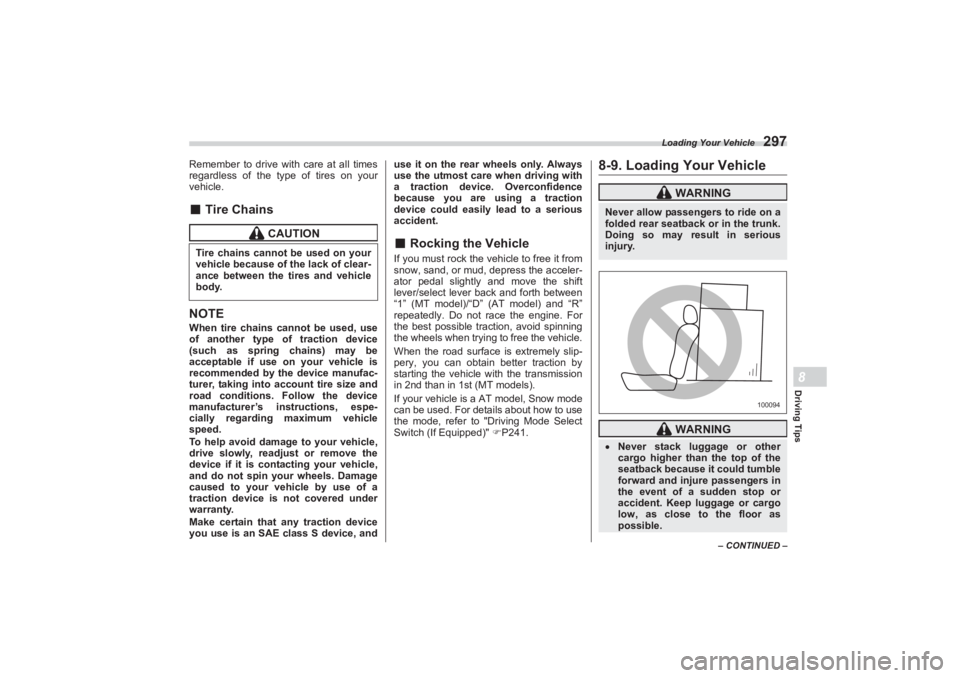
Never allow passengers to ride on a
folded rear seatback or in the trunk.
Doing so may result in serious
injury.
WARNING
Never stack luggage or other
cargo higher than the top of the
seatback because it could tumble
forward and injure passengers in
the event of a sudden stop or
accident. Keep luggage or cargo
low, as close to the floor as
possible.
100094
BRZ_U.book 297 ページ 2022年3月29日 火曜日 午後3時59分
Page 321 of 432
Flat Tires
315
In Case of Emergency9
– CONTINUED –
■Tire Pressure Monitoring
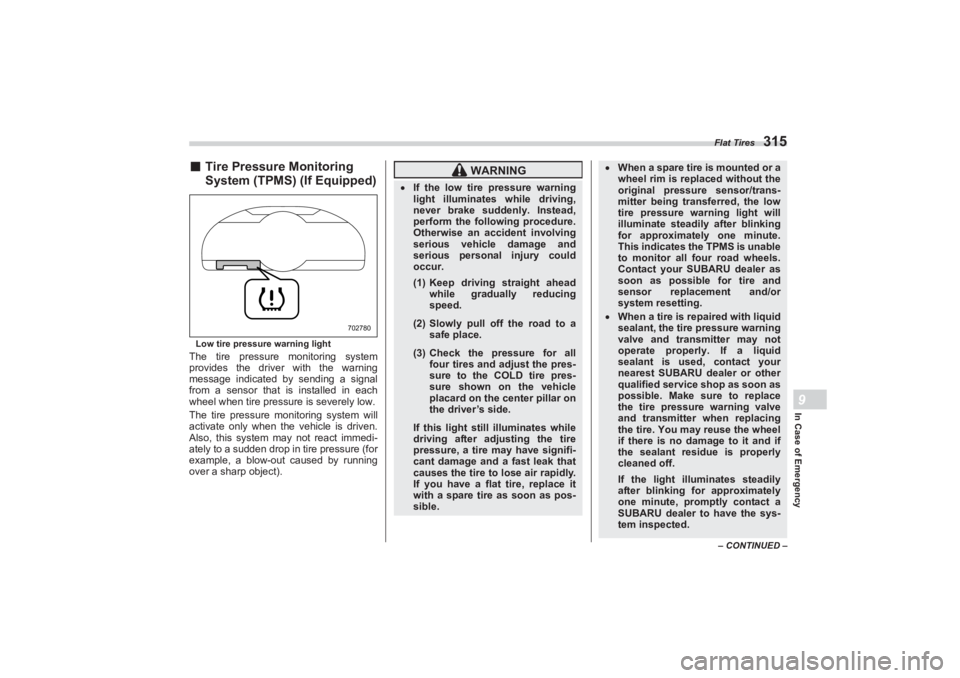
System (TPMS) (If Equipped)Low tire pressure warning lightThe tire pressure monitoring system
provides the driver with the warning
message indicated by sending a signal
from a sensor that is installed in each
wheel when tire pressure is severely low.
The tire pressure mo nitoring system will
activate only when the vehicle is driven.
Also, this system may not react immedi-
ately to a sudden drop in tire pressure (for
example, a blow-out caused by running
over a sharp object).
702780
WARNING
If the low tire pressure warning
light illuminates while driving,
never brake suddenly. Instead,
perform the following procedure.
Otherwise an accident involving
serious vehicle damage and
serious personal injury could
occur.
(1) Keep driving straight ahead
while gradually reducing
speed.(2) Slowly pull off the road to a
safe place.(3) Check the pressure for all
four tires and adjust the pres-
sure to the CO LD tire pres-
sure shown on the vehicle
placard on the center pillar on
the driver’s side.If this light still illuminates while
driving after adjusting the tire
pressure, a tire may have signifi-
cant damage and a fast leak that
causes the tire to lose air rapidly.
If you have a flat tire, replace it
with a spare tire as soon as pos-
sible.
When a spare tire is mounted or a
wheel rim is replaced without the
original pressure sensor/trans-
mitter being transferred, the low
tire pressure warning light will
illuminate steadily after blinking
for approximately one minute.
This indicates the TPMS is unable
to monitor all four road wheels.
Contact your SUBARU dealer as
soon as possible for tire and
sensor replacement and/or
system resetting. When a tire is repaired with liquid
sealant, the tire pressure warning
valve and transmitter may not
operate properly. If a liquid
sealant is used, contact your
nearest SUBARU dealer or other
qualified service shop as soon as
possible. Make sure to replace
the tire pressure warning valve
and transmitter when replacing
the tire. You may reuse the wheel
if there is no damage to it and if
the sealant residue is properly
cleaned off.
If the light illuminates steadily
after blinking for approximately
one minute, promptly contact a
SUBARU dealer to have the sys-
tem inspected.
BRZ_U.book 315 ページ 2022年3月29日 火曜日 午後3時59分
Page 322 of 432
Jump Starting
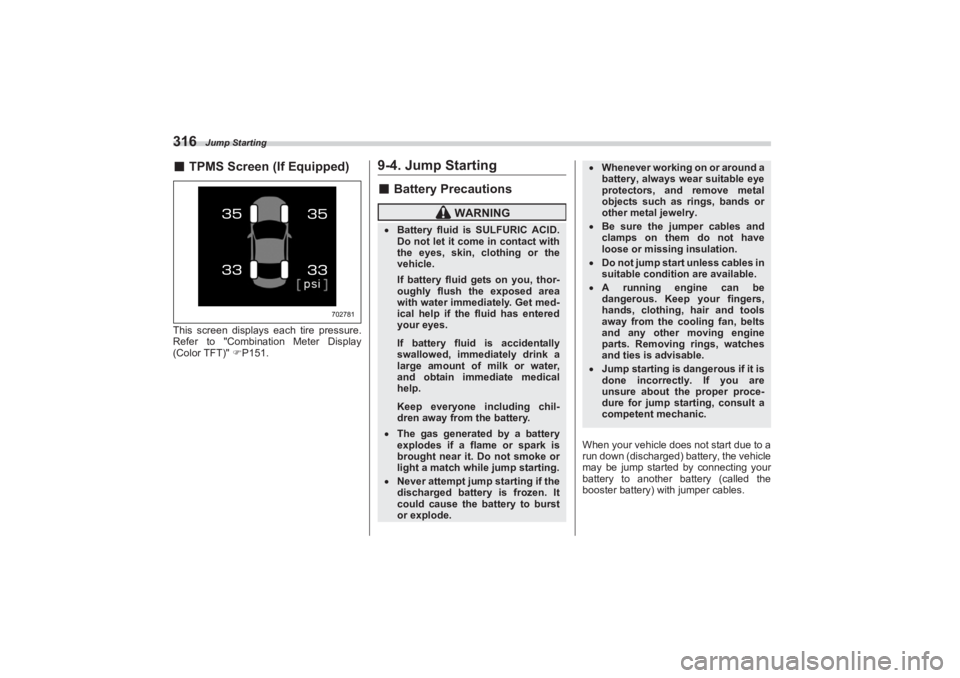
316■TPMS Screen (If Equipped)This screen displays ea ch tire pressure.
Refer to "Combination Meter Display
(Color TFT)" P151.
9-4. Jump Starting■ Battery Precautions
When your vehicle does not start due to a
run down (discharged) battery, the vehicle
may be jump started by connecting your
battery to another battery (called the
booster battery) with jumper cables.
702781
WARNING
Battery fluid is SULFURIC ACID.
Do not let it come in contact with
the eyes, skin, clothing or the
vehicle.
If battery fluid gets on you, thor-
oughly flush the exposed area
with water immedi ately. Get med-
ical help if the fluid has entered
your eyes.If battery fluid is accidentally
swallowed, imme diately drink a
large amount of milk or water,
and obtain immediate medical
help.Keep everyone including chil-
dren away from the battery.
The gas generated by a battery
explodes if a flame or spark is
brought near it. Do not smoke or
light a match while jump starting. Never attempt jump starting if the
discharged battery is frozen. It
could cause the battery to burst
or explode.
Whenever working on or around a
battery, always wear suitable eye
protectors, and remove metal
objects such as rings, bands or
other metal jewelry. Be sure the jumper cables and
clamps on them do not have
loose or missing insulation. Do not jump start unless cables in
suitable condition are available. A running engine can be
dangerous. Keep your fingers,
hands, clothing, hair and tools
away from the cooling fan, belts
and any other moving engine
parts. Removing rings, watches
and ties is advisable. Jump starting is dangerous if it is
done incorrectly. If you are
unsure about the proper proce-
dure for jump starting, consult a
competent mechanic.
BRZ_U.book 316 ページ 2022年3月29日 火曜日 午後3時59分