ECO mode SUBARU BRZ 2023 User Guide
[x] Cancel search | Manufacturer: SUBARU, Model Year: 2023, Model line: BRZ, Model: SUBARU BRZ 2023Pages: 432, PDF Size: 16.56 MB
Page 151 of 432
Warning and Indicator Lights
145
Instruments and Controls3
– CONTINUED –
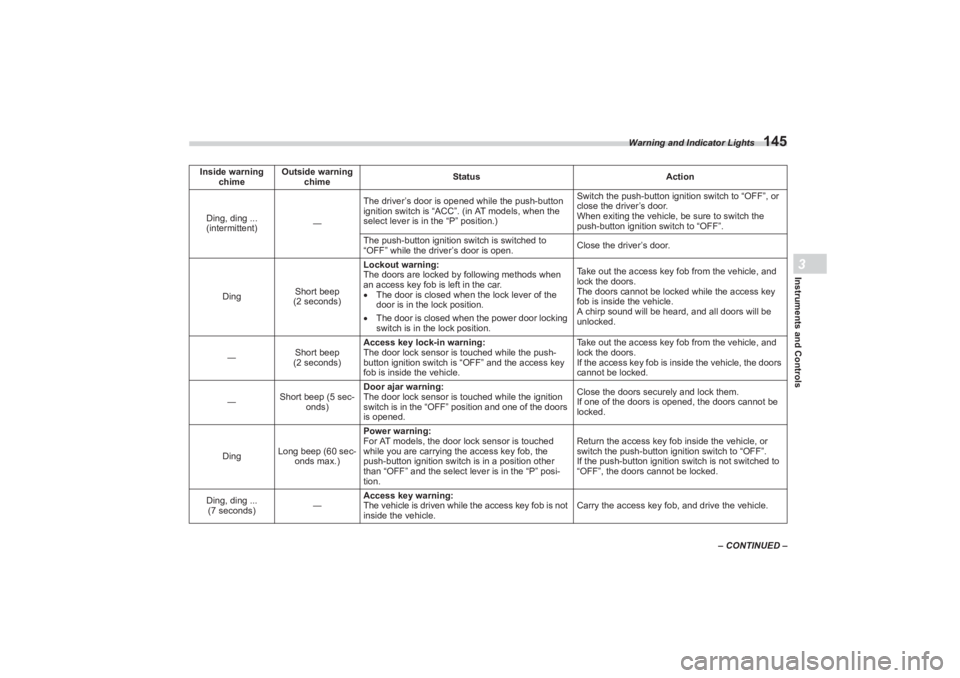
Inside warning
chime Outside warning
chime Status
Action
Ding, ding ...
(intermittent) ―The driver’s door is opened while the push-button
ignition switch is “ACC”. (in AT models, when the
select lever is in the “P” position.) Switch the push-button ignition switch to “OFF”, or
close the driver’s door.
When exiting the vehicle, be sure to switch the
push-button ignition switch to “OFF”.
The push-button ignition switch is switched to
“OFF” while the driver’s door is open. Close the driver’s door.
Ding Short beep
(2 seconds) Lockout warning:
The doors are locked by following methods when
an access key fob is left in the car.
The door is closed when the lock lever of the
door is in the lock position.
The door is closed when the power door locking
switch is in the lock position. Take out the access key fob from the vehicle, and
lock the doors.
The doors cannot be locked while the access key
fob is inside the vehicle.
A chirp sound will be heard, and all doors will be
unlocked.
― Short beep
(2 seconds) Access key lock-in warning:
The door lock sensor is touched while the push-
button ignition switch is “OFF” and the access key
fob is inside the vehicle. Take out the access key fob from the vehicle, and
lock the doors.
If the access key fob is in
side the vehicle, the doors
cannot be locked.
― Short beep (5 sec-
onds) Door ajar warning:
The door lock sensor is touched while the ignition
switch is in the “OFF” position and one of the doors
is opened. Close the doors securely and lock them.
If one of the doors is opened, the doors cannot be
locked.
Ding Long beep (60 sec-
onds max.) Power warning:
For AT models, the door lock sensor is touched
while you are carrying t
he access key fob, the
push-button ignition switch is in a position other
than “OFF” and the select lever is in the “P” posi-
tion. Return the access key fob inside the vehicle, or
switch the push-button ignition switch to “OFF”.
If the push-button ignition switch is not switched to
“OFF”, the doors cannot be locked.
Ding, ding ... (7 seconds) ―Access key warning:
The vehicle is driven while
the access key fob is not
inside the vehicle. Carry the access key f
ob, and drive the vehicle.
BRZ_U.book 145 ページ 2022年3月29日 火曜日 午後3時59分
Page 155 of 432
Warning and Indicator Lights
149
Instruments and Controls3
– CONTINUED –
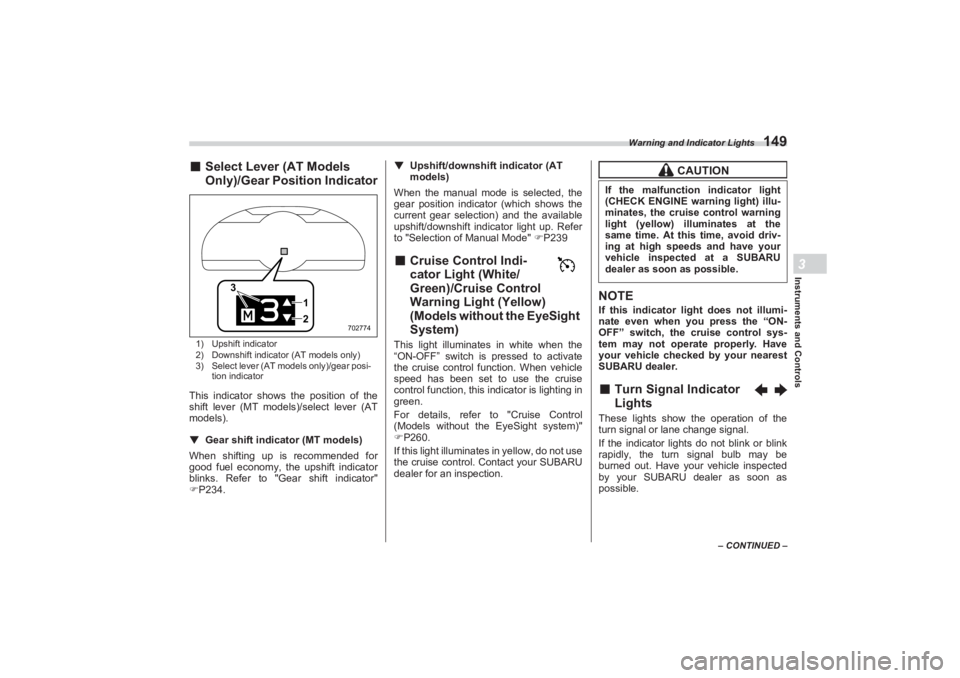
■Select Lever (AT Models
Only)/Gear Position Indicator1) Upshift indicator
2) Downshift indicator (AT models only)
3) Select lever (AT models only)/gear posi-
tion indicatorThis indicator shows the position of the
shift lever (MT models)/select lever (AT
models).
▼ Gear shift indicator (MT models)
When shifting up is recommended for
good fuel economy, the upshift indicator
blinks. Refer to "G ear shift indicator"
P234. ▼
Upshift/downshift indicator (AT
models)
When the manual mode is selected, the
gear position indicator (which shows the
current gear selection) and the available
upshift/downshift indicator light up. Refer
to "Selection of Manual Mode" P239
■ Cruise Control Indi -
cator Light (White/
Green)/Cruise Control
Warning Light (Yellow)
(Models without the EyeSight
System)This light illuminates in white when the
“ON-OFF” switch is pressed to activate
the cruise control function. When vehicle
speed has been set to use the cruise
control function, this indicator is lighting in
green.
For details, refer to "Cruise Control
(Models without the EyeSight system)"
P260.
If this light illuminates in yellow, do not use
the cruise control. Contact your SUBARU
dealer for an inspection.
NOTEIf this indicator light does not illumi-
nate even when you press the “ON-
OFF” switch, the cruise control sys-
tem may not operate properly. Have
your vehicle checked by your nearest
SUBARU dealer.■ Turn Signal Indicator
LightsThese lights show the operation of the
turn signal or lane change signal.
If the indicator lights do not blink or blink
rapidly, the turn signal bulb may be
burned out. Have your vehicle inspected
by your SUBARU dealer as soon as
possible.
12
3
702774
CAUTION
If the malfunction indicator light
(CHECK ENGINE warning light) illu-
minates, the cruise control warning
light (yellow) illuminates at the
same time. At this time, avoid driv-
ing at high speeds and have your
vehicle inspected at a SUBARU
dealer as soon as possible.
BRZ_U.book 149 ページ 2022年3月29日 火曜日 午後3時59分
Page 156 of 432
Warning and Indicator Lights
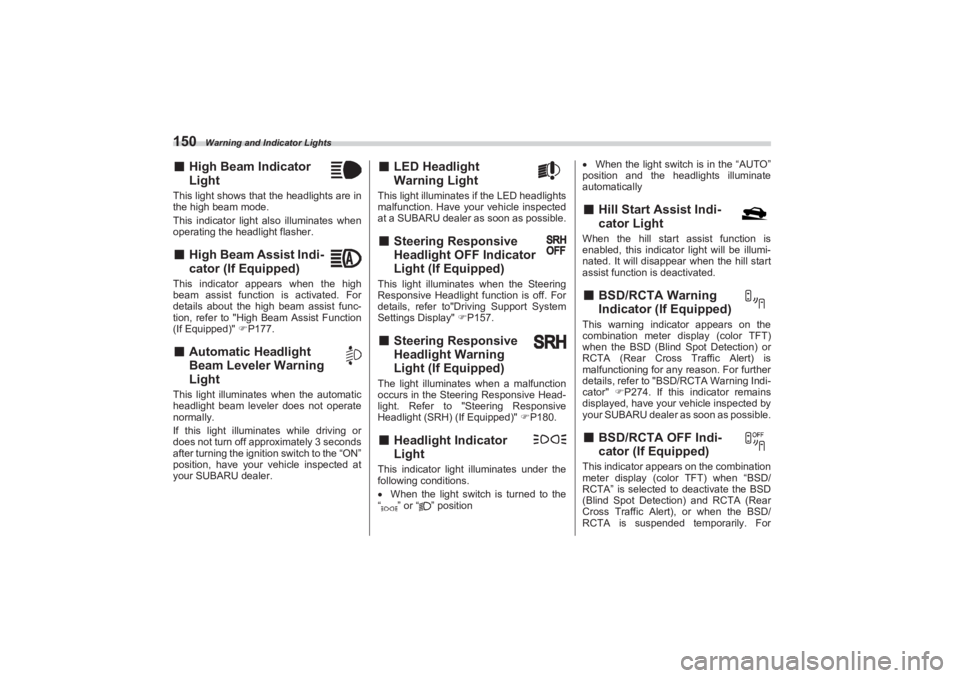
150■High Beam Indicator
LightThis light shows that the headlights are in
the high beam mode.
This indicator light also illuminates when
operating the headlight flasher.■ High Beam Assist Indi -
cator (If Equipped)This indicator appears when the high
beam assist function is activated. For
details about the high beam assist func-
tion, refer to "High Beam Assist Function
(If Equipped)" P177.■ Automatic Headlight
Beam Leveler Warning
LightThis light illuminates when the automatic
headlight beam leveler does not operate
normally.
If this light illuminates while driving or
does not turn off approximately 3 seconds
after turning the ignition switch to the “ON”
position, have your vehicle inspected at
your SUBARU dealer.
■ LED Headlight
Warning LightThis light illuminates if the LED headlights
malfunction. Have your vehicle inspected
at a SUBARU dealer as soon as possible.■ Steering Responsive
Headlight OFF Indicator
Light (If Equipped)This light illuminates when the Steering
Responsive Headlight function is off. For
details, refer to"Driving Support System
Settings Display" P157.■ Steering Responsive
Headlight Warning
Light (If Equipped)The light illuminates when a malfunction
occurs in the Steering Responsive Head-
light. Refer to "Steering Responsive
Headlight (SRH) (If Equipped)" P180.■ Headlight Indicator
LightThis indicator light illuminates under the
following conditions.
When the light switch is turned to the
“ ” or “ ” position
When the light switch is in the “AUTO”
position and the headlights illuminate
automatically
■ Hill Start Assist Indi -
cator LightWhen the hill start assist function is
enabled, this indicator light will be illumi-
nated. It will disappear when the hill start
assist function is deactivated.■ BSD/RCTA Warning
Indicator (If Equipped)This warning indicator appears on the
combination meter di splay (color TFT)
when the BSD (Blind Spot Detection) or
RCTA (Rear Cross Traffic Alert) is
malfunctioning for any reason. For further
details, refer to "BSD/RCTA Warning Indi-
cator" P274. If this indicator remains
displayed, have your vehicle inspected by
your SUBARU dealer as soon as possible.■ BSD/RCTA OFF Indi -
cator (If Equipped)This indicator appears on the combination
meter display (color TFT) when “BSD/
RCTA” is selected to deactivate the BSD
(Blind Spot Detection) and RCTA (Rear
Cross Traffic Alert), or when the BSD/
RCTA is suspended temporarily. For
BRZ_U.book 150 ページ 2022年3月29日 火曜日 午後3時59分
Page 164 of 432
Combination Meter Display (Color TFT)
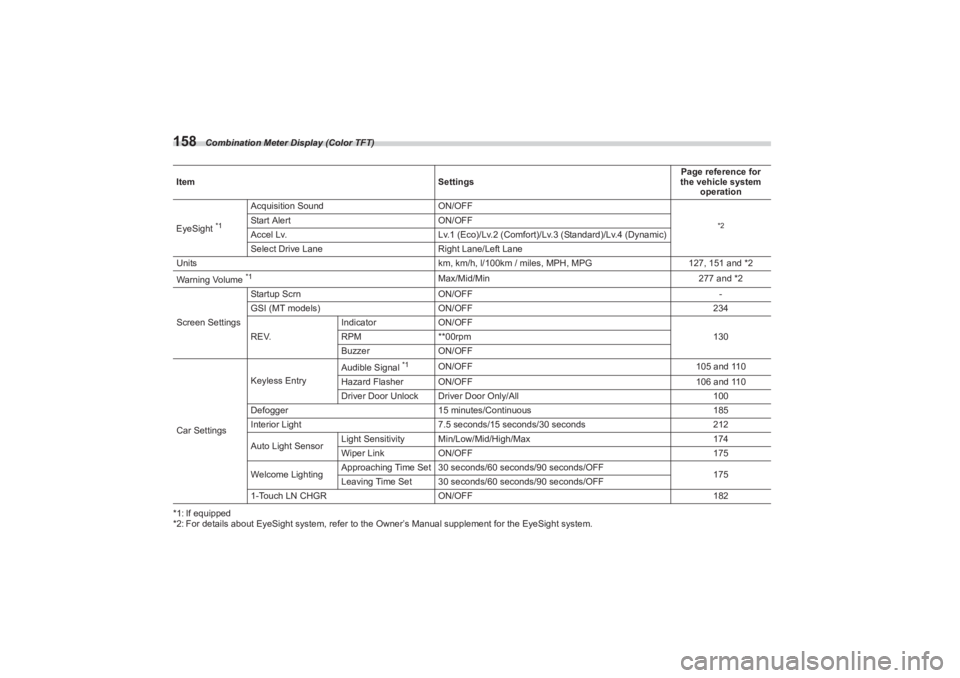
158*1: If equipped
*2: For details about EyeSight system, refer to the Owner’s Manual supplement for the EyeSight system.
Item
SettingsPage reference for
the vehicle system
operation
EyeSight
*1
Acquisition Sound ON/OFF
*2
Start AlertON/OFF
Accel Lv. Lv.1 (Eco)/Lv.2 (Comfort)/Lv.3 (Standard)/Lv.4 (Dynamic)
Select Drive Lane Right Lane/Left Lane
Units km, km/h, l/100km / miles, MPH, MPG127, 151 and *2
Warning Volume *1
Max/Mid/Min 277 and *2
Screen Settings Startup Scrn
ON/OFF -
GSI (MT models) ON/OFF 234
REV. Indicator
ON/OFF
130
RPM **00rpm
Buzzer ON/OFF
Car Settings Keyless Entry
Audible Signal
*1
ON/OFF
105 and 110
Hazard Flasher ON/OFF 106 and 110
Driver Door Unlock Driver Door Only/All 100
Defogger 15 minutes/Continuous 185
Interior Light 7.5 seconds/15 seconds/30 seconds 212
Auto Light Sensor Light Sensitivity Min/Low/Mid/High/Max
174
Wiper Link ON/OFF 175
Welcome Lighting Approaching Time Set 30 sec
onds/60 seconds/90 seconds/OFF
175
Leaving Time Set 30 seconds/60 seconds/90 seconds/OFF
1-Touch LN CHGR ON/OFF 182
BRZ_U.book 158 ページ 2022年3月29日 火曜日 午後3時59分
Page 170 of 432
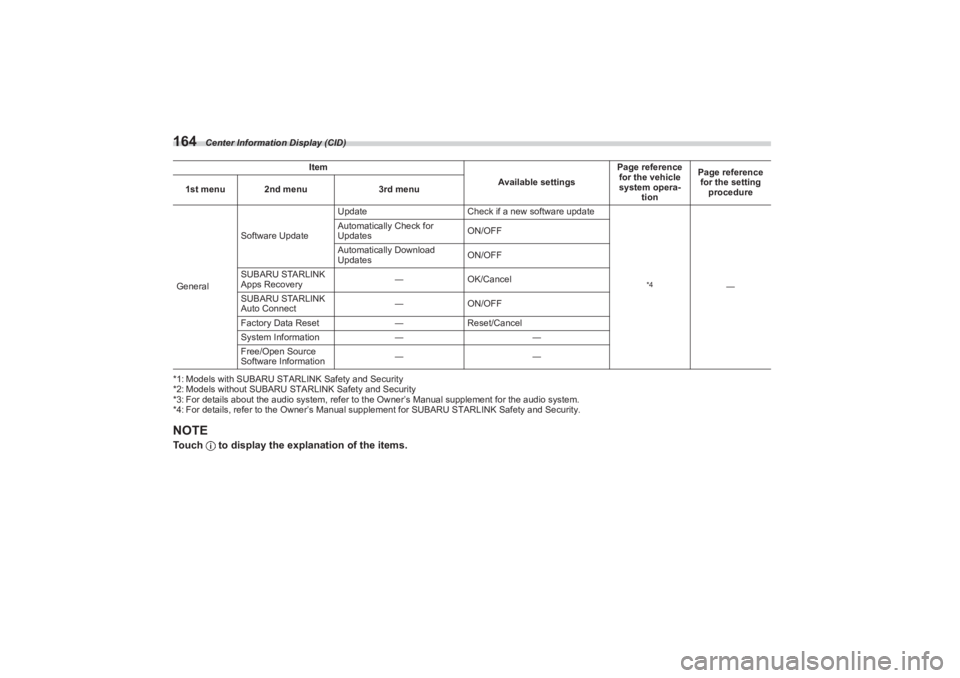
Center Information Display (CID)
164*1: Models with SUBARU STARLINK Safety and Security
*2: Models without SUBARU STARLINK Safety and Security
*3: For details about the audio system, refer to the Owner’s Manual supplement for the audio system.
*4: For details, refer to the Owner’s Manual supp lement for SUBARU STARLINK Safety and Security.NOTETouch to display the explanation of the items.GeneralSoftware Update
Update
Check if a new software update
*4
―
Automatically Check for
Updates
ON/OFF
Automatically Download
Updates ON/OFF
SUBARU STARLINK
Apps Recovery ―
OK/Cancel
SUBARU STARLINK
Auto Connect ―
ON/OFF
Factory Data Reset ―Reset/Cancel
System Information ――
Free/Open Source
Software Information ――
Item
Available settingsPage reference
for the vehicle
system opera- tion Page reference
for the setting procedure
1st menu 2nd menu
3rd menu
BRZ_U.book 164 ページ 2022年3月29日 火曜日 午後3時59分
Page 180 of 432
Light Control Switch
1743-10. Light Control SwitchThe light control switch operates when the
push-button ignition switch is in the “ACC”
or “ON” position.
Regardless of the pos ition of the light
control switch, the illuminated lights are
turned off when the push-button ignition
switch is turned off.NOTEThe light control switch can be oper-
ated (except auto on/off headlights),
even the push-button ignition switch
is turned off.
If the driver’s door is opened while the
headlights are illuminated under such conditions, a chirp sound will inform
the driver that the lights are illumi-
nated.
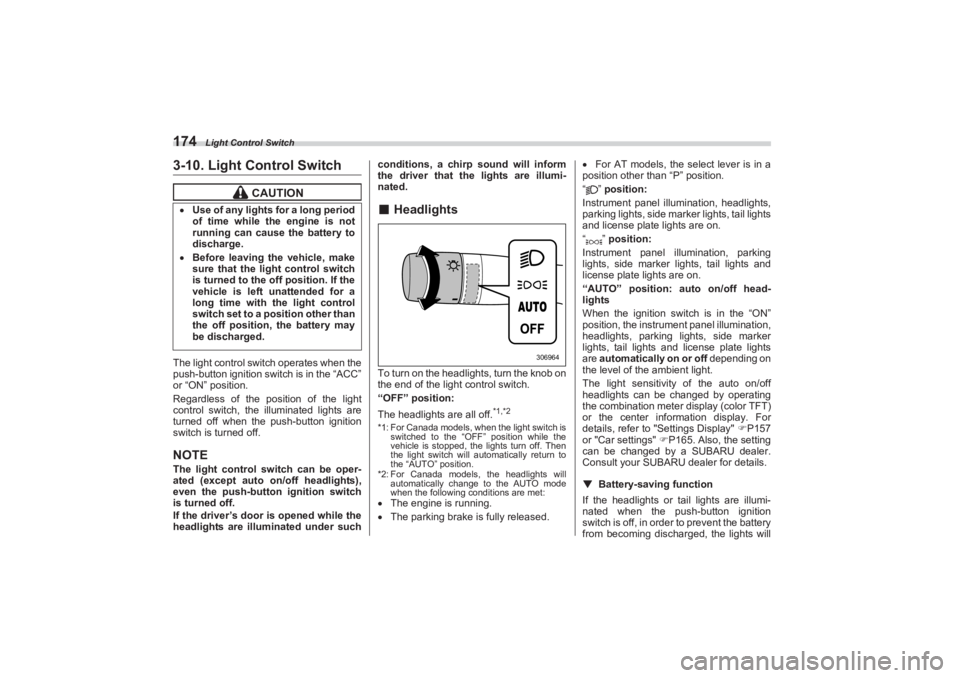
■ HeadlightsTo turn on the headlights, turn the knob on
the end of the light control switch.
“OFF” position:
The headlights are all off.
*1,*2
*1: For Canada models, when the light switch is
switched to the “OFF” position while the
vehicle is stopped, the lights turn off. Then
the light switch will automatically return to
the “AUTO” position.
*2: For Canada models, the headlights will automatically change to the AUTO mode
when the following conditions are met: The engine is running.
The parking brake is fully released.
For AT models, the select lever is in a
position other than “P” position.
“” position:
Instrument panel illumination, headlights,
parking lights, side marker lights, tail lights
and license plate lights are on.
“” position:
Instrument panel illumination, parking
lights, side marker lights, tail lights and
license plate lights are on.
“AUTO” position: auto on/off head-
lights
When the ignition switch is in the “ON”
position, the instrum ent panel illumination,
headlights, parking lights, side marker
lights, tail lights and license plate lights
are automatically on or off depending on
the level of the ambient light.
The light sensitivity of the auto on/off
headlights can be changed by operating
the combination meter display (color TFT)
or the center information display. For
details, refer to "Settings Display" P157
or "Car settings" P165. Also, the setting
can be changed by a SUBARU dealer.
Consult your SUBARU dealer for details.
▼ Battery-saving function
If the headlights or tail lights are illumi-
nated when the push-button ignition
switch is off, in order to prevent the battery
from becoming discharg ed, the lights will
CAUTION
Use of any lights for a long period
of time while the engine is not
running can cause the battery to
discharge. Before leaving the vehicle, make
sure that the light control switch
is turned to the off position. If the
vehicle is left unattended for a
long time with the light control
switch set to a position other than
the off position, the battery may
be discharged.
306964
BRZ_U.book 174 ページ 2022年3月29日 火曜日 午後3時59分
Page 181 of 432
Light Control Switch
175
Instruments and Controls3
– CONTINUED –
automatically be turned off after approxi-
mately 20 minutes.
If a door is opened or closed, the battery
saving function will temporarily be
canceled and the lights will automatically
be turned off after approximately 20
minutes.▼ Auto-on/off wiper-linked headlights
While the light control switch is in the
“AUTO” position, the headlights will auto-
matically turn on when the windshield
wipers operate several times. The head-
lights will automatica lly turn off approxi-
mately 1 minute after the wiper stops.
The ON/OFF setting of this function can
be changed by operating the combination
meter display (color TFT) or the center
information display. For details, refer to
"Settings Display" P157 or "Car
settings" P165. Also, the setting can be
changed by a SUBARU dealer. Consult
your SUBARU dealer for details.
▼ Welcome lighting function
The welcome lighting function turns on the
low beam headlight for smooth
approaching to or exiting from the vehicle
at night or in a dark place.
The function is activated while all of the
following conditions are met.
The light control swit ch is in the “AUTO”
position
It is dark enough to turn on the auto on/
off headlights
NOTEIf the engine is turn ed off after turning
off the light swit ch, the welcome
lighting function may not operate (for
Canada models).
▽ When approaching
While the welcome lighting function is acti-
vated, the low beam headlights will auto-
matically illuminate when unlocking the
doors by using the remote keyless entry
system.
The low beam headlights will remain illu-
minated for 30 seconds
*1 and then turn
off. However, if any of the following opera-
tions is done, the low beam headlights will
turn off.
The ignition switch is turned to the “ON”
position.
The doors are locked.
The light control switch is turned to a
position other than “AUTO”. ▽
When exiting
While the welcome lighting function is acti-
vated, the low beam headlights will remain
illuminated even when the push-button
ignition switch is turned to the “OFF”
status.
The low beam headlights will turn off
under any of the following conditions.
30 seconds have passed since the
door is opened and closed.
*1
The light control switch is turned to a
position other than “AUTO”.
The locking procedure is performed
twice. When performing the unlocking
procedure after performing the locking
procedure, perform the locking procedure
twice again.*1: The setting for the period of time in which
the low beam headlights remain on by the
welcome lighting function can be changed
by a SUBARU dealer. Contact your
SUBARU dealer for details. Also, you can
change the setting by operating the combi-
nation meter display (color TFT) or the
center information display. For details, refer
to "Settings Display" P157 or "Car
settings" P165.
BRZ_U.book 175 ページ 2022年3月29日 火曜日 午後3時59分
Page 182 of 432
Light Control Switch
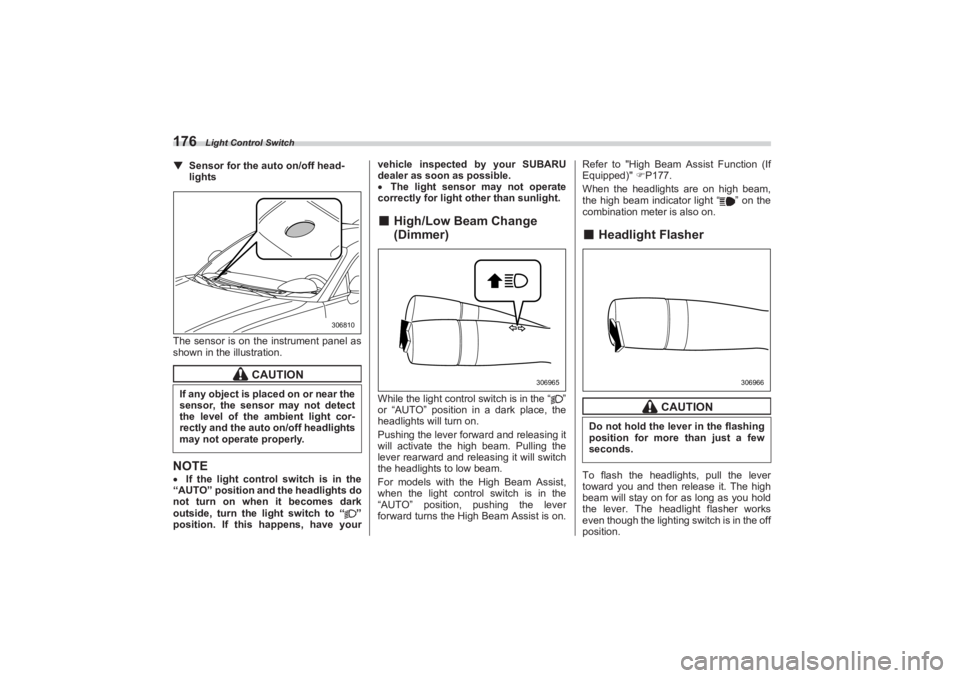
176▼Sensor for the auto on/off head -
lights
The sensor is on the instrument panel as
shown in the illustration.NOTE If the light control switch is in the
“AUTO” position and the headlights do
not turn on when it becomes dark
outside, turn the light switch to “ ”
position. If this happens, have your vehicle inspected
by your SUBARU
dealer as soon as possible.
The light sensor may not operate
correctly for light other than sunlight.
■ High/Low Beam Change
(Dimmer)While the light control switch is in the “ ”
or “AUTO” position in a dark place, the
headlights will turn on.
Pushing the lever forward and releasing it
will activate the high beam. Pulling the
lever rearward and releasing it will switch
the headlights to low beam.
For models with the High Beam Assist,
when the light control switch is in the
“AUTO” position, pushing the lever
forward turns the High Beam Assist is on. Refer to "High Beam Assist Function (If
Equipped)" P177.
When the headlights are on high beam,
the high beam indicator light “ ” on the
combination meter is also on.
■ Headlight FlasherTo flash the headlights, pull the lever
toward you and then release it. The high
beam will stay on for as long as you hold
the lever. The headlight flasher works
even though the lighting sw itch is in the off
position.
CAUTION
If any object is placed on or near the
sensor, the sensor may not detect
the level of the ambient light cor-
rectly and the auto on/off headlights
may not operate properly.
306810
306965
CAUTION
Do not hold the lever in the flashing
position for more than just a few
seconds.
306966
BRZ_U.book 176 ページ 2022年3月29日 火曜日 午後3時59分
Page 184 of 432
Light Control Switch
178NOTEEven when the operation conditions of
the high beam assist function are met,
there may be a case in which the high
beam assist indicator does not illumi-
nate.▼ How to temporarily lower the sensi -
tivity of the high beam assist func -
tion
The sensitivity of the high beam assist
function can be lowered by using the
following operations.
1. After turning the ignition switch to the
“ON” position, set the light control switch
to the “AUTO” position and push the
signal lever forward (high beam position).
2. After the high beam assist indicator on
the combination meter will illuminate, turn
the ignition switch to the “OFF” position.
3. Turn the ignition switch to the “ON”
position and within approximately 15
seconds, press the “ ” (following
distance setting) switch more than 10
times consecutively.
When the sensitivity of the high beam
assist function is lowered, the high beam
assist indicator light “ ” on the combina-
tion meter display (col or TFT) will flash.
NOTEThe sensitivity of the high beam
assist function cannot be lowered in
the following conditions. - Cruise control or Adaptive
Cruise Control indicator is illumi-
nated.
- The EyeSight warning indicator
(yellow) is illuminated
The sensitivity of the high beam
assist function retu rns to normal level
the next time the ignition switch is
turned to the “OFF ” position and the
engine is restarted.
▼ How to change the headlight mode
manually
Change to the low beam:
Set the light control switch to “ ”.
Pull the lever while the high beam is
turning on and release it.
Change to the high beam:
Push the lever forward and release it.
At this time, the high beam assist function
will turn off, the high beam assist indicator
will turn off and the high beam indicator
light will turn on.NOTE After manually changing the head-
light mode to the high beam, if you turn on the high beam assist function, push
the lever forward and release it.
When manually changing the head-
light mode to the high beam, if you turn
the light control switch to the “ ”
position, the parking lights, side
marker lights, tail lights and license
plate lights will turn on.
▼ Tips for the high beam assist
system
The high beam assist function recog-
nizes the condition surrounding the
vehicle based on the brightness of illumi-
nation ahead of your vehicle, etc. There-
fore, the headlight mode may switch in
some situations that do not match to the
driver’s sense.
A bicycle or cargo cycle may not be
detected.
Under the following situations, the
brightness of ambient illumination may not
be detected correctly and the high beam
assist function may not work properly. As
a result, the glare of the high beam may
disturb the oncoming vehicle or vehicle
ahead. Also, the low beam mode may
continue although there are no oncoming
vehicles and vehicles ahead. In the such
cases, change the headlight mode manu-
ally.
BRZ_U.book 178 ページ 2022年3月29日 火曜日 午後3時59分
Page 186 of 432
Steering Responsive Headlight (SRH) (If Equipped)
180■Daytime Running Light
SystemThe daytime running lights will automati-
cally illuminate when the following condi-
tions are fulfilled.
The engine is running.
The parking brake is fully released.
The light control switch is in the
“AUTO”, “ ” or “OFF” position.
For AT models, the select lever is in a
position other than the “P” position.NOTE When the light switch is in the “ ”
position, the instrument panel illumina-
tion, side marker lights, tail lights and
license plate lights are also illumi-
nated.
While the headlight switch is in the
“AUTO” position and the headlights
turn on automatically, the daytime
running light is deactivated.
When the turn signal indicators are
flashing, the daytime running light on
the side that the turn signals are
flashing will turn off.
3-11. Steering Responsive
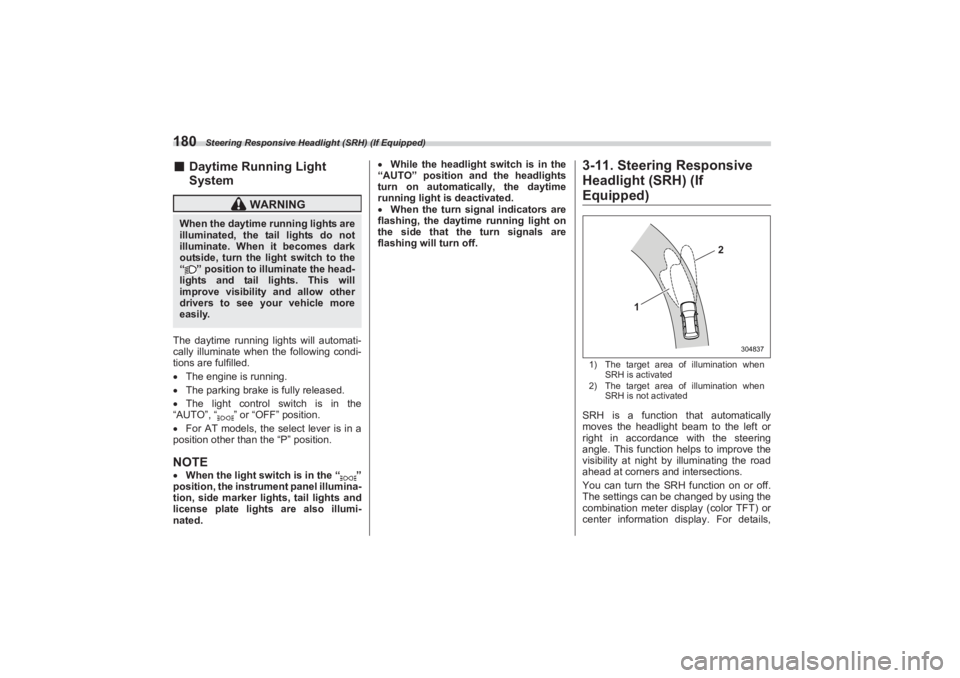
Headlight (SRH) (If Equipped)1) The target area of illumination when
SRH is activated
2) The target area of illumination when
SRH is not activatedSRH is a function that automatically
moves the headlight beam to the left or
right in accordance with the steering
angle. This function helps to improve the
visibility at night by illuminating the road
ahead at corners and intersections.
You can turn the SRH function on or off.
The settings can be changed by using the
combination meter display (color TFT) or
center information display. For details,
WARNING
When the daytime running lights are
illuminated, the tail lights do not
illuminate. When it becomes dark
outside, turn the li ght switch to the
“ ” position to illuminate the head-
lights and tail lights. This will
improve visibility and allow other
drivers to see your vehicle more
easily.
1
2
304837
BRZ_U.book 180 ページ 2022年3月29日 火曜日 午後3時59分