change time SUBARU BRZ 2023 User Guide
[x] Cancel search | Manufacturer: SUBARU, Model Year: 2023, Model line: BRZ, Model: SUBARU BRZ 2023Pages: 432, PDF Size: 16.56 MB
Page 135 of 432
Meters and Gauges
129
Instruments and Controls3
– CONTINUED –
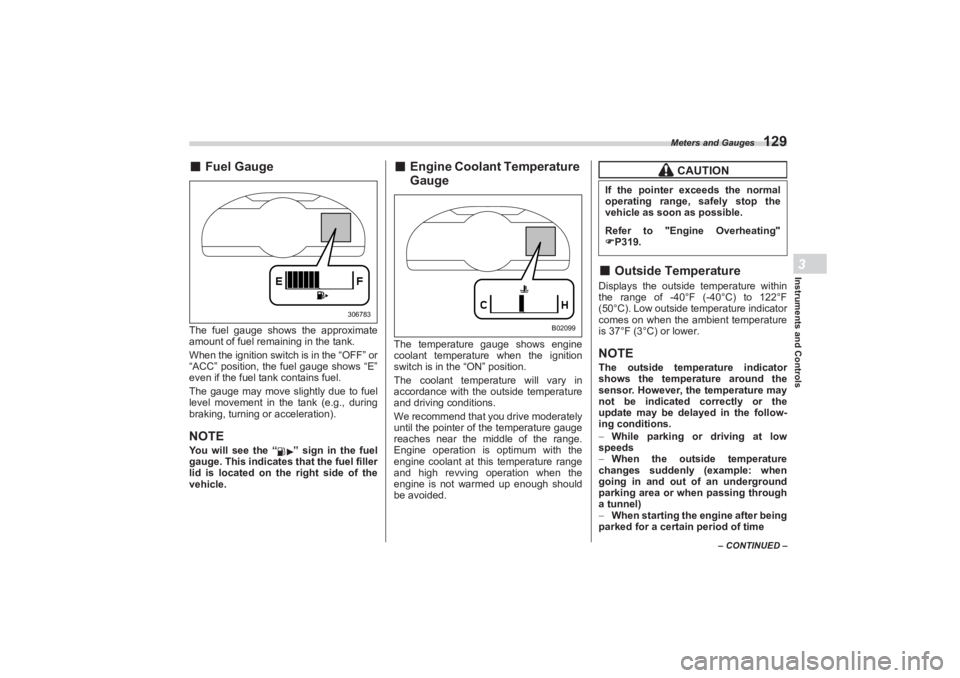
■Fuel GaugeThe fuel gauge shows the approximate
amount of fuel remaining in the tank.
When the ignition switch is in the “OFF” or
“ACC” position, the fuel gauge shows “E”
even if the fuel tank contains fuel.
The gauge may move slightly due to fuel
level movement in the tank (e.g., during
braking, turning or acceleration).NOTEYou will see the “ ” sign in the fuel
gauge. This indicates that the fuel filler
lid is located on the right side of the
vehicle.
■ Engine Coolant Temperature
GaugeThe temperature gauge shows engine
coolant temperature when the ignition
switch is in the “ON” position.
The coolant temperature will vary in
accordance with the outside temperature
and driving conditions.
We recommend that you drive moderately
until the pointer of the temperature gauge
reaches near the middle of the range.
Engine operation is optimum with the
engine coolant at this temperature range
and high revving operation when the
engine is not warmed up enough should
be avoided.
■ Outside TemperatureDisplays the outside temperature within
the range of -40°F (-40°C) to 122°F
(50°C). Low outside temperature indicator
comes on when the ambient temperature
is 37°F (3°C) or lower.NOTEThe outside temperature indicator
shows the temperature around the
sensor. However, the temperature may
not be indicated correctly or the
update may be delayed in the follow-
ing conditions.
While parking or driving at low
speeds
When the outside temperature
changes suddenly (example: when
going in and out of an underground
parking area or when passing through
a tunnel)
When starting the engine after being
parked for a certain period of time
306783
B02099
CAUTION
If the pointer exceeds the normal
operating range, safely stop the
vehicle as soon as possible.Refer to "Engine Overheating"
P319.
BRZ_U.book 129 ページ 2022年3月29日 火曜日 午後3時59分
Page 143 of 432
Warning and Indicator Lights
137
Instruments and Controls3
– CONTINUED –
This coolant temperature low indicator
light/coolant temper ature high warning
light has the following three functions.
Illumination in BLUE indicates insuffi-
cient warming up of the engine
Blinking in RED indicates that the
engine is close to overheating
Illumination in RED indicates over-
heating condition of the engine
For the system check, this indicator light/
warning light illuminates in RED for
approximately 2 seconds when the igni-
tion switch is turned to the “ON” position.
After that, this indicator light/warning light
changes to BLUE and maintains illumina- tion in
BLUE. This BLUE illuminated light
turns off when the engine is warmed up
sufficiently.
If the engine coolant temperature
increases over the specified range, the
indicator light/warning light blinks in RED.
At this time, the engine is close to over-
heating.
If the engine coolant temperature
increases further, the indicator light/
warning light illuminates in RED continu-
ously. At this time, the engine may be
overheating.
When the indicator light/warning light
blinks in RED or illuminates in RED, safely
stop the vehicle as soon as possible, and
refer to the emergency steps for the
engine overheating. Refer to "Engine
Overheating" P319. After that, have the
system checked by your nearest
SUBARU dealer.
Also, if the indicator light/warning light
often blinks in RED, the electrical system
may be malfunctioning. Contact your
SUBARU dealer for an inspection.
NOTEIf the engine is restarted after a certain
driving condition, this indicator light/
warning light may illuminate in RED.
However, this is not a malfunction if the indicator light/warning light turns
off after a short time.
■ Charge Warning LightIf this light illuminates when the engine is
running, it may indicate that the charging
system is not working properly.
If the light illuminates while driving or does
not turn off after the engine starts, stop the
engine at the first safe opportunity and
check the drive belt. If the belt is loose,
broken or if the belt is in good condition
but the light remains illuminated, contact
your nearest SUBARU dealer immedi-
ately.■ Oil Pressure Warning
LightIf this light illuminates when the engine is
running, it may indicate that the engine oil
pressure is low and the lubricating system
is not working properly.
If the light illuminates while driving or does
not turn off after the engine starts, stop the
- Blinking or illuminated in
RED:
Safely stop the vehicle as
soon as possible, and refer to
the emergency steps for the
engine overheating. After that,
have the system checked by
your nearest SUBARU dealer.
Refer to "Engine Overheating"
P319- Blinking in RED and BLUE
alternately:
The electrical system may be
malfunctioning. Contact your
SUBARU dealer for an inspec-
tion.
CAUTION
Do not operate the engine with the
oil pressure warning light on. This
may cause serious engine damage.
BRZ_U.book 137 ページ 2022年3月29日 火曜日 午後3時59分
Page 149 of 432
Warning and Indicator Lights
143
Instruments and Controls3
– CONTINUED –
while the vehicle is subsequently being
driven.
The warning light illuminates during
driving, but turns off immediately and
remains off.▼ Vehicle Stability Control (VSC)
operation indicator light
The indicator light flashes during activa-
tion of the skid suppression function and
during activation of the TRAC system.NOTE The light may remain illuminated for
a short period of time after the engine
has been started, especially in cold
weather. This does not indicate the
existence of a problem. The light
should turn off as soon as the engine
has warmed up.
The indicator light illuminates when
the engine has developed a problem
and the CHECK ENGINE warning light/
malfunction indicator light is on.
The Vehicle Stability Control (VSC)
system is probably malfunctioning under
the following condition. Have your vehicle
checked at a SUBARU dealer as soon as
possible.
The light does not turn off even after
the lapse of several minutes (the engine
has warmed up) after the engine has
started.
■ Vehicle Stability
Control (VSC) OFF
Indicator Light The light illuminates when “Vehicle
Stability Control (VSC)” is selected to
deactivate the Vehicle Stability Control
(VSC) system.
The Vehicle Stability Control (VSC)
system is probably malfunctioning under
any of the following conditions. Have your
vehicle checked at a SUBARU dealer
immediately.
The light does not illuminate while the
system check.
The light does not turn off even after a
period of approximately 2 seconds after
the ignition switch has been turned to the
“ON” position.
■ Warning Chimes and
Warning Indicator of the
Keyless Access with Push-
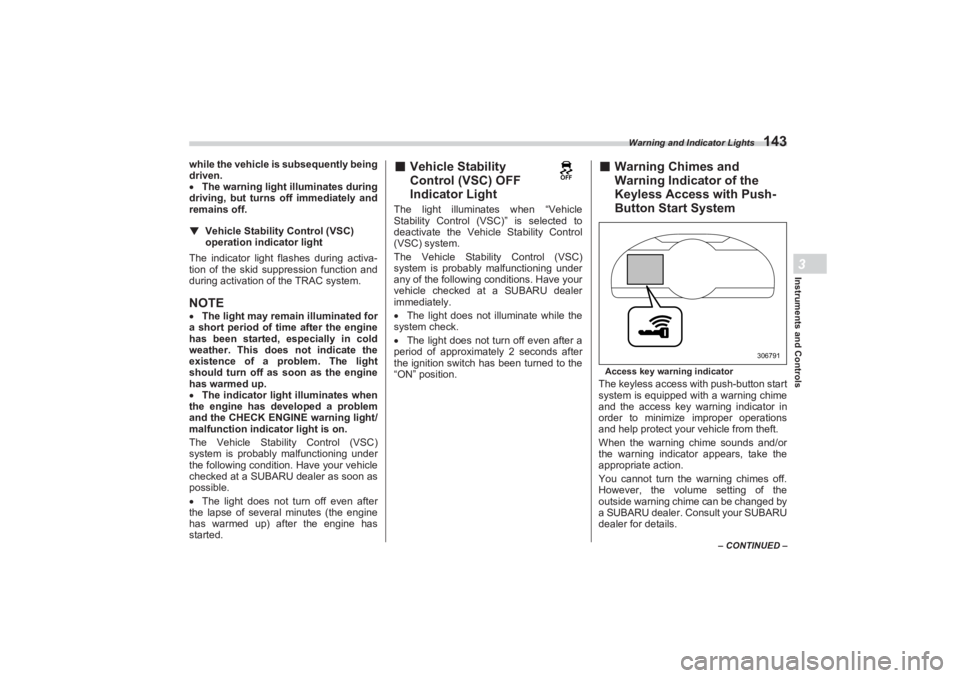
Button Start SystemAccess key warning indicatorThe keyless access with push-button start
system is equipped wi th a warning chime
and the access key warning indicator in
order to minimize improper operations
and help protect your vehicle from theft.
When the warning chime sounds and/or
the warning indicator appears, take the
appropriate action.
You cannot turn the warning chimes off.
However, the volume setting of the
outside warning chime can be changed by
a SUBARU dealer. Consult your SUBARU
dealer for details.
306791
BRZ_U.book 143 ページ 2022年3月29日 火曜日 午後3時59分
Page 155 of 432
Warning and Indicator Lights
149
Instruments and Controls3
– CONTINUED –
■Select Lever (AT Models
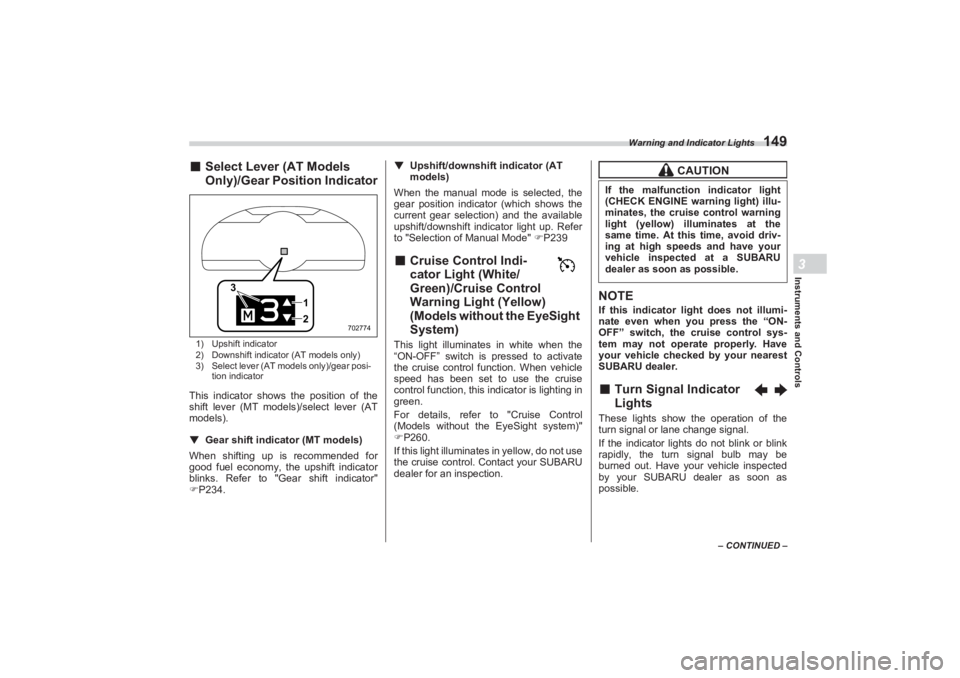
Only)/Gear Position Indicator1) Upshift indicator
2) Downshift indicator (AT models only)
3) Select lever (AT models only)/gear posi-
tion indicatorThis indicator shows the position of the
shift lever (MT models)/select lever (AT
models).
▼ Gear shift indicator (MT models)
When shifting up is recommended for
good fuel economy, the upshift indicator
blinks. Refer to "G ear shift indicator"
P234. ▼
Upshift/downshift indicator (AT
models)
When the manual mode is selected, the
gear position indicator (which shows the
current gear selection) and the available
upshift/downshift indicator light up. Refer
to "Selection of Manual Mode" P239
■ Cruise Control Indi -
cator Light (White/
Green)/Cruise Control
Warning Light (Yellow)
(Models without the EyeSight
System)This light illuminates in white when the
“ON-OFF” switch is pressed to activate
the cruise control function. When vehicle
speed has been set to use the cruise
control function, this indicator is lighting in
green.
For details, refer to "Cruise Control
(Models without the EyeSight system)"
P260.
If this light illuminates in yellow, do not use
the cruise control. Contact your SUBARU
dealer for an inspection.
NOTEIf this indicator light does not illumi-
nate even when you press the “ON-
OFF” switch, the cruise control sys-
tem may not operate properly. Have
your vehicle checked by your nearest
SUBARU dealer.■ Turn Signal Indicator
LightsThese lights show the operation of the
turn signal or lane change signal.
If the indicator lights do not blink or blink
rapidly, the turn signal bulb may be
burned out. Have your vehicle inspected
by your SUBARU dealer as soon as
possible.
12
3
702774
CAUTION
If the malfunction indicator light
(CHECK ENGINE warning light) illu-
minates, the cruise control warning
light (yellow) illuminates at the
same time. At this time, avoid driv-
ing at high speeds and have your
vehicle inspected at a SUBARU
dealer as soon as possible.
BRZ_U.book 149 ページ 2022年3月29日 火曜日 午後3時59分
Page 160 of 432
Combination Meter Display (Color TFT)
154Pressing and holding will reset the
average vehicle speed/driving time/
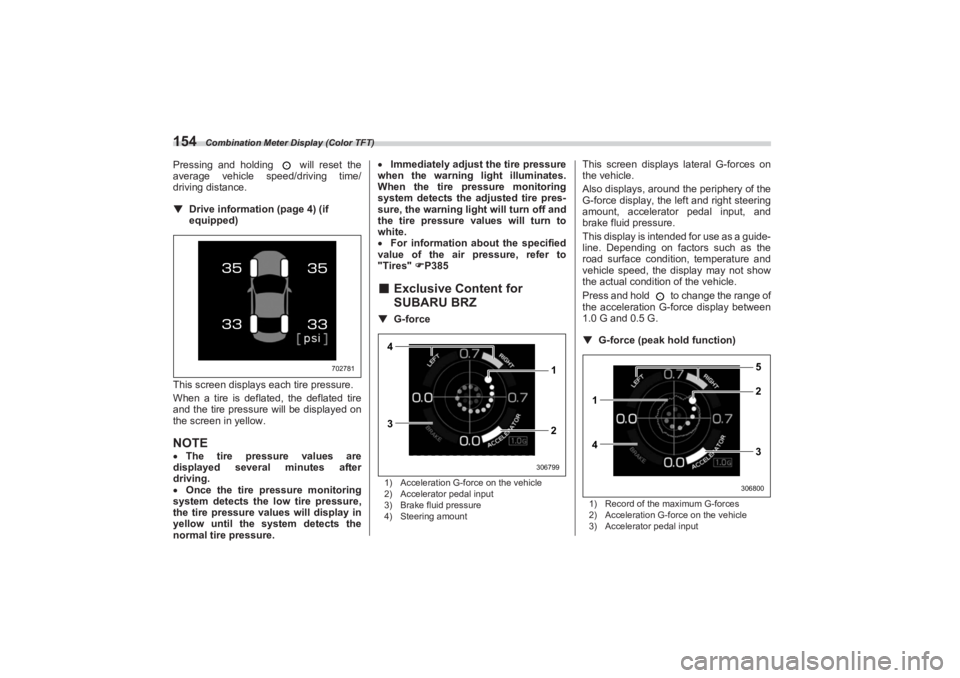
driving distance.▼ Drive information (page 4) (if
equipped)
This screen displays each tire pressure.
When a tire is deflated, the deflated tire
and the tire pressure will be displayed on
the screen in yellow.NOTE The tire pressure values are
displayed several minutes after
driving.
Once the tire pressure monitoring
system detects the low tire pressure,
the tire pressure values will display in
yellow until the system detects the
normal tire pressure.
Immediately adjust the tire pressure
when the warning light illuminates.
When the tire pr essure monitoring
system detects the adjusted tire pres-
sure, the warning ligh t will turn off and
the tire pressure values will turn to
white.
For information about the specified
value of the air pressure, refer to
"Tires" P385
■ Exclusive Content for
SUBARU BRZ▼ G-force1) Acceleration G-force on the vehicle
2) Accelerator pedal input
3) Brake fluid pressure
4) Steering amount
This screen displays lateral G-forces on
the vehicle.
Also displays, around the periphery of the
G-force display, the left and right steering
amount, accelerator pedal input, and
brake fluid pressure.
This display is intended for use as a guide-
line. Depending on factors such as the
road surface conditi on, temperature and
vehicle speed, the display may not show
the actual condition of the vehicle.
Press and hold to change the range of
the acceleration G-force display between
1.0 G and 0.5 G.
▼ G-force (peak ho ld function)1) Record of the maximum G-forces
2) Acceleration G-force on the vehicle
3) Accelerator pedal input
702781
4
3 1
2
306799
1
42 5
3
306800
BRZ_U.book 154 ページ 2022年3月29日 火曜日 午後3時59分
Page 161 of 432
Combination Meter Display (Color TFT)
155
Instruments and Controls3
– CONTINUED –
4) Brake fluid pressure
5) Steering amount
This screen displays lateral G-forces on
the vehicle
Also displays, around the periphery of the
G-force display, the left and right steering
amount, accelerator pedal input, and
brake fluid pressure
This display is intended for use as a guide-
line. Depending on factors such as the
road surface condition, temperature and
vehicle speed, the display may not show
the actual condition of the vehicle.
Press and hold to reset the record of
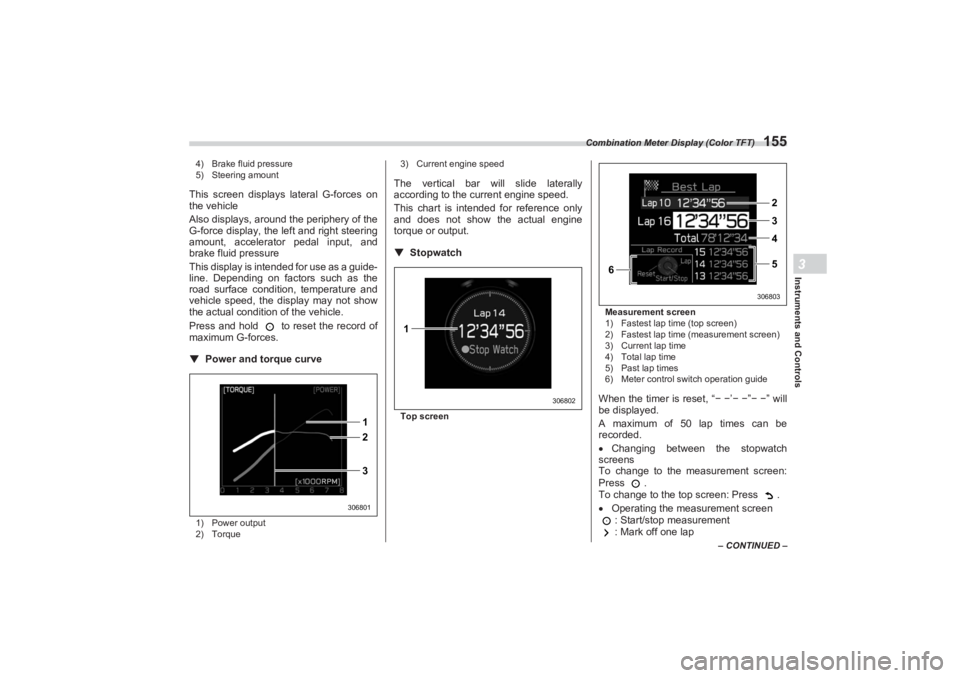
maximum G-forces.▼ Power and torque curve1) Power output
2) Torque 3) Current engine speed
The vertical bar will slide laterally
according to the current engine speed.
This chart is intended for reference only
and does not show the actual engine
torque or output.
▼ StopwatchTop screen Measurement screen
1) Fastest lap time (top screen)
2) Fastest lap time (measurement screen)
3) Current lap time
4) Total lap time
5) Past lap times
6) Meter control switch operation guide
When the timer is reset, “
− − ’− − ”− − ” will
be displayed.
A maximum of 50 lap times can be
recorded.
Changing between the stopwatch
screens
To change to the measurement screen:
Press .
To change to the top screen: Press .
Operating the measurement screen
: Start/stop measurement
: Mark off one lap
2 1
3
306801
1
306802
6
2
3
4
5
306803
BRZ_U.book 155 ページ 2022年3月29日 火曜日 午後3時59分
Page 168 of 432
Center Information Display (CID)
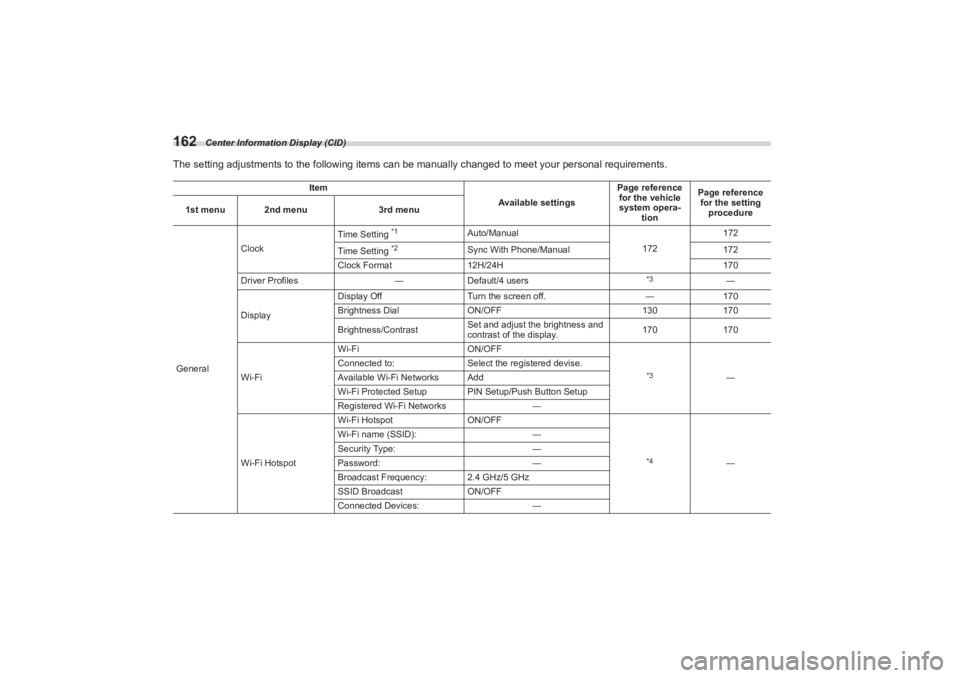
162The setting adjustments to the following items can be manually changed to meet your personal requirements.
Item
Available settingsPage reference
for the vehicle
system opera- tion Page reference
for the setting
procedure
1st menu 2nd menu
3rd menu
General Clock
Time Setting
*1
Auto/Manual
172172
Time Setting
*2
Sync With Phone/Manual 172
Clock Format 12H/24H 170
Driver Profiles ―Default/4 users
*3
―
Display Display Off
Turn the screen off. ―170
Brightness Dial ON/OFF 130170
Brightness/Contrast Set and adjust the brightness and
contrast of the display.
170
170
Wi-Fi Wi-Fi
ON/OFF
*3
―
Connected to:
Select the registered devise.
Available Wi-Fi Networks Add
Wi-Fi Protected Setup PIN Setup/Push Button Setup
Registered Wi-Fi Networks ―
Wi-Fi Hotspot Wi-Fi Hotspot
ON/OFF
*4
―
Wi-Fi name (SSID):
―
Security Type: ―
Password: ―
Broadcast Frequency: 2.4 GHz/5 GHz
SSID Broadcast ON/OFF
Connected Devices: ―
BRZ_U.book 162 ページ 2022年3月29日 火曜日 午後3時59分
Page 173 of 432
Center Information Display (CID)
167
Instruments and Controls3
– CONTINUED –
*1: If equipped
*2: For details about EyeSight system, refer to the
Owner’s Manual supplement for the EyeSight system.
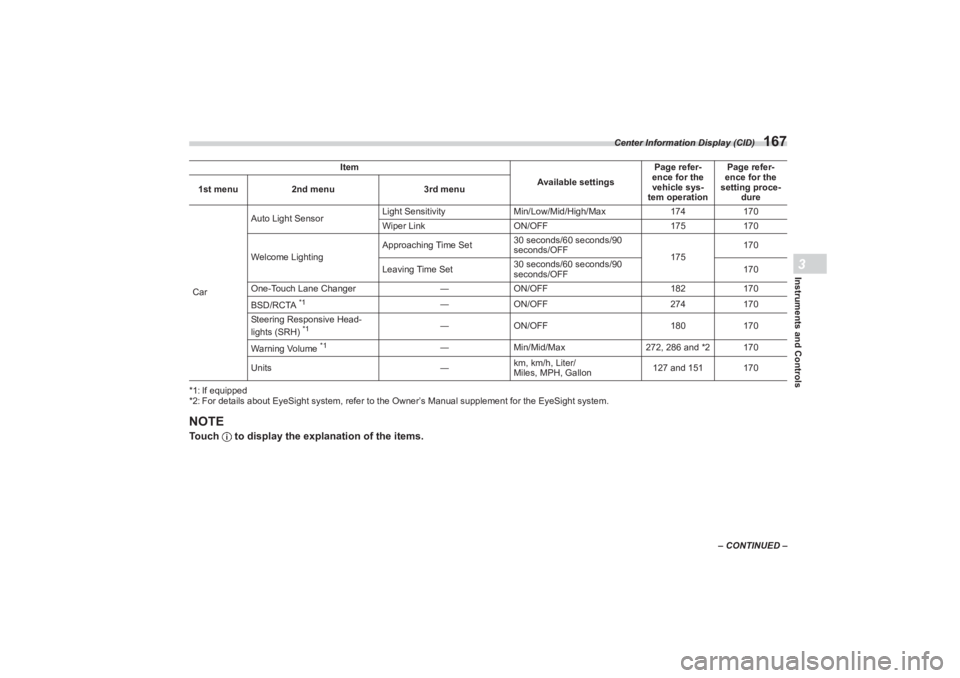
NOTETouch to display the explanation of the items.CarAuto Light Sensor
Light Sensitivity
Min/Low/Mid/High/Max 174170
Wiper Link ON/OFF 175170
Welcome Lighting Approaching Time Set
30 seconds/60 seconds/90
seconds/OFF
175170
Leaving Time Set 30 seconds/60 seconds/90
seconds/OFF 170
One-Touch Lane Changer ―ON/OFF 182170
BSD/RCTA
*1
― ON/OFF 274170
Steering Responsive Head-
lights (SRH)
*1
― ON/OFF 180170
Warning Volume
*1
― Min/Mid/Max 272, 286 and *2 170
Units ―km, km/h, Liter/
Miles, MPH, Gallon 127 and 151 170
Item
Available settingsPage refer-
ence for the
vehicle sys-
tem operation Page refer-
ence for the
setting proce-
dure
1st menu
2nd menu 3rd menu
BRZ_U.book 167 ページ 2022年3月29日 火曜日 午後3時59分
Page 179 of 432
Clock
173
Instruments and Controls3
■Setting the Clock Automati-
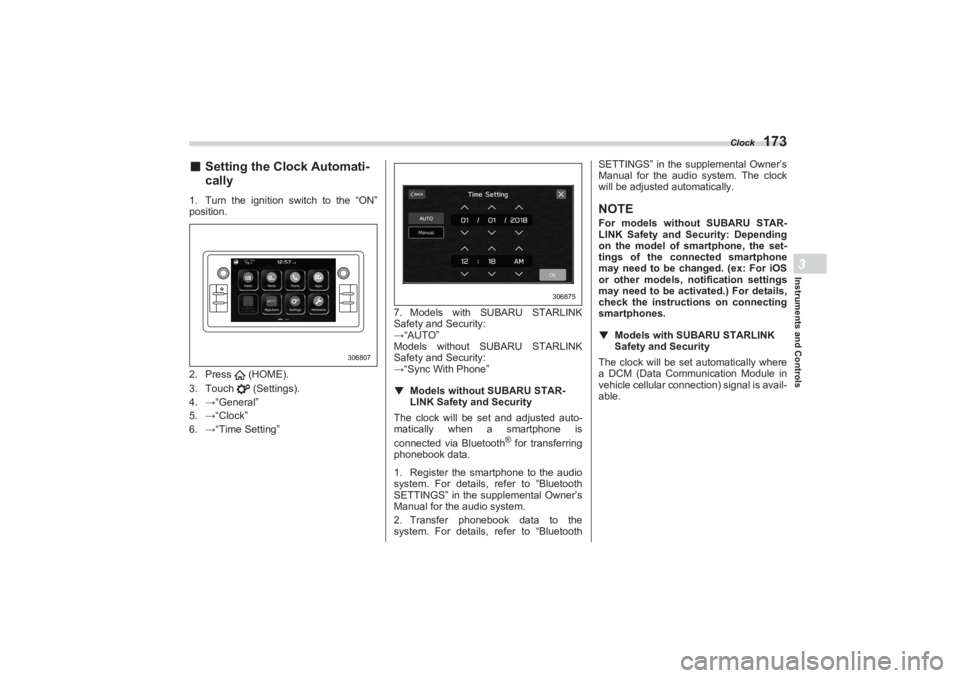
cally1. Turn the ignition switch to the “ON”
position.
2. Press (HOME).
3. Touch (Settings).
4. →“General”
5. →“Clock”
6. →“Time Setting” 7. Models with SUBARU STARLINK
Safety and Security:
→ “AUTO”
Models without SUBARU STARLINK
Safety and Security:
→ “Sync With Phone”
▼ Models without SUBARU STAR -
LINK Safety and Security
The clock will be set and adjusted auto-
ma tically when a smartphone is
connected via Bluetooth
® for transferring
phonebook data.
1. Register the smartphone to the audio
system. For details, refer to “Bluetooth
SETTINGS” in the supplemental Owner’s
Manual for the audio system.
2. Transfer phonebook data to the
system. For details, refer to “Bluetooth SETTINGS” in the supplemental Owner’s
Manual for the audi o system. The clock
will be adjusted automatically.
NOTEFor models with out SUBARU STAR-
LINK Safety and Security: Depending
on the model of smartphone, the set-
tings of the connected smartphone
may need to be changed. (ex: For iOS
or other models, notification settings
may need to be activated.) For details,
check the instructions on connecting
smartphones.
▼ Models with SUBAR U STARLINK
Safety and SecurityThe clock will be set automatically where
a DCM (Data Communication Module in
vehicle cellular connection) signal is avail-
able.
306807
306875
BRZ_U.book 173 ページ 2022年3月29日 火曜日 午後3時59分
Page 180 of 432
Light Control Switch
1743-10. Light Control SwitchThe light control switch operates when the
push-button ignition switch is in the “ACC”
or “ON” position.
Regardless of the pos ition of the light
control switch, the illuminated lights are
turned off when the push-button ignition
switch is turned off.NOTEThe light control switch can be oper-
ated (except auto on/off headlights),
even the push-button ignition switch
is turned off.
If the driver’s door is opened while the
headlights are illuminated under such conditions, a chirp sound will inform
the driver that the lights are illumi-
nated.
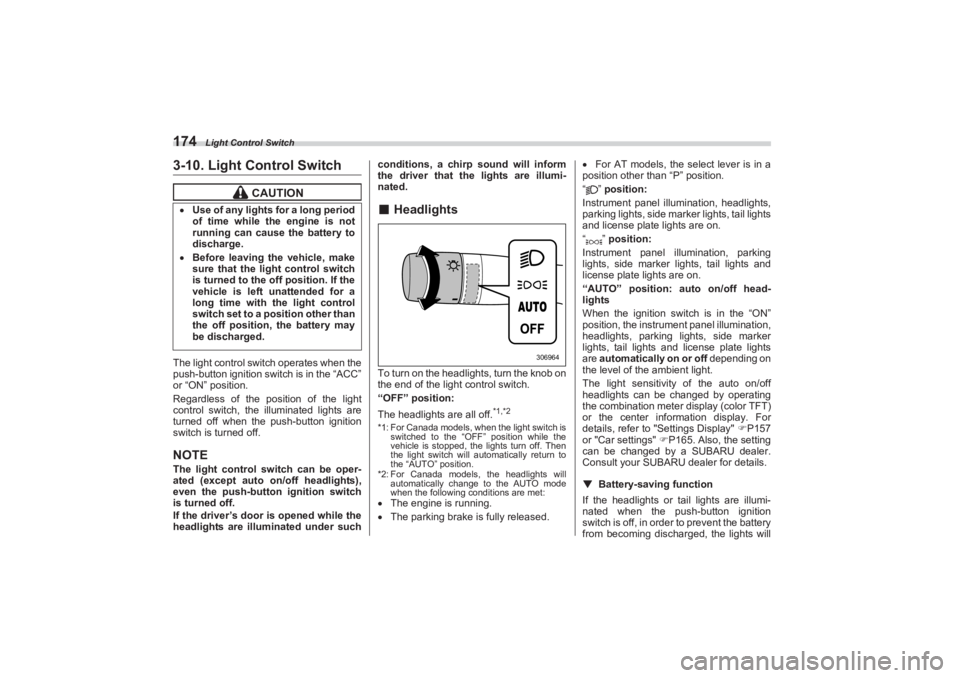
■ HeadlightsTo turn on the headlights, turn the knob on
the end of the light control switch.
“OFF” position:
The headlights are all off.
*1,*2
*1: For Canada models, when the light switch is
switched to the “OFF” position while the
vehicle is stopped, the lights turn off. Then
the light switch will automatically return to
the “AUTO” position.
*2: For Canada models, the headlights will automatically change to the AUTO mode
when the following conditions are met: The engine is running.
The parking brake is fully released.
For AT models, the select lever is in a
position other than “P” position.
“” position:
Instrument panel illumination, headlights,
parking lights, side marker lights, tail lights
and license plate lights are on.
“” position:
Instrument panel illumination, parking
lights, side marker lights, tail lights and
license plate lights are on.
“AUTO” position: auto on/off head-
lights
When the ignition switch is in the “ON”
position, the instrum ent panel illumination,
headlights, parking lights, side marker
lights, tail lights and license plate lights
are automatically on or off depending on
the level of the ambient light.
The light sensitivity of the auto on/off
headlights can be changed by operating
the combination meter display (color TFT)
or the center information display. For
details, refer to "Settings Display" P157
or "Car settings" P165. Also, the setting
can be changed by a SUBARU dealer.
Consult your SUBARU dealer for details.
▼ Battery-saving function
If the headlights or tail lights are illumi-
nated when the push-button ignition
switch is off, in order to prevent the battery
from becoming discharg ed, the lights will
CAUTION
Use of any lights for a long period
of time while the engine is not
running can cause the battery to
discharge. Before leaving the vehicle, make
sure that the light control switch
is turned to the off position. If the
vehicle is left unattended for a
long time with the light control
switch set to a position other than
the off position, the battery may
be discharged.
306964
BRZ_U.book 174 ページ 2022年3月29日 火曜日 午後3時59分