mirror SUBARU BRZ 2023 User Guide
[x] Cancel search | Manufacturer: SUBARU, Model Year: 2023, Model line: BRZ, Model: SUBARU BRZ 2023Pages: 432, PDF Size: 16.56 MB
Page 196 of 432
Mirrors
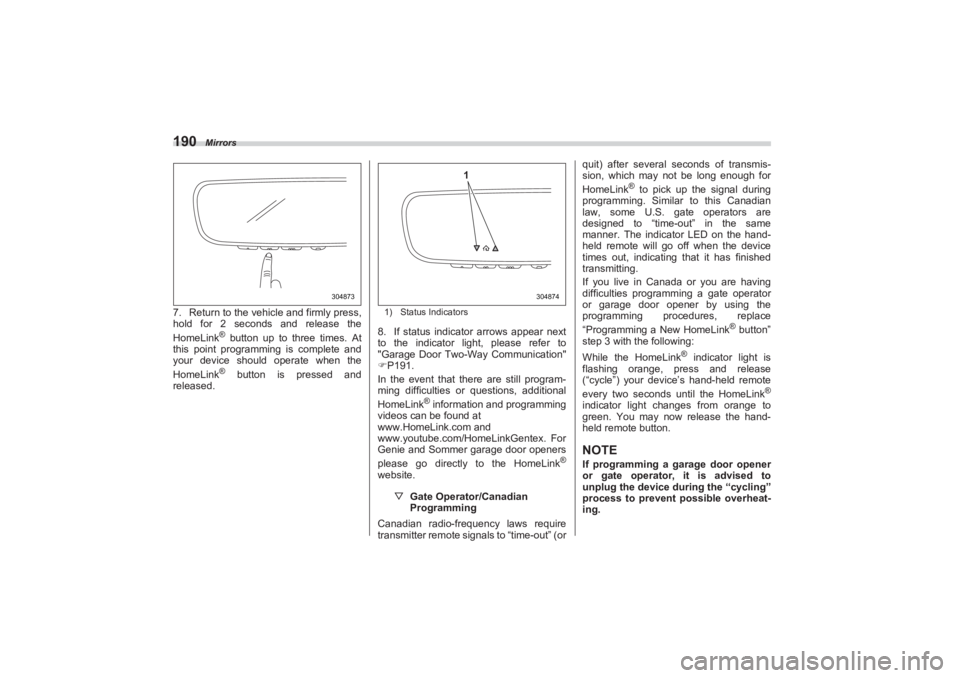
1907. Return to the vehicle and firmly press,
hold for 2 seconds and release the
HomeLink
® button up to three times. At
this point programming is complete and
your device should operate when the
HomeLink® button is pressed and
released.
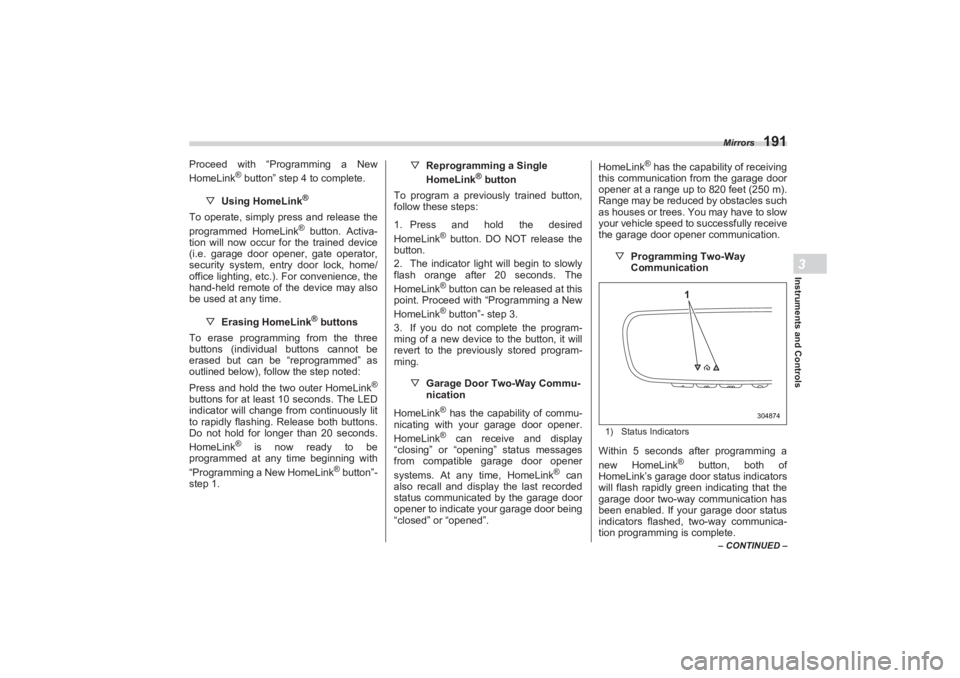
1) Status Indicators8. If status indicator arrows appear next
to the indicator light, please refer to
"Garage Door Two-Way Communication"
P191.
In the event that there are still program-
ming difficulties or questions, additional
HomeLink
® information and programming
videos can be found at
www.HomeLink.com and
www.youtube.com/HomeLinkGentex. For
Genie and Sommer garage door openers
please go directly to the HomeLink
®
website.
▽ Gate Operator/Canadian
Programming
Canadian radio-frequency laws require
transmitter remote signals to “time-out” (or quit) after several se
conds of transmis-
sion, which may not be long enough for
HomeLink
® to pick up the signal during
programming. Similar to this Canadian
law, some U.S. gate operators are
designed to “time-out” in the same
manner. The indicator LED on the hand-
held remote will go off when the device
times out, indicating that it has finished
transmitting.
If you live in Canada or you are having
difficulties programming a gate operator
or garage door opener by using the
programming procedures, replace
“Programming a New HomeLink
® button”
step 3 with the following:
While the HomeLink
® indicator light is
flashing orange, press and release
(“cycle”) your device’s hand-held remote
every two seconds until the HomeLink
®
indicator light changes from orange to
green. You may now release the hand-
held remote button.NOTEIf programming a garage door opener
or gate operator, it is advised to
unplug the device during the “cycling”
process to prevent possible overheat-
ing.
304873
304874
1
BRZ_U.book 190 ページ 2022年3月29日 火曜日 午後3時59分
Page 197 of 432
Mirrors
191
Instruments and Controls3
– CONTINUED –
Proceed with “Programming a New
HomeLink
® button” step 4 to complete.
▽ Using HomeLink
®
To operate, simply press and release the
programmed HomeLink
® button. Activa-
tion will now occur for the trained device
(i.e. garage door opener, gate operator,
security system, entry door lock, home/
office lighting, etc.). For convenience, the
hand-held remote of the device may also
be used at any time.
▽Erasing HomeLink® buttons
To erase programming from the three
buttons (individual buttons cannot be
erased but can be “reprogrammed” as
outlined below), follow the step noted:
Press and hold the two outer HomeLink
®
buttons for at least 10 seconds. The LED
indicator will change from continuously lit
to rapidly flashing. Release both buttons.
Do not hold for longer than 20 seconds.
HomeLink
® is now ready to be
programmed at any time beginning with
“Programming a New HomeLink
® button”-
step 1. ▽
Reprogramming a Single
HomeLink
® button
To program a previously trained button,
follow these steps:
1. Press and hold the desired
HomeLink
® button. DO NOT release the
button.
2. The indicator light will begin to slowly
flash orange after 20 seconds. The
HomeLink® button can be released at this
point. Proceed with “Programming a New
HomeLink® button”- step 3.
3. If you do not complete the program-
ming of a new device to the button, it will
revert to the previously stored program-
ming.
▽Garage Door Two-Way Commu -
nication
HomeLink® has the capability of commu-
nicating with your garage door opener.
HomeLink® can receive and display
“closing” or “opening” status messages
from compatible garage door opener
systems. At any time, HomeLink
® can
also recall and display the last recorded
status communicated by the garage door
opener to indicate your garage door being
“closed” or “opened”. HomeLink
® has the capability of receiving
this communication from the garage door
opener at a range up to 820 feet (250 m).
Range may be reduced by obstacles such
as houses or trees. You may have to slow
your vehicle speed to successfully receive
the garage door opener communication.
▽Programming Two-Way
Communication
1) Status IndicatorsWithin 5 seconds after programming a
new HomeLink
® button, both of
HomeLink’s garage door status indicators
will flash rapidly green indicating that the
garage door two-way communication has
been enabled. If your garage door status
indicators flashed, two-way communica-
tion programming is complete.
304874
1
BRZ_U.book 191 ページ 2022年3月29日 火曜日 午後3時59分
Page 198 of 432
Mirrors
192If the garage door status indicators do not
flash, additional HomeLink
® information
and programming videos can be found
online at www.HomeLink.com and
www.youtube.com/HomeLinkGentex.
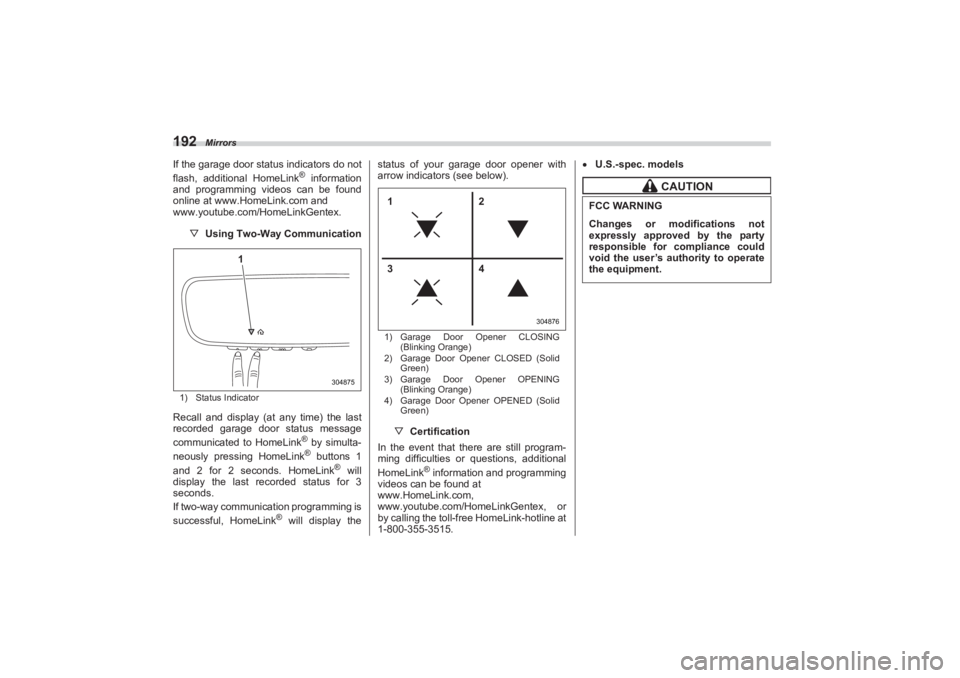
▽ Using Two-Way Communication1) Status IndicatorRecall and display (at any time) the last
recorded garage door status message
communicated to HomeLink
® by simulta-
neously pressing HomeLink® buttons 1
and 2 for 2 seconds. HomeLink
® will
display the last recorded status for 3
seconds.
If two-way communication programming is
successful, HomeLink
® will display the status of your garage door opener with
arrow indicators (see below).
1) Garage Door Opener CLOSING
(Blinking Orange)
2) Garage Door Opener CLOSED (Solid
Green)
3) Garage Door Opener OPENING
(Blinking Orange)
4) Garage Door Opener OPENED (Solid
Green)▽ Certification
In the event that there are still program-
ming difficulties or questions, additional
HomeLink
® information and programming
videos can be found at
www.HomeLink.com,
www.youtube.com/HomeLinkGentex, or
by calling the toll-free HomeLink-hotline at
1-800-355-3515.
U.S.-spec. models
304875
1
304876
12
34
CAUTION
FCC WARNINGChanges or modifications not
expressly approved by the party
responsible for compliance could
void the user’s authority to operate
the equipment.
BRZ_U.book 192 ページ 2022年3月29日 火曜日 午後3時59分
Page 199 of 432
Mirrors
193
Instruments and Controls3
– CONTINUED –
Canada-spec. models
HomeLink
® and the HomeLink
® house
are registered tr ademarks of Gentex
Corporation.
306210
306210
306211
BRZ_U.book 193 ページ 2022年3月29日 火曜日 午後3時59分
Page 200 of 432
Mirrors
194
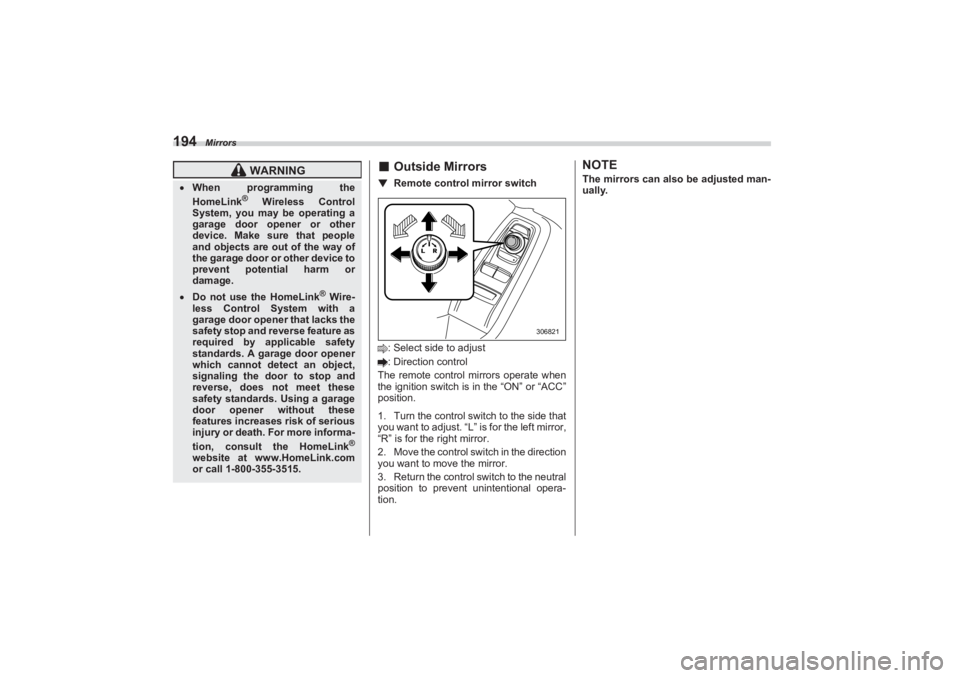
■Outside Mirrors▼ Remote control mirror switch: Select side to adjust
: Direction control
The remote control mirrors operate when
the ignition switch is in the “ON” or “ACC”
position.
1. Turn the control switch to the side that
you want to adjust. “L” is for the left mirror,
“R” is for the right mirror.
2. Move the control swit ch in the direction
you want to move the mirror.
3. Return the control switch to the neutral
position to prevent unintentional opera-
tion.
NOTEThe mirrors can also be adjusted man-
ually.
WARNING
When programming the
HomeLink
® Wireless Control
System, you may be operating a
garage door opener or other
device. Make sure that people
and objects are out of the way of
the garage door or other device to
prevent potential harm or
damage.
Do not use the HomeLink
® Wire-
less Control System with a
garage door opener that lacks the
safety stop and reverse feature as
required by applicable safety
standards. A garage door opener
which cannot detect an object,
signaling the door to stop and
reverse, does not meet these
safety standards. Using a garage
door opener without these
features increases risk of serious
injury or death. For more informa-
tion, consult the HomeLink
®
website at www.HomeLink.com
or call 1-800-355-3515.
306821
BRZ_U.book 194 ページ 2022年3月29日 火曜日 午後3時59分
Page 205 of 432
Climate Control Panel
199
Climate Control4
17
2
3
4
6
5
15
13
8
9
10
11
12
14
403484
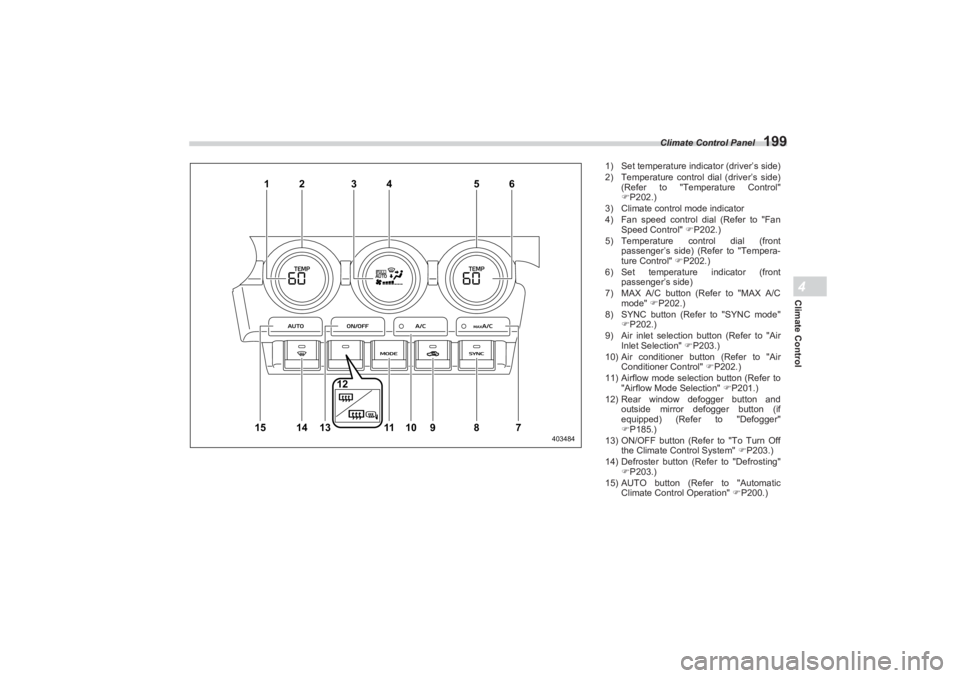
1) Set temperature indi cator (driver’s side)
2) Temperature control dial (driver’s side)
(Refer to "Temperature Control"
P202.)
3) Climate control mode indicator
4) Fan speed control dial (Refer to "Fan
Speed Control" P202.)
5) Temperature control dial (front
passenger’s side) (Refer to "Tempera-
ture Control" P202.)
6) Set temperature indicator (front
passenger’s side)
7) MAX A/C button (Refer to "MAX A/C
mode" P202.)
8) SYNC button (Refer to "SYNC mode"
P202.)
9) Air inlet selection button (Refer to "Air
Inlet Selection" P203.)
10) Air conditioner button (Refer to "Air
Conditioner Control" P202.)
11) Airflow mode selection button (Refer to
"Airflow Mode Selection" P201.)
12) Rear window defogger button and
outside mirror defogger button (if
equipped) (Refer to "Defogger"
P185.)
13) ON/OFF button (Refer to "To Turn Off
the Climate Control System" P203.)
14) Defroster button (Refer to "Defrosting"
P203.)
15) AUTO button (Refer to "Automatic
Climate Control Operation" P200.)
BRZ_U.book 199 ページ 2022年3月29日 火曜日 午後3時59分
Page 217 of 432
Interior Equipment6
Interior Equipment
6-1. Interior Light ........................................................212
Map Lights.....................................................................212
OFF Delay Timer ...........................................................212
6-2. Sun Visors ...........................................................213
Vanity Mirror with Light (If Equipped) ........................213
6-3. Storage Compartment ........................................213
Glove Box ......................................................................214
Center Console .............................................................214
6-4. Bottle Holders .....................................................215
6-5. Accessory Power Outlets ...................................215
6-6. USB Power Supply ..............................................216
How to Use the USB Power Supply ........................... 217
6-7. Ashtray (Dealer Option) ......................................217
6-8. Floor Mat ..............................................................218
6-9. Under-Floor Storage Compartment
(models with the flat tire repair kit) .................219
BRZ_U.book 211 ページ 2022年3月29日 火曜日 午後3時59分
Page 219 of 432
Sun Visors
213
Interior Equipment6
– CONTINUED –
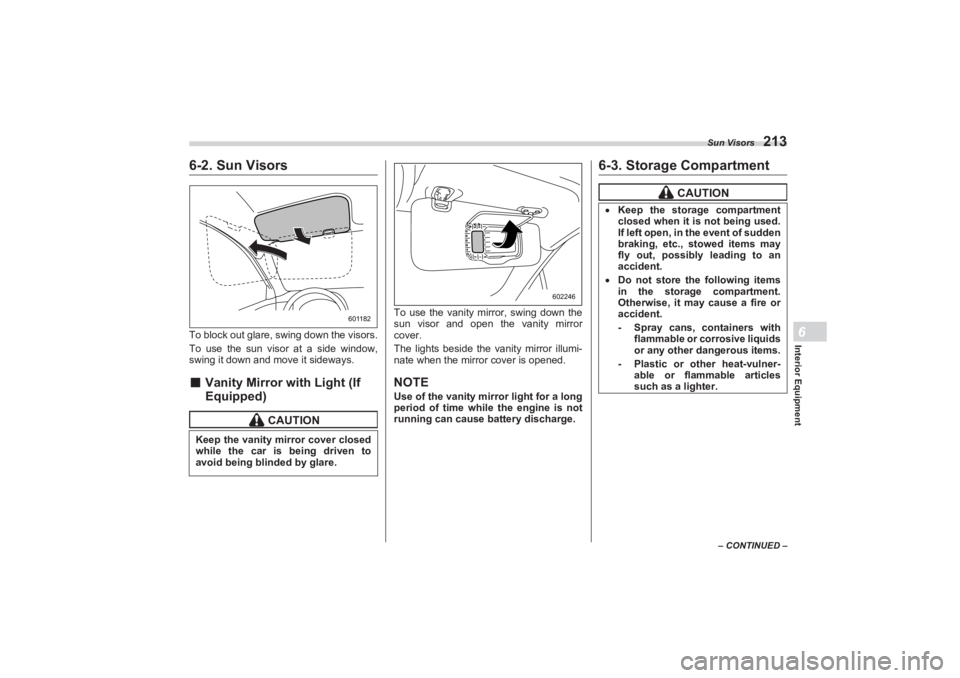
6-2. Sun VisorsTo block out glare, swing down the visors.
To use the sun visor at a side window,
swing it down and move it sideways.■ Vanity Mirror with Light (If
Equipped)
To use the vanity mirror, swing down the
sun visor and open the vanity mirror
cover.
The lights beside the vanity mirror illumi-
nate when the mirror cover is opened.NOTEUse of the vanity mirror light for a long
period of time while the engine is not
running can cause battery discharge.
6-3. Storage Compartment
CAUTION
Keep the vanity mirror cover closed
while the car is being driven to
avoid being blinded by glare.
601182
602246
CAUTION
Keep the storage compartment
closed when it is not being used.
If left open, in the event of sudden
braking, etc., stowed items may
fly out, possibly leading to an
accident. Do not store the following items
in the storage compartment.
Otherwise, it may cause a fire or
accident.
- Spray cans, containers with
flammable or corrosive liquids
or any other dangerous items.- Plastic or other heat-vulner- able or flammable articles
such as a lighter.
BRZ_U.book 213 ページ 2022年3月29日 火曜日 午後3時59分
Page 234 of 432
Preparing to Drive
228have implemented emission inspection of
the OBDII system.
The inspection of the OBDII system
consists of a visual operational check of
the “ CHECK ENGINE ” warning light/
malfunction indicator light (MIL) and an
examination of the OBDII system with an
electronic scan tool.
A vehicle passes
the OBDII system
inspection if proper operation of the
“ CHECK ENGINE ” warning light is
observed, there are no stored diagnostic
trouble codes, and the OBDII readiness
monitors are all complete.
A vehicle fails
the OBDII inspection if
the “ CHECK ENGINE ” warning light is not
properly operating (light is illuminated or is
not working due to a burned out bulb) or
there is one or more diagnostic trouble
codes stored in the vehicle’s computer.
A state emission in spection may reject
(not pass or fail) a vehicle if the number of
OBDII system readiness monitors “ NOT
READY ” is greater than one. If the
vehicle’s battery has been recently
replaced or disconnected, the OBDII
system inspection may indicate that the
vehicle is not ready for the emission test.
Under this condition, the vehicle driver
should be instructed to drive his/her
vehicle for a few days to reset the readi-
ness monitors and return for an emission
re-inspection.
Owners of rejected or failing vehicles
should contact their SUBARU Dealer for
service.
7-3. Preparing to DriveYou should perform the following checks
and adjustments every day before you
start driving.
1. Check that all windows, mirrors, and
lights are clean and unobstructed.
2. Check the appearance and condition
of the tires. Also check tires for proper
inflation.
3. Look under the vehicle for any sign of
leaks.
4. Check that no small animals enter the
engine compartment.
5. Check that the hood and trunk are fully
closed.
6. Check the adjustment of the seat.
7. Check the adjustment of the inside
and outside mirrors.
8. Fasten your seatbelt. Check that your
passengers have fastened their seatbelts.
9. Check the operation of the warning
and indicator lights when the ignition
switch is turned to the “ON” position.
10. Check the gauges, indicator and
warning lights after starting the engine.
BRZ_U.book 228 ページ 2022年3月29日 火曜日 午後3時59分
Page 269 of 432
Rear View Camera
263
Starting and Operating7
– CONTINUED –
the switch. The vehicle speed at that
moment will be memorized and treated as
the new set speed.
When setting the displayed unit as
“MPH”:
The set speed can be decreased 1 mph
(1.6 km/h) each time by pushing the cruise
control switch to the “-SET” side.
When setting the displayed unit as
“km/h”:
The set speed can be decreased 1 km/h
(0.6 mph) each time by pushing the cruise
control switch to the “-SET” side.▼ To decrease the speed (by brake
pedal)
1. Depress the brake pedal to release
cruise control temporarily.
2. When the speed decreases to the
desired speed, push the cruise control
switch to the “-SET” side once. Now the
desired speed is set and the vehicle will
keep running at that speed without
depressing the accelerator pedal.■ Cruise Control Indicator
LightRefer to "Combination Meter Settings"
P130.
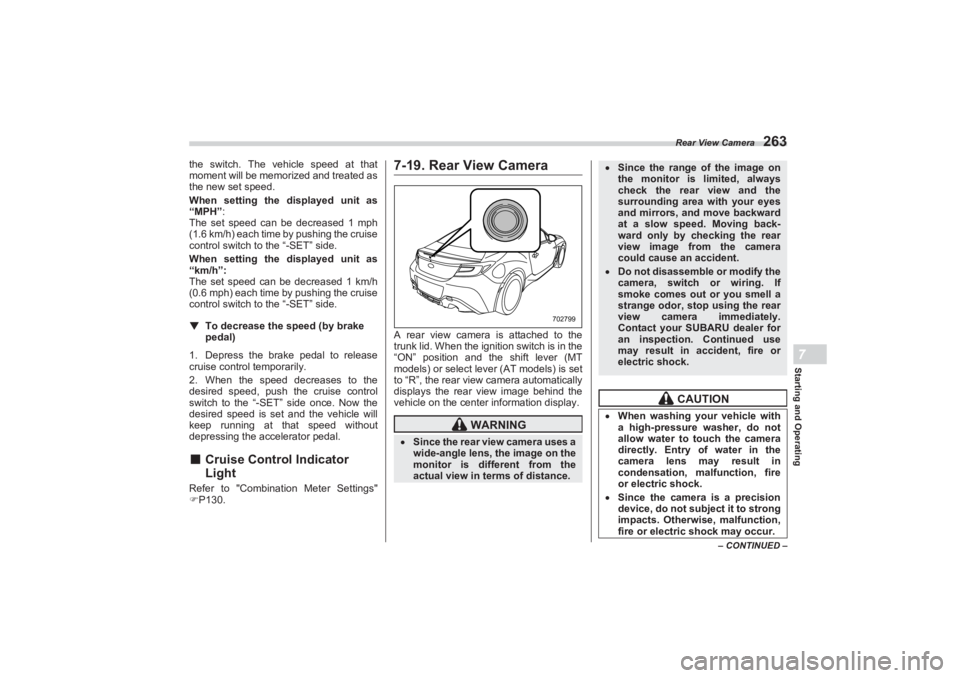
7-19. Rear View CameraA rear view camera is attached to the
trunk lid. When the ignition switch is in the
“ON” position and the shift lever (MT
models) or select lever (AT models) is set
to “R”, the rear view camera automatically
displays the rear view image behind the
vehicle on the center information display.
WARNING
Since the rear view camera uses a
wide-angle lens, the image on the
monitor is diffe rent from the
actual view in terms of distance.
702799
Since the range of the image on
the monitor is limited, always
check the rear view and the
surrounding area with your eyes
and mirrors, and move backward
at a slow speed. Moving back-
ward only by checking the rear
view image from the camera
could cause an accident. Do not disassemble or modify the
camera, switch or wiring. If
smoke comes out or you smell a
strange odor, stop using the rear
view camera immediately.
Contact your SUBARU dealer for
an inspection. Continued use
may result in accident, fire or
electric shock.
CAUTION
When washing your vehicle with
a high-pressure washer, do not
allow water to touch the camera
directly. Entry of water in the
camera lens may result in
condensation, malfunction, fire
or electric shock. Since the camera is a precision
device, do not subject it to strong
impacts. Otherwise, malfunction,
fire or electric shock may occur.
BRZ_U.book 263 ページ 2022年3月29日 火曜日 午後3時59分