ignition SUBARU CROSSTREK 2018 Owners Manual
[x] Cancel search | Manufacturer: SUBARU, Model Year: 2018, Model line: CROSSTREK, Model: SUBARU CROSSTREK 2018Pages: 474, PDF Size: 20.76 MB
Page 289 of 474
(298,1)
北米Model "A1320BE-C" EDITED: 2017/ 10/ 10
!Supplemental booster function
when vacuum pressure fails
While the ignition switch is turned“ON”
and the engine is running, the supple-
mental booster function operates when the
brake booster performance is decreased
due to insufficient vacuum boost.
When the brake pedal is depressed while
the supplemental booster function is oper-
ating, an operation sound and brake pedal
vibration may be generated. This is not a
malfunction.
!Brake assist system
WARNING
Do not be overconfident about the
brake assist. It is not a system that
brings more braking ability to the
vehicle beyond its braking capabil-
ity. Always use the utmost care
when driving regarding vehicle
speed and safe distance.
CAUTION
When you need to brake suddenly,
continue depressing the brake pedal
strongly to bring the effect of the
brake assist.Brake assist is a driver assistance system.
It assists the brake power when the driver
cannot depress the brake pedal strongly
and the brake power is insufficient.
Brake assist generates the brake power
according to the speed at which the driver
depresses the brake pedal.
NOTEWhen you depress the brake pedal
strongly or suddenly, the following
phenomena occur. However, even
though these occur, they do not indi-
cate any malfunctions, and the brake
assist system is operating properly.
.You might feel that the brake pedal is
applied by lighter force and generates a
greater braking force.
.You might hear an ABS operating
noise from the engine compartment.
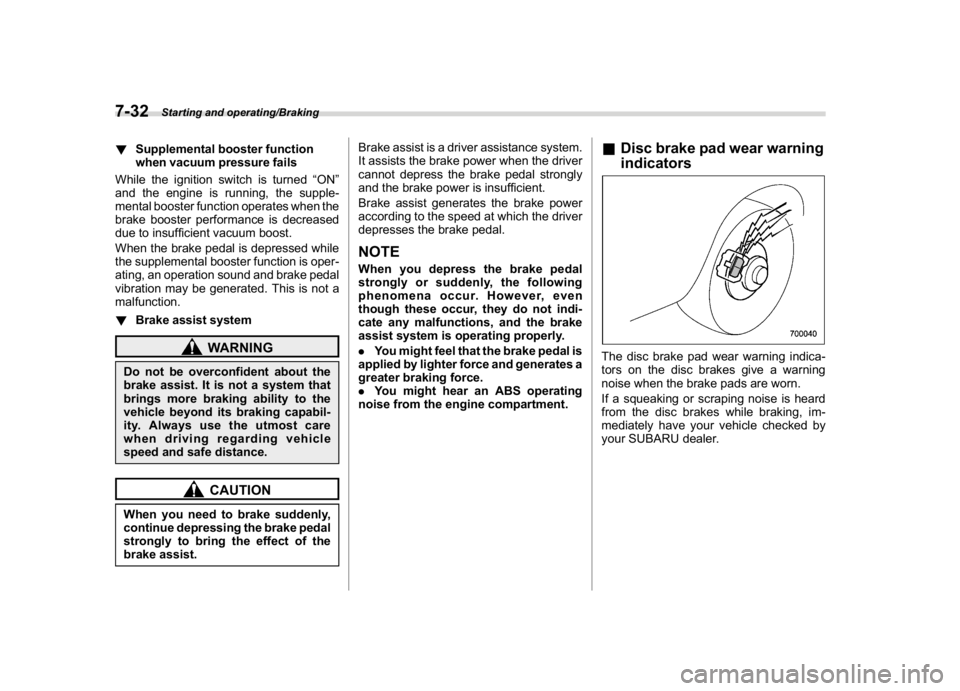
&Disc brake pad wear warning
indicatorsThe disc brake pad wear warning indica-
tors on the disc brakes give a warning
noise when the brake pads are worn.
If a squeaking or scraping noise is heard
from the disc brakes while braking, im-
mediately have your vehicle checked by
your SUBARU dealer.
Starting and operating/Braking
7-32
Page 294 of 474
(303,1)
北米Model "A1320BE-C" EDITED: 2017/ 10/ 10
&Vehicle Dynamics Control
system monitorRefer to“Vehicle Dynamics Control warn-
ing light/Vehicle Dynamics Control opera-
tion indicator light”F3-23 and“Vehicle
Dynamics Control OFF indicator light”F3-
24.&Vehicle Dynamics Control
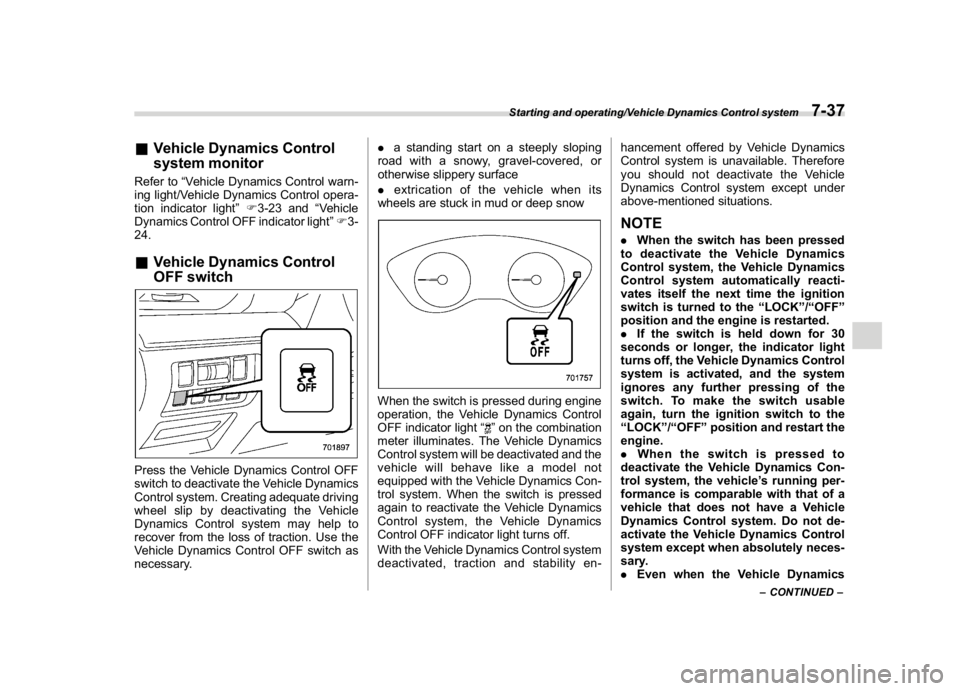
OFF switchPress the Vehicle Dynamics Control OFF
switch to deactivate the Vehicle Dynamics
Control system. Creating adequate driving
wheel slip by deactivating the Vehicle
Dynamics Control system may help to
recover from the loss of traction. Use the
Vehicle Dynamics Control OFF switch as
necessary..a standing start on a steeply sloping
road with a snowy, gravel-covered, or
otherwise slippery surface
.extrication of the vehicle when its
wheels are stuck in mud or deep snow
When the switch is pressed during engine
operation, the Vehicle Dynamics Control
OFF indicator light“
”on the combination
meter illuminates. The Vehicle Dynamics
Control system will be deactivated and the
vehicle will behave like a model not
equipped with the Vehicle Dynamics Con-
trol system. When the switch is pressed
again to reactivate the Vehicle Dynamics
Control system, the Vehicle Dynamics
Control OFF indicator light turns off.
With the Vehicle Dynamics Control system
deactivated, traction and stability en-hancement offered by Vehicle Dynamics
Control system is unavailable. Therefore
you should not deactivate the Vehicle
Dynamics Control system except under
above-mentioned situations.
NOTE.When the switch has been pressed
to deactivate the Vehicle Dynamics
Control system, the Vehicle Dynamics
Control system automatically reacti-
vates itself the next time the ignition
switch is turned to the“LOCK”/“OFF”
position and the engine is restarted.
.If the switch is held down for 30
seconds or longer, the indicator light
turns off, the Vehicle Dynamics Control
system is activated, and the system
ignores any further pressing of the
switch. To make the switch usable
again, turn the ignition switch to the
“LOCK”/“OFF”position and restart the
engine.
.When the switch is pressed to
deactivate the Vehicle Dynamics Con-
trol system, the vehicle’s running per-
formance is comparable with that of a
vehicle that does not have a Vehicle
Dynamics Control system. Do not de-
activate the Vehicle Dynamics Control
system except when absolutely neces-
sary.
.Even when the Vehicle Dynamics
–CONTINUED–
Starting and operating/Vehicle Dynamics Control system
7-37
7
Page 302 of 474
(311,1)
北米Model "A1320BE-C" EDITED: 2017/ 10/ 10
Hill start assist system
WARNING
.The Hill start assist system is a
device only for helping the driver
to START the vehicle on an uphill
grade. To prevent accidents
when the vehicle is parked on a
slope, be sure to firmly set the
parking brake. When setting the
parking brake, make sure that the
vehicle remains stationary when
the clutch pedal (MT models) and
brake pedal (both MT and CVT
models) are released.
.Do not turn the ignition switch to
the“LOCK”/“OFF”position while
the Hill start assist system is
operating. The Hill start assist
system will be deactivated and
may lead to an accident.
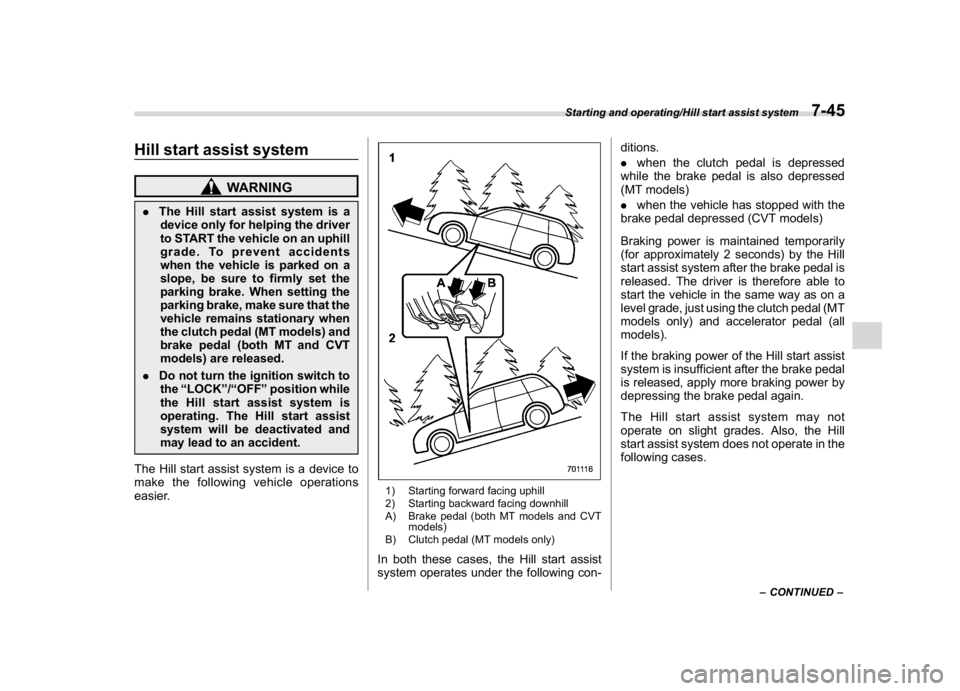
The Hill start assist system is a device to
make the following vehicle operations
easier.
1) Starting forward facing uphill
2) Starting backward facing downhill
A) Brake pedal (both MT models and CVT
models)
B) Clutch pedal (MT models only)In both these cases, the Hill start assist
system operates under the following con-ditions.
.when the clutch pedal is depressed
while the brake pedal is also depressed
(MT models)
.when the vehicle has stopped with the
brake pedal depressed (CVT models)
Braking power is maintained temporarily
(for approximately 2 seconds) by the Hill
start assist system after the brake pedal is
released. The driver is therefore able to
start the vehicle in the same way as on a
level grade, just using the clutch pedal (MT
models only) and accelerator pedal (all
models).
If the braking power of the Hill start assist
system is insufficient after the brake pedal
is released, apply more braking power by
depressing the brake pedal again.
The Hill start assist system may not
operate on slight grades. Also, the Hill
start assist system does not operate in the
following cases.
–CONTINUED–
Starting and operating/Hill start assist system
7-45
7
Page 303 of 474
(312,1)
北米Model "A1320BE-C" EDITED: 2017/ 10/ 10
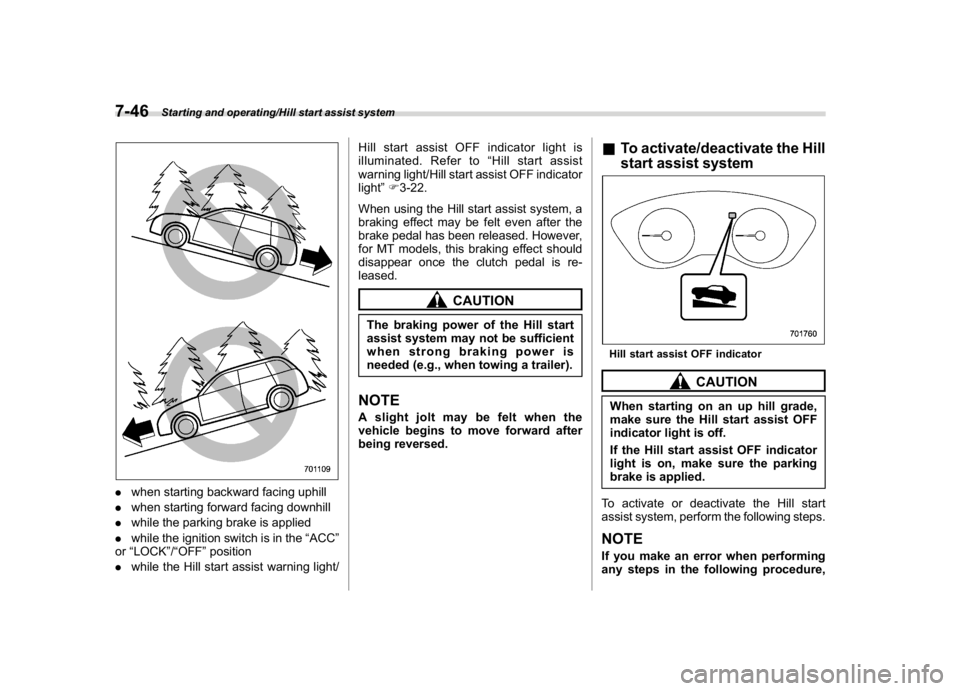
.when starting backward facing uphill
.when starting forward facing downhill
.while the parking brake is applied
.while the ignition switch is in the“ACC”
or“LOCK”/“OFF”position
.while the Hill start assist warning light/Hill start assist OFF indicator light is
illuminated. Refer to“Hill start assist
warning light/Hill start assist OFF indicator
light”F3-22.
When using the Hill start assist system, a
braking effect may be felt even after the
brake pedal has been released. However,
for MT models, this braking effect should
disappear once the clutch pedal is re-
leased.
CAUTION
The braking power of the Hill start
assist system may not be sufficient
when strong braking power is
needed (e.g., when towing a trailer).NOTEA slight jolt may be felt when the
vehicle begins to move forward after
being reversed.
&To activate/deactivate the Hill
start assist systemHill start assist OFF indicator
CAUTION
When starting on an up hill grade,
make sure the Hill start assist OFF
indicator light is off.
If the Hill start assist OFF indicator
light is on, make sure the parking
brake is applied.
To activate or deactivate the Hill start
assist system, perform the following steps.NOTEIf you make an error when performing
any steps in the following procedure,
Starting and operating/Hill start assist system
7-46
Page 304 of 474
(313,1)
北米Model "A1320BE-C" EDITED: 2017/ 10/ 10
place the ignition switch in the“LOCK”/
“OFF”position once and then start
over again.
!To deactivate
1. Park your vehicle in a flat and safe
location and apply the parking brake.
2. Turn the ignition switch to the“LOCK”/
“OFF”position.
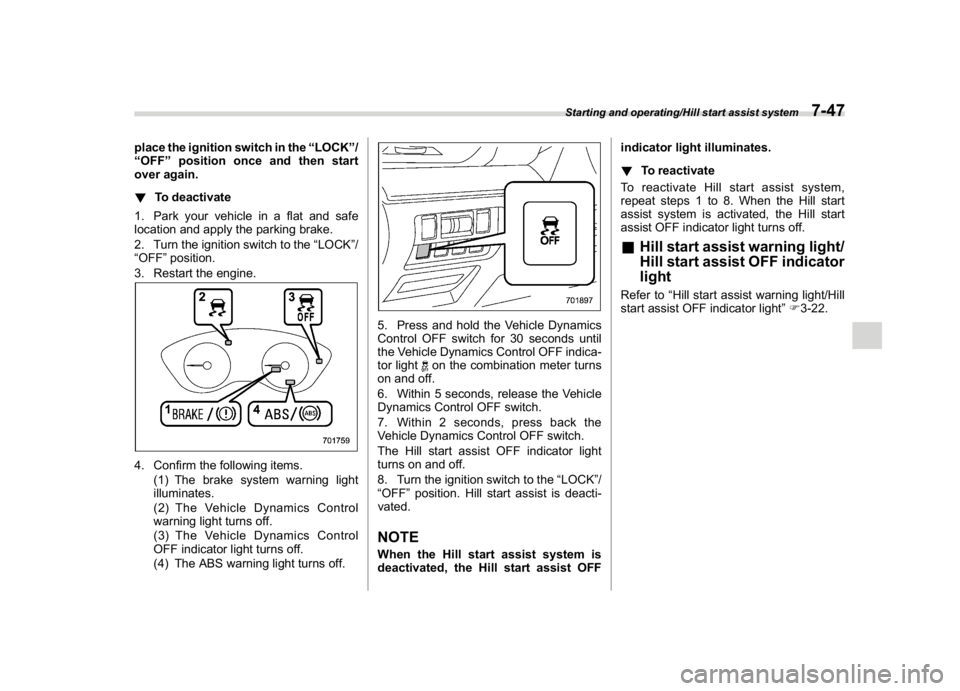
3. Restart the engine.4. Confirm the following items.
(1) The brake system warning light
illuminates.
(2) The Vehicle Dynamics Control
warning light turns off.
(3) The Vehicle Dynamics Control
OFF indicator light turns off.
(4) The ABS warning light turns off.
5. Press and hold the Vehicle Dynamics
Control OFF switch for 30 seconds until
the Vehicle Dynamics Control OFF indica-
tor light
on the combination meter turns
on and off.
6. Within 5 seconds, release the Vehicle
Dynamics Control OFF switch.
7. Within 2 seconds, press back the
Vehicle Dynamics Control OFF switch.
The Hill start assist OFF indicator light
turns on and off.
8. Turn the ignition switch to the“LOCK”/
“OFF”position. Hill start assist is deacti-
vated.
NOTEWhen the Hill start assist system is
deactivated, the Hill start assist OFFindicator light illuminates.
!To reactivate
To reactivate Hill start assist system,
repeat steps 1 to 8. When the Hill start
assist system is activated, the Hill start
assist OFF indicator light turns off.
&Hill start assist warning light/
Hill start assist OFF indicator
lightRefer to“Hill start assist warning light/Hill
start assist OFF indicator light”F3-22.
Starting and operating/Hill start assist system
7-47
7
Page 307 of 474
(316,1)
北米Model "A1320BE-C" EDITED: 2017/ 10/ 10
WARNING
For CVT models, you can cancel the
cruise control by shifting the select
lever into the“N”position. However,
do not shift the lever into the“N”
position while driving except in case
of emergency. If the select lever is
shifted into the“N”position, the
engine brake will no longer work.
This could result in an accident.
The cruise control set indicator light in the
combination meter turns off when the
cruise control is canceled.To resume the cruise control after it has
been temporarily canceled and with vehi-
cle speed of approximately 20 mph (30
km/h) or more, press the“RES/SET”switch to the“RES”side to return to the
original cruising speed automatically.
The cruise control set indicator light in the
combination meter will automatically illu-
minate at this time.
&To turn off the cruise controlThere are two ways to turn off the cruise
control:
.Press the cruise control main button
again.
.Turn the ignition switch to the“ACC”or
“LOCK”/“OFF”position (but only when the
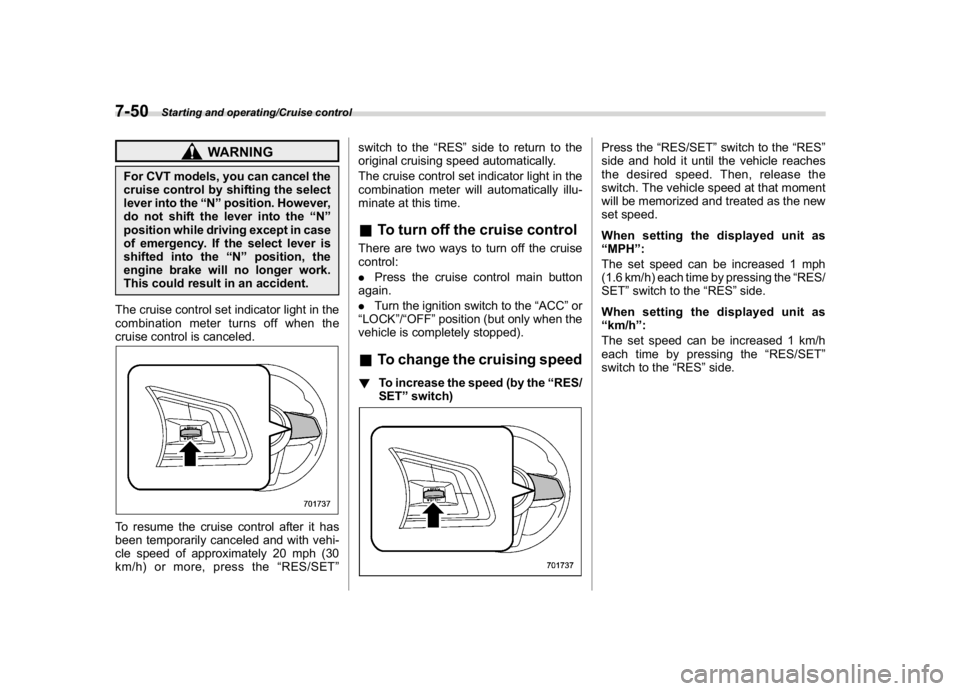
vehicle is completely stopped).&To change the cruising speed!To increase the speed (by the“RES/
SET”switch)
Press the“RES/SET”switch to the“RES”
side and hold it until the vehicle reaches
the desired speed. Then, release the
switch. The vehicle speed at that moment
will be memorized and treated as the new
set speed.
When setting the displayed unit as
“MPH”:
The set speed can be increased 1 mph
(1.6 km/h) each time by pressing the“RES/
SET”switch to the“RES”side.
When setting the displayed unit as
“km/h”:
The set speed can be increased 1 km/h
each time by pressing the“RES/SET”
switch to the“RES”side.
Starting and operating/Cruise control
7-50
Page 312 of 474

(321,1)
北米Model "A1320BE-C" EDITED: 2017/ 10/ 10
&System operation!Operating conditions
The BSD/RCTA will operate when all of the
following conditions are met.
.Theignitionswitchisinthe“ON”
position.
.The BSD/RCTA warning indicator and
BSD/RCTA OFF indicator are turned off.
.The vehicle is driven at speeds above 6
mph (10 km/h) (except when reversing).
.The shift lever/select lever is in the“R”
position (when reversing).
The BSD/RCTA will not operate in the
following situations.
.The BSD/RCTA OFF indicator is on.
.The vehicle speed is below 6 mph (10
km/h) even when the BSD/RCTA OFF
indicator remains off (except when rever-
sing).NOTE.In the following case, the BSD/RCTA
will stop operating and the BSD/RCTA
warning indicator will appear. If the
BSD/RCTA warning indicator appears,
have your vehicle inspected at a
SUBARU dealer as soon as possible.
–When a malfunction occurs in the
system, including the BSD/RCTA
approach indicator light.In the following cases, the BSD/
RCTA will temporarily stop operating
(or may stop operating) and the BSD/
RCTA warning indicator will appear.
–When the radar sensor becomes
significantly misaligned (If the or-
ientation of the radar sensor is
shifted for any reason, readjust-
ment is required. Have the sensor
adjusted at a SUBARU dealer.)
–When a large amount of snow or
ice sticks to the rear bumper sur-
face around the radar sensors
–When the vehicle is driven on a
snow-covered road or in an envir-
onment in which there are no ob-
jects around (such as in a desert) for
a long time
–When the temperature around the
radar sensors increased exces-
sively due to long driving on uphill
grades in summer, etc.
–When the temperature around the
radar sensors becomes extremely
low
–When the vehicle battery voltage
lowers
–When the vehicle battery be-
comes overvoltage
When the above conditions are cor-
rected, the BSD/RCTA will resume op-eration and the BSD/RCTA warning
indicator will disappear. However, if
the BSD/RCTA warning indicator has
appeared for a prolonged time, have the
system inspected at a SUBARU dealer
as soon as possible.
.The detectability of the radar sen-
sors is restricted. The BSD/RCTA de-
tection may be impaired and the system
may not operate properly under the
following conditions.
–When the rear bumper around the
radar sensors is distorted
–When ice, snow or mud adheres
to the rear bumper surface around
the radar sensors
–When stickers, etc. are affixed on
the areas of the radar sensors on
the rear bumper
–During adverse weather condi-
tions such as rain, snow or fog
–When driving on wet roads such
as snow-covered roads and through
puddles
.The radar sensors may not detect or
may have difficulty detecting the fol-
lowing.
–Small motorcycles, bicycles, pe-
destrians, stationary objects on the
road or road side, etc.
–Vehicles with body shapes that
the radar may not reflect (vehicles
–CONTINUED–
Starting and operating/BSD/RCTA
7-55
7
Page 316 of 474
(325,1)
北米Model "A1320BE-C" EDITED: 2017/ 10/ 10
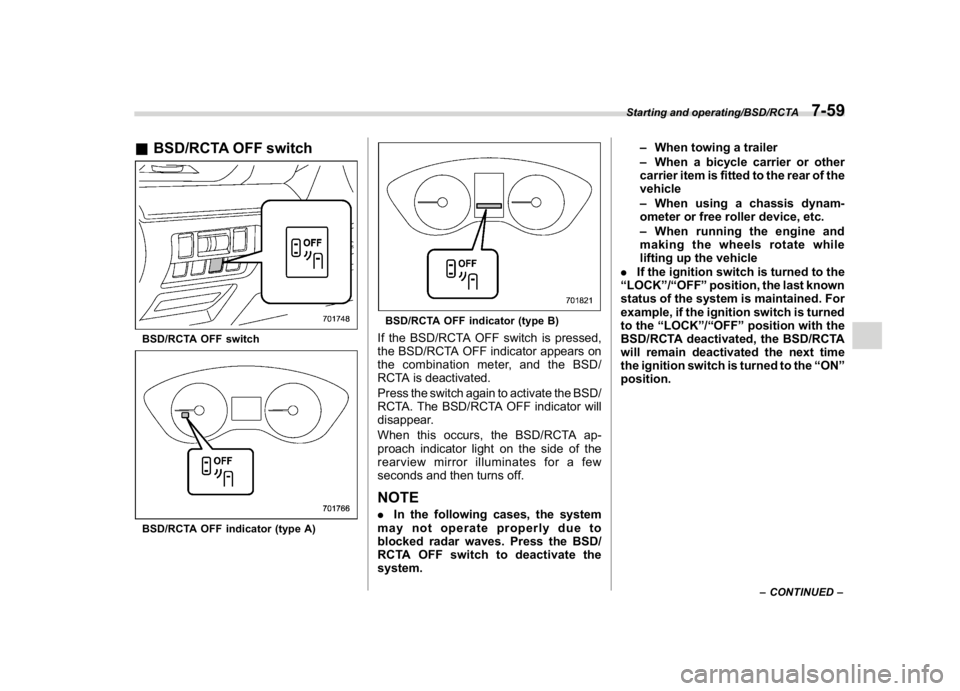
&BSD/RCTA OFF switchBSD/RCTA OFF switchBSD/RCTA OFF indicator (type A)
BSD/RCTA OFF indicator (type B)If the BSD/RCTA OFF switch is pressed,
the BSD/RCTA OFF indicator appears on
the combination meter, and the BSD/
RCTA is deactivated.
Press the switch again to activate the BSD/
RCTA. The BSD/RCTA OFF indicator will
disappear.
When this occurs, the BSD/RCTA ap-
proach indicator light on the side of the
rearview mirror illuminates for a few
seconds and then turns off.NOTE.In the following cases, the system
may not operate properly due to
blocked radar waves. Press the BSD/
RCTA OFF switch to deactivate the
system.–When towing a trailer
–When a bicycle carrier or other
carrier item is fitted to the rear of the
vehicle
–When using a chassis dynam-
ometer or free roller device, etc.
–When running the engine and
making the wheels rotate while
lifting up the vehicle
.If the ignition switch is turned to the
“LOCK”/“OFF”position, the last known
status of the system is maintained. For
example, if the ignition switch is turned
to the“LOCK”/“OFF”position with the
BSD/RCTA deactivated, the BSD/RCTA
will remain deactivated the next time
the ignition switch is turned to the“ON”
position.
–CONTINUED–
Starting and operating/BSD/RCTA
7-59
7
Page 319 of 474
(328,1)
北米Model "A1320BE-C" EDITED: 2017/ 10/ 10
party except under the following con-
ditions.
.The vehicle owner has given his/her
consent.
.The disclosure/provision is based
on a court order or other legally en-
forceable request.
.Data that has been modified so that
the user and vehicle cannot be identi-
fied is provided to a research institution
for statistical processing or similar
purposes.&Reverse Automatic Braking
System overviewThe system detects objects using sonar
sensors installed in the rear bumper.
.If the system determines a possible
collision with an object in the reversing
direction, automatic deceleration will be
activated. Also, beeping sounds will acti-
vate.
.If the vehicle is further reversed, auto-
matic hard braking will be applied and a
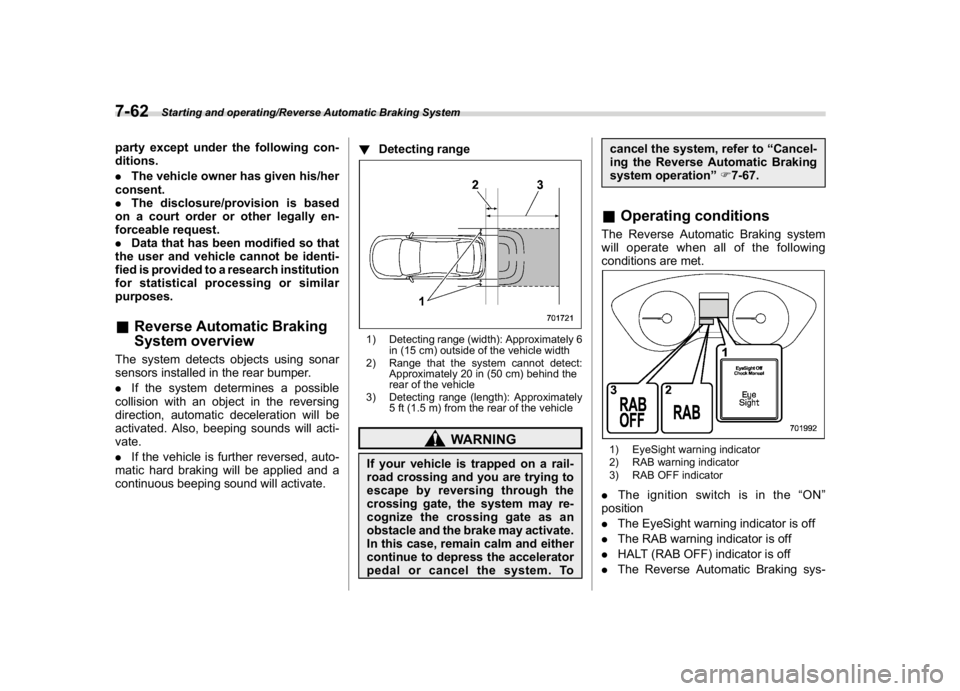
continuous beeping sound will activate.!Detecting range
1) Detecting range (width): Approximately 6
in (15 cm) outside of the vehicle width
2) Range that the system cannot detect:
Approximately 20 in (50 cm) behind the
rear of the vehicle
3) Detecting range (length): Approximately
5 ft (1.5 m) from the rear of the vehicle
WARNING
If your vehicle is trapped on a rail-
road crossing and you are trying to
escape by reversing through the
crossing gate, the system may re-
cognize the crossing gate as an
obstacle and the brake may activate.
In this case, remain calm and either
continue to depress the accelerator
pedal or cancel the system. Tocancel the system, refer to“Cancel-
ing the Reverse Automatic Braking
system operation”F7-67.
&Operating conditionsThe Reverse Automatic Braking system
will operate when all of the following
conditions are met.1) EyeSight warning indicator
2) RAB warning indicator
3) RAB OFF indicator.Theignitionswitchisinthe“ON”
position
.The EyeSight warning indicator is off
.The RAB warning indicator is off
.HALT (RAB OFF) indicator is off
.The Reverse Automatic Braking sys-
Starting and operating/Reverse Automatic Braking System
7-62
Page 325 of 474
(334,1)
北米Model "A1320BE-C" EDITED: 2017/ 10/ 10
&Reverse Automatic Braking
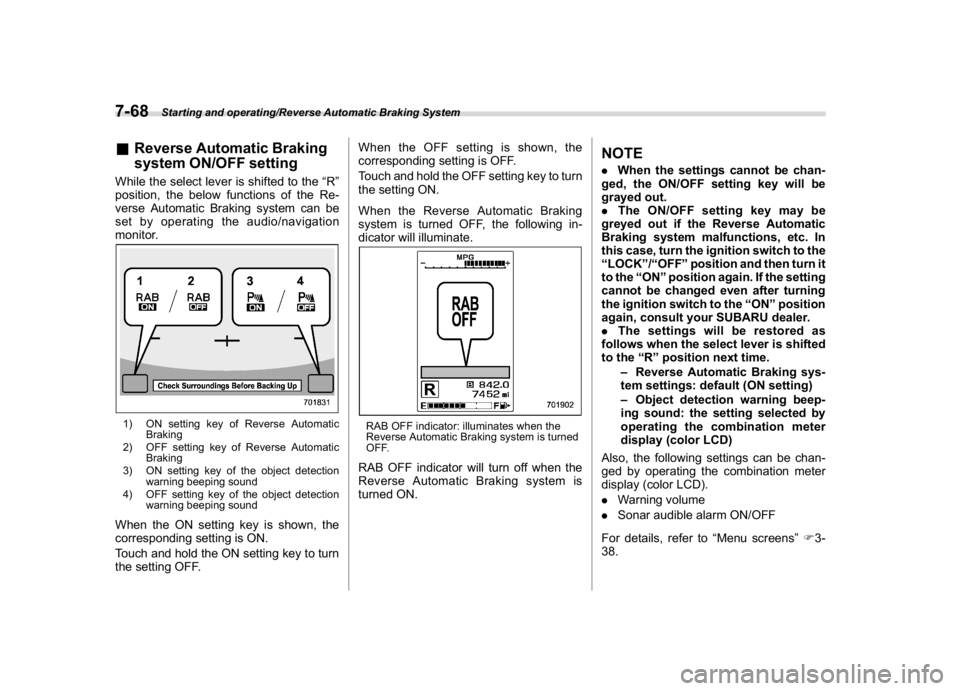
system ON/OFF settingWhile the select lever is shifted to the“R”
position, the below functions of the Re-
verse Automatic Braking system can be
set by operating the audio/navigation
monitor.1) ON setting key of Reverse Automatic
Braking
2) OFF setting key of Reverse Automatic
Braking
3) ON setting key of the object detection
warning beeping sound
4) OFF setting key of the object detection
warning beeping soundWhen the ON setting key is shown, the
corresponding setting is ON.
Touch and hold the ON setting key to turn
the setting OFF.When the OFF setting is shown, the
corresponding setting is OFF.
Touch and hold the OFF setting key to turn
the setting ON.
When the Reverse Automatic Braking
system is turned OFF, the following in-
dicator will illuminate.
RAB OFF indicator: illuminates when the
Reverse Automatic Braking system is turned
OFF.RAB OFF indicator will turn off when the
Reverse Automatic Braking system is
turned ON.
NOTE.When the settings cannot be chan-
ged, the ON/OFF setting key will be
grayed out.
.The ON/OFF setting key may be
greyed out if the Reverse Automatic
Braking system malfunctions, etc. In
this case, turn the ignition switch to the
“LOCK”/“OFF”position and then turn it
to the“ON”position again. If the setting
cannot be changed even after turning
the ignition switch to the“ON”position
again, consult your SUBARU dealer.
.The settings will be restored as
follows when the select lever is shifted
to the“R”position next time.
–Reverse Automatic Braking sys-
tem settings: default (ON setting)
–Object detection warning beep-
ing sound: the setting selected by
operating the combination meter
display (color LCD)
Also, the following settings can be chan-
ged by operating the combination meter
display (color LCD).
.Warning volume
.Sonar audible alarm ON/OFF
For details, refer to“Menu screens”F3-
38.
Starting and operating/Reverse Automatic Braking System
7-68