lock SUBARU CROSSTREK 2018 Workshop Manual
[x] Cancel search | Manufacturer: SUBARU, Model Year: 2018, Model line: CROSSTREK, Model: SUBARU CROSSTREK 2018Pages: 474, PDF Size: 20.76 MB
Page 122 of 474
(125,1)
北米Model "A1320BE-C" EDITED: 2017/ 10/ 10
belts and child restraints, locking
the doors reduces the chance of
being thrown out of the vehicle in an
accident.
It also helps prevent passengers
from falling out if a door is acciden-
tally opened, and intruders from
unexpectedly opening doors and
entering your vehicle.
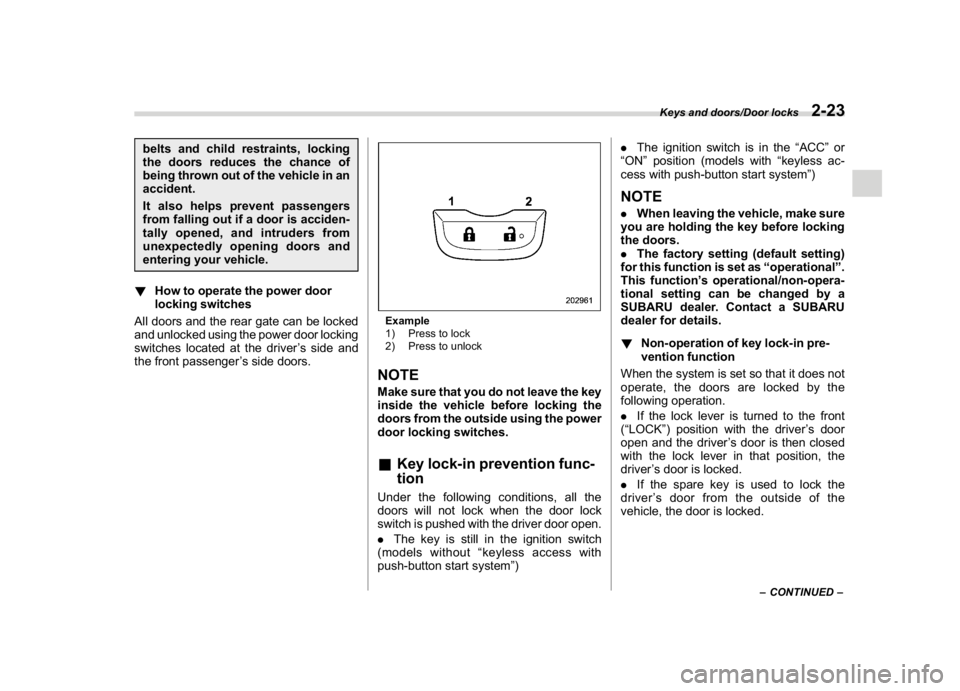
!How to operate the power door
locking switches
All doors and the rear gate can be locked
and unlocked using the power door locking
switches located at the driver’s side and
the front passenger’s side doors.
Example
1) Press to lock
2) Press to unlockNOTEMake sure that you do not leave the key
inside the vehicle before locking the
doors from the outside using the power
door locking switches.&Key lock-in prevention func-
tionUnder the following conditions, all the
doors will not lock when the door lock
switch is pushed with the driver door open.
.The key is still in the ignition switch
(models without“keyless access with
push-button start system”).The ignition switch is in the“ACC”or
“ON”position (models with“keyless ac-
cess with push-button start system”)
NOTE.When leaving the vehicle, make sure
you are holding the key before locking
the doors.
.The factory setting (default setting)
for this function is set as“operational”.
This function’s operational/non-opera-
tional setting can be changed by a
SUBARU dealer. Contact a SUBARU
dealer for details.
!Non-operation of key lock-in pre-
vention function
When the system is set so that it does not
operate, the doors are locked by the
following operation.
.If the lock lever is turned to the front
(“LOCK”) position with the driver’s door
open and the driver’s door is then closed
with the lock lever in that position, the
driver’s door is locked.
.If the spare key is used to lock the
driver’s door from the outside of the
vehicle, the door is locked.
–CONTINUED–
Keys and doors/Door locks
2-23
2
Page 124 of 474
(127,1)
北米Model "A1320BE-C" EDITED: 2017/ 10/ 10
&Alarm system operationWhen the alarm system is armed, it is
triggered by the opening any of the doors
or the rear gate.
The alarm system will activate the follow-
ing alarms when triggered.
.The vehicle’s horn will sound for 30
seconds.
.The hazard warning flashers will flash
for 30 seconds.
If any of the doors or the rear gate remains
open after the 30-second period, the horn
will continue to sound for a maximum of 3
minutes. If the door or the rear gate is
closed while the horn is sounding, the horn
will stop sounding with a delay of up to 30
seconds.NOTEThe alarm system can be set to trigger
the illumination of the following interior
lights.
.Map lights (illuminates only when
the door interlock switch is in the
“DOOR”position)
.Dome light (illuminates only when
the dome light switch is in the“DOOR”
position)
.Cargo area light (illuminates only
when the cargo area light switch is in
the“DOOR”position)The notifications regarding the map
lights, dome light and cargo area light
are deactivated as the factory setting. A
SUBARU dealer can activate the sys-
tem. Contact your SUBARU dealer for
details.
&Arming the systemThe alarm system becomes armed when
the following operation is performed.
1. Close all windows and the moonroof (if
equipped) and turn the ignition switch to
the“OFF”position.
2. Carry the key and get out of the
vehicle.
3. Lock the doors using any of the
following methods.
.Locking using the remote keyless
entry system. For details, refer to
“Remote keyless entry system”F2-17.
.Locking using the keyless access
function (if equipped). For details, refer
to“Locking with the door lock sensor”
F2-8.
.Locking using the power door lock-
ing switch. For details, refer to“Locking
using power door locking switch”F2-
22.
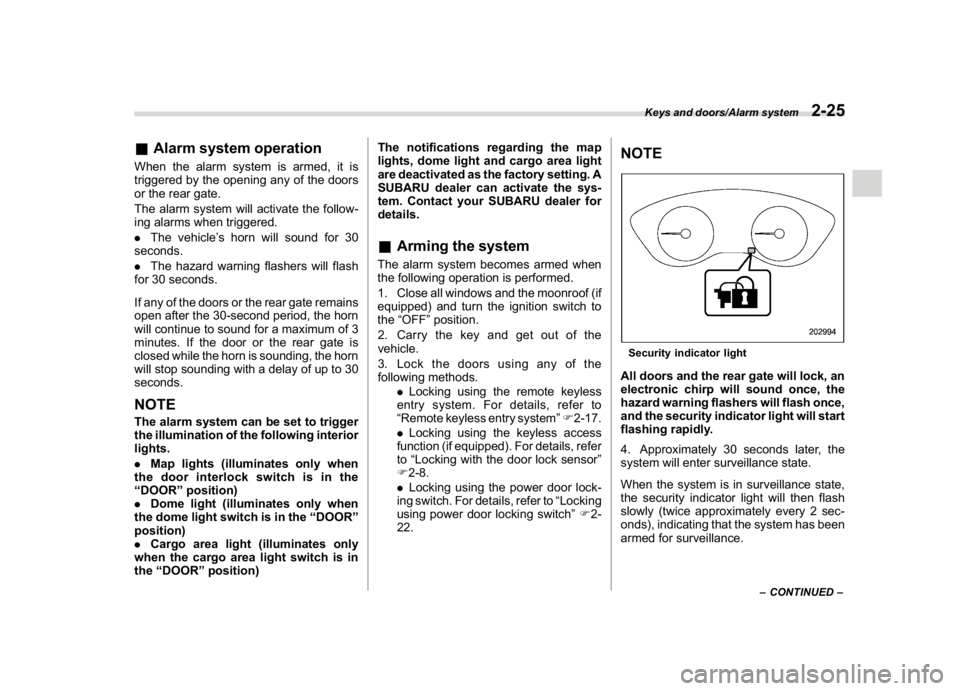
NOTESecurity indicator lightAll doors and the rear gate will lock, an
electronic chirp will sound once, the
hazard warning flashers will flash once,
and the security indicator light will start
flashing rapidly.
4. Approximately 30 seconds later, the
system will enter surveillance state.
When the system is in surveillance state,
the security indicator light will then flash
slowly (twice approximately every 2 sec-
onds), indicating that the system has been
armed for surveillance.
–CONTINUED–
Keys and doors/Alarm system
2-25
2
Page 125 of 474

(128,1)
北米Model "A1320BE-C" EDITED: 2017/ 10/ 10
NOTE.The system can be armed even if the
engine hood, windows and/or moon-
roof are open. Always make sure that
they are fully closed before arming the
system.
.When arming the system, if any of
the doors or the rear gate is not fully
closed, an electronic chirp sounds five
times, the hazard warning flashers
flash five times to alert you that the
doors (or the rear gate) are not properly
closed. When you close the door, doors
will automatically lock and the system
will automatically arm in 30 seconds.
.The 30-second standby time can be
eliminated if you prefer. Have it per-
formed by your SUBARU dealer.
.If any of the following actions is
done during the standby period, the
system will not switch to the surveil-
lance state.
–Doors (including the rear gate)
are unlocked using the access key
fob/remote transmitter.
–Doors (including the rear gate)
are unlocked using the keyless
access function (models with“key-
less access with push-button start
system”).
–Any door (including the rear gate)
is opened.–The ignition switch is turned to
the“ON”position (models without
“keyless access with push-button
start system”).
–Push-button ignition switch is
turned to the“ACC”position (mod-
els with“keyless access with push-
button start system”).
&Disarming the systemPerform either of the following procedures.
.Briefly press a button (for less than 2
seconds) on the access key fob/remote
transmitter.
.Carry the access key fob and perform
either of the following procedures (models
with“keyless access with push-button
start system”).
–Grip the front door handle.
–Press the rear gate opener button.
–Unlock using the PIN code access.
The flashing of the security indicator light
will then change slowly (once approxi-
mately every 3 seconds from twice ap-
proximately every 2 seconds), indicating
that the alarm system has been disarmed.
!Emergency disarming
If you cannot disarm the system using the
access key fob/transmitter (i.e. the trans-
mitter is lost, broken or the transmitterbattery is too weak), you can disarm the
system without using the access key fob/
remote transmitter.
The system can be disarmed if you turn the
ignition switch from the“LOCK”/“OFF”to
the“ON”position with a registered key/
access key fob.
NOTEFor models with“keyless access with
push-button start system”, if the ac-
cess key fob battery is discharged,
perform the procedure described in
“Switching power status”F9-17. In
such a case, replace the battery im-
mediately. Refer to“Replacing battery
of access key fob”F11-43.&Alarm system settingTo change the setting of your vehicle’s
alarm system for activation or deactiva-
tion, do the following.
1. Disarm the alarm system. Refer to
“Disarming the system”F2-26.
2. Sit in the driver’s seat and shut all
doors and the rear gate.
3. Turn the ignition switch to the“ON”
position.
4. Hold down“
”of the driver’s power
door locking switch, open the driver’s door
within the following 1 second, and wait 10
Keys and doors/Alarm system
2-26
Page 126 of 474

(129,1)
北米Model "A1320BE-C" EDITED: 2017/ 10/ 10
seconds without releasing the switch. The
setting will then be changed as follows.
.Type A combination meterSetting
statusCombination
meter displayHorn
Activate ALon Once
Deactivate ALoFTwice.Type B combination meter
Setting
statusCombination
meter displayHorn
Activate AL ON Once
Deactivate AL OFFTwice
NOTEYou may have the above setting change
done by your SUBARU dealer.
&If you have accidentally trig-
gered the alarm system!To stop the alarm
Do any of the following operations:
.Press any button on the access key fob/
remote transmitter.
.Turn the ignition switch to the“ON”
position (models without“keyless access
with push-button start system”).
.Turn the push-button ignition to the
“ACC”position (models with“keyless
access with push-button start system”).NOTEOnly registered keys will stop the
alarm. If the immobilizer transponder
is not registered, the alarm will not
stop.
&Valet modeWhen you choose the valet mode, the
alarm system does not operate. In valet
mode, the remote transmitter is used only
for locking and unlocking the doors and
rear gate and panic activation.
To enter the valet mode, change the
setting of your vehicle’s alarm system for
deactivation mode. Refer to“Alarm system
setting”F2-26. The security indicator light
will continue to flash once every 3 seconds
indicating that the system is in the valet
mode.
To exit valet mode, change the setting of
your vehicle’s alarm system for activation
mode. Refer to“Alarm system setting”F2-
26.
Keys and doors/Alarm system
2-27
2
Page 127 of 474
(130,1)
北米Model "A1320BE-C" EDITED: 2017/ 10/ 10
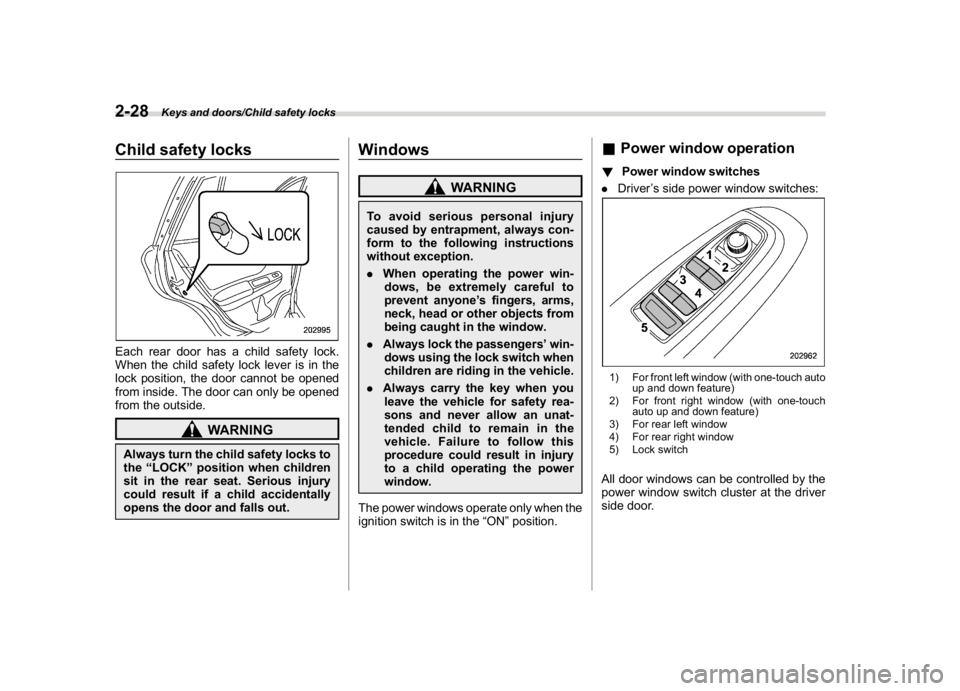
Child safety locksEach rear door has a child safety lock.
When the child safety lock lever is in the
lock position, the door cannot be opened
from inside. The door can only be opened
from the outside.
WARNING
Always turn the child safety locks to
the“LOCK”position when children
sit in the rear seat. Serious injury
could result if a child accidentally
opens the door and falls out.
Windows
WARNING
To avoid serious personal injury
caused by entrapment, always con-
form to the following instructions
without exception.
.When operating the power win-
dows, be extremely careful to
prevent anyone’s fingers, arms,
neck, head or other objects from
being caught in the window.
.Always lock the passengers’win-
dows using the lock switch when
children are riding in the vehicle.
.Always carry the key when you
leave the vehicle for safety rea-
sons and never allow an unat-
tended child to remain in the
vehicle. Failure to follow this
procedure could result in injury
to a child operating the power
window.
The power windows operate only when the
ignition switch is in the“ON”position.
&Power window operation!Power window switches
.Driver’s side power window switches:1) For front left window (with one-touch auto
up and down feature)
2) For front right window (with one-touch
auto up and down feature)
3) For rear left window
4) For rear right window
5) Lock switchAll door windows can be controlled by the
power window switch cluster at the driver
side door.
Keys and doors/Child safety locks
2-28
Page 129 of 474
(132,1)
北米Model "A1320BE-C" EDITED: 2017/ 10/ 10
!Anti-entrapment function (windows
with one-touch auto up/down func-
tion)
While closing the driver’s and front pas-
senger’s windows automatically, if the
window senses a substantial enough
object trapped between the window and
the window frame, it automatically moves
down slightly and stops.
If a foreign object is caught while the
driver’s window or passenger’s window is
opening automatically, the window will
stop.
CAUTION
.Never attempt to test this func-
tion using fingers, hands or other
parts of your body.
.The anti-entrapment function
may not operate properly if some
object gets trapped just before
the window fully closes.NOTE.If a window detects an impact similar
to that caused by trapping an object (for
example, when the vehicle encounters
a deep pothole), the anti-entrapment
function may operate.
.The window cannot be operated for afew seconds after the anti-entrapment
function operates.
!Off delay function (windows with
one-touch auto up/down function)
The front windows can be operated for
approximately 45 seconds even after the
ignition switch is turned to the“ACC”or
“OFF”position. If a front door is opened
within 45 seconds, the off delay function is
canceled.
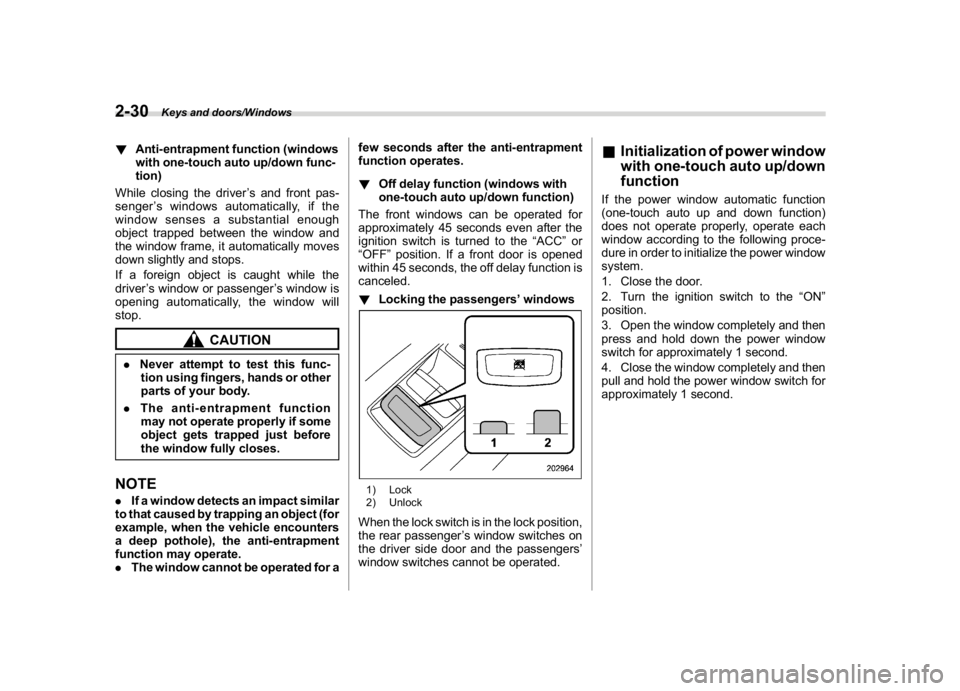
!Locking the passengers’windows
1) Lock
2) UnlockWhen the lock switch is in the lock position,
the rear passenger’s window switches on
the driver side door and the passengers’
window switches cannot be operated.
&Initialization of power window
with one-touch auto up/down
functionIf the power window automatic function
(one-touch auto up and down function)
does not operate properly, operate each
window according to the following proce-
dure in order to initialize the power window
system.
1. Close the door.
2. Turn the ignition switch to the“ON”
position.
3. Open the window completely and then
press and hold down the power window
switch for approximately 1 second.
4. Close the window completely and then
pull and hold the power window switch for
approximately 1 second.
Keys and doors/Windows
2-30
Page 130 of 474
(133,1)
北米Model "A1320BE-C" EDITED: 2017/ 10/ 10
Rear gate
WARNING
.To prevent dangerous exhaust
gas from entering the vehicle,
always keep the rear gate closed
while the engine is running.
.Do not attempt to shut the rear
gate while holding the recessed
grip. Also avoid closing the rear
gate by pulling on the recessed
grip from inside the cargo space.
There is a danger of your hand
being caught and injured.NOTEIf the rear gate cannot be unlocked due
to a discharged vehicle battery, a mal-
function in the door locking/unlocking
system or other causes, you can unlock
it by manually operating the rear gate
lock release lever.
For the procedure, refer to“Rear gate–
if the rear gate cannot be opened”F9-
19.
&Lock/unlockThe rear gate can be locked and unlocked
using any of the following systems.
.Power door locking switch: Refer to
“How to operate the power door locking
switches”F2-23.
.Keyless access with the push-button
start system (if equipped): Refer to“Key-
less access with push-button start system”
F2-2.
.Remote keyless entry system: Refer to
“Remote keyless entry system”F2-17.
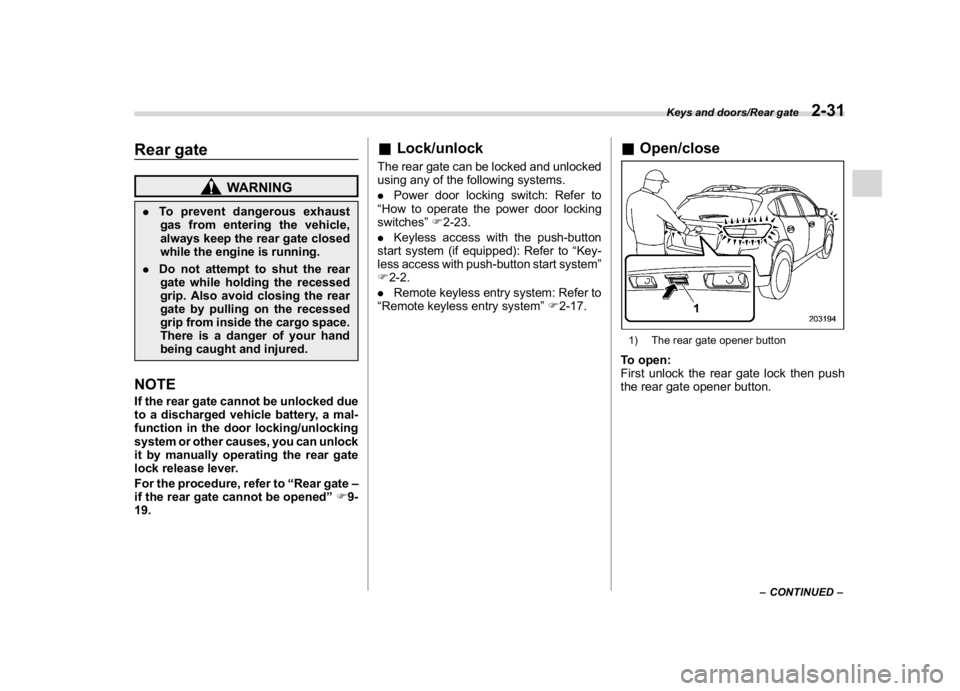
&Open/close1) The rear gate opener buttonTo open:
First unlock the rear gate lock then push
the rear gate opener button.
–CONTINUED–
Keys and doors/Rear gate
2-31
2
Page 135 of 474

(140,1)
北米Model "A1320BE-C" EDITED: 2017/ 10/ 10
Cruise control indicator light (if equipped).............3-31
Cruise control set indicator light (if equipped).......3-31
Automatic headlight beam leveler warning light
(models with LED headlights)..............................3-31
LED headlight warning light (models with LED
headlights)..........................................................3-31
Steering Responsive Headlight warning light/
Steering Responsive Headlight OFF indicator
light (if equipped)................................................3-31
Front fog light indicator light (if equipped) ............3-31
Headlight indicator light (if equipped)....................3-31
Steering responsive fog lights warning indicator/
Steering responsive fog lights OFF indicator
(if equipped).......................................................3-31
X-mode indicator (if equipped)..............................3-32
Hill descent control indicator (if equipped) ............3-32
BSD/RCTA warning indicator (if equipped).............3-32
BSD/RCTA OFF indicator (if equipped)..................3-32
RAB warning indicator (if equipped)......................3-32
RAB OFF indicator light (if equipped)....................3-32
Icy road surface warning indicator (if equipped)....3-32
Combination meter display (color LCD)
(if equipped).......................................................3-33
Basic operation.....................................................3-34
Welcome screen and Good-bye screen..................3-34
Warning screen.....................................................3-35
Telltale screen.......................................................3-35
Basic screens.......................................................3-36
Menu screens.......................................................3-38
Multi-function display (black andwhite).............3-42
Driving information display...................................3-43
Outside temperature indicator...............................3-46X-mode indicator (if equipped)..............................3-47
Clock....................................................................3-47
Multi-function display (color LCD)
(if equipped).......................................................3-47
Features...............................................................3-48
Welcome screen...................................................3-48
Self-check screen.................................................3-48
Interruption screen...............................................3-49
Basic operation....................................................3-49
Basic screens.......................................................3-50
Setting screen......................................................3-57
How to get the source code using the open
source...............................................................3-62
Clock......................................................................3-63
Setting the clock manually....................................3-63
Setting the clock automatically.............................3-66
Regulatory information.........................................3-66
Light control switch.............................................3-66
Precautions and tips.............................................3-66
Headlights............................................................3-67
High/low beam change (dimmer) ...........................3-68
Headlight flasher..................................................3-69
High beam assist function (if equipped)................3-69
Daytime running light system...............................3-72
Steering Responsive Headlight (SRH)
(if equipped).......................................................3-72
Headlight beam leveler
(models with LEDheadlights)..........................3-73
Fog light switch (ifequipped)..............................3-74
Steering responsive fog lights system
(if equipped)......................................................3-74
Instruments and controls
Page 137 of 474
(142,1)
北米Model "A1320BE-C" EDITED: 2017/ 10/ 10
Ignition switch (models with-
out“keyless access with
push-button start system”)
WARNING
.Never turn the ignition switch to
the“LOCK”position while the
vehicle is being driven or towed
because that will lock the steer-
ing wheel, preventing steering
control. And when the engine is
turned off, it takes a much greater
effort than usual to steer.
.Before leaving the vehicle, al-
ways remove the key from the
ignition switch for safety and
never allow an unattended child
to remain in the vehicle. Failure to
follow this procedure could re-
sult in injury to a child or others.
Children could operate the power
windows, the moonroof or other
controls or even make the vehicle
move.
CAUTION
Do not attach a large key holder or
key case to either key. If it banged
against your knees or hands while
you are driving, it could turn the
ignition switch from the“ON”posi-
tion to the“ACC”or“LOCK”posi-
tion, thereby stopping the engine.
Also, if the key is attached to a key
holder or to a large bunch of other
keys, centrifugal force may act on it
as the vehicle moves, resulting in
unwanted turning of the ignition
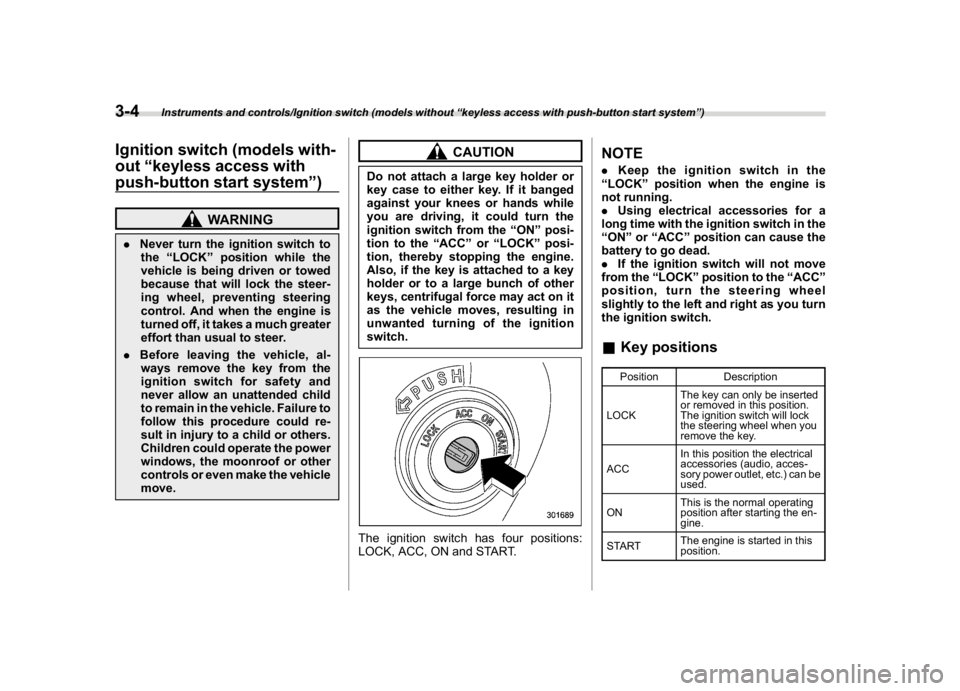
switch.The ignition switch has four positions:
LOCK, ACC, ON and START.
NOTE.Keep the ignition switch in the
“LOCK”position when the engine is
not running.
.Using electrical accessories for a
long time with the ignition switch in the
“ON”or“ACC”position can cause the
battery to go dead.
.If the ignition switch will not move
from the“LOCK”position to the“ACC”
position, turn the steering wheel
slightly to the left and right as you turn
the ignition switch.&Key positions
Position Description
LOCKThe key can only be inserted
or removed in this position.
The ignition switch will lock
the steering wheel when you
remove the key.
ACCIn this position the electrical
accessories (audio, acces-
sory power outlet, etc.) can be
used.
ONThis is the normal operating
position after starting the en-
gine.
STARTThe engine is started in this
position.
Instruments and controls/Ignition switch (models without“keyless access with push-button start system”)
3-4
Page 138 of 474
(143,1)
北米Model "A1320BE-C" EDITED: 2017/ 10/ 10
CAUTION
Do not turn the ignition switch to the
“START”position while the engine
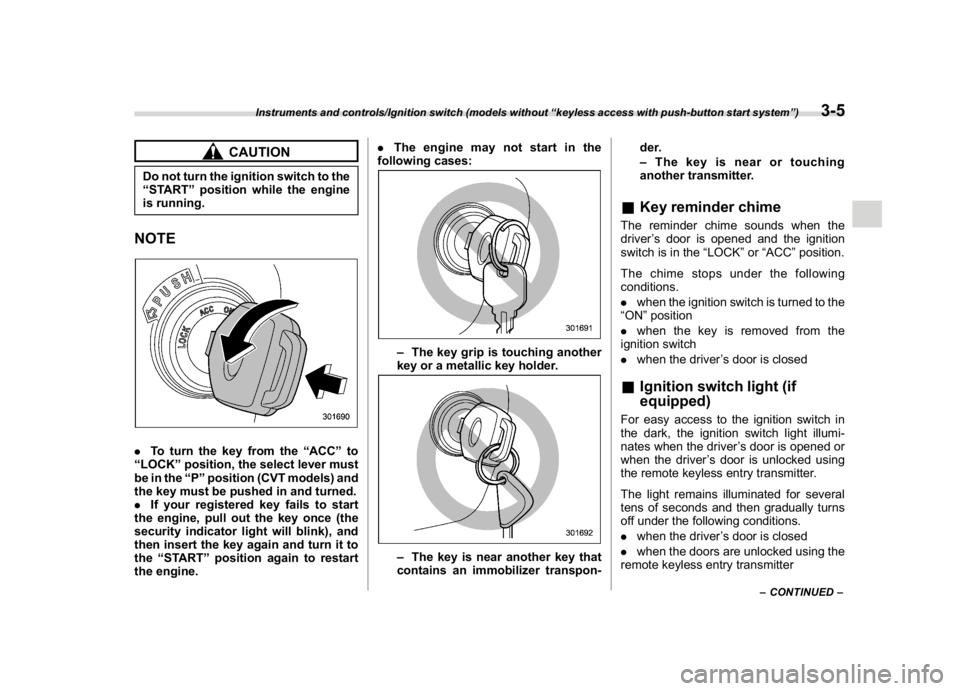
is running.NOTE.To turn the key from the“ACC”to
“LOCK”position, the select lever must
be in the“P”position (CVT models) and
the key must be pushed in and turned.
.If your registered key fails to start
the engine, pull out the key once (the
security indicator light will blink), and
then insert the key again and turn it to
the“START”position again to restart
the engine..The engine may not start in the
following cases:
–The key grip is touching another
key or a metallic key holder.–The key is near another key that
contains an immobilizer transpon-der.
–The key is near or touching
another transmitter.
&Key reminder chimeThe reminder chime sounds when the
driver’s door is opened and the ignition
switch is in the“LOCK”or“ACC”position.
The chime stops under the following
conditions.
.when the ignition switch is turned to the
“ON”position
.when the key is removed from the
ignition switch
.when the driver’s door is closed&Ignition switch light (if
equipped)For easy access to the ignition switch in
the dark, the ignition switch light illumi-
nates when the driver’s door is opened or
when the driver’s door is unlocked using
the remote keyless entry transmitter.
The light remains illuminated for several
tens of seconds and then gradually turns
off under the following conditions.
.when the driver’s door is closed
.when the doors are unlocked using the
remote keyless entry transmitter
–CONTINUED–
Instruments and controls/Ignition switch (models without“keyless access with push-button start system”)
3-5
3