3-57 SUBARU CROSSTREK 2018 Owners Manual
[x] Cancel search | Manufacturer: SUBARU, Model Year: 2018, Model line: CROSSTREK, Model: SUBARU CROSSTREK 2018Pages: 474, PDF Size: 20.76 MB
Page 135 of 474
(140,1)
北米Model "A1320BE-C" EDITED: 2017/ 10/ 10
Cruise control indicator light (if equipped).............3-31
Cruise control set indicator light (if equipped).......3-31
Automatic headlight beam leveler warning light
(models with LED headlights)..............................3-31
LED headlight warning light (models with LED
headlights)..........................................................3-31
Steering Responsive Headlight warning light/
Steering Responsive Headlight OFF indicator
light (if equipped)................................................3-31
Front fog light indicator light (if equipped) ............3-31
Headlight indicator light (if equipped)....................3-31
Steering responsive fog lights warning indicator/
Steering responsive fog lights OFF indicator
(if equipped).......................................................3-31
X-mode indicator (if equipped)..............................3-32
Hill descent control indicator (if equipped) ............3-32
BSD/RCTA warning indicator (if equipped).............3-32
BSD/RCTA OFF indicator (if equipped)..................3-32
RAB warning indicator (if equipped)......................3-32
RAB OFF indicator light (if equipped)....................3-32
Icy road surface warning indicator (if equipped)....3-32
Combination meter display (color LCD)
(if equipped).......................................................3-33
Basic operation.....................................................3-34
Welcome screen and Good-bye screen..................3-34
Warning screen.....................................................3-35
Telltale screen.......................................................3-35
Basic screens.......................................................3-36
Menu screens.......................................................3-38
Multi-function display (black andwhite).............3-42
Driving information display...................................3-43
Outside temperature indicator...............................3-46X-mode indicator (if equipped)..............................3-47
Clock....................................................................3-47
Multi-function display (color LCD)
(if equipped).......................................................3-47
Features...............................................................3-48
Welcome screen...................................................3-48
Self-check screen.................................................3-48
Interruption screen...............................................3-49
Basic operation....................................................3-49
Basic screens.......................................................3-50
Setting screen......................................................3-57
How to get the source code using the open
source...............................................................3-62
Clock......................................................................3-63
Setting the clock manually....................................3-63
Setting the clock automatically.............................3-66
Regulatory information.........................................3-66
Light control switch.............................................3-66
Precautions and tips.............................................3-66
Headlights............................................................3-67
High/low beam change (dimmer) ...........................3-68
Headlight flasher..................................................3-69
High beam assist function (if equipped)................3-69
Daytime running light system...............................3-72
Steering Responsive Headlight (SRH)
(if equipped).......................................................3-72
Headlight beam leveler
(models with LEDheadlights)..........................3-73
Fog light switch (ifequipped)..............................3-74
Steering responsive fog lights system
(if equipped)......................................................3-74
Instruments and controls
Page 185 of 474
(190,1)
北米Model "A1320BE-C" EDITED: 2017/ 10/ 10
!Information screen
Press the INFO button on the steering wheel to switch the item displayed on the information screen.
Content Description Page
Electric components operating status screen
Displays the operating status of the electric components and equipment. 3-53
Prevention safety screen Displays the status of your vehicle. 3-53
EyeSight screen*1
Displays the operating status of EyeSight. 3-54
Favorite screen Displays up to 3 optional items. 3-54
Weather information screen*
2
Displays weather information. 3-55
Traffic information*
2/Navigation*
3screen Displays information linked with the navigation system. 3-55
Audio screen Displays audio system information. 3-56
Fuel consumption screen Displays fuel consumption information. 3-56
Clock screen Displays the clock. 3-56
Guidance screen Moves to the setting screen.3-57
*1: Models with EyeSight system
*2: Models with SiriusXM Satellite Radio
*3: Models with navigation system
Instruments and controls/Multi-function display (color LCD)
3-52
Page 190 of 474
(195,1)
北米Model "A1320BE-C" EDITED: 2017/ 10/ 10
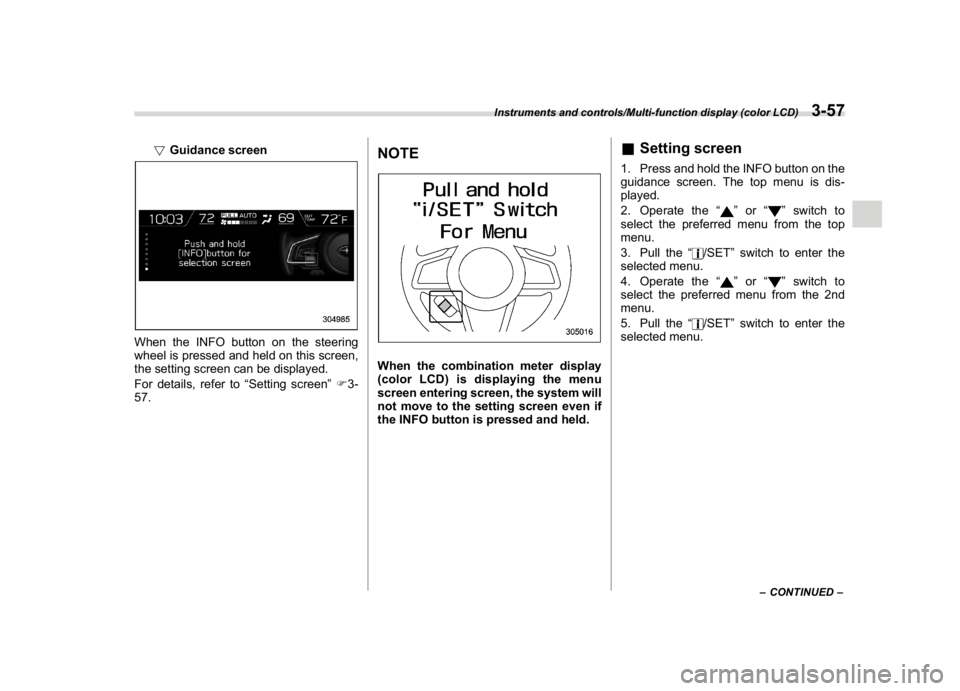
!Guidance screen
When the INFO button on the steering
wheel is pressed and held on this screen,
the setting screen can be displayed.
For details, refer to“Setting screen”F3-
57.
NOTEWhen the combination meter display
(color LCD) is displaying the menu
screen entering screen, the system will
not move to the setting screen even if
the INFO button is pressed and held.
&Setting screen1. Press and hold the INFO button on the
guidance screen. The top menu is dis-
played.
2. Operate the“
”or“
”switch to
select the preferred menu from the top
menu.
3. Pull the“
/SET”switch to enter the
selected menu.
4. Operate the“
”or“
”switch to
select the preferred menu from the 2nd
menu.
5. Pull the“
/SET”switch to enter the
selected menu.
–CONTINUED–
Instruments and controls/Multi-function display (color LCD)
3-57
3
Page 192 of 474

(197,1)
北米Model "A1320BE-C" EDITED: 2017/ 10/ 10
!Date and time settings
You can set the date, time and 12h or 24h
format settings.
!Current date and time setting
For details about clock setting, refer to
“Clock”F3-63.
!Birthday setting
If a birthday or anniversary is approaching,
a message will be displayed when the
ignition switch is turned to the“ON”
position. This function can be set to on or
off. For details, refer to“Bypass screen
setting”F3-60.
1. Select“Birthday”from the 2nd menu in
the setting screen. Refer to“Setting
screen”F3-57.2. Select from the list the number that youwant to register.
3. Enter the date and the text by using the
control switches.
4. Select“Set”to exit settings. Select“Go
Back”to return to the previous screen
without applying the setting changes.NOTEYou can store a maximum of 5 birth-
days.
!Anniversary setting
1. The procedure for setting an anniver-
sary is the same as“Birthday setting”F3-
59, except that in step 1“Anniversary”is
selected.
NOTEYou can store a maximum of 5 anniver-
saries.
!Display/Beep settings
You can set the display settings and
volume settings.
!Screen OFF setting
1. Select“Screen Off”from the 2nd menu
in setting screen. Refer to“Setting screen”
F3-57.2. Select“Ye s”to turn off the screen.
Select“No”to return to the previous
screen.
Restoring the screen
When the INFO button is operated after
–CONTINUED–
Instruments and controls/Multi-function display (color LCD)
3-59
3
Page 193 of 474

(198,1)
北米Model "A1320BE-C" EDITED: 2017/ 10/ 10
the ignition switch is turned to the“ON”or
“ACC”position, the screen will be restored.
The screen will be restored with the basic
screen that was displayed when the
screen was turned off.NOTEWhile the screen is off, the screen
switches to the climate control screen
only when the climate control system is
operated.
!Favorite setting
1. Select the“Favorite”from the 2nd
menu in setting screen. Refer to“Setting
screen”F3-57.2. Set the desired items by using the
control switches. For details about items,
refer to“Favorite screen”F3-54.3. Select“Set”to exit settings. Select“Go
Back”to return to the previous screen
without applying the setting changes.
NOTE.You can display a maximum of the 3
items.
.The same item cannot be selected
for the left, center or right location.
.Weather information for 3 hours
later or 6 hours later can be displayed.
!Bypass screen setting
1. Select“Bypass Screen”from the 2nd
menu in the setting screen. Refer to
“Setting screen”F3-57.2. Select“On”or“Off”to turn the display
of items on or off by using the controlswitches.
3. Select“Set”to exit settings. Select“Go
Back”to return to the previous screen
without applying the setting changes.
NOTETraffic information setting is only dis-
played for the audio unit with SiriusXM
satellite radio.
!Beep setting
1. Select“Beep”from the 2nd menu in the
setting screen. Refer to“Setting screen”
F3-57.2. Set the beep volume by using the
control switches.
3. Select“Set”to exit settings. Select“Go
Back”to return to the previous screen
Instruments and controls/Multi-function display (color LCD)
3-60
Page 194 of 474

(199,1)
北米Model "A1320BE-C" EDITED: 2017/ 10/ 10
without applying the setting changes.
!Maintenance settings
You can set maintenance reminders.
!Engine oil setting
1. Select“Engine Oil”from the 2nd menu
in the setting screen. Refer to“Setting
screen”F3-57.2. Set the date and distance of the
reminder by using the control switches.
3. Select“Set”to exit settings. Select
“Update”to change the notification dis-
tance to the default value. Select“Go
Back”to return to the previous screen
without applying the setting changes.
NOTE.The reminder will be displayed by
either date or distance in accordance
with the setting.
.Even when either“Day”or“Dis-
tance”are displayed as“__”a pop-up
screen will appear.
.The reminder will be displayed until
either of the following conditions is
satisfied.
–The period of time passed after
the registered notification date is 15
days or more.
–The total distance driven after the
registered notification distance is
approximately 311 miles (500 km) or
more.
!Oil filter setting
The setting procedure is the same as
“Engine oil setting”F3-61, but select the
“Oil Filter”item in step 1.
!Tires setting
The setting procedure is the same as
“Engine oil setting”F3-61, but select the
“Tires”item in step 1.
!Maintenance schedule setting
The setting procedure is the same as
“Engine oil setting”F3-61, but select the
“Maintenance Schedule”item in step 1.!On/Off setting
1. Select“On/Off”from the 2nd menu on
the setting screen. Refer to“Setting
screen”F3-57.
2. Select“On”or“Off”to turn the opening
screen on or off by using the control
switches.
3. Select“Set”to exit settings. Select“Go
Back”to return to the previous screen
without applying the setting changes.
!Clear setting
1. Select“Clear All Settings”from the 2nd
menu on the setting screen. Refer to
“Setting screen”F3-57.
–CONTINUED–
Instruments and controls/Multi-function display (color LCD)
3-61
3
Page 195 of 474

(200,1)
北米Model "A1320BE-C" EDITED: 2017/ 10/ 10
2. Select“Ye s”or“No”by using the
control switches.
!Initialize
You can initialize the items that have been
set to your preference.
1. Select“Initialize”from the 2nd menu on
the setting screen. Refer to“Setting
screen”F3-57.
2. Select“Ye s”or“No”by using the
control switches.
&How to get the source code
using the open sourceFree/Open Source Software Information
This product contains Free/Open Source
Software (FOSS).
The license information and/or the source
code of such FOSS can be found at the
following URL.
http://www.globaldenso.com/en/open-
source/ivi/subaru/
Instruments and controls/Multi-function display (color LCD)
3-62