clock setting SUBARU CROSSTREK 2018 Owners Manual
[x] Cancel search | Manufacturer: SUBARU, Model Year: 2018, Model line: CROSSTREK, Model: SUBARU CROSSTREK 2018Pages: 474, PDF Size: 20.76 MB
Page 135 of 474

(140,1)
北米Model "A1320BE-C" EDITED: 2017/ 10/ 10
Cruise control indicator light (if equipped).............3-31
Cruise control set indicator light (if equipped).......3-31
Automatic headlight beam leveler warning light
(models with LED headlights)..............................3-31
LED headlight warning light (models with LED
headlights)..........................................................3-31
Steering Responsive Headlight warning light/
Steering Responsive Headlight OFF indicator
light (if equipped)................................................3-31
Front fog light indicator light (if equipped) ............3-31
Headlight indicator light (if equipped)....................3-31
Steering responsive fog lights warning indicator/
Steering responsive fog lights OFF indicator
(if equipped).......................................................3-31
X-mode indicator (if equipped)..............................3-32
Hill descent control indicator (if equipped) ............3-32
BSD/RCTA warning indicator (if equipped).............3-32
BSD/RCTA OFF indicator (if equipped)..................3-32
RAB warning indicator (if equipped)......................3-32
RAB OFF indicator light (if equipped)....................3-32
Icy road surface warning indicator (if equipped)....3-32
Combination meter display (color LCD)
(if equipped).......................................................3-33
Basic operation.....................................................3-34
Welcome screen and Good-bye screen..................3-34
Warning screen.....................................................3-35
Telltale screen.......................................................3-35
Basic screens.......................................................3-36
Menu screens.......................................................3-38
Multi-function display (black andwhite).............3-42
Driving information display...................................3-43
Outside temperature indicator...............................3-46X-mode indicator (if equipped)..............................3-47
Clock....................................................................3-47
Multi-function display (color LCD)
(if equipped).......................................................3-47
Features...............................................................3-48
Welcome screen...................................................3-48
Self-check screen.................................................3-48
Interruption screen...............................................3-49
Basic operation....................................................3-49
Basic screens.......................................................3-50
Setting screen......................................................3-57
How to get the source code using the open
source...............................................................3-62
Clock......................................................................3-63
Setting the clock manually....................................3-63
Setting the clock automatically.............................3-66
Regulatory information.........................................3-66
Light control switch.............................................3-66
Precautions and tips.............................................3-66
Headlights............................................................3-67
High/low beam change (dimmer) ...........................3-68
Headlight flasher..................................................3-69
High beam assist function (if equipped)................3-69
Daytime running light system...............................3-72
Steering Responsive Headlight (SRH)
(if equipped).......................................................3-72
Headlight beam leveler
(models with LEDheadlights)..........................3-73
Fog light switch (ifequipped)..............................3-74
Steering responsive fog lights system
(if equipped)......................................................3-74
Instruments and controls
Page 175 of 474
(180,1)
北米Model "A1320BE-C" EDITED: 2017/ 10/ 10
doors to unlock simultaneously when
accessing from the cargo area.
!Defogger
Sets and customizes the operation of the
defogger.
!Interior Light
Sets and customizes the interior light off
delay timer.
!Auto Light Sensor (if equipped)
Sets and customizes the sensitivity of the
auto light sensor.
!Welcome Lighting (if equipped)
Sets the leaving time and approaching
time.
.Approaching time set
Sets the illumination time of the headlights
that illuminate when you approach the
vehicle.
.Leaving time set
Sets the time until the headlights turn off
when you have moved away from the
vehicle.
!One-touch lane changer
Sets the one-touch lane changer on/off.!Default Settings
Select“Ye s”to use the menu screen to
restore customized settings to the factory
default settings. Select“No”to return to the
previous screen without restoring to the
factory default settings.
Multi-function display (black
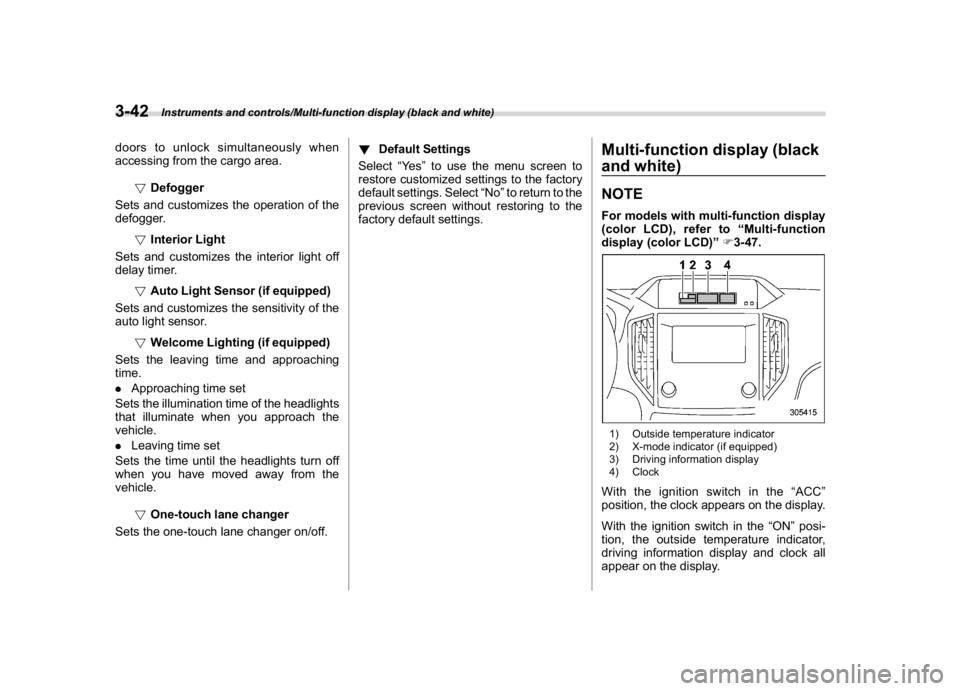
and white)NOTEFor models with multi-function display
(color LCD), refer to“Multi-function
display (color LCD)”F3-47.1) Outside temperature indicator
2) X-mode indicator (if equipped)
3) Driving information display
4) ClockWith the ignition switch in the“ACC”
position, the clock appears on the display.
With the ignition switch in the“ON”posi-
tion, the outside temperature indicator,
driving information display and clock all
appear on the display.
Instruments and controls/Multi-function display (black and white)
3-42
Page 180 of 474
(185,1)
北米Model "A1320BE-C" EDITED: 2017/ 10/ 10
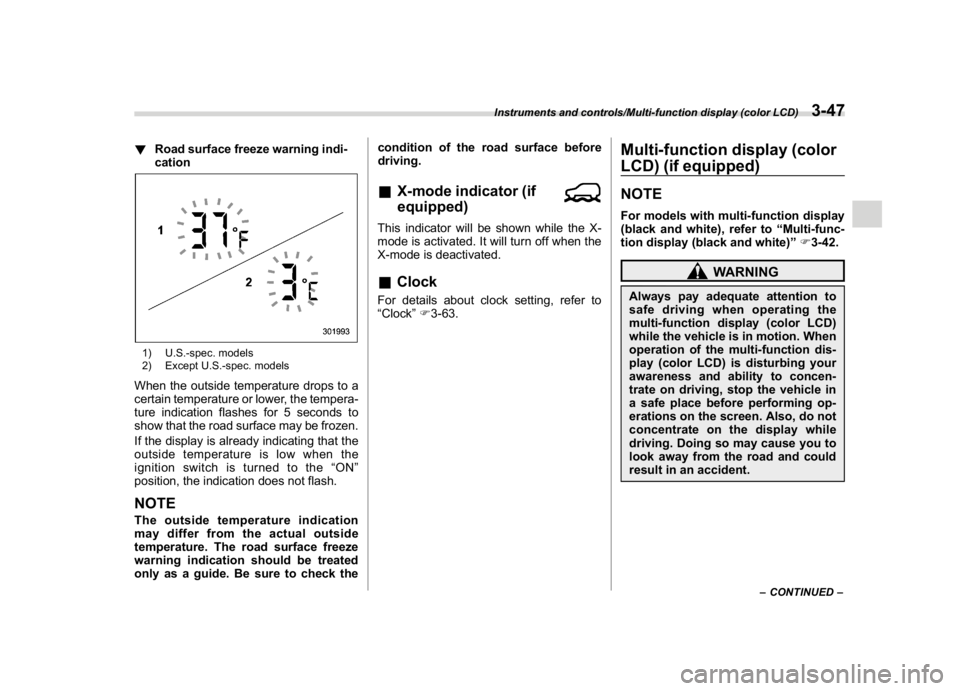
!Road surface freeze warning indi-
cation1) U.S.-spec. models
2) Except U.S.-spec. modelsWhen the outside temperature drops to a
certain temperature or lower, the tempera-
ture indication flashes for 5 seconds to
show that the road surface may be frozen.
If the display is already indicating that the
outside temperature is low when the
ignition switch is turned to the“ON”
position, the indication does not flash.NOTEThe outside temperature indication
may differ from the actual outside
temperature. The road surface freeze
warning indication should be treated
only as a guide. Be sure to check thecondition of the road surface before
driving.
&X-mode indicator (if
equipped)This indicator will be shown while the X-
mode is activated. It will turn off when the
X-mode is deactivated.&ClockFor details about clock setting, refer to
“Clock”F3-63.
Multi-function display (color
LCD) (if equipped)NOTEFor models with multi-function display
(black and white), refer to“Multi-func-
tion display (black and white)”F3-42.
WARNING
Always pay adequate attention to
safe driving when operating the
multi-function display (color LCD)
while the vehicle is in motion. When
operation of the multi-function dis-
play (color LCD) is disturbing your
awareness and ability to concen-
trate on driving, stop the vehicle in
a safe place before performing op-
erations on the screen. Also, do not
concentrate on the display while
driving. Doing so may cause you to
look away from the road and could
result in an accident.
–CONTINUED–
Instruments and controls/Multi-function display (color LCD)
3-47
3
Page 184 of 474
(189,1)
北米Model "A1320BE-C" EDITED: 2017/ 10/ 10
climate control operation, refer to“Climate
control panel”F4-2.
!Clock
The clock can be displayed in either 12-
hour display or 24-hour display. For details
about the setting, refer to“Clock”F3-63.
–CONTINUED–
Instruments and controls/Multi-function display (color LCD)
3-51
3
Page 185 of 474
(190,1)
北米Model "A1320BE-C" EDITED: 2017/ 10/ 10
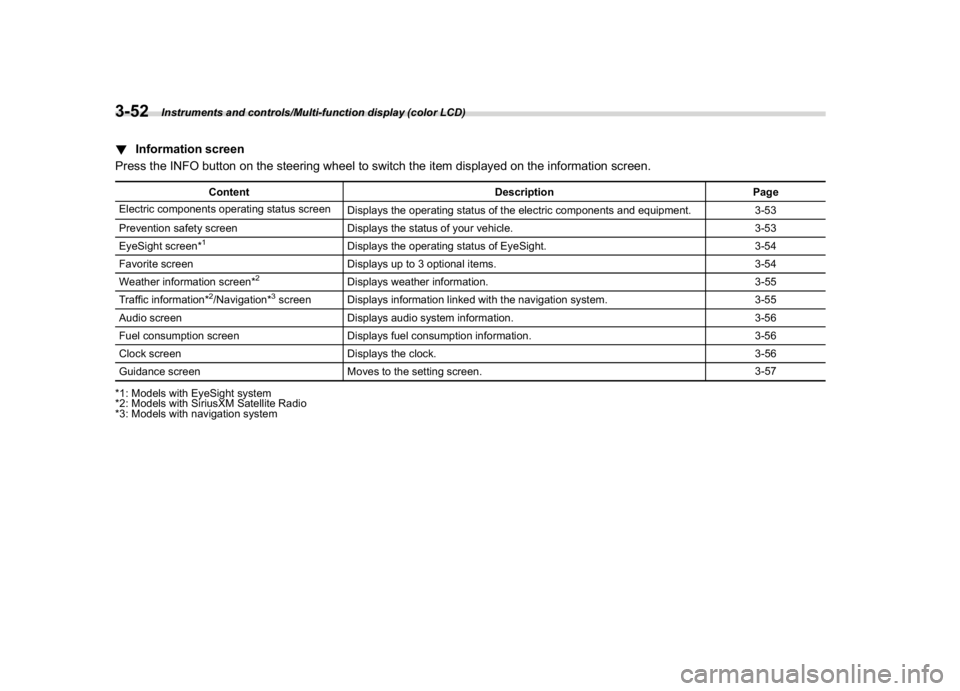
!Information screen
Press the INFO button on the steering wheel to switch the item displayed on the information screen.
Content Description Page
Electric components operating status screen
Displays the operating status of the electric components and equipment. 3-53
Prevention safety screen Displays the status of your vehicle. 3-53
EyeSight screen*1
Displays the operating status of EyeSight. 3-54
Favorite screen Displays up to 3 optional items. 3-54
Weather information screen*
2
Displays weather information. 3-55
Traffic information*
2/Navigation*
3screen Displays information linked with the navigation system. 3-55
Audio screen Displays audio system information. 3-56
Fuel consumption screen Displays fuel consumption information. 3-56
Clock screen Displays the clock. 3-56
Guidance screen Moves to the setting screen.3-57
*1: Models with EyeSight system
*2: Models with SiriusXM Satellite Radio
*3: Models with navigation system
Instruments and controls/Multi-function display (color LCD)
3-52
Page 192 of 474

(197,1)
北米Model "A1320BE-C" EDITED: 2017/ 10/ 10
!Date and time settings
You can set the date, time and 12h or 24h
format settings.
!Current date and time setting
For details about clock setting, refer to
“Clock”F3-63.
!Birthday setting
If a birthday or anniversary is approaching,
a message will be displayed when the
ignition switch is turned to the“ON”
position. This function can be set to on or
off. For details, refer to“Bypass screen
setting”F3-60.
1. Select“Birthday”from the 2nd menu in
the setting screen. Refer to“Setting
screen”F3-57.2. Select from the list the number that youwant to register.
3. Enter the date and the text by using the
control switches.
4. Select“Set”to exit settings. Select“Go
Back”to return to the previous screen
without applying the setting changes.NOTEYou can store a maximum of 5 birth-
days.
!Anniversary setting
1. The procedure for setting an anniver-
sary is the same as“Birthday setting”F3-
59, except that in step 1“Anniversary”is
selected.
NOTEYou can store a maximum of 5 anniver-
saries.
!Display/Beep settings
You can set the display settings and
volume settings.
!Screen OFF setting
1. Select“Screen Off”from the 2nd menu
in setting screen. Refer to“Setting screen”
F3-57.2. Select“Ye s”to turn off the screen.
Select“No”to return to the previous
screen.
Restoring the screen
When the INFO button is operated after
–CONTINUED–
Instruments and controls/Multi-function display (color LCD)
3-59
3
Page 196 of 474
(201,1)
北米Model "A1320BE-C" EDITED: 2017/ 10/ 10
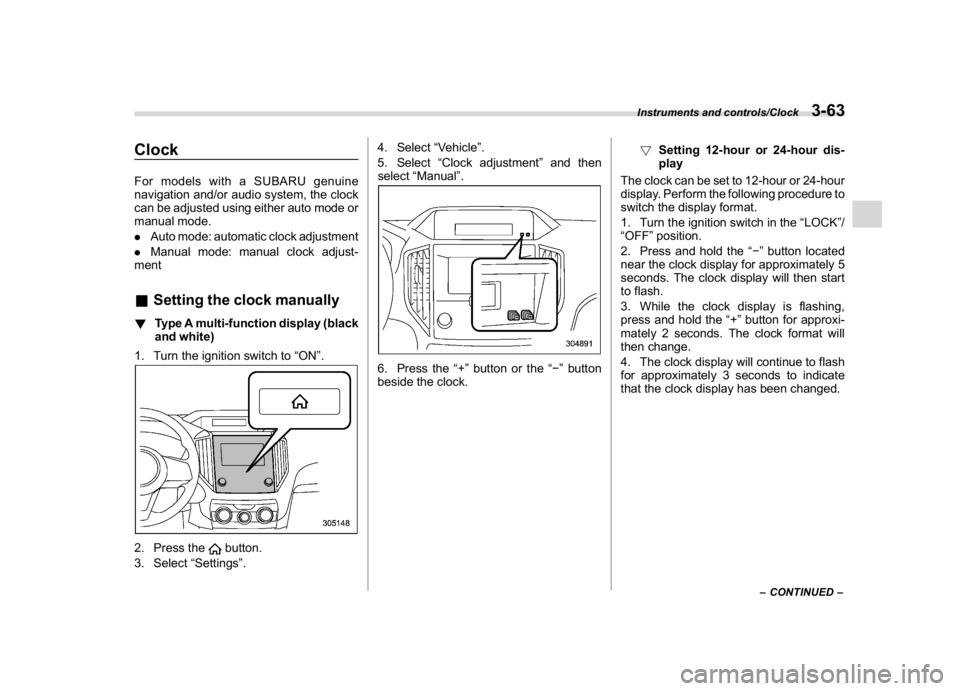
ClockFor models with a SUBARU genuine
navigation and/or audio system, the clock
can be adjusted using either auto mode or
manual mode.
.Auto mode: automatic clock adjustment
.Manual mode: manual clock adjust-
ment&Setting the clock manually!Type A multi-function display (black
and white)
1. Turn the ignition switch to“ON”.2. Press the
button.
3. Select“Settings”.4. Select“Vehicle”.
5. Select“Clock adjustment”and then
select“Manual”.
6. Press the“+”button or the“”button
beside the clock.!Setting 12-hour or 24-hour dis-
play
The clock can be set to 12-hour or 24-hour
display. Perform the following procedure to
switch the display format.
1. Turn the ignition switch in the“LOCK”/
“OFF”position.
2. Press and hold the“”button located
near the clock display for approximately 5
seconds. The clock display will then start
to flash.
3. While the clock display is flashing,
press and hold the“+”button for approxi-
mately 2 seconds. The clock format will
then change.
4. The clock display will continue to flash
for approximately 3 seconds to indicate
that the clock display has been changed.
–CONTINUED–
Instruments and controls/Clock
3-63
3
Page 197 of 474

(202,1)
北米Model "A1320BE-C" EDITED: 2017/ 10/ 10
!Type B multi-function display (color
LCD)NOTEWhen the combination meter display
(color LCD) is displaying the menu
screen entering screen, the system will
not move to the selection screen even if
the“INFO”button is pressed and held.
Before adjusting the clock, be sure to
change the combination meter display
(color LCD) to a screen other than the
menu screen entering screen.
1. Turn the ignition switch to“ON”.
2. Press the
button.
3. Select“Settings”.
4. Select“Vehicle”.
5. Select“Clock adjustment”and then
select“Manual”.
1)“INFO”button
6. Press the“INFO”button on the steer-
ing wheel to display the guidance screen.7. While displaying the guidance screen,
press and hold the“INFO”button on the
steering wheel. The screen goes to the
selection screen.
Instruments and controls/Clock
3-64
Page 198 of 474

(203,1)
北米Model "A1320BE-C" EDITED: 2017/ 10/ 10
1)2)
/SET
3)
8. Pull the“
”or“
”switch to select the
item.
9. Select“Time/Date”and pull the
/SETswitch.
10. Select“Time/Date”and pull the
/SET
switch.
NOTEIf“Clock adjustment”is not in manual
mode,“Time/Date”cannot be selected.
Be sure to perform steps 2 through 5.
11. Pull the“
”,“
”switches to scroll
through to the items you can set.
(1) Use the
/ SET switch to choose
the item you would like to change.
(2) Pull the“
”,“
”switches to
adjust the items.
12. Select“Set”and pull the
/SET switch
to complete the clock setting.
Select“Go Back”to return to the previous
screen without saving settings.
NOTEThe Birthday/Anniversary and mainte-
nance reminder system function are
based on the time and date on the
multifunction display (color LCD).
–CONTINUED–
Instruments and controls/Clock
3-65
3
Page 199 of 474
(204,1)
北米Model "A1320BE-C" EDITED: 2017/ 10/ 10
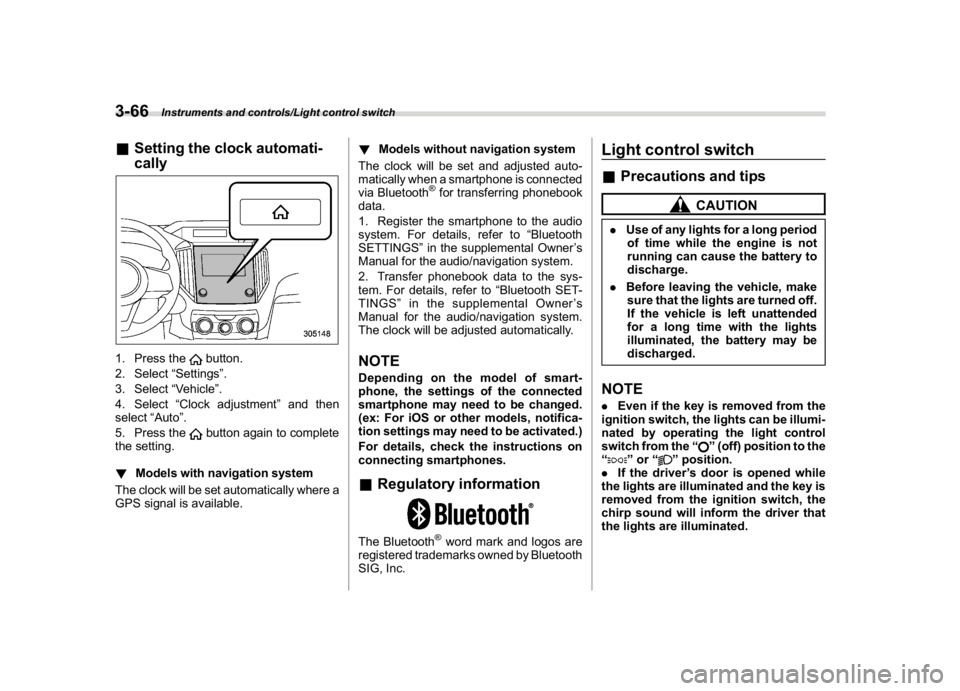
&Setting the clock automati-
cally1. Press the
button.
2. Select“Settings”.
3. Select“Vehicle”.
4. Select“Clock adjustment”and then
select“Auto”.
5. Press thebutton again to complete
the setting.
!Models with navigation system
The clock will be set automatically where a
GPS signal is available.!Models without navigation system
The clock will be set and adjusted auto-
matically when a smartphone is connected
via Bluetooth
®for transferring phonebook
data.
1. Register the smartphone to the audio
system. For details, refer to“Bluetooth
SETTINGS”in the supplemental Owner’s
Manual for the audio/navigation system.
2. Transfer phonebook data to the sys-
tem. For details, refer to“Bluetooth SET-
TINGS”in the supplemental Owner’s
Manual for the audio/navigation system.
The clock will be adjusted automatically.
NOTEDepending on the model of smart-
phone, the settings of the connected
smartphone may need to be changed.
(ex: For iOS or other models, notifica-
tion settings may need to be activated.)
For details, check the instructions on
connecting smartphones.&Regulatory informationThe Bluetooth
®word mark and logos are
registered trademarks owned by Bluetooth
SIG, Inc.
Light control switch&Precautions and tips
CAUTION
.Use of any lights for a long period
of time while the engine is not
running can cause the battery to
discharge.
.Before leaving the vehicle, make
sure that the lights are turned off.
If the vehicle is left unattended
for a long time with the lights
illuminated, the battery may be
discharged.NOTE.Even if the key is removed from the
ignition switch, the lights can be illumi-
nated by operating the light control
switch from the“
”(off) position to the
“
”or“
”position.
.If the driver’s door is opened while
the lights are illuminated and the key is
removed from the ignition switch, the
chirp sound will inform the driver that
the lights are illuminated.
Instruments and controls/Light control switch
3-66