CD player SUBARU FORESTER 2001 SF / 1.G User Guide
[x] Cancel search | Manufacturer: SUBARU, Model Year: 2001, Model line: FORESTER, Model: SUBARU FORESTER 2001 SF / 1.GPages: 357, PDF Size: 4.51 MB
Page 157 of 357
Audio5-21
–
CONTINUED –
Cassette player operation
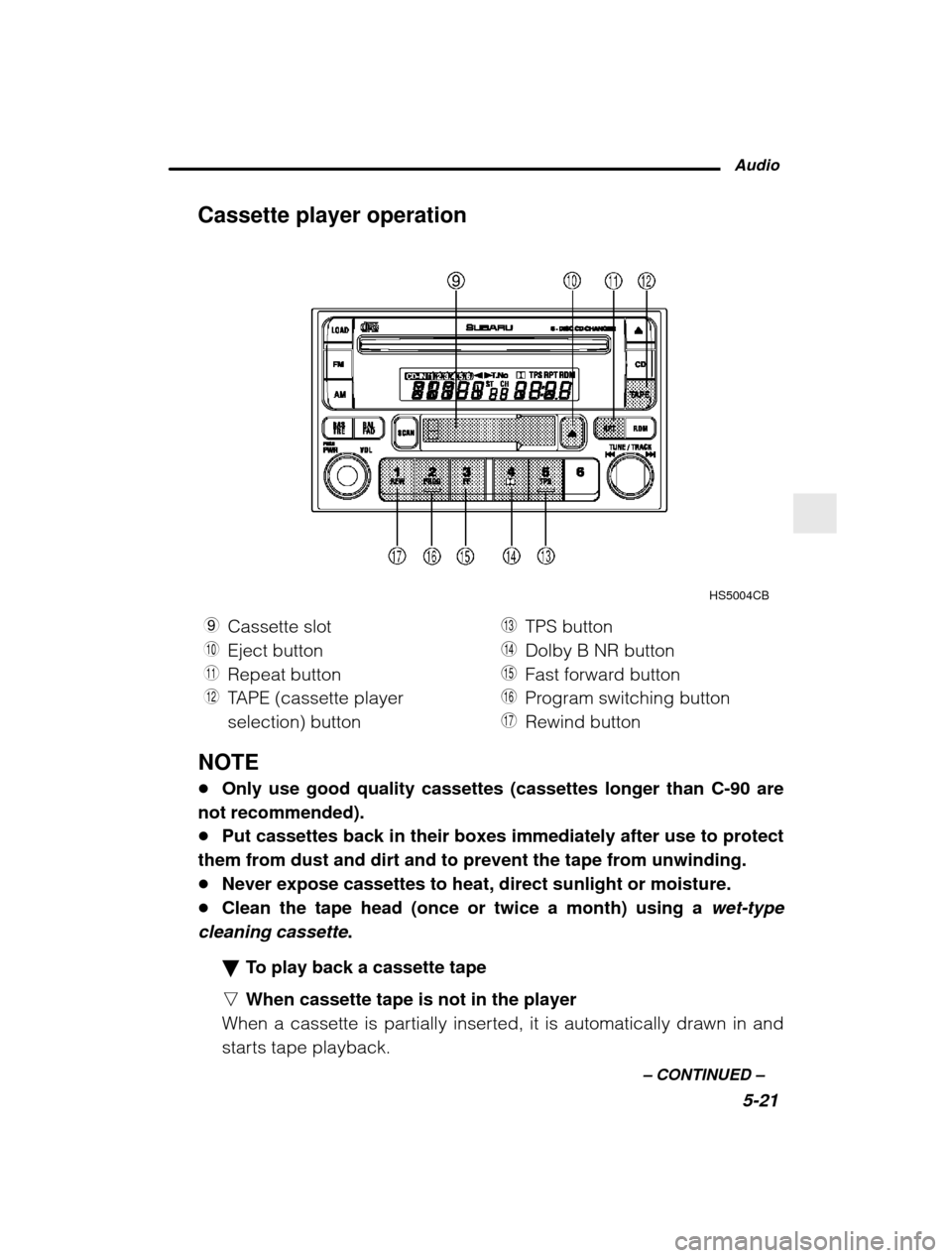
HS5004CB
9 Cassette slot
Q Eject button
W Repeat button
E TAPE (cassette player selection) button R
TPS button
T Dolby B NR button
Y Fast forward button
U Program switching button
I Rewind button
NOTE Only use good quality cassettes (cassettes longer than C-90 are
not recommended). Put cassettes back in their boxes immediately after use to protect
them from dust and dirt and to prevent the tape from unwinding. Never expose cassettes to heat, direct sunlight or moisture.
Clean the tape head (once or twice a month) using a wet-type
cleaning cassette .
To play back a cassette tape
n When cassette tape is not in the player
When a cassette is partially inserted, it is automatically drawn in and
starts tape playback.
Page 158 of 357

5-22n
When cassette tape is in the player
When the “TAPE” button E is pressed, the display will show “PLAY”
and the player will start playback. Tape travel indicators
These indicate the direction the cassette tape is moving. : indicates that the top side of the cassette is being played back.
: indicates that the bottom side of the cassette is being played
back. Program switching button (PROG)
When the program switching button “PROG”
U is pressed during
playback, the tape travel indicators will switch and the player will be- gin playing back the opposite side of the tape. The same mechanism
is automatically activated when the end of the tape is reached. This
allows the opposite side of the tape to play, providing continuousplayback. Fast-forward button (FF)
To fast-forward the tape, press the “FF” button
Y. The display will
show “FF”. To stop fast-forwarding, press the “FF” or “TAPE” E button.
Rewind button (REW)
To rewind the tape, press the “REW” button I. The display will indi-
cate “REW” . To stop rewinding, press the “REW” or “TAPE” E button.
Eject button (
)
When “
” button Q is pressed, play back stops and the cassette
tape is ejected. The ejection function also operates when the ignition switch is in the
“LOCK” position. Always make certain that you remove the cassette
tape. Tape program sensor button (TPS)
n Blank skip
When the “TPS” button
R is pressed, the “TPS” indicator will come on
and the player will automatically skip any blank portion of 15 second
or more and play the next program, even if it is on the other side. To
cancel blank skip mode, press the “TPS” button again.
Page 159 of 357
Audio5-23
–
CONTINUED –
n
Blank search
Press “TPS” button R during playback to return to the beginning of
the current selection or to skip to the beginning of the next selection.
To use this function, press the “TPS” button to turn on the “TPS” indi-
cator. If the fast-forward button “FF”
Y is then pressed, the player ad-
vances the tape to the beginning of the next selection and starts play-
ing it. If the rewind button “REW”
I is pressed instead, the player
rewinds the tape to the beginning of the current selection and starts
replaying it. The “TPS” function may not operate properly under the
following conditions: When the recording level is low.
When there are long pauses in the middle of a selection.
When the tape contains verbal material such as conversations.
When the blanks between selections are shorter than five seconds.
When there are no blanks between selections (live concerts, etc.).
Repeat button (RPT)
Push the “RPT” button
W to repeat the piece of music being listened
to. To use this function, push the “RPT” button while the piece you
want to hear again is being played. “RPT” will be indicated on the dis-
play. When the selection ends, the cassette player automatically re-
winds to the beginning of the piece and the selection begins again.
To cancel the repeat function, push the “RPT” button again. Until the
repeat function is cancelled, the same piece of music will be repeated
indefinitely. The “RPT” function may not operate properly under the
following conditions: When the recording level is low.
When there are long pauses in the middle of a selection.
When the tape contains verbal material such as conversations.
When the blanks between selections are shorter than five seconds.
When there are no blanks between selections (live concerts, etc).
Dolby B NR button (
)
Press “
” button T when playing tapes recorded using the Dolby
NR system*. The “
” indicator will light up and high-frequency
noise on the tape will be reduced for clearer sound reproduction.
Page 160 of 357

5-24* Noise reduction system manufactured under license from Dolby Laboratories
Licensing Corporation.
“Dolby” and the double-D Symbol are trade marks of
Dolby Laboratories Licensing Corporation.
Auto metal sensor
The cassette player automatically adjusts for metal or CrO 2 tape.
Built in CD changer operation
HS5004DB
O LOAD button
P SCAN button
A Disc slot
S CD button
D Eject button F
Random button
G Fast forward/Fast reverse and track UP/DOWN knob
H Repeat button
J Disc select button
NOTE
Make sure to always insert a disc with the label side up. If a disc is inserted with the label side down, it might be ejected or theplayer might shut off.
Page 161 of 357
Audio5-25
–
CONTINUED –
How to insert a CD(s)
n Inserting a CD
1. Press “LOAD” button O. If the magazine in the player has an idle
position where you can insert a disc, the “DISC” indicator associated
with the idle position will blink.
If no indicator blinks, it means that there is no idle position in the mag-azine.
2. As soon as the “DISC” indicator begins to blink, the “IN” will ap-
pear on display for a period of 15 seconds. Insert a disc during theperiod. The disc will be then automatically drawn in, and the playerwill begin to play back the first number of the disc. To insert more discs in succession, repeat Steps 1 and 2. The
magazine will be loaded with discs in the ascending order of position
number.
If you do not insert any disc in 15 seconds after you have pressed the
“LOAD” button, the player will begin to play back the first number of
the last disc you have inserted. The disc indicator steadily lights up if a disc is already inserted in
the corresponding position of the magazine. While the player is in the loading mode, if you press any of the oth-
er mode buttons “FM”
2, “AM” 1 and “TAPE” E, the player will enter
the standby mode. Press the “CD” button S to start playback.
n Inserting a disc in a desired position
1. Press the “LOAD” button. If the magazine in the player has an idle
position where you can insert a disc, the “DISC” indicator associated
with the idle position will blink.The positions in the magazine the indicator of which steadily lights up
are already loaded with discs.
2. Press the “DISC SELECT ” button
J at the position where you want
to insert a disc. The associated “DISC” indicator will blink, and the
“IN” will be displayed.
3. If you insert a disc during the 15-second period while the “IN” is on
display, the disc will be automatically drawn in, and the player will
start playback of the disc, beginning with the first number. To insert more discs in succession, repeat Steps 1 and 2.
Page 162 of 357

5-26
While the player is in the loading mode, if you press any of the oth-
er mode buttons “FM” 2, “AM” 1 and “TAPE” E, the player will enter
standby mode. Press the “CD” button to start playback.
n Loading all the magazine (Full disc loading mode)
1. If you continue to press the “LOAD” button for more than 1.5 se-
conds, the player will produce beep sound and will enter the full disc
loading mode.
2. A “DISC” indicator will blink, and the “IN” will be on display for a
period of 15 seconds. If a disc is successfully loaded during this peri-od, the “DISC” indicator will stop blinking and will steadily light.
3. When the loading of a disc is complete, the next “DISC” indicator
will blink. Then repeat Step 2.
4. When the magazine is filled with discs by repeating Steps 2 and 3,
the player will start playback of the discs, beginning with the one in-
serted first.
If you fail to insert any disc during each 15-second interval, the full
disc loading mode will be canceled, and the player will start playback
of the disc inserted first. How to play back a CD or make a pause
n When there is no CD inserted:
Insert a CD by referring to “How to Insert a CD(s) ”.
When a CD is loaded, the player will start playback of the CD, begin-
ning with the first number. n When there are CDs loaded:
Press a desired one of the “DISC SELECT ” buttons
J the “DISC” indi-
cator of which steadily lights up. The player will then start playback of
the selected CD, beginning with the first number.
Page 164 of 357

5-28played continuously. To cancel the repeat mode, press the button
again. Then the
“RPT” indicator goes out, and normal playback mode
is restored. Random playback
Press the “RDM” button
F while a disc is being played back to play
all songs on the disc in a random order. The “RDM” indicator will
come on and all songs on the disc will be played in a random order.
To cancel the random mode, press the button again. Then the “RDM”
indicator goes out, and normal playback mode is restored. Scan
When the “SCAN” button
P is pressed while the disc is being played
back, you can hear the first 10 seconds of each track to seach for the
desired program. To continue listening to the program, press the
“SCAN” button again. After all tracks on the disc have been scanned,
normal playback mode is restored. How to unload CDs from the player
n Ejecting a CD from the player
Of the discs loaded, you can select and remove only one disc.
1. Press the “DISC SELECT ” button
J of the disc whose “DISC” indi-
cator is ON.
2. Press the “EJECT” button D. Then the “DISC” indicator associated
with the disc you have selected will blink, and the disc will be ejected.
To remove more discs in succession, repeat Steps 1 and 2. n Ejecting all discs from the player (All disc ejection mode)
1. If you continue to press the “EJECT” button
D, the player will pro-
duce beep sound and will enter the all disc ejection mode.
2. Remove the disc that has been ejected. The other discs loaded
will then be ejected one after another. If you do not remove the discthat has been ejected, the “All disc ejection mode ” will be canceled.
NOTE
Avoid driving the vehicle with a CD sticking out, because vibra- tion might make it fall out.
Page 165 of 357
Audio5-29
–
CONTINUED –
CD changer control (If optional in dash CD changer is connected) An optional CD changer can be connected to this audio unit. See your
SUBARU dealer for more information. For procedures for loading and un-
loading CDs, refer to
“In-dash 6 CD auto changer ” in this chapter.
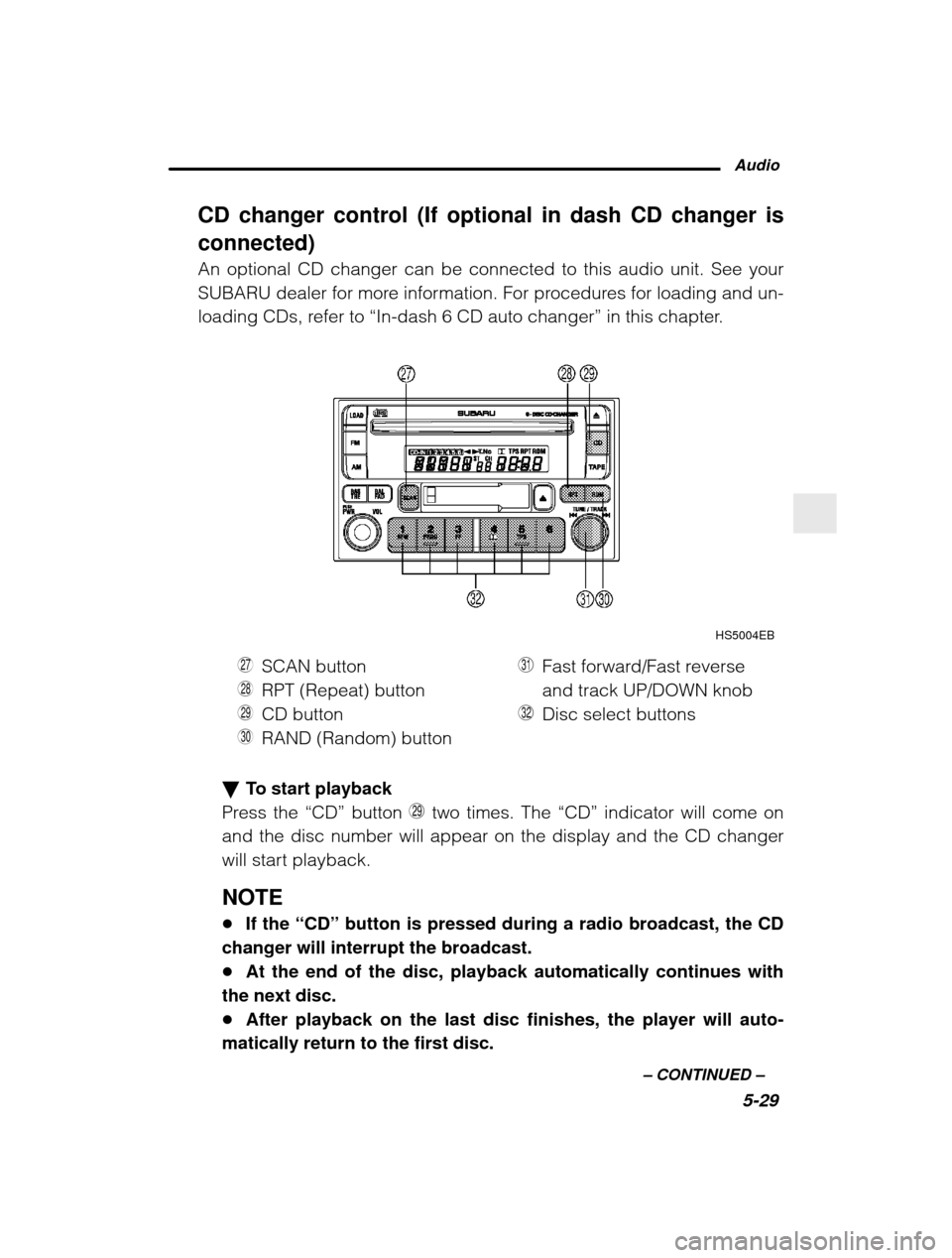
HS5004EB
K SCAN button
L RPT (Repeat) button
Z CD button
X RAND (Random) button C
Fast forward/Fast reverseand track UP/DOWN knob
V Disc select buttons
To start playback
Press the “CD” button Z two times. The “CD” indicator will come on
and the disc number will appear on the display and the CD changer
will start playback. NOTE If the “CD” button is pressed during a radio broadcast, the CD
changer will interrupt the broadcast. At the end of the disc, playback automatically continues with
the next disc. After playback on the last disc finishes, the player will auto-
matically return to the first disc.
Page 167 of 357
Audio5-31
–
CONTINUED –
n
Fast reverse
Turn the “FF/FR and UP/DOWN ” knob C counterclockwise and hold it
continuously for more than 2 seconds to fast reverse the disc.
Release the knob to stop fast reverse.
If you continue fast reverse to the beginning of the disc, the CD
changer will automatically stop fast reverse and start playback begin-
ning with the first track on the current disc. Repeat
Press the “RPT” button
L while a song is playing to play the song
repeatedly. The “RPT” indicator will come on and the song will be
played continuously. To cancel the repeat mode, press the button
again. Then the “RPT” indicator goes out, and normal playback mode
is restored. Random playback
Press the “RAND” button
X while a disc is being played back to play
all songs on the disc in a random order. The “RAND” indicator will
come on and all songs on the disc will be played in a random order.
To cancel the random mode, press the button again. Then the
“RAND” indicator goes out, and normal playback mode is restored.
Scan (a convenient way to become familiar with a disc)
1. Press the “SCAN” button
K.
– The display shows “SCAN” and the track number being
scanned.– You hear the first 10 seconds of each track.
– The operation is automatically cleared after playing all pro-
grams. Then, normal playback starts.
2. Press the “SCAN” button again when you hear a track you like.
– Normal playback resumes.
To stop playback
To stop playback and switch over to the radio mode, press the
“BAND” button. To stop playback and switch over to the cassette
player mode, press the “TAPE” button.
Page 168 of 357

5-32CD player (if equipped)
HB5039BB
1 Disc slot
2 Disc indicator 3
Eject button
CAUTION
Use only music CDs identified by
mark.
Do not use CDs listed below which could cause damage to the
CD player.
Any disc with a peel-off or seal on it.
Any disc with scratches and/or dust.
Bent disc.
Cleaning disc.
CD accessory. (E.g., 3-inch (8 cm) disc adapter)
Do not insert or remove any disc when the automatic transmis-
sion selector lever is in the park position; the selector lever in that position can interfere with disc insertion or removal, causing
scratches on the disc surface (for AT vehicles).