ECO mode SUBARU FORESTER 2001 SF / 1.G User Guide
[x] Cancel search | Manufacturer: SUBARU, Model Year: 2001, Model line: FORESTER, Model: SUBARU FORESTER 2001 SF / 1.GPages: 357, PDF Size: 4.51 MB
Page 147 of 357
Audio5-11
–
CONTINUED –
To start playback
n When CD is not in the CD player
Hold a disc with a finger in the center hole while gripping the edge of
the disc, then insert it in to the slot (with the label side up) on the CDplayer and the player will automatically pull the disc into position.
After insertion, the CD player mode indicator “CD” will come on and
playback will start. n When CD is in the CD player
Press the “CD” button
U. The “CD” indicator will come on, and the
track number will appear on the display and the CD player will start playback. NOTE If the “CD” button is pressed during a radio broadcast, the
disc will interrupt the broadcast. After playback on the last song finishes, the player will auto-
matically return to track 1 (the first song on the disc). To select a song from its beginning
Briefly press the “ ❚” button
P to skip to the beginning of the next
track and briefly press the “❚ ” button to skip to the beginning of
the current track. Fast-forwarding and fast-reverse
Press the “ ❚” button
P continuously for more than a half second
to fast-forward the disc.
Press the “❚ ” button continuously for more than a half second to
fast reverse the disc.
Release the button to stop fast forwarding or fast reverse. Repeat
Press the “RPT” button
O while a song is playing to play the song
repeatedly. The “RPT” indicator will come on and the song will be
played continuously. To cancel the repeat mode, press the button
again. Then the “RPT” indicator goes out, and normal playback mode
is restored.
Page 148 of 357

5-12
Random playback
Press the “RAND” button I while a disc is being played back to play
all songs on the disc in a random order. The “RAND” indicator will
come on and all songs on the disc will be played in a random order.
To cancel the random mode, press the button again. Then the
“RAND” indicator goes out, and normal playback mode is restored.
Scan (a convenient way to become familiar with a disc)
1. Press the “SCAN” button
A.
– The display shows “SCAN” and the track number being
scanned.– You hear the first 10 seconds of each track.
– The operation is automatically cleared after playing all pro-
grams. Then, normal playback starts.
2. Press the “SCAN” button again when you hear a track you like.
– Normal playback resumes.
To stop playback
To stop playback and switch over to the radio mode, press the
“BAND” button. To stop playback and switch over to the cassette
player mode, press the “TAPE” button.
Page 150 of 357

5-14
If you have loaded fewer than 6 discs, any missing disc is
automatically skipped. Selection of a desired disc
Briefly press the “ ” button
D to skip to the next disc and briefly
press the “ ” button to skip to the previous disc.
n Operation with the in-dash CD changer unit
Press the desired “Disc select ” button (numbered from 1 to 6) and the
disc will begin to play. To select a song from its beginning
Briefly press the “ ❚” button
H to skip to the beginning of the next
track and briefly press the “❚ ” button to skip to the beginning of
the current track. Fast-forwarding and fast-reverse
Press the “ ❚” button H continuously for more than a half second
to fast-forward the disc.
Press the “❚ ” button continuously for more than a half second to
fast reverse the disc.
Release the button to stop fast forwarding or fast reverse. Repeat
Press the “RPT” button
G while a song is playing to play the song
repeatedly. The “RPT” indicator will come on and the song will be
played continuously. To cancel the repeat mode, press the button
again. Then the “RPT” indicator goes out, and normal playback mode
is restored. Random playback
Press the “RAND” button
F while a disc is being played back to play
all songs on the disc in a random order. The “RAND” indicator will
come on and all songs on the disc will be played in a random order.
To cancel the random mode, press the button again. Then the
“RAND” indicator goes out, and normal playback mode is restored.
Page 151 of 357
Audio5-15
–
CONTINUED –
Scan (a convenient way to become familiar with a disc)
1. Press the “SCAN” button J.
– The display shows “SCAN” and the track number being
scanned. – You hear the first 10 seconds of each track.
– The operation is automatically cleared after playing all pro-
grams. Then, normal playback starts.
2. Press the “SCAN” button again when you hear a track you like.
– Normal playback resumes.
To stop playback
To stop playback and switch over to the radio mode, press the
“BAND” button. To stop playback and switch over to the cassette
player mode, press the “TAPE” button.
Page 153 of 357
Audio5-17
–
CONTINUED –
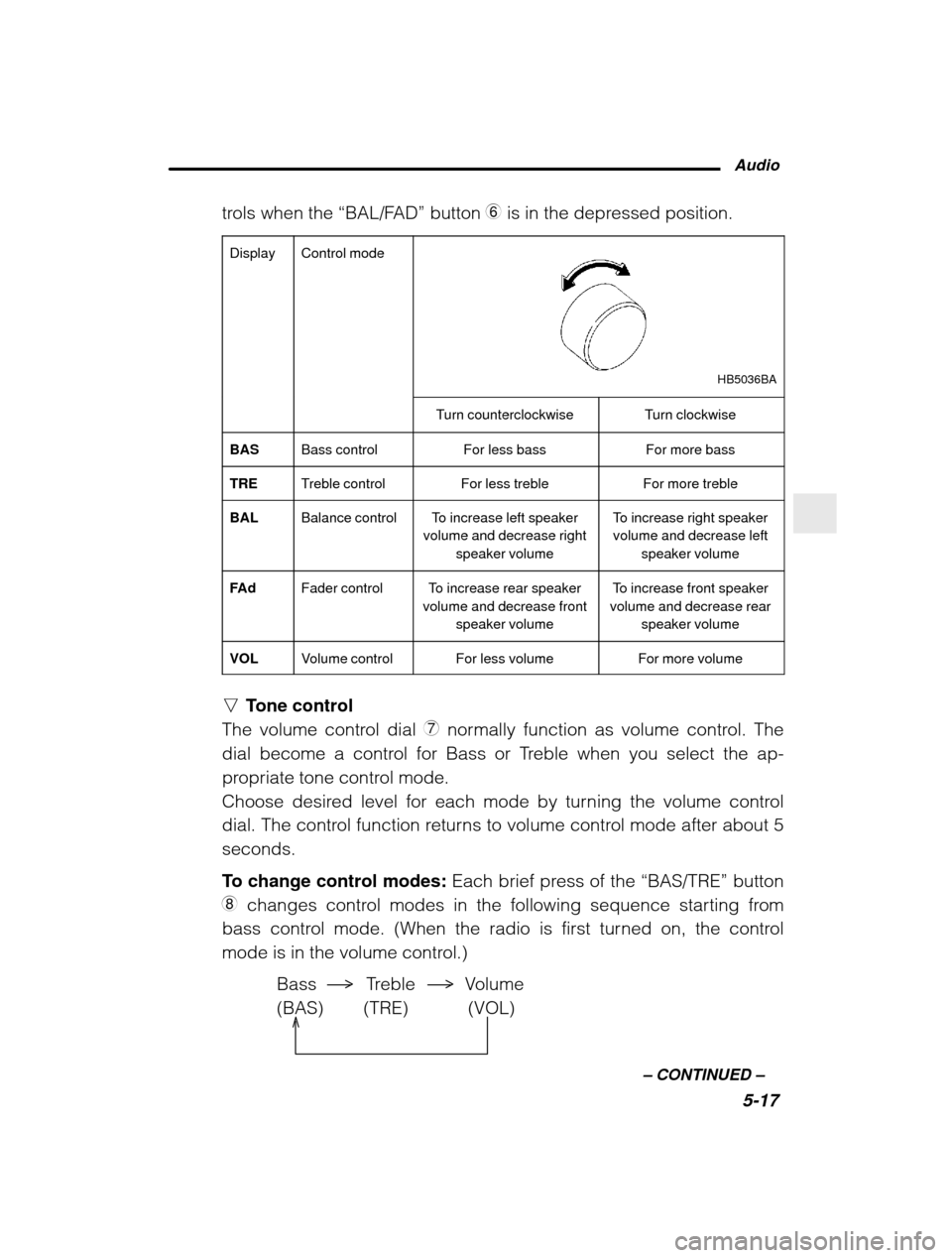
trols when the
“BAL/FAD” button 6 is in the depressed position.
Display
Control mode
HB5036BA
Turn counterclockwiseTurn clockwise
BASBass controlFor less bassFor more bass
TRETreble controlFor less trebleFor more treble
BALBalance controlTo increase left speaker
volume and decrease right
speaker volumeTo increase right speakervolume and decrease left
speaker volume
FA dFader controlTo increase rear speaker
volume and decrease front
speaker volumeTo increase front speaker
volume and decrease rear
speaker volume
VOLVolume controlFor less volumeFor more volume
nTone control
The volume control dial 7 normally function as volume control. The
dial become a control for Bass or Treble when you select the ap-
propriate tone control mode.
Choose desired level for each mode by turning the volume control
dial. The control function returns to volume control mode after about 5seconds.
To change control modes: Each brief press of the “BAS/TRE” button
8 changes control modes in the following sequence starting from
bass control mode. (When the radio is first turned on, the control
mode is in the volume control.)
Bass Treble Volume(BAS) (TRE) (VOL)
Page 154 of 357

5-18n
Fader and balance control
The volume control dial 7 normally function as volume control. The
dial become the controls for Fader or Balance when you select the
appropriate fader and balance control mode.
Choose desired setting for each mode by turning the volume control
dial. The control function returns to volume control mode after about 5seconds.
To change control modes: Each brief press of the “FAD/BAL” button
6 changes control modes in the following sequence starting from
fader control mode. (When the radio is turned on, the control mode is
in the volume control.)
Balance Fader Volume
(BAL) (FAd) (VOL)
nDisplay illumination dimness cancellation
The brightness of the radio display dims when the light switch is in the “ p ” or “w ” positions. If this makes the display difficult to read,
press the volume dial for more than two seconds to return the displayto original brightness. FM/AM selection button
Push the “FM”
1 or “AM” 2 button when the radio is off to turn on the
radio. Push the “FM” or “AM” button when the radio is on to select FM1, FM2
or AM reception. Stereo indicator
The stereo indicator “ST” will come on when an FM stereo broadcast
is received.
Page 155 of 357
Audio5-19
–
CONTINUED –
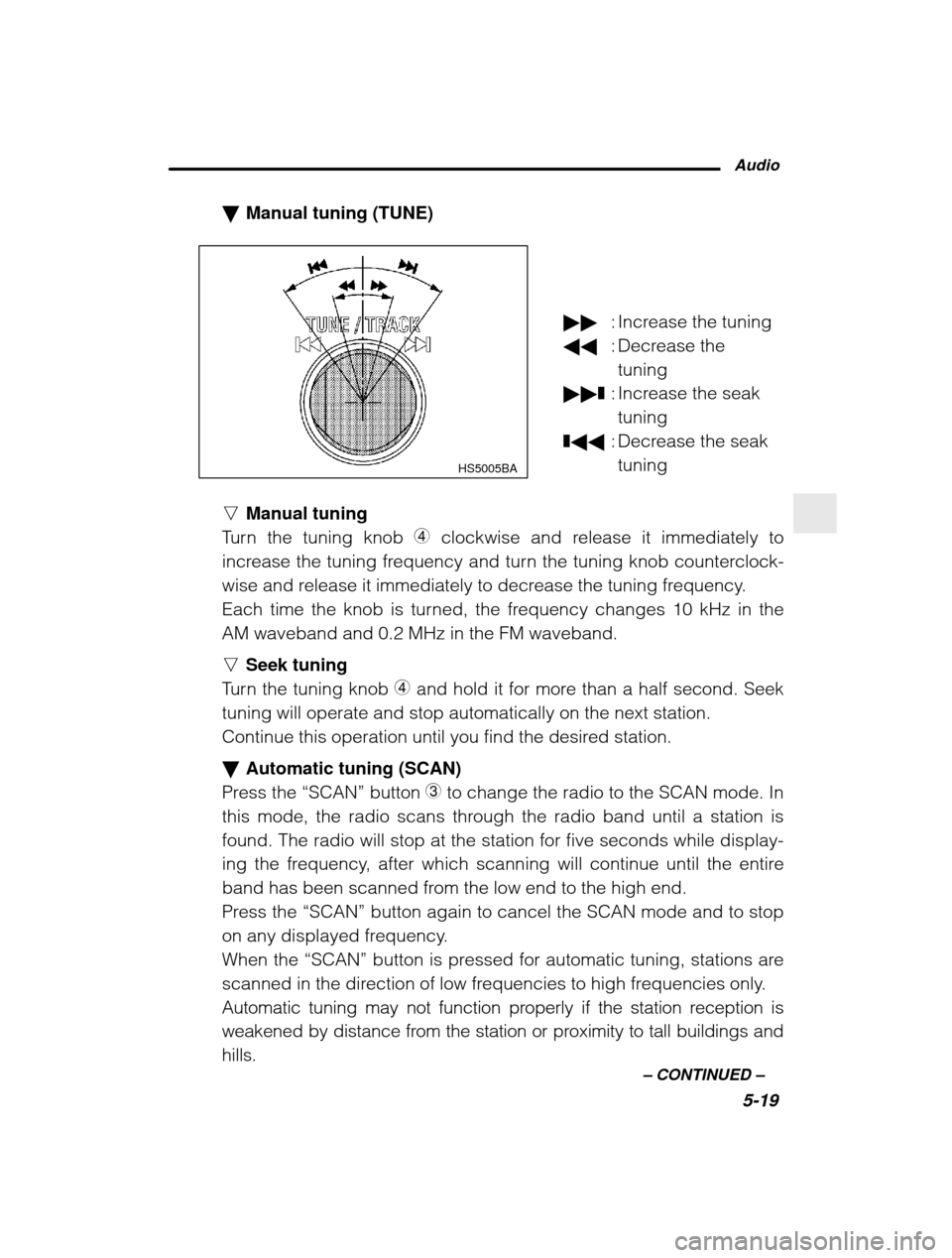
Manual tuning (TUNE)
HS5005BA
nManual tuning
Turn the tuning knob 4 clockwise and release it immediately to
increase the tuning frequency and turn the tuning knob counterclock-
wise and release it immediately to decrease the tuning frequency.
Each time the knob is turned, the frequency changes 10 kHz in theAM waveband and 0.2 MHz in the FM waveband. n Seek tuning
Turn the tuning knob 4 and hold it for more than a half second. Seek
tuning will operate and stop automatically on the next station.
Continue this operation until you find the desired station. Automatic tuning (SCAN)
Press the “SCAN” button
3 to change the radio to the SCAN mode. In
this mode, the radio scans through the radio band until a station is
found. The radio will stop at the station for five seconds while display-
ing the frequency, after which scanning will continue until the entire
band has been scanned from the low end to the high end.
Press the “SCAN” button again to cancel the SCAN mode and to stop
on any displayed frequency.
When the “SCAN” button is pressed for automatic tuning, stations are
scanned in the direction of low frequencies to high frequencies only.
Automatic tuning may not function properly if the station reception is
weakened by distance from the station or proximity to tall buildings and
hills.
: Increase the tuning
: Decrease the
tuning
❚: Increase the seak
tuning
❚ : Decrease the seak
tuning
Page 158 of 357

5-22n
When cassette tape is in the player
When the “TAPE” button E is pressed, the display will show “PLAY”
and the player will start playback. Tape travel indicators
These indicate the direction the cassette tape is moving. : indicates that the top side of the cassette is being played back.
: indicates that the bottom side of the cassette is being played
back. Program switching button (PROG)
When the program switching button “PROG”
U is pressed during
playback, the tape travel indicators will switch and the player will be- gin playing back the opposite side of the tape. The same mechanism
is automatically activated when the end of the tape is reached. This
allows the opposite side of the tape to play, providing continuousplayback. Fast-forward button (FF)
To fast-forward the tape, press the “FF” button
Y. The display will
show “FF”. To stop fast-forwarding, press the “FF” or “TAPE” E button.
Rewind button (REW)
To rewind the tape, press the “REW” button I. The display will indi-
cate “REW” . To stop rewinding, press the “REW” or “TAPE” E button.
Eject button (
)
When “
” button Q is pressed, play back stops and the cassette
tape is ejected. The ejection function also operates when the ignition switch is in the
“LOCK” position. Always make certain that you remove the cassette
tape. Tape program sensor button (TPS)
n Blank skip
When the “TPS” button
R is pressed, the “TPS” indicator will come on
and the player will automatically skip any blank portion of 15 second
or more and play the next program, even if it is on the other side. To
cancel blank skip mode, press the “TPS” button again.
Page 161 of 357
Audio5-25
–
CONTINUED –
How to insert a CD(s)
n Inserting a CD
1. Press “LOAD” button O. If the magazine in the player has an idle
position where you can insert a disc, the “DISC” indicator associated
with the idle position will blink.
If no indicator blinks, it means that there is no idle position in the mag-azine.
2. As soon as the “DISC” indicator begins to blink, the “IN” will ap-
pear on display for a period of 15 seconds. Insert a disc during theperiod. The disc will be then automatically drawn in, and the playerwill begin to play back the first number of the disc. To insert more discs in succession, repeat Steps 1 and 2. The
magazine will be loaded with discs in the ascending order of position
number.
If you do not insert any disc in 15 seconds after you have pressed the
“LOAD” button, the player will begin to play back the first number of
the last disc you have inserted. The disc indicator steadily lights up if a disc is already inserted in
the corresponding position of the magazine. While the player is in the loading mode, if you press any of the oth-
er mode buttons “FM”
2, “AM” 1 and “TAPE” E, the player will enter
the standby mode. Press the “CD” button S to start playback.
n Inserting a disc in a desired position
1. Press the “LOAD” button. If the magazine in the player has an idle
position where you can insert a disc, the “DISC” indicator associated
with the idle position will blink.The positions in the magazine the indicator of which steadily lights up
are already loaded with discs.
2. Press the “DISC SELECT ” button
J at the position where you want
to insert a disc. The associated “DISC” indicator will blink, and the
“IN” will be displayed.
3. If you insert a disc during the 15-second period while the “IN” is on
display, the disc will be automatically drawn in, and the player will
start playback of the disc, beginning with the first number. To insert more discs in succession, repeat Steps 1 and 2.
Page 162 of 357

5-26
While the player is in the loading mode, if you press any of the oth-
er mode buttons “FM” 2, “AM” 1 and “TAPE” E, the player will enter
standby mode. Press the “CD” button to start playback.
n Loading all the magazine (Full disc loading mode)
1. If you continue to press the “LOAD” button for more than 1.5 se-
conds, the player will produce beep sound and will enter the full disc
loading mode.
2. A “DISC” indicator will blink, and the “IN” will be on display for a
period of 15 seconds. If a disc is successfully loaded during this peri-od, the “DISC” indicator will stop blinking and will steadily light.
3. When the loading of a disc is complete, the next “DISC” indicator
will blink. Then repeat Step 2.
4. When the magazine is filled with discs by repeating Steps 2 and 3,
the player will start playback of the discs, beginning with the one in-
serted first.
If you fail to insert any disc during each 15-second interval, the full
disc loading mode will be canceled, and the player will start playback
of the disc inserted first. How to play back a CD or make a pause
n When there is no CD inserted:
Insert a CD by referring to “How to Insert a CD(s) ”.
When a CD is loaded, the player will start playback of the CD, begin-
ning with the first number. n When there are CDs loaded:
Press a desired one of the “DISC SELECT ” buttons
J the “DISC” indi-
cator of which steadily lights up. The player will then start playback of
the selected CD, beginning with the first number.