audio SUBARU FORESTER 2002 SG / 2.G User Guide
[x] Cancel search | Manufacturer: SUBARU, Model Year: 2002, Model line: FORESTER, Model: SUBARU FORESTER 2002 SG / 2.GPages: 466, PDF Size: 4.35 MB
Page 182 of 466
Audio5-11
–
CONTINUED –
Press the “SCAN” button again to cancel the SCAN mode and to stop
on any displayed frequency.
When the “SCAN” button is pressed for automatic tuning, stations are
scanned in the direction of low frequencies to high frequencies only.
Automatic tuning may not function properly if the station reception is
weakened by distance from the station or proximity to tall buildingsand hills. Selecting preset stations
Presetting a station with a “preset button ”
5 allows you to select that
station in a single operation. Up to six WB (if equipped), AM, FM1 and
FM2 stations each may be preset. How to preset stations
1. Press the “BAND” button 3 to select FM1, FM2, AM or WB (if
equipped) reception.
2. Press the “SCAN” button or tune the radio manually until the
desired station frequency is displayed.
3. Press one of the preset buttons for more than 2 seconds to store
the frequency. At this time, there will momentarily be no sound from
the radio. If the button is pressed for less than 2 seconds, the preced-
ing selection will remain in memory.
NOTE If the connection between the radio and battery is broken for any
reason such as vehicle maintenance or radio removal, all stationsstored in the preset buttons are cleared. If this occurs, it is neces-sary to reset the preset buttons.
Page 184 of 466
Audio5-13
–
CONTINUED –
Tape travel indicators
These indicate the direction the cassette tape is moving. : Indicates that the top side of the cassette is being played back.
: Indicates that the bottom side of the cassette is being played
back. Program button (PROG)
When the program button Y is pressed during playback, the tape
travel indicators will switch and the player will begin playing back the opposite side of the tape. The same mechanism is automatically acti-
vated when the end of the tape is reached. This allows the opposite
side of the tape to play, providing continuous playback. Fast-forward button (FF)
To fast-forward the tape, press the “FF” button
E. To stop fast-for-
warding, lightly press the “
” 8 button.
Rewind button (REW)
To rewind the tape, press the “REW” button R. To stop rewinding,
lightly press the “
” 8 button.
Eject button (
)
When “
” button 8 is pressed, playback stops and the cassette
tape is ejected. The ejection function is also active when the ignition switch is in the
“LOCK” position. Always make certain that you remove the cassette
tape. Tape program sensor button (TPS)
n Blank skip
When the “TPS” button Q is pressed, the “TPS” indicator will come on
and the player will automatically skip any blank portion of 15 second
or more and play the next program, even if it is on the other side. To
cancel blank skip mode, press the “TPS” button again.
n Blank search
Press “TPS” button
Q during playback to return to the beginning of
the current selection or to skip to the beginning of the next selection.
Page 186 of 466
Audio5-15
–
CONTINUED –
CD player control (If optional CD player is connected) An optional CD player can be connected to this audio unit. See your
SUBARU dealer for more information. For procedures for loading and un-
loading CDs, refer to “CD player 1 ” in this chapter.
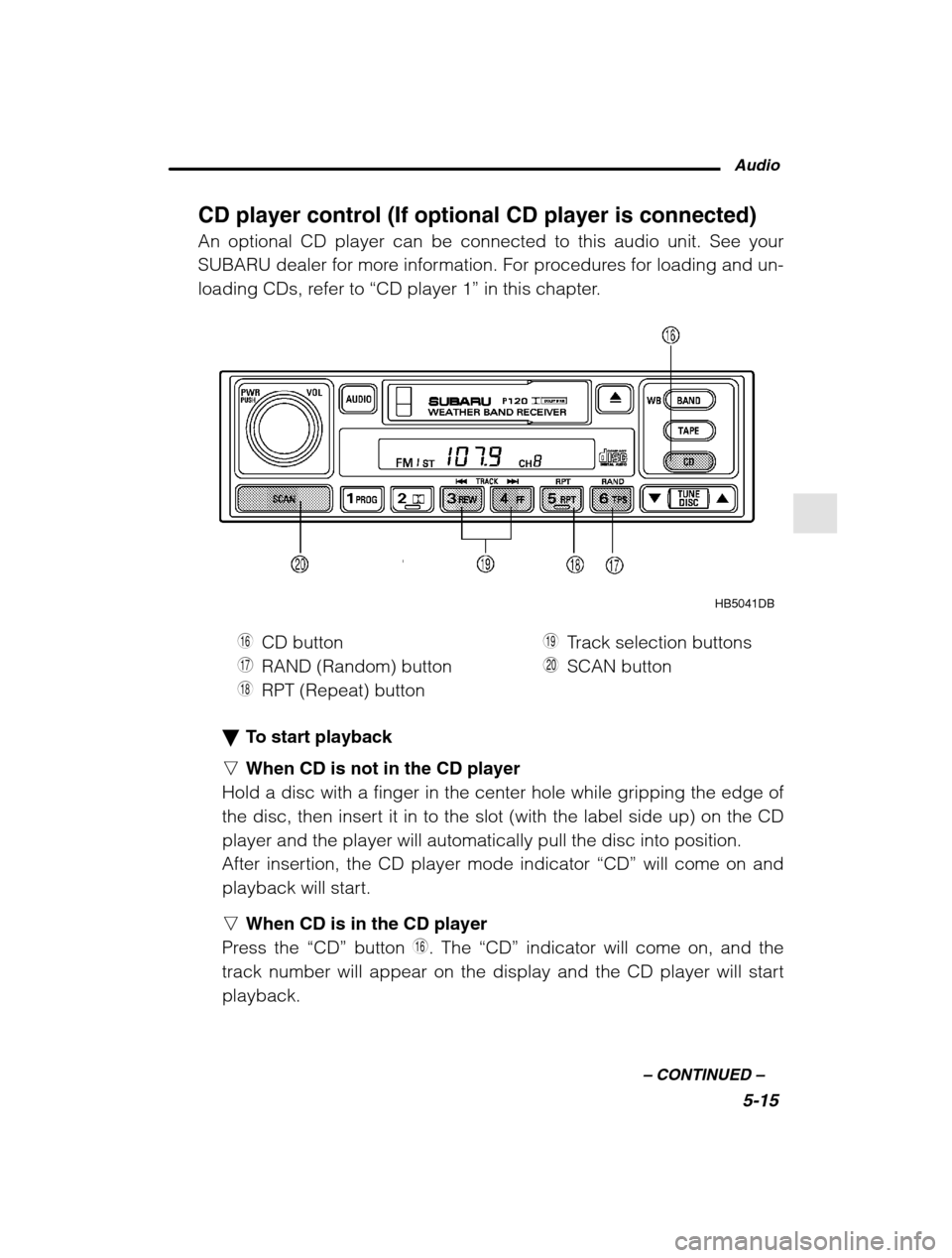
HB5041DB
U CD button
I RAND (Random) button
O RPT (Repeat) button P
Track selection buttons
A SCAN button
To start playback
n When CD is not in the CD player
Hold a disc with a finger in the center hole while gripping the edge of
the disc, then insert it in to the slot (with the label side up) on the CDplayer and the player will automatically pull the disc into position.
After insertion, the CD player mode indicator “CD” will come on and
playback will start. n When CD is in the CD player
Press the “CD” button
U. The “CD” indicator will come on, and the
track number will appear on the display and the CD player will start playback.
Page 188 of 466
Audio5-17
–
CONTINUED –
grams. Then, normal playback starts.
2. Press the “SCAN” button again when you hear a track you like.
– Normal playback resumes.
To stop playback
To stop playback and switch over to the radio mode, press the
“BAND” button. To stop playback and switch over to the cassette
player mode, press the “TAPE” button.
CD changer control (If optional in dash CD changer is connected) An optional CD changer can be connected to this audio unit. See your
SUBARU dealer for more information. For procedures for loading and un-
loading CDs, refer to “In-dash 6 CD auto changer ” in this chapter.
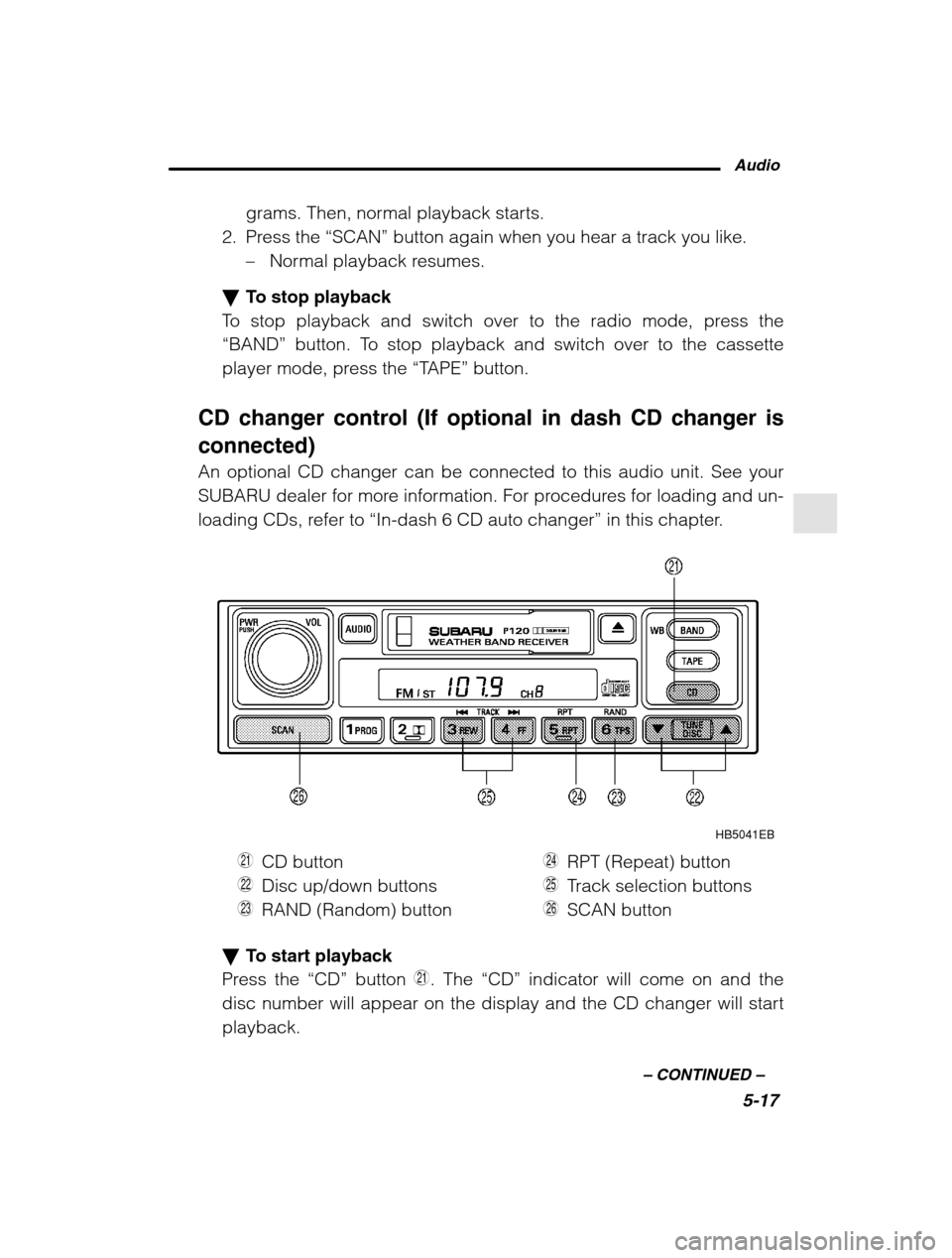
HB5041EB
S CD button
D Disc up/down buttons
F RAND (Random) button G
RPT (Repeat) button
H Track selection buttons
J SCAN button
To start playback
Press the “CD” button S. The “CD” indicator will come on and the
disc number will appear on the display and the CD changer will start playback.
Page 190 of 466
Audio5-19
–
CONTINUED –
all songs on the disc in a random order. The “RAND” indicator will
come on and all songs on the disc will be played in a random order.
To cancel the random mode, press the button again. Then the
“RAND” indicator goes out, and normal playback mode is restored.
Scan (a convenient way to become familiar with a disc)
1. Press the “SCAN” button
J.
– The display shows “SCAN” and the track number being
scanned.– You hear the first 10 seconds of each track.
– The operation is automatically cleared after playing all pro-
grams. Then, normal playback starts.
2. Press the “SCAN” button again when you hear a track you like.
– Normal playback resumes.
To stop playback
To stop playback and switch over to the radio mode, press the
“BAND” button. To stop playback and switch over to the cassette
player mode, press the “TAPE” button.
Page 191 of 466
5-20
Type C audio set (if equipped) The radio will operate only when the ignition switch is in the “ACC” or
“ON” position.
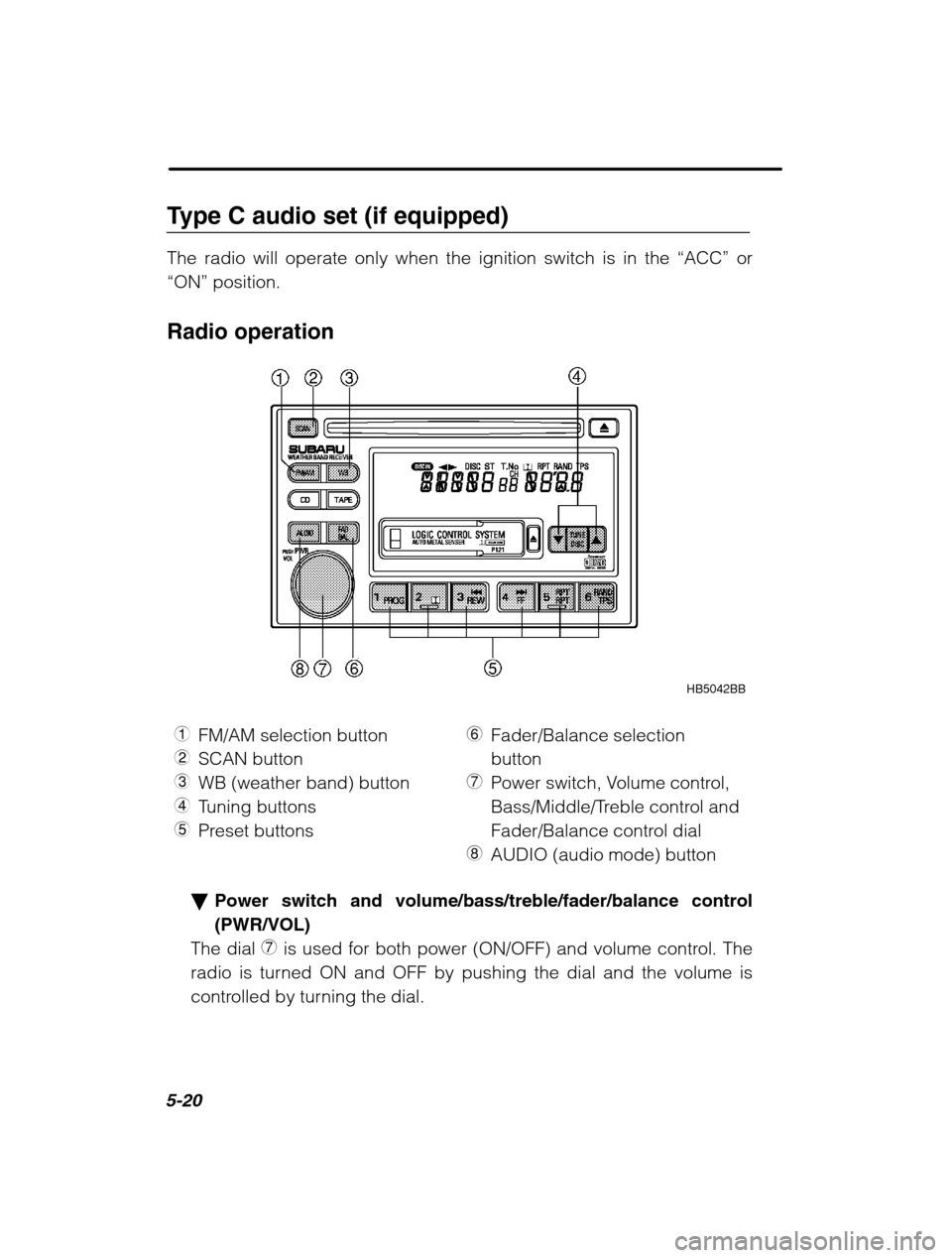
Radio operation
HB5042BB
1 FM/AM selection button
2 SCAN button
3 WB (weather band) button
4 Tuning buttons
5 Preset buttons 6
Fader/Balance selection button
7 Power switch, Volume control,
Bass/Middle/Treble control and
Fader/Balance control dial
8 AUDIO (audio mode) button
Power switch and volume/bass/treble/fader/balance control (PWR/VOL)
The dial 7 is used for both power (ON/OFF) and volume control. The
radio is turned ON and OFF by pushing the dial and the volume is
controlled by turning the dial.
Page 192 of 466

Audio5-21
–
CONTINUED –
This dial is used for bass/middle/treble controls when the “AUDIO”
button 8 is in the depressed position. It is also used for fader/balance
controls when the “FAD/BAL” button 6 is in the depressed position.
Display
Control mode
HB5036BA
Turn counterclockwiseTurn clockwise
BASBass controlFor less bassFor more bass
MIdMiddle note controlFor less middle noteFor more middle note
TRETreble controlFor less trebleFor more treble
FA dFader controlTo increase rear speaker
volume and decrease front
speaker volumeTo increase front speaker
volume and decrease rear
speaker volume
BALBalance controlTo increase left speaker
volume and decrease right
speaker volumeTo increase right speakervolume and decrease left
speaker volume
VOLVolume controlFor less volumeFor more volume
nTone control
The volume control dial 7 normally function as volume control. The
dial become a control for Bass, Middle note or Treble when you select
the appropriate tone control mode.
Choose desired level for each mode by turning the volume control
dial. The control function returns to volume control mode after about 5seconds.
To change control modes: Each brief press of the “AUDIO” button
8 changes control modes in the following sequence starting from
bass control mode. (When the radio is first turned on, the control
mode is in the volume control.)
Page 194 of 466
Audio5-23
–
CONTINUED –
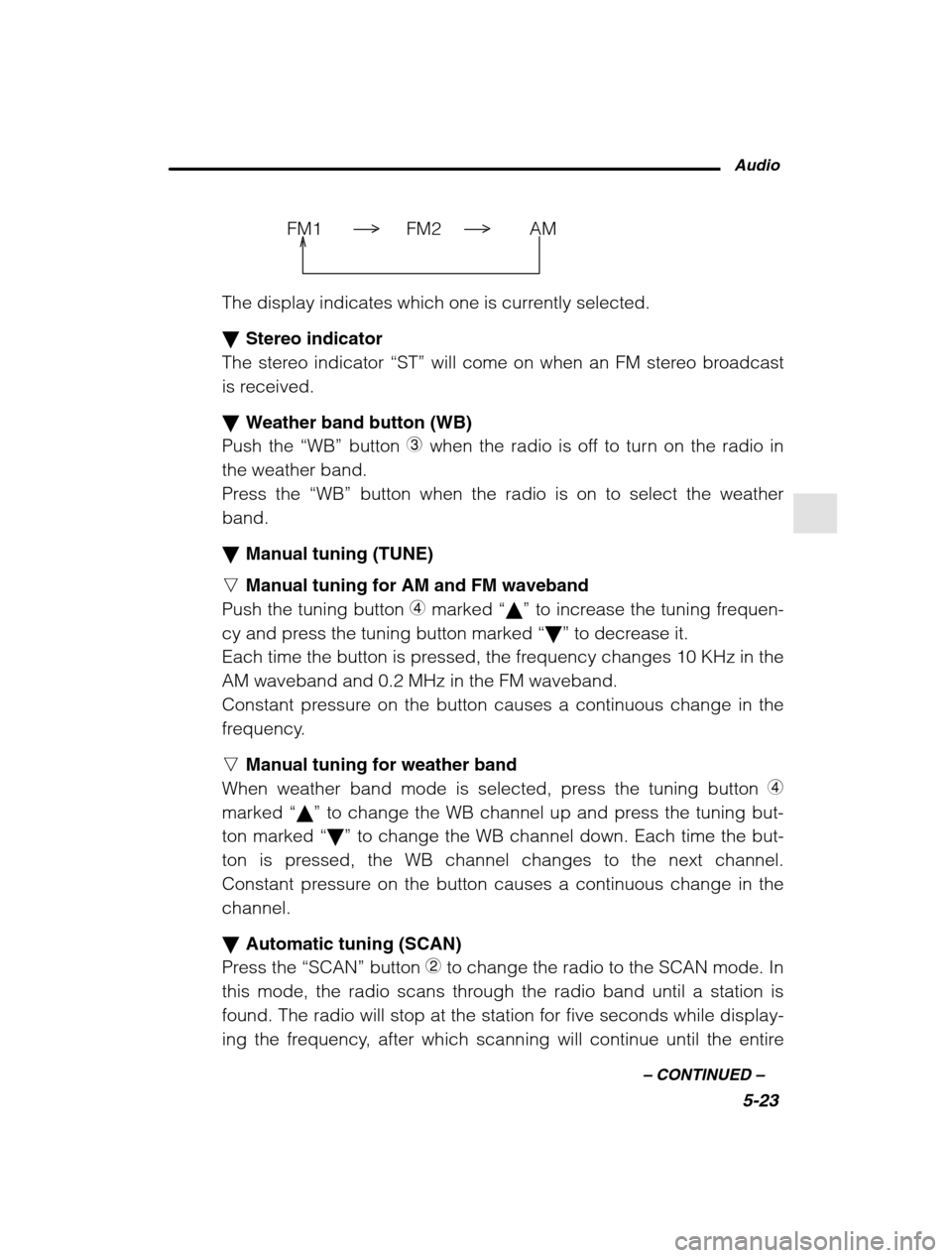
FM1 FM2 AM
The display indicates which one is currently selected. Stereo indicator
The stereo indicator “ST” will come on when an FM stereo broadcast
is received. Weather band button (WB)
Push the “WB” button
3 when the radio is off to turn on the radio in
the weather band.
Press the “WB” button when the radio is on to select the weather
band. Manual tuning (TUNE)
n Manual tuning for AM and FM waveband
Push the tuning button 4 marked “ ” to increase the tuning frequen-
cy and press the tuning button marked “ ” to decrease it.
Each time the button is pressed, the frequency changes 10 KHz in the AM waveband and 0.2 MHz in the FM waveband.
Constant pressure on the button causes a continuous change in the
frequency. n Manual tuning for weather band
When weather band mode is selected, press the tuning button 4
marked “ ” to change the WB channel up and press the tuning but-
ton marked “ ” to change the WB channel down. Each time the but-
ton is pressed, the WB channel changes to the next channel.
Constant pressure on the button causes a continuous change in thechannel. Automatic tuning (SCAN)
Press the “SCAN” button
2 to change the radio to the SCAN mode. In
this mode, the radio scans through the radio band until a station is
found. The radio will stop at the station for five seconds while display-
ing the frequency, after which scanning will continue until the entire
Page 196 of 466
Audio5-25
–
CONTINUED –
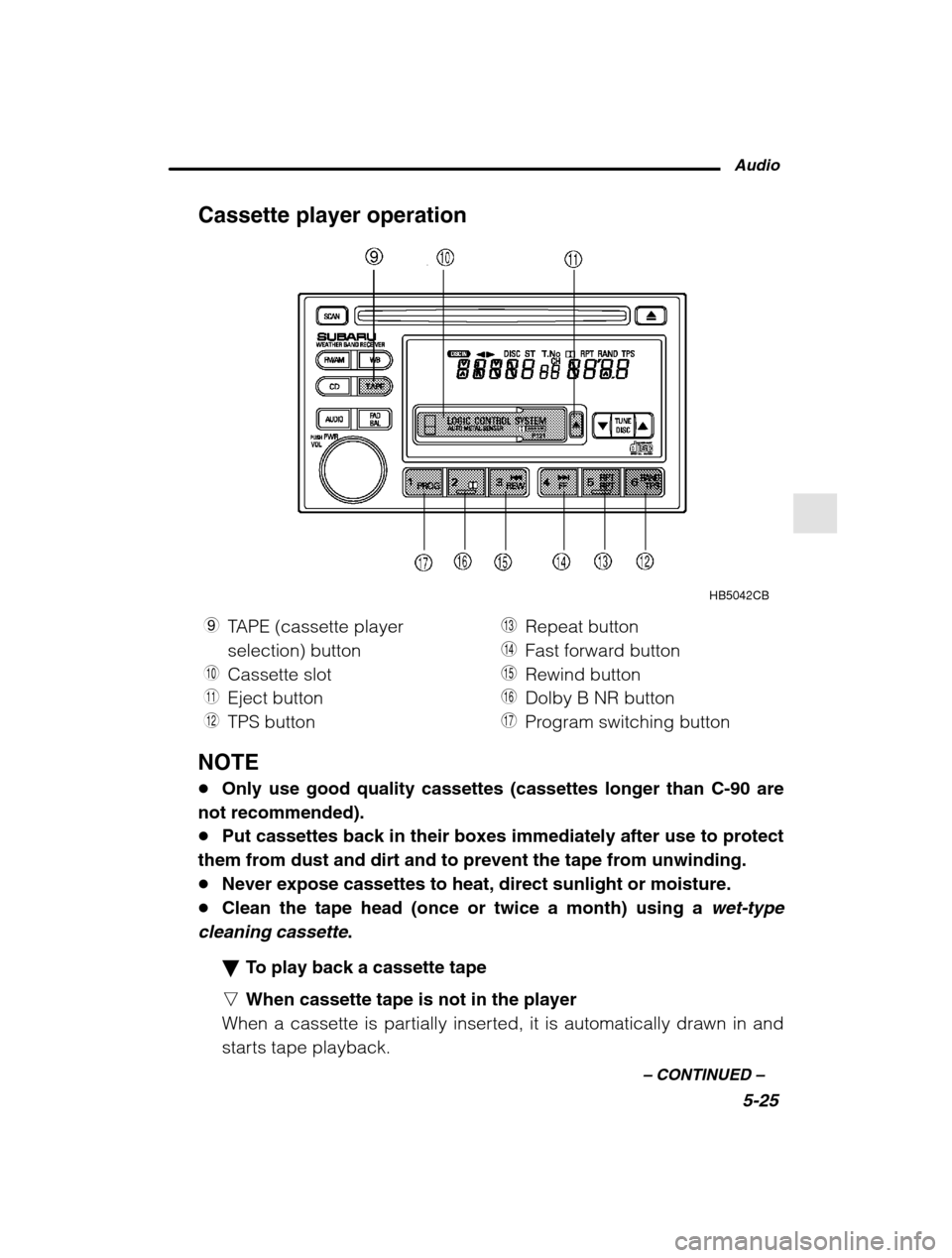
Cassette player operation
HB5042CB
9 TAPE (cassette player selection) button
Q Cassette slot
W Eject button
E TPS button R
Repeat button
T Fast forward button
Y Rewind button
U Dolby B NR button
I Program switching button
NOTE Only use good quality cassettes (cassettes longer than C-90 are
not recommended). Put cassettes back in their boxes immediately after use to protect
them from dust and dirt and to prevent the tape from unwinding. Never expose cassettes to heat, direct sunlight or moisture.
Clean the tape head (once or twice a month) using a
wet-type
cleaning cassette
.
To play back a cassette tape
n When cassette tape is not in the player
When a cassette is partially inserted, it is automatically drawn in and
starts tape playback.
Page 198 of 466
Audio5-27
–
CONTINUED –
nBlank search
Press “TPS” button E during playback to return to the beginning of
the current selection or to skip to the beginning of the next selection.
To use this function, press the “TPS” button to turn on the “TPS” indi-
cator. If the fast-forward button “FF”
T is then pressed, the player ad-
vances the tape to the beginning of the next selection and starts play-
ing it. If the rewind button “REW”
Y is pressed instead, the player
rewinds the tape to the beginning of the current selection and starts
replaying it. The “TPS” function may not operate properly under the
following conditions: When the recording level is low.
When there are long pauses in the middle of a selection.
When the tape contains verbal material such as conversations.
When the blanks between selections are shorter than five seconds.
When there are no blanks between selections (live concerts, etc.).
Repeat button (RPT)
Push the “RPT” button
R to repeat the piece of music being listened
to. To use this function, push the “RPT” button while the piece you
want to hear again is being played. “RPT” will be indicated on the dis-
play. When the selection ends, the cassette player automatically re-
winds to the beginning of the piece and the selection begins again.
To cancel the repeat function, push the “RPT” button again. Until the
repeat function is cancelled, the same piece of music will be repeated
indefinitely. The “RPT” function may not operate properly under the
following conditions: When the recording level is low.
When there are long pauses in the middle of a selection.
When the tape contains verbal material such as conversations.
When the blanks between selections are shorter than five seconds.
When there are no blanks between selections (live concerts, etc).
Dolby B NR button (
)
Press “
” button U when playing tapes recorded using the Dolby
NR system*. The “
” indicator will light up and high-frequency
noise on the tape will be reduced for clearer sound reproduction.