ECU SUBARU FORESTER 2004 Service Repair Manual
[x] Cancel search | Manufacturer: SUBARU, Model Year: 2004, Model line: FORESTER, Model: SUBARU FORESTER 2004Pages: 2870, PDF Size: 38.67 MB
Page 2451 of 2870
4AT-137
AUTOMATIC TRANSMISSION
AT Main Case
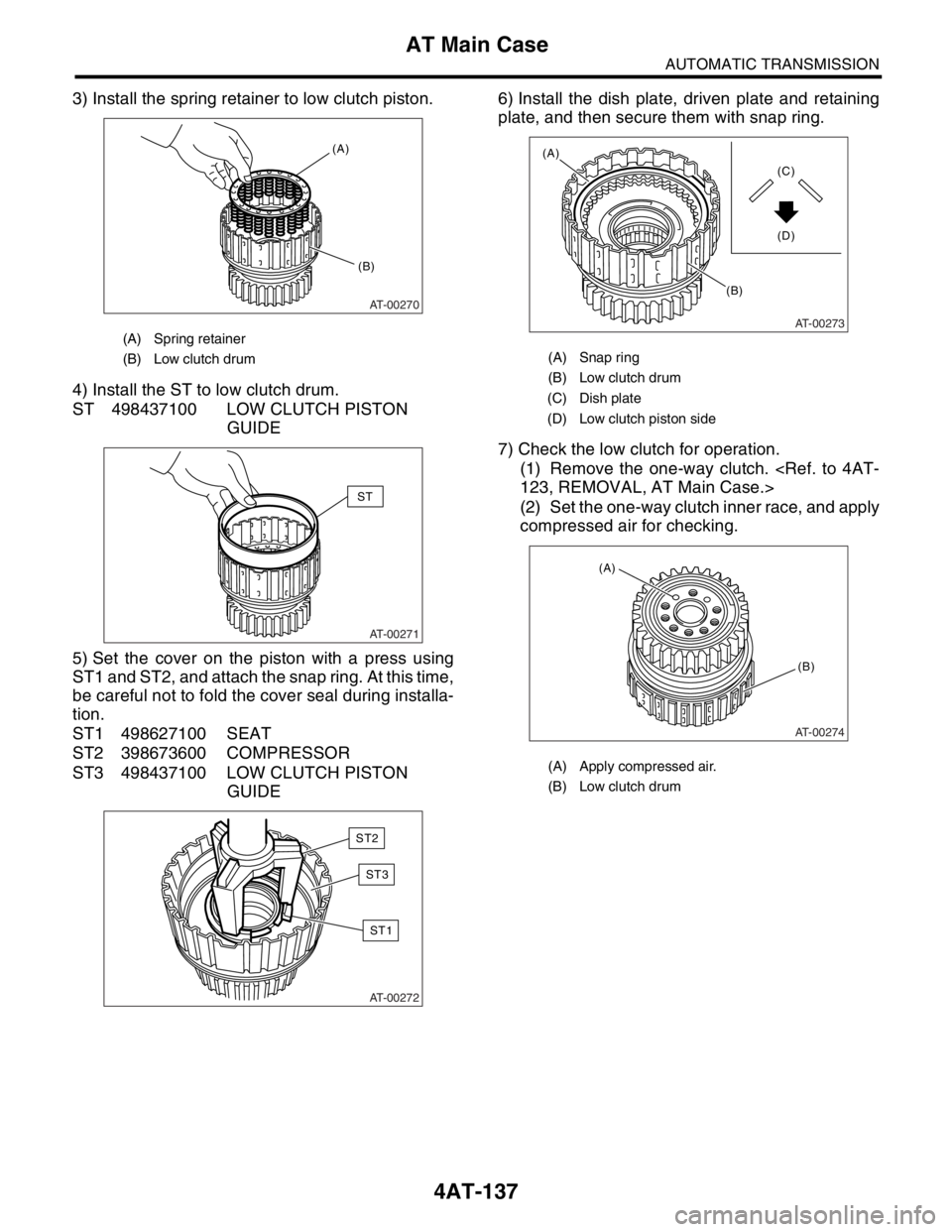
3) Install the spring retainer to low clutch piston.
4) Install the ST to low clutch drum.
ST 498437100 LOW CLUTCH PISTON
GUIDE
5) Set the cover on the piston with a press using
ST1 and ST2, and attach the snap ring. At this time,
be careful not to fold the cover seal during installa-
tion.
ST1 498627100 SEAT
ST2 398673600 COMPRESSOR
ST3 498437100 LOW CLUTCH PISTON
GUIDE6) Install the dish plate, driven plate and retaining
plate, and then secure them with snap ring.
7) Check the low clutch for operation.
(1) Remove the one-way clutch.
(2) Set the one-way clutch inner race, and apply
compressed air for checking.
(A) Spring retainer
(B) Low clutch drum
AT-00270
(A)
(B)
AT-00271
ST
AT-00272
ST2
ST3
ST1
(A) Snap ring
(B) Low clutch drum
(C) Dish plate
(D) Low clutch piston side
(A) Apply compressed air.
(B) Low clutch drum
AT-00273
(B)
(A)
(C)
(D)
AT-00274
(B) (A)
Page 2454 of 2870
4AT-140
AUTOMATIC TRANSMISSION
AT Main Case
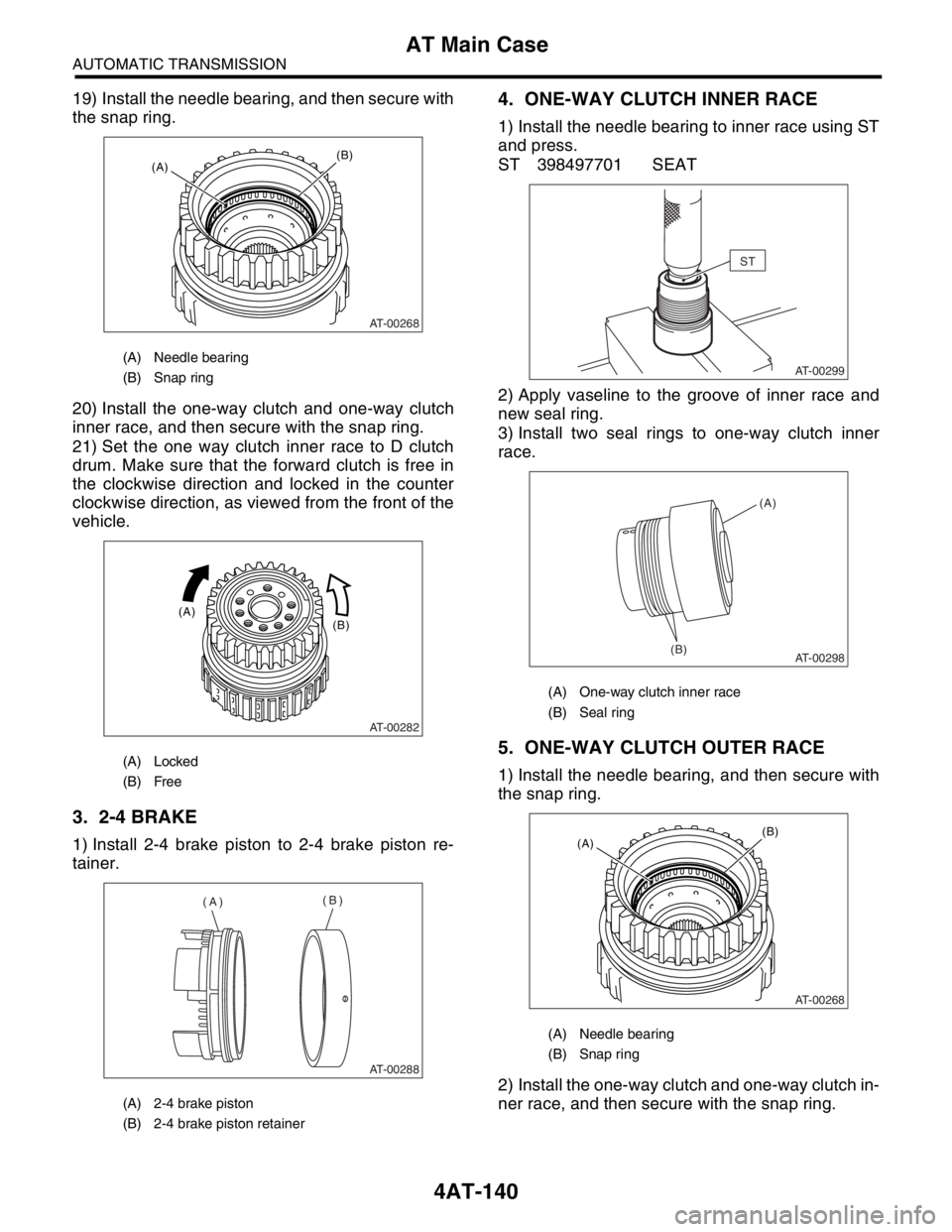
19) Install the needle bearing, and then secure with
the snap ring.
20) Install the one-way clutch and one-way clutch
inner race, and then secure with the snap ring.
21) Set the one way clutch inner race to D clutch
drum. Make sure that the forward clutch is free in
the clockwise direction and locked in the counter
clockwise direction, as viewed from the front of the
vehicle.
3. 2-4 BRAKE
1) Install 2-4 brake piston to 2-4 brake piston re-
tainer.
4. ONE-WAY CLUTCH INNER RACE
1) Install the needle bearing to inner race using ST
and press.
ST 398497701 SEAT
2) Apply vaseline to the groove of inner race and
new seal ring.
3) Install two seal rings to one-way clutch inner
race.
5. ONE-WAY CLUTCH OUTER RACE
1) Install the needle bearing, and then secure with
the snap ring.
2) Install the one-way clutch and one-way clutch in-
ner race, and then secure with the snap ring.
(A) Needle bearing
(B) Snap ring
(A) Locked
(B) Free
(A) 2-4 brake piston
(B) 2-4 brake piston retainer
AT-00268
(B)(A)
AT-00282
(B) (A)
AT-00288
(A)(B)
(A) One-way clutch inner race
(B) Seal ring
(A) Needle bearing
(B) Snap ring
ST
AT-00299
AT-00298(B)(A)
AT-00268
(B)(A)
Page 2456 of 2870
4AT-142
AUTOMATIC TRANSMISSION
Transmission Control Device
39.Transmission Control Device
A: REMOVAL
1) Remove the transmission assembly from vehi-
cle.
2) Pull out the torque converter clutch assembly.
3) Remove the input shaft.
4) Lift-up the lever on rear side of transmission har-
ness connector, and then disconnect it from the
stay.
5) Disconnect the air breather hose.
6) Disconnect the inhibitor switch connector from
the stay.
7) Wrap vinyl tape around the nipple attached to
the air breather hose.
8) Remove the pitching stopper bracket.
9) Remove the inhibitor switch.
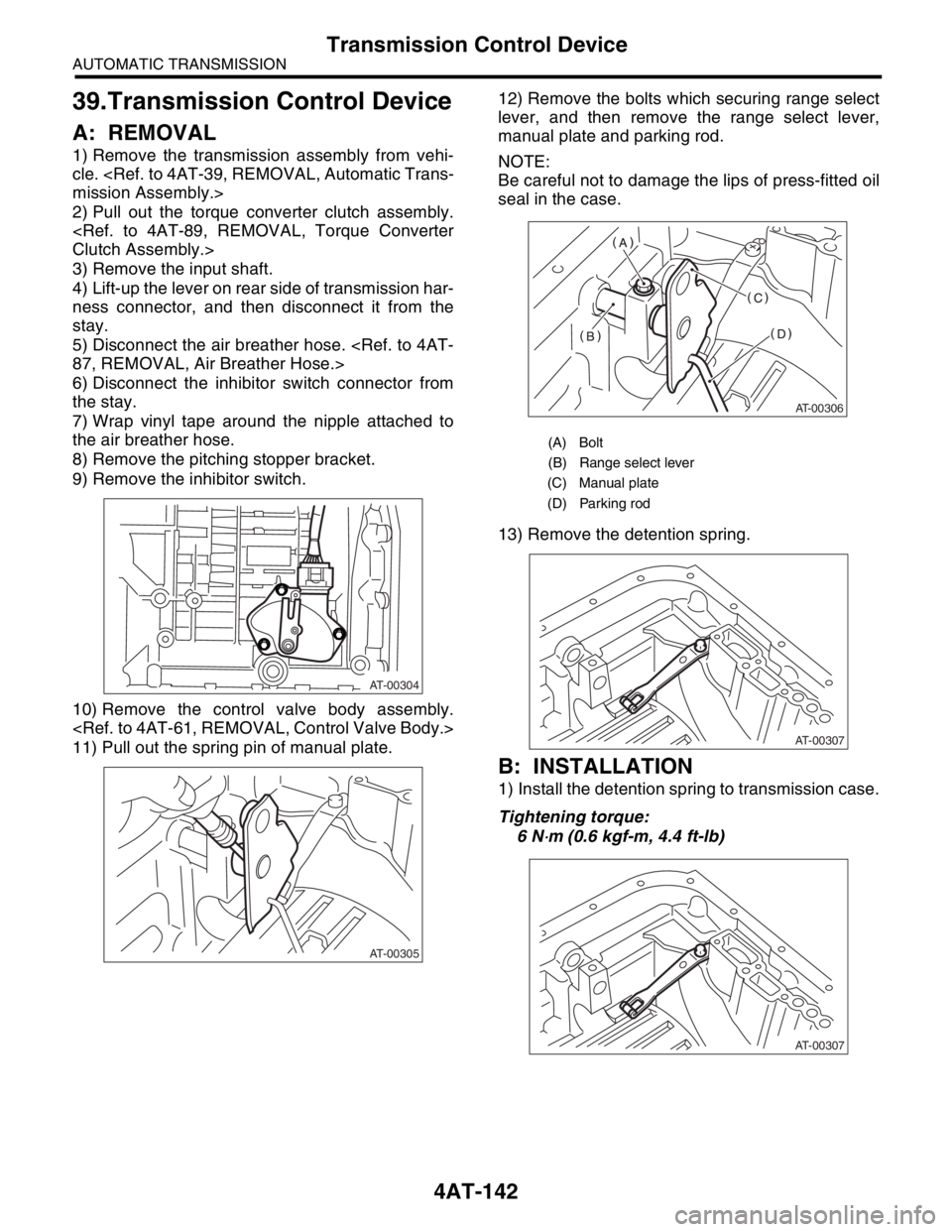
10) Remove the control valve body assembly.
11) Pull out the spring pin of manual plate.12) Remove the bolts which securing range select
lever, and then remove the range select lever,
manual plate and parking rod.
NOTE:
Be careful not to damage the lips of press-fitted oil
seal in the case.
13) Remove the detention spring.
B: INSTALLATION
1) Install the detention spring to transmission case.
Tightening torque:
6 N
⋅m (0.6 kgf-m, 4.4 ft-lb)
AT-00304
AT-00305
(A) Bolt
(B) Range select lever
(C) Manual plate
(D) Parking rod
AT-00306
AT-00307
AT-00307
Page 2461 of 2870

4AT(H4SO)-2
AUTOMATIC TRANSMISSION (DIAGNOSTIC)
Basic Diagnostic Procedure
1. Basic Diagnostic Procedure
A: PROCEDURE
Step Check Yes No
1 CHECK PRE-INSPECTION.
1) Ask the customer when and how trouble
occurred using interview checklist.
2) Before performing the diagnosis, inspect
following items which might influence the AT
problems.
General inspection
Disconnection of harness connector
Visually check the damage of harness
Oil leak
Stall speed test
Line pressure test
Transfer clutch pressure test
Time lag test
Road test
Inhibitor switch
AT problem normal?Go to step 2.Repair or replace
each item.
2 CHECK POWER INDICATOR LIGHT.
Turn the ignition switch to ON.Does the POWER indicator
light illuminate?Go to step 4.Go to step 3.
3 CHECK POWER INDICATOR LIGHT.
1) Turn the ignition switch to OFF.
2) Repair the POWER indicator light circuit or
power supply and ground line circuit.
3) Turn the ignition switch to ON.Is the POWER indicator light
illuminate?Go to step 4.Go to step 5.
4 CHECK INDICATION OF DTC.
Calling up the DTC.
Without Subaru Select Monitor
Diagnostic Trouble Code (DTC).>
With Subaru Select Monitor
Diagnostic Trouble Code (DTC).>
NOTE:
If the communication function of select monitor
cannot be executed normally, check the communi-
cation circuit.
Diagnostic Procedure for Subaru Select Monitor
Communication.>Is the DTC displayed? Go to step 6.
NOTE:
Record all DTC.Go to step 5.
Page 2464 of 2870
4AT(H4SO)-5
AUTOMATIC TRANSMISSION (DIAGNOSTIC)
General Description
3. General Description
A: CAUTION
Supplemental Restraint System “Airbag”
The airbag system wiring harness is routed near
the transmission control module (TCM).
CAUTION:
All airbag system wiring harness and con-
nectors are colored yellow. Do not use an elec-
trical test equipment on these circuit.
Be careful not to damage the airbag system wir-
ing harness when performing diagnostics and ser-
vicing the TCM.
Measurement
When measuring the voltage and resistance of
ECM, TCM or each sensor, use a tapered pin with
diameter of less than 0.64 mm (0.025 in) in order to
avoid poor contact. Do not insert the pin more than
0.65 mm (0.256 in).
B: INSPECTION
1. BATTERY
Measure the battery voltage and specific gravity of
electrolyte.
Standard voltage: 12 V or more
Specific gravity: Above 1.260
2. TRANSMISSION GROUND
Make sure that the ground terminal bolt is tightened
securely.
Chassis side
Tightening torque:
13 N
⋅m (1.3 kgf-m, 9.4 ft-lb)
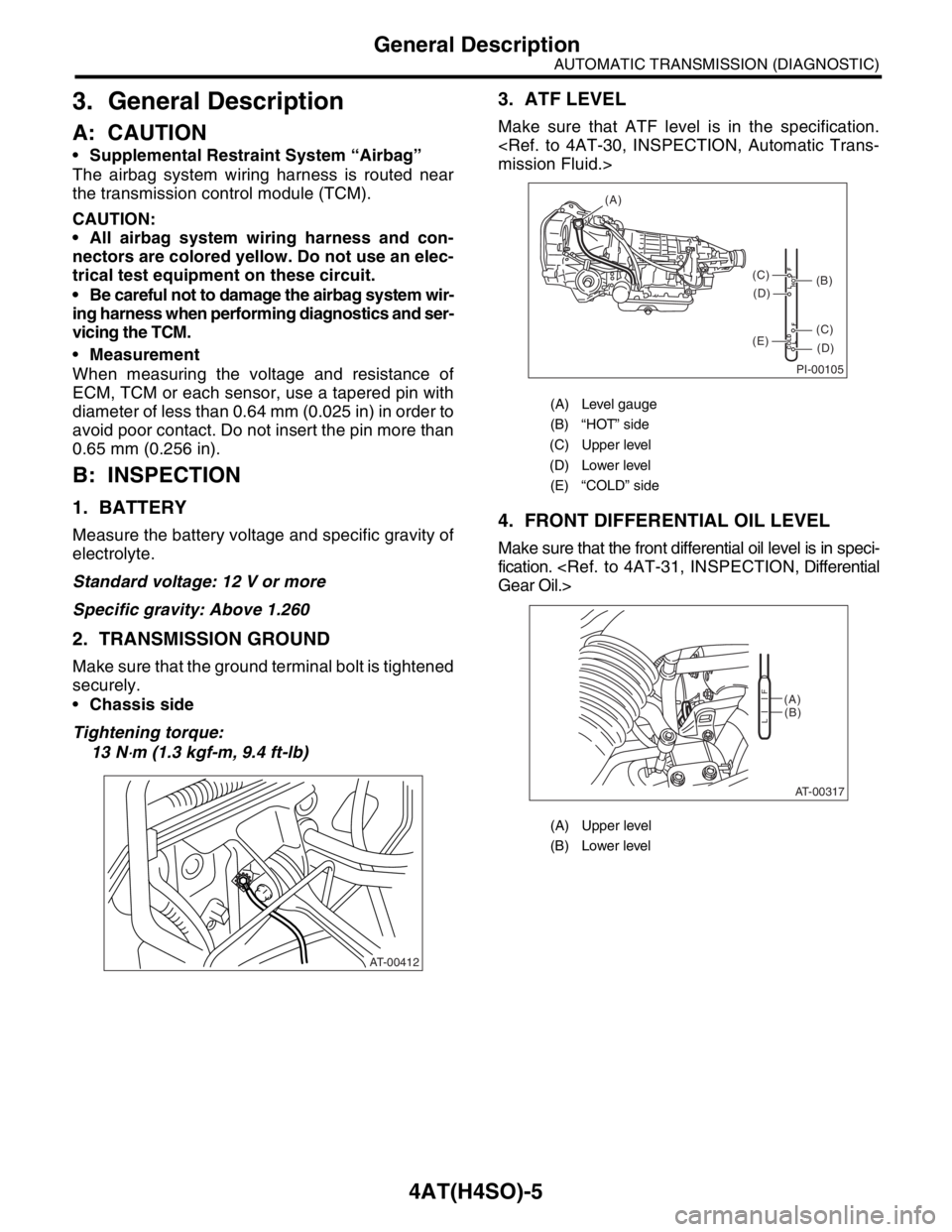
3. ATF LEVEL
Make sure that ATF level is in the specification.
4. FRONT DIFFERENTIAL OIL LEVEL
Make sure that the front differential oil level is in speci-
fication.
AT-00412
(A) Level gauge
(B) “HOT” side
(C) Upper level
(D) Lower level
(E) “COLD” side
(A) Upper level
(B) Lower level
PI-00105
COLD
LFHOT LF
(A)
(C)
(D)
(C)
(D)
(E)
(B)
AT-00317
(A)
(B)
LF
Page 2492 of 2870

4AT(H4SO)-33
AUTOMATIC TRANSMISSION (DIAGNOSTIC)
Diagnostic Procedure for Subaru Select Monitor Communication
Step Check Yes No
1 CHECK SUBARU SELECT MONITOR POW-
ER SUPPLY CIRCUIT.
Measure the voltage between data link con-
nector and chassis ground.
Connector & terminal
(B40) No. 1 (+) — Chassis ground (
−):Is the voltage more than 10 V? Go to step 2.Repair the har-
ness and connec-
tor between battery
and data link con-
nector, and poor
contact in coupling
connector.
2 CHECK SUBARU SELECT MONITOR
GROUND CIRCUIT.
Measure the resistance of harness between
data link connector and chassis ground.
Connector & terminal
(B40) No. 12 — Chassis ground:
(B40) No. 13 — Chassis ground:Is the resistance less than 1
Ω?Go to step 3.Repair the open
circuit in harness
between data link
connector and
ground terminal,
and poor contact
in coupling con-
nector.
3 CHECK COMMUNICATION OF SELECT
MONITOR.
1) Turn the ignition switch to ON.
2) Using the Subaru Select Monitor, check
whether communication to engine systems can
be executed normally.Are the contents of engine sys-
tem displayed on Subaru
Select Monitor?Go to step 8.Go to step 4.
4 CHECK COMMUNICATION OF SELECT
MONITOR.
1) Turn the ignition switch to OFF.
2) Disconnect the TCM connector.
3) Check whether communication to engine
systems can be executed normally.Are the contents of engine sys-
tem displayed on Subaru
Select Monitor?Go to step 6.Go to step 5.
5 CHECK COMMUNICATION OF SELECT
MONITOR.
1) Turn the ignition switch to OFF.
2) Connect the TCM connector.
3) Disconnect the ECM connector.
4) Check whether communication to transmis-
sion systems can be executed normally.Are the contents of transmis-
sion displayed on Subaru
Select Monitor?Inspect the ECM. Go to step 6.
6 CHECK HARNESS CONNECTOR BETWEEN
EACH CONTROL MODULE AND DATA LINK
CONNECTOR.
1) Turn the ignition switch to OFF.
2) Disconnect the TCM, ECM.
3) Measure the resistance between data link
connector and chassis ground.
Connector & terminal
(B40) No. 10 — Chassis ground:
(B40) No. 6 — Chassis ground:Is the resistance more than 1
MΩ?Go to step 7.Repair the har-
ness and connec-
tor between each
control module and
data link connector.
7 CHECK OUTPUT SIGNAL FOR TCM.
1) Turn the ignition switch to ON.
2) Measure the voltage between data link con-
nector and chassis ground.
Connector & terminal
(B40) No. 10 (+) — Chassis ground (
−):Is the voltage more than 1 V? Repair the har-
ness and connec-
tor between each
control module
and data link con-
nector.Go to step 8.
8 CHECK HARNESS/CONNECTOR BETWEEN
TCM AND DATA LINK CONNECTOR.
Measure the resistance between TCM connec-
tor and data link connector.
Connector & terminal
(B56) No. 15 — (B40) No. 10:Is the resistance less than 0.5
Ω?Go to step 9.Repair the harness
and connector
between TCM and
data link connector.
Page 2578 of 2870

4AT(H4DOTC)-2
AUTOMATIC TRANSMISSION (DIAGNOSTIC)
Basic Diagnostic Procedure
1. Basic Diagnostic Procedure
A: PROCEDURE
Step Check Yes No
1 CHECK PRE-INSPECTION.
1) Ask the customer when and how trouble
occurred using interview checklist.
2) Before performing the diagnosis, inspect
following items which might influence the AT
problems.
General inspection
Disconnection of harness connector
Visually check the damage of harness
Oil leak
Stall speed test
Line pressure test
Transfer clutch pressure test
Time lag test
Road test
Inhibitor switch
AT problem normal?Go to step 2.Repair or replace
each item.
2 CHECK POWER INDICATOR LIGHT.
Turn the ignition switch to ON.Does the POWER indicator
light illuminate?Go to step 4.Go to step 3.
3 CHECK POWER INDICATOR LIGHT.
1) Turn the ignition switch to OFF.
2) Repair the POWER indicator light circuit or
power supply and ground line circuit.
3) Turn the ignition switch to ON.Is the POWER indicator light
flashing?Go to step 4.Go to step 5.
4 READ OF DTC.
Calling up the DTC.
N
OTE:
If the communication function of Subaru Select
Monitor cannot be executed normally, check the
communication circuit.
POSSIBLE, Diagnostic Procedure for Subaru
Select Monitor Communication.>Is the DTC displayed? Go to step 6.
NOTE:
Record all DTC.Go to step 5.
5 PERFORM THE GENERAL DIAGNOSTICS.
1) Inspect using “Diagnostics Procedure with-
out DTC”.
Code (DTC).>
2) Inspect using “Symptom Related Diagnos-
tic”.
3) Perform the clear memory mode.
4) Perform the inspection mode.
5) Calling up the DTC.Is the DTC displayed? Go to step 6.Complete the
diagnosis.
Page 2581 of 2870
4AT(H4DOTC)-5
AUTOMATIC TRANSMISSION (DIAGNOSTIC)
General Description
3. General Description
A: CAUTION
Supplemental Restraint System “Airbag”
The airbag system wiring harness is routed near
the TCM.
CAUTION:
All airbag system wiring harness and con-
nectors are colored yellow. Do not use an elec-
trical test equipment on these circuit.
Be careful not to damage the airbag system
wiring harness when performing diagnostics and
servicing the TCM.
Measurement
When measuring the voltage and resistance of
ECM, TCM or each sensor, use a tapered pin with
diameter of less than 0.64 mm (0.025 in) in order to
avoid poor contact. Do not insert the pin more than
0.65 mm (0.026 in).
B: INSPECTION
1. BATTERY
Measure the battery voltage and specific gravity of
electrolyte.
Standard voltage: 12 V or more
Specific gravity: Above 1.260
2. TRANSMISSION GROUND
Make sure that the ground terminal bolt is tightened
securely.
Chassis side
Tightening torque:
13 N
⋅m (1.3 kgf-m, 9.4 ft-lb)
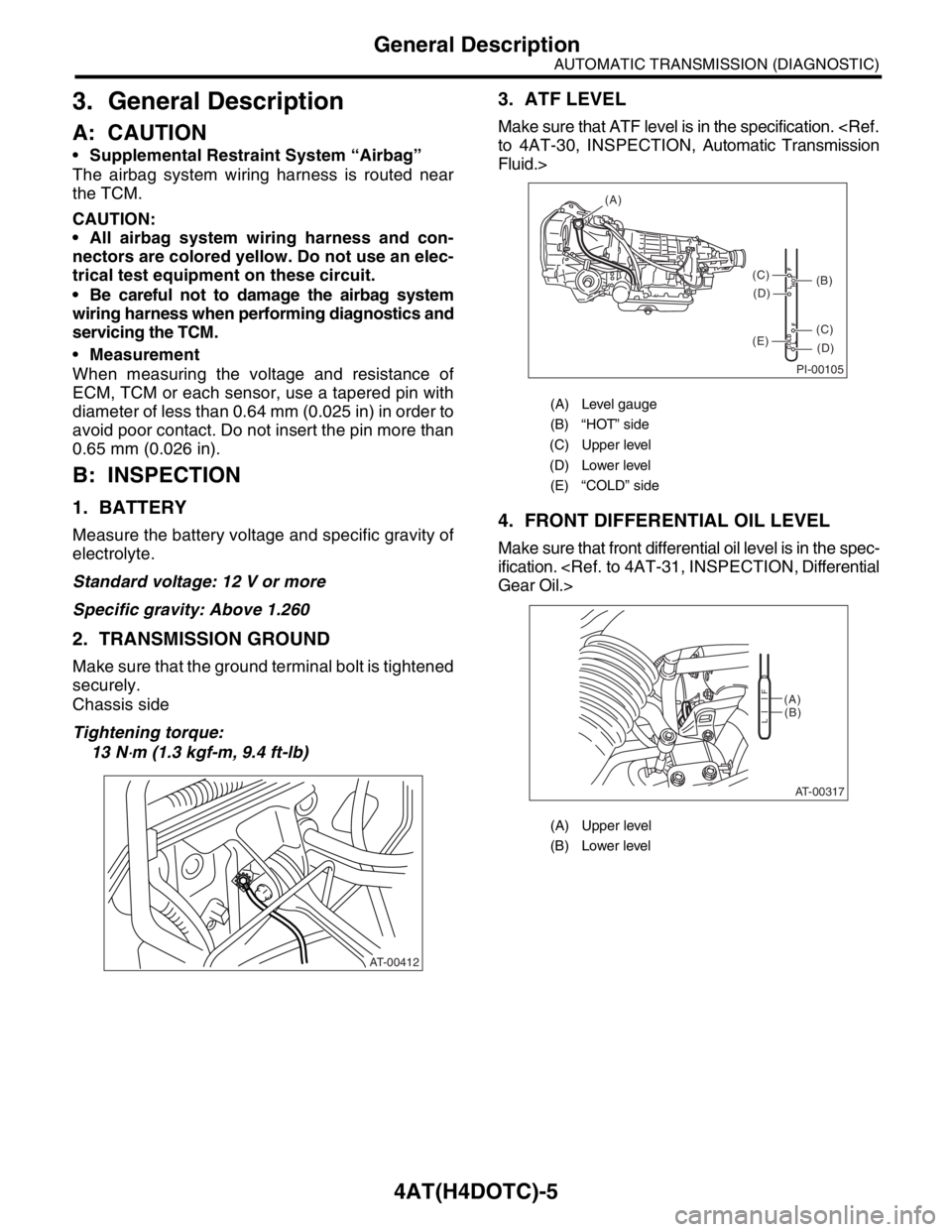
3. ATF LEVEL
Make sure that ATF level is in the specification.
Fluid.>
4. FRONT DIFFERENTIAL OIL LEVEL
Make sure that front differential oil level is in the spec-
ification.
AT-00412
(A) Level gauge
(B) “HOT” side
(C) Upper level
(D) Lower level
(E) “COLD” side
(A) Upper level
(B) Lower level
PI-00105
COLD
LFHOT LF
(A)
(C)
(D)
(C)
(D)
(E)
(B)
AT-00317
(A)
(B)
LF
Page 2593 of 2870
![SUBARU FORESTER 2004 Service Repair Manual 4AT(H4DOTC)-17
AUTOMATIC TRANSMISSION (DIAGNOSTIC)
Subaru Select Monitor
3. CLEAR MEMORY MODE
1) On the «Main Menu» display screen, select the
{2. Each System Check} and press the [YES] key.
2) On t](/img/17/57426/w960_57426-2592.png "SUBARU FORESTER 2004 Service Repair Manual 4AT(H4DOTC)-17
AUTOMATIC TRANSMISSION (DIAGNOSTIC)
Subaru Select Monitor
3. CLEAR MEMORY MODE
1) On the «Main Menu» display screen, select the
{2. Each System Check} and press the [YES] key.
2) On t")
4AT(H4DOTC)-17
AUTOMATIC TRANSMISSION (DIAGNOSTIC)
Subaru Select Monitor
3. CLEAR MEMORY MODE
1) On the «Main Menu» display screen, select the
{2. Each System Check} and press the [YES] key.
2) On the «System Selection Menu» display screen,
select the {Transmission Control System} and press
the [YES] key.
3) Press the [YES] key after the information of
transmission type is displayed.
4) On the «Transmission Diagnosis» display screen,
select the {Clear Memory} and press the [YES] key.
5) When the “Done” is shown on display screen,
turn the Subaru Select Monitor and ignition switch
to OFF.
NOTE:
For details concerning operation procedure, refer
to the SUBARU SELECT MONITOR OPERATION
MANUAL.
When {Clear Memory 2} is selected and executed,
DTC and learned control memory is cleared. If Clear
Memory 2 is performed, execute the learning con-
trol.
Select Monitor.>
4. FACILITATION OF LEARNING CON-
TROL
1) Shift the select lever to “P” range, and apply
parking brake.
2) Lift-up the vehicle.
3) Connect the Subaru Select Monitor to data link
connector, and then turn the ignition switch to ON.
4) Perform the {Clear Memory 2} using Subaru Select
Monitor.
5) Using Subaru Select Monitor, check that the DTC
is not output.
aru Select Monitor.>
6) Warm-up the engine until the ATF temperature
which is displayed on the Subaru Select Monitor is
within 60 — 90°C (140 — 194°F).
ERATION, Subaru Select Monitor.>
7) Shift the select lever to “R” range.
8) Turn all switches including headlight, air condi-
tioner, seat heater, rear defogger and etc. to OFF.
9) Turn the ignition switch to OFF.
10) Depress the brake pedal fully until the facilitation
of learning control is completed when the “Communi-
cation Failed!” is displayed on Subaru Select Monitor.
11) Turn the ignition switch to ON.
12) Check that the Subaru Select Monitor is re-
turned to normal operation.
13) Shift the select lever to “P” range, and then wait
for more than 3 seconds.14) Shift the select lever to “R” range, and then wait
for more than 3 seconds.
15) Shift the select lever to “N” range, and then wait
for more than 3 seconds.
16) Shift the select lever to “D” range, and then wait
for more than 3 seconds.
17) Shift the select lever to “N” range, and then wait
for more than 3 seconds.
18) Slightly depress the accelerator pedal fully.
19) Slightly release the accelerator pedal fully.
20) Start the engine, and idle it.
21) Shift the select lever to “D” range.
22) Start the facilitation of learning control. At this
time, the POWER indicator light in combination meter
blinks at 2 Hz. When the POWER indicator light does
not blink, turn the ignition switch to OFF and repeat
the procedures from step 4). When the POWER indi-
cator light which blinking at 2 Hz changes to blink at
0.5 Hz, facilitation of learning control is completed.
NOTE:
When blinking of POWER indicator light changes
from 2 Hz to 4 Hz during facilitation of learning con-
trol, repeat the procedure from step 4).
23) Shift the select lever to “N” range, and then turn
the ignition switch to OFF.
24) Shift the select lever to the “P” range, and then
complete the facilitation of learning control.
Page 2604 of 2870

4AT(H4DOTC)-28
AUTOMATIC TRANSMISSION (DIAGNOSTIC)
Diagnostic Procedure for Subaru Select Monitor Communication
Step Check Yes No
1 CHECK INSTALLATION OF TCM CONNEC-
TOR.
Turn the ignition switch to OFF.Is the TCM connector inserted
into TCM?Go to step 2.Insert the TCM
connector into
TCM.
2 CHECK SUBARU SELECT MONITOR POW-
ER SUPPLY CIRCUIT.
Measure the voltage between data link con-
nector and chassis ground.
Connector & terminal
(B40) No. 1 (+) — Chassis ground (
−):Is the voltage more than 10 V? Go to step 3.Repair the har-
ness and connec-
tor between battery
and data link con-
nector, and poor
contact in coupling
connector.
3 CHECK SUBARU SELECT MONITOR
GROUND CIRCUIT.
Measure the resistance of harness between
data link connector and chassis ground.
Connector & terminal
(B40) No. 12 — Chassis ground:
(B40) No. 13 — Chassis ground:Is the resistance less than 1
Ω?Go to step 4.Repair the open
circuit in harness
between data link
connector and
ground terminal,
and poor contact
in coupling con-
nector.
4 CHECK COMMUNICATION OF SUBARU SE-
LECT MONITOR.
1) Turn the ignition switch to ON.
2) Using the Subaru Select Monitor, check
whether communication to transmission sys-
tems can be executed normally.Are the contents of transmis-
sion system displayed on Sub-
aru Select Monitor?Go to step 9.Go to step 5.
5 CHECK COMMUNICATION OF SUBARU SE-
LECT MONITOR.
1) Turn the ignition switch to OFF.
2) Disconnect the TCM connector.
3) Check whether communication to engine
systems can be executed normally.Are the contents of engine sys-
tem displayed on Subaru
Select Monitor?Go to step 7.Go to step 6.
6 CHECK COMMUNICATION OF SUBARU SE-
LECT MONITOR.
1) Turn the ignition switch to OFF.
2) Connect the TCM connector.
3) Disconnect the ECM connector.
4) Check whether communication to transmis-
sion systems can be executed normally.Are the contents of transmis-
sion system displayed on Sub-
aru Select Monitor?Inspect the ECM. Go to step 7.
7 CHECK HARNESS CONNECTOR BETWEEN
EACH CONTROL MODULE AND DATA LINK
CONNECTOR.
1) Turn the ignition switch to OFF.
2) Disconnect the TCM and ECM connectors.
3) Measure the resistance between TCM con-
nector and chassis ground.
Connector & terminal
(B40) No. 10 — Chassis ground:Is the resistance more than 1
MΩ?Go to step 8.Repair the har-
ness and connec-
tor between each
control module and
data link connector.
8 CHECK OUTPUT SIGNAL FOR TCM.
1) Turn the ignition switch to ON.
2) Measure the voltage between TCM and
chassis ground.
Connector & terminal
(B40) No. 10 (+) — Chassis ground (
−):Is the voltage more than 1 V? Repair the harness
and connector
between each con-
trol module and
data link connector.Go to step 9.
9 CHECK HARNESS/CONNECTOR BETWEEN
TCM AND DATA LINK CONNECTOR.
Measure the resistance between TCM connec-
tor and data link connector.
Connector & terminal
(B56) No. 12 — (B40) No. 10:Is the resistance less than 0.5
Ω?Go to step 10.Repair the harness
and connector
between TCM and
data link connector.