ESP SUBARU FORESTER 2006 User Guide
[x] Cancel search | Manufacturer: SUBARU, Model Year: 2006, Model line: FORESTER, Model: SUBARU FORESTER 2006Pages: 355, PDF Size: 5.49 MB
Page 96 of 355
Keys and doors
2-5
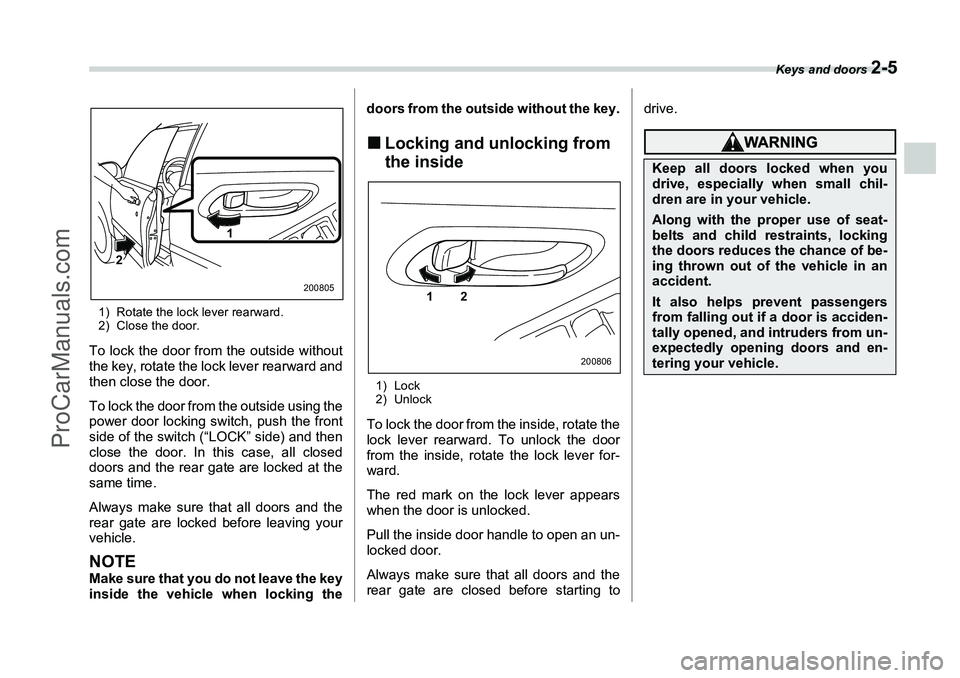
1) Rotate the lock lever rearward.
2) Close the door.To lock the door from the outside without
the key, rotate the lock lever rearward and
then close the door.
To lock the door from the outside using the
power door locking switch, push the front
side of the switch (“LOCK” side) and then
close the door. In this case, all closed
doors and the rear gate are locked at the
same time.
Always make sure that all doors and the
rear gate are locked before leaving your
vehicle.NOTEMake sure that you do not leave the key
inside the vehicle when locking thedoors from the outside without the key.
„
Locking and unlocking from
the inside1) Lock
2) UnlockTo lock the door from the inside, rotate the
lock lever rearward. To unlock the door
from the inside, rotate the lock lever for-
ward.
The red mark on the lock lever appears
when the door is unlocked.
Pull the inside door handle to open an un-
locked door.
Always make sure that all doors and the
rear gate are closed before starting to drive.
1
2
200805
1 2
200806
Keep all doors locked when you
drive, especially when small chil-
dren are in your vehicle.Along with the proper use of seat-
belts and child restraints, locking
the doors reduces the chance of be-
ing thrown out of the vehicle in an
accident.It also helps prevent passengers
from falling out if a door is acciden-
tally opened, and intruders from un-
expectedly opening doors and en-
tering your vehicle.
ProCarManuals.com
Page 97 of 355
2-6
Keys and doors
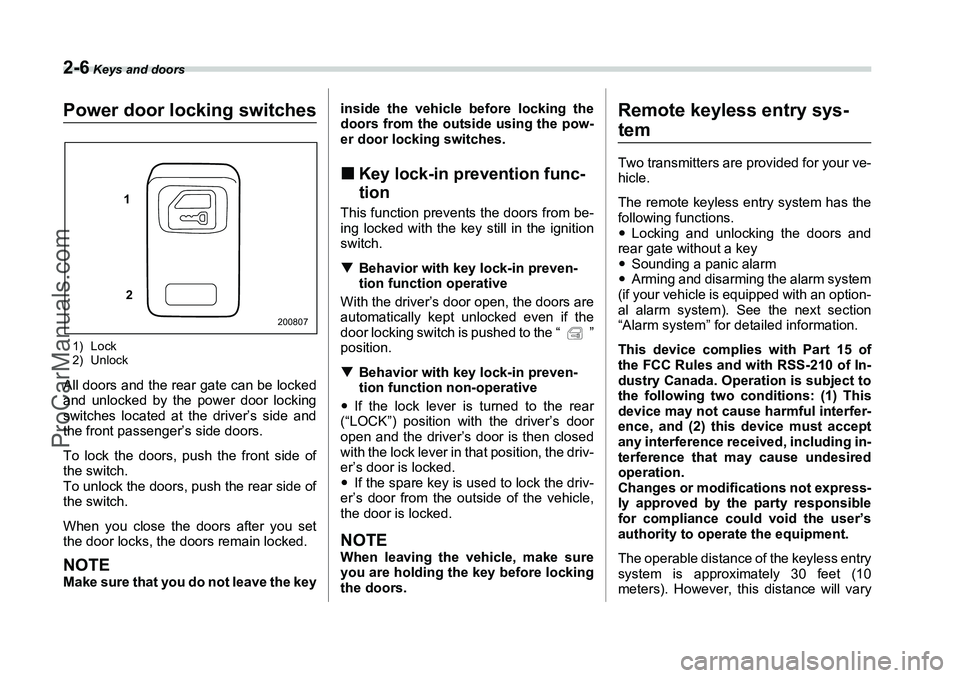
Power door locking switches1) Lock
2) UnlockAll doors and the rear gate can be locked
and unlocked by the power door locking
switches located at the driver’s side and
the front passenger’s side doors.
To lock the doors, push the front side of
the switch.
To unlock the doors, push the rear side of
the switch.
When you close the doors after you set
the door locks, the doors remain locked.NOTEMake sure that you do not leave the keyinside the vehicle before locking the
doors from the outside using the pow-
er door locking switches.
„
Key lock-in prevention func-
tionThis function prevents the doors from be-
ing locked with the key still in the ignition
switch.
T Behavior with key lock-in preven-
tion function operative
With the driver’s door open, the doors are
automatically kept unlocked even if the
door locking switch is pushed to the “ ”
position.
T Behavior with key lock-in preven-
tion function non-operative
y If the lock lever is turned to the rear
(“LOCK”) position with the driver’s door
open and the driver’s door is then closed
with the lock lever in that position, the driv-
er’s door is locked.
y If the spare key is used to lock the driv-
er’s door from the outside of the vehicle,
the door is locked.NOTEWhen leaving the vehicle, make sure
you are holding the key before locking
the doors.
Remote keyless entry sys-temTwo transmitters are provided for your ve-
hicle.
The remote keyless entry system has the
following functions.
y Locking and unlocking the doors and
rear gate without a key
y Sounding a panic alarm
y Arming and disarming the alarm system
(if your vehicle is equipped with an option-
al alarm system). See the next section
“Alarm system” for detailed information.
This device complies with Part 15 of
the FCC Rules and with RSS-210 of In-
dustry Canada. Operation is subject to
the following two conditions: (1) This
device may not cause harmful interfer-
ence, and (2) this device must accept
any interference received, including in-
terference that may cause undesired
operation.
Changes or modifications not express-
ly approved by the party responsible
for compliance could void the user’s
authority to operate the equipment.
The operable distance of the keyless entry
system is approximately 30 feet (10
meters). However, this distance will vary
1
2
200807
ProCarManuals.com
Page 98 of 355
Keys and doors
2-7
– CONTINUED –
depending on environmental conditions.
The system’s operable distance will be
shorter in areas near a facility or electronic
equipment emitting strong radio waves
such as a power plant, broadcast station,
TV tower, or remote controller of home
electronic appliances.
The keyless entry system does not oper-
ate when the key is inserted in the ignition
switch to prevent accidental lockout.
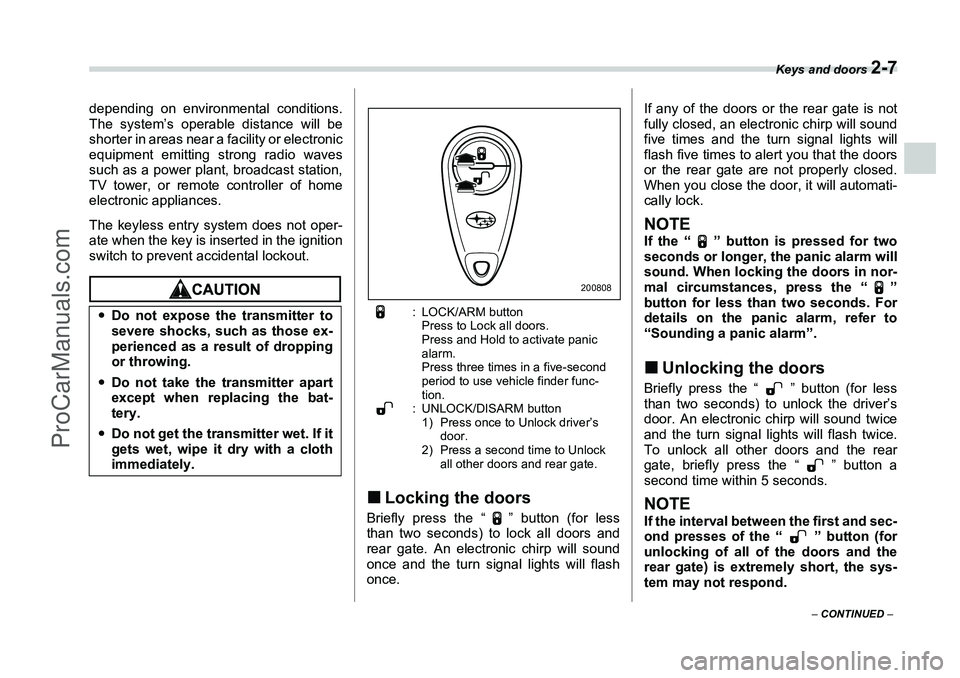
: LOCK/ARM button
Press to Lock all doors.
Press and Hold to activate panic
alarm.
Press three times in a five-second
period to use vehicle finder func-
tion.
: UNLOCK/DISARM button
1) Press once to Unlock driver’s door.
2) Press a second time to Unlock all other doors and rear gate.
„Locking the doorsBriefly press the “ ” button (for less
than two seconds) to lock all doors and
rear gate. An electronic chirp will sound
once and the turn signal lights will flash
once. If any of the doors or the rear gate is not
fully closed, an electronic chirp will sound
five times and the turn signal lights will
flash five times to alert you that the doors
or the rear gate are not properly closed.
When you close the door, it will automati-
cally lock.
NOTEIf the “ ” button is pressed for two
seconds or longer, the panic alarm will
sound. When locking the doors in nor-
mal circumstances, press the “ ”
button for less than two seconds. For
details on the panic alarm, refer to
“Sounding a panic alarm”.„
Unlocking the doorsBriefly press the “ ” button (for less
than two seconds) to unlock the driver’s
door. An electronic chirp will sound twice
and the turn signal lights will flash twice.
To unlock all other doors and the rear
gate, briefly press the “ ” button a
second time within 5 seconds.NOTEIf the interval between the first and sec-
ond presses of the “ ” button (for
unlocking of all of the doors and the
rear gate) is extremely short, the sys-
tem may not respond.
y
Do not expose the transmitter to
severe shocks, such as those ex-
perienced as a result of dropping
or throwing.
y Do not take the transmitter apart
except when replacing the bat-
tery.
y Do not get the transmitter wet. If it
gets wet, wipe it dry with a cloth
immediately.
200808
ProCarManuals.com
Page 122 of 355
Instruments and controls
3-9
– CONTINUED –
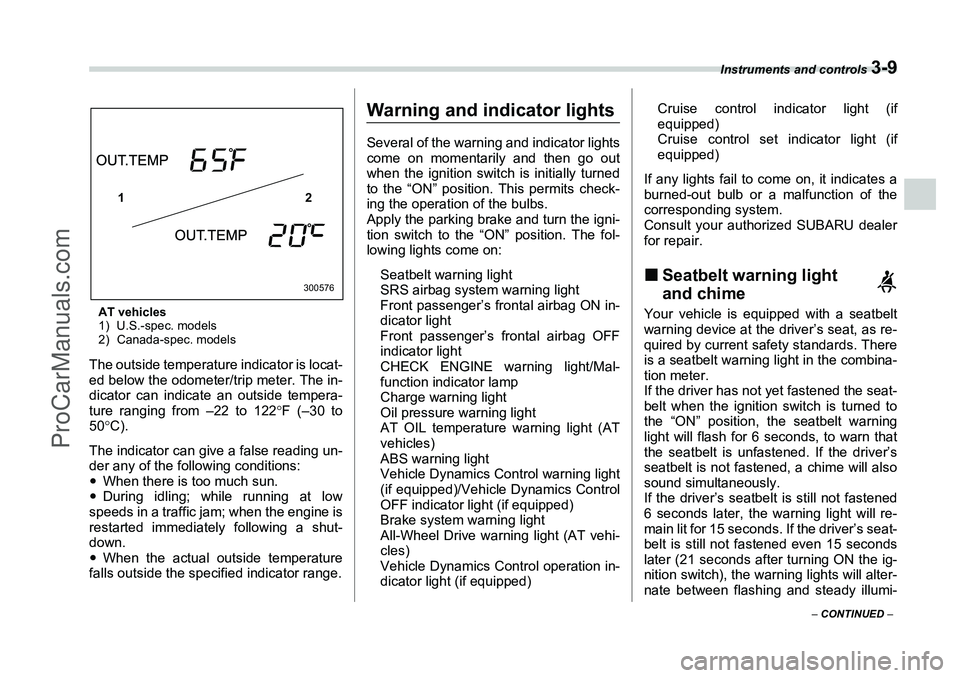
AT vehicles
1) U.S.-spec. models
2) Canada-spec. modelsThe outside temperature indicator is locat-
ed below the odometer/trip meter. The in-
dicator can indicate an outside tempera-
ture ranging from –22 to 122 °F (–30 to
50° C).
The indicator can give a false reading un-
der any of the following conditions:
y When there is too much sun.
y During idling; while running at low
speeds in a traffic jam; when the engine is
restarted immediately following a shut-
down.
y When the actual outside temperature
falls outside the specified indicator range.
Warning and indicator lightsSeveral of the warning and indicator lights
come on momentarily and then go out
when the ignition switch is initially turned
to the “ON” position. This permits check-
ing the operation of the bulbs.
Apply the parking brake and turn the igni-
tion switch to the “ON” position. The fol-
lowing lights come on:
Seatbelt warning light
SRS airbag system warning light
Front passenger’s frontal airbag ON in-
dicator light
Front passenger’s frontal airbag OFF
indicator light
CHECK ENGINE warning light/Mal-
function indicator lamp
Charge warning light
Oil pressure warning light
AT OIL temperature warning light (AT
vehicles)
ABS warning light
Vehicle Dynamics Control warning light
(if equipped)/Vehicle Dynamics Control
OFF indicator light (if equipped)
Brake system warning light
All-Wheel Drive warning light (AT vehi-
cles)
Vehicle Dynamics Control operation in-
dicator light (if equipped) Cruise control indicator light (if
equipped)
Cruise control set indicator light (if
equipped)
If any lights fail to come on, it indicates a
burned-out bulb or a malfunction of the
corresponding system.
Consult your authorized SUBARU dealer
for repair.
„ Seatbelt warning light
and chimeYour vehicle is equipped with a seatbelt
warning device at the driver’s seat, as re-
quired by current safety standards. There
is a seatbelt warning light in the combina-
tion meter.
If the driver has not yet fastened the seat-
belt when the ignition switch is turned to
the “ON” position, the seatbelt warning
light will flash for 6 seconds, to warn that
the seatbelt is unfastened. If the driver’s
seatbelt is not fastened, a chime will also
sound simultaneously.
If the driver’s seatbelt is still not fastened
6 seconds later, the warning light will re-
main lit for 15 seconds. If the driver’s seat-
belt is still not fastened even 15 seconds
later (21 seconds after turning ON the ig-
nition switch), the warning lights will alter-
nate between flashing and steady illumi-
12
300576
ProCarManuals.com
Page 127 of 355
3-14
Instruments and controls
tions of the brake system are still avail-
able. You will be safe while driving with
this condition, but have your vehicle
checked at a SUBARU dealer as soon as
possible.NOTEIf the warning light behavior is as
shown in the following, the Vehicle Dy-
namics Control system may be consid-
ered normal.
yThe warning light comes on right af-
ter the engine is started but goes out
immediately, remaining off.
y The warning light comes on after en-
gine startup and goes off while the ve-
hicle is subsequently being driven.
y The warning light comes on during
driving, but it goes out immediately
and remains off.
T Vehicle Dynamics Control OFF indi-
cator light
y It comes on when the Vehicle Dynamics
Control OFF switch is pressed.
y It also comes on when the Vehicle Dy-
namics Control system is deactivated.NOTEy The light may stay on for a while after
the engine has been started, especially
in cold weather. This does not indicate
the existence of a problem. The light should go out as soon as the engine
has warmed up.
y
The indicator light comes on when
the engine has developed a problem
and the Malfunction indicator light is
on.
The Vehicle Dynamics Control system is
probably faulty under the following condi-
tion. Have your vehicle checked at a
SUBARU dealer as soon as possible.
y The light does not go out even after the
lapse of several minutes (the engine has
warmed up) after the engine has started.
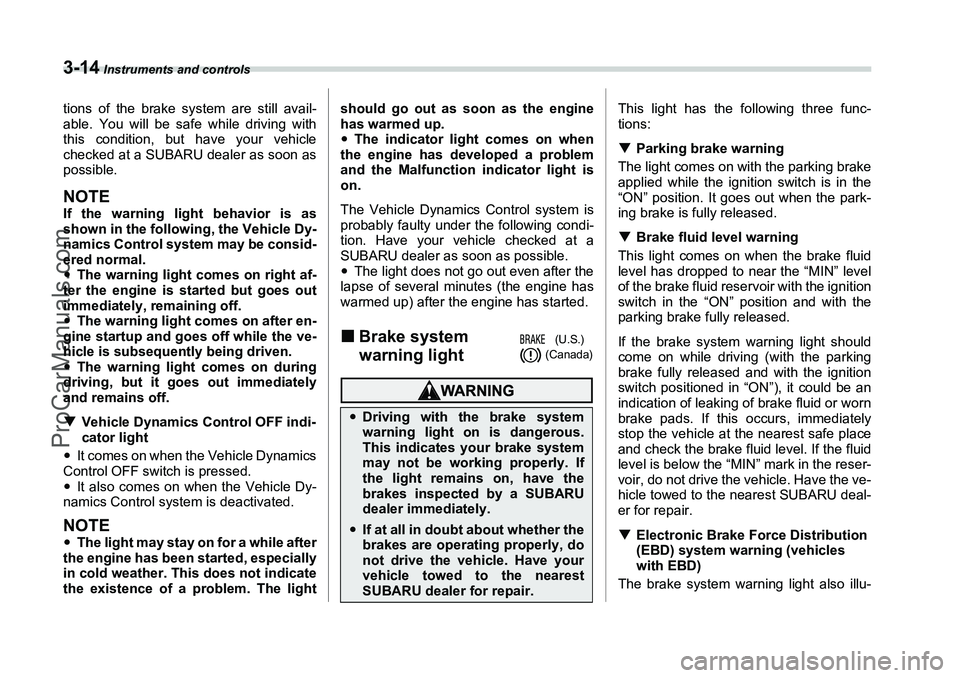
„ Brake system
warning light
This light has the following three func-
tions:
T Parking brake warning
The light comes on with the parking brake
applied while the ignition switch is in the
“ON” position. It goes out when the park-
ing brake is fully released.
T Brake fluid level warning
This light comes on when the brake fluid
level has dropped to near the “MIN” level
of the brake fluid reservoir with the ignition
switch in the “ON” position and with the
parking brake fully released.
If the brake system warning light should
come on while driving (with the parking
brake fully released and with the ignition
switch positioned in “ON”), it could be an
indication of leaking of brake fluid or worn
brake pads. If this occurs, immediately
stop the vehicle at the nearest safe place
and check the brake fluid level. If the fluid
level is below the “MIN” mark in the reser-
voir, do not drive the vehicle. Have the ve-
hicle towed to the nearest SUBARU deal-
er for repair.
T Electronic Brake Force Distribution
(EBD) system warning (vehicles
with EBD)
The brake system warning light also illu-
y Driving with the brake system
warning light on is dangerous.
This indicates your brake system
may not be working properly. If
the light remains on, have the
brakes inspected by a SUBARU
dealer immediately.yIf at all in doubt about whether the
brakes are operating properly, do
not drive the vehicle. Have your
vehicle towed to the nearest
SUBARU dealer for repair.
(U.S.)
(Canada)
ProCarManuals.com
Page 168 of 355
Audio
5-11
the discs contained in the CD changer
only by pressing the corresponding num-
ber on one of the disc select buttons. If
you are to listen to the 5th disc in the CD
changer, press the “5” button of the disc
select buttons. All other discs in the CD
changer can also be selected in a similar
way.NOTEyNo disc change takes place if the
button corresponding to the storage
tray in which no disc is loaded is
pressed.
y If the disc select button correspond-
ing to the disc now in playback is
pressed again, the disc will be replayed
from its beginning.
T To select a song from its beginning
V Forward direction
Briefly press the “ ” side of the button
(17) to skip to the beginning of the next
track. Each time this side of the button is
pressed, the indicated track number will
increase.
V Backward direction
Briefly press the “ ” side of the button
(17) to skip to the beginning of the current
track. Each time this side of the button is
pressed, the indicated track number will decrease.
T
Fast-forwarding and fast-reversing
V Fast-forwarding
Press the “ ” side of the button (17)
continuously to fast-forward the disc.
Release the button to stop fast-forward-
ing.
If you continue fast-forwarding to the end
of the disc, the CD changer will automati-
cally stop fast-forwarding and start play-
back beginning with the first track on the
current disc.
V Fast-reversing
Press the “ ” side of the button (17)
continuously to fast-reverse the disc.
Release the button to stop fast-reversing.
If you continue fast-reversing to the begin-
ning of the disc, the CD changer will auto-
matically stop fast-reversing and start
playback beginning with the first track on
the current disc.
T Repeat playback
Press the “RPT” button (19) while a song
is playing to play the song repeatedly. The
“RPT” indicator will come on and the song
will be played continuously. To cancel the
repeat mode, press the button again.
Then the “RPT” indicator goes out, and
normal playback mode is restored. T
Random playback
Press the “RAND” button (18) while a disc
is being played back to play all songs on
the disc in a random order. The “RAND”
indicator will come on and all songs on the
disc will be played in a random order.
To cancel the random mode, press the
button again. Then the “RAND” indicator
goes out, and normal playback mode is
restored.
T Scan (a convenient way to become
familiar with a disc)
1. Press the “SCAN” button (20). – The display shows “SCAN” and the
track number being scanned.
– You hear the first 10 seconds of each
track.
– The operation is automatically
cleared after playing all programs.
Then, normal playback starts.
2. Press the “SCAN” button again when
you hear a track you like. – Normal playback resumes.
T To stop playback
To stop playback and switch over to the
radio mode, press the “BAND” button.
ProCarManuals.com
Page 174 of 355
Audio
5-17
– CONTINUED –
no idle position in the magazine.
2. As soon as the “DISC” indicator (13)
begins to blink, the “LOAD” will blink on
display for a period of 15 seconds. Insert
a disc during the period. The disc will be
then automatically drawn in, and the play-
er will begin to play back the first track of
the disc.
yTo insert more discs in succession, re-
peat Steps 1 and 2. The magazine will be
loaded with discs in the ascending order
of position number.
If you do not insert any disc in 15 seconds
after you have pressed the “LOAD” but-
ton, the player will begin to play back the
first track of the last disc you have insert-
ed.
y The disc indicator steadily lights up if a
disc is already inserted in the correspond-
ing position of the magazine.
y While the player is in the loading mode,
if you press the “FM/AM” selection button
(2), the player will enter the standby
mode. Press the “CD” button (11) to start
playback.
V Inserting a disc in a desired position
1. Press the “LOAD” button (16). If the
magazine in the player has an idle posi-
tion where you can insert a disc, the
“DISC” indicator (13) associated with the
idle position will blink. The positions in the magazine the indica-
tor of which steadily lights up are already
loaded with discs.
2. Press the disc select button (17) at the
position where you want to insert a disc.
The associated “DISC” indicator will blink,
and then the “LOAD” will blink.
3. If you insert a disc during the 15-sec-
ond period while the “LOAD” is on display,
the disc will be automatically drawn in,
and the player will start playback of the
disc, beginning with the first track.
y
To insert more discs in succession, re-
peat Steps 1 and 2.
y While the player is in the loading mode,
if you press the “FM/AM” selection button
(2), the player will enter standby mode.
Press the “CD” button (11) to start play-
back.
V Loading all the magazine (Full disc
loading mode)
1. If you continue to press the “LOAD”
button (16) for more than 1.5 seconds, the
player will produce beep sound and will
enter the full disc loading mode.
2. A “DISC” indicator (13) will blink, and
the “ALL LOAD” will be on display for a pe-
riod of 15 seconds. If a disc is successfully
loaded during this period, the “DISC” indi-
cator will stop blinking and will steadily
light. 3. When the loading of a disc is complete,
the next “DISC” indicator will blink. Then
repeat Step 2.
4. When the magazine is filled with discs
by repeating Steps 2 and 3, the player will
start playback of the discs, beginning with
the one inserted first.
If you fail to insert any disc during each 15
seconds interval, the full disc loading
mode will be canceled, and the player will
start playback of the disc inserted first.
T
How to play back a CD or make a
pause
V When there is no CD inserted:
Insert a CD by referring to “How to insert a
CD(s)”.
When a CD is loaded, the player will start
playback of the CD, beginning with the
first track.
V When there are CDs loaded:
Press a desired one of the disc select but-
tons (17) the “DISC” indicator (13) of
which steadily lights up. The player will
then start playback of the selected CD,
beginning with the first track.
T To select a song from its beginning
V Forward direction
Briefly press the “ ” side of the button
(18) to skip to the beginning of the next
ProCarManuals.com
Page 177 of 355
5-20
Audio
TTo insert a disc
1. Press one of the disc select buttons (3) (numbered from 1 to 6) for which the disc
indicator light (2) is “OFF”.
The disc indicator lights are located direct-
ly above the corresponding disc select
buttons.
2. The indicator will begin blinking. The
blinking will last for 15 seconds.
During this period, insert a desired disc,
and the disc will begin to play. (If any disc
is not inserted during this period, the “Disc
slot” (1) door will close. Repeat Step 1.)
Be sure to hold a disc with the label side
(the side where titles are printed) up.
3. To insert another disc, repeat Steps 1
and 2 choosing a different disc select but-
ton.
T
To insert six discs at a time
1. Press and hold the disc select button
number 1 until all disc indicators begin
blinking (approximately 1.5 seconds).
2. The indicators will blink for 15 seconds.
During this period, insert desired six discs.
3. When all discs are loaded, the first disc
will begin to play. (If no disc is inserted
within this 15 seconds, the entire disc load
sequence will be canceled.)
T To remove a disc
1. Press the desired one of the disc select
buttons (3) (numbered from 1 to 6) for
which the disc indicator light is on.
2. Press the eject button (4). The selected disc will be ejected and the indicator light
will begin blinking.
3. To remove another disc, repeat Steps
1 and 2 choosing a different disc select
button.
(To remove discs when the ignition switch
is in the “Lock” position, press the eject
button, and the first disc will be ejected.
Press the eject button again, and the next
disc will be ejected and so on. At this time,
the disc select buttons are disabled.)
T
To remove all discs at one time
1. Press and hold the eject button (4) until
all “Disc” indicators begin blinking (ap-
proximately 1.5 seconds), and the first
disc will be ejected.
2. When the disc is removed, the next
one will be ejected, and so on.
T To replace a playing disc with an-
other
Simply press the desired one of disc se-
lect buttons (3) (numbered from 1 to 6) or
press the disc select button on the radio
unit to select the desired disc, and the disc
will begin to play.
T Disc indicators
Lit: when the corresponding storage tray
is occupied by a disc.
Blinking: Disc player is either in loading,
eject or changing mode.
y
Do not attempt to insert two or
more discs into the slot at a time.
Doing so can cause mechanical
damage to the CD changer.
y Use only music CDs identified by
a mark.
y Do not use CDs listed in the fol-
lowing which could cause dam-
age to the CD player.
– 3 inch (8 cm) compact disc.
– Any disc with a peel-off or seal
on it.
– Bent disc.
– Cleaning disc.
– CD accessory. (E.g., 3 inch (8 cm) disc adapter)
y Do not insert or remove any disc
when the automatic transmission
selector lever is in the park posi-
tion; the selector lever in that po-
sition can interfere with disc in-
sertion or removal, causing
scratches on the disc surface (for
AT vehicles).
ProCarManuals.com
Page 187 of 355
6-8
Interior equipment
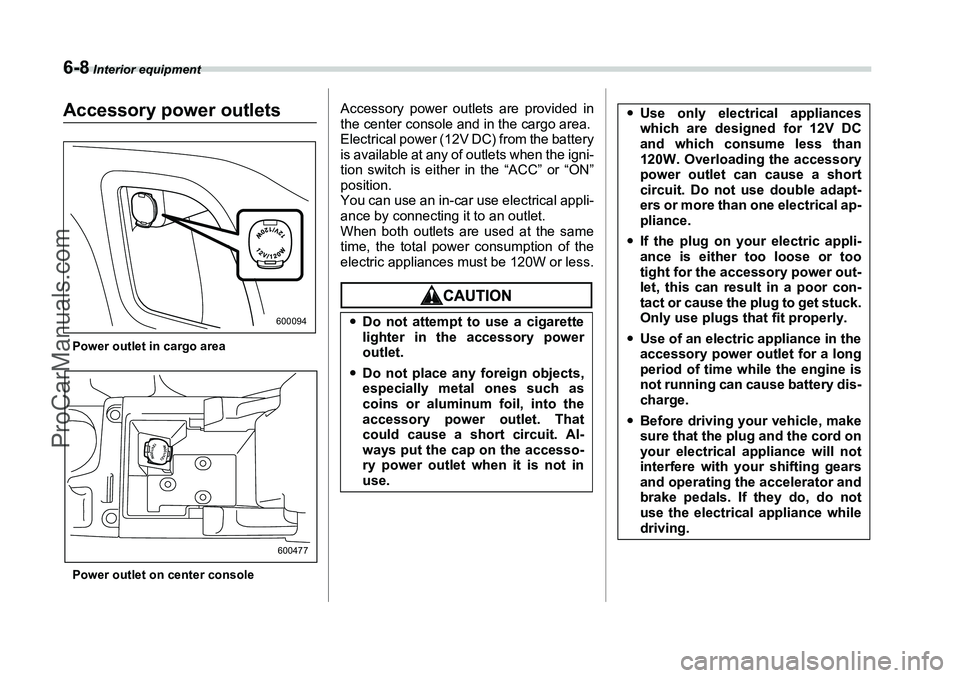
Accessory power outletsPower outlet in cargo area
Power outlet on center console
Accessory power outlets are provided in
the center console and in the cargo area.
Electrical power (12V DC) from the battery
is available at any of outlets when the igni-
tion switch is either in the “ACC” or “ON”
position.
You can use an in-car use electrical appli-
ance by connecting it to an outlet.
When both outlets are used at the same
time, the total power consumption of the
electric appliances must be 120W or less.
600094600477
yDo not attempt to use a cigarette
lighter in the accessory power
outlet.
y Do not place any foreign objects,
especially metal ones such as
coins or aluminum foil, into the
accessory power outlet. That
could cause a short circuit. Al-
ways put the cap on the accesso-
ry power outlet when it is not in
use.
yUse only electrical appliances
which are designed for 12V DC
and which consume less than
120W. Overloading the accessory
power outlet can cause a short
circuit. Do not use double adapt-
ers or more than one electrical ap-
pliance.
y If the plug on your electric appli-
ance is either too loose or too
tight for the accessory power out-
let, this can result in a poor con-
tact or cause the plug to get stuck.
Only use plugs that fit properly.
y Use of an electric appliance in the
accessory power outlet for a long
period of time while the engine is
not running can cause battery dis-
charge.
y Before driving your vehicle, make
sure that the plug and the cord on
your electrical appliance will not
interfere with your shifting gears
and operating the accelerator and
brake pedals. If they do, do not
use the electrical appliance while
driving.
ProCarManuals.com
Page 188 of 355
Interior equipment
6-9
– CONTINUED –
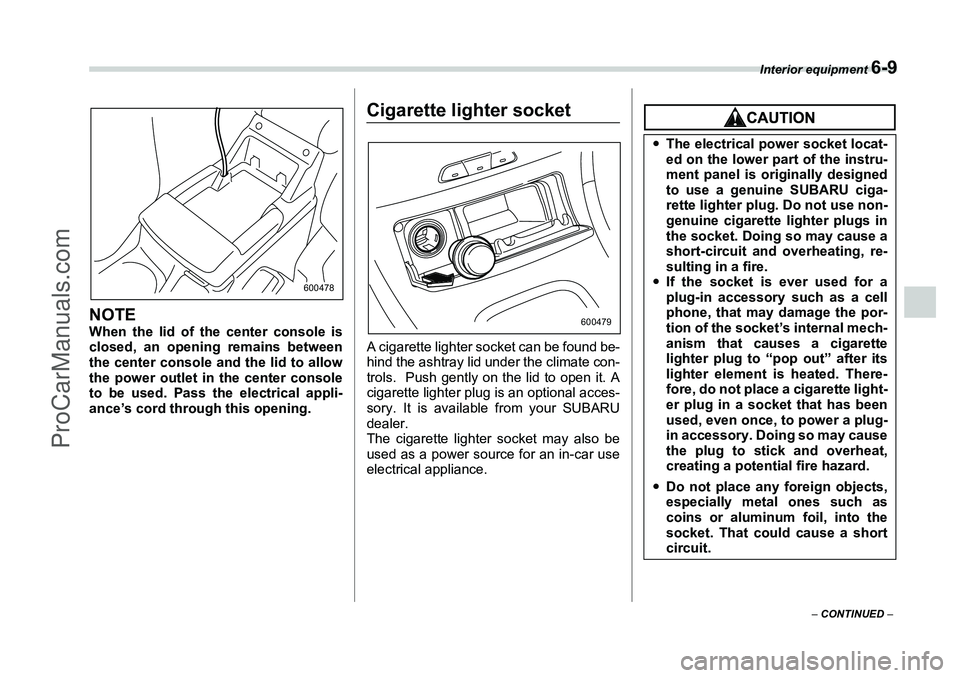
NOTEWhen the lid of the center console is
closed, an opening remains between
the center console and the lid to allow
the power outlet in the center console
to be used. Pass the electrical appli-
ance’s cord through this opening.
Cigarette lighter socketA cigarette lighter socket can be found be-
hind the ashtray lid under the climate con-
trols. Push gently on the lid to open it. A
cigarette lighter plug is an optional acces-
sory. It is available from your SUBARU
dealer.
The cigarette lighter socket may also be
used as a power source for an in-car use
electrical appliance.
600478
600479
yThe electrical power socket locat-
ed on the lower part of the instru-
ment panel is originally designed
to use a genuine SUBARU ciga-
rette lighter plug. Do not use non-
genuine cigarette lighter plugs in
the socket. Doing so may cause a
short-circuit and overheating, re-
sulting in a fire.
y If the socket is ever used for a
plug-in accessory such as a cell
phone, that may damage the por-
tion of the socket’s internal mech-
anism that causes a cigarette
lighter plug to “pop out” after its
lighter element is heated. There-
fore, do not place a cigarette light-
er plug in a socket that has been
used, even once, to power a plug-
in accessory. Doing so may cause
the plug to stick and overheat,
creating a potential fire hazard.
y Do not place any foreign objects,
especially metal ones such as
coins or aluminum foil, into the
socket. That could cause a short
circuit.
ProCarManuals.com