reset SUBARU FORESTER 2006 User Guide
[x] Cancel search | Manufacturer: SUBARU, Model Year: 2006, Model line: FORESTER, Model: SUBARU FORESTER 2006Pages: 355, PDF Size: 5.49 MB
Page 161 of 355
5-4
Audio
Type A audio set (if equipped)The radio will operate only when the ignition switch is in the “ACC” or “ON” position.„Radio operation
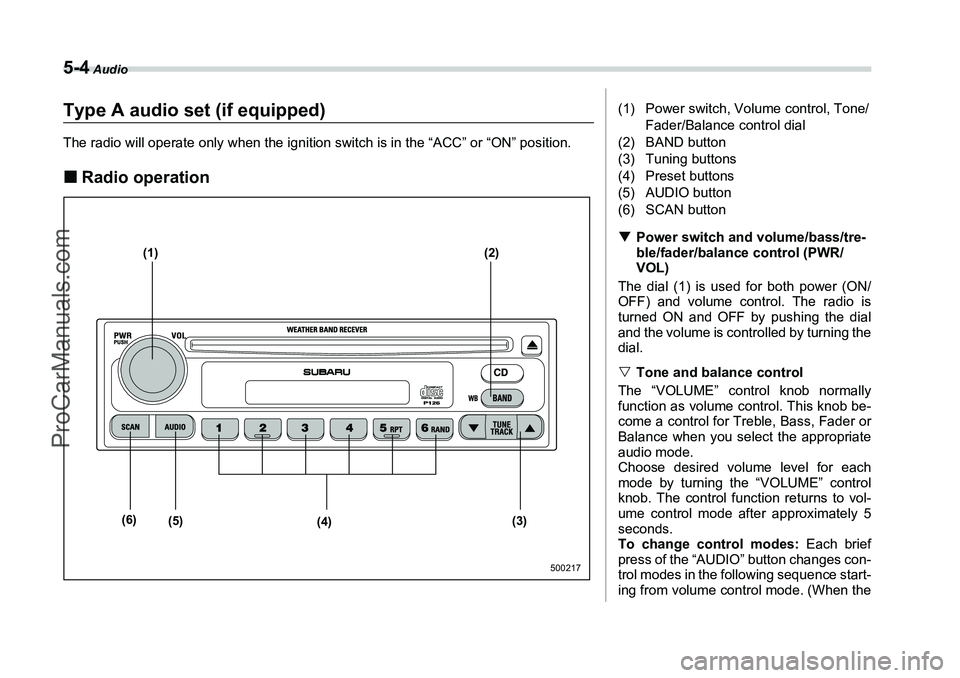
(1) (2)
(3)
(4)
(5)
(6)
500217
(1) Power switch, Volume control, Tone/
Fader/Balance control dial
(2) BAND button
(3) Tuning buttons
(4) Preset buttons
(5) AUDIO button
(6) SCAN button
T Power switch and volume/bass/tre-
ble/fader/balance control (PWR/
VOL)
The dial (1) is used for both power (ON/
OFF) and volume control. The radio is
turned ON and OFF by pushing the dial
and the volume is controlled by turning the
dial.
V Tone and balance control
The “VOLUME” control knob normally
function as volume control. This knob be-
come a control for Treble, Bass, Fader or
Balance when you select the appropriate
audio mode.
Choose desired volume level for each
mode by turning the “VOLUME” control
knob. The control function returns to vol-
ume control mode after approximately 5
seconds.
To change control modes: Each brief
press of the “AUDIO” button changes con-
trol modes in the following sequence start-
ing from volume control mode. (When the
ProCarManuals.com
Page 163 of 355
5-6
Audio
TFM/AM/Weather band selection but-
ton (BAND)
Push the “BAND” button when the radio is
on to select FM1, FM2, AM or Weather
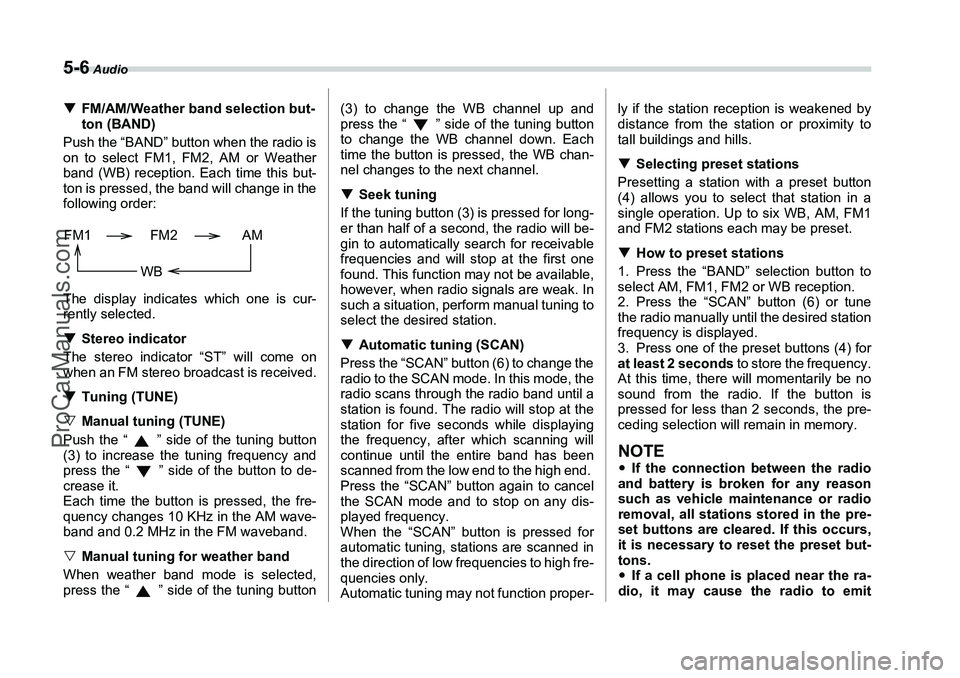
band (WB) reception. Each time this but-
ton is pressed, the band will change in the
following order:
The display indicates which one is cur-
rently selected.
T Stereo indicator
The stereo indicator “ST” will come on
when an FM stereo broadcast is received.
T Tuning (TUNE)
V Manual tuning (TUNE)
Push the “ ” side of the tuning button
(3) to increase the tuning frequency and
press the “ ” side of the button to de-
crease it.
Each time the button is pressed, the fre-
quency changes 10 KHz in the AM wave-
band and 0.2 MHz in the FM waveband.
V Manual tuning for weather band
When weather band mode is selected,
press the “ ” side of the tuning button (3) to change the WB channel up and
press the “ ” side of the tuning button
to change the WB channel down. Each
time the button is pressed, the WB chan-
nel changes to the next channel.
T
Seek tuning
If the tuning button (3) is pressed for long-
er than half of a second, the radio will be-
gin to automatically search for receivable
frequencies and will stop at the first one
found. This function may not be available,
however, when radio signals are weak. In
such a situation, perform manual tuning to
select the desired station.
T Automatic tuning (SCAN)
Press the “SCAN” button (6) to change the
radio to the SCAN mode. In this mode, the
radio scans through the radio band until a
station is found. The radio will stop at the
station for five seconds while displaying
the frequency, after which scanning will
continue until the entire band has been
scanned from the low end to the high end.
Press the “SCAN” button again to cancel
the SCAN mode and to stop on any dis-
played frequency.
When the “SCAN” button is pressed for
automatic tuning, stations are scanned in
the direction of low frequencies to high fre-
quencies only.
Automatic tuning may not function proper- ly if the station reception is weakened by
distance from the station or proximity to
tall buildings and hills.
T
Selecting preset stations
Presetting a station with a preset button
(4) allows you to select that station in a
single operation. Up to six WB, AM, FM1
and FM2 stations each may be preset.
T How to preset stations
1. Press the “BAND” selection button to
select AM, FM1, FM2 or WB reception.
2. Press the “SCAN” button (6) or tune
the radio manually until the desired station
frequency is displayed.
3. Press one of the preset buttons (4) for
at least 2 seconds to store the frequency.
At this time, there will momentarily be no
sound from the radio. If the button is
pressed for less than 2 seconds, the pre-
ceding selection will remain in memory.
NOTEy If the connection between the radio
and battery is broken for any reason
such as vehicle maintenance or radio
removal, all stations stored in the pre-
set buttons are cleared. If this occurs,
it is necessary to reset the preset but-
tons.
y If a cell phone is placed near the ra-
dio, it may cause the radio to emit
FM1 FM2 AM
WB
ProCarManuals.com
Page 169 of 355
5-12
Audio
Type B audio set (if equipped)The radio will operate only when the ignition switch is in the “ACC” or “ON” position.„Radio operation
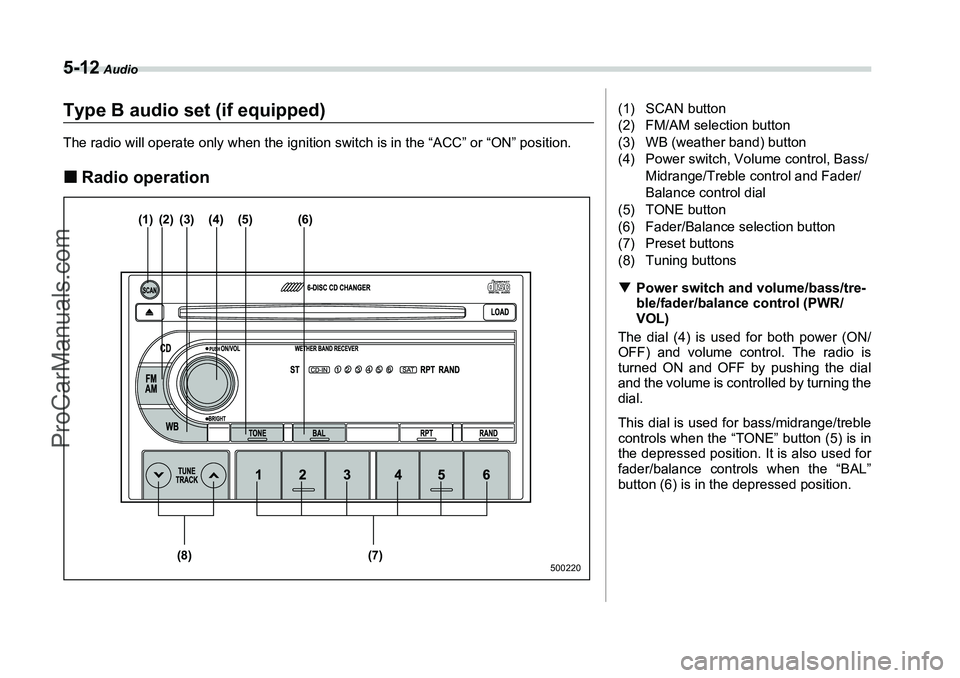
(1) (2) (3) (4) (5) (6)
(7)
(8)
500220
(1) SCAN button
(2) FM/AM selection button
(3) WB (weather band) button
(4) Power switch, Volume control, Bass/
Midrange/Treble control and Fader/
Balance control dial
(5) TONE button
(6) Fader/Balance selection button
(7) Preset buttons
(8) Tuning buttons
T Power switch and volume/bass/tre-
ble/fader/balance control (PWR/
VOL)
The dial (4) is used for both power (ON/
OFF) and volume control. The radio is
turned ON and OFF by pushing the dial
and the volume is controlled by turning the
dial.
This dial is used for bass/midrange/treble
controls when the “TONE” button (5) is in
the depressed position. It is also used for
fader/balance controls when the “BAL”
button (6) is in the depressed position.
ProCarManuals.com
Page 172 of 355
Audio
5-15
– CONTINUED –
select the desired station.
TAutomatic tuning (SCAN)
Press the “SCAN” button (1) to change the
radio to the SCAN mode. In this mode, the
radio scans through the radio band until a
station is found. The radio will stop at the
station for five seconds while displaying
the frequency, after which scanning will
continue until the entire band has been
scanned from the low end to the high end.
Press the “SCAN” button again to cancel
the SCAN mode and to stop on any dis-
played frequency.
When the “SCAN” button is pressed for
automatic tuning, stations are scanned in
the direction of low frequencies to high fre-
quencies only.
Automatic tuning may not function proper-
ly if the station reception is weakened by
distance from the station or proximity to
tall buildings and hills.
T Selecting preset stations
Presetting a station with a preset button
(7) allows you to select that station in a
single operation. Up to six AM, FM1, FM2
and WB stations each may be preset.
T How to preset stations
1. Press the “FM/AM” selection button to
select AM, FM1 or FM2 reception.
OR
Press the “WB” button (3) to select the
weather band.
2. Press the “SCAN” button (1) or tune
the radio manually until the desired station
frequency is displayed.
3. Press one of the preset buttons (7) for
at least 1.5 seconds to store the frequen-
cy. The frequency of the station will flash
once on the display at this time.
NOTEy If the connection between the radio
and battery is broken for any reason
such as vehicle maintenance or radio
removal, all stations stored in the pre-
set buttons are cleared. If this occurs,
it is necessary to reset the preset but-
tons.
y If a cell phone is placed near the ra-
dio, it may cause the radio to emit
noise when it receives calls. This noise
does not indicate a radio fault.
ProCarManuals.com