brake light SUBARU FORESTER 2007 SG / 2.G User Guide
[x] Cancel search | Manufacturer: SUBARU, Model Year: 2007, Model line: FORESTER, Model: SUBARU FORESTER 2007 SG / 2.GPages: 356, PDF Size: 5.89 MB
Page 206 of 356
7-8 Starting and operating
1) Turn the ignition switch to the “OFF”
position and wait for at least 10 sec-
onds. After checking that the parking
brake is firmly set, turn the ignition
switch to the “START” position while de-
pressing the accelerator pedal slightly
(about a quarter of the full stroke). Re-
lease the accelerator pedal as soon as
the engine starts.
2) If this fails to start the engine, turn the
ignition switch back to the “OFF” posi-
tion and wait for at least 10 seconds.
Then fully depress the accelerator ped-
al and turn the ignition switch to the
“START” position. If the engine starts,
quickly release the accelerator pedal.
3) If this fails to start the engine, turn the
ignition switch again to the “OFF” posi-
tion. After waiting for 10 seconds or
longer, turn the ignition switch to the
“START” position without depressing
the accelerator pedal.
4) If the engine still refuses to start, con-
tact your nearest SUBARU dealer for
assistance.
6. Confirm that all warning and indicator
lights have gone out after the engine has
started. The fuel injection system auto-
matically lowers the idle speed as the en-
gine warms up.
While the engine is warming up, make
sure that the selector lever is at the “P” or “N” position and that the parking brake is
applied.
NOTE
The engine may be difficult to start
when the battery has been disconnect-
ed and reconnected (for maintenance
or other purposes). This difficulty is
caused by the electronically controlled
throttle’s self-diagnosis function. To
overcome it, keep the ignition switch in
the “ON” position for approximately 10
seconds before starting the engine.
Stopping the engine
The ignition switch should be turned off
only when the vehicle is stopped and the
engine is idling.
If you restart the engine while the
vehicle is moving, shift the selector
lever into the “N” position. Do not
attempt to place the selector lever of
a moving vehicle into the “P” posi-
tion.
Do not stop the engine when the ve-
hicle is moving. This will cause loss
of power to the power steering and
the brake booster, making steering
and braking more difficult. It could
also result in accidental activation
of the “LOCK” position on the igni-
tion switch, causing the steering
wheel to lock.
Page 210 of 356
7-12 Starting and operating
sure safe starting of the vehicle.
To shift the selector lever from the “P” to
the any other position, you have to de-
press the brake pedal fully when the igni-
tion switch is in the “ON” position. This
prevents the vehicle from lurching when it
is started.
If the shift lever does not move from the
“P” position with the brake pedal de-
pressed, refer to the “Shift lock release”
section in this chapter. TR (Reverse)
This position is for backing the vehicle.
To shift from the “N” to “R” position, first
stop the vehicle completely then move the
lever to the “R” position. T N (Neutral)
This position is for restarting a stalled en-
gine.
In this position the wheels and transmis-
sion are not locked. In this position, the
transmission is neutral; the vehicle will roll
freely, even on the slightest incline unless
the parking brake or foot brake is on.
Avoid coasting with the transmission neu-
tral.
During coasting, there is no engine brak-
ing effect.NOTE
If you stop the engine with the selector
lever in the “N” position, move the se-
lector lever to the “P” position immedi-
ately. Otherwise, you may find that the
selector lever soon cannot be moved
to the “P” position. If you find that the
selector lever cannot be moved from
the “N” position to the “P” position,
turn the ignition switch to the “ON” po-
sition and try again.
T D (Drive)
This position is for normal driving.
The transmission automatically shifts into
a suitable gear from 1st to 4th according to
the vehicle speed and the acceleration
you require.
When more acceleration is required in this
position, press the accelerator pedal fully
to the floor and hold that position. The
transmission will automatically downshift
to 3rd, 2nd or 1st gear. When you release
the pedal, the transmission will return to the original gear position. V
While climbing a grade
When driving up hill, undesired upshift to
4th gear is prevented from taking place
when the accelerator pedal is released.
This minimizes the chances of subse-
quent downshifting to a lower gear when
accelerating again. This prevents repeat-
ed upshifting and downshifting resulting in
a smoother operation of the vehicle.
NOTE
The transmission may downshift to
2nd or 1st gear, depending on the way
the accelerator pedal is pressed to ac-
celerate the vehicle again. V While going down a hill
When descending a steep hill, depressing
the brake pedal will cause the transmis-
sion to downshift to 3rd gear, thus apply-
ing engine braking. Reacceleration for a
short time will cause the transmission to
upshift normally.
NOTE
In some cases, depressing the brake
pedal on a downhill grade does not re-
sult in an automatic downshift to 3rd
gear. This can happen when the auto-
matic transmission fluid temperature is
very low, for example, during driving
Do not drive the vehicle with the se-
lector lever in the “N” (neutral) posi-
tion. Engine braking has no effect in
this condition and the risk of an ac-
cident is consequently increased.
Page 213 of 356
Starting and operating 7-15
– CONTINUED –
Rear viscous limited slip dif-
ferential (LSD) (if equipped)
The LSD provides optimum distribution of
power according to the difference in revo-
lutions between the right and left rear
wheels that may be caused by certain
driving conditions, thereby improving driv-
ing stability on snow-covered, muddy or
other slippery roads.
Power steering
The power steering system operates only
when the engine is running.
If you lose power steering assist because
the engine stops or the system fails to
function, you can steer but it will take
much more effort.
NOTE
Right after the engine has been started
and before it has warmed up, you may
hear a noise coming from areas adja-
cent to the power steering pump which
is located at the right-front area of the
engine compartment. This noise is nor-
mal. It does not indicate power steering
system trouble.
Braking „
Braking tips
TWhen the brakes get wet
When driving in rain or after washing the
vehicle, the brakes may get wet. As a re-
sult, brake stopping distance will be long-
er. To dry the brakes, drive the vehicle at
a safe speed while lightly depressing the
brake pedal to heat up the brakes. T Use of engine braking
Remember to make use of engine braking
in addition to foot braking. When descend-
ing a grade, if only the foot brake is used,
the brakes may start working improperly
because of brake fluid overheating,
caused by overheated brake pads. To
help prevent this, shift into a lower gear to
get stronger engine braking. T Braking when a tire is punctured
Do not depress the brake pedal suddenly
y
Never start the engine while a tire
on one side is jacked up, as the
vehicle may move.
y If one rear tire is spinning in mud,
avoid continued spinning at high
speed as this could adversely af-
fect the LSD.
y If a different size rear tire is tem-
porarily used (as in an emergen-
cy), it will adversely affect the
LSD. Always replace it with a reg-
ular size tire as soon as possible.
Do not hold the steering wheel at the
fully locked position left or right for
more than five seconds. This may
damage the power steering pump.
Never rest your foot on the brake
pedal while driving. This can cause
dangerous overheating of the
brakes and needless wear on the
brake pads and linings.
Page 215 of 356
Starting and operating 7-17
– CONTINUED –
The ABS system prevents the lock-up of
wheels which may occur during sudden
braking or braking on slippery road surfac-
es. This helps prevent the loss of steering
control and directional stability caused by
wheel lock-up.
When the ABS system is operating, you
may hear a chattering noise or feel a slight
vibration in the brake pedal. This is normal
when the ABS operates.
The ABS system will not operate when the
vehicle speed is below approximately 6
mph (10 km/h). „
ABS system self-check
You may feel a slight shock in the brake
pedal and hear the operating sound of
ABS from the engine compartment just af-
ter the vehicle is started. This is caused by
an automatic functional test of the ABS
system being carried out and does not in-
dicate any abnormal condition. „
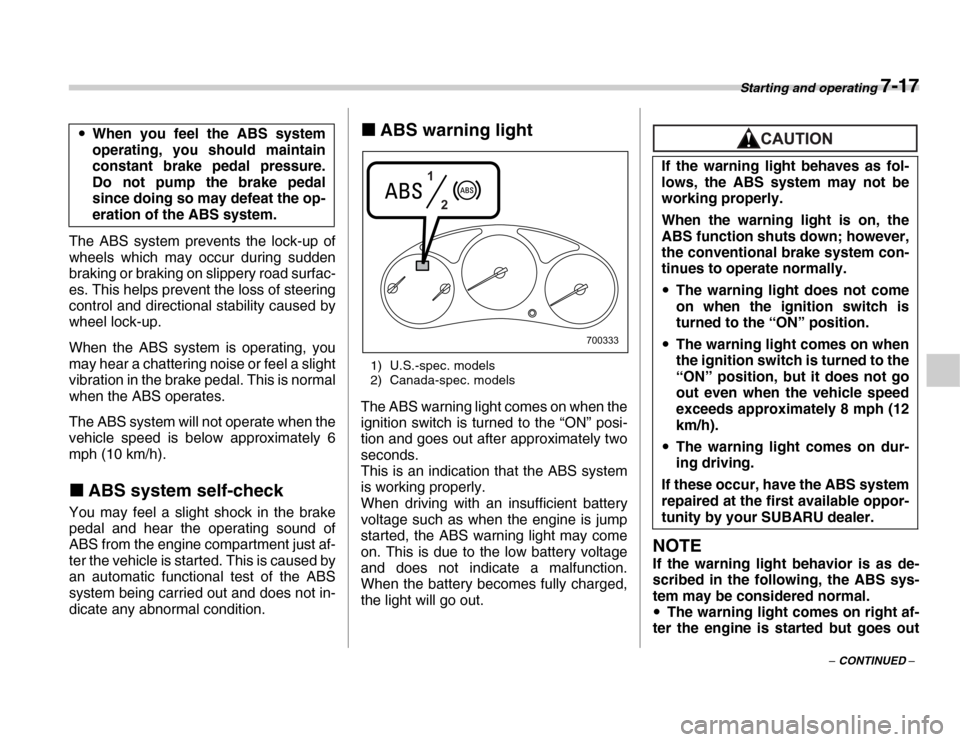
ABS warning light
1) U.S.-spec. models
2) Canada-spec. models
The ABS warning light comes on when the
ignition switch is turned to the “ON” posi-
tion and goes out after approximately two
seconds.
This is an indication that the ABS system
is working properly.
When driving with an insufficient battery
voltage such as when the engine is jump
started, the ABS warning light may come
on. This is due to the low battery voltage
and does not indicate a malfunction.
When the battery becomes fully charged,
the light will go out.
NOTE
If the warning light behavior is as de-
scribed in the following, the ABS sys-
tem may be considered normal. y The warning light comes on right af-
ter the engine is started but goes out
y
When you feel the ABS system
operating, you should maintain
constant brake pedal pressure.
Do not pump the brake pedal
since doing so may defeat the op-
eration of the ABS system.
1
2
700333 If the warning light behaves as fol-
lows, the ABS system may not be
working properly.
When the warning light is on, the
ABS function shuts down; however,
the conventional brake system con-
tinues to operate normally. y
The warning light does not come
on when the ignition switch is
turned to the “ON” position.
y The warning light comes on when
the ignition switch is turned to the
“ON” position, but it does not go
out even when the vehicle speed
exceeds approximately 8 mph (12
km/h).
y The warning light comes on dur-
ing driving.
If these occur, have the ABS system
repaired at the first available oppor-
tunity by your SUBARU dealer.
Page 216 of 356
7-18 Starting and operating
immediately, remaining off. yThe warning light remains on after
the engine has been started, but it goes
out when the vehicle speed reaches
approximately 8 mph (12 km/h). y The warning light comes on during
driving, but it goes out immediately
and remains off. Electronic Brake Force Dis-
tribution (EBD) system
The EBD system maximizes the effective-
ness of the brakes by allowing the rear
brakes to supply a greater proportion of
the braking force. It functions by adjusting
the distribution of braking force to the rear
wheels in accordance with the vehicle’s
loading condition and speed.
The EBD system is an integral part of the
ABS system and uses some of the ABS
system’s components to perform its func-
tion of optimizing the distribution of brak-
ing force. If any of the ABS components
used by the EBD function fails, the EBD
system also stops working.
When the EBD system is operating, you
may hear a chattering noise or feel a slight
vibration in the brake pedal. This is normal
and does not indicate a malfunction.„
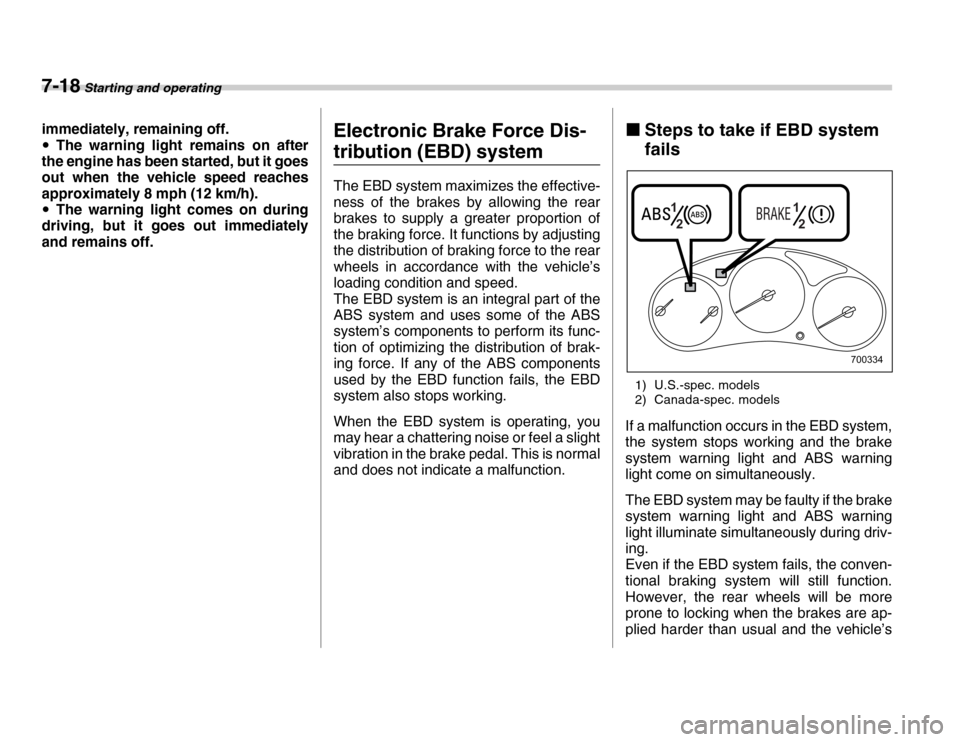
Steps to take if EBD system
fails
1) U.S.-spec. models
2) Canada-spec. models
If a malfunction occurs in the EBD system,
the system stops working and the brake
system warning light and ABS warning
light come on simultaneously.
The EBD system may be faulty if the brake
system warning light and ABS warning
light illuminate simultaneously during driv-
ing.
Even if the EBD system fails, the conven-
tional braking system will still function.
However, the rear wheels will be more
prone to locking when the brakes are ap-
plied harder than usual and the vehicle’s
1 2 1
2
700334
Page 217 of 356
Starting and operating 7-19
– CONTINUED –
motion may therefore become somewhat
harder to control.
If the brake system warning light and ABS
warning light illuminate simultaneously,
take the following steps:
1. Stop the vehicle in the nearest safe, flat
place.
2. Shut down the engine, then restart it.
3. Release the parking brake. If both
warning lights go out, the EBD system
may be faulty.
Drive carefully to the nearest SUBARU
dealer and have the system inspected.
4. If both warning lights come on again
and stay illuminated after the engine has
been restarted, shut down the engine
again, apply the parking brake, and check
the brake fluid level.
5. If the brake fluid level is not below the
“MIN” mark, the EBD system may be
faulty. Drive carefully to the nearest
SUBARU dealer and have the system in-
spected.
6. If the brake fluid level is below the
“MIN” mark, DO NOT drive the vehicle. In-
stead, have the vehicle towed to the near-
est SUBARU dealer for repair.
Parking your vehicle
y
Driving with the brake system
warning light on is dangerous.
This indicates your brake system
may not be working properly. If
the light remains on, have the
brakes inspected by a SUBARU
dealer immediately.
yIf at all in doubt about whether the
brakes are operating properly, do
not drive the vehicle. Have your
vehicle towed to the nearest SUB-
ARU dealer for repair.
yNever leave unattended children
or pets in the vehicle. They could
accidentally injure themselves or
others through inadvertent opera-
tion of the vehicle. Also, on hot or
sunny days, the temperature in a
closed vehicle could quickly be-
come high enough to cause se-
vere or possibly fatal injuries to
people.
yDo not park the vehicle over flam-
mable materials such as dry
grass, waste paper or rags, as
they may burn easily if they come
near hot engine or exhaust sys-
tem parts.
yBe sure to stop the engine if you
take a nap in the vehicle. If engine
exhaust gas enters the passenger
compartment, occupants in the
vehicle could die from carbon
monoxide (CO) contained in the
exhaust gas.
Page 218 of 356
7-20 Starting and operating
„Parking brake
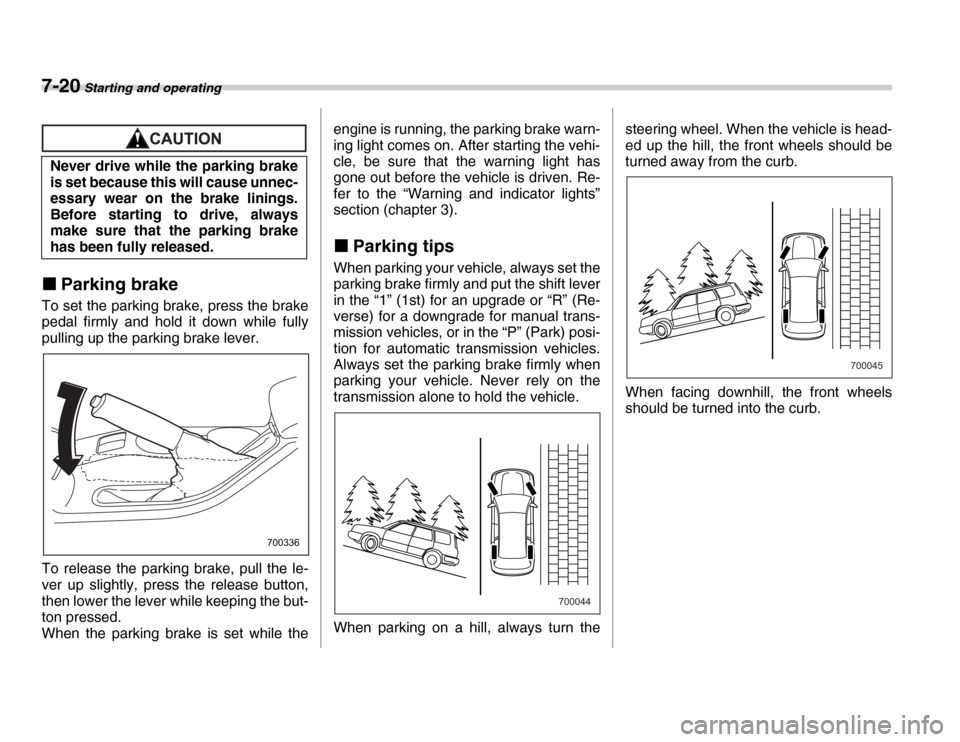
To set the parking brake, press the brake
pedal firmly and hold it down while fully
pulling up the parking brake lever.
To release the parking brake, pull the le-
ver up slightly, press the release button,
then lower the lever while keeping the but-
ton pressed.
When the parking brake is set while the engine is running, the parking brake warn-
ing light comes on. After starting the vehi-
cle, be sure that the warning light has
gone out before the vehicle is driven. Re-
fer to the “Warning and indicator lights”
section (chapter 3).
„ Parking tips
When parking your vehicle, always set the
parking brake firmly and put the shift lever
in the “1” (1st) for an upgrade or “R” (Re-
verse) for a downgrade for manual trans-
mission vehicles, or in the “P” (Park) posi-
tion for automatic transmission vehicles.
Always set the parking brake firmly when
parking your vehicle. Never rely on the
transmission alone to hold the vehicle.
When parking on a hill, always turn the steering wheel. When the vehicle is head-
ed up the hill, the front wheels should be
turned away from the curb.
When facing downhill, the front wheels
should be turned into the curb.
Never drive while the parking brake
is set because this will cause unnec-
essary wear on the brake linings.
Before starting to drive, always
make sure that the parking brake
has been fully released.
700336
700044
700045
Page 219 of 356
Starting and operating 7-21
Hill holder (Manual transmis-
sion – if equipped)
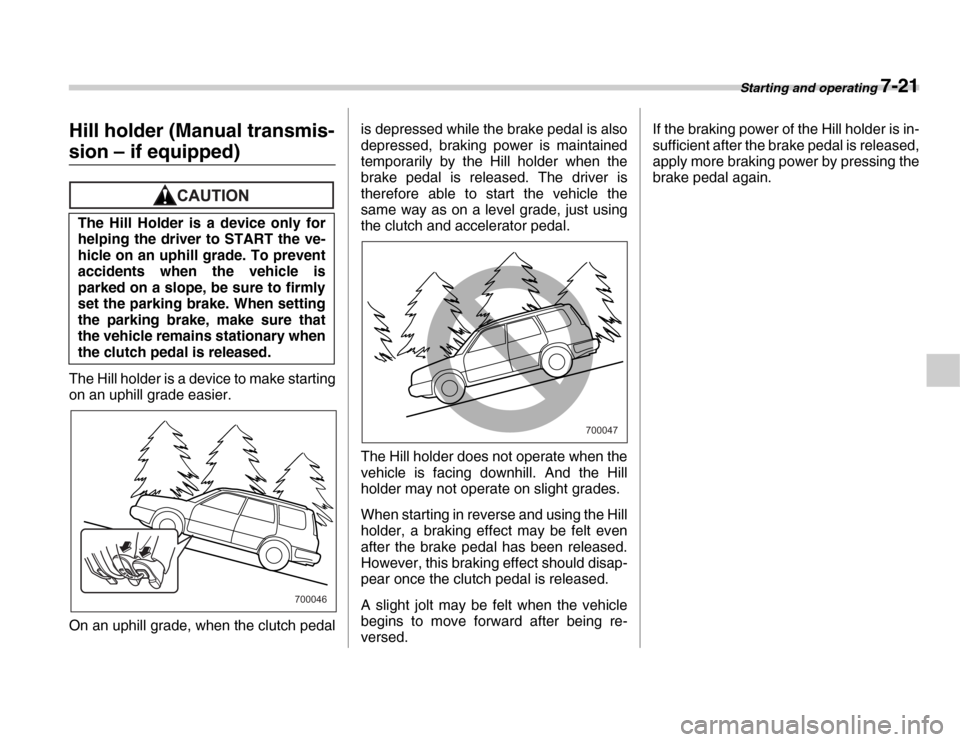
The Hill holder is a device to make starting
on an uphill grade easier.
On an uphill grade, when the clutch pedalis depressed while the brake pedal is also
depressed, braking power is maintained
temporarily by the Hill holder when the
brake pedal is released. The driver is
therefore able to start the vehicle the
same way as on a level grade, just using
the clutch and accelerator pedal.
The Hill holder does not operate when the
vehicle is facing downhill. And the Hill
holder may not operate on slight grades.
When starting in reverse and using the Hill
holder, a braking effect may be felt even
after the brake pedal has been released.
However, this braking effect should disap-
pear once the clutch pedal is released.
A slight jolt may be felt when the vehicle
begins to move forward after being re-
versed. If the braking power of the Hill holder is in-
sufficient after the brake pedal is released,
apply more braking power by pressing the
brake pedal again.
The Hill Holder is a device only for
helping the driver to START the ve-
hicle on an uphill grade. To prevent
accidents when the vehicle is
parked on a slope, be sure to firmly
set the parking brake. When setting
the parking brake, make sure that
the vehicle remains stationary when
the clutch pedal is released.
700046
700047
Page 221 of 356
Starting and operating 7-23
– CONTINUED –
The vehicle will maintain the desired
speed.
Vehicle speed can be temporarily in-
creased while driving with the cruise con-
trol activated. Simply depress the acceler-
ator pedal to accelerate the vehicle. When
the accelerator pedal is released, the ve-
hicle will return to and maintain the previ-
ous cruising speed. „
To temporarily cancel the
cruise control
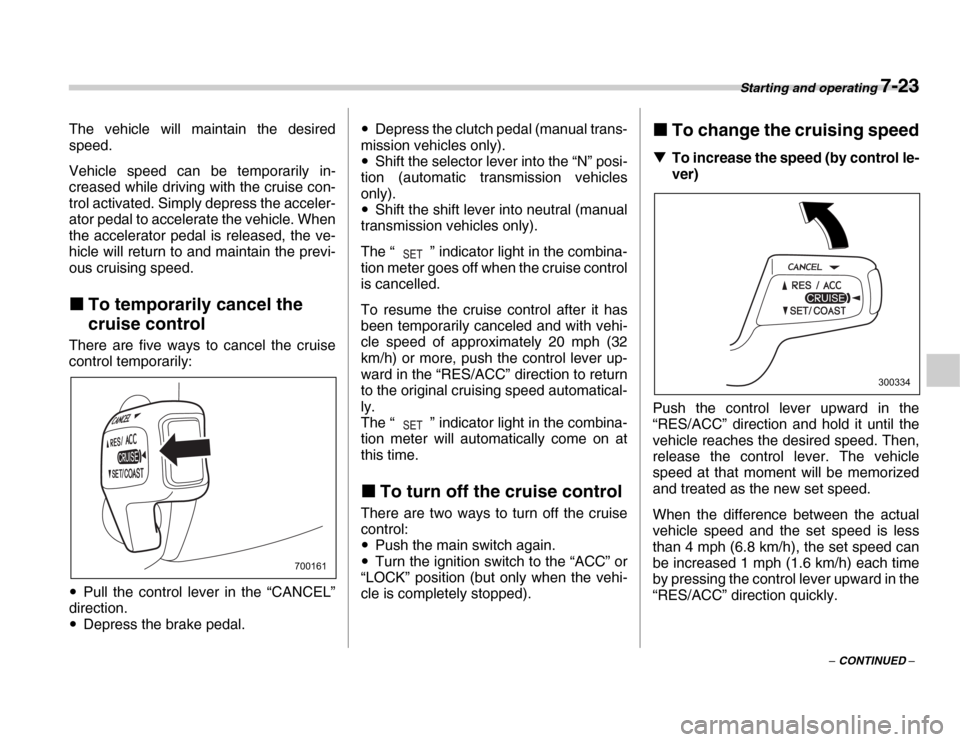
There are five ways to cancel the cruise
control temporarily: y Pull the control lever in the “CANCEL”
direction. y Depress the brake pedal. y
Depress the clutch pedal (manual trans-
mission vehicles only). y Shift the selector lever into the “N” posi-
tion (automatic transmission vehicles
only). y Shift the shift lever into neutral (manual
transmission vehicles only).
The “ ” indicator light in the combina-
tion meter goes off when the cruise control
is cancelled.
To resume the cruise control after it has
been temporarily canceled and with vehi-
cle speed of approximately 20 mph (32
km/h) or more, push the control lever up-
ward in the “RES/ACC” direction to return
to the original cruising speed automatical-
ly.
The “ ” indicator light in the combina-
tion meter will automatically come on at
this time.
„ To turn off the cruise control
There are two ways to turn off the cruise
control: y Push the main switch again.
y Turn the ignition switch to the “ACC” or
“LOCK” position (but only when the vehi-
cle is completely stopped). „
To change the cruising speed
T To increase the speed (by control le-
ver)
Push the control lever upward in the
“RES/ACC” direction and hold it until the
vehicle reaches the desired speed. Then,
release the control lever. The vehicle
speed at that moment will be memorized
and treated as the new set speed.
When the difference between the actual
vehicle speed and the set speed is less
than 4 mph (6.8 km/h), the set speed can
be increased 1 mph (1.6 km/h) each time
by pressing the control lever upward in the
“RES/ACC” direction quickly.
700161
300334
Page 231 of 356
Driving tips 8-7
– CONTINUED –
thrown around in the vehicle and cause in-
jury. Do not pile heavy loads on the roof.
Those loads raise the vehicle’s center of
gravity and make it more prone to tip over. y
If you must rock the vehicle to free it
from sand or mud, depress the accelera-
tor pedal slightly and move the selector le-
ver back and forth between “D” and “R” re-
peatedly. Do not race the engine. For the
best possible traction, avoid spinning the
wheels when trying to free the vehicle.
When the road surface is extremely slip-
pery, you can obtain better traction by
starting the vehicle with the transmission
in 2nd than 1st (both for MT and AT). y Never equip your vehicle with tires larg-
er than those specified in this manual.y Frequent driving of an AWD vehicle un-
der hard-driving conditions such as rough
roads or off roads will necessitate more
frequent replacement of engine oil, brake
fluid and transmission oil than that speci-
fied in the maintenance schedule de-
scribed in the “Warranty and Maintenance
Booklet”.
Remember that damage done to your
SUBARU while operating it off-road and
not using common sense precautions
such as those listed above is not eligible
for warranty coverage.y Wash the vehicle’s underbody after off-
road driving. Suspension components are particularly prone to dirt buildup, so they
need to be washed thoroughly.
Winter driving „
Operation during cold weath- er
Carry some emergency equipment, such
as tire chains, a window scraper, a bag of
sand, flares, a small shovel, and jumper
cables.
Check the battery and cables. Cold tem-
peratures reduce battery capacity. The
battery must be in good condition to pro-
vide enough power for cold winter starts.
Use an engine oil of proper grade and vis-
cosity for cold weather. Heavy summer oil
will cause harder starting.
Keep the door locks from freezing by
800219