clock SUBARU FORESTER 2009 SH / 3.G User Guide
[x] Cancel search | Manufacturer: SUBARU, Model Year: 2009, Model line: FORESTER, Model: SUBARU FORESTER 2009 SH / 3.GPages: 384, PDF Size: 13.91 MB
Page 179 of 384

5-14Audio
ready because each tuner is identified by
its unique satellite radio tuner ID.
The satellite radio ID will be needed when
you activate satellite radio and receive
satellite radio customer support.
The satellite radio ID can be found on the
audio display by tuning the channel to “0 ”.
Turn the “CH ”dial to select the satellite
radio channel.
NOTE
For Sirius, change the display to an
indication mode other than the channel
number after performing the aboveoperation. & Band selection
Push the “SAT ”button when the radio is off to turn on the radio.
Push the
“SAT ”button when the radio is
on to select SAT1, SAT2 or SAT3 recep- tion.
& Channel and category selec- tion
! Channel selection (type A)
Turn the “CH ”dial clockwise to select the
next channel and turn the “CH ”dial
counterclockwise to select the previous channel. !
Channel selection (type B)
When in the SAT mode, briefly press the “SEEK ”button “”or “”to select the
channel.
Page 184 of 384

start playback of the discs, beginning with
the one inserted first.
If you fail to insert any disc during each 15
seconds interval, the full disc loading
mode will be canceled, and the player will
start playback of the disc inserted first. &How to play back a CD
! When there is no CD inserted
Insert a CD by referring to “How to insert a
CD (type A) ”/“How to insert a CD(s) (type
B) ”.
When a CD is loaded, the player will start
playback of the CD, beginning with the
first track. ! When CD is in the player (type A)
When the “CD ”button is pressed, the player will start playback. !
When there are CDs loaded (type B)
Press a desired one of the disc select
buttons the disc number indicator of which
steadily lights up. The player will then start
playback of the selected CD, beginning
with the first track.
If a disc that the player cannot read has
been loaded, the player will display themessage “CHECK DISC ”. &
To select a track from its beginning
! Forward direction
Turn the “TRACK ”dial clockwise to skip to
the beginning of the next track/file (track).
Each time the dial is turned, the indicated
track/file (track) number will increase.
NOTE
In an MP3 or WMA folder, skipping past
the last track/file (track) will take you
back to the first track/file (track) in the
folder. Audio
5-19
– CONTINUED –
Page 185 of 384
5-20Audio
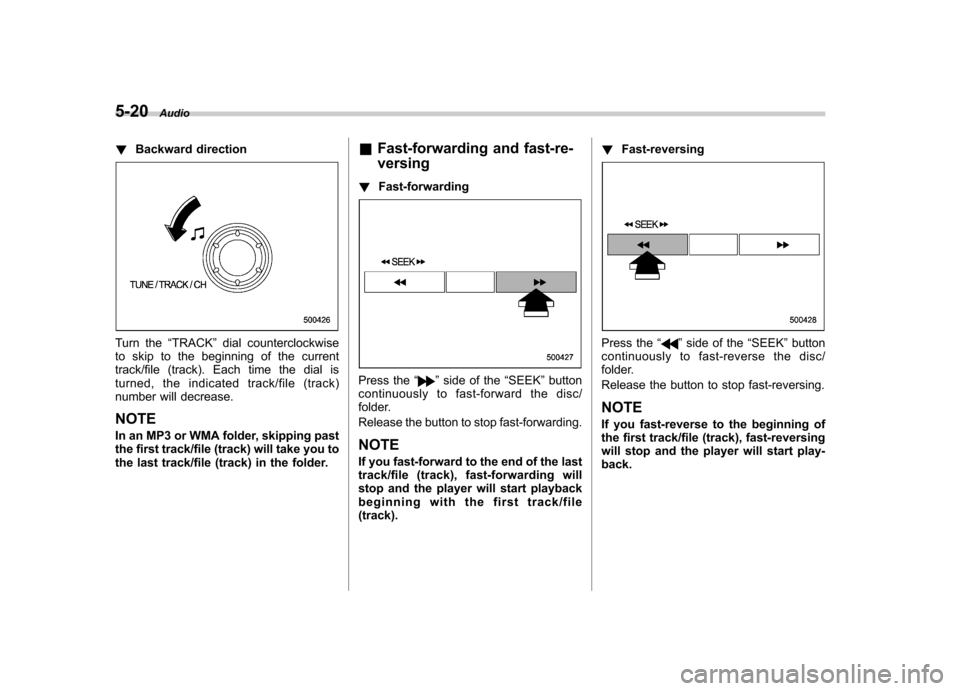
! Backward direction
Turn the “TRACK ”dial counterclockwise
to skip to the beginning of the current
track/file (track). Each time the dial is
turned, the indicated track/file (track)
number will decrease.
NOTE
In an MP3 or WMA folder, skipping past
the first track/file (track) will take you to
the last track/file (track) in the folder. &
Fast-forwarding and fast-re- versing
! Fast-forwarding
Press the “”side of the “SEEK ”button
continuously to fast-forward the disc/
folder.
Release the button to stop fast-forwarding.
NOTE
If you fast-forward to the end of the last
track/file (track), fast-forwarding will
stop and the player will start playback
beginning with the first track/file(track). !
Fast-reversing
Press the “”side of the “SEEK ”button
continuously to fast- reverse the disc/
folder.
Release the button to stop fast-reversing. NOTE
If you fast-reverse to the beginning of
the first track/file (track), fast-reversing
will stop and the player will start play-back.
Page 200 of 384
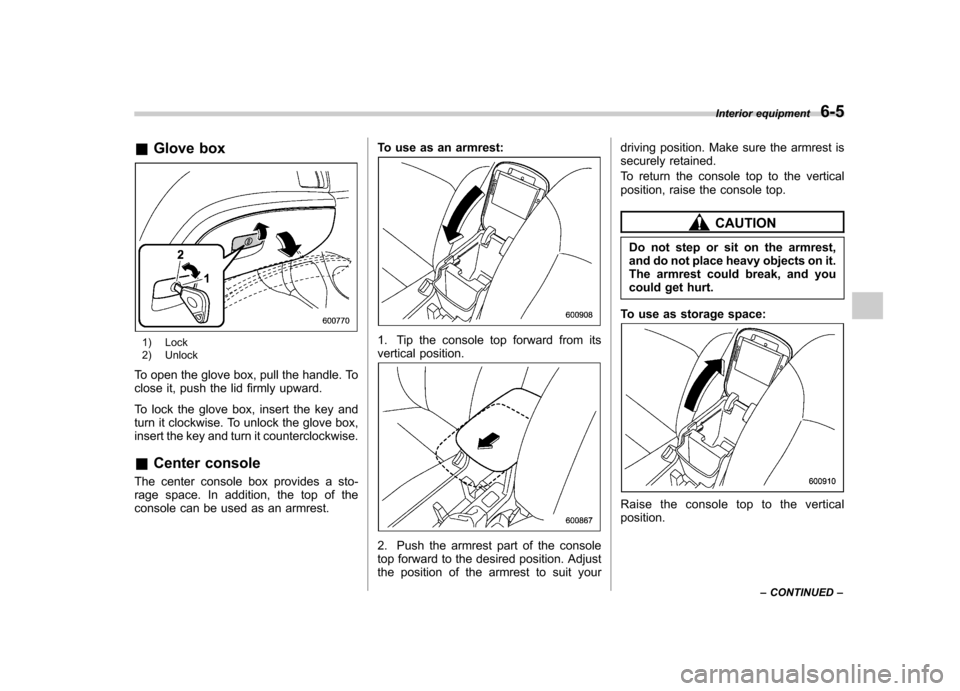
&Glove box
1) Lock
2) Unlock
To open the glove box, pull the handle. To
close it, push the lid firmly upward.
To lock the glove box, insert the key and
turn it clockwise. To unlock the glove box,
insert the key and turn it counterclockwise. & Center console
The center console box provides a sto-
rage space. In addition, the top of the
console can be used as an armrest. To use as an armrest:1. Tip the console top forward from its
vertical position.
2. Push the armrest part of the console
top forward to the desired position. Adjust
the position of the armrest to suit yourdriving position. Make sure the armrest is
securely retained.
To return the console top to the vertical
position, raise the console top.
CAUTION
Do not step or sit on the armrest,
and do not place heavy objects on it.
The armrest could break, and you
could get hurt.
To use as storage space:
Raise the console top to the vertical position. Interior equipment
6-5
– CONTINUED –
Page 213 of 384
7-4Starting and operating
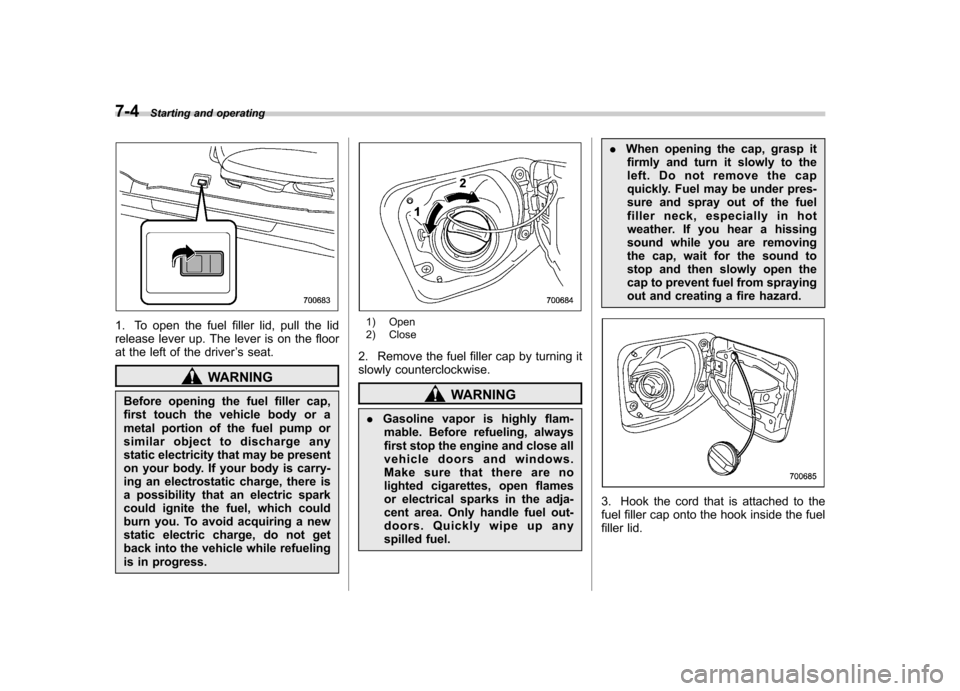
1. To open the fuel filler lid, pull the lid
release lever up. The lever is on the floor
at the left of the driver ’s seat.
WARNING
Before opening the fuel filler cap,
first touch the vehicle body or a
metal portion of the fuel pump or
similar object to discharge any
static electricity that may be present
on your body. If your body is carry-
ing an electrostatic charge, there is
a possibility that an electric spark
could ignite the fuel, which could
burn you. To avoid acquiring a new
static electric charge, do not get
back into the vehicle while refueling
is in progress.
1) Open
2) Close
2. Remove the fuel filler cap by turning it
slowly counterclockwise.
WARNING
. Gasoline vapor is highly flam-
mable. Before refueling, always
first stop the engine and close all
vehicle doors and windows.
Make sure that there are no
lighted cigarettes, open flames
or electrical sparks in the adja-
cent area. Only handle fuel out-
doors. Quickly wipe up any
spilled fuel. .
When opening the cap, grasp it
firmly and turn it slowly to the
left. Do not remove the cap
quickly. Fuel may be under pres-
sure and spray out of the fuel
filler neck, especially in hot
weather. If you hear a hissing
sound while you are removing
the cap, wait for the sound to
stop and then slowly open the
cap to prevent fuel from spraying
out and creating a fire hazard.
3. Hook the cord that is attached to the
fuel filler cap onto the hook inside the fuel
filler lid.
Page 214 of 384
WARNING
. When refueling, insert the fuel
nozzle securely into the fuel filler
pipe. If the nozzle is lifted or not
fully inserted, its automatic stop-
ping mechanism may not func-
tion, causing fuel to overflow the
tank and creating a fire hazard.
. Stop refueling when the auto-
matic stop mechanism on the
fuel nozzle activates. If you con-
tinue to add fuel, temperature
changes or other conditions
may cause fuel to overflow from
the tank and create a fire hazard.
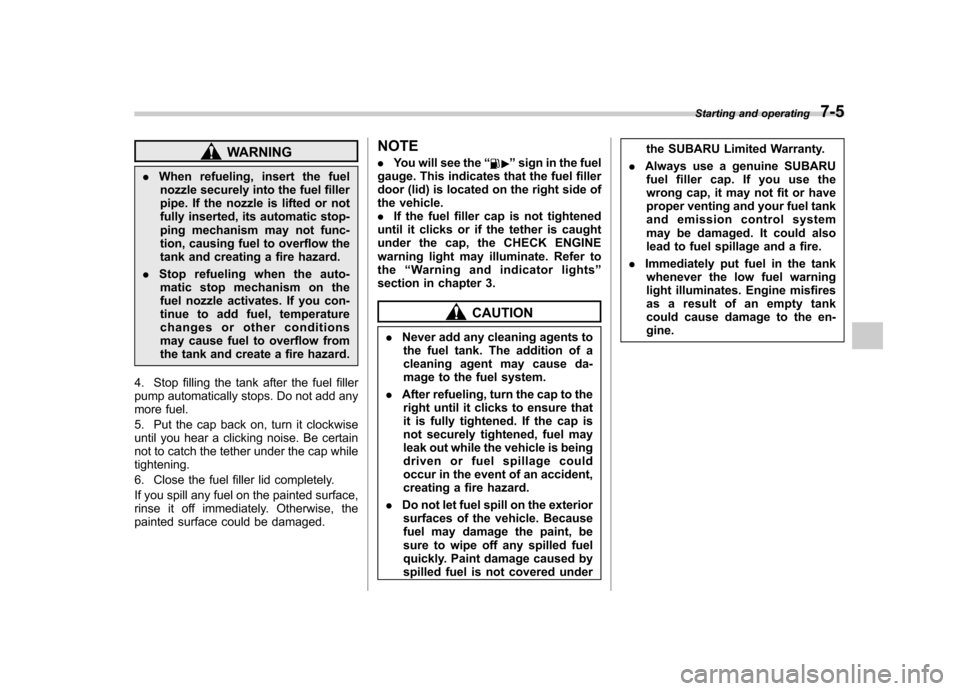
4. Stop filling the tank after the fuel filler
pump automatically stops. Do not add any
more fuel.
5. Put the cap back on, turn it clockwise
until you hear a clicking noise. Be certain
not to catch the tether under the cap whiletightening.
6. Close the fuel filler lid completely.
If you spill any fuel on the painted surface,
rinse it off immediately. Otherwise, the
painted surface could be damaged. NOTE .
You will see the “”sign in the fuel
gauge. This indicates that the fuel filler
door (lid) is located on the right side of
the vehicle.. If the fuel filler cap is not tightened
until it clicks or if the tether is caught
under the cap, the CHECK ENGINE
warning light may illuminate. Refer tothe “Warning and indicator lights ”
section in chapter 3.
CAUTION
. Never add any cleaning agents to
the fuel tank. The addition of a
cleaning agent may cause da-
mage to the fuel system.
. After refueling, turn the cap to the
right until it clicks to ensure that
it is fully tightened. If the cap is
not securely tightened, fuel may
leak out while the vehicle is being
driven or fuel spillage could
occur in the event of an accident,
creating a fire hazard.
. Do not let fuel spill on the exterior
surfaces of the vehicle. Because
fuel may damage the paint, be
sure to wipe off any spilled fuel
quickly. Paint damage caused by
spilled fuel is not covered under the SUBARU Limited Warranty.
. Always use a genuine SUBARU
fuel filler cap. If you use the
wrong cap, it may not fit or have
proper venting and your fuel tank
and emission control system
may be damaged. It could also
lead to fuel spillage and a fire.
. Immediately put fuel in the tank
whenever the low fuel warning
light illuminates. Engine misfires
as a result of an empty tank
could cause damage to the en-gine. Starting and operating
7-5
Page 277 of 384
9-6In case of emergency
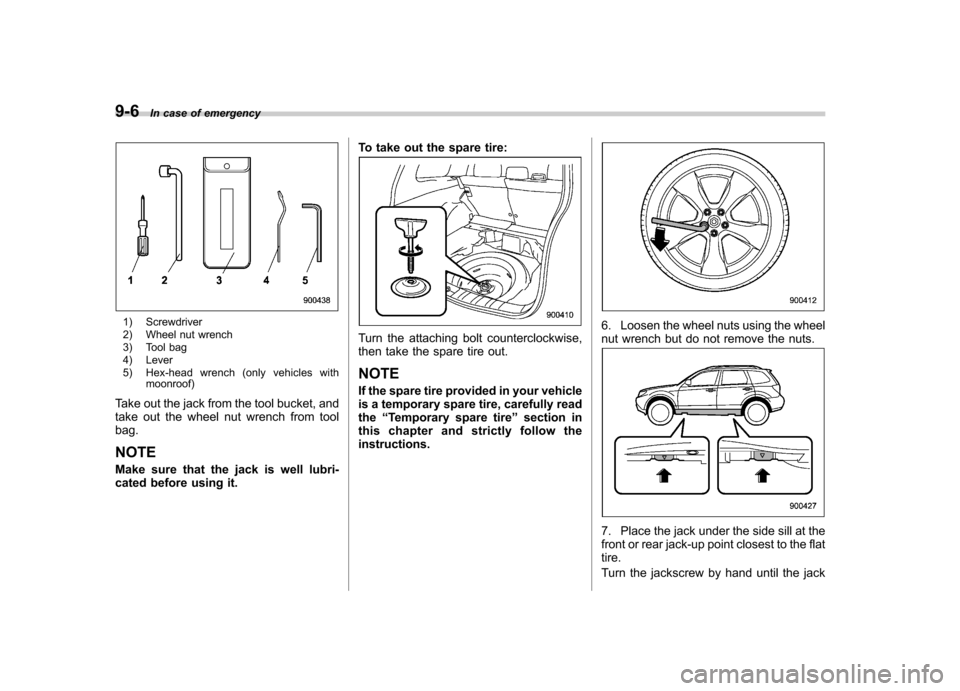
1) Screwdriver
2) Wheel nut wrench
3) Tool bag
4) Lever
5) Hex-head wrench (only vehicles with
moonroof)
Take out the jack from the tool bucket, and
take out the wheel nut wrench from tool bag. NOTE
Make sure that the jack is well lubri-
cated before using it. To take out the spare tire:
Turn the attaching bolt counterclockwise,
then take the spare tire out. NOTE
If the spare tire provided in your vehicle
is a temporary spare tire, carefully readthe
“Temporary spare tire ”section in
this chapter and strictly follow the instructions.6. Loosen the wheel nuts using the wheel
nut wrench but do not remove the nuts.
7. Place the jack under the side sill at the
front or rear jack-up point closest to the flattire.
Turn the jackscrew by hand until the jack
Page 278 of 384
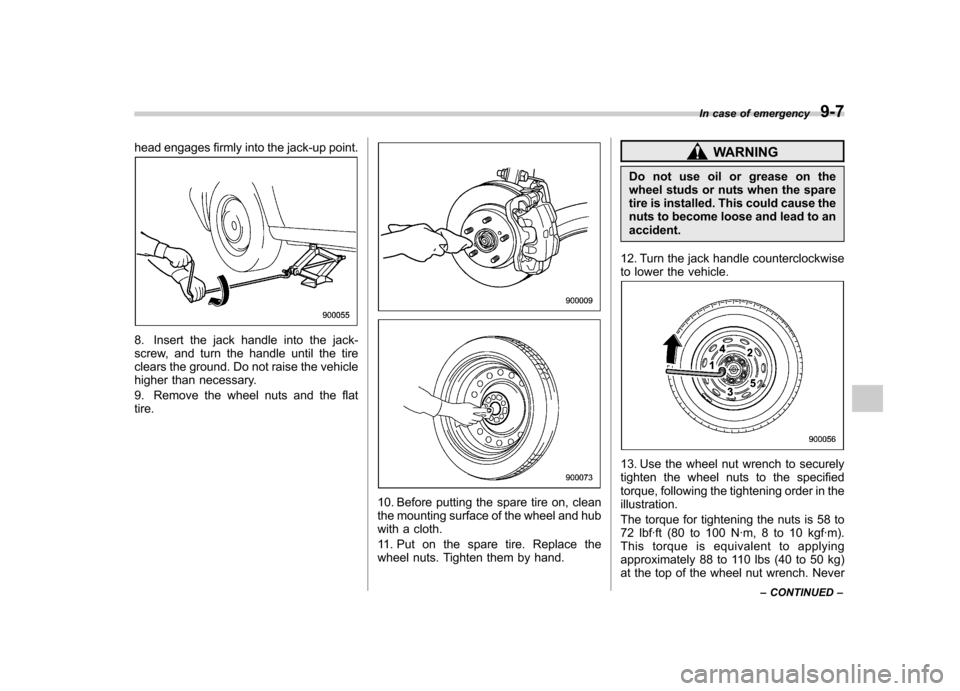
head engages firmly into the jack-up point.
8. Insert the jack handle into the jack-
screw, and turn the handle until the tire
clears the ground. Do not raise the vehicle
higher than necessary.
9. Remove the wheel nuts and the flat tire.
10. Before putting the spare tire on, clean
the mounting surface of the wheel and hub
with a cloth.
11. Put on the spare tire. Replace the
wheel nuts. Tighten them by hand.
WARNING
Do not use oil or grease on the
wheel studs or nuts when the spare
tire is installed. This could cause the
nuts to become loose and lead to anaccident.
12. Turn the jack handle counterclockwise
to lower the vehicle.
13. Use the wheel nut wrench to securely
tighten the wheel nuts to the specified
torque, following the tightening order in theillustration.
The torque for tightening the nuts is 58 to
72 lbf·ft (80 to 100 N·m, 8 to 10 kgf·m).
This torque is equivalent to applying
approximately 88 to 110 lbs (40 to 50 kg)
at the top of the wheel nut wrench. Never In case of emergency
9-7
– CONTINUED –
Page 282 of 384
Make sure that the cables are not near
any moving parts and that the cable
clamps are not in contact with any othermetal.
5. Start the engine of the vehicle with the
booster battery and run it at moderate
speed. Then start the engine of the vehicle
that has the discharged battery.
6. When finished, carefully disconnect
the cables in exactly the reverse order.Engine overheating
WARNING
Never attempt to remove the radia-
tor cap until the engine has been
shut off and has fully cooled down.
When the engine is hot, the coolant
is under pressure. Removing the
cap while the engine is still hot
could release a spray of boiling hot
coolant, which could burn you very
seriously.
If the engine overheats, safely pull off the
road and stop the vehicle in a safe place. & If steam is coming from the
engine compartment
Turn off the engine and get everyone
away from the vehicle until it cools down. & If no steam is coming from
the engine compartment
1. Keep the engine running at idling speed.
2. Open the hood to ventilate the engine compartment.
Confirm that the cooling fan is turning. If
the fan is not turning, immediately turn off the engine and contact your authorized
dealer for repair.
3. After the engine coolant temperature
has dropped, turn off the engine.
If the coolant temperature high warning
light illuminates, turn off the engine.
4. After the engine has fully cooled down,
check the coolant level in the reservetank.
If the coolant level is below the
“LOW ”
mark, add coolant up to the “FULL ”mark.
5. If there is no coolant in the reserve
tank, add coolant to the reserve tank.
Then remove the radiator cap and fill the
radiator with coolant.
If you remove the radiator cap from a hot
radiator, first wrap a thick cloth around the
radiator cap, then turn the cap counter-
clockwise slowly without pressing down
until it stops. Release the pressure from
the radiator. After the pressure has been
fully released, remove the cap by pressing
down and turning it. In case of emergency
9-11
Page 288 of 384
Moonroof–if the moonroof
cannot be closed
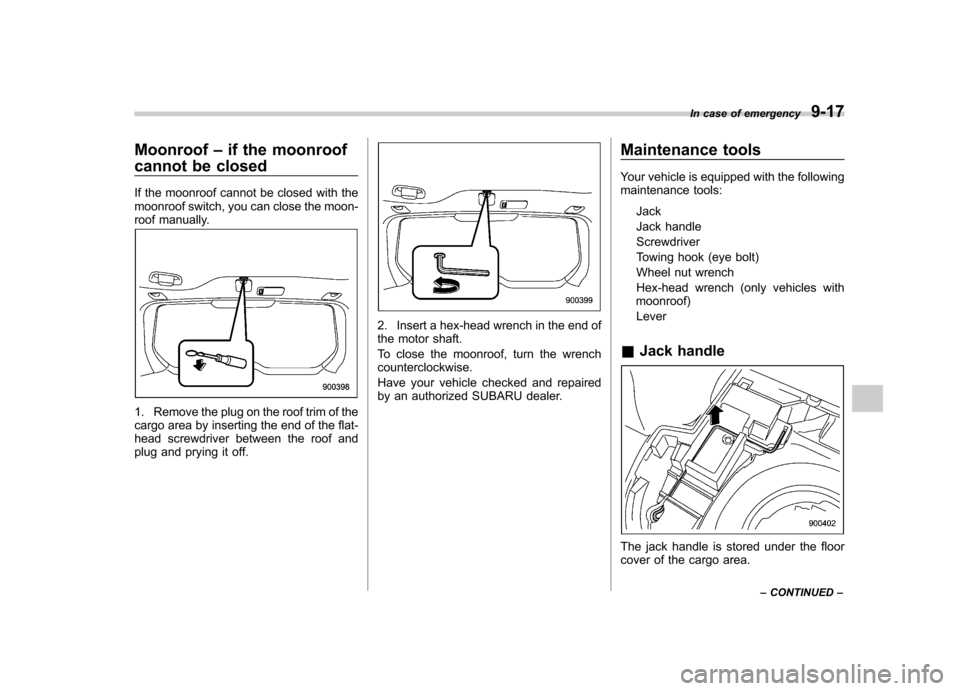
If the moonroof cannot be closed with the
moonroof switch, you can close the moon-
roof manually.
1. Remove the plug on the roof trim of the
cargo area by inserting the end of the flat-
head screwdriver between the roof and
plug and prying it off.
2. Insert a hex-head wrench in the end of
the motor shaft.
To close the moonroof, turn the wrench counterclockwise.
Have your vehicle checked and repaired
by an authorized SUBARU dealer. Maintenance tools
Your vehicle is equipped with the following
maintenance tools:
Jack
Jack handleScrewdriver
Towing hook (eye bolt)
Wheel nut wrench
Hex-head wrench (only vehicles with
moonroof)
Lever
& Jack handle
The jack handle is stored under the floor
cover of the cargo area. In case of emergency
9-17
– CONTINUED –