change time SUBARU FORESTER 2009 SH / 3.G Owners Manual
[x] Cancel search | Manufacturer: SUBARU, Model Year: 2009, Model line: FORESTER, Model: SUBARU FORESTER 2009 SH / 3.GPages: 384, PDF Size: 13.91 MB
Page 1 of 384

Foreword
Congratulations on choosing a SUBARU vehicle. This Owner’s
Manual has all the information necessary to keep your SUBARU in
excellent condition and to properly maintain the emission control
system for minimizing emission pollutants. We urge you to read
this manual carefully so that you may understand your vehicle and
its operation. For information not found in this Owner ’s Manual,
such as details concerning repairs or adjustments, please contact
the dealer from whom you purchased your SUBARU or the nearest
SUBARU dealer.
The information, specifications and illustrations found in this
manual are those in effect at the time of printing. FUJI HEAVY
INDUSTRIES LTD. reserves the right to change specifications and
designs at any time without prior notice and without incurring any
obligation to make the same or similar changes on vehicles
previously sold. This Owner ’s Manual applies to all models and
covers all equipment, including factory installed options. Some
explanations, therefore may be for equipment not installed in yourvehicle.
Please leave this manual in the vehicle at the time of resale. The
next owner will need the information found herein.
FUJI HEAVY INDUSTRIES LTD., TOKYO, JAPAN
is a registered trademark of FUJI HEAVY INDUSTRIES LTD.
* C
copyright 2008 FUJI HEAVY INDUSTRIES LTD.
Page 18 of 384
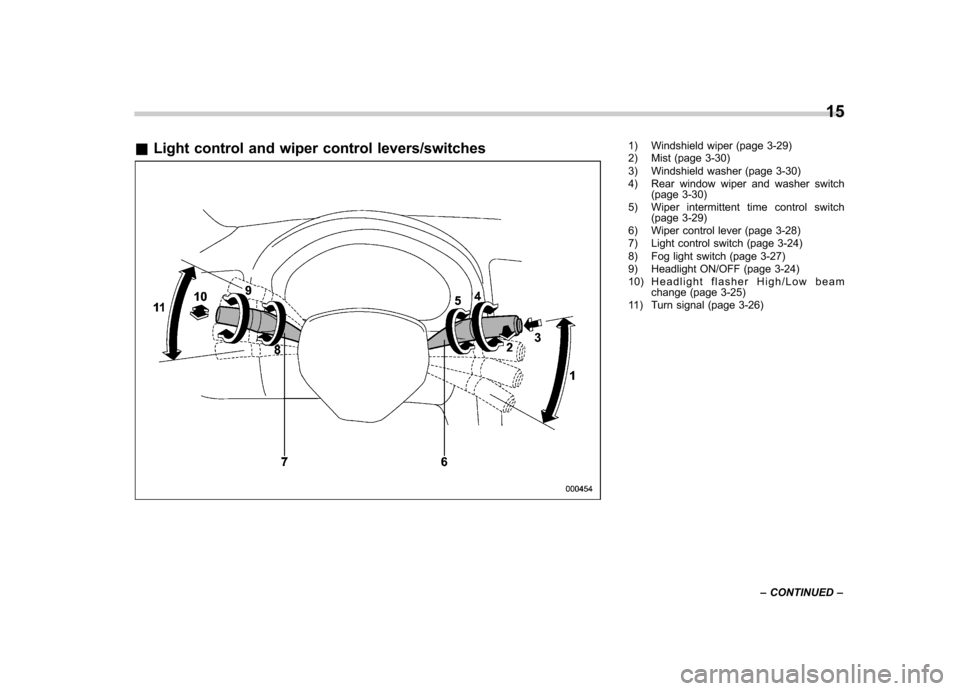
&Light control and wiper control levers/switches1) Windshield wiper (page 3-29)
2) Mist (page 3-30)
3) Windshield washer (page 3-30)
4) Rear window wiper and washer switch
(page 3-30)
5) Wiper intermittent time control switch (page 3-29)
6) Wiper control lever (page 3-28)
7) Light control switch (page 3-24)
8) Fog light switch (page 3-27)
9) Headlight ON/OFF (page 3-24)
10) Headlight flasher High/Low beam change (page 3-25)
11) Turn signal (page 3-26) 15
– CONTINUED –
Page 25 of 384

22
Function settings
A SUBARU dealer can change the settings of the functions shown in the following table to meet your personal requirements. Contact
the nearest SUBARU dealer for details. If your vehicle is equipped with a navigation system, the settings for some of these functions
can be changed using the monitor. For details, please refer to the Owner’s Manual supplement for the monitor.
Item Function Possible settings Default setting Page
Alarm system Alarm system Operation/Non-operation Operation 2-14 Monitoring start delay time (after closure
of doors) 0 second/30 seconds 30 seconds 2-15
Impact sensor operation (only vehicles
with shock sensors (dealer option)) Operation/Non-operation Non-operation 2-18
Passive arming Operation/Non-operation Non-operation 2-16
Dome light illumination ON/OFF OFF 2-14
Remote keyless entry sys- tem Hazard warning flasher Operation/Non-operation Operation 2-7
Audible signal Operation/Non-operation Operation 2-9
Key lock-in prevention Key lock-in prevention Operation/Non-operation Operation 2-6
Remote engine start system
(dealer option) Horn chirp confirmation ON/OFF ON 7-11
Rear window defogger Rear window defogger Operation for 15 minutes/Con- tinuous operationOperation for 15 minutes 3-31
Windshield wiper deicer (if
equipped) Windshield wiper deicer Operation for 15 minutes/Con-
tinuous operationOperation for 15 minutes 3-32
Map light/Dome light Operation in conjunction with remote keyless entry system OFF/Short/Normal/Long Normal 6-2
Battery drainage preventionfunction Battery drainage prevention function Operation/Non-operation Operation 2-5
Seatbelt warning Sounds a chime while driving Operation/Non-operation Operation 1-12
Page 44 of 384
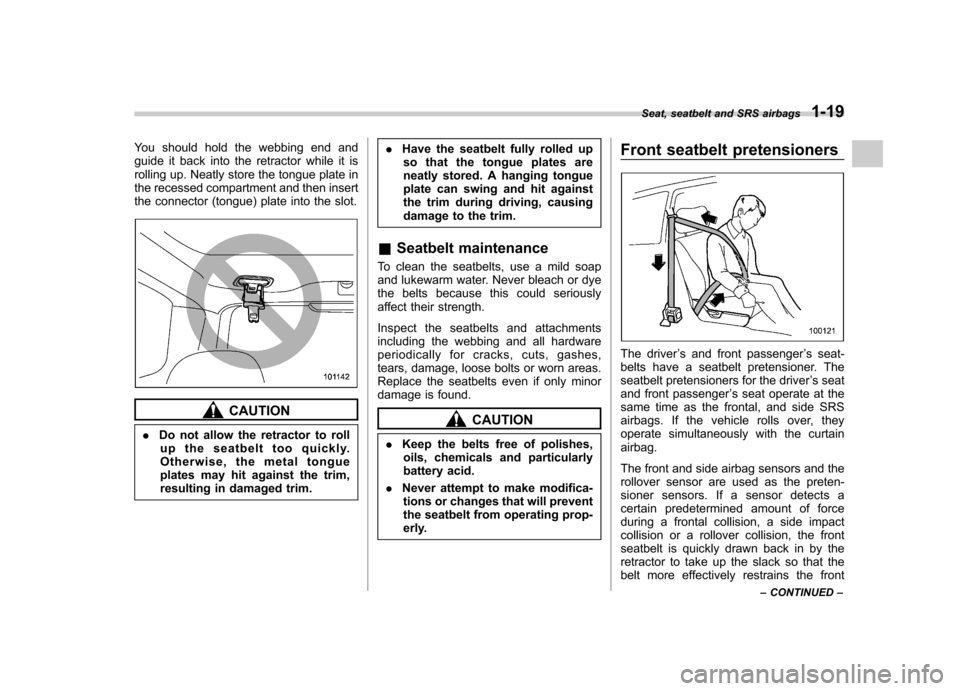
You should hold the webbing end and
guide it back into the retractor while it is
rolling up. Neatly store the tongue plate in
the recessed compartment and then insert
the connector (tongue) plate into the slot.
CAUTION
. Do not allow the retractor to roll
up the seatbelt too quickly.
Otherwise, the metal tongue
plates may hit against the trim,
resulting in damaged trim. .
Have the seatbelt fully rolled up
so that the tongue plates are
neatly stored. A hanging tongue
plate can swing and hit against
the trim during driving, causing
damage to the trim.
& Seatbelt maintenance
To clean the seatbelts, use a mild soap
and lukewarm water. Never bleach or dye
the belts because this could seriously
affect their strength.
Inspect the seatbelts and attachments
including the webbing and all hardware
periodically for cracks, cuts, gashes,
tears, damage, loose bolts or worn areas.
Replace the seatbelts even if only minor
damage is found.CAUTION
. Keep the belts free of polishes,
oils, chemicals and particularly
battery acid.
. Never attempt to make modifica-
tions or changes that will prevent
the seatbelt from operating prop-
erly. Front seatbelt pretensioners
The driver
’s and front passenger ’s seat-
belts have a seatbelt pretensioner. The
seatbelt pretensioners for the driver ’s seat
and front passenger ’s seat operate at the
same time as the frontal, and side SRS
airbags. If the vehicle rolls over, they
operate simultaneously with the curtainairbag.
The front and side airbag sensors and the
rollover sensor are used as the preten-
sioner sensors. If a sensor detects a
certain predetermined amount of force
during a frontal collision, a side impact
collision or a rollover collision, the front
seatbelt is quickly drawn back in by the
retractor to take up the slack so that the
belt more effectively restrains the front Seat, seatbelt and SRS airbags
1-19
– CONTINUED –
Page 51 of 384
1-26Seat, seatbelt and SRS airbags
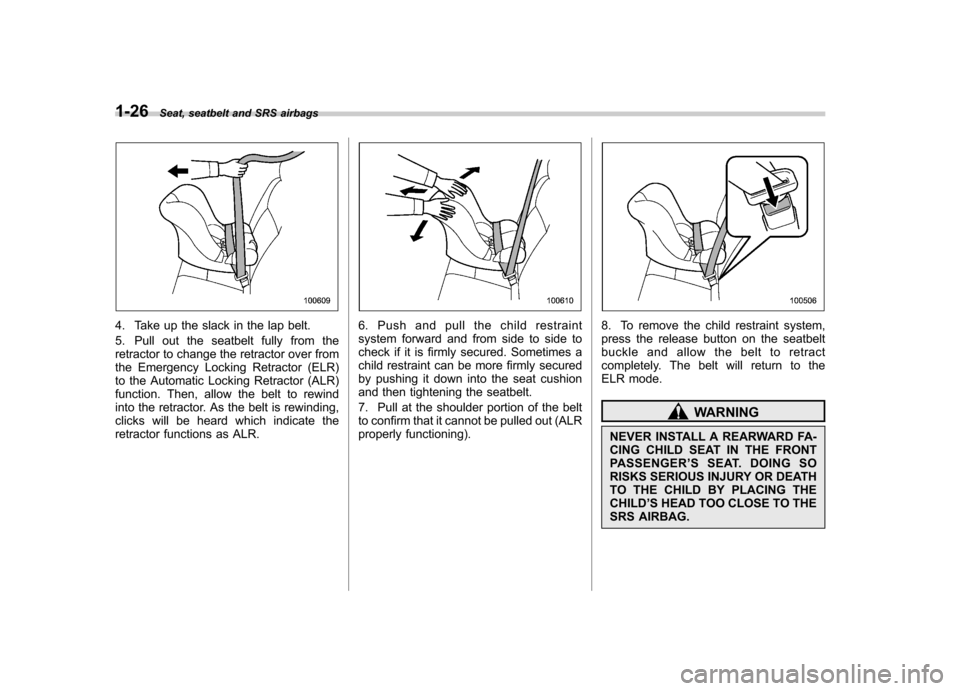
4. Take up the slack in the lap belt.
5. Pull out the seatbelt fully from the
retractor to change the retractor over from
the Emergency Locking Retractor (ELR)
to the Automatic Locking Retractor (ALR)
function. Then, allow the belt to rewind
into the retractor. As the belt is rewinding,
clicks will be heard which indicate the
retractor functions as ALR.6. Push and pull the child restraint
system forward and from side to side to
check if it is firmly secured. Sometimes a
child restraint can be more firmly secured
by pushing it down into the seat cushion
and then tightening the seatbelt.
7. Pull at the shoulder portion of the belt
to confirm that it cannot be pulled out (ALR
properly functioning).8. To remove the child restraint system,
press the release button on the seatbelt
buckle and allow the belt to retract
completely. The belt will return to the
ELR mode.
WARNING
NEVER INSTALL A REARWARD FA-
CING CHILD SEAT IN THE FRONT
PASSENGER ’SSEAT.DOINGSO
RISKS SERIOUS INJURY OR DEATH
TO THE CHILD BY PLACING THECHILD ’S HEAD TOO CLOSE TO THE
SRS AIRBAG.
Page 52 of 384
NOTE
When the child restraint system is no
longer in use, remove it and restore the
ELR function of the retractor. That
function is restored by allowing the
seatbelt to retract fully. !Installing forward facing child re- straint
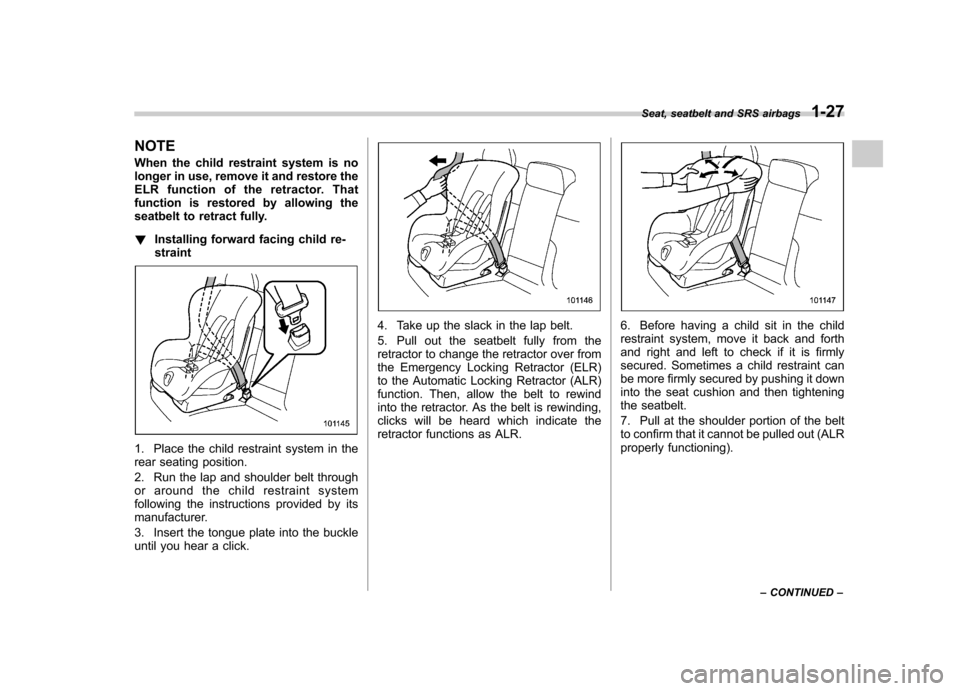
1. Place the child restraint system in the
rear seating position.
2. Run the lap and shoulder belt through
or around the child restraint system
following the instructions provided by its
manufacturer.
3. Insert the tongue plate into the buckle
until you hear a click.
4. Take up the slack in the lap belt.
5. Pull out the seatbelt fully from the
retractor to change the retractor over from
the Emergency Locking Retractor (ELR)
to the Automatic Locking Retractor (ALR)
function. Then, allow the belt to rewind
into the retractor. As the belt is rewinding,
clicks will be heard which indicate the
retractor functions as ALR.6. Before having a child sit in the child
restraint system, move it back and forth
and right and left to check if it is firmly
secured. Sometimes a child restraint can
be more firmly secured by pushing it down
into the seat cushion and then tightening
the seatbelt.
7. Pull at the shoulder portion of the belt
to confirm that it cannot be pulled out (ALR
properly functioning). Seat, seatbelt and SRS airbags
1-27
– CONTINUED –
Page 92 of 384
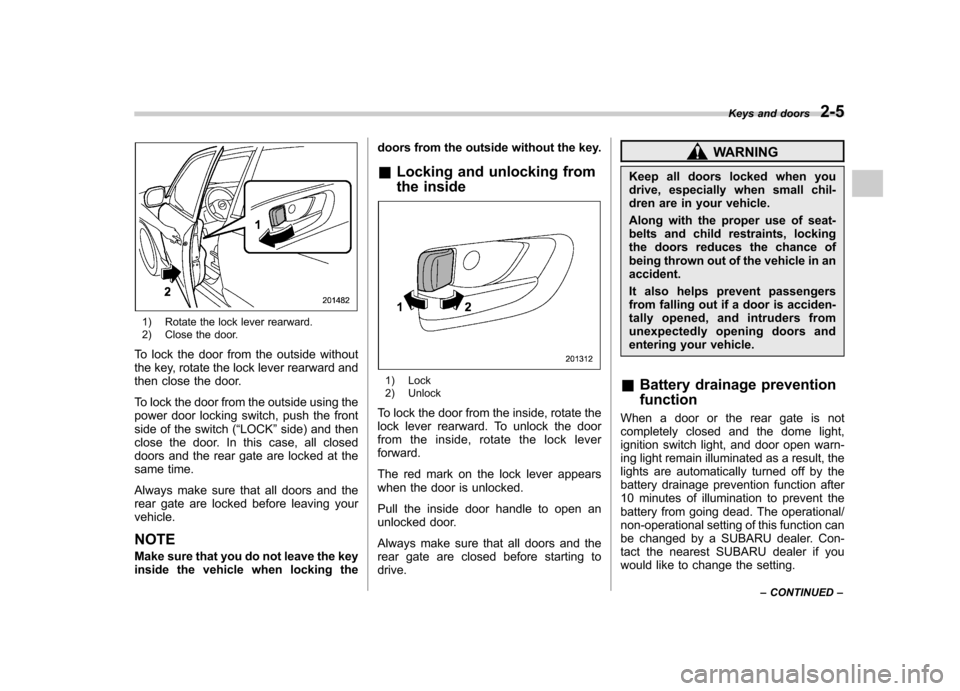
1) Rotate the lock lever rearward.
2) Close the door.
To lock the door from the outside without
the key, rotate the lock lever rearward and
then close the door.
To lock the door from the outside using the
power door locking switch, push the front
side of the switch ( “LOCK ”side) and then
close the door. In this case, all closed
doors and the rear gate are locked at the
same time.
Always make sure that all doors and the
rear gate are locked before leaving yourvehicle. NOTE
Make sure that you do not leave the key
inside the vehicle when locking the doors from the outside without the key.
& Locking and unlocking from
the inside
1) Lock
2) Unlock
To lock the door from the inside, rotate the
lock lever rearward. To unlock the door
from the inside, rotate the lock leverforward.
The red mark on the lock lever appears
when the door is unlocked.
Pull the inside door handle to open an
unlocked door.
Always make sure that all doors and the
rear gate are closed before starting todrive.
WARNING
Keep all doors locked when you
drive, especially when small chil-
dren are in your vehicle.
Along with the proper use of seat-
belts and child restraints, locking
the doors reduces the chance of
being thrown out of the vehicle in anaccident.
It also helps prevent passengers
from falling out if a door is acciden-
tally opened, and intruders from
unexpectedly opening doors and
entering your vehicle.
& Battery drainage prevention function
When a door or the rear gate is not
completely closed and the dome light,
ignition switch light, and door open warn-
ing light remain illuminated as a result, the
lights are automatically turned off by the
battery drainage prevention function after
10 minutes of illumination to prevent the
battery from going dead. The operational/
non-operational setting of this function can
be changed by a SUBARU dealer. Con-
tact the nearest SUBARU dealer if you
would like to change the setting. Keys and doors
2-5
– CONTINUED –
Page 96 of 384

&Unlocking the rear gate
Pressing the “”button opens the rear
gate.
An electronic chirp will sound twice and
the turn signal lights will flash twice. & Illuminated entry
The interior (dome) light and the map light
will illuminate when the “
”button is
pressed. These lights stay illuminated for
approximately 30 seconds if any of the
doors or the rear gate is not opened.
If the “
”button is pressed before 30
seconds have elapsed, these lights will
turn off. The dome light must be set to the
DOOR position in order for this function
to operate.
A SUBARU dealer can change the illumi- nation period setting of the interior light in
accordance with your preference. Contact
the nearest SUBARU dealer for details.
& Vehicle finder function
Use this function to find your vehicle
parked among many vehicles in a large
parking lot. Provided you are within 30 feet
(10 meters) of the vehicle, pressing the “
”
button three times in a 5-second period
will cause your vehicle ’s horn to sound
once and its turn signal lights to flash threetimes. NOTE
If the interval between presses is too
short when you press the “
”button
three times, the system may not re-
spond to the signals from the remote
transmitter. &
Sounding a panic alarm
A“PANIC ”button is located on the back of
the transmitter.
To activate the alarm, press the “PANIC ”
button once.
The horn will sound and the turn signal
lights will flash.
To deactivate the panic alarm, press any
button on the remote transmitter. Unless a
button on the remote is pressed, the alarm
will be deactivated after approximately 30seconds. & Selecting audible signal op- eration
Using an electronic chirp, the system will
give you an audible signal when the doors
lock and unlock. If desired, you may turn Keys and doors
2-9
– CONTINUED –
Page 101 of 384
2-14Keys and doors
Alarm system
The alarm system helps to protect your
vehicle and valuables from theft. The horn
sounds, the turn signal lights flash, and
the dome light and the map light illuminate
(only when the dome light switch is in the“DOOR ”position) if someone attempts to
break into your vehicle. The starter motor
is also interrupted to prevent starting the
vehicle without a key.
The system can be armed and disarmed
with the remote transmitter.
The system does not operate when the
key is inserted into the ignition switch.
Your vehicle ’s alarm system has been set
for activation at the time of shipment from
the factory. You can set the system for
deactivation yourself or have it done by
your SUBARU dealer. & System operation
The alarm system will give the following
alarms when triggered: . The vehicle ’s horn will sound, the turn
signal lights will flash for 30 seconds and
the dome light illuminates (only when the
dome light switch is in the “DOOR ”
position). . If any door or the rear gate remains open after the 30-second period, the horn
will continue to sound for a maximum of 3
minutes. If the door or the rear gate is
closed while the horn is sounding, the
horn will stop sounding with a delay of up
to 30 seconds.
The alarm is triggered by: .
Opening a door, the rear gate
. Physical impact to the vehicle, such as
forced entry (only vehicles with shock
sensors (dealer option))
NOTE
The alarm system can be set to trigger
illumination of the dome light. The
dome light notification is deactivated
as the factory setting. A SUBARU
dealer can activate the system. Contact
your SUBARU dealer for details. & Activating and deactivating
the alarm system
To change the setting of your vehicle ’s
alarm system for activation or deactiva-
tion, do the following.
1. Disarm the alarm system (refer to “ Disarming the system ”in this section).
2. Sit in the driver ’s seat and shut all
doors and the rear gate.
3. Turn the ignition switch to the “ON ” position.
4. Hold down the UNLOCK side of the driver
’s power door locking switch, open
the driver ’s door within the following 1
second, and wait 10 seconds without
releasing the switch. The setting will then
be changed as follows:
If the system was previously activated:
The odometer/trip meter screen displays “ AL oF ”and the horn sounds twice,
indicating that the system is now deacti-vated.
If the system was previously deacti- vated:
The odometer/trip meter screen displays “ AL on ”and the horn sounds once,
indicating that the system is now acti-vated.
NOTE
You may have the above setting
change done by your SUBARU dealer. & If you have accidentally trig-
gered the alarm system
! To stop the alarm
Do any of the following operations: . Press any button on the remote trans-
mitter.. Turn the ignition switch to the “ON ”
Page 103 of 384
2-16Keys and doors
flashing rapidly. After rapid flashing for 30
seconds (standby time), the indicator
lights will then flash slowly (twice approxi-
mately every 2 seconds), indicating that
the system has been armed for surveil-lance. NOTE . The system can be armed even if the
engine hood, the windows and/or
moonroof (if equipped) are open. Al-
ways make sure that they are fully
closed before arming the system.. The 30-second standby time can be
eliminated if you prefer. Have it per-
formed by your SUBARU dealer.. The system is in the standby mode
for a 30-second period after locking the
doors with the remote transmitter. The
security indicator light will flash at
short intervals during this period.. If any of the following actions are
done during the standby period, the
system will not switch to the surveil-
lance state.
–Doors are unlocked using the
remote transmitter. – Any door (including the rear
gate) is opened.– Ignition switch is turned to the
“ ON ”position. &
Disarming the system
Briefly press the “
”button (for less than
2 seconds) on the remote transmitter. The driver ’s door will unlock, an electronic
chirp will sound twice, the turn signal
lights will flash twice. The flashing of the
security indicator light will then change
slowly (once approximately every 3 sec-
onds from twice approximately every 2
seconds), indicating that the alarm system
has been disarmed. NOTE
After disarming the alarm system,
briefly press the “
”button a second
time within 5 seconds to unlock all
other doors and the rear gate. ! Emergency disarming
If you cannot disarm the system using the
transmitter (i.e. the transmitter is lost,
broken or the transmitter battery is too
weak), you can disarm the system without
using the transmitter.
The system can be disarmed as follows. . Turn the ignition switch from the
“ LOCK ”to the “ON ”position with a
registered key.
& Valet mode
When you choose the valet mode, the
alarm system does not operate. In valet mode, the remote transmitter is used only
for locking and unlocking the doors and
rear gate and panic activation.
To enter the valet mode, change the
setting of your vehicle
’s alarm system for
deactivation mode. Refer to “Activating
and deactivating the alarm system ”in this
section. The security indicator light will
continue to flash once every 3 seconds
indicating that the system is in the valetmode.
To exit valet mode, change the setting of
your vehicle ’s alarm system for activation
mode. Refer to “Activating and deactivat-
ing the alarm system ”in this section.
& Passive arming
When passive arming mode has been
programmed by the dealer, arming of the
system is automatically accomplished
without using the remote transmitter. Note
that in this mode, DOORS MUST BE
MANUALLY LOCKED. ! To enter the passive mode
If you wish to program the passive arming
mode, have it done by your SUBARU
dealer.