lock SUBARU FORESTER 2011 SH / 3.G Manual Online
[x] Cancel search | Manufacturer: SUBARU, Model Year: 2011, Model line: FORESTER, Model: SUBARU FORESTER 2011 SH / 3.GPages: 446, PDF Size: 15.93 MB
Page 216 of 446

.The “ALBUM RDM ”indication refers
to the shuffle playback of the album. It
sequentially plays back all of the
indexes in the album.. The “SONG RDM ”indication refers
to the shuffle playback in the entireiPod
®. It randomly repeats all of the
indexes in the iPod®.
. When an iPod®is connected, the
files are played back at random by the
shuffle function of the iPod
®. There-
fore, iPod®operation may be different
depending on the model of the con-
nected iPod
®.
. When an audiobook or a podcast is
playing, the mode does not change
even if you press the “RDM ”button for
0.5 second or longer (type C audio)/
briefly (type D audio).
To cancel the random playback mode,
press the “RDM ”button for more than 0.5
second (type C audio)/briefly (type D
audio) and select CANCEL. The “RDM ”
indication will turn off, and the normal
playback mode will resume.
& SCAN (only when connecting
USB storage device)
Scan is operated in the same way a CD is
played. For details, refer to “Scan (type A,
B and C audio) ”F 5-27. NOTE
When an iPod
®is connected, you
cannot select the SCAN mode. & Selecting category (only
when connecting iPod
®)
When the
button is pressed for less
than 1.5 seconds, the iPod®menu is
displayed.
Each time you turn the “TUNE/TRACK/
CH ”dial clockwise, the displayed category
changes in the following sequence. Each
time you turn the dial counterclockwise,
the displayed category changes in the
opposite sequence.
To select the category, press the dial. To
close the iPod®menu, press thebutton for more than 1.5 seconds. To
return to the previous screen, briefly pressthe
button. &
Display selection
Refer to “Display selection (type A, B and
C audio) ”F 5-28.
! Page scroll
Refer to “Page (track/folder title) scroll ”
F 5-28.
& Folder selection (only when
connecting USB storage de- vice)
Refer to “Folder selection ”F 5-28.
NOTE
When an iPod
®is connected, you
cannot select a folder.
& Setting the playing speed
(only when the audiobook is
playing) (type D audio)
Each time you briefly press
(the
“ RPT ”button) while the audiobook is
playing, the playing speed changes in
the following sequence.
Audio 5-37
– CONTINUED –
Page 220 of 446
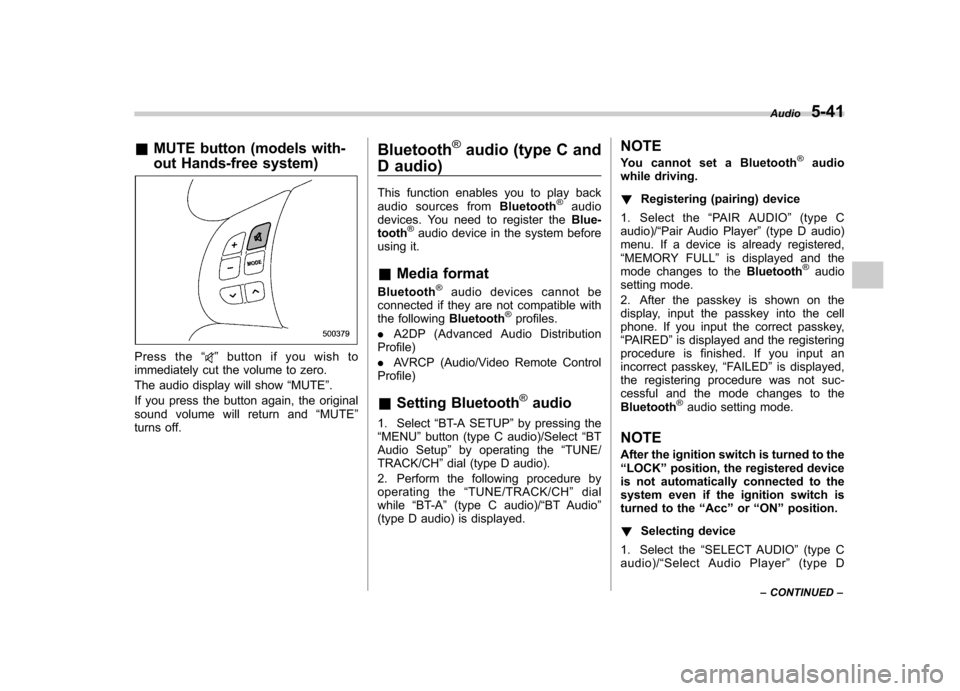
&MUTE button (models with-
out Hands-free system)
Press the “”button if you wish to
immediately cut the volume to zero.
The audio display will show “MUTE ”.
If you press the button again, the original
sound volume will return and “MUTE ”
turns off. Bluetooth
®audio (type C and
D audio)
This function enables you to play back
audio sources from Bluetooth
®audio
devices. You need to register the Blue-
tooth
®audio device in the system before
using it. & Media format
Bluetooth
®audio devices cannot be
connected if they are not compatible with
the following Bluetooth
®profiles.
. A2DP (Advanced Audio Distribution
Profile) . AVRCP (Audio/Video Remote Control
Profile) & Setting Bluetooth
®audio
1. Select “BT-A SETUP ”by pressing the
“ MENU ”button (type C audio)/Select “BT
Audio Setup ”by operating the “TUNE/
TRACK/CH ”dial (type D audio).
2. Perform the following procedure by
operating the “TUNE/TRACK/CH ”dial
while “BT-A ”(type C audio)/ “BT Audio ”
(type D audio) is displayed. NOTE
You cannot set a Bluetooth
®audio
while driving. ! Registering (pairing) device
1. Select the “PAIR AUDIO ”(type C
audio)/ “Pair Audio Player ”(type D audio)
menu. If a device is already registered, “ MEMORY FULL ”is displayed and the
mode changes to the Bluetooth
®audio
setting mode.
2. After the passkey is shown on the
display, input the passkey into the cell
phone. If you input the correct passkey,“ PAIRED ”is displayed and the registering
procedure is finished. If you input an
incorrect passkey, “FAILED ”is displayed,
the registering procedure was not suc-
cessful and the mode changes to theBluetooth
®audio setting mode.
NOTE
After the ignition switch is turned to the “ LOCK ”position, the registered device
is not automatically connected to the
system even if the ignition switch is
turned to the “Acc ”or “ON ”position.
! Selecting device
1. Select the “SELECT AUDIO ”(type C
audio)/ “Select Audio Player ”(type D
Audio
5-41
– CONTINUED –
Page 222 of 446

Hands-free system (if equipped) NOTE .For models with the genuine
SUBARU navigation system, refer to
the Owner ’s Manual supplement for the
navigation system.. When selling your vehicle, make
sure that you initialize the Hands-free
system to prevent personal data from
being improperly accessed.
The Hands-free system operates while the
ignition switch is in the “Acc ”or “ON ”
position. &
Tips for the Hands-free sys- tem
! Bluetooth
®
NOTE
The Bluetooth word mark and logo are
registered tradem arks of Bluetooth
SIG, Inc.
It is possible to connect a cell phone to the
in-vehicle equipment through the Blue-
tooth
®format (wireless) to make a phone
call from the in-vehicle equipment or take
an incoming phone call.
Since the Bluetooth
®format is wireless, a
connection between the in-vehicle equip-
ment and the cell phone can be made
without placing them in close proximity of
each other. The cell phone can be used with it left in the breast pocket or bag. NOTE .
The Hands-free system may not
operate properly under the following conditions.
–The cell phone is turned off.
– The cell phone is not in the
phone call area. – The battery of the cell phone has
run down.– The cell phone is not connected
to the Hands-free system.– The cell phone is behind the seat
or in the glove box.– A metal material covers or
touches the cell phone.
. Depending on the type of cell phone
that is used, the screen on the cell
phone may remain illuminated while
the ignition switch is in the “ON ”
position. If this occurs, turn the illumi-
nation off by adjusting the cell phonesettings. . Depending on the setting of the cell
phone, the dial lock function may be
activated after making a call. Deacti-
vate the automatic dial lock function of
the cell phone before using the Hands-
free system. . Depending on the type of cell phone
that is used, operation and the sound Audio
5-43
– CONTINUED –
Page 223 of 446

5-44Audio
volume may be different from those of
cell phones currently used. .When the ignition switch is turned to
the “LOCK ”position during a call, the
call may be disconnected or continued
on the cell phone depending on the
type of cell phone that is used. Note
that operation of the cell phone may be
necessary if the call is continued on the
cell phone. . Do not speak at the same time as the
other party during a call. If you and the
party speak at the same time, it may be
difficult for the other party to hear your
voice and vice versa. This is normal. . The receiver sound volume should
be set as low as possible. Otherwise,
the party you are calling may notice an
undesirable echo sound. . Speak clearly and loudly.
. Your voice may be difficult to be
heard by the party under the following conditions.
–Driving on a rough road.
– Driving at a high speed.
– Driving with a window open.
– When air from the ventilator
blows directly towards the micro-phone. – When the sound coming from the
ventilator is loud. –
When the cell phone is too close
to the microphone.
. The sound quality may degrade due
to the influence of the cell phone that is
connected to the system or the circum-
stances of the Bluetooth network. . When another Bluetooth
®device is
simultaneously connected, noise may
be heard in the voice coming from the
hands-free phone. ! Corresponding profiles for the cell phone
. HFP (Hands Free Profile): Ver. 1.0
. OPP (Object Push Profile): Ver. 1.1
& Certification for the Hands-
free system
CAUTION
FCC WARNING
Changes or modifications not ex-
pressly approved by the party re-
sponsible for compliance could void
the user ’s authority to operate the
equipment.
NOTE
This device complies with Part 15 of
the FCC Rules and RSS-Gen of IC Rules. Operation is subject to the
following two conditions: (1) this de-
vice may not cause harmful interfer-
ence, and (2) this device must accept
any interference received, including
interference that may cause undesiredoperation. NOTE
This equipment has been tested and
found to comply with the limits for a
Class B digital device, pursuant to Part
15 of the FCC Rules. These limits are
designed to provide reasonable protec-
tion against harmful interference in a
residential installation. This equipment
may cause harmful interference to
radio communications, if it is not
installed and used in accordance with
the instructions. However, there is no
guarantee that interference will not
occur in a particular installation. If this
equipment does cause harmful inter-
ference to radio or television reception,
which can be determined by turning the
equipment off and on, the user is
encouraged to try to correct the inter-
ference by one or more of the followingmeasures. .
Reorient or relocate the receiving
antenna. . Increase the separation between the
Page 227 of 446

5-48Audio
First menu Second menu Third menu Details Page
SETUP SECURITY SET PIN Setting a PIN code 5-54
PHBK LOCK*/
PHONE BOOK LOCK* Locking the phonebook
5-54
PHBK UNLOCK*/
PHONE BOOK UN- LOCK* Unlocking the phonebook
5-54
GO BACK
PHONE SETUP PAIR PHONE Registering a new cell phone 5-46
SELECT PHONE Selecting a cell phone to be used 5-54
CHANGE NAME Changing the registered name of the cell phone 5-54
LIST PHONES Showing the list of the registered cell phones 5-55
SET PASSKEY Changing the pass key 5-55
DELETE Deleting the registered cell phone 5-55
GO BACK
SYSTEM SETUP GUIDANCE VOL/
GUICANCE VOLUME Setting the volume of the voice guidance 5-55
INITIALIZE Initialization 5-55
SEL LANGUAGE/SE-
LECT LANGUAGE Selecting the language (using the Hands-free system) 5-55
GO BACK
GO BACK —
*: If a PIN code is not registered, the menu described in the chart is not available.
Page 228 of 446
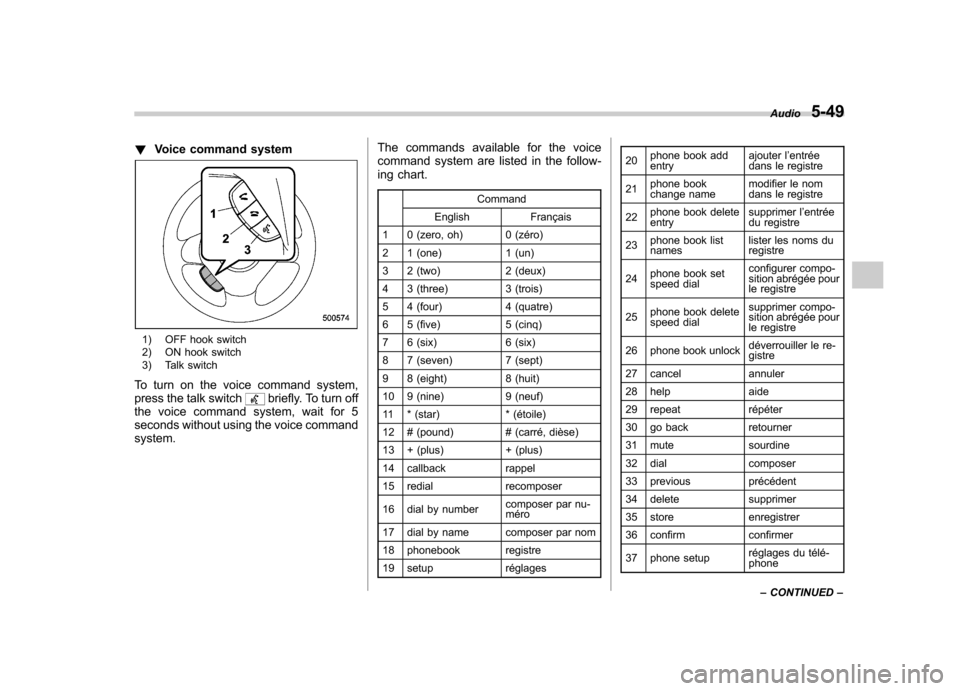
!Voice command system
1) OFF hook switch
2) ON hook switch
3) Talk switch
To turn on the voice command system,
press the talk switch
briefly. To turn off
the voice command system, wait for 5
seconds without using the voice commandsystem. The commands available for the voice
command system are listed in the follow-
ing chart.
Command
English Français
1 0 (zero, oh) 0 (zéro)
2 1 (one) 1 (un)
3 2 (two) 2 (deux)
4 3 (three) 3 (trois)
5 4 (four) 4 (quatre)
6 5 (five) 5 (cinq)
7 6 (six) 6 (six)
8 7 (seven) 7 (sept)
9 8 (eight) 8 (huit)
10 9 (nine) 9 (neuf)
11 * (star) * (étoile)
12 # (pound) # (carré, dièse)
13 + (plus) + (plus)
14 callback rappel
15 redial recomposer
16 dial by number composer par nu- méro
17 dial by name composer par nom
18 phonebook registre
19 setup réglages 20
phone book add entry ajouter l
’entrée
dans le registre
21 phone book
change name modifier le nom
dans le registre
22 phone book deleteentry supprimer l
’entrée
du registre
23 phone book listnames lister les noms duregistre
24 phone book set
speed dial configurer compo-
sition abrégée pour
le registre
25 phone book delete
speed dial supprimer compo-
sition abrégée pour
le registre
26 phone book unlock déverrouiller le re-gistre
27 cancel annuler
28 help aide
29 repeat répéter
30 go back retourner
31 mute sourdine
32 dial composer
33 previous précédent
34 delete supprimer
35 store enregistrer
36 confirm confirmer
37 phone setup réglages du télé- phoneAudio
5-49
– CONTINUED –
Page 229 of 446

5-50Audio
38 security sécurité
39 pair phone jumeler le télé- phone
40 change name modifier le nom
41 select phone sélectionner le tél- éphone
42 list phones lister les télé-phones
43 set pass key configurer le
passe-partout
44 add entry ajouter l ’entrée
45 delete entry supprimer l ’entrée
46 delete speed dial supprimer compo-
sition abrégée
47 by voice vocalement
48 by phone par téléphone
49 call history historique d ’appels
50 set speed dial configurer compo-
sition abrégée
51 incoming entrant
52 outgoing sortant
53 list names lister les noms
54 set PIN configurer NIP
55 phone book lock verrouiller le regis- tre!
Updating phonebook data
NOTE
The maximum number of phonebook
entries that can be registered in the
phonebook is 50. ! Registering by voice
1. Select the “BY VOICE ”menu.
2. Press the talk switch
.
3. Say the phone number to be regis- tered.
4. Select the “CONFIRM ”menu.
5. Select the “RECORD NAME ”menu by
operating the “TUNE/TRACK/CH ”dial or
press the talk switch
.
6. Say the name (voice tag) to be registered.
7. Select the “CONFIRM ”menu. Then
“ STORED ”is displayed and the mode
changes to the registering speed dial
mode. Refer to “Registering speed dial ”
F 5-51.
! Registering by phone
1. Select the “BY PHONE ”menu.
2. Select the “CONFIRM ”menu. Then
“ TRANSFER ”is displayed.
3. Transfer the data from the cell phone.
For details about transferring the data,
refer to the Owner ’s Manual of the cell phone.
4. Select the
“RECORD NAME ”menu by
operating the “TUNE/TRACK/CH ”dial or
press the talk switch
.
5. Say the name (voice tag) to be registered.
6. Select the “CONFIRM ”menu. Then
“ STORED ”is displayed and the mode
changes to the registering speed dial
mode. Refer to “Registering speed dial ”
F 5-51.
! Registering by inputting manually
1. Select the “MANUAL INPUT ”menu by
operating the “TUNE/TRACK/CH ”dial.
2. Input the phone number to be regis-tered.
3. Select the “RECORD NAME ”menu by
operating the “TUNE/TRACK/CH ”dial or
press the talk switch
.
4. Say the name (voice tag) to be registered.
5. Select the “CONFIRM ”menu. Then
“ STORED ”is displayed and the mode
changes to the registering speed dial
mode. Refer to “Registering speed dial ”
F 5-51.
NOTE
While inputting the phone numbers, if
Page 233 of 446

5-54Audio
!Adjustable level of each volume
Volume Range Initial setting
Phone call 0 to 14 7
Voice 0 to 14 7
Voice guidance 0 to 6 3
& Bluetooth
®setting
! Security setting
! Setting PIN code
The PIN code is a 4-digit number and is
used when locking the phonebook.
1. Select the “SET PIN ”menu. Then
“ CURRENT PIN? ”is displayed.
2. Input the current PIN code by operat-
ing the “TUNE/TRACK/CH ”dial or saying
the number.
3. Select the “CONFIRM ”menu.
4. Input the new PIN code by operating the “TUNE/TRACK/CH ”dial or saying the
number.
5. Select the “CONFIRM ”menu.
! Locking the phonebook
1. Select the “PHBK LOCK ”/“ PHONE-
BOOK LOCK ”menu. Then “CURRENT
PIN? ”is displayed.
2. Input the PIN code by operating the “
TUNE/TRACK/CH ”dial or saying the
number.
3. Select the “CONFIRM ”menu. If the
inputted PIN code is correct, “LOCKED ”is
displayed and the phonebook is locked.
NOTE
While the phonebook is locked, if the
operation restricted menu is selected,“ PHBK LOCK ”is displayed.
! Unlocking the phonebook
1. Select the “PHBK UNLOCK ”/“ PHONE-
BOOK UNLOCK ”menu. Then “CUR-
RENT PIN? ”is displayed.
NOTE
If the phonebook is not locked, “UN-
LOCK ”is displayed and the mode
changes to the security mode.
2. Input the PIN code by operating the “ TUNE/TRACK/CH ”dial or saying the
number.
3. Select the “CONFIRM ”menu. If the
inputted PIN code is correct, “UN-
LOCKED ”is displayed and the phone-
book is unlocked. !
Phone setup
! Setting pair phone
Refer to “Preparation for using the Hands-
free system ”F 5-46.
! Selecting phone
To select the registered cell phone for
connecting to the in-vehicle equipment,
perform the following procedure.
1. Select the “SELECT PHONE ”menu. If
no cell phones are registered, “EMPTY ”is
displayed and the mode changes to the “ PHONE SETUP ”mode.
2. Select the cell phone by operating the“ TUNE/TRACK/CH ”dial or saying the
voice tag.
3. Select the “CONFIRM ”menu (only
after saying the voice tag). “SELECTED ”
is displayed, the selected cell phone is
connected to the in-vehicle equipment and
the mode changes to the “PHONE SET-
UP ”mode.
! Changing the voice tag of the cellphone
1. Select the “CHANGE NAME ”menu. If
no cell phones are registered, “EMPTY ”is
displayed and the mode changes to the“ PHONE SETUP ”mode.
2. Select the cell phone by operating the“ TUNE/TRACK/CH ”dial or saying the
Page 235 of 446

5-56Audio
Screensaver (type D audio)
If the following operations are not per-
formed for more than 30 seconds while
the audio is ON, the screensaver will bedisplayed. .Operate any button or dial
. Shift the shift lever/select lever to the
“ R ”position
. A cell phone registered in the Hands-
free system is called
If one of the following operations is
performed, the screensaver turns off and
the operation screen will be displayed. . A cell phone registered in the Hands-
free system is called. The update for satellite radio starts.
. The update for satellite radio stops.
If one of the following operations is
performed, the screensaver turns off.
However, the operation screen will not
be displayed. . Operate any button or any dial in a
condition other than the following condi- tions
–Pressing the
button while a
mode other than the CD mode is selected – Pressing the volume control buttons
of the audio control buttons –
Pressing the power switch
. Insert a CD (except reloading a CD)
. Connect a USB storage device or an
iPod
®
NOTE
The screensaver is not displayed under
the following conditions. . While the ignition switch is in the
“ LOCK ”position
. While the audio is OFF
. While the screen is OFF
. While talking on a cell phone regis-
tered in the Hands-free system . While setting the audio
. While seek tuning, PTY group tun-
ing, scan tuning or auto-storing while
the FM/AM radio is on.. While in the category search mode
of the satellite radio. While the rear view camera is being
used & Downloading picture
Perform the following procedure to down-
load a picture to be used as screensaver.
1. Connect a USB storage device. Refer to “ConnectingUSBstoragedevice/
iPod
®” F 5-34.
2. Select the “Picture Download ”menu
by operating the “TUNE/TRACK/CH ”dial. For details, refer to
“Audio settings (type D
audio) ”F 5-10.
3. Select the preferred JPEG file by
operating the “TUNE/TRACK/CH ”dial.
4. Select “Wide ”or “Normal ”by operating
the “TUNE/TRACK/CH ”dial.
NOTE . JPEG files that are 10 MB or less can
be saved. . If the file name is too long, the file
may not be saved.. Up to two JPEG files can be saved in
the in-vehicle equipment.. If the aspect ratio of the displayed
pictureis16:9, “Wide ”cannot be
selected.. If the aspect ratio of the displayed
picture is 4:3, “Normal ”cannot be
selected.
& Selecting picture
1. Select the “Picture Select ”menu by
operating the “TUNE/TRACK/CH ”dial. For
details, refer to “Audio settings (type D
audio) ”F 5-10. If no pictures are saved,
“ No Data ”is displayed. Press thebutton to return to the “Screen Saver ”
mode.
2. Select the preferred picture by operat-
ing the “TUNE/TRACK/CH ”dial.
Page 239 of 446

6-2Interior equipment
Interior lights
When leaving your vehicle, make sure the
lights are turned off to avoid batterydischarge. &Dome light
Type A
Type B
1) ON
2) DOOR
3) OFF
The dome light switch has the following
three positions. ON: The light remains on continuously.
OFF: The light remains off.
DOOR: The dome light illuminates auto-
matically in the following cases. . Any of the doors or the rear gate is
opened.. The doors or the rear gate are un-
locked using the remote keyless entry
transmitter. . The ignition switch is turned from the
“ Acc ”position to the “LOCK ”position. The automatically illuminated dome light
remains on for several seconds and then
gradually turns off after all doors and the
rear gate are closed.
While the light is illuminated, if any of the
following operations are performed, the
dome light turns off immediately. .
The ignition switch is turned from the
“ LOCK ”position to the “Acc ”or “ON ”
position.. All doors and the rear gate are locked
using the remote keyless entry transmitter.
The setting of the period for which the light
remains on (OFF delay timer) can be
changed as follows. . Models with genuine SUBARU navi-
gation system:
The setting can be changed using the
navigation monitor. For details, please
refer to the Owner ’s Manual supplement
for the navigation system. Also, the setting
can be changed by a SUBARU dealer.
Contact your SUBARU dealer for details. . Models without genuine SUBARU
navigation system:
The setting can be changed by a
SUBARU dealer. Contact your SUBARU
dealer for details.