odometer SUBARU FORESTER 2013 SH / 3.G Owners Manual
[x] Cancel search | Manufacturer: SUBARU, Model Year: 2013, Model line: FORESTER, Model: SUBARU FORESTER 2013 SH / 3.GPages: 436, PDF Size: 15.3 MB
Page 21 of 436

18 &Combination meter
! Type A
1) Tachometer (page 3-10)
2) Trip meter and odometer (page 3-8)
3) Select lever and gear position indicator
(page 3-24)
4) Speedometer (page 3-8)
5) Information display switching knob (page 3-26)
6) ECO gauge (page 3-11)
7) Fuel gauge (page 3-10)
8) Temperature gauge (page 3-11)
9) Trip meter A/B selection and trip meter reset knob (page 3-6)
Page 22 of 436

!Type B (U.S.-spec. models)1) Tachometer (page 3-10)
2) Speedometer (page 3-8)
3) Fuel gauge (page 3-10)
4) Trip meter A/B selection and trip meter
reset knob (page 3-6)
5) Odometer/Trip meter (page 3-8)
6) Select lever and gear position indicator (AT models) (page 3-24)
7) Coolant temperature low indicator light/ Coolant temperature high warning light
(page 3-16) 19
– CONTINUED –
Page 23 of 436

20 !Type B (except U.S.-spec. models)
1) Tachometer (page 3-10)
2) Speedometer (page 3-8)
3) Fuel gauge (page 3-10)
4) Trip meter A/B selection and trip meter
reset knob (page 3-6)
5) Odometer/Trip meter (page 3-8)
6) Select lever and gear position indicator (AT models) (page 3-24)
7) Coolant temperature low indicator light/ Coolant temperature high warning light
(page 3-16)
Page 100 of 436

to 30 seconds.
The alarm is triggered by: .Opening any of the doors or the rear
gate. Physical impact to the vehicle, such as
forced entry (only vehicles with shock
sensors (dealer option)) NOTE
The alarm system can be set to trigger
the illumination of the following interiorlights. . Dome light (illuminates only when
the dome light switch is in the “DOOR ”
position) . Map lights (illuminate only when the
door interlock switch is in the “DOOR ”
position)
The notifications regarding the dome
light and the map lights are deactivated
as the factory setting. A SUBARU
dealer can activate the system. Contact
your SUBARU dealer for details. &
Activating and deactivating
the alarm system
To change the setting of your vehicle ’s
alarm system for activation or deactiva-
tion, do the following.
1. Disarm the alarm system. Refer to “ Disarming the system ”F 2-17.
2. Sit in the driver ’s seat and shut all
doors and the rear gate.
3. Turn the ignition switch to the “ON ”
position.
4. Hold down the UNLOCK side of the driver ’s power door locking switch, open
the driver ’s door within the following 1
second, and wait 10 seconds without
releasing the switch. The setting will then
be changed as follows.
If the system was previously activated:
The odometer/trip meter screen displays “ AL oF ”and the horn sounds twice,
indicating that the system is now deacti-vated.
If the system was previously deacti- vated:
The odometer/trip meter screen displays “ AL on ”and the horn sounds once,
indicating that the system is now acti-vated. NOTE
You may have the above setting
change done by your SUBARU dealer. &
If you have accidentally trig-
gered the alarm system
! To stop the alarm
Do any of the following operations: . Press any button on the remote trans-
mitter.. Turn the ignition switch to the “ON ”
position. & Arming the system
! To arm the system using remote transmitter
1. Close all windows and the moonroof (ifequipped).
2. Remove the key from the ignition switch.
3. Open the doors and get out of the vehicle.
4. Make sure that the engine hood is locked.
5. Close all doors and the rear gate. Keys and doors
2-15
– CONTINUED –
Page 112 of 436

Ignition switch..................................................... 3-3
LOCK .................................................................. 3-3
Acc..................................................................... 3-4
ON...................................................................... 3-4
START ................................................................ 3-4
Key reminder chime ............................................ 3-5
Ignition switch light ............................................. 3-5
Hazard warning flasher ....................................... 3-5
Meters and gauges. ............................................. 3-6
Combination meter illumination ........................... 3-6
Canceling the function for meter/gauge needle movement upon turning on the ignition switch ............................................................... 3-6
Meter needles/gauge illumination setting (models with type A combination meter) ......................... 3-7
Speedometer ....................................................... 3-8
Odometer/Trip meter ............................................ 3-8
Tachometer ........................................................ 3-10
Fuel gauge ......................................................... 3-10
Temperature gauge (models with type A combination meter) .......................................... 3-11
ECO gauge (models with type A combination meter) .............................................................. 3-11
Warning and indicator lights ............................. 3-12
Seatbelt warning light and chime ........................ 3-13
SRS airbag system warning light ........................ 3-14
Front passenger ’s frontal airbag ON and OFF
indicators ......................................................... 3-15
CHECK ENGINE warning light/Malfunction indicator light ................................................... 3-15 Coolant temperature low indicator light (if
equipped)/Coolant temperature high warning
light (if equipped). ............................................ 3-16
Charge warning light .......................................... 3-17
Oil pressure warning light .................................. 3-17
AT OIL TEMP warning light (AT models) .............. 3-17
Low tire pressure warning light (U.S.-spec. models) ........................................................... 3-18
ABS warning light .............................................. 3-19
Brake system warning light ................................ 3-20
Low fuel warning light ....................................... 3-21
Hill start assist warning light (MT models) ..... ..... 3-21
Door open warning light .................................... 3-21
All-Wheel Drive warning light (AT models) ..... ..... 3-21
Automatic headlight beam leveler warning light (models with HID headlights).. .......................... 3-21
Vehicle Dynamics Control warning light/Vehicle Dynamics Control operation indicator light .. ..... 3-22
Vehicle Dynamics Control OFF indicator light ..... 3-23
Security indicator light ....................................... 3-23
SPORT mode indicator light (AT models) ............ 3-24
Select lever and gear position indicator (AT models) ........................................................... 3-24
Turn signal indicator lights ................................. 3-24
High beam indicator light ................................... 3-24
Cruise control indicator light .............................. 3-24
Cruise control set indicator light ........................ 3-25
Front fog light indicator light (if equipped) ..... ..... 3-25
Headlight indicator light ..................................... 3-25
Clock .................................................................. 3-25Instruments and controls
3
Page 117 of 436
3-6Instruments and controls
Meters and gauges NOTE
Liquid crystal displays are used in
some of the meters and gauges on
the combination meter. You will find
their indications hard to see if you wear
polarized glasses. &Combination meter illumina- tion
When the ignition switch is turned to the “ ON ”position, the various parts of the
combination meter are illuminated in the
following sequence:
1. Warning lights, indicator lights, meter
needles, gauge needles, odometer and
trip meter back light illuminate.
2. Meters and gauges each show MAX position.
3. Meters and gauges each show MIN position.
4. Dials and indicators in meters and
gauges light up.
5. Regular illumination (for driving) be- gins. &
Canceling the function for
meter/gauge needle move-
ment upon turning on the
ignition switch
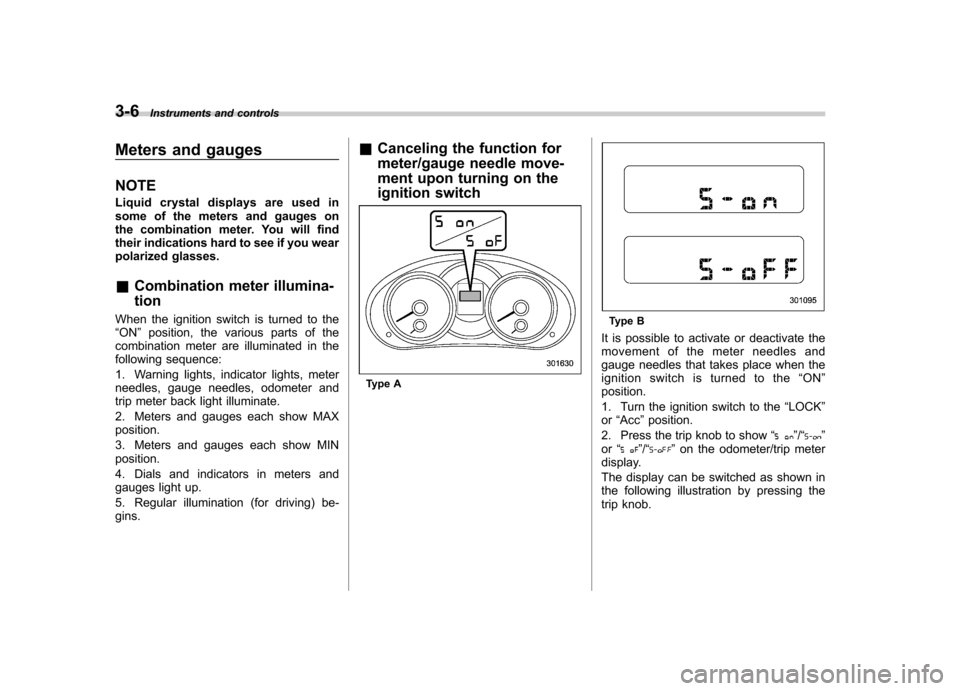
Type A
Type B
It is possible to activate or deactivate the
movement of the meter needles and
gauge needles that takes place when the
ignition switch is turned to the “ON ”
position.
1. Turn the ignition switch to the “LOCK ”
or “Acc ”position.
2. Press the trip knob to show “
”/“”
or “”/“” on the odometer/trip meter
display.
The display can be switched as shown in
the following illustration by pressing the
trip knob.
Page 119 of 436
3-8Instruments and controls
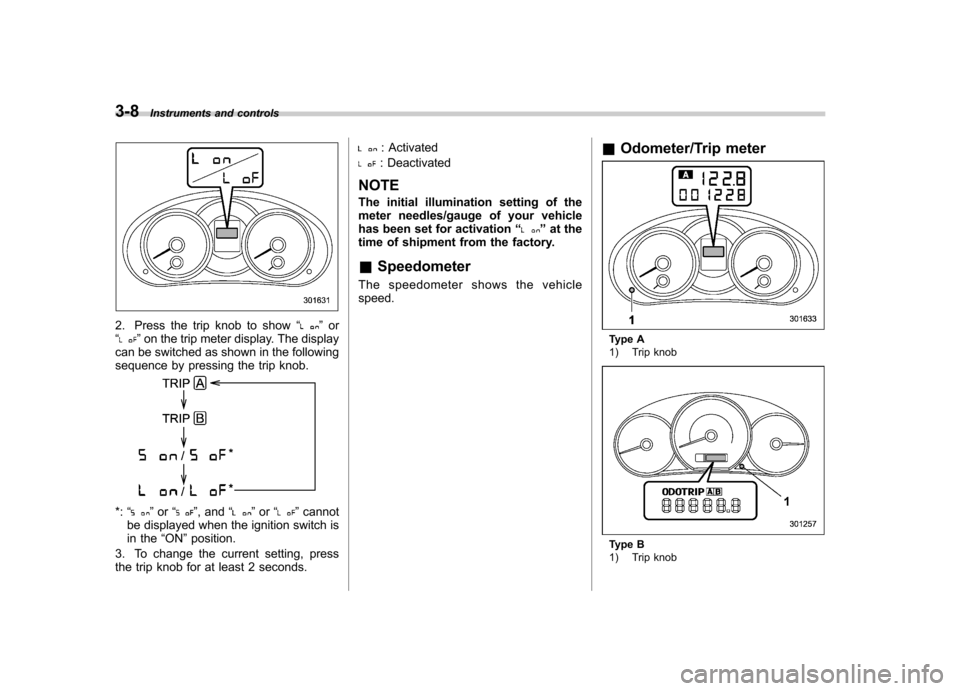
2. Press the trip knob to show “”or
“” on the trip meter display. The display
can be switched as shown in the following
sequence by pressing the trip knob.
*: “”or “”, and “”or “”cannot
be displayed when the ignition switch is
in the “ON ”position.
3. To change the current setting, press
the trip knob for at least 2 seconds.
: Activated
: Deactivated
NOTE
The initial illumination setting of the
meter needles/gauge of your vehicle
has been set for activation “
”at the
time of shipment from the factory.
& Speedometer
The speedometer shows the vehicle speed. &
Odometer/Trip meter
Type A
1) Trip knob
Type B
1) Trip knob
Page 120 of 436
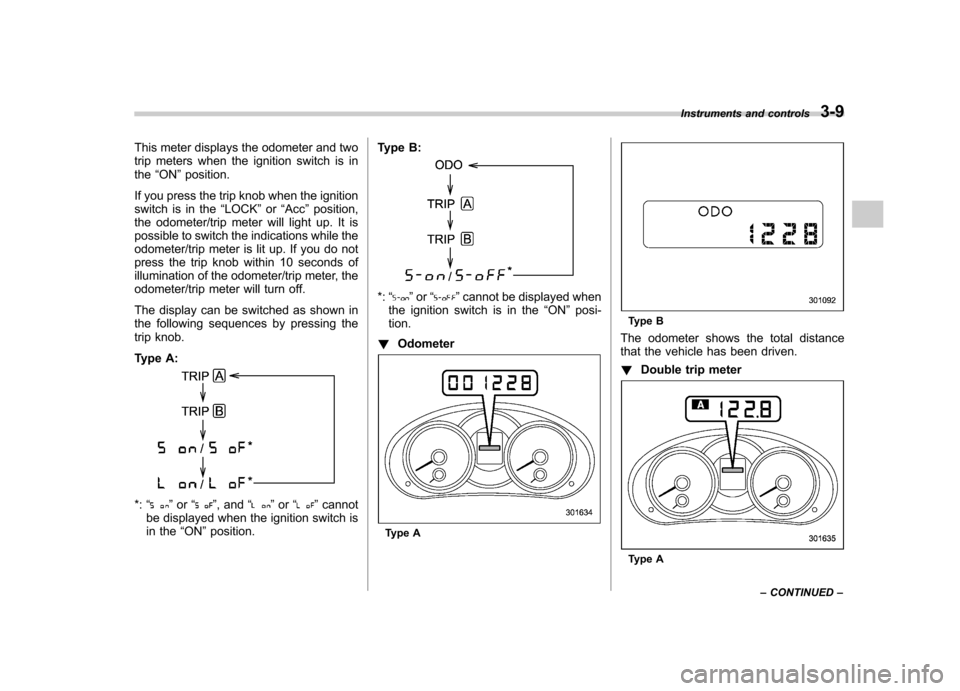
This meter displays the odometer and two
trip meters when the ignition switch is inthe“ON ”position.
If you press the trip knob when the ignition
switch is in the “LOCK ”or “Acc ”position,
the odometer/trip meter will light up. It is
possible to switch the indications while the
odometer/trip meter is lit up. If you do not
press the trip knob within 10 seconds of
illumination of the odometer/trip meter, the
odometer/trip meter will turn off.
The display can be switched as shown in
the following sequences by pressing the
trip knob.
Type A:
*: “”or “”, and “”or “”cannot
be displayed when the ignition switch is
in the “ON ”position. Type B:
*:
“”or “”cannot be displayed when
the ignition switch is in the “ON ”posi-
tion.
! Odometer
Type A
Type B
The odometer shows the total distance
that the vehicle has been driven. ! Double trip meter
Type A Instruments and controls
3-9
– CONTINUED –
Page 137 of 436
3-26Instruments and controls
Information display
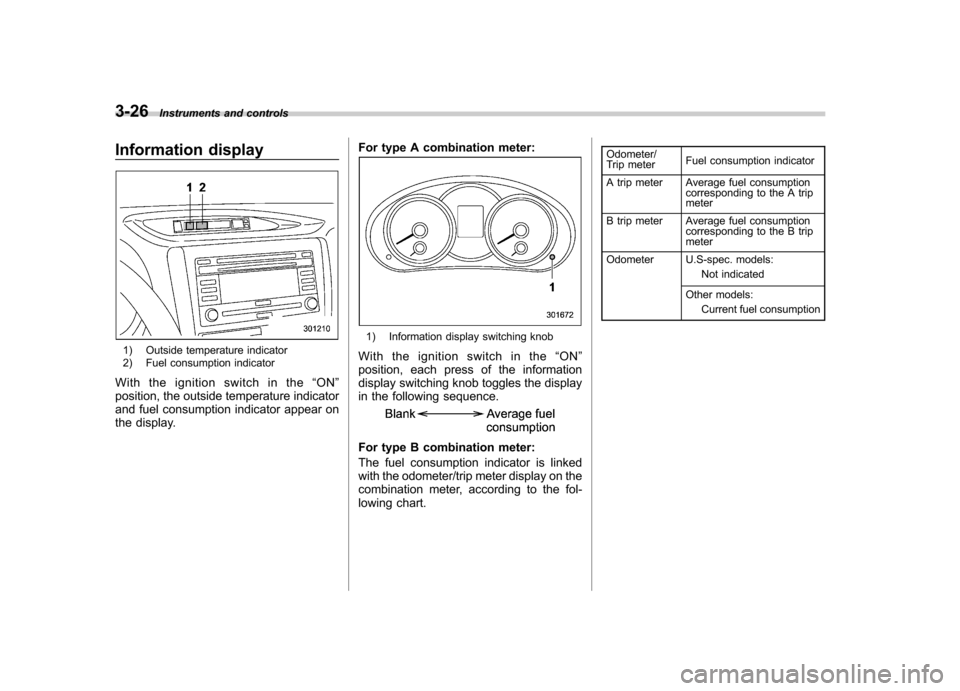
1) Outside temperature indicator
2) Fuel consumption indicator
With the ignition switch in the “ON ”
position, the outside temperature indicator
and fuel consumption indicator appear on
the display. For type A combination meter:
1) Information display switching knob
Withtheignitionswitchinthe “ON ”
position, each press of the information
display switching knob toggles the display
in the following sequence.
For type B combination meter:
The fuel consumption indicator is linked
with the odometer/trip meter display on the
combination meter, according to the fol-
lowing chart. Odometer/
Trip meter
Fuel consumption indicator
A trip meter Average fuel consumption corresponding to the A trip meter
B trip meter Average fuel consumption corresponding to the B tripmeter
Odometer U.S-spec. models: Not indicated
Other models: Current fuel consumption
Page 292 of 436
Driving tips for AWD models
WARNING
. Always maintain a safe driving
speed according to the road and
weather conditions in order to
avoid having an accident on a
sharp turn, during sudden brak-
ing or under other similar condi-tions.
. Always use the utmost care in
driving –overconfidence be-
cause you are driving an All-
Wheel Drive model could easily
lead to a serious accident.
. When replacing a tire, you must
use a tire that is of the same size,
circumference, construction,
brand (tread pattern), speed sym-
bol and load index as the original
tires listed on the tire placard.
Using tires of other sizes, cir-
cumferences or constructions
may result in severe mechanical
damage to the drive train of your
vehicle and may affect ride,
handling, braking, speedometer/
odometer calibration, and clear-
ance between the body and tires.
It also may be dangerous and lead to loss of vehicle control.
. You must install four tires that are
of the same size, circumference,
construction, manufacturer,
brand (tread pattern), degree of
wear, speed symbol and load
index. Mixing tires of other sizes,
circumferences or constructions
may result in severe mechanical
damage to the drive train of your
vehicle and may affect ride,
handling, braking and speed-
ometer/odometer calibration. It
also may be dangerous and lead
to loss of vehicle control.
CAUTION
If you use a temporary spare tire to
replace a flat tire, be sure to use the
original temporary spare tire stored
in the vehicle. Using other sizes may
result in severe mechanical damage
to the drive train of your vehicle.
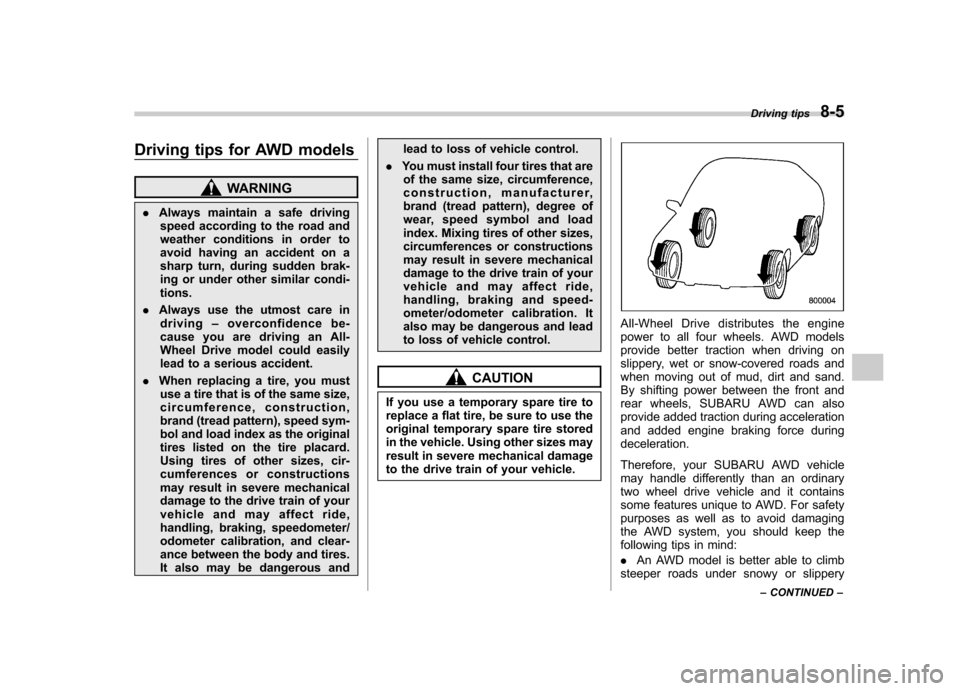
All-Wheel Drive distributes the engine
power to all four wheels. AWD models
provide better traction when driving on
slippery, wet or snow-covered roads and
when moving out of mud, dirt and sand.
By shifting power between the front and
rear wheels, SUBARU AWD can also
provide added traction during acceleration
and added engine braking force duringdeceleration.
Therefore, your SUBARU AWD vehicle
may handle differently than an ordinary
two wheel drive vehicle and it contains
some features unique to AWD. For safety
purposes as well as to avoid damaging
the AWD system, you should keep the
following tips in mind: . An AWD model is better able to climb
steeper roads under snowy or slippery Driving tips
8-5
– CONTINUED –