ignition SUBARU FORESTER 2017 SJ / 4.G Owners Manual
[x] Cancel search | Manufacturer: SUBARU, Model Year: 2017, Model line: FORESTER, Model: SUBARU FORESTER 2017 SJ / 4.GPages: 634, PDF Size: 11.77 MB
Page 455 of 634
Starting and operating/Hill start assist system
Dynamics Control OFF indicator light“”
on the combination meter illuminates for
30 seconds and then turns off.
6. Within 5 seconds after the Vehicle
Dynamics Control OFF indicator light
turns off, release the Vehicle Dynamics
Control OFF switch.
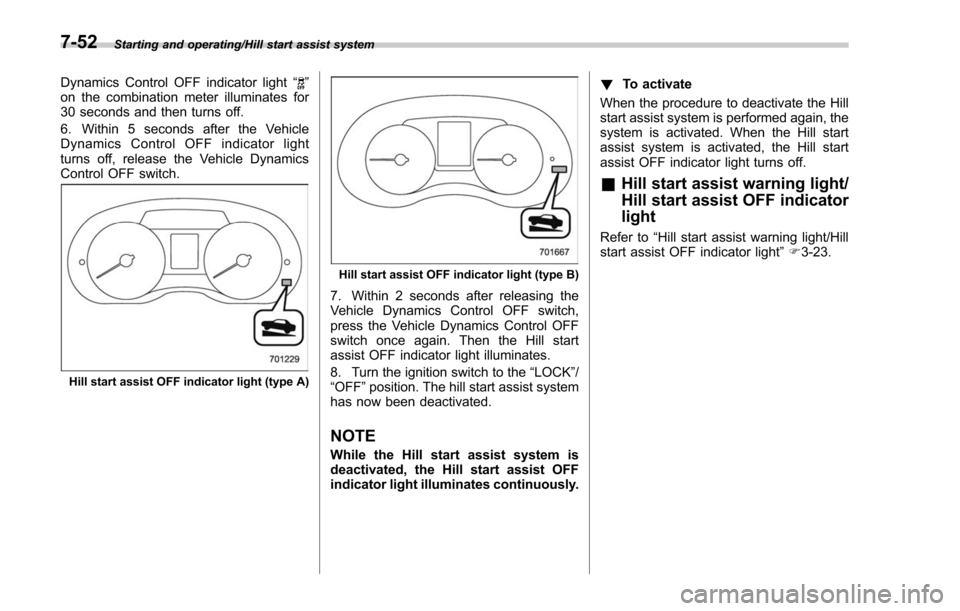
Hill start assist OFF indicator light (type A)
Hill start assist OFF indicator light (type B)
7. Within 2 seconds after releasing the
Vehicle Dynamics Control OFF switch,
press the Vehicle Dynamics Control OFF
switch once again. Then the Hill start
assist OFF indicator light illuminates.
8. Turn the ignition switch to the “LOCK”/
“OFF ”position. The hill start assist system
has now been deactivated.
NOTE
While the Hill start assist system is
deactivated, the Hill start assist OFF
indicator light illuminates continuously. !
To activate
When the procedure to deactivate the Hill
start assist system is performed again, the
system is activated. When the Hill start
assist system is activated, the Hill start
assist OFF indicator light turns off.
& Hill start assist warning light/
Hill start assist OFF indicator
light
Refer to “Hill start assist warning light/Hill
start assist OFF indicator light ”F 3-23.
7-52
Page 458 of 634
&To temporarily cancel the
cruise control
The cruise control can be temporarily
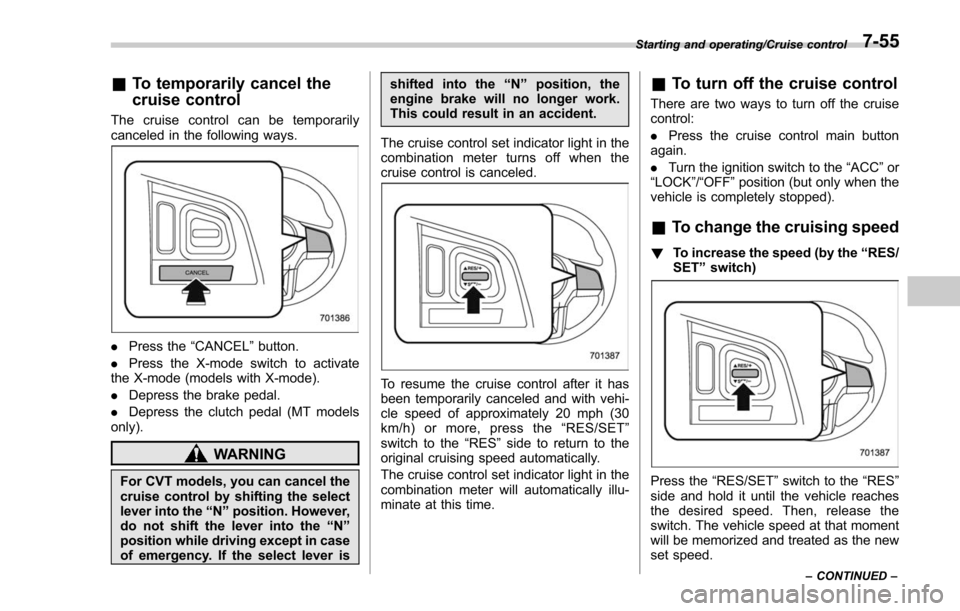
canceled in the following ways.
. Press the “CANCEL”button.
. Press the X-mode switch to activate
the X-mode (models with X-mode).
. Depress the brake pedal.
. Depress the clutch pedal (MT models
only).
WARNING
For CVT models, you can cancel the
cruise control by shifting the select
lever into the “N ” position. However,
do not shift the lever into the “N ”
position while driving except in case
of emergency. If the select lever is shifted into the
“N ” position, the
engine brake will no longer work.
This could result in an accident.
The cruise control set indicator light in the
combination meter turns off when the
cruise control is canceled.
To resume the cruise control after it has
been temporarily canceled and with vehi-
cle speed of approximately 20 mph (30
km/h) or more, press the “RES/SET ”
switch to the “RES ”side to return to the
original cruising speed automatically.
The cruise control set indicator light in the
combination meter will automatically illu-
minate at this time.
& To turn off the cruise control
There are two ways to turn off the cruise
control:
. Press the cruise control main button
again.
. Turn the ignition switch to the “ACC”or
“ LOCK ”/“OFF ”position (but only when the
vehicle is completely stopped).
& To change the cruising speed
! To increase the speed (by the “RES/
SET ”switch)
Press the “RES/SET ”switch to the “RES”
side and hold it until the vehicle reaches
the desired speed. Then, release the
switch. The vehicle speed at that moment
will be memorized and treated as the new
set speed.
Starting and operating/Cruise control
–CONTINUED –7-55
Page 463 of 634
Starting and operating/BSD/RCTA
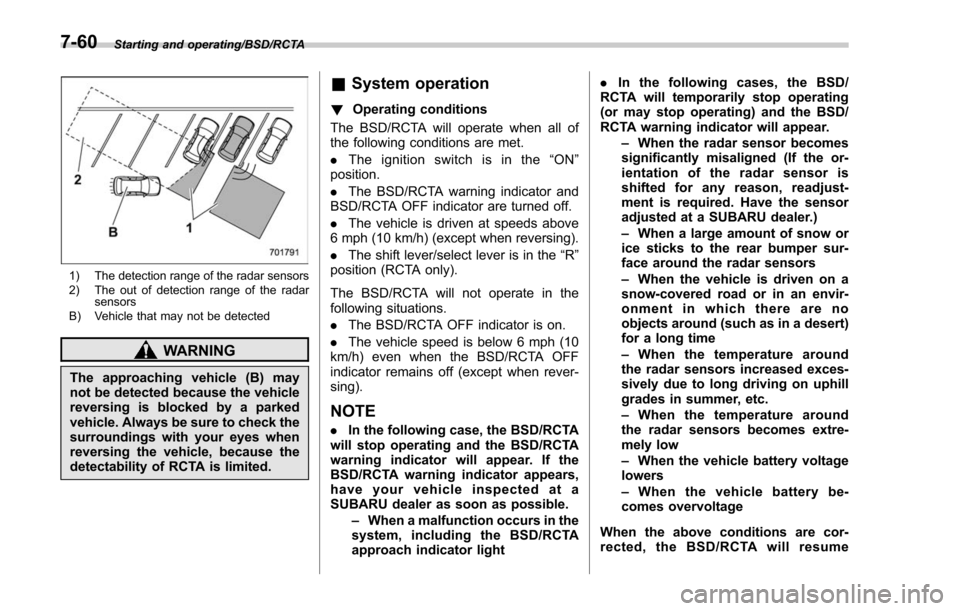
1) The detection range of the radar sensors
2) The out of detection range of the radarsensors
B) Vehicle that may not be detected
WARNING
The approaching vehicle (B) may
not be detected because the vehicle
reversing is blocked by a parked
vehicle. Always be sure to check the
surroundings with your eyes when
reversing the vehicle, because the
detectability of RCTA is limited.
& System operation
! Operating conditions
The BSD/RCTA will operate when all of
the following conditions are met.
. The ignition switch is in the “ON ”
position.
. The BSD/RCTA warning indicator and
BSD/RCTA OFF indicator are turned off.
. The vehicle is driven at speeds above
6 mph (10 km/h) (except when reversing).
. The shift lever/select lever is in the “R”
position (RCTA only).
The BSD/RCTA will not operate in the
following situations.
. The BSD/RCTA OFF indicator is on.
. The vehicle speed is below 6 mph (10
km/h) even when the BSD/RCTA OFF
indicator remains off (except when rever-
sing).
NOTE
. In the following case, the BSD/RCTA
will stop operating and the BSD/RCTA
warning indicator will appear. If the
BSD/RCTA warning indicator appears,
have your vehicle inspected at a
SUBARU dealer as soon as possible.
–When a malfunction occurs in the
system, including the BSD/RCTA
approach indicator light .
In the following cases, the BSD/
RCTA will temporarily stop operating
(or may stop operating) and the BSD/
RCTA warning indicator will appear.
–When the radar sensor becomes
significantly misaligned (If the or-
ientation of the radar sensor is
shifted for any reason, readjust-
ment is required. Have the sensor
adjusted at a SUBARU dealer.)
– When a large amount of snow or
ice sticks to the rear bumper sur-
face around the radar sensors
– When the vehicle is driven on a
snow-covered road or in an envir-
onment in which there are no
objects around (such as in a desert)
for a long time
– When the temperature around
the radar sensors increased exces-
sively due to long driving on uphill
grades in summer, etc.
– When the temperature around
the radar sensors becomes extre-
mely low
– When the vehicle battery voltage
lowers
– When the vehicle battery be-
comes overvoltage
When the above conditions are cor-
rected, the BSD/RCTA will resume
7-60
Page 468 of 634
vehicle
–When using a chassis dynam-
ometer or free roller device, etc.
– When running the engine and
makingthewheelsrotatewhile
lifting up the vehicle
. If the ignition switch is turned to the
“ LOCK ”/“ OFF ”position, the last known
status of the system is maintained. For
example, if the ignition switch is turned
to the “LOCK ”/“ OFF ”position with the
BSD/RCTA deactivated, the BSD/RCTA
will remain deactivated the next time
the ignition switch is turned to the
“ ON ”position.
. If the vehicle battery is disconnected
due to situations such as battery
terminal or fuse replacement, after the
battery is reconnected, the BSD/RCTA
will be activated.
& Certification for the BSD/
RCTA
. U.S.-spec. models
FCC ID: OAYSRR2A
CAUTION
FCC WARNING
Changes or modifications not ex-
pressly approved by the party re- sponsible for compliance could void
the user
’s authority to operate the
equipment.
This device complies with part 15 of the
FCC Rules. Operation is subject to the
following two conditions: (1) This device
may not cause harmful interference, and
(2) this device must accept any interfer-
ence received, including interference that
may cause undesired operation.
. Canada-spec. models
This device complies with Industry
Canada licence-exempt RSS standard
(s). Operation is subject to the following
two conditions: (1) this device may not
cause interference, and (2) this device
must accept any interference, including
interference that may cause undesired
operation of the device.
Le présent appareil est conforme aux
CNR d ’Industrie Canada applicables aux
appareils radio exempts de licence. L ’ex-
ploitation est autorisée aux deux condi-
tions suivantes: (1) l ’appareil ne doit pas
produire de brouillage, et (2) l ’utilisateur
de l ’appareil doit accepter tout brouillage
radioélectrique subi, même si le brouillage
est susceptible d ’en compromettre le
fonctionnement.
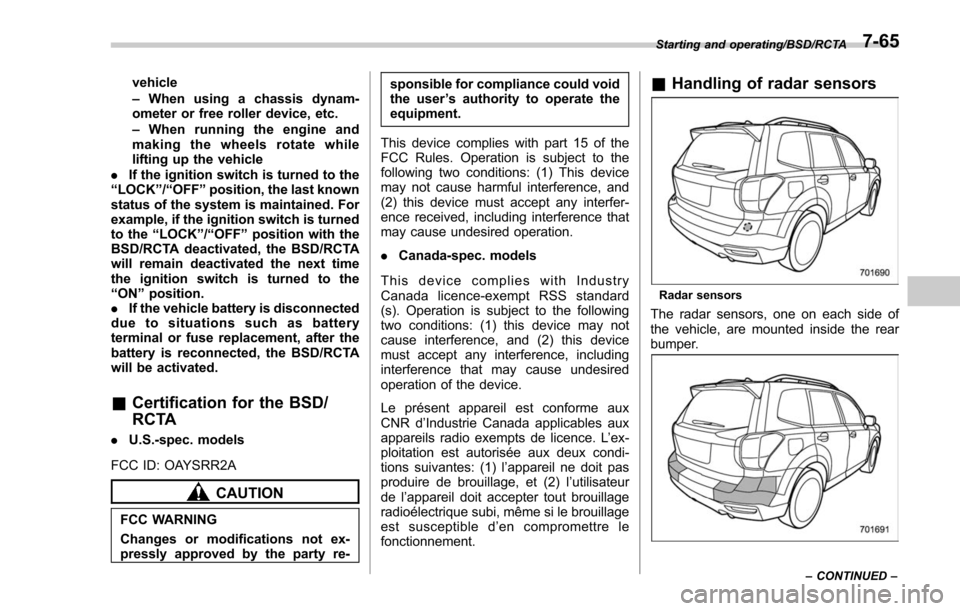
& Handling of radar sensors
Radar sensors
The radar sensors, one on each side of
the vehicle, are mounted inside the rear
bumper.
Starting and operating/BSD/RCTA
–CONTINUED –7-65
Page 470 of 634
data to any other third party except
under the following conditions.– The vehicle owner has given his/
her consent.
– The disclosure/provision is
based on a court order or other
legally enforceable request.
– Data that has been modified so
that the user and vehicle cannot be
identified is provided to a research
institution for statistical processing
or similar purposes.
& Reverse Automatic Braking
System overview
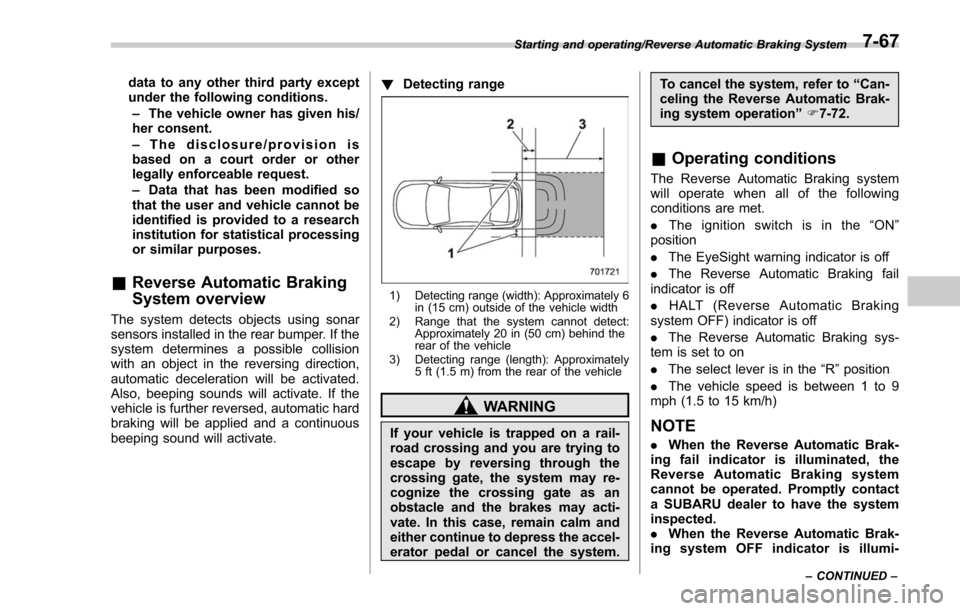
The system detects objects using sonar
sensors installed in the rear bumper. If the
system determines a possible collision
with an object in the reversing direction,
automatic deceleration will be activated.
Also, beeping sounds will activate. If the
vehicle is further reversed, automatic hard
braking will be applied and a continuous
beeping sound will activate. !
Detecting range
1) Detecting range (width): Approximately 6
in (15 cm) outside of the vehicle width
2) Range that the system cannot detect: Approximately 20 in (50 cm) behind the
rear of the vehicle
3) Detecting range (length): Approximately 5 ft (1.5 m) from the rear of the vehicle
WARNING
If your vehicle is trapped on a rail-
road crossing and you are trying to
escape by reversing through the
crossing gate, the system may re-
cognize the crossing gate as an
obstacle and the brakes may acti-
vate. In this case, remain calm and
either continue to depress the accel-
erator pedal or cancel the system. To cancel the system, refer to
“Can-
celing the Reverse Automatic Brak-
ing system operation ”F 7-72.
& Operating conditions
The Reverse Automatic Braking system
will operate when all of the following
conditions are met.
. The ignition switch is in the “ON ”
position
. The EyeSight warning indicator is off
. The Reverse Automatic Braking fail
indicator is off
. HALT (Reverse Automatic Braking
system OFF) indicator is off
. The Reverse Automatic Braking sys-
tem is set to on
. The select lever is in the “R ”position
. The vehicle speed is between 1 to 9
mph (1.5 to 15 km/h)
NOTE
. When the Reverse Automatic Brak-
ing fail indicator is illuminated, the
Reverse Automatic Braking system
cannot be operated. Promptly contact
a SUBARU dealer to have the system
inspected.
. When the Reverse Automatic Brak-
ing system OFF indicator is illumi-
Starting and operating/Reverse Automatic Braking System
–CONTINUED –7-67
Page 480 of 634
exhaust fumes are entering the
vehicle, have the problem
checked and corrected as soon
as possible. If you must drive
under these conditions, drive
only with all windows fully open.
. Keep the rear gate closed while
driving to prevent exhaust gas
from entering the vehicle.
NOTE
Due to the expansion and contraction
of the metals used in the manufacture
of the exhaust system, you may hear a
crackling sound coming from the ex-
haust system for a short time after the
engine has been shut off. This sound is
normal.
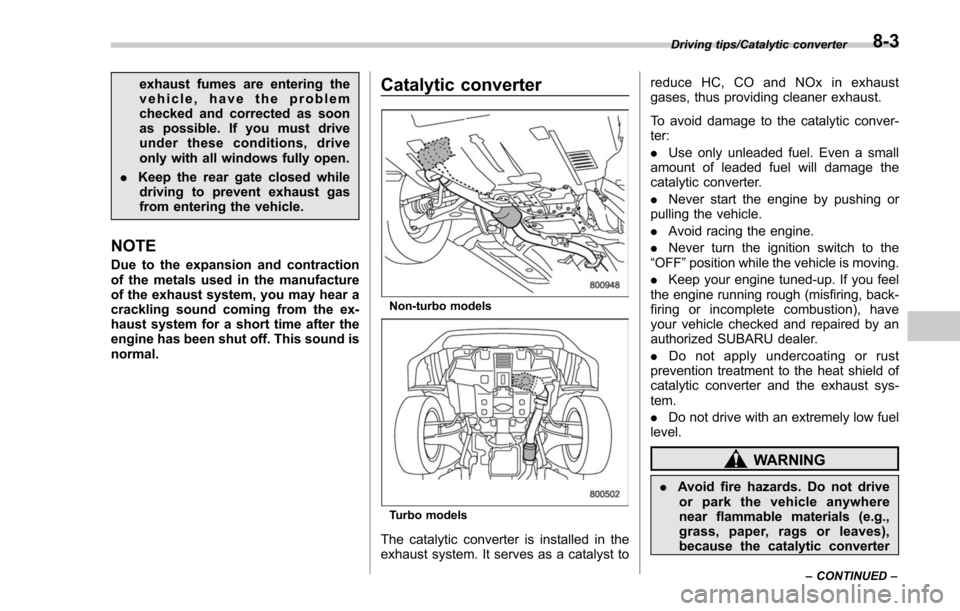
Catalytic converter
Non-turbo models
Turbo models
The catalytic converter is installed in the
exhaust system. It serves as a catalyst to reduce HC, CO and NOx in exhaust
gases, thus providing cleaner exhaust.
To avoid damage to the catalytic conver-
ter:
.
Use only unleaded fuel. Even a small
amount of leaded fuel will damage the
catalytic converter.
. Never start the engine by pushing or
pulling the vehicle.
. Avoid racing the engine.
. Never turn the ignition switch to the
“OFF ”position while the vehicle is moving.
. Keep your engine tuned-up. If you feel
the engine running rough (misfiring, back-
firing or incomplete combustion), have
your vehicle checked and repaired by an
authorized SUBARU dealer.
. Do not apply undercoating or rust
prevention treatment to the heat shield of
catalytic converter and the exhaust sys-
tem.
. Do not drive with an extremely low fuel
level.
WARNING
. Avoid fire hazards. Do not drive
or park the vehicle anywhere
near flammable materials (e.g.,
grass, paper, rags or leaves),
because the catalytic converter
Driving tips/Catalytic converter
–CONTINUED –8-3
Page 505 of 634
In case of emergency/If you park your vehicle in case of an emergency
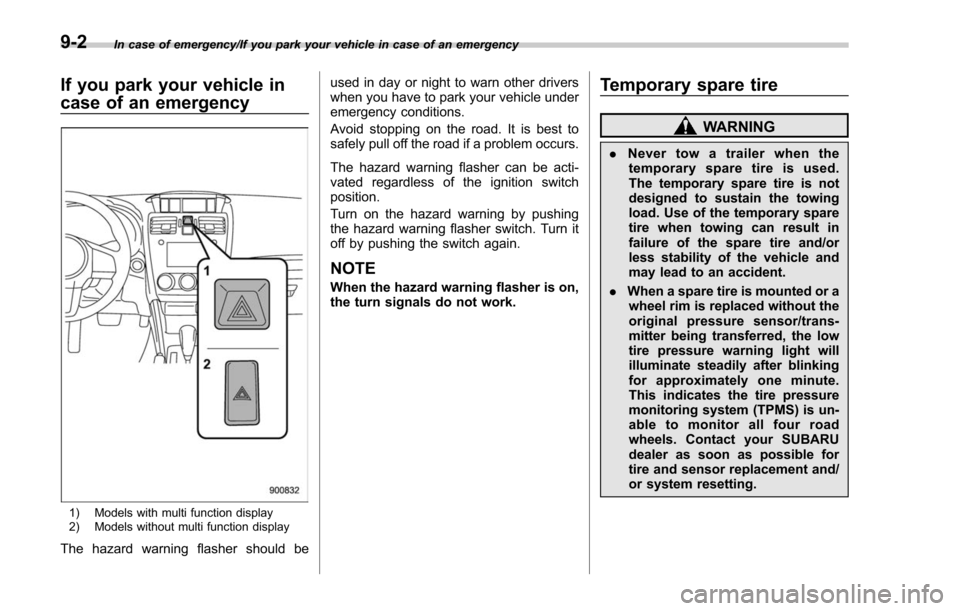
If you park your vehicle in
case of an emergency
1) Models with multi function display
2) Models without multi function display
The hazard warning flasher should beused in day or night to warn other drivers
when you have to park your vehicle under
emergency conditions.
Avoid stopping on the road. It is best to
safely pull off the road if a problem occurs.
The hazard warning flasher can be acti-
vated regardless of the ignition switch
position.
Turn on the hazard warning by pushing
the hazard warning flasher switch. Turn it
off by pushing the switch again.
NOTE
When the hazard warning flasher is on,
the turn signals do not work.
Temporary spare tire
WARNING
.
Never tow a trailer when the
temporary spare tire is used.
The temporary spare tire is not
designed to sustain the towing
load. Use of the temporary spare
tire when towing can result in
failure of the spare tire and/or
less stability of the vehicle and
may lead to an accident.
. When a spare tire is mounted or a
wheel rim is replaced without the
original pressure sensor/trans-
mitter being transferred, the low
tire pressure warning light will
illuminate steadily after blinking
for approximately one minute.
This indicates the tire pressure
monitoring system (TPMS) is un-
able to monitor all four road
wheels. Contact your SUBARU
dealer as soon as possible for
tire and sensor replacement and/
or system resetting.
9-2
Page 519 of 634
In case of emergency/Towing
position for CVT models. Shift the shift
lever into the“1st ”position for MT models.
2. Apply the parking brake firmly.
3. Secure the vehicle onto the carrier
properly with safety chains. Each safety
chain should be equally tightened and
care must be taken not to pull the chains
so tightly that the suspension bottoms out.
CAUTION
If your vehicle has a front under-
spoiler and rear underspoiler (both
optional), be careful not to scrape
them when placing the vehicle on
the carrier and when removing the
vehicle from the carrier.
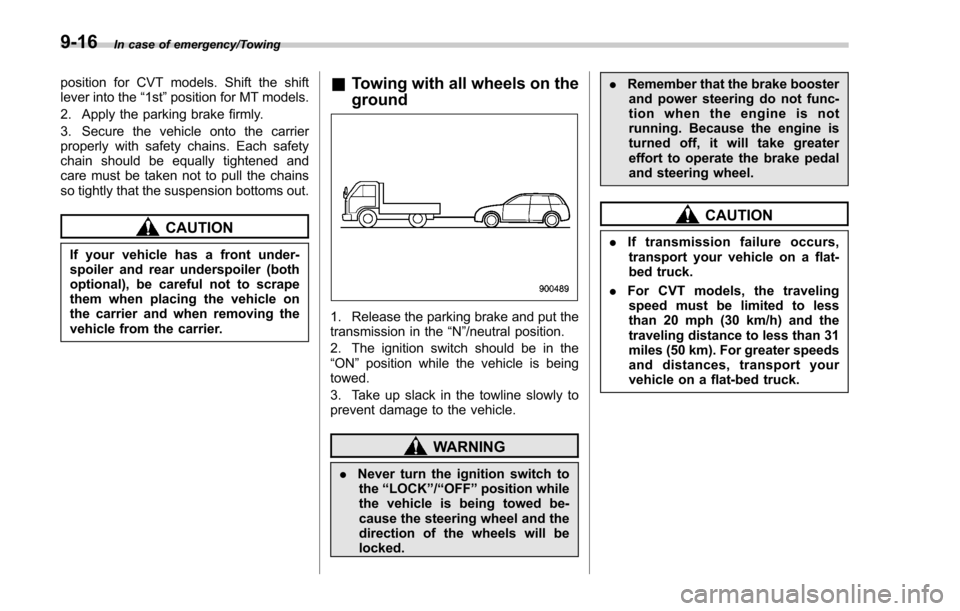
& Towing with all wheels on the
ground
1. Release the parking brake and put the
transmission in the “N”/neutral position.
2. The ignition switch should be in the
“ON ”position while the vehicle is being
towed.
3. Take up slack in the towline slowly to
prevent damage to the vehicle.
WARNING
. Never turn the ignition switch to
the “LOCK ”/“OFF ”position while
the vehicle is being towed be-
cause the steering wheel and the
direction of the wheels will be
locked. .
Remember that the brake booster
and power steering do not func-
tion when the engine is not
running. Because the engine is
turned off, it will take greater
effort to operate the brake pedal
and steering wheel.
CAUTION
. If transmission failure occurs,
transport your vehicle on a flat-
bed truck.
. For CVT models, the traveling
speed must be limited to less
than 20 mph (30 km/h) and the
traveling distance to less than 31
miles (50 km). For greater speeds
and distances, transport your
vehicle on a flat-bed truck.
9-16
Page 520 of 634
Access key–if access key
does not operate properly
CAUTION
Keep metallic objects, magnetic
sources and signal transmitters
away from the area between the
access key and the push-button
ignition switch. They may interfere
with the communication between
the access key and the push-button
ignition switch.
The following functions may be inoperable
because of strong radio signals in the
surrounding area or the access key
battery being low.
. Locking/unlocking doors including the
rear gate
. Switching power status
. Starting the engine
In such cases, perform the following
procedure. When the battery of the access
key is discharged, replace it with a new
one. Refer to “Replacing battery of access
key ”F 11-45.
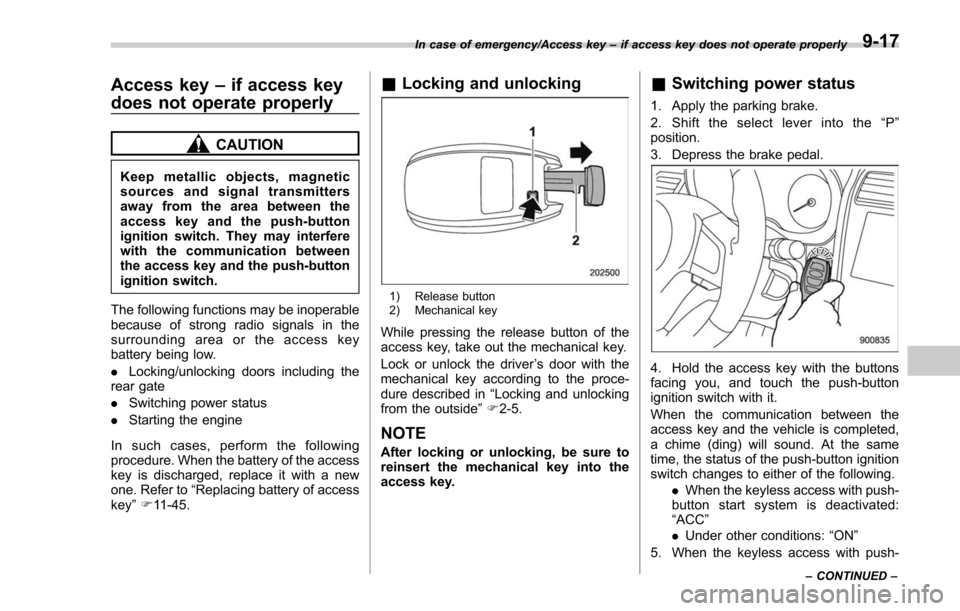
& Locking and unlocking
1) Release button
2) Mechanical key
While pressing the release button of the
access key, take out the mechanical key.
Lock or unlock the driver ’s door with the
mechanical key according to the proce-
dure described in “Locking and unlocking
from the outside ”F 2-5.
NOTE
After locking or unlocking, be sure to
reinsert the mechanical key into the
access key.
& Switching power status
1. Apply the parking brake.
2. Shift the select lever into the “P ”
position.
3. Depress the brake pedal.
4. Hold the access key with the buttons
facing you, and touch the push-button
ignition switch with it.
When the communication between the
access key and the vehicle is completed,
a chime (ding) will sound. At the same
time, the status of the push-button ignition
switch changes to either of the following.
.When the keyless access with push-
button start system is deactivated:
“ACC ”
. Under other conditions: “ON ”
5. When the keyless access with push-
In case of emergency/Access key –if access key does not operate properly
–CONTINUED –9-17
Page 521 of 634
In case of emergency/Rear gate–if the rear gate cannot be opened
button start system is deactivated, press
the push-button ignition switch with the
brake pedal released. The status of the
push-button ignition switch then changes
to “ON ”.
NOTE
If the power does not switch even
though the above procedure was fol-
lowed precisely, contact your SUBARU
dealer.
&Starting engine
1. Apply the parking brake.
2. Shift the select lever into the “P ”
position.
3. Depress the brake pedal.
4. Hold the access key with the buttons facing you, and touch the push-button
ignition switch with it.
When the communication between the
access key and the vehicle is completed,
a chime (ding) will sound. At the same
time, the push-button ignition switch turns
to the
“ACC”or “ON ”position.
5. After the push-button ignition switch
turns to the “ACC”or “ON ”position, while
depressing the brake pedal, press the
push-button ignition switch.
NOTE
If the engine does not start even
though the above procedure was fol-
lowed precisely, contact your SUBARU
dealer.
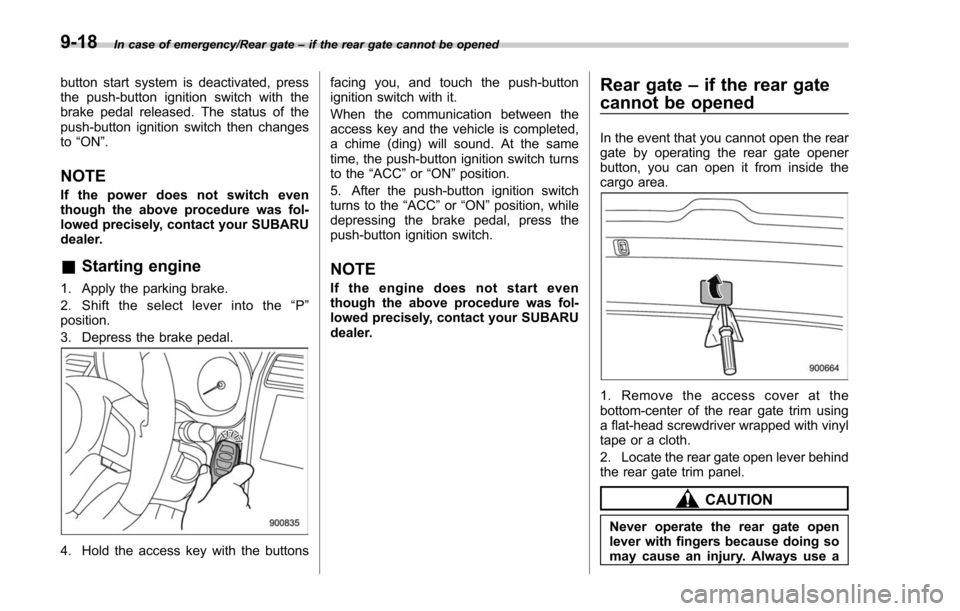
Rear gate –if the rear gate
cannot be opened
In the event that you cannot open the rear
gate by operating the rear gate opener
button, you can open it from inside the
cargo area.
1. Remove the access cover at the
bottom-center of the rear gate trim using
a flat-head screwdriver wrapped with vinyl
tape or a cloth.
2. Locate the rear gate open lever behind
the rear gate trim panel.
CAUTION
Never operate the rear gate open
lever with fingers because doing so
may cause an injury. Always use a
9-18