mirror SUBARU FORESTER 2017 SJ / 4.G Owner's Manual
[x] Cancel search | Manufacturer: SUBARU, Model Year: 2017, Model line: FORESTER, Model: SUBARU FORESTER 2017 SJ / 4.GPages: 634, PDF Size: 11.77 MB
Page 400 of 634
is displayed.
1. Set the ignition switch to“ON”.
2. Set the shift lever/select lever to “R”.
NOTE
. For models with the genuine
SUBARU navigation or audio system,
while the navigation system is acti-
vated, the image of the rear view
camera will not be displayed. However,
the image of the rear view camera has
priority over other screen displays.
. The image of the rear view camera
has priority over other screen displays.
. The image of the rear view camera is
horizontally reversed as is the case
with the vehicle rearview mirror or the
side view mirror.
. It may be difficult to see the image of
the rear view camera in the following
cases. This is not a malfunction of the
camera.
–The vehicle is used for towing or
a trailer hitch is installed.
– The vehicle is in a dark place (at
night, in a tunnel, etc.).
– The vehicle is in an extremely hot
or cold place.
– An object (such as raindrops,
snow, dirt, etc.) that disturbs the
view of the rear view camera sticks to the lens of the camera.
–
Strong light shined directly on
the camera lens (occasionally, there
are vertical lines on the screen).& Viewing range on the screen
CAUTION
The range that can be viewed with
the rear view camera is limited.
Always be sure to check with your
eyes when moving backward and
proceed slowly.
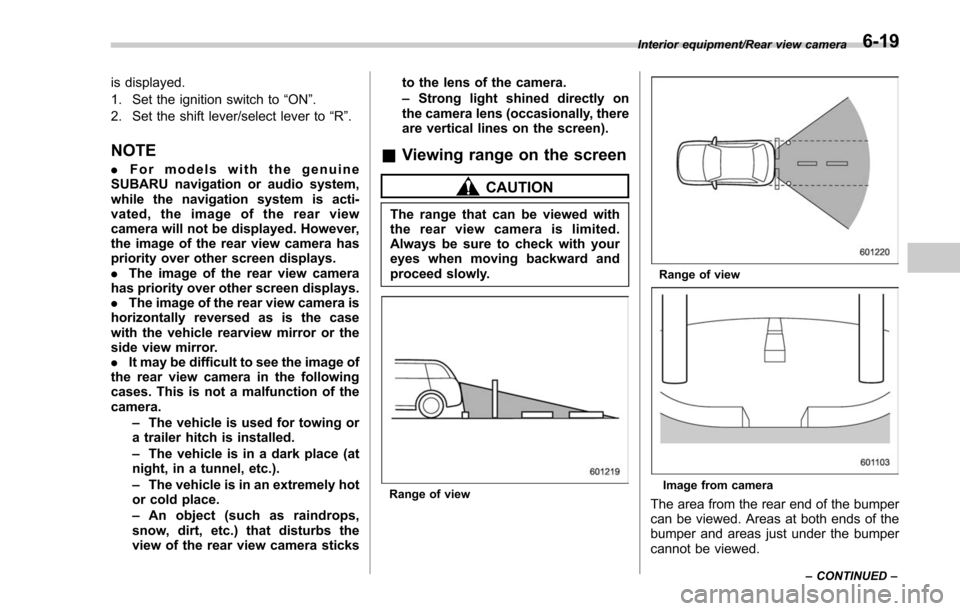
Range of view
Range of view
Image from camera
The area from the rear end of the bumper
can be viewed. Areas at both ends of the
bumper and areas just under the bumper
cannot be viewed.
Interior equipment/Rear view camera
–CONTINUED –6-19
Page 411 of 634
Starting and operating/Preparing to drive
.A vehiclefails the OBDII inspection if
the “CHECK ENGINE ”warning light is not
properly operating (light is illuminated or is
not working due to a burned out bulb) or
there is one or more diagnostic trouble
codes stored in the vehicle’ s computer.
. A state emission inspection may reject
(not pass or fail) a vehicle if the number of
OBDII system readiness monitors “NOT
READY ”is greater than one. If the
vehicle’ s battery has been recently re-
placed or disconnected, the OBDII system
inspection may indicate that the vehicle is
not ready for the emission test. Under this
condition, the vehicle driver should be
instructed to drive his/her vehicle for a few
days to reset the readiness monitors and
return for an emission re-inspection.
. Owners of rejected or failing vehicles
should contact their SUBARU Dealer for
service.
Some states still use dynamometers in
their emission inspection program. A
dynamometer is a treadmill or roller-like
testing device that allows your vehicle ’s
wheels to turn while the vehicle remains in
one place. Prior to your vehicle being put
on a dynamometer, tell your emission
inspector
not to place your SUBARU
AWD vehicle on a two-wheel dynam-
ometer. Otherwise, serious transmis-
sion damage will result. The U.S. Environmental Protection
Agency (EPA) and states using two-wheel
dynamometers in their emission testing
program have EXEMPTED SUBARU
AWD vehicles from the portion of the
testing program that involves a two-wheel
dynamometer. There are some states that
use four-wheel dynamometers in their
testing program. When properly used, this
equipment should not damage a SUBARU
AWD vehicle.
Under no circumstances should the rear
wheels be jacked off the ground, nor
should the driveshaft be disconnected for
state emission testing.
Preparing to drive
You should perform the following checks
and adjustments every day before you
start driving.
1. Check that all windows, mirrors, and
lights are clean and unobstructed.
2. Check the appearance and condition
of the tires. Also check tires for proper
inflation.
3. Look under the vehicle for any sign of
leaks and check that no small animal is
under the vehicle.
4. Check that no small animal enters the
engine compartment.
5. Check that the hood and rear gate are
fully closed.
6. Check the adjustment of the seat.
7. Check the adjustment of the inside
and outside mirrors.
8. Fasten your seatbelt. Check that your
passengers have fastened their seatbelts.
9. Check the operation of the warning
and indicator lights when the ignition
switch is turned to the
“ON ”position.
10. Check the gauges, indicator and warn-
ing lights after starting the engine.
7-8
Page 461 of 634
Starting and operating/BSD/RCTA
BSD/RCTA (if equipped)
The BSD/RCTA consists of rear radar with
Blind Spot Detection and Rear Cross
Traffic Alert.
These functions enable the system to
detect objects or vehicles to the rear,
drawing attention to the driver when
changingalaneorwhendrivingin
reverse.
WARNING
The driver is responsible for driving
safely. Always be sure to check the
surroundings with your eyes when
changing lanes or reversing the
vehicle.
The system is designed to assist the
driver by monitoring the rear and
side areas of the vehicle during a
lane change or reversing. However,
you cannot rely on this system
alone in assuring the safety during
a lane change or reversing. Over-
confidence in this system could
result in an accident and lead to
serious injury or death. Since the
system operation has various limita-
tions, the flashing or illumination of
the BSD/RCTA approach indicatorlight may be delayed or it may not
operate at all even when a vehicle is
present in a neighboring lane or
approaching from either side.
The driver is responsible for paying
attention to the rear and side areas
of the vehicle.
&
System features
BSD/RCTA consists of the following func-
tions.
. To detect a vehicle in a blind spot on an
adjacent lane or a vehicle approaching at
high speed while driving the vehicle (Blind
Spot Detection)
. To detect a vehicle approaching from
the right or left while reversing the vehicle
(Rear Cross Traffic Alert)
The system uses radar sensors for the
above functions.
NOTE
The BSD/RCTA radar sensor has been
certified by the radio wave related laws
of the U.S. When driving in other
countries, certification of the country
where the vehicle is driven must be
obtained. For certification in the U.S.,
refer to “Certification for the BSD/
RCTA ”F 7-65. !
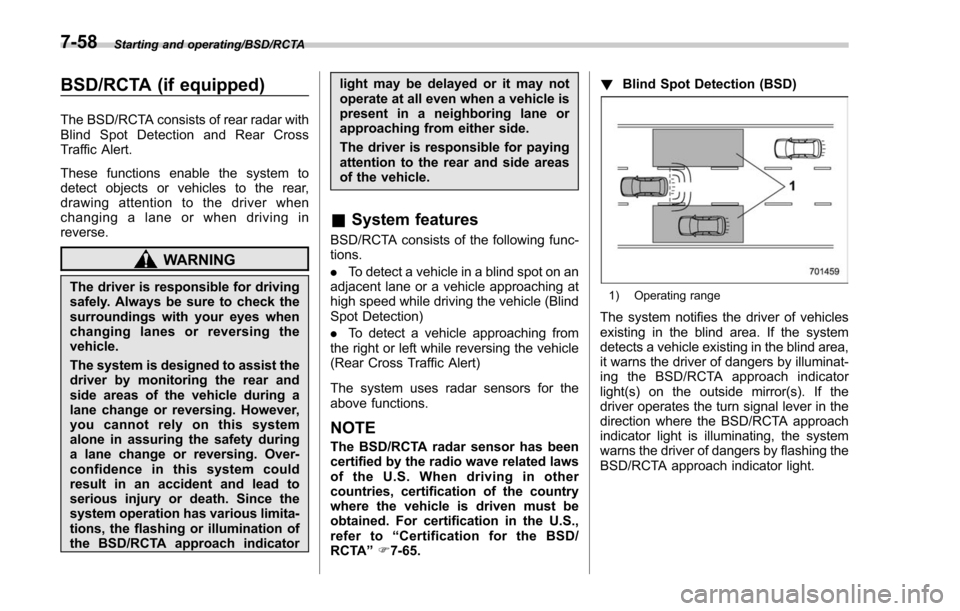
Blind Spot Detection (BSD)
1) Operating range
The system notifies the driver of vehicles
existing in the blind area. If the system
detects a vehicle existing in the blind area,
it warns the driver of dangers by illuminat-
ing the BSD/RCTA approach indicator
light(s) on the outside mirror(s). If the
driver operates the turn signal lever in the
direction where the BSD/RCTA approach
indicator light is illuminating, the system
warns the driver of dangers by flashing the
BSD/RCTA approach indicator light.
7-58
Page 462 of 634
!Lane Change Assist (LCA)
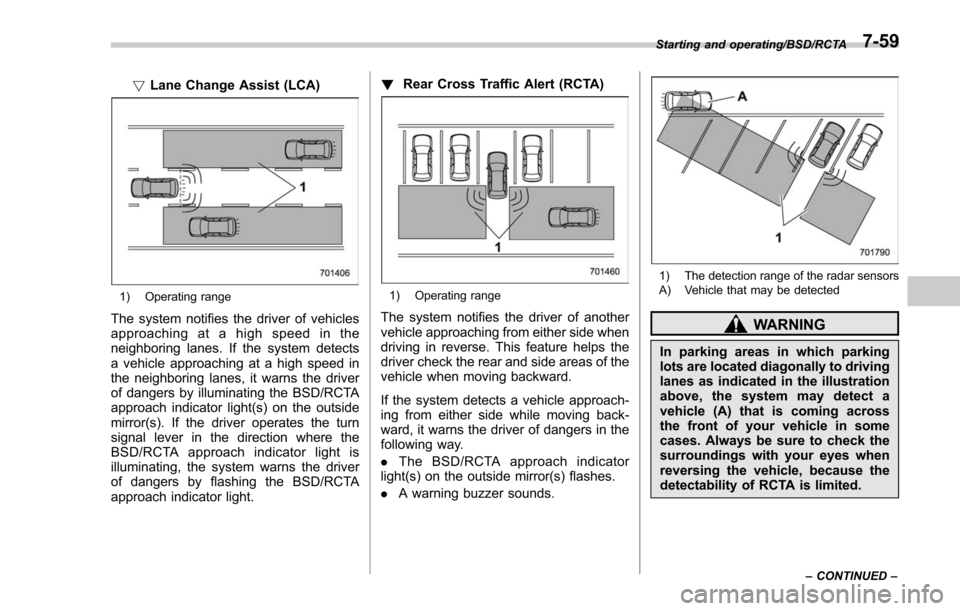
1) Operating range
The system notifies the driver of vehicles
approaching at a high speed in the
neighboring lanes. If the system detects
a vehicle approaching at a high speed in
the neighboring lanes, it warns the driver
of dangers by illuminating the BSD/RCTA
approach indicator light(s) on the outside
mirror(s). If the driver operates the turn
signal lever in the direction where the
BSD/RCTA approach indicator light is
illuminating, the system warns the driver
of dangers by flashing the BSD/RCTA
approach indicator light. !
Rear Cross Traffic Alert (RCTA)
1) Operating range
The system notifies the driver of another
vehicle approaching from either side when
driving in reverse. This feature helps the
driver check the rear and side areas of the
vehicle when moving backward.
If the system detects a vehicle approach-
ing from either side while moving back-
ward, it warns the driver of dangers in the
following way.
.The BSD/RCTA approach indicator
light(s) on the outside mirror(s) flashes.
. A warning buzzer sounds.
1) The detection range of the radar sensors
A) Vehicle that may be detected
WARNING
In parking areas in which parking
lots are located diagonally to driving
lanes as indicated in the illustration
above, the system may detect a
vehicle (A) that is coming across
the front of your vehicle in some
cases. Always be sure to check the
surroundings with your eyes when
reversing the vehicle, because the
detectability of RCTA is limited.
Starting and operating/BSD/RCTA
–CONTINUED –7-59
Page 464 of 634
operation and the BSD/RCTA warning
indicator will disappear. However, if the
BSD/RCTA warning indicator has ap-
peared for a prolonged time, have the
system inspected at a SUBARU dealer
as soon as possible.
.The detectability of the radar sen-
sors is restricted. The BSD/RCTA de-
tection may be impaired and the sys-
tem may not operate properly under the
following conditions.
–When the rear bumper around
the radar sensors is distorted
– When ice, snow or mud adheres
to the rear bumper surface around
the radar sensors
– When stickers, etc. are affixed on
the areas of the radar sensors on
the rear bumper
– During adverse weather condi-
tions such as rain, snow or fog
– When driving on wet roads such
as snow-covered roads and
through puddles
. The radar sensors may not detect or
may have difficulty detecting the fol-
lowing.
–Small motorcycles, bicycles, pe-
destrians, stationary objects on the
road or road side, etc.
– Vehicles with body shapes that
the radar may not reflect (vehicles with a low body height such as
sports cars or a trailer with no
cargo)
–
Vehicles that are not approach-
ing your vehicle even though they
are in the detection area (either on a
neighboring lane to the rear or
beside your vehicle when rever-
sing) (The system determines the
presence of approaching vehicles
based on data detected by the radar
sensors.)
– Vehicles traveling at significantly
different speeds
– Vehicles driving in parallel at
almost the same speed as your
vehicle for a prolonged time
– Oncoming vehicles
– Vehicles in a lane beyond the
neighboring lane
– Vehicles travelling at a signifi-
cantly lower speed that you are
trying to overtake
. On a road with extremely narrow
lanes, the system may detect vehicles
driving in a lane next to the neighbor-
ing lane.& BSD/RCTA approach indica-
tor light/warning buzzer
While the BSD/RCTA is active, the follow-
ing item(s) will operate to alert the driver.
. The BSD/RCTA approach indicator
light (when there are vehicles in the
neighboring lanes)
. The BSD/RCTA approach indicator
light and warning buzzer (when a vehicle
is approaching from the left or right side
while reversing)
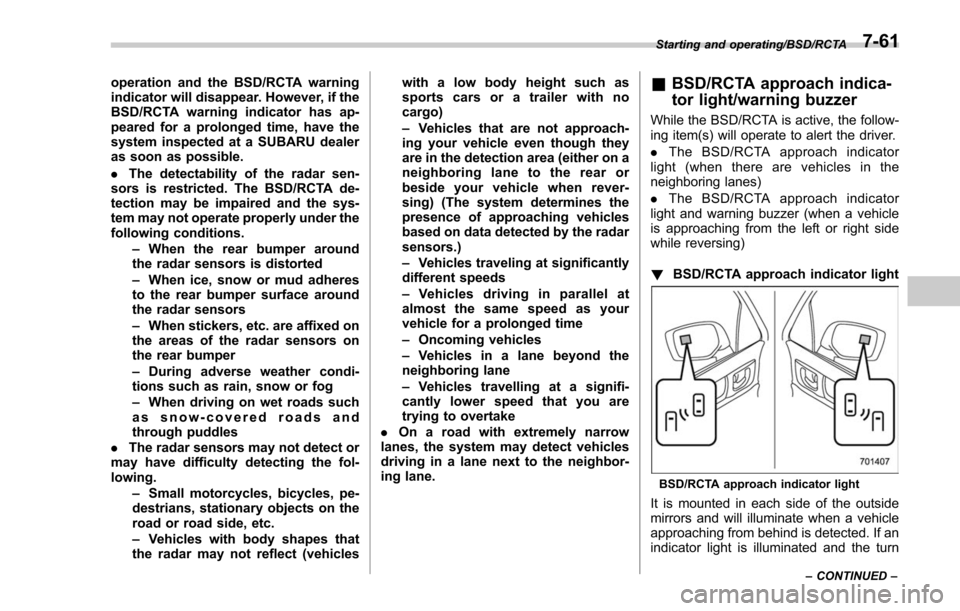
! BSD/RCTA approach indicator light
BSD/RCTA approach indicator light
It is mounted in each side of the outside
mirrors and will illuminate when a vehicle
approaching from behind is detected. If an
indicator light is illuminated and the turn
Starting and operating/BSD/RCTA
–CONTINUED –7-61
Page 500 of 634
total, one to the right side and the other to
the left side trailer tongue. Pass the chains
crossing each other under the trailer
tongue to prevent the trailer from dropping
onto the ground in case the trailer tongue
should disconnect from the hitch ball.
Allow sufficient slack in the chains taking
tight turn situations into account; however,
be careful not to let them drag on the
ground.
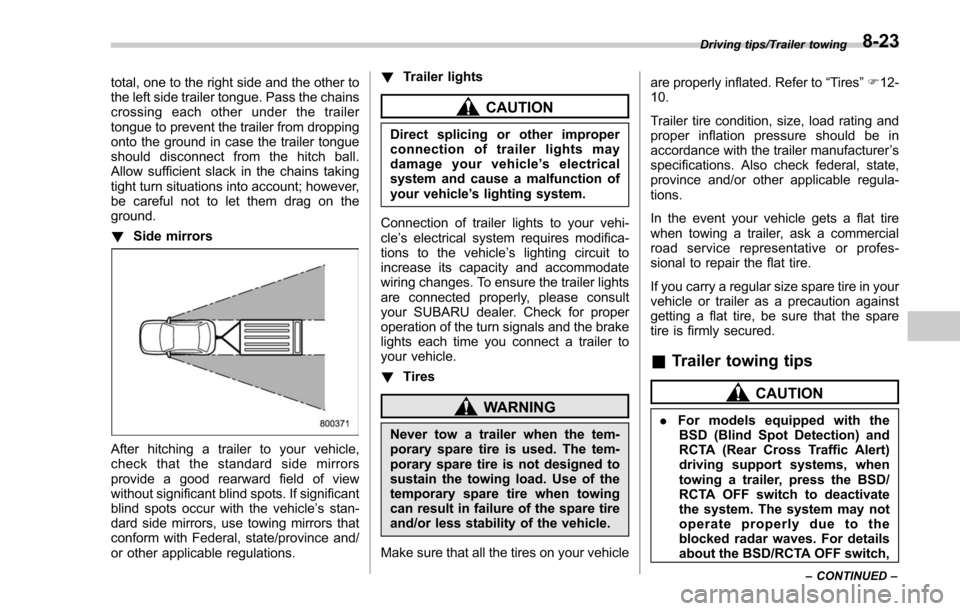
!Side mirrors
After hitching a trailer to your vehicle,
check that the standard side mirrors
provide a good rearward field of view
without significant blind spots. If significant
blind spots occur with the vehicle’ s stan-
dard side mirrors, use towing mirrors that
conform with Federal, state/province and/
or other applicable regulations. !
Trailer lights
CAUTION
Direct splicing or other improper
connection of trailer lights may
damage your vehicle’ s electrical
system and cause a malfunction of
your vehicle ’s lighting system.
Connection of trailer lights to your vehi-
cle ’s electrical system requires modifica-
tions to the vehicle ’s lighting circuit to
increase its capacity and accommodate
wiring changes. To ensure the trailer lights
are connected properly, please consult
your SUBARU dealer. Check for proper
operation of the turn signals and the brake
lights each time you connect a trailer to
your vehicle.
! Tires
WARNING
Never tow a trailer when the tem-
porary spare tire is used. The tem-
porary spare tire is not designed to
sustain the towing load. Use of the
temporary spare tire when towing
can result in failure of the spare tire
and/or less stability of the vehicle.
Make sure that all the tires on your vehicle are properly inflated. Refer to
“Tires”F 12-
10.
Trailer tire condition, size, load rating and
proper inflation pressure should be in
accordance with the trailer manufacturer ’s
specifications. Also check federal, state,
province and/or other applicable regula-
tions.
In the event your vehicle gets a flat tire
when towing a trailer, ask a commercial
road service representative or profes-
sional to repair the flat tire.
If you carry a regular size spare tire in your
vehicle or trailer as a precaution against
getting a flat tire, be sure that the spare
tire is firmly secured.
& Trailer towing tips
CAUTION
. For models equipped with the
BSD (Blind Spot Detection) and
RCTA (Rear Cross Traffic Alert)
driving support systems, when
towing a trailer, press the BSD/
RCTA OFF switch to deactivate
the system. The system may not
operate properly due to the
blocked radar waves. For details
about the BSD/RCTA OFF switch,
Driving tips/Trailer towing
–CONTINUED –8-23
Page 501 of 634
Driving tips/Trailer towing
refer to“BSD/RCTA OFF switch ”
F 7-64.
. For models equipped with RAB
(Reverse Automatic Braking)
system, consult your SUBARU
dealer for additional information
about towing a trailer.
. Never exceed 45 mph (72 km/h)
when towing a trailer in hilly
country on hot days.
. When towing a trailer, steering,
stability, stopping distance and
braking performance will be dif-
ferent when compared to normal
operation. You should never
drive at excessive speeds but
always employ extra caution
when towing a trailer. You should
also keep the following tips in
mind.
! Before starting out on a trip
. Check that the vehicle and vehicle-to-
hitch mounting are in good condition. If
any problems are apparent, do not tow the
trailer.
. Check that the vehicle rests horizon-
tally with the trailer attached. If the vehicle
is tipped sharply up at the front and down
at the rear, check the total trailer weight,
GVW, GAWs and tongue load again, then confirm that the load and its distribution
are acceptable.
.
Check that the tire rating and pressures
are correct.
. Check that the vehicle and trailer are
connected properly. Confirm that:
–the trailer tongue is connected
properly to the hitch ball.
– the trailer lights connector is con-
nected properly and trailer ’sbrake
lights illuminate when the vehicle ’s
brake pedal is pressed, and that the
trailer ’s turn signal lights flash when
the vehicle’ s turn signal lever is oper-
ated.
– the safety chains are connected
properly.
– all cargo in the trailer is secured
safety in position.
– the side mirrors provide a good
rearward field of view without a sig-
nificant blind spot.
. Sufficient time should be taken to learn
the “feel ”of the vehicle/trailer combination
before starting out on a trip. In an area free
of traffic, practice turning, stopping and
backing up.
! Driving with a trailer
. You should allow for considerably more
stopping distance when towing a trailer.
Avoid sudden braking because it may result in skidding or jackknifing and loss of
control.
.
Avoid abrupt starts and sudden accel-
erations. If your vehicle has a manual
transmission, always start out in first gear
and release the clutch at moderate engine
revolution.
. Avoid uneven steering, sharp turns and
rapid lane changes.
. Slow down before turning. Make a
longer than normal turning radius because
the trailer wheels will be closer than the
vehicle wheels to the inside of the turn. In
a tight turn, the trailer could hit your
vehicle.
. Crosswinds will adversely affect the
handling of your vehicle and trailer, caus-
ing sway. Crosswinds can be due to
weather conditions or the passing of large
trucks or buses. If swaying occurs, firmly
grip the steering wheel and promptly begin
decelerating your vehicle at a gradual
pace.
. When passing other vehicles, consid-
erable distance is required because of the
added weight and length caused by
attaching the trailer to your vehicle.
8-24
Page 591 of 634
Specifications/Fuses and circuits
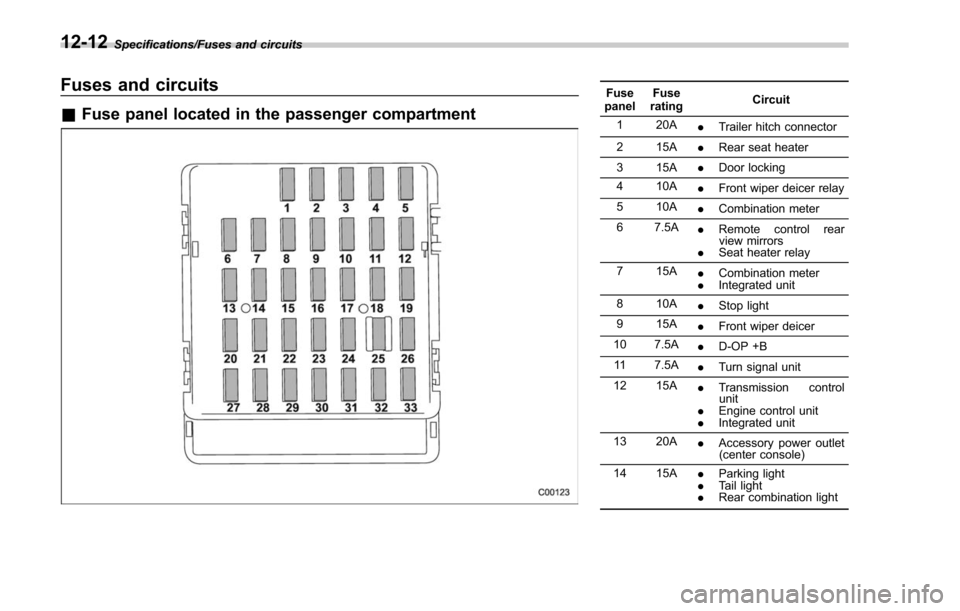
Fuses and circuits
&Fuse panel located in the passenger compartment
Fuse
panel Fuse
rating Circuit
1 20A .Trailer hitch connector
2 15A .Rear seat heater
3 15A .Door locking
4 10A .Front wiper deicer relay
5 10A .Combination meter
6 7.5A .Remote control rear
view mirrors
. Seat heater relay
7 15A .Combination meter
. Integrated unit
8 10A .Stop light
9 15A .Front wiper deicer
10 7.5A .D-OP +B
11 7.5A .Turn signal unit
12 15A .Transmission control
unit
. Engine control unit
. Integrated unit
13 20A .Accessory power outlet
(center console)
14 15A .Parking light
. Tail light
. Rear combination light
12-12
Page 593 of 634
Specifications/Fuses and circuits
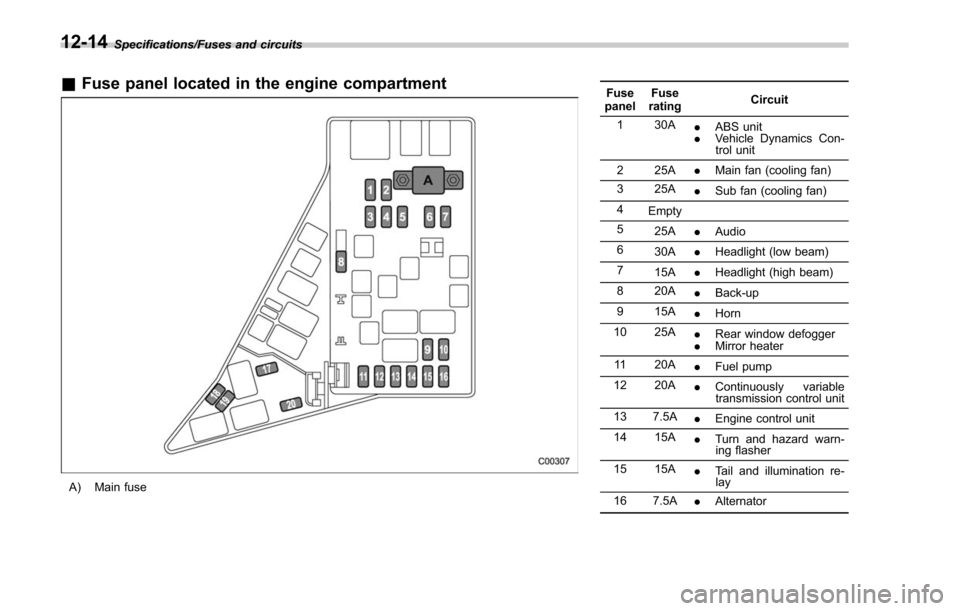
&Fuse panel located in the engine compartment
A) Main fuse Fuse
panel Fuse
rating Circuit
1 30A .ABS unit
. Vehicle Dynamics Con-
trol unit
2 25A .Main fan (cooling fan)
3 25A .Sub fan (cooling fan)
4 Empty
5 25A .Audio
6 30A .Headlight (low beam)
7 15A .Headlight (high beam)
8 20A .Back-up
9 15A .Horn
10 25A .Rear window defogger
. Mirror heater
11 20A .Fuel pump
12 20A .Continuously variable
transmission control unit
13 7.5A .Engine control unit
14 15A .Turn and hazard warn-
ing flasher
15 15A .Tail and illumination re-
lay
16 7.5A .Alternator
12-14
Page 596 of 634
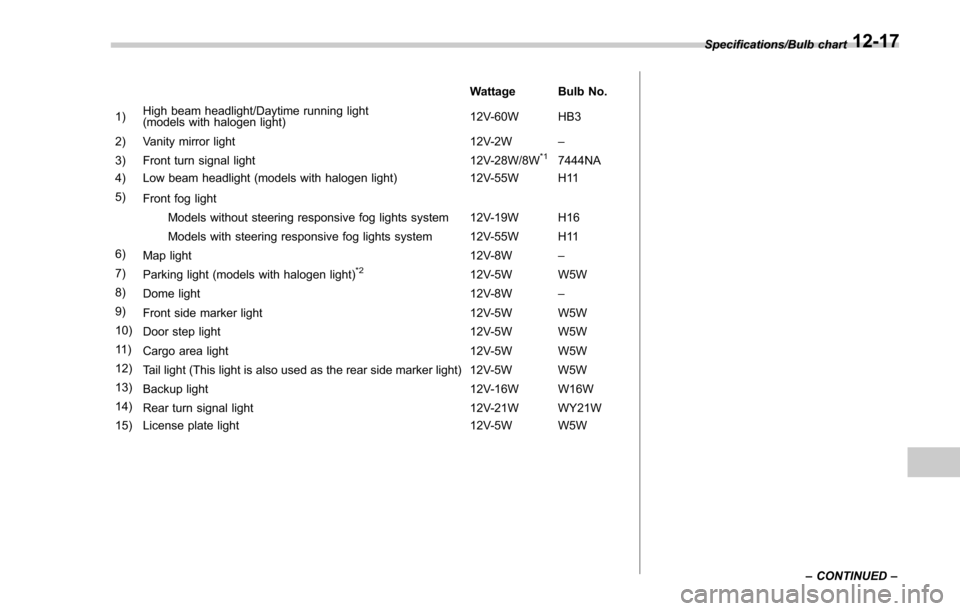
Wattage Bulb No.
1) High beam headlight/Daytime running light
(models with halogen light) 12V-60W HB3
2) Vanity mirror light 12V-2W –
3) Front turn signal light 12V-28W/8W
*17444NA
4) Low beam headlight (models with halogen light) 12V-55W H11
5) Front fog light
Models without steering responsive fog lights system 12V-19W H16
Models with steering responsive fog lights system 12V-55W H11
6) Map light 12V-8W–
7) Parking light (models with halogen light)
*212V-5W W5W
8) Dome light 12V-8W –
9) Front side marker light 12V-5W W5W
10) Door step light 12V-5W W5W
11 ) Cargo area light 12V-5W W5W
12) Tail light (This light is also used as the rear side marker light) 12V-5W W5W
13) Backup light 12V-16W W16W
14) Rear turn signal light 12V-21W WY21W
15) License plate light 12V-5W W5W Specifications/Bulb chart
–CONTINUED –
12-17