instrument panel SUBARU FORESTER 2018 Quick Guide
[x] Cancel search | Manufacturer: SUBARU, Model Year: 2018, Model line: FORESTER, Model: SUBARU FORESTER 2018Pages: 33, PDF Size: 3.29 MB
Page 19 of 33
17
Automatic Climate
Control System
(if equipped)
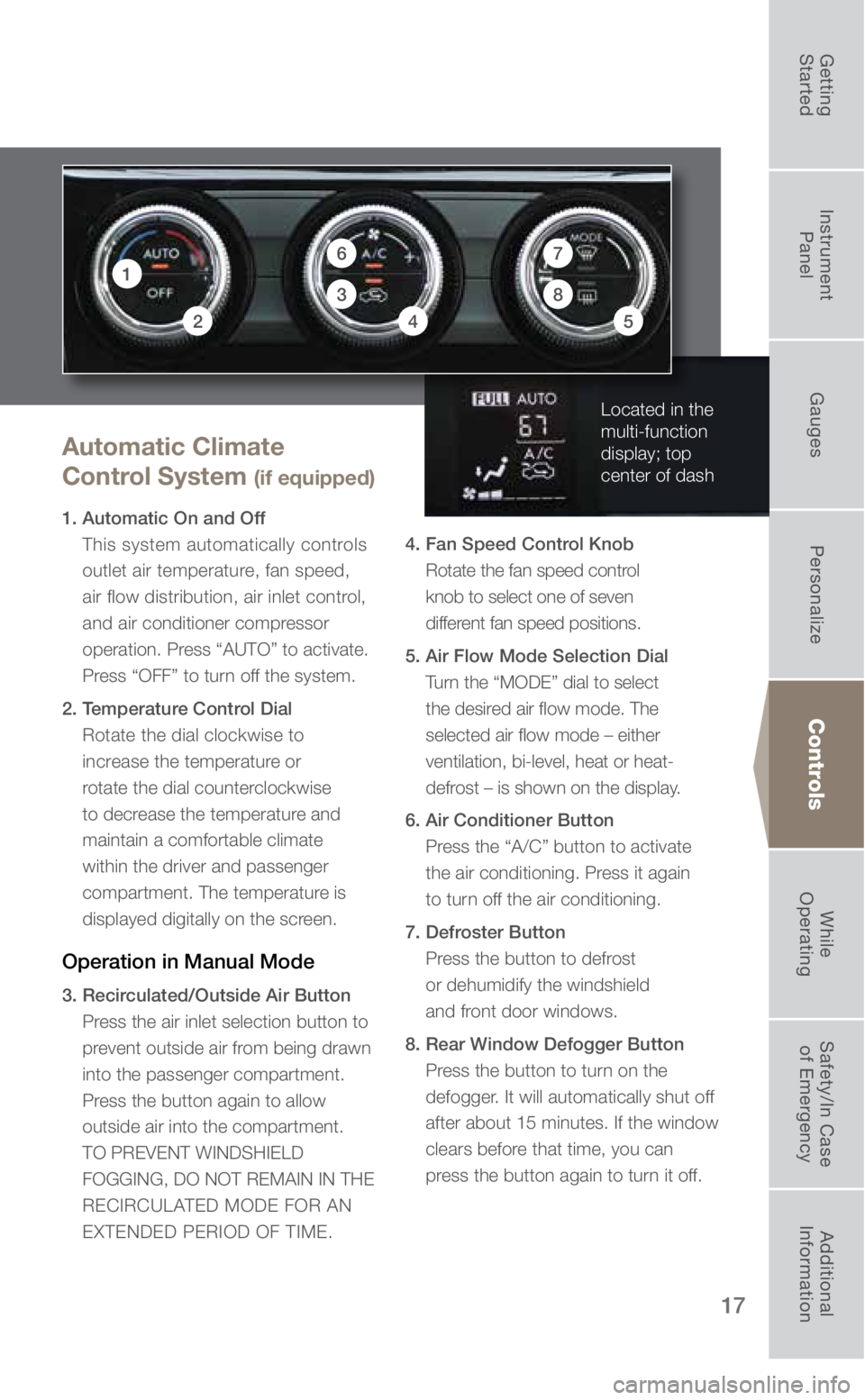
1. Automatic On and Off This system automatically controls
outlet air temperature, fan speed,
air flow distribution, air inlet control,
and air conditioner compressor
operation. Press “AUTO” to activate.
Press “OFF” to turn off the system.
2. Temperature Control Dial Rotate the dial clockwise to
increase the temperature or
rotate the dial counterclockwise
to decrease the temperature and
maintain a comfortable climate
within the driver and passenger
compartment. The temperature is
displayed digitally on the screen.
Operation in Manual Mode
3. Recirculated/Outside Air Button Press the air inlet selection button to
prevent outside air from being drawn
into the passenger compartment.
Press the button again to allow
outside air into the compartment.
TO PREVENT WINDSHIELD
FOGGING, DO NOT REMAIN IN THE
RECIRCULATED MODE FOR AN
EXTENDED PERIOD OF TIME. 4. Fan Speed Control Knob
Rotate the fan speed control
knob to select one of seven
different fan speed positions.
5. Air Flow Mode Selection Dial Turn the “MODE” dial to select
the desired air flow mode. The
selected air flow mode – either
ventilation, bi-level, heat or heat-
defrost – is shown on the display.
6. Air Conditioner Button Press the “A/C” button to activate
the air conditioning. Press it again
to turn off the air conditioning.
7. Defroster Button Press the button to defrost
or dehumidify the windshield
and front door windows.
8. Rear Window Defogger Button Press the button to turn on the
defogger. It will automatically shut off
after about 15 minutes. If the window
clears before that time, you can
press the button again to turn it off.
Controls
Located in the
multi-function
display; top
center of dash
17
3
42
8
6
5
3053392_18b_Subaru_Forester_QRG_061117.indd 176/12/17 9:01 AM
Getting
Started Instrument
Panel Gauges
Personalize ControlsWhile
Operating Safety/In Case
of Emergency Additional
Information
Page 21 of 33
19
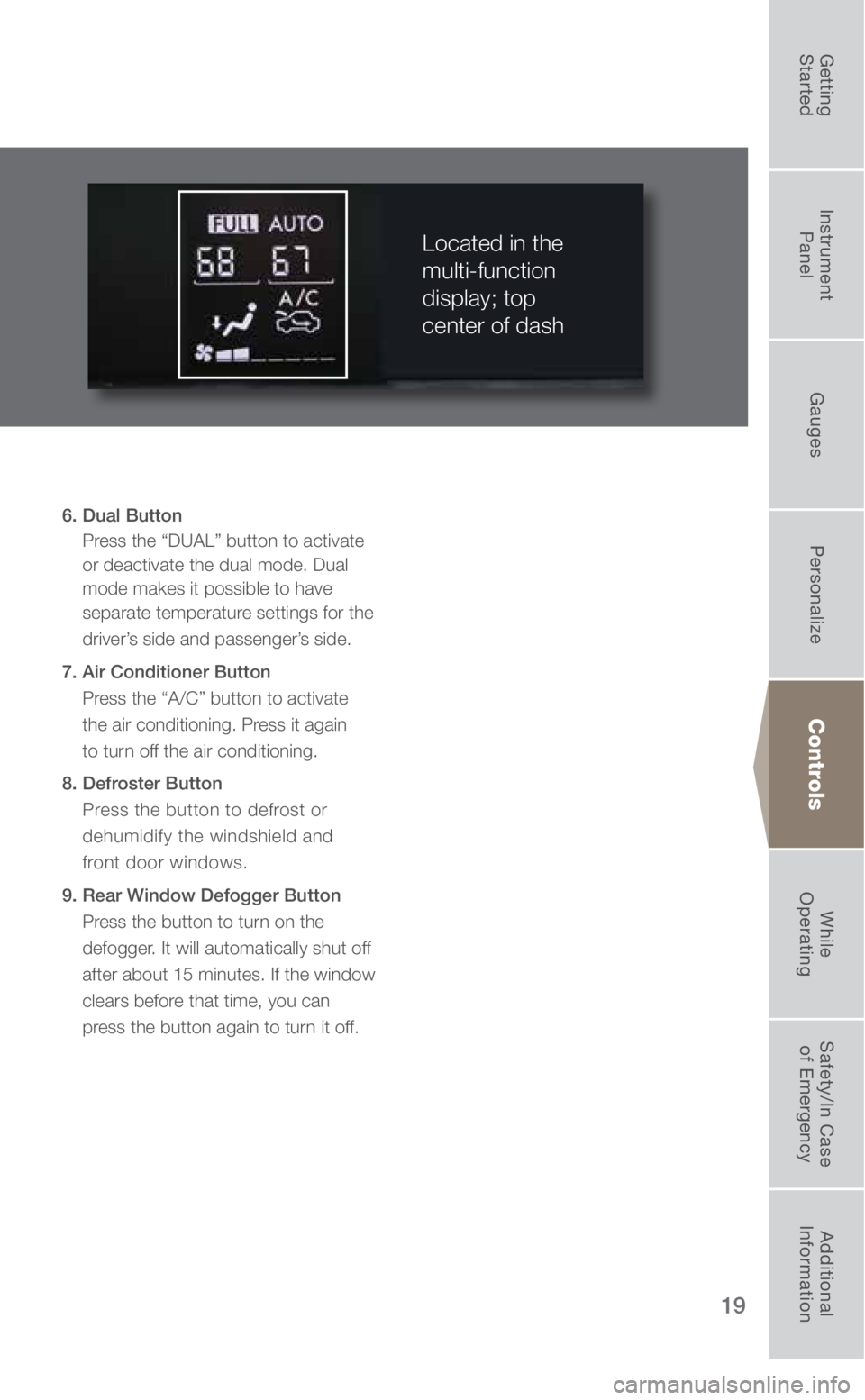
6. Dual Button Press the “DUAL” button to activate
or deactivate the dual mode. Dual
mode makes it possible to have
separate temperature settings for the
driver’s side and passenger’s side.
7. Air Conditioner Button Press the “A/C” button to activate
the air conditioning. Press it again
to turn off the air conditioning.
8. Defroster Button Press the button to defrost or
dehumidify the windshield and
front door windows.
9. Rear Window Defogger Button Press the button to turn on the
defogger. It will automatically shut off
after about 15 minutes. If the window
clears before that time, you can
press the button again to turn it off.
Located in the
multi-function
display; top
center of dash
Controls
3053392_18b_Subaru_Forester_QRG_061117.indd 196/12/17 9:02 AM
Getting
Started Instrument
Panel Gauges
Personalize ControlsWhile
Operating Safety/In Case
of Emergency Additional
Information
Page 23 of 33
21
Controls
Cruise Control
Increase Speed
Push up the “RES/SET” switch to the
“RES” side; hold until your vehicle
reaches the desired speed and release.
To increase speed using the accelerator
pedal, press the pedal until you reach
the desired speed. Push down the
“RES/SET” switch to the “SET” side
to set the speed. Decrease Speed
Push down the “RES/SET” switch to
the “SET” side; hold until your vehicle
slows to the desired speed and release.
To decrease the speed using the brake
pedal, press the pedal to release
cruise control temporarily. When the
speed decreases to the desired speed,
push down the “RES/SET” switch to
the “SET” side to set the speed.
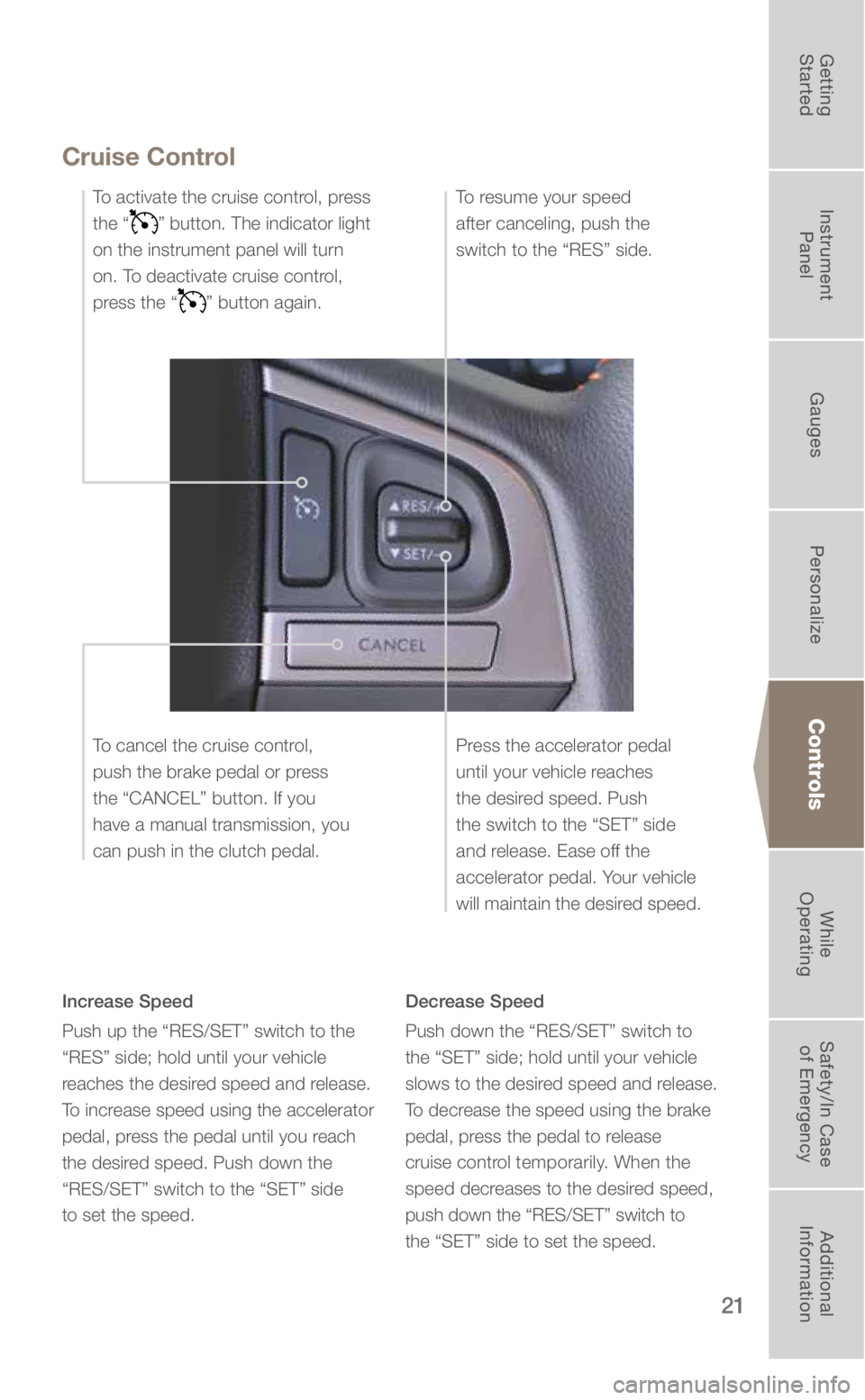
To activate the cruise control, press
the “
” button. The indicator light
on the instrument panel will turn
on. To deactivate cruise control,
press the “
” button again.
Press the accelerator pedal
until your vehicle reaches
the desired speed. Push
the switch to the “SET” side
and release. Ease off the
accelerator pedal. Your vehicle
will maintain the desired speed.
To cancel the cruise control,
push the brake pedal or press
the “CANCEL” button. If you
have a manual transmission, you
can push in the clutch pedal. To resume your speed
after canceling, push the
switch to the “RES” side.
3053392_18b_Subaru_Forester_QRG_061117.indd 216/12/17 9:03 AM
Getting
Started Instrument
Panel Gauges
Personalize ControlsWhile
Operating Safety/In Case
of Emergency Additional
Information
Page 24 of 33
22
While Operating
Paddle Shift Control Switches (if equipped)
• Temporary use: Even when the selector is in the
“D” (Drive) position, you can temporarily shift the
gear by pulling the “+” or “–” paddle shift control
switch. The transmission will automatically
switch back to Normal Mode.
• When the selector lever is in Manual Mode,
shift to the next higher gear by pulling the “+” paddle shift cont\
rol switch on the steering
wheel. Pull the “–” paddle shift control switch to shift into the next lower gear.
Manual Shifting Operation
Arrow-shaped lights in the center of the instrument panel show whether an u\
pshift is possible
and whether a downshift is possible.
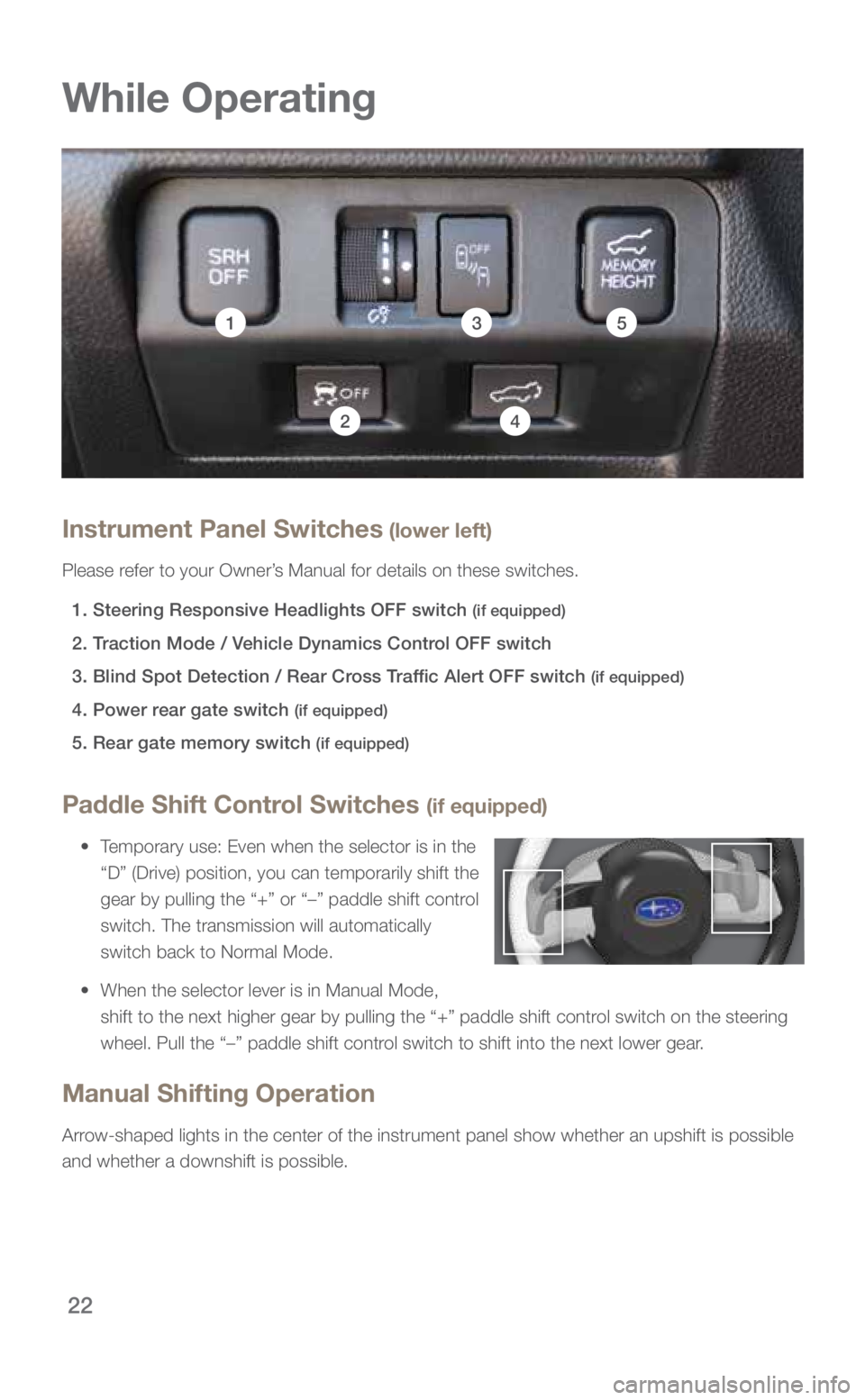
Instrument Panel Switches (lower left)
Please refer to your Owner’s Manual for details on these switches.
1. Steering Responsive Headlights OFF switch
(if equipped)
2.
Traction Mode / Vehicle Dynamics Control OFF switch
3.
Blind Spot Detection / Rear Cross Traffic Alert OFF switch
(if equipped)
4.
Power rear gate switch (if equipped)
5.
Rear gate memory switch (if equipped)
153
42
3053392_18b_Subaru_Forester_QRG_061117.indd 226/12/17 9:04 AM
Page 25 of 33
23
1
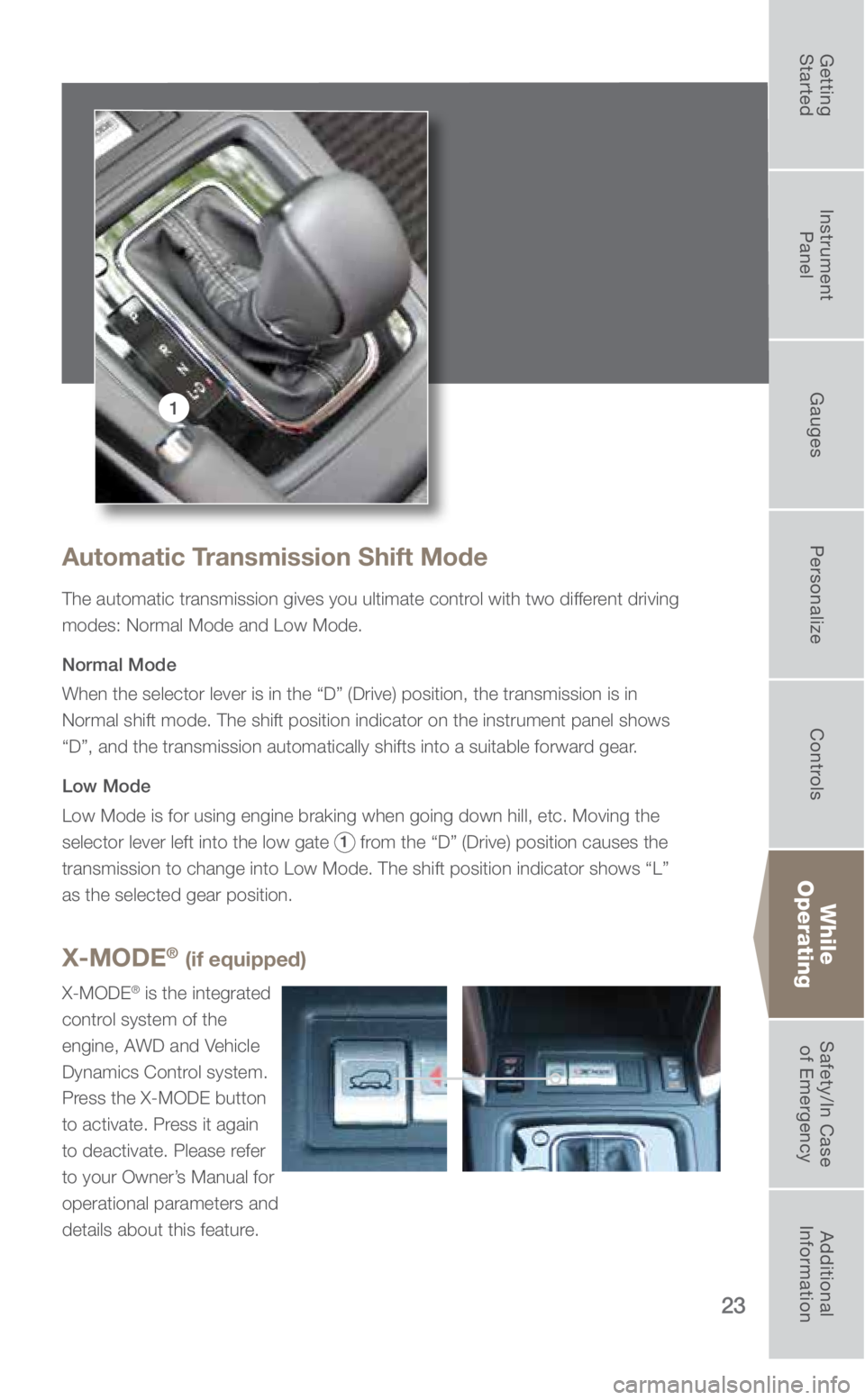
Automatic Transmission Shift Mode
The automatic transmission gives you ultimate control with two different driving
modes: Normal Mode and Low Mode.
Normal Mode
When the selector lever is in the “D” (Drive) position, the tran\
smission is in
Normal shift mode. The shift position indicator on the instrument panel \
shows
“D”, and the transmission automatically shifts into a suitable for\
ward gear.
Low Mode
Low Mode is for using engine braking when going down hill, etc. Moving t\
he
selector lever left into the low gate
1 from the “D” (Drive) position causes the
transmission to change into Low Mode. The shift position indicator shows\
“L”
as the selected gear position.
While
Operating
X-MODE® (if equipped)
X-MODE® is the integrated
control system of the
engine, AWD and Vehicle
Dynamics Control system.
Press the X-MODE button
to activate. Press it again
to deactivate. Please refer
to your Owner’s Manual for
operational parameters and
details about this feature.
3053392_18b_Subaru_Forester_QRG_061117.indd 236/12/17 9:04 AM
Getting
Started Instrument
Panel Gauges
Personalize ControlsWhile
Operating Safety/In Case
of Emergency Additional
Information
Page 27 of 33
25
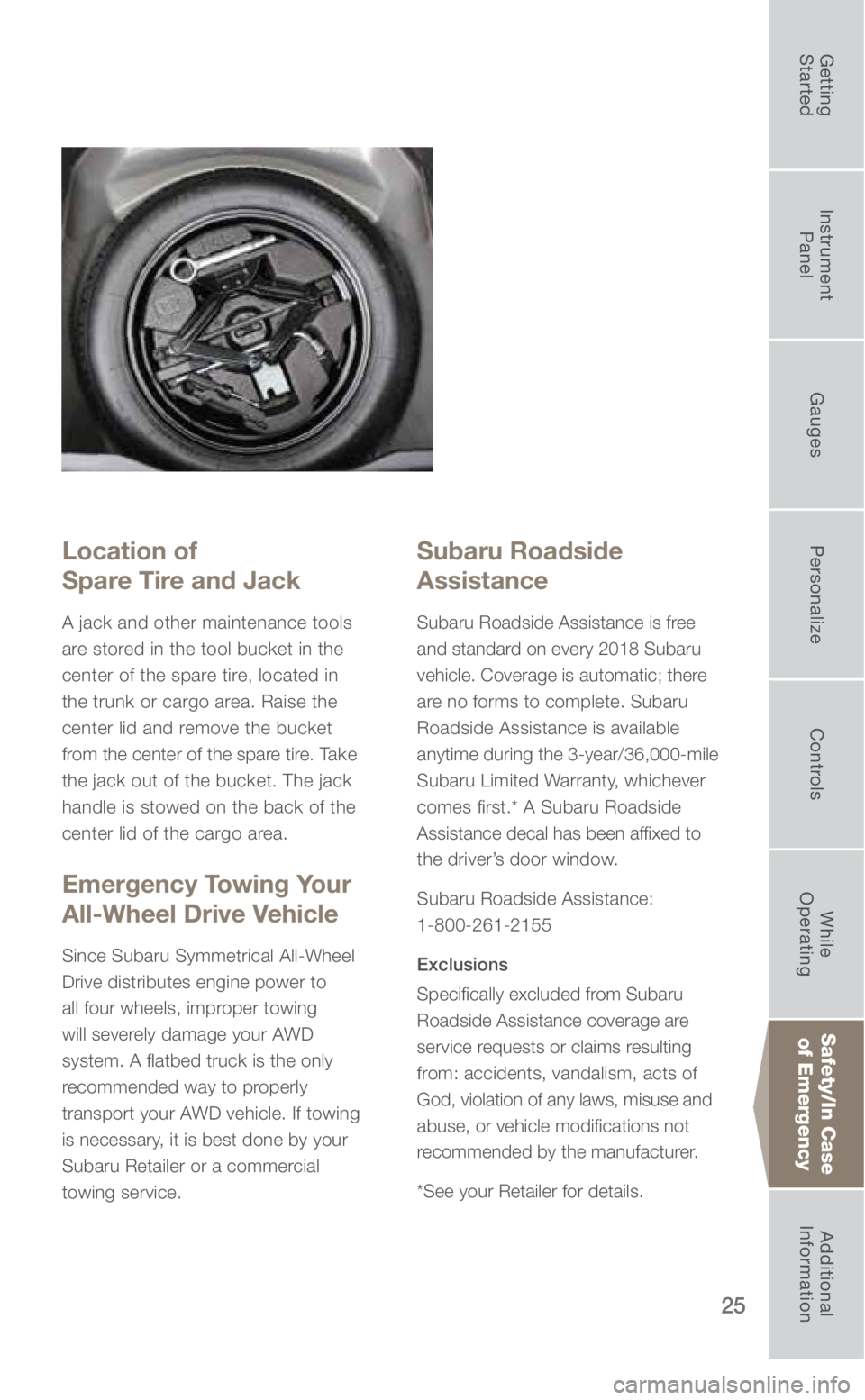
Location of
Spare Tire and Jack
A jack and other maintenance tools
are stored in the tool bucket in the
center of the spare tire, located in
the trunk or cargo area. Raise the
center lid and remove the bucket
from the center of the spare tire. Take
the jack out of the bucket. The jack
handle is stowed on the back of the
center lid of the cargo area.
Emergency Towing Your
All-Wheel Drive Vehicle
Since Subaru Symmetrical All-Wheel
Drive distributes engine power to
all four wheels, improper towing
will severely damage your AWD
system. A flatbed truck is the only
recommended way to properly
transport your AWD vehicle. If towing
is necessary, it is best done by your
Subaru Retailer or a commercial
towing service.
Subaru Roadside
Assistance
Subaru Roadside Assistance is free
and standard on every 2018 Subaru
vehicle. Coverage is automatic; there
are no forms to complete. Subaru
Roadside Assistance is available
anytime during the 3-year/36,000-mile
Subaru Limited Warranty, whichever
comes first.* A Subaru Roadside
Assistance decal has been affixed to
the driver’s door window.
Subaru Roadside Assistance:
1-800-261-2155
Exclusions
Specifically excluded from Subaru
Roadside Assistance coverage are
service requests or claims resulting
from: accidents, vandalism, acts of
God, violation of any laws, misuse and
abuse, or vehicle modifications not
recommended by the manufacturer.
*See your Retailer for details.
Safety/In Case of Emergency
3053392_18b_Subaru_Forester_QRG_061117.indd 256/12/17 9:05 AM
Getting
Started Instrument
Panel Gauges
Personalize ControlsWhile
Operating Safety/In Case
of Emergency Additional
Information
Page 28 of 33
26
Additional Information
Fuel
• 2.5 liter DOHC Non-turbo models use regular unleaded gasoline with an octane rating of
87 AKI or higher. Consult the Owner’s Manual for more detailed information.
• 2.0 liter DOHC Turbo model’s engine is designed to operate at maximum performance
using unleaded gasoline with an octane rating of 93 AKI or higher. If 93 AKI fuel is
not readily available, unleaded gasoline with an octane rating of 91 AKI or h\
igher may
be temporarily used. However, you may notice a slight decrease in maximum engine
performance while using 91 AKI fuel.
Regular unleaded gasoline with an octane rating of 87 AKI or higher may \
also be
used. Using regular unleaded gasoline will not be detrimental to engine durability, nor
will it affect your warranty coverage. However, depending on your driving habits and
conditions, you may notice a decrease in maximum engine performance, fuel economy
or slight engine vibration or knocking. It is not recommended to use 87 AKI when towing.
Consult the Owner’s Manual for more detailed information.
Fuel Capacity
• 15.9 US gal (60 liters, 13.2 lmp gal)
• When the low fuel indicator light is displayed on the instrument panel, \
approximately
2.6 US gallons (10.0 liters, 2.2 Imp gal) of fuel remain.
• If you have recently fueled your vehicle, the Check Engine light on the instrument pa\
nel
may stay on due to a missing or loose fuel filler cap (the cap should\
be tightened until
a click is heard).
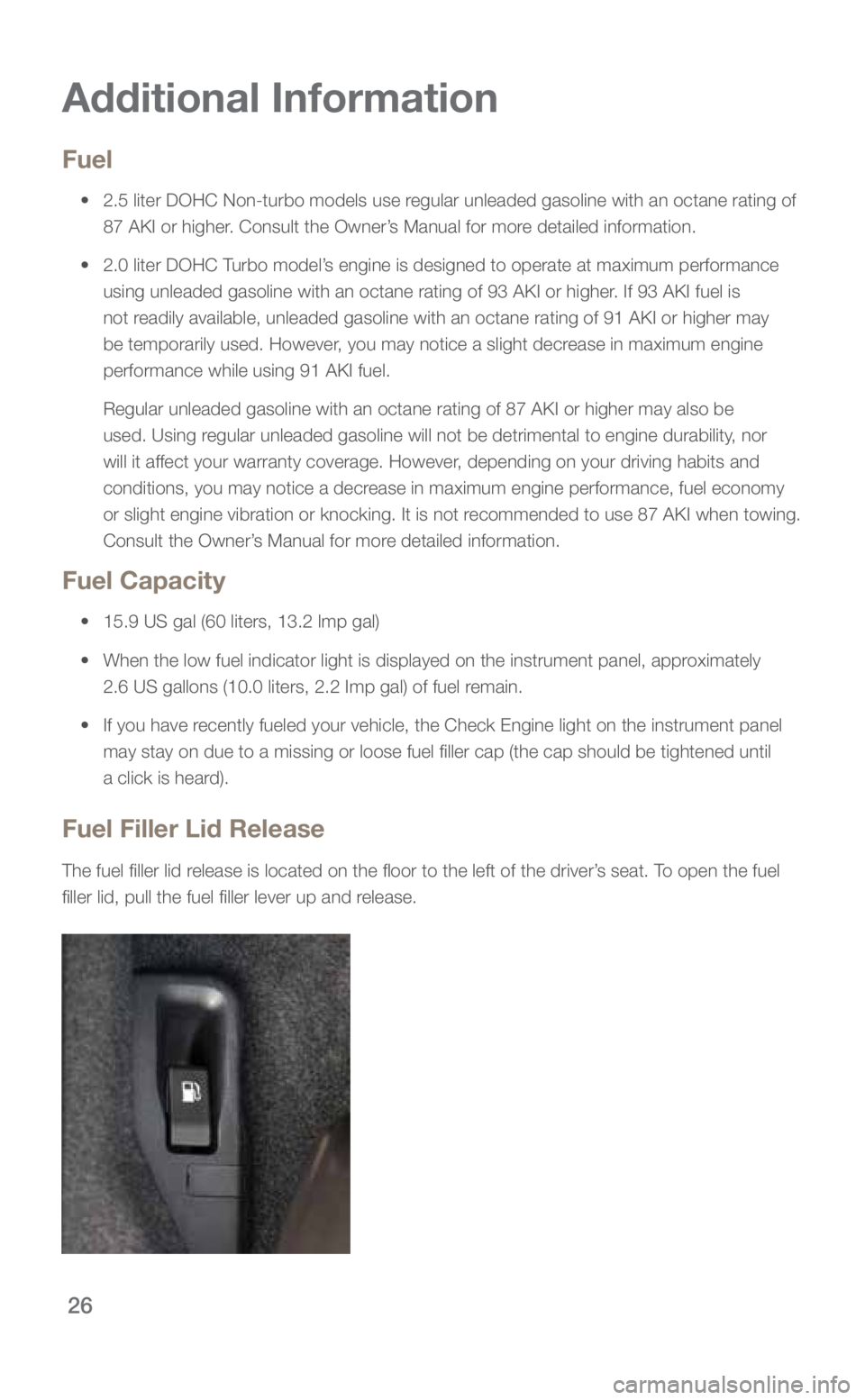
Fuel Filler Lid Release
The fuel filler lid release is located on the floor to the left of the driver’s seat. To open the fuel
filler lid, pull the fuel filler lever up and release.
3053392_18b_Subaru_Forester_QRG_061117.indd 266/12/17 9:05 AM
Page 29 of 33
.
• Or API classification SN with the words “RESOUR")
27
Engine Oil
Use only the following oils:
• ILSAC GF-5, which can be identified with the ILSAC certification mar\
k
(Starburst mark).
• Or API classification SN with the words “RESOURCE CONSERVING”.
- 2.5 liter DOHC Non-turbo models use 0W-20 synthetic, replacement
interval 6,000 miles under normal driving conditions. No requirement at
the first 3,000 miles.
- 2.0 liter DOHC Turbo models use 5W-30 synthetic, replacement interval
6,000 miles under normal driving conditions. No requirement at the first
3,000 miles.
Engine Oil Capacity
• 2.5 liter DOHC Non-turbo models: 5.1 US qt (4.8 liters, 4.2 lmp qt)
• 2.0 liter DOHC Turbo models: 5.4 US qt (5.1 liters, 4.5 lmp qt)
Additional
Information
3053392_18b_Subaru_Forester_QRG_061117.indd 276/12/17 9:05 AM
Getting
Started Instrument
Panel Gauges
Personalize ControlsWhile
Operating Safety/In Case
of Emergency Additional
Information
Page 32 of 33
Steering Wheel & Instrument Panel
Master and Valet Keys, Keyless Access System* operation,
Push Button Start* and Remote Start*
Tilt/Telescopic Steering Column Adjustments and Paddle Shift operation*
Steering Wheel Controls
Headlights, DRL, Parking Lights, Hazard Lights, Interior Lights,
Fog Lights*, Autolights* and Welcome/Goodbye Lighting*
Front & Rear* Wiper and Washer Controls
Gauges, Warning Lights, Multi Function Display*, Information Display settings
and Parking Brake operation
Safety, Comfort & Convenience
All Wheel Drive System, Emergency towing of AWD, VDC, X-MODE®*,
Hill Holder™*, Incline Start Assist*, and Auto Vehicle Hold* operation
Rear Vision Camera
All Weather Package operation — Heated Seats,
Exterior Mirrors & Windshield Wiper De-icer
Review operation of climate control system
Power windows, locks, exterior mirrors, seat including Memory Function*
and Power Moonroof* operation
Hood Release and fluid reservoir locations
Fuel Filler Door, Trunk Release, Rear Gate operation
and location of Spare Tire*, Jack & Tools
STARLINK Audio System, Bluetooth & Safety/Security
Bluetooth — Pair owner’s phone(s) & show operation
(Download SUBARU STARLINK and MySubaru Apps*)
STARLINK Audio and Navigation* system controls
Driver Assist Technologies
EyeSight™ System*
Reverse Automatic Braking System*
Blind Spot Detection*, Lane Change Assist* and Rear Cross Traffic Alert*
High Beam Assist*, Steering Responsive Foglights* and
Steering Responsive Headlights*
*If Applicable
Owner Signature(s) ________________________________________________________________
Subaru Sales Consultant ___________________________________________________________
Subaru Sales Manager _____________________________________________________________
3053392_18b_Subaru_Forester_QRG_061117.indd 306/12/17 9:05 AM