navigation system SUBARU FORESTER 2021 Getting Started Guide
[x] Cancel search | Manufacturer: SUBARU, Model Year: 2021, Model line: FORESTER, Model: SUBARU FORESTER 2021Pages: 140, PDF Size: 38.84 MB
Page 84 of 140
CLOCK
The clock can be set manually or automatically. When set to “Auto”, the clock
automatically adjusts when a Bluetooth®connected phone is paired (vehicles without
navigation), or through the GPS signal (vehicles with navigation system).
Manually
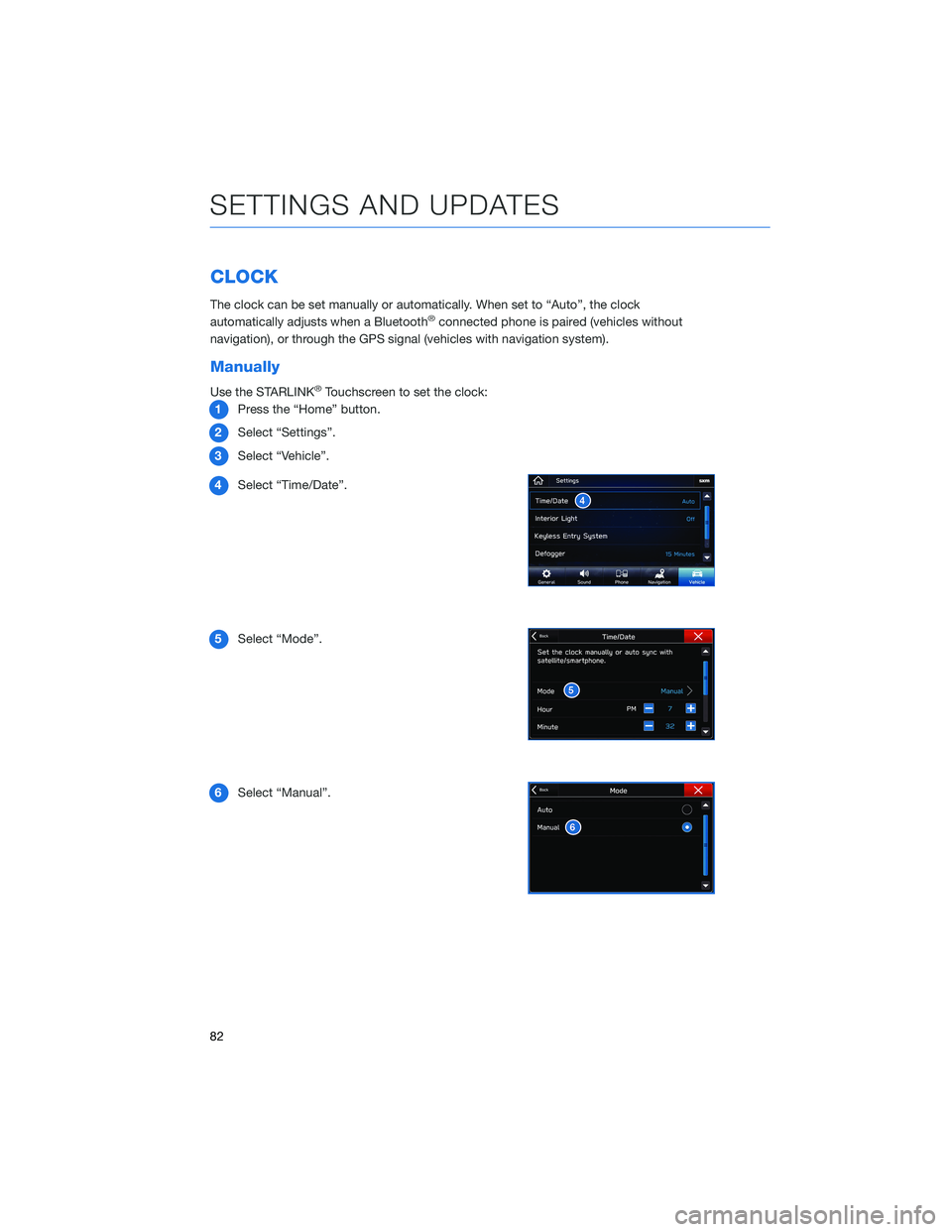
Use the STARLINK®Touchscreen to set the clock:
1Press the “Home” button.
2Select “Settings”.
3Select “Vehicle”.
4Select “Time/Date”.
5Select “Mode”.
6Select “Manual”.
SETTINGS AND UPDATES
82
Page 85 of 140
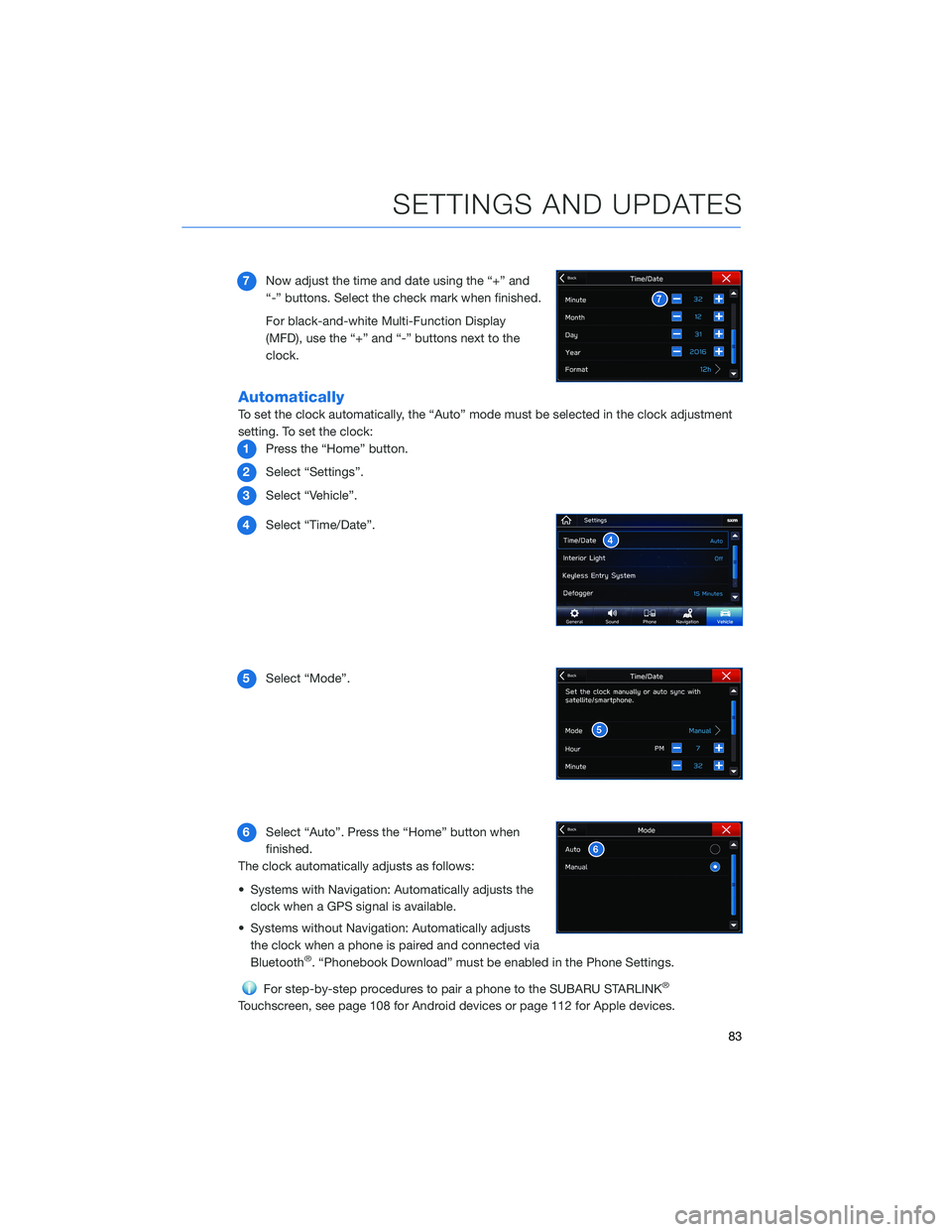
7Now adjust the time and date using the “+” and
“-” buttons. Select the check mark when finished.
For black-and-white Multi-Function Display
(MFD), use the “+” and “-” buttons next to the
clock.
Automatically
To set the clock automatically, the “Auto” mode must be selected in the clock adjustment
setting. To set the clock:
1Press the “Home” button.
2Select “Settings”.
3Select “Vehicle”.
4Select “Time/Date”.
5Select “Mode”.
6Select “Auto”. Press the “Home” button when
finished.
The clock automatically adjusts as follows:
• Systems with Navigation: Automatically adjusts the
clock when a GPS signal is available.
• Systems without Navigation: Automatically adjusts
the clock when a phone is paired and connected via
Bluetooth
®. “Phonebook Download” must be enabled in the Phone Settings.
For step-by-step procedures to pair a phone to the SUBARU STARLINK®
Touchscreen, see page 108 for Android devices or page 112 for Apple devices.
SETTINGS AND UPDATES
83
Page 126 of 140
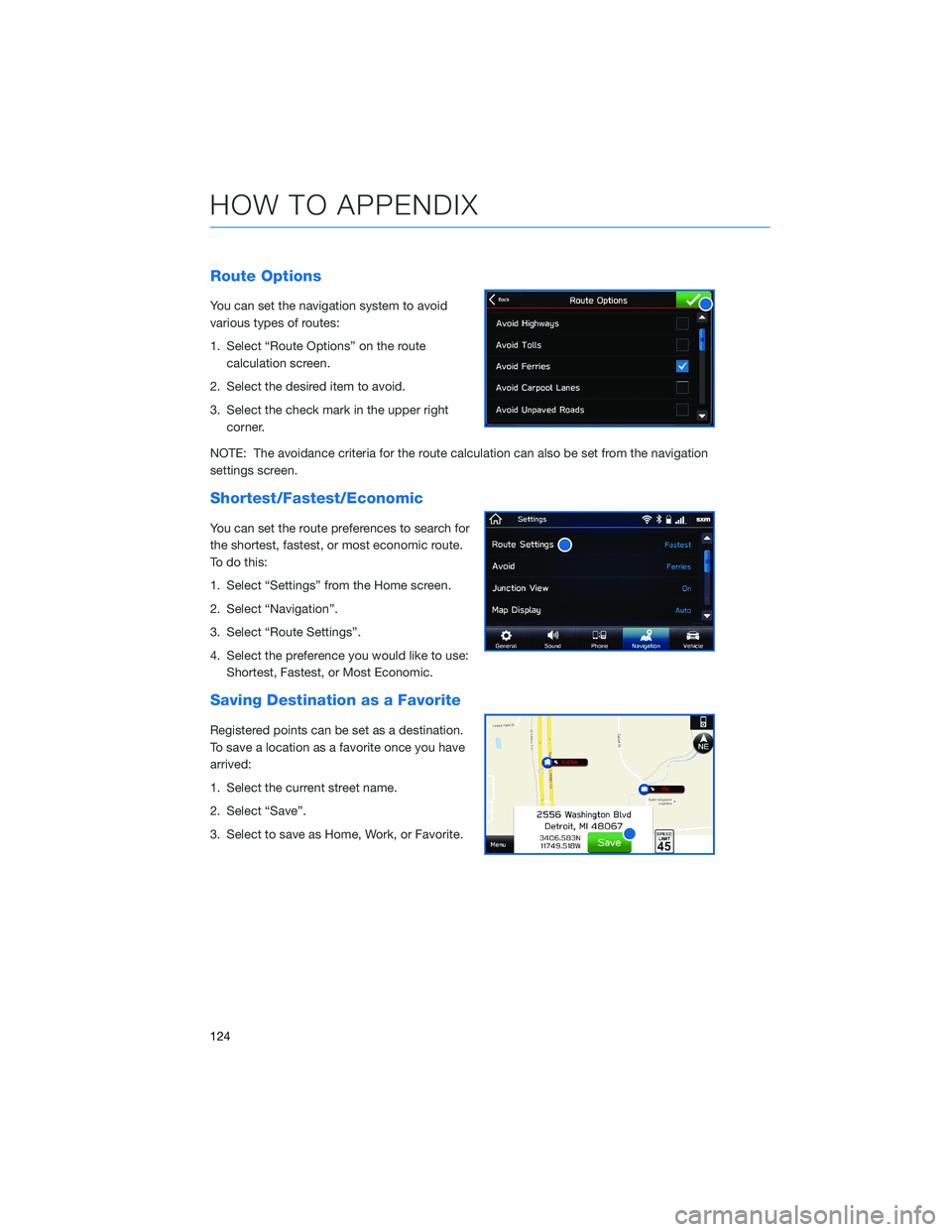
Route Options
You can set the navigation system to avoid
various types of routes:
1. Select “Route Options” on the route
calculation screen.
2. Select the desired item to avoid.
3. Select the check mark in the upper right
corner.
NOTE: The avoidance criteria for the route calculation can also be set from the navigation
settings screen.
Shortest/Fastest/Economic
You can set the route preferences to search for
the shortest, fastest, or most economic route.
To do this:
1. Select “Settings” from the Home screen.
2. Select “Navigation”.
3. Select “Route Settings”.
4. Select the preference you would like to use:
Shortest, Fastest, or Most Economic.
Saving Destination as a Favorite
Registered points can be set as a destination.
To save a location as a favorite once you have
arrived:
1. Select the current street name.
2. Select “Save”.
3. Select to save as Home, Work, or Favorite.
HOW TO APPENDIX
124
Page 132 of 140
FIRMWARE AND SOFTWARE UPDATES
For 8.0–inch Multimedia Plus and 8.0–inch Multimedia Navigation systems, you can
update the system software via a Wi-Fi connection or the aha™ application on your
smartphone (depending on your smartphone communication and transfer speed).
To accurately check for updates, make sure the clock is set to “Auto” with a GPS signal
available (system with navigation) or a phone paired via Bluetooth
®(system without
navigation). See page 82 for step by step directions on setting the clock. System
functionality will be restricted during installation.
1.
Connect to a Wi-Fi network or start the aha application on your smartphone (see
page
120).
2. Return to the general settings screen (if needed, press the “Home” button, select
“Settings”, and then select “General”).
3. Select “Check for Updates”.
• If “Automatically Check for Updates” is turned on at the general settings screen, an
update check will be performed automatically before proceeding to the next step.
• If “Automatically Download Updates” is turned on at the general settings screen, the
software update will be downloaded automatically before proceeding to “Update
Installation”.
4. If the “Software Update Ready to Download” pop-up is displayed, select “Download
Now” to begin the download. The download status progress is displayed in the upper
right of the screen.
5. Select “Install Now” to start the installation process. The installation process will take
several minutes to complete. If you need to stop the installation process, press
“Cancel”.
6. When the installation is complete, select “I Agree” on the confirmation message to
complete the update process. By selecting “I Agree”, the system will restart
automatically.
HOW TO APPENDIX
130
Page 135 of 140
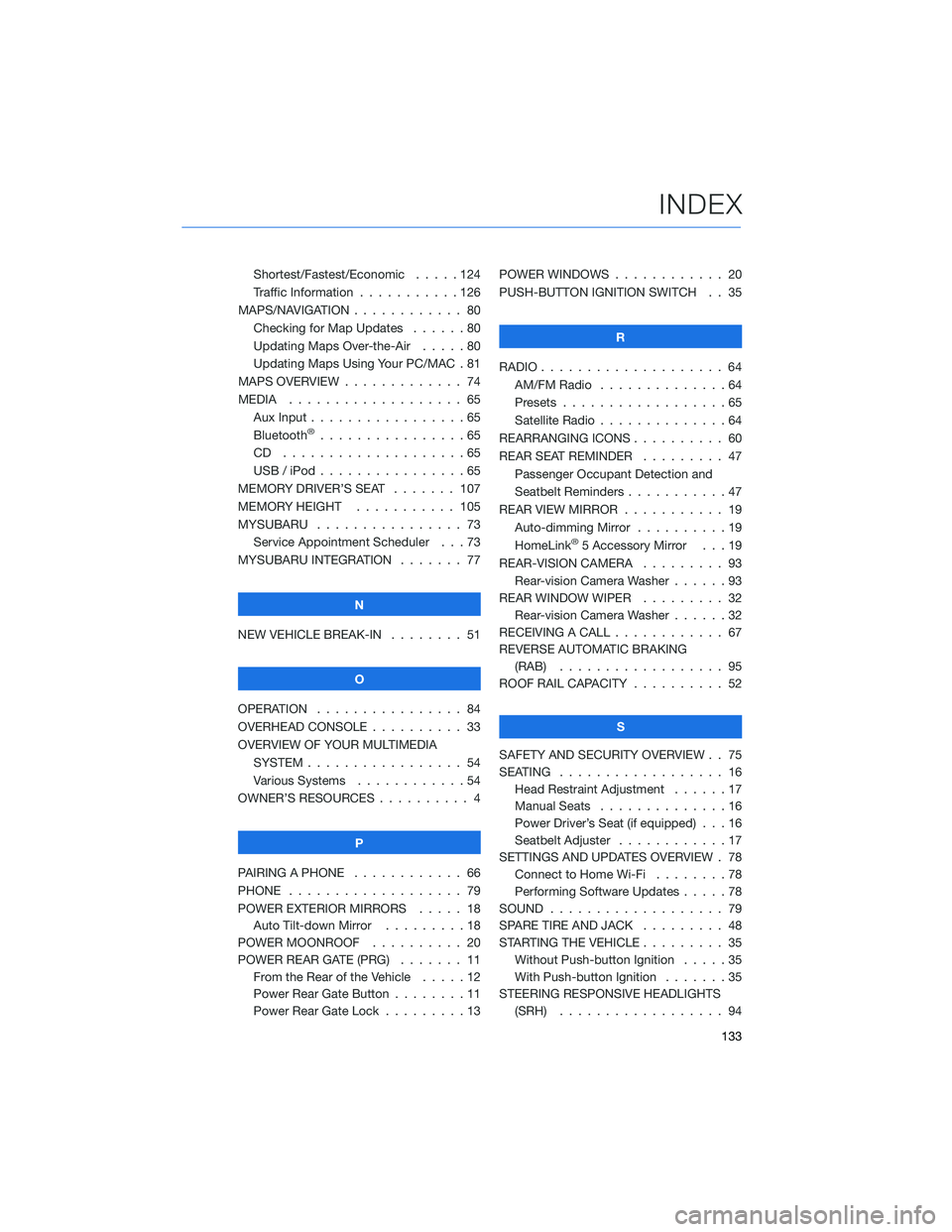
Shortest/Fastest/Economic . . . . . 124
Traffic Information . . . . . . . . . . . 126
MAPS/NAVIGATION . ........... 80
Checking for Map Updates . . . . . . 80
Updating Maps Over-the-Air .....80
Updating Maps Using Your PC/MAC . 81
MAPS OVERVIEW . . . . . . . . . . . . . 74
MEDIA . . . . . . . . ........... 65
Aux Input . . . . . . ...........65
Bluetooth
®................65
CD ....................65
USB / iPod . . . . . ...........65
MEMORY DRIVER’S SEAT ....... 107
MEMORY HEIGHT . . ......... 105
MYSUBARU . . . . . ........... 73
Service Appointment Scheduler . . . 73
MYSUBARU INTEGRATION....... 77
N
NEW VEHICLE BREAK-IN . . . . . . . . 51
O
OPERATION . . . . ............ 84
OVERHEAD CONSOLE .......... 33
OVERVIEW OF YOUR MULTIMEDIA
SYSTEM . . . . . . . . . . . . . . . . . 54
Various Systems . ...........54
OWNER’S RESOURCES . ......... 4
P
PAIRING A PHONE . . . . . . . . . . . . 66
PHONE . . . . . . . . ........... 79
POWER EXTERIOR MIRRORS . . . . . 18
Auto Tilt-down Mirror . . . ......18
POWER MOONROOF.......... 20
POWER REAR GATE (PRG)....... 11
From the Rear of the Vehicle . . . . . 12
Power Rear Gate Button . . . .....11
Power Rear Gate Lock . . . . . . . . . 13POWER WINDOWS . . . . ........ 20
PUSH-BUTTON IGNITION SWITCH . . 35
R
RADIO.................... 64
AM/FM Radio . . . . . . . . . .....64
Presets . . . . . . . ...........65
Satellite Radio . . . . ..........64
REARRANGING ICONS.......... 60
REAR SEAT REMINDER . . . . . . . . . 47
Passenger Occupant Detection and
Seatbelt Reminders . . . ........47
REAR VIEW MIRROR . . ......... 19
Auto-dimming Mirror . .........19
HomeLink
®5 Accessory Mirror . . . 19
REAR-VISION CAMERA . . . ...... 93
Rear-vision Camera Washer . . . . . . 93
REAR WINDOW WIPER . . . ...... 32
Rear-vision Camera Washer . . . . . . 32
RECEIVING A CALL . . . . . . . . . . . . 67
REVERSE AUTOMATIC BRAKING
(RAB) . . . . . . . . . ......... 95
ROOF RAIL CAPACITY.......... 52
S
SAFETY AND SECURITY OVERVIEW . . 75
SEATING . . . . .............. 16
Head Restraint Adjustment ......17
Manual Seats . . . . . . . . . . . . . . 16
Power Driver’s Seat (if equipped) . . . 16
Seatbelt Adjuster . . . .........17
SETTINGS AND UPDATES OVERVIEW . 78
Connect to Home Wi-Fi........78
Performing Software Updates . . . . . 78
SOUND . . . . ............... 79
SPARE TIRE AND JACK . . ....... 48
STARTING THE VEHICLE......... 35
Without Push-button Ignition . . . . . 35
With Push-button Ignition . . . . . . . 35
STEERING RESPONSIVE HEADLIGHTS
(SRH).................. 94
INDEX
133