CD changer SUBARU IMPREZA 2004 2.G Owners Manual
[x] Cancel search | Manufacturer: SUBARU, Model Year: 2004, Model line: IMPREZA, Model: SUBARU IMPREZA 2004 2.GPages: 491, PDF Size: 5.93 MB
Page 214 of 491

5-1
5
Audio
A nte nna system .. ... ... ... .. ... ... ... ... .. ... ... ... ... .. ... 5-2
P rin ted anten na ........................ .................... ..... 5-2
FM rece ptio n ....... ..................... .................... ..... 5-2
I n stallat ion of access ories ..... ... .. ... ... ... ... .. ... 5-3
A udio set ... ... ... .. ... ... ... ... .. ... ... ... ... .. ... ... ... ... .. ... 5-3
Ty pe A a udio set .. .................... .................... ..... 5-3
Ty pe B a udio set .. .................... .................... ..... 5-4
In -d ash 6 CD a uto cha nger 1 (O ptio nal a udio
u n it – if eq uipp ed) ................. .................... ..... 5-4
T ype A au dio set (if eq uip ped) .... ... ... ... ... .. ... 5-5
Radio o p erati on ....................... .................... ..... 5-5
Co mpact disc player operat ion .................. ..... 5-10
CD c han ger co ntrol (If opti o nal in -d ash CD
cha nger is c onn ecte d) .......... .................... ..... 5-1 2
Type B audio set (if equipped) ..................... 5-16 Radio operation ................................................ 5-16
Cassette player operation ................................ 5-22
Built in CD changer operation ......................... 5-26
In-dash 6 CD auto changer 1 (if equipped) . 5-31 Loading and unloading compact discs .......... 5-31
Precautions to observe when handling a compact disc (CD) .................................. 5-34
Page 216 of 491
5-3
Audio
– CONTINUED –
Installation of accessories
Always consult your SUBARU dealer before installing
a citizen band radio or other transmitting device in
your vehicle. Such devices may cause the electronic
control system to malfunction if they are incorrectly in-
stalled or if they are not suited for the vehicle.Audio set
Your SUBARU may be equipped with one of the fol-
lowing audio sets. See the pages indicated in this sec-
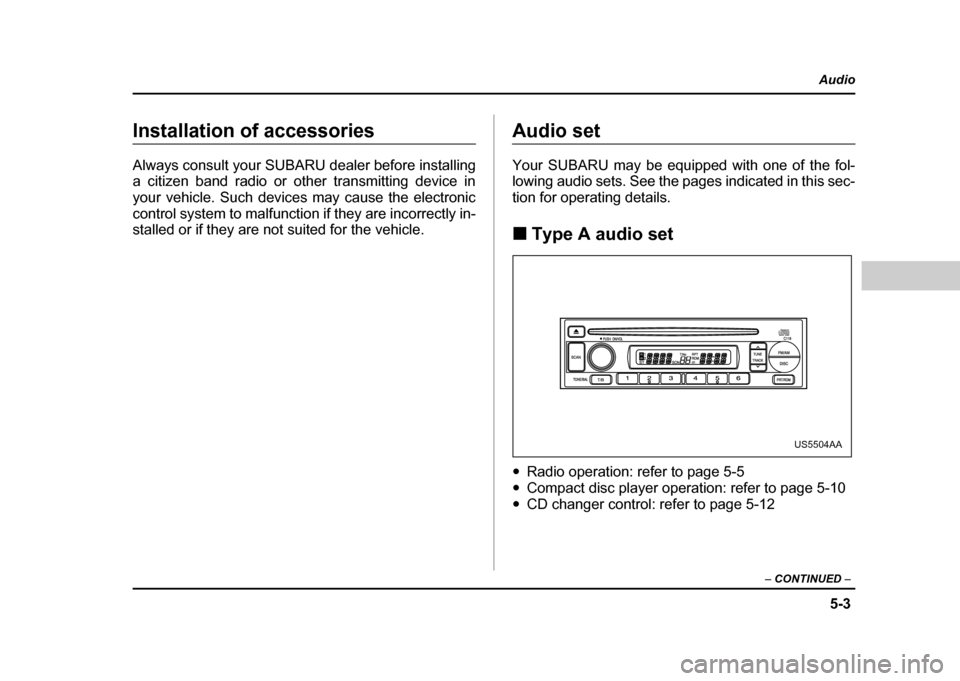
tion for operating details. !Type A audio set
" Radio operation: refer to page 5-5
" Compact disc player operation: refer to page 5-10
" CD changer control: refer to page 5-12
US5504AA
Page 217 of 491
5-4
Audio
!
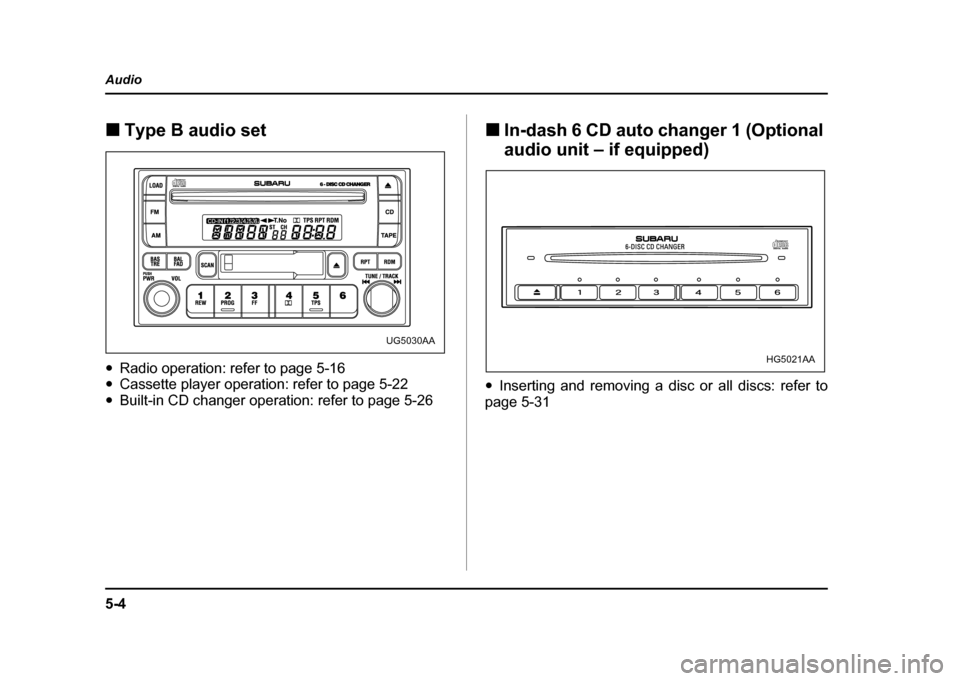
Type B audio set
" Radio operation: refer to page 5-16
" Cassette player operation: refer to page 5-22
" Built-in CD changer operation: refer to page 5-26 !
In-dash 6 CD auto changer 1 (Optional
audio unit – if equipped)
" Inserting and removing a disc or all discs: refer to
page 5-31
UG5030AA
HG5021AA
Page 225 of 491
5-12
Audio
mode, press the button again. Then the “RPT” indica-
tor goes out, and normal playback mode is restored. !
Random playback
Press the “RPT/RDM” button (10) and hold it in for
more than 2 seconds while a disc is being played back
to play all songs on the disc in a random order. The
“RDM” indicator will come on and all songs on the disc
will be played in a random order.
To cancel the random mode, press the button again.
Then the “RDM” indicator goes out, and normal play-
back mode is restored. ! To eject a disc from the player
When a disc is being played back or when a disc is in
the player, press the eject button “ ” (7). The disc
will be ejected.
The disc may be removed even when the ignition
switch is in the “LOCK” position.
NOTE
Avoid driving the vehicle with a CD sticking out,
because vibration might make it fall out. !
CD changer control (If optional in-dash
CD changer is connected)
An optional CD changer can be connected to this au-
dio unit. Consult the instructions that accompany the
CD changer for operating the CD changer itself (e.g.,
how to load or unload CDs). See your SUBARU dealerfor more information.
Page 227 of 491
5-14
Audio
!
To start playback
When the “CD” button (13) is pressed, the CD changer
will start playback. The display shows the current disc
number, track number and the elapsed time during
playback.
NOTE " If a disc is in the player, the “DISC” button is
used to change from CD player operation to DISC
changer operation. Each time the “DISC” button is
pressed, the operating mode will change alter-
nately. " At the end of the disc, the player automatically
continues with the next disc. " After playback on the last disc finishes, play-
back will automatically return to the first disc. " If you have loaded fewer than 6 discs, any miss-
ing disc is automatically skipped. ! Selection of a desired disc
You can select a desired disc from among the discs
contained in the CD changer only by pressing the cor-
responding number on one of the disc select buttons.
If you are to listen to the 5th disc in the CD changer,
press the “5” button of the disc select buttons. All other
discs in the CD changer can also be selected in a sim-
ilar way.
NOTE " No disc change takes place if the button corre-
sponding to the storage tray in which no disc is
loaded is pressed." If the disc select button corresponding to the
disc now in playback is pressed again, the disc
will be replayed from its beginning. ! To select a song from its beginning
" Forward direction
Briefly press the “ ” button (12) to skip to the begin-
ning of the next track. Each time the button is pressed,
the indicated track number will increase. " Backward direction
Briefly press the “ ” button (12) to skip to the begin-
ning of the current track. Each time the button is
pressed, the indicated track number will decrease. ! Fast forwarding and fast reverse
" Fast forwarding
Press the “ ” button (12) continuously for more than
1 second to fast forward the disc.
Release the button to stop fast forwarding.
If you continue fast forwarding to the end of the disc,
the CD changer will automatically stop fast forwarding
and start playback beginning with the first track on the
Page 228 of 491
5-15
Audio
– CONTINUED –
current disc. "Fast reverse
Press the “ ” button (12) continuously for more than
1 second to fast reverse the disc.
Release the button to stop fast reverse.
If you continue fast reverse to the beginning of the
disc, the CD changer will automatically stop fast re-
verse and start playback beginning with the first track
on the current disc. ! Repeat playback
Use this to play a certain track repeatedly. During
playback, press the “RPT/RDM” button (14) and re-
lease it in less than 2 seconds. The “RPT” indicator will
come on and the song will be played continuously. To
cancel the repeat mode, press the button again. Then
the “RPT” indicator goes out, and normal playback
mode is restored. ! Random playback
Use this to play the tracks on the disc in random order.
During playback, press the “RPT/RDM” button (14)
and hold it in for more than 2 seconds. The “RDM” in-
dicator will come on and all songs on the disc will be
played in a random order.
To cancel the random mode, press the button again.
Then the “RDM” indicator goes out, and normal play- back mode is restored.
Page 239 of 491
5-26
Audio !
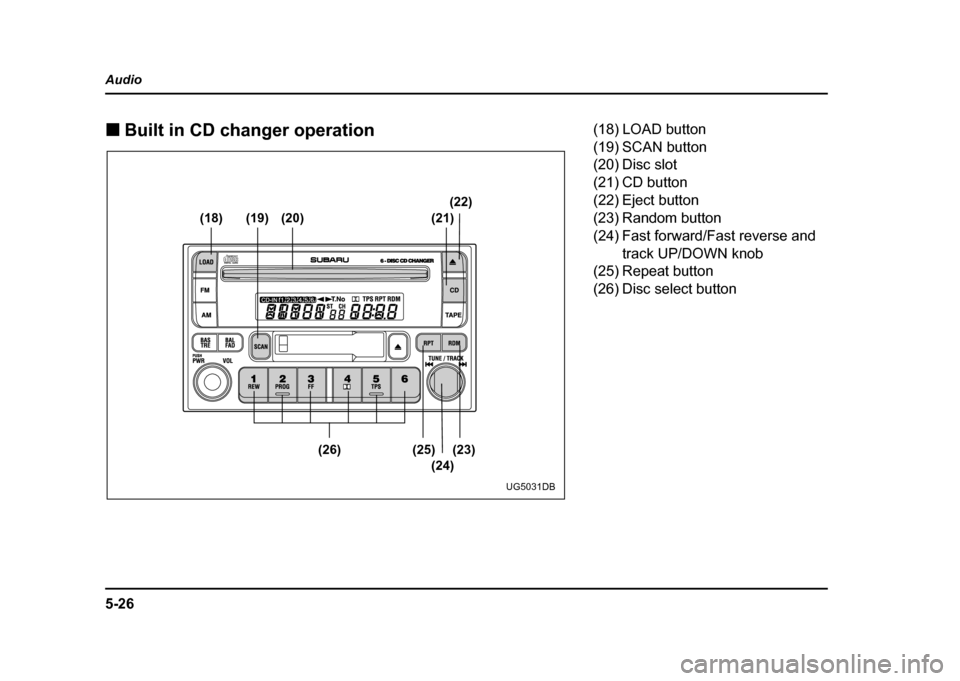
Built in CD changer operation
(18) (19) (20) (21) (22)
(23)
(25)
(26)
(24)
UG5031DB
(18) LOAD button
(19) SCAN button
(20) Disc slot
(21) CD button
(22) Eject button
(23) Random button
(24) Fast forward/Fast reverse and
track UP/DOWN knob
(25) Repeat button
(26) Disc select button
Page 244 of 491
5-31
Audio
– CONTINUED –
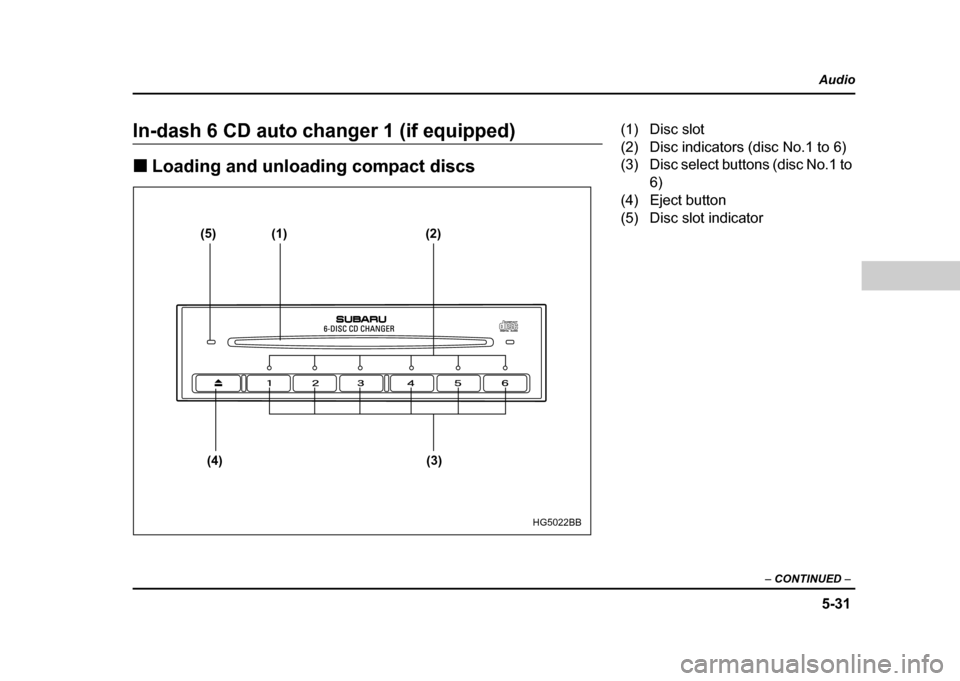
In-dash 6 CD auto changer 1 (if equipped) !Loading and unloading compact discs
(5) (1) (2)
(4) (3)
HG5022BB
(1) Disc slot
(2) Disc indicators (disc No.1 to 6)
(3) Disc select buttons (disc No.1 to 6)
(4) Eject button
(5) Disc slot indicator
Page 245 of 491
5-32
Audio
"
Do not attempt to insert two or more discs
into the slot at a time. Doing so can cause me-
chanical damage to the CD changer." Use only music CDs identified by
am ark .
" Do not use CDs listed below which could
cause damage to the CD player. "3-inch (8 cm) compact disc.
" Any disc with a peel-off or seal on it.
" Any disc with scratches and/or dust.
" Bent disc.
" Cleaning disc.
" CD accessory. (E.g., 3-inch (8 cm) disc
adapter)
" Do not insert or remove any disc when the
automatic transmission selector lever is in the
park position; the selector lever in that position
can interfere with disc insertion or removal,
causing scratches on the disc surface (for AT
vehicles).
! To insert a disc
1. Press one of the “Disc select” buttons (3) (num-
bered from 1 to 6) for which the disc indicator light (2) is “OFF”.
The Disc indicator lights are located directly above the
corresponding “Disc select” buttons.
2. The indicator will begin blinking. The blinking will last for 15 seconds.
During this period, insert a desired disc, and the disc
will begin to play. (If any disc is not inserted during this
period, the “Disc slot” (1) door will close. Repeat step
1.)
Be sure to hold a disc with the label side (the side
where titles are printed) up.
3. To insert another disc, repeat step 1 and 2 choos-
ing a different disc select button. !
To insert six discs at a time
1. Press and hold the “Disc select” button number 1
until all disc indicators begin blinking (about 1.5 sec-
onds).
2. The indicators will blink for 15 seconds. During this
period, insert desired six discs.
3. When all discs are loaded, the first disc will begin to
play. (If no disc is inserted within this 15 seconds, the
entire disc load sequence will be canceled.) ! To remove a disc
1. Press the desired one of the “Disc select” buttons
(3) (numbered from 1 to 6) for which the disc indicator
light is on.
Page 246 of 491

5-33
Audio
– CONTINUED –
2. Press the “Eject button” (4). The selected disc will
be ejected and the indicator light will begin blinking.
3. To remove another disc, repeat step 1 and 2
choosing a different “Disc select” button.
(To remove discs when the ignition switch is in the
“Lock” position, press the “Eject” button, and the first
disc will be ejected. Press the “Eject” button again,
and the next disc will be ejected and so on. At this
time, the “Disc select” buttons are disabled.) !To remove all discs at one time
1. Press and hold the “Eject” button (4) until all “Disc”
indicators begin blinking (about 1.5 seconds), and the
first disc will be ejected.
2. When the disc is removed, the next one will be
ejected, and so on. ! To replace a playing disc with another
Simply press the desired one of “Disc select” buttons
(3) (numbered from 1 to 6) or press the “DISC select”
button on the radio unit to select the desired disc, and
the disc will begin to play. ! Disc indicators
Lit: when the corresponding storage tray is occupied
by a disc.
Blinking: Disc player is either in loading, eject or
changing mode. OFF: No disc is loaded or the ignition switch is in the
“LOCK” position. "
Open/Closed disc slot indicator
When the disc slot is open, the disc indicators on both
sides of the slot illuminate. ! Function control
Refer to CD changer control operating instructions de-
scribed in the “Type B audio set (if equipped)” section.