audio SUBARU IMPREZA 2006 2.G Owner's Manual
[x] Cancel search | Manufacturer: SUBARU, Model Year: 2006, Model line: IMPREZA, Model: SUBARU IMPREZA 2006 2.GPages: 365, PDF Size: 7.09 MB
Page 180 of 365
Audio 5-17
CONTINUED
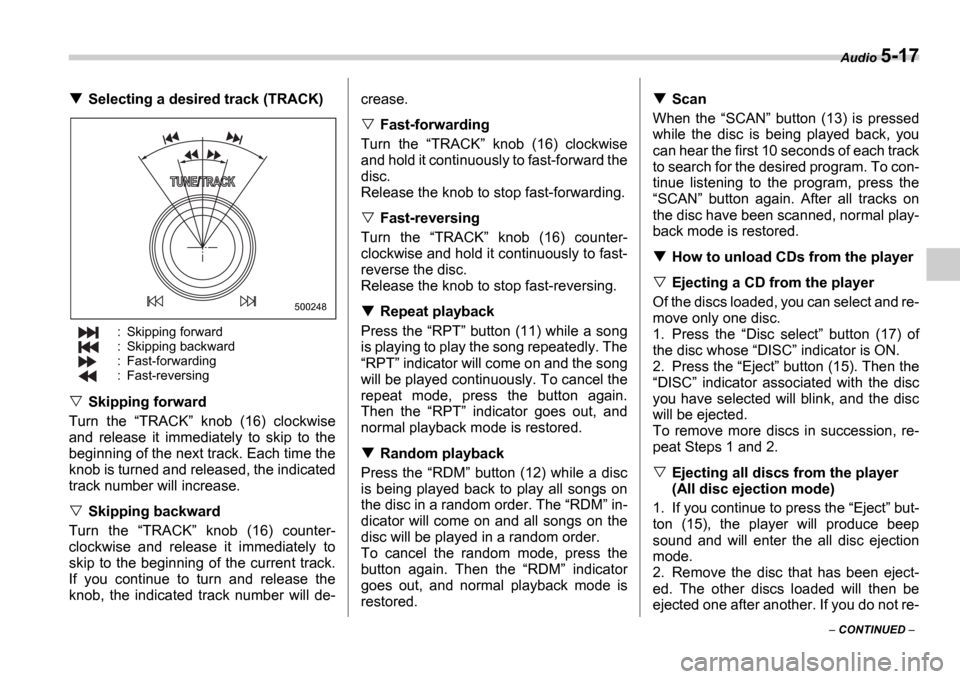
Selecting a desired track (TRACK)
: Skipping forward
: Skipping backward
: Fast-forwarding
: Fast-reversing
Skipping forward
Turn the TRACK knob (16) clockwise
and release it immediately to skip to the
beginning of the next track. Each time the
knob is turned and released, the indicated
track number will increase.
Skipping backward
Turn the TRACK knob (16) counter-
clockwise and release it immediately to
skip to the beginning of the current track.
If you continue to turn and release the
knob, the indicated track number will de- crease.
Fast-forwarding
Turn the TRACK knob (16) clockwise
and hold it continuously to fast-forward the
disc.
Release the knob to stop fast-forwarding.
Fast-reversing
Turn the TRACK knob (16) counter-
clockwise and hold it continuously to fast-
reverse the disc.
Release the knob to stop fast-reversing.
Repeat playback
Press the RPT button (11) while a song
is playing to play the song repeatedly. The RPT indicator will come on and the song
will be played continuously. To cancel the
repeat mode, press the button again.
Then the RPT indicator goes out, and
normal playback mode is restored.
Random playback
Press the RDM button (12) while a disc
is being played back to play all songs on
the disc in a random order. The RDM in-
dicator will come on and all songs on the
disc will be played in a random order.
To cancel the random mode, press the
button again. Then the RDM indicator
goes out, and normal playback mode is
restored.
Scan
When the SCAN button (13) is pressed
while the disc is being played back, you
can hear the first 10 seconds of each track
to search for the desired program. To con-
tinue listening to the program, press the SCAN button again. After all tracks on
the disc have been scanned, normal play-
back mode is restored.
How to unload CDs from the player
Ejecting a CD from the player
Of the discs loaded, you can select and re-
move only one disc.
1. Press the Disc select button (17) of
the disc whose DISC indicator is ON.
2. Press the Eject button (15). Then the
DISC indicator associated with the disc
you have selected will blink, and the disc
will be ejected.
To remove more discs in succession, re-
peat Steps 1 and 2.
Ejecting all discs from the player
(All disc ejection mode)
1. If you continue to press the Eject but-
ton (15), the player will produce beep
sound and will enter the all disc ejection
mode.
2. Remove the disc that has been eject-
ed. The other discs loaded will then be
ejected one after another. If you do not re-
500248
Page 181 of 365
5-18 Audio
move the disc that has been ejected, the All disc ejection mode will be canceled.
NOTE
Avoid driving the vehicle with a CD
sticking out, because vibration might
make it fall out.
Page 182 of 365
Audio 5-19
CONTINUED
In-dash 6 CD auto changer 1 (if equipped)
Loading and unloading compact discs
(5) (1) (2)
(4) (3)
500222
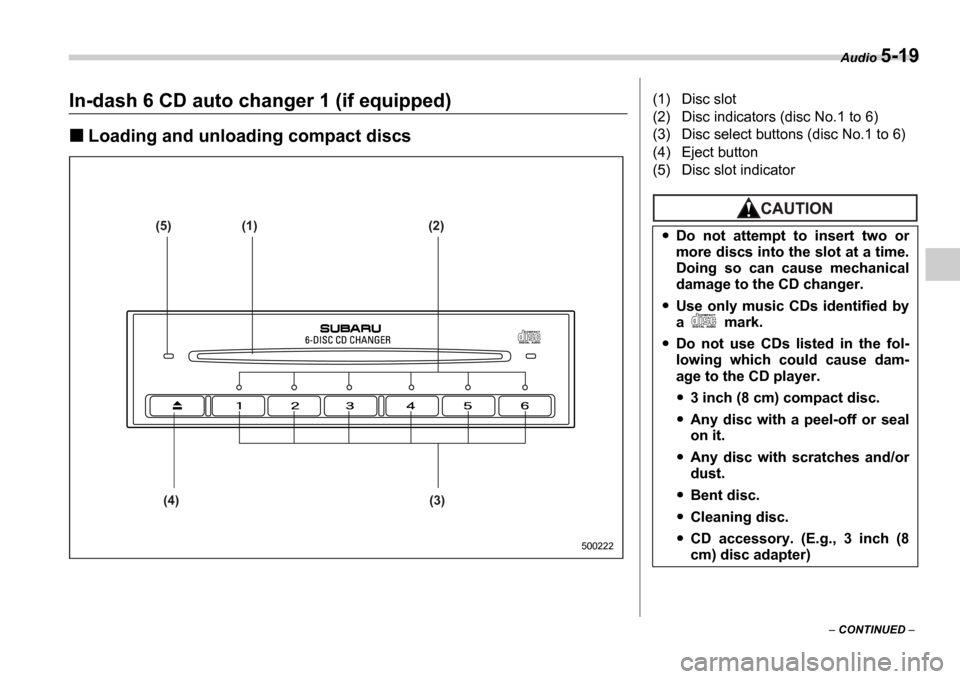
(1) Disc slot
(2) Disc indicators (disc No.1 to 6)
(3) Disc select buttons (disc No.1 to 6)
(4) Eject button
(5) Disc slot indicator
Do not attempt to insert two or
more discs into the slot at a time.
Doing so can cause mechanical
damage to the CD changer.
Use only music CDs identified by
a mark.
Do not use CDs listed in the fol-
lowing which could cause dam-
age to the CD player.
3 inch (8 cm) compact disc.
Any disc with a peel-off or seal
on it.
Any disc with scratches and/or
dust.
Bent disc.
Cleaning disc.
CD accessory. (E.g., 3 inch (8
cm) disc adapter)
Page 183 of 365

5-20 Audio
To insert a disc
1. Press one of the Disc select buttons
(3) (numbered from 1 to 6) for which the
disc indicator light (2) is OFF .
The disc indicator lights are located direct-
ly above the corresponding Disc select
buttons.
2. The indicator will begin blinking. The
blinking will last for 15 seconds.
During this period, insert a desired disc,
and the disc will begin to play. (If any disc
is not inserted during this period, the Disc
slot (1) door will close. Repeat Step 1.)
Be sure to hold a disc with the label side
(the side where titles are printed) up.
3. To insert another disc, repeat Steps 1
and 2 choosing a different disc select but-
ton.
To insert six discs at a time
1. Press and hold the Disc select button
number 1 until all disc indicators begin
blinking (approximately 1.5 seconds). 2. The indicators will blink for 15 seconds.
During this period, insert desired six discs.
3. When all discs are loaded, the first disc
will begin to play. (If no disc is inserted
within this 15 seconds, the entire disc load
sequence will be canceled.)
To remove a disc
1. Press the desired one of the Disc se-
lect buttons (3) (numbered from 1 to 6) for
which the disc indicator light is on.
2. Press the Eject button (4). The select-
ed disc will be ejected and the indicator
light will begin blinking.
3. To remove another disc, repeat Steps
1 and 2 choosing a different Disc select
button.
(To remove discs when the ignition switch
is in the Lock position, press the Eject
button, and the first disc will be ejected.
Press the Eject button again, and the
next disc will be ejected and so on. At this
time, the Disc select buttons are dis-
abled.)
To remove all discs at one time
1. Press and hold the Eject button (4)
until all Disc indicators begin blinking
(approximately 1.5 seconds), and the first
disc will be ejected.
2. When the disc is removed, the next
one will be ejected, and so on.
To replace a playing disc with an-
other
Simply press the desired one of Disc se-
lect buttons (3) (numbered from 1 to 6) or
press the Disc select button on the radio
unit to select the desired disc, and the disc
will begin to play.
Disc indicators
Lit: when the corresponding storage tray
is occupied by a disc.
Blinking: Disc player is either in loading,
eject or changing mode.
OFF: No disc is loaded or the ignition
switch is in the LOCK position.
Open/Closed disc slot indicator
When the disc slot is open, the disc indica-
tors on both sides of the slot illuminate.
Function control
Refer to CD changer control operating in-
structions described in the Type B audio
set (if equipped) section.
Do not insert or remove any disc
when the automatic transmission
selector lever is in the park posi-
tion; the selector lever in that po-
sition can interfere with disc in-
sertion or removal, causing
scratches on the disc surface (for
AT vehicles).
Page 184 of 365
Audio 5-21
CONTINUED
Precautions to observe when
handling a compact disc
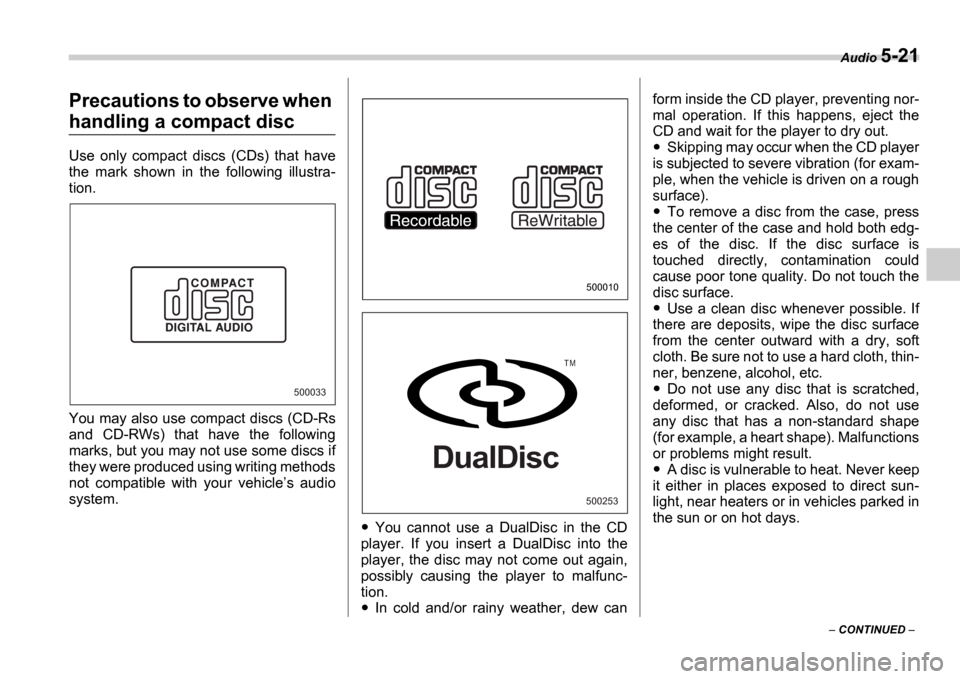
Use only compact discs (CDs) that have
the mark shown in the following illustra-
tion.
You may also use compact discs (CD-Rs
and CD-RWs) that have the following
marks, but you may not use some discs if
they were produced using writing methods
not compatible with your vehicle s audio
system.
You cannot use a DualDisc in the CD
player. If you insert a DualDisc into the
player, the disc may not come out again,
possibly causing the player to malfunc-
tion.
In cold and/or rainy weather, dew can form inside the CD player, preventing nor-
mal operation. If this happens, eject the
CD and wait for the player to dry out.
Skipping may occur when the CD player
is subjected to severe vibration (for exam-
ple, when the vehicle is driven on a rough
surface).
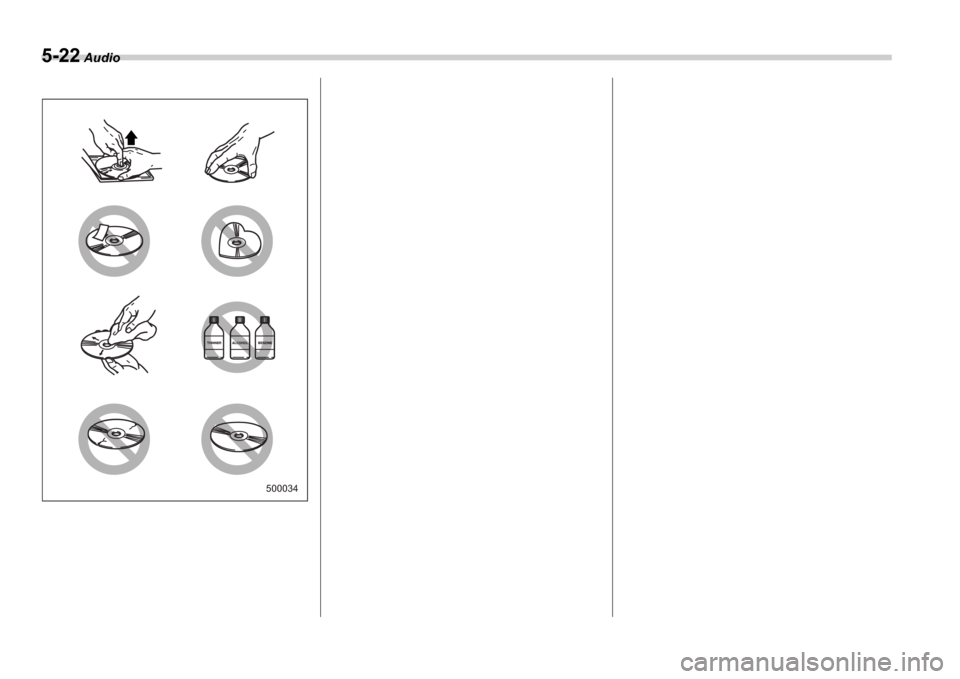
To remove a disc from the case, press
the center of the case and hold both edg-
es of the disc. If the disc surface is
touched directly, contamination could
cause poor tone quality. Do not touch the
disc surface.
Use a clean disc whenever possible. If
there are deposits, wipe the disc surface
from the center outward with a dry, soft
cloth. Be sure not to use a hard cloth, thin-
ner, benzene, alcohol, etc.
Do not use any disc that is scratched,
deformed, or cracked. Also, do not use
any disc that has a non-standard shape
(for example, a heart shape). Malfunctions
or problems might result.
A disc is vulnerable to heat. Never keep
it either in places exposed to direct sun-
light, near heaters or in vehicles parked in
the sun or on hot days.
500033
500010
500253
T M
DualDisc
Page 185 of 365
5-22 Audio
500034
Page 190 of 365
Interior equipment 6-5
CONTINUED
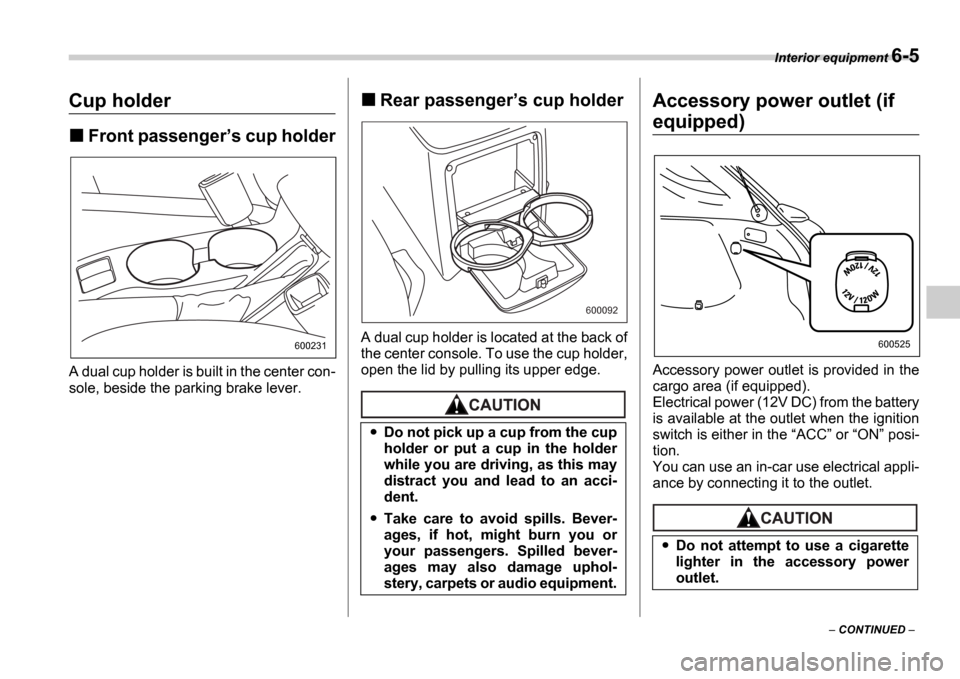
Cup holder
Front passenger s cup holder
A dual cup holder is built in the center con-
sole, beside the parking brake lever.
Rear passenger s cup holder
A dual cup holder is located at the back of
the center console. To use the cup holder,
open the lid by pulling its upper edge.
Accessory power outlet (if
equipped)
Accessory power outlet is provided in the
cargo area (if equipped).
Electrical power (12V DC) from the battery
is available at the outlet when the ignition
switch is either in the ACC or ON posi-
tion.
You can use an in-car use electrical appli-
ance by connecting it to the outlet.
600231
Do not pick up a cup from the cup
holder or put a cup in the holder
while you are driving, as this may
distract you and lead to an acci-
dent.
Take care to avoid spills. Bever-
ages, if hot, might burn you or
your passengers. Spilled bever-
ages may also damage uphol-
stery, carpets or audio equipment.
600092
Do not attempt to use a cigarette
lighter in the accessory power
outlet.
600525
Page 274 of 365

10
Appearance care
Exterior care ....................................................... 10-2
Washing ........................................... ........................ 10-2
Waxing and polishing .............................. ............... 10-3
Cleaning aluminum wheels .......................... .......... 10-3
Corrosion protection .............................. ............ 10-4
Most common causes of corrosion ................... ... 10-4
To help prevent corrosion ......................... ............ 10-4
Cleaning the interior ............................. ............. 10-5
Seat fabric ....................................... ........................ 10-5
Leather seat materials ............................ ................ 10-5
Synthetic leather upholstery ...................... ........... 10-5
Climate control panel, audio panel, instrument panel, console panel, and switches ............... ... 10-6
Page 278 of 365
Appearance care 10-5
CONTINUED
soon as you find them.
Check the interior of the vehicle for water
and dirt accumulation under the floor mats
because that could cause corrosion. Oc-
casionally check under the mats to make
sure the area is dry.
Keep your garage dry. Do not park your
vehicle in a damp, poorly ventilated ga-
rage. In such a garage, corrosion can be
caused by dampness. If you wash the ve-
hicle in the garage or put the vehicle into
the garage when wet or covered with
snow, that can cause dampness.
If your vehicle is operated in cold weather
and/or in areas where road salts and other
corrosive materials are used, the door
hinges and locks, trunk lid lock, and hood
latch should be inspected and lubricated
periodically.
Cleaning the interior
Use a soft, damp cloth to clean the climate
control panel, audio equipment, instru-
ment panel, center console, combination
meter panel, and switches. (Do not use or-
ganic solvents.)
Seat fabric
Remove loose dirt, dust or debris with a
vacuum cleaner. If the dirt is caked on the
fabric or hard to remove with a vacuum
cleaner, use a soft blush then vacuum it.
Wipe the fabric surface with a tightly
wrung cloth and dry the seat fabric thor-
oughly. If the fabric is still dirty, wipe using
a solution of mild soap and lukewarm wa-
ter then dry thoroughly.
If the stain does not come out, try a com-
mercially-available fabric cleaner. Use the
cleaner on a hidden place and make sure
it does not affect the fabric adversely. Use
the cleaner according to its instructions.
NOTE
When cleaning the seat, do not use
benzine, paint thinner, or any similar
materials.
Leather seat materials
The leather used by SUBARU is a high
quality natural product which will retain its
distinctive appearance and feel for many
years with proper care.
Allowing dust or road dirt to build up on the
surface can cause the material to become
brittle and to wear prematurely. Regular
cleaning with a soft, moist, natural fiber
cloth should be performed monthly, taking
care not to soak the leather or allow water
to penetrate the stitched seams.
A mild detergent suitable for cleaning
woolen fabrics may be used to remove dif-
ficult dirt spots, rubbing with a soft, dry
cloth afterwards to restore the luster. If
your SUBARU is to be parked for a long
time in bright sunlight, it is recommended
that the seats and headrests be covered,
or the windows shaded, to prevent fading
or shrinkage.
Minor surface blemishes or bald patches
may be treated with a commercial leather
spray lacquer. You will discover that each
leather seat section will develop soft folds
or wrinkles, which is characteristic of gen-
uine leather.
Synthetic leather upholstery
The synthetic leather material used on the
SUBARU may be cleaned using mild soap
or detergent and water, after first vacuum-
ing or brushing away loose dirt. Allow the
soap to soak in for a few minutes and wipe
Page 279 of 365
10-6 Appearance care
off with a clean, damp cloth. Commercial
foam-type cleaners suitable for synthetic
leather materials may be used when nec-
essary.
NOTE
Strong cleaning agents such as sol-
vents, paint thinners, window cleaner
or gasoline must never be used on
leather or synthetic interior materials.
Climate control panel, audio
panel, instrument panel, con-
sole panel, and switches
Use a soft, damp cloth to clean the climate
control panel, audio equipment, instru-
ment panel, center console, combination
meter panel, and switches.
NOTE
Do not use organic solvents such as
paint thinners or gasoline, or strong
cleaning agents that contain those sol-
vents.