set clock SUBARU IMPREZA 2007 3.G Owners Manual
[x] Cancel search | Manufacturer: SUBARU, Model Year: 2007, Model line: IMPREZA, Model: SUBARU IMPREZA 2007 3.GPages: 364, PDF Size: 11.91 MB
Page 104 of 364
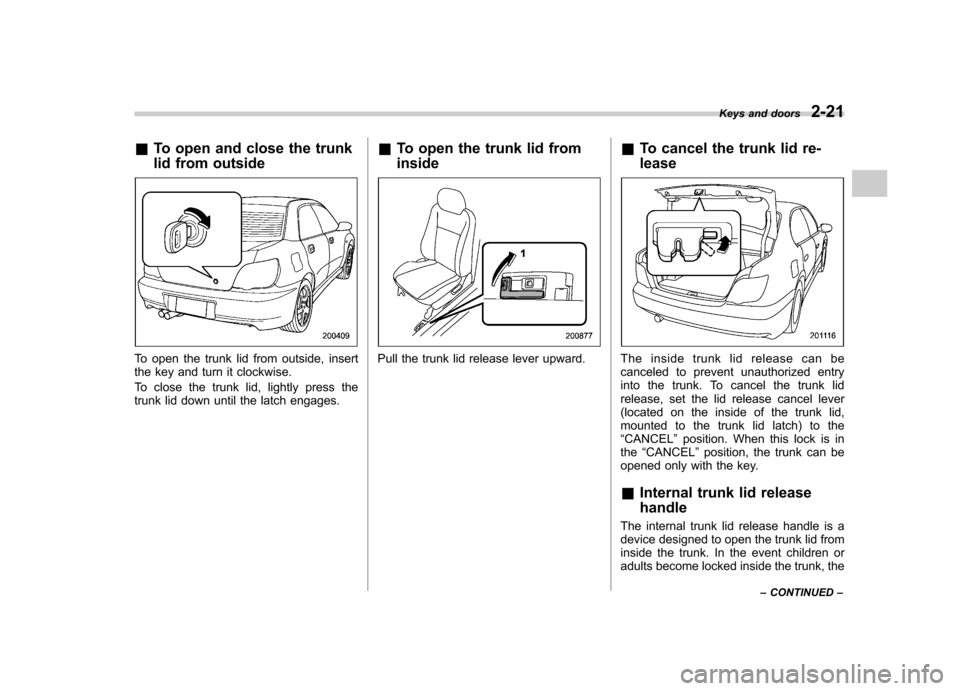
&To open and close the trunk
lid from outside
To open the trunk lid from outside, insert
the key and turn it clockwise.
To close the trunk lid, lightly press the
trunk lid down until the latch engages. &
To open the trunk lid from insidePull the trunk lid release lever upward. &
To cancel the trunk lid re- leaseTheinsidetrunklidreleasecanbe
canceled to prevent unauthorized entry
into the trunk. To cancel the trunk lid
release, set the lid release cancel lever
(located on the inside of the trunk lid,
mounted to the trunk lid latch) to the“CANCEL ”position. When this lock is in
the “CANCEL ”position, the trunk can be
opened only with the key. & Internal trunk lid release handle
The internal trunk lid release handle is a
device designed to open the trunk lid from
inside the trunk. In the event children or
adults become locked inside the trunk, the Keys and doors
2-21
– CONTINUED –
Page 110 of 364
Ignition switch..................................................... 3-3
LOCK .................................................................. 3-3
Acc..................................................................... 3-4
ON...................................................................... 3-4
START ................................................................ 3-4
Key reminder chime ............................................ 3-5
Ignition switch light ............................................. 3-5
Key interlock release (AT vehicles only) ... ............ 3-5
Hazard warning flasher ....................................... 3-6
Meters and gauges (WRX-STI) ........................... 3-6
Combination meter illumination ........................... 3-6
Canceling sequential illumination of the combination meter ............................................ 3-6
Speedometer ....................................................... 3-7
Odometer/Trip meter ............................................ 3-7
Tachometer ......................................................... 3-7
Fuel gauge .......................................................... 3-8
Temperature gauge ............................................. 3-8
Outside temperature indicator ............................. 3-9
REV indicator light and buzzer (WRX-STI) ........ 3-9
Setting the alarm-level engine speed ................... 3-10
Deactivating the REV alarm system ..................... 3-11
Meters and gauges (Except WRX-STI) .............. 3-11
Speedometer ...................................................... 3-11
Odometer/Trip meter ........................................... 3-11
Tachometer ........................................................ 3-12
Fuel gauge ......................................................... 3-12
Temperature gauge ............................................ 3-13
Outside temperature indicator ............................ 3-13
Warning and indicator lights ............................. 3-14
Seatbelt warning light and chime ........................ 3-14SRS airbag system warning light
........................ 3-14
Front passenger ’s frontal airbag ON and OFF
indicators ........................................................ 3-15
CHECK ENGINE warning light/Malfunction indicator lamp ................................................. 3-16
Charge warning light .......................................... 3-16
Oil pressure warning light .................................. 3-16
AT OIL TEMPerature warning light (AT vehicles) .................................................... 3-17
Rear differential oil temperature warning light (WRX-STI) ........................................................ 3-17
ABS warning light .............................................. 3-17
Brake system warning light ................................ 3-18
Door open warning light .................................... 3-19
All-Wheel Drive warning light (AWD AT vehicles –
if equipped) ..................................................... 3-19
Intercooler water spray warning light (WRX-STI) ........................................................ 3-19
Selector lever position indicator (AT vehicles) .................................................... 3-20
Turn signal indicator lights ................................. 3-20
High beam indicator light ................................... 3-20
Cruise control indicator light .............................. 3-20
Cruise control set indicator light ........................ 3-20
Driver ’s control center differential auto indicator
light (WRX-STI) ................................................ 3-20
Driver ’s control center differential indicator and
warning lights (WRX-STI) ................................. 3-21
Lights indicator light (WRX-STI) ......................... 3-21
REV indicator light (WRX-STI) .. .......................... 3-21
Clock .................................................................. 3-22Instruments and controls
3
Page 115 of 364

3-6Instruments and controls
Hazard warning flasher
The hazard warning flasher is used to
warn other drivers when you have to park
your vehicle under emergency conditions.
The hazard warning flasher works with the
ignition switch in any position.
To turn on the hazard warning flasher,
push the hazard warning button on the
instrument panel. To turn off the flasher,
push the button again. NOTE
When the hazard warning flasher is on,
the turn signals do not work. Meters and gauges (WRX- STI) NOTE
Liquid-crystal displays are used in
some of the meters and gauges in the
combination meter. You will find their
indications hard to see if you wear
polarized glasses. &
Combination meter illumina- tion
When the ignition switch is turned to the “ ON ”position, the various parts of the
combination meter are illuminated in the
following sequence:
1. Meter needles and gauge needles
light up.
2. Meter needles and gauge needles
each show MAX position.
3. Meter needles and gauge needles
each show MIN position, and REV indi-
cator flashes.
4. Dials and indicators in meters and
gauges light up. 5. “STI ”mark lights up.
6. Regular illumination (for driving) be- gins. &
Canceling sequential illumi-
nation of the combination meter
With the ignition switch in the “ON ”
position, it is possible to cancel sequential
illumination of the combination meter.
Press the trip knob while turning the REV
setting knob clockwise or counterclock-
wise. The buzzer will sound briefly, and
the outside temperature indicator willshow “ON ”or “– –” .
ON : sequential illumination –– : sequential illumination canceled
The setting toggles between “ON ”and “–
–” each time the trip knob is pressed.
Return the REV setting knob to its original
position to complete the setting process.
The buzzer will sound briefly. A few
seconds later, the outside temperature
indicator will return to showing the outsidetemperature. NOTE
It is not possible to cancel sequential
illumination of the combination meter
while sequential illumination is actually
taking place. Cancel sequential illumi-
nation when regular illumination (for
driving) has begun.
Page 119 of 364

3-10Instruments and controls
NOTE
Even if the REV alarm system is not set,
the REV indicator light will come on
whenever the engine speed enters thetachometer ’s red zone.
& Setting the alarm-level en-
gine speed
1. Turn the REV setting knob clockwise
or counterclockwise, then release it and
let it return to its initial position. The buzzer
will sound. The REV alarm system is now
ready to be set.
2. Turn the REV setting knob to select
the desired alarm-level engine speed.
At this time, the outside temperature
indicator will show the engine-speed setting. .
Counterclockwise ( ): Speed setting
changes downward by 100 rpm. . Clockwise (+): Speed setting
changes upward by 100 rpm.
The speed setting will stop changing if
it reaches 0 rpm or the maximum
engine speed.
The alarm-level engine speed can be set
(in 100 rpm steps) within the range from
2,000 rpm to 7,000 rpm.
The indicator shows the setting as follows:
Speed (rpm) Indication 00 0
2,000 20
2,100 21 ––
7,000 70
Approximately 3 seconds after you stop
turning the knob, the REV alarm system
will automatically enter its next setting
mode (step 3 below), in which you can
activate or deactivate the buzzer.
3. Activate or deactivate the buzzer as
desired using the REV setting knob. .Turn the knob clockwise (+) to
activate the buzzer. The indicator willshow “ON ”, and the buzzer will sound three times. With the buzzer activated,
engine-speed warnings are given by
both the REV indicator light and the
buzzer. .
Turn the knob counterclockwise ( )
to deactivate the buzzer. The indicator
will show “– –”, and the buzzer will not
sound. With the buzzer deactivated,
engine-speed warnings are given only
by the REV indicator light.
Approximately 3 seconds after you stop
turning the knob, the buzzer will sound
once to indicate the end of the setting
procedure. The indicator will return to
showing the outside temperature.
Also, the tachometer needle will return to approximately “0 ”.
NOTE . The REV alarm system does not
operate while settings are being en- tered.. The speed-setting mode terminates
if 0 rpm is selected.. The speed-setting mode is canceled
if the ignition switch is turned to OFF or
the vehicle starts moving before the
setting procedure is finished.. Speed setting is impossible when
the vehicle is moving.. The set engine speed may differ
Page 131 of 364
3-22Instruments and controls
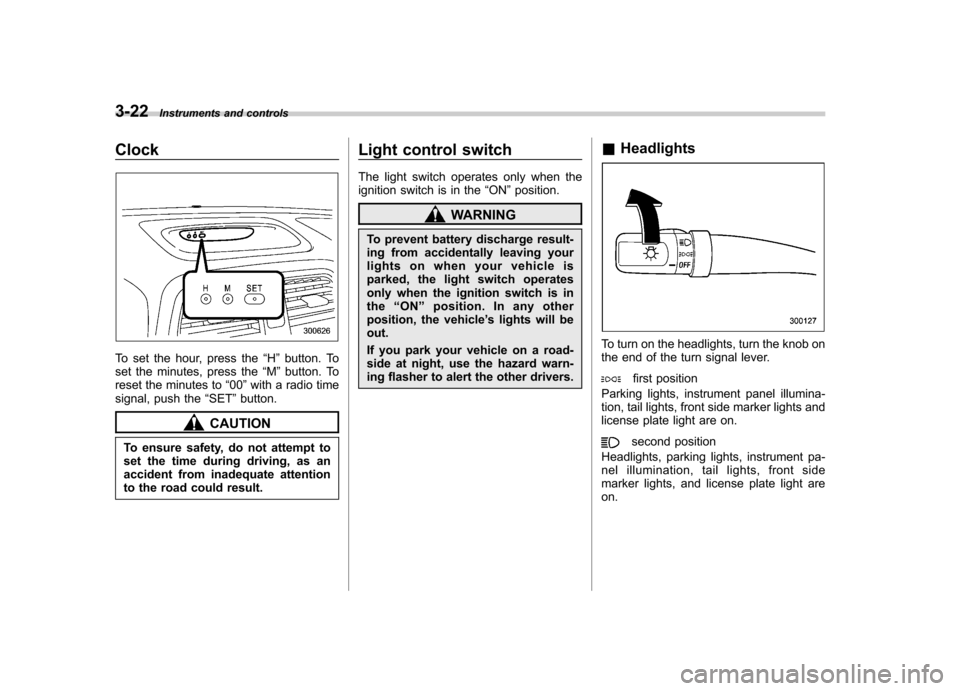
Clock
To set the hour, press the “H ” button. To
set the minutes, press the “M ”button. To
reset the minutes to “00 ”with a radio time
signal, push the “SET ”button.
CAUTION
To ensure safety, do not attempt to
set the time during driving, as an
accident from inadequate attention
to the road could result. Light control switch
The light switch operates only when the
ignition switch is in the
“ON ”position.
WARNING
To prevent battery discharge result-
ing from accidentally leaving your
lights on when your vehicle is
parked, the light switch operates
only when the ignition switch is inthe “ON ”position. In any other
position, the vehicle ’s lights will be
out.
If you park your vehicle on a road-
side at night, use the hazard warn-
ing flasher to alert the other drivers. &
Headlights
To turn on the headlights, turn the knob on
the end of the turn signal lever.
first position
Parking lights, instrument panel illumina-
tion, tail lights, front side marker lights and
license plate light are on.
second position
Headlights, parking lights, instrument pa-
nel illumination, tail lights, front side
marker lights, and license plate light areon.
Page 149 of 364

&Heater operation
! Defrosting or defogging the wind- shield
To direct warm air to the windshield and
front door windows:
1. Set the air inlet selection lever to the “
”position.
2. Set the air flow control dial to the “
”
position.
3. Turn the temperature control dial all
the way to the right.
4. Set the fan speed control dial to the
highest speed.
If your vehicle is equipped with an air
conditioner, when the “
”or “”position
is selected, the air conditioner compressor
automatically operates regardless of the position of the air conditioner button to
defog the windshield quickly.
However, the air conditioner indicator light
does not come on at this time.
NOTE
Warm air also comes out from the right
and left air outlets. To stop warm air
flow from these outlets, turn the corre-
sponding knob clockwise. ! Heating and defrosting
To direct warm air toward the floor and the windshield:
1. Set the air inlet selection lever to the “
”position.
2. Set the air flow control dial to the “
”
position.
3. Set the temperature control dial to the most comfortable level.
4. Set the fan speed control dial to the
desired speed.
If your vehicle is equipped with an air
conditioner, when the
“
”or “”position
is selected, the air conditioner compressor
automatically operates regardless of the
position of the air conditioner button to
defog the windshield quickly.
However, the air conditioner indicator light
does not come on at this time.
NOTE
Warm air also comes out from the right
and left air outlets. To stop warm air
flow from these outlets, turn the corre-
sponding knob clockwise. Climate control
4-5
– CONTINUED –
Page 150 of 364

4-6Climate control
! Heating
To direct warm air toward the floor:
1. Set the air inlet selection lever to the “
”position.
2. Set the air flow control dial to the “
”
position.
3. Set the temperature control dial to the
most comfortable level.
4. Set the fan speed control dial to the
desired speed.
NOTE
Warm air also comes out from the right
and left air outlets. To stop warm air
flow from these outlets, turn the corre-
sponding knob clockwise. !
Bi-level heating
This setting allows you to direct air of
different temperatures from the instrument
panel and foot outlets. The air from the
foot outlets is slightly warmer than from
the instrument panel outlets.
1. Set the air inlet selection lever to the “
”position.
2. Set the air flow control dial to the “
”
position.
3. Set the temperature control dial to the
desired temperature level.
4. Set the fan speed control dial to the
desired speed.
Setting the temperature control dial fully
turned to the red area or blue area
decreases the temperature difference
between the air from the instrument panel outlets and the air from the foot outlets. !
Ventilation
To force outside air through the instrument
panel outlets:
1. Set the air inlet selection lever to the “
”position.
2. Set the air flow control dial to the “
”
position.
3. Set the temperature control dial all the
way left.
4. Set the fan speed control dial to the
desired speed.
When driving on a dusty road, set the air
inlet selection lever to the “
”position.
Page 153 of 364

&Fan speed control dial
The fan operates only with the ignition
switch in the ON position. The fan speed
control dial is used to select the AUTO
(automatic control) mode or to select the
desired fan speed. The dial ’s positions
and their functions are as follows: OFF: The fan does not operate.
AUTO: The fan speed is adjusted auto-
maticallyinaccordancewiththeair
temperature inside and outside the pas-
senger compartment, the intensity of sun-
light, and other factors. SUBARU recom-
mends using the AUTO position.
Other positions: The fan speed can be
adjusted in 25 steps. NOTE
With the fan speed control dial in the
AUTO position and the air flow control
dial in the
“
”, “”,or “”position,
the fan does not operate during engine
warm-up until the engine coolant tem-
perature exceeds approx. 122 8F (50 8C).
& Temperature control dial
This dial is used to set the desired interior
temperature. With the dial set to your
desired temperature, the system automa-
tically adjusts the temperature of air
supplied from the outlets such that the
desired temperature is achieved andmaintained.
If the dial is turned fully counterclockwise,
the system gives maximum cooling per- formance. If the dial is turned fully clock-
wise, the system gives maximum heatingperformance. &
Air flow control dial
This dial has the following six positions.
The outlets from which air is supplied in
each position are as follows: AUTO: The air flow control is adjusted
automatically in accordance with the air
temperature inside and outside the pas-
senger compartment, the intensity of sun-
light, and other factors. SUBARU recom-
mends using the AUTO position.
: Instrument panel outlets
: Instrument panel outlets and foot
outlets
: Foot outlets and windshield defroster Climate control
4-9
– CONTINUED –
Page 170 of 364

5-12Audio
Display Control mode
Turn counterclockwise Turn clockwise
BASS Bass control For less bass sound For more bass sound
MIDDLE Midrange control For less midrange sound For more midrange sound
TREBLE Treble control For less treble sound For more treble sound
FADER Fader control To increase rear speaker volume and
decrease front speaker volume To increase front speaker volume and
decrease rear speaker volume
BALANCE Balance control To increase left speaker volume and de-
crease right speaker volume To increase right speaker volume and
decrease left speaker volume
VOLUME Volume control For less volume For more volume
! Sound control
The dial (5) controls the Bass, Midrange,
Treble, Balance and Fader when you
select the appropriate sound control
mode. Choose the desired setting for
each mode by depressing the “SOUND ”
controldial(5).Thecontrolfunction returns to last mode after approximately
5 seconds.
To change control modes:
Each brief
press of the “SOUND ”control dial (5)
changes control modes in the following
sequence starting from bass controlmode.
Page 171 of 364

!Display illumination dimness cance-
lation (BRIGHT)
The brightness of the radio display dims
when the light switch is in the “
”or
“” position. If this makes the display
difficult to read, press the volume dial for
more than 2 seconds to return the display
to original brightness. Subsequently
pressing the volume dial again for more
than 2 seconds or if you can safely do so,
turning the light switch to the OFF position
and back to the “
”or “”position
makes the radio display dim again. ! FM/AM selection button (FM/AM)
Push the “FM/AM ”button (2) when the
radio is on to select FM1, FM2 or AM
reception. Each time this button is
pressed, the band will change in the
following order:
The display indicates which one is cur-
rently selected. ! Stereo indicator
The stereo indicator “ST ”will come on
when an FM stereo broadcast is received. !
Manual tuning (TUNE)
Turn the tuning dial (5) clockwise to
increase the tuning frequency and turn
the dial counterclockwise to decrease it.
Each click the dial is turned, the frequency
changes 10 kHz in the AM waveband and
0.2 MHz in the FM waveband. ! Seek tuning
When the “
”side of the “SEEK/TRACK/
CAT ”button (3) is depressed, the radio will
begin to automatically seek up for recei-
vable frequencies and will stop at the first
one found. For the “
”side, the radio will
begin to automatically seek down. This
function may not be available, however,
when radio signals are weak. In such a
situation, perform manual tuning to select
the desired station. ! Automatic tuning (SCAN)
Press the “SCAN ”button (4) to change the
radio to the SCAN mode. In this mode, the
radio scans through the radio band until a
station is found. The radio will stop at a
receivable station for 5 seconds while
displaying the frequency by blinking, after
which scanning will continue until the
entire band has been scanned from the
low end to the high end. Press the “SCAN ”
button again to cancel the SCAN mode
and to stop on any displayed frequency.
When the “SCAN ”button is pressed for automatic tuning, stations are scanned in
the direction of low frequencies to high
frequencies only. Automatic tuning may
not function properly if the station recep-
tion is weakened by distance from the
station or proximity to tall buildings andhills. !
Selecting preset stations
Presetting a station with a preset button
(6) allows you to select that station in a
single operation. Up to six AM, FM1 and
FM2 stations each may be preset. ! How to preset stations
1. Press the “FM/AM ”button (2) to select
AM, FM1 or FM2 reception.
2. Press the “SCAN ”button (4) or tune
the radio manually until the desired station
frequency is displayed.
3. Press one of the preset buttons (6) for
at least 2 seconds to store the frequency.
The frequency of the station will flash once
on the display at this time. NOTE . If the connection between the radio
and battery is broken for any reason
such as vehicle maintenance or radio
removal, all stations stored in the
preset buttons are cleared. If this
occurs, it is necessary to reset the Audio
5-13
– CONTINUED –