audio SUBARU IMPREZA 2016 5.G Manual Online
[x] Cancel search | Manufacturer: SUBARU, Model Year: 2016, Model line: IMPREZA, Model: SUBARU IMPREZA 2016 5.GPages: 594, PDF Size: 5.36 MB
Page 344 of 594
&Registering/connecting a
Bluetooth phone
To use the hands-free system for cell
phones, it is necessary to register a cell
phone with the system. Refer to “Register-
ing/connecting Bluetooth
®device ”F 5-66.
! Bluetooth phone condition display
The condition of the Bluetooth phone
appears on the upper right side of the
screen.
& Using the phone switch/mi-
crophone
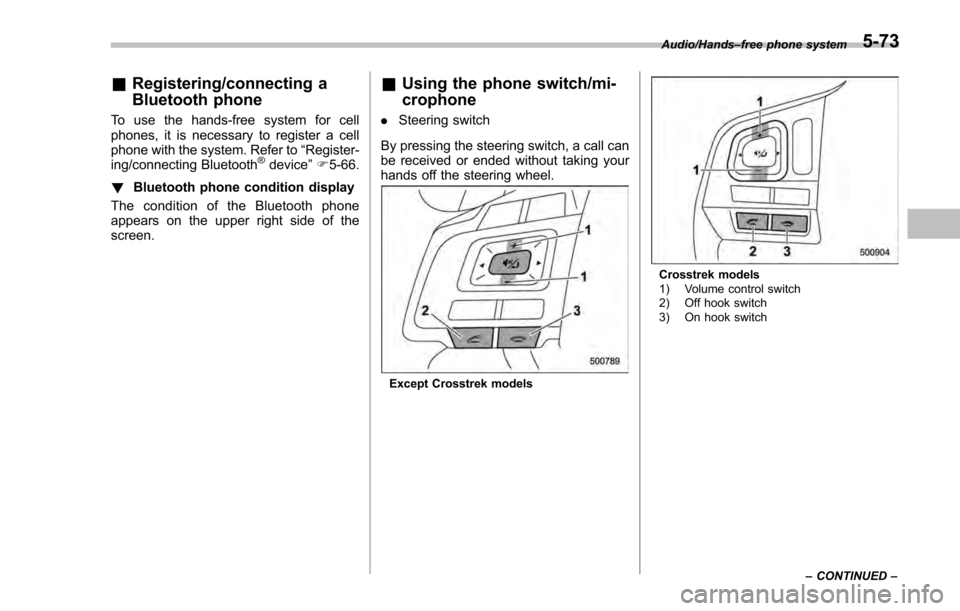
. Steering switch
By pressing the steering switch, a call can
be received or ended without taking your
hands off the steering wheel.
Except Crosstrek models
Crosstrek models
1) Volume control switch
2) Off hook switch
3) On hook switch Audio/Hands
–free phone system
–CONTINUED –
5-73
Page 345 of 594
Audio/Hands–free phone system
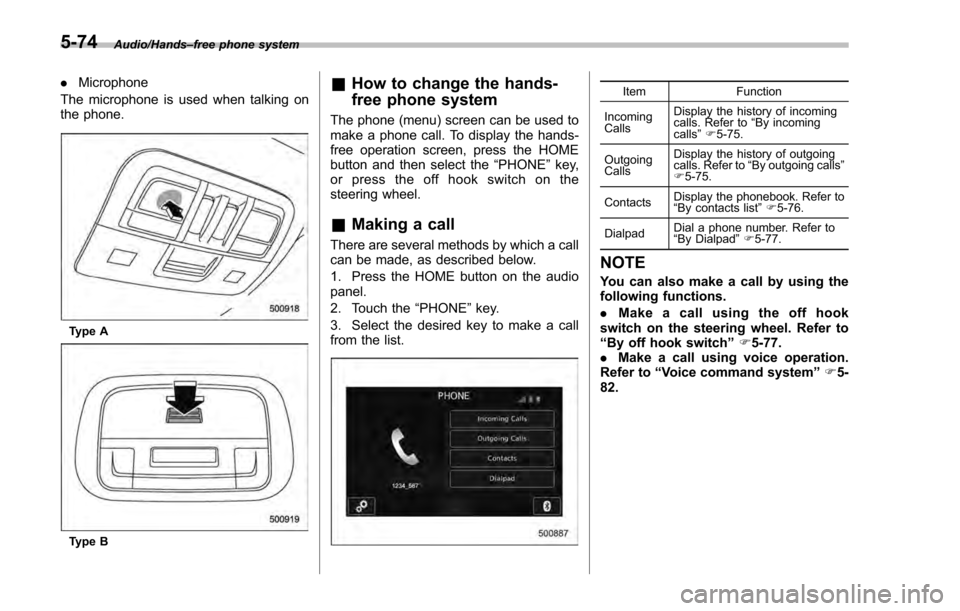
. Microphone
The microphone is used when talking on
the phone.
Type A
Type B
& How to change the hands-
free phone system
The phone (menu) screen can be used to
make a phone call. To display the hands-
free operation screen, press the HOME
button and then select the “PHONE”key,
or press the off hook switch on the
steering wheel.
& Making a call
There are several methods by which a call
can be made, as described below.
1. Press the HOME button on the audio
panel.
2. Touch the “PHONE”key.
3. Select the desired key to make a call
from the list.
Item Function
Incoming
Calls Display the history of incoming
calls. Refer to
“By incoming
calls ”F 5-75.
Outgoing
Calls Display the history of outgoing
calls. Refer to
“By outgoing calls ”
F 5-75.
Contacts Display the phonebook. Refer to
“
By contacts list ”F 5-76.
Dialpad Dial a phone number. Refer to
“
By Dialpad ”F 5-77.
NOTE
You can also make a call by using the
following functions.
. Make a call using the off hook
switch on the steering wheel. Refer to
“By off hook switch ”F 5-77.
. Make a call using voice operation.
Refer to “Voice command system ”F 5-
82.
5-74
Page 346 of 594
!By incoming calls
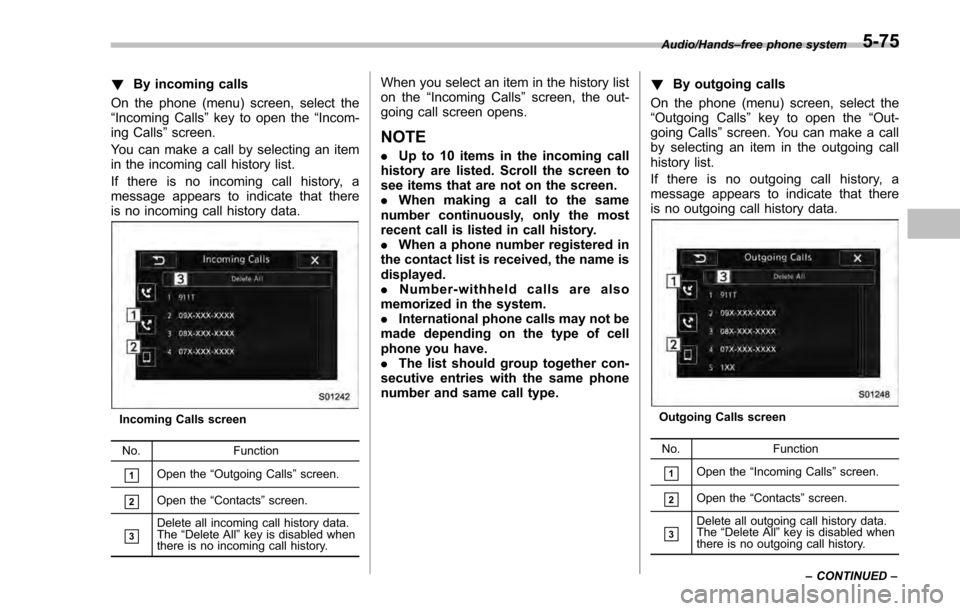
On the phone (menu) screen, select the
“Incoming Calls ”key to open the “Incom-
ing Calls” screen.
You can make a call by selecting an item
in the incoming call history list.
If there is no incoming call history, a
message appears to indicate that there
is no incoming call history data.
Incoming Calls screen
No. Function
&1Open the“Outgoing Calls ”screen.
&2Open the “Contacts ”screen.
&3Delete all incoming call history data.
The “Delete All” key is disabled when
there is no incoming call history.
When you select an item in the history list
on the “Incoming Calls ”screen, the out-
going call screen opens.
NOTE
. Up to 10 items in the incoming call
history are listed. Scroll the screen to
see items that are not on the screen.
. When making a call to the same
number continuously, only the most
recent call is listed in call history.
. When a phone number registered in
the contact list is received, the name is
displayed.
. Number-withheld calls are also
memorized in the system.
. International phone calls may not be
made depending on the type of cell
phone you have.
. The list should group together con-
secutive entries with the same phone
number and same call type. !
By outgoing calls
On the phone (menu) screen, select the
“Outgoing Calls ”key to open the “Out-
going Calls ”screen. You can make a call
by selecting an item in the outgoing call
history list.
If there is no outgoing call history, a
message appears to indicate that there
is no outgoing call history data.
Outgoing Calls screen
No. Function
&1Open the“Incoming Calls ”screen.
&2Open the “Contacts ”screen.
&3Delete all outgoing call history data.
The “Delete All ”key is disabled when
there is no outgoing call history.
Audio/Hands
–free phone system
–CONTINUED –
5-75
Page 347 of 594
Audio/Hands–free phone system
When you select an item in the history list
on the “Outgoing Calls ”screen, the out-
going call screen opens.
NOTE
. Up to 10 items in the outgoing call
history are listed. Scroll the screen to
see items that are not on the screen.
. When making a call to the same
number continuously, only the most
recent call is listed in call history.
. When a phone number registered in
the contact list is received, the name is
displayed.
. Number-withheld calls are also
memorized in the system.
. International phone calls may not be
made depending on the type of cell
phone you have.
. The list should group together con-
secutive entries with the same phone
number and same call type.
! By contacts list
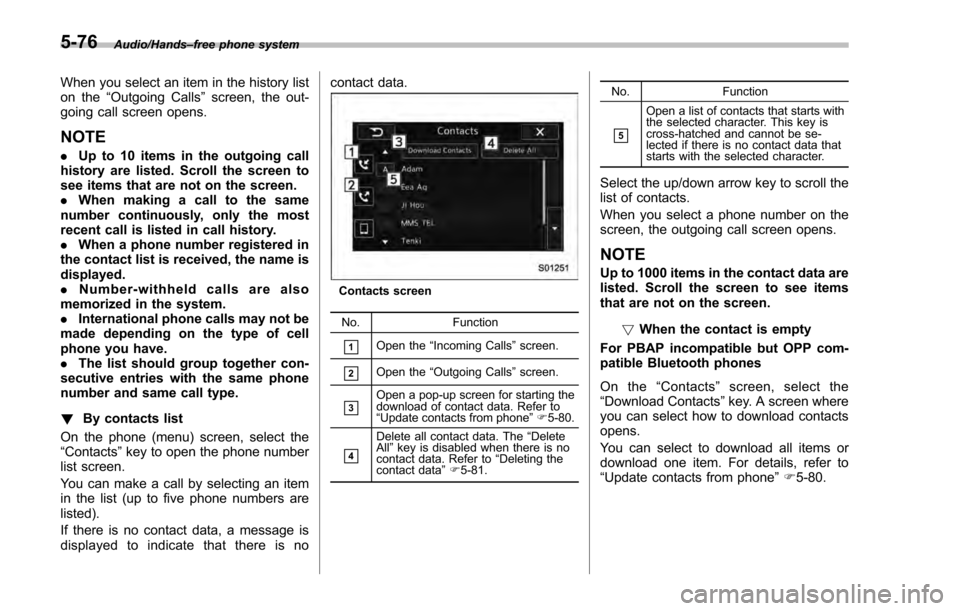
On the phone (menu) screen, select the
“Contacts” key to open the phone number
list screen.
You can make a call by selecting an item
in the list (up to five phone numbers are
listed).
If there is no contact data, a message is
displayed to indicate that there is no contact data.
Contacts screen
No. Function
&1Open the“Incoming Calls ”screen.
&2Open the “Outgoing Calls ”screen.
&3Open a pop-up screen for starting the
download of contact data. Refer to
“Update contacts from phone ”F 5-80.
&4
Delete all contact data. The “Delete
All” key is disabled when there is no
contact data. Refer to “Deleting the
contact data ”F 5-81. No.
Function
&5
Open a list of contacts that starts with
the selected character. This key is
cross-hatched and cannot be se-
lected if there is no contact data that
starts with the selected character.
Select the up/down arrow key to scroll the
list of contacts.
When you select a phone number on the
screen, the outgoing call screen opens.
NOTE
Up to 1000 items in the contact data are
listed. Scroll the screen to see items
that are not on the screen.
!When the contact is empty
For PBAP incompatible but OPP com-
patible Bluetooth phones
On the “Contacts ”screen, select the
“ Download Contacts ”key. A screen where
you can select how to download contacts
opens.
You can select to download all items or
download one item. For details, refer to
“Update contacts from phone ”F 5-80.
5-76
Page 348 of 594
!Delete contacts
When the “Delete All ”key is selected, all
contact data downloaded into the in-
vehicle equipment will be deleted.
Refer to “Deleting the contact data ”F 5-
81.
! By Dialpad
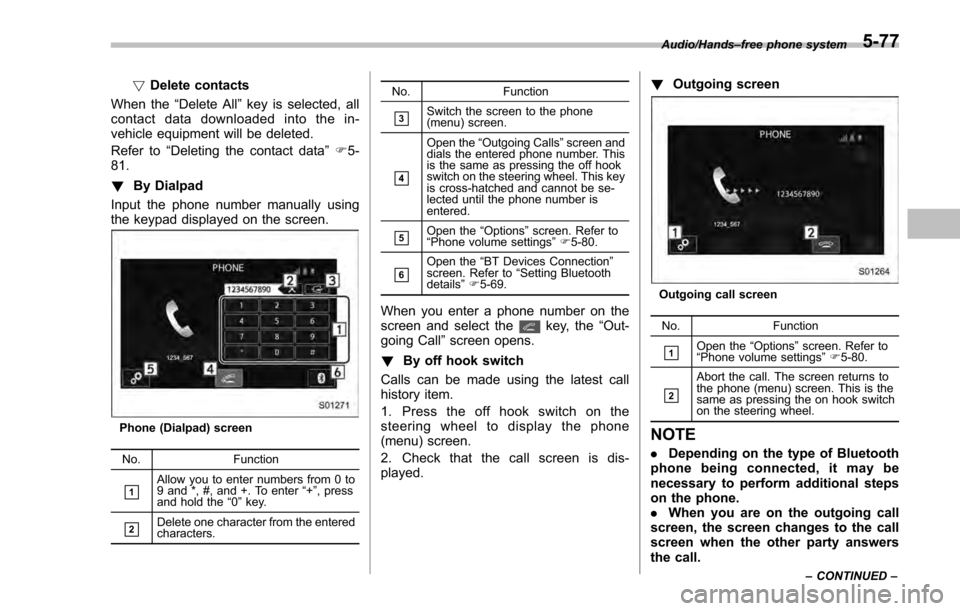
Input the phone number manually using
the keypad displayed on the screen.
Phone (Dialpad) screen
No. Function
&1Allow you to enter numbers from 0 to
9 and *, #, and +. To enter “+” , press
and hold the “0 ” key.
&2Delete one character from the entered
characters. No. Function
&3Switch the screen to the phone
(menu) screen.
&4
Open the
“Outgoing Calls ”screen and
dials the entered phone number. This
is the same as pressing the off hook
switch on the steering wheel. This key
is cross-hatched and cannot be se-
lected until the phone number is
entered.
&5Open the “Options ”screen. Refer to
“ Phone volume settings ”F 5-80.
&6Open the “BT Devices Connection ”
screen. Refer to “Setting Bluetooth
details ”F 5-69.
When you enter a phone number on the
screen and select thekey, the “Out-
going Call ”screen opens.
! By off hook switch
Calls can be made using the latest call
history item.
1. Press the off hook switch on the
steering wheel to display the phone
(menu) screen.
2. Check that the call screen is dis-
played. !
Outgoing screen
Outgoing call screen
No. Function
&1Open the “Options ”screen. Refer to
“ Phone volume settings ”F 5-80.
&2
Abort the call. The screen returns to
the phone (menu) screen. This is the
same as pressing the on hook switch
on the steering wheel.
NOTE
. Depending on the type of Bluetooth
phone being connected, it may be
necessary to perform additional steps
on the phone.
. When you are on the outgoing call
screen, the screen changes to the call
screen when the other party answers
the call.
Audio/Hands –free phone system
–CONTINUED –5-77
Page 349 of 594
Audio/Hands–free phone system
. The,, andkeys are disabled
on the outgoing call screen.
& Receiving a call
! Incoming calls
When a call is received, the incoming call
screen is displayed with a sound.
When you receive a phone call while the
cell phone is connected, the screen
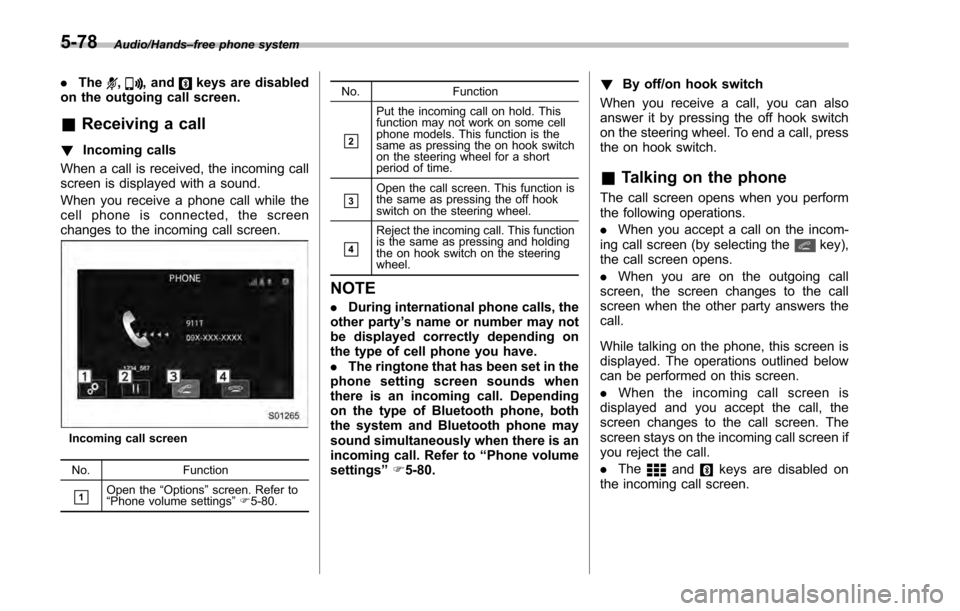
changes to the incoming call screen.
Incoming call screen
No. Function
&1Open the“Options ”screen. Refer to
“ Phone volume settings ”F 5-80. No. Function
&2
Put the incoming call on hold. This
function may not work on some cell
phone models. This function is the
same as pressing the on hook switch
on the steering wheel for a short
period of time.
&3Open the call screen. This function is
the same as pressing the off hook
switch on the steering wheel.
&4
Reject the incoming call. This function
is the same as pressing and holding
the on hook switch on the steering
wheel.
NOTE
.
During international phone calls, the
other party ’s name or number may not
be displayed correctly depending on
the type of cell phone you have.
. The ringtone that has been set in the
phone setting screen sounds when
there is an incoming call. Depending
on the type of Bluetooth phone, both
the system and Bluetooth phone may
sound simultaneously when there is an
incoming call. Refer to “Phone volume
settings ”F 5-80. !
By off/on hook switch
When you receive a call, you can also
answer it by pressing the off hook switch
on the steering wheel. To end a call, press
the on hook switch.
& Talking on the phone
The call screen opens when you perform
the following operations.
. When you accept a call on the incom-
ing call screen (by selecting the
key),
the call screen opens.
. When you are on the outgoing call
screen, the screen changes to the call
screen when the other party answers the
call.
While talking on the phone, this screen is
displayed. The operations outlined below
can be performed on this screen.
. When the incoming call screen is
displayed and you accept the call, the
screen changes to the call screen. The
screen stays on the incoming call screen if
you reject the call.
. The
andkeys are disabled on
the incoming call screen.
5-78
Page 350 of 594
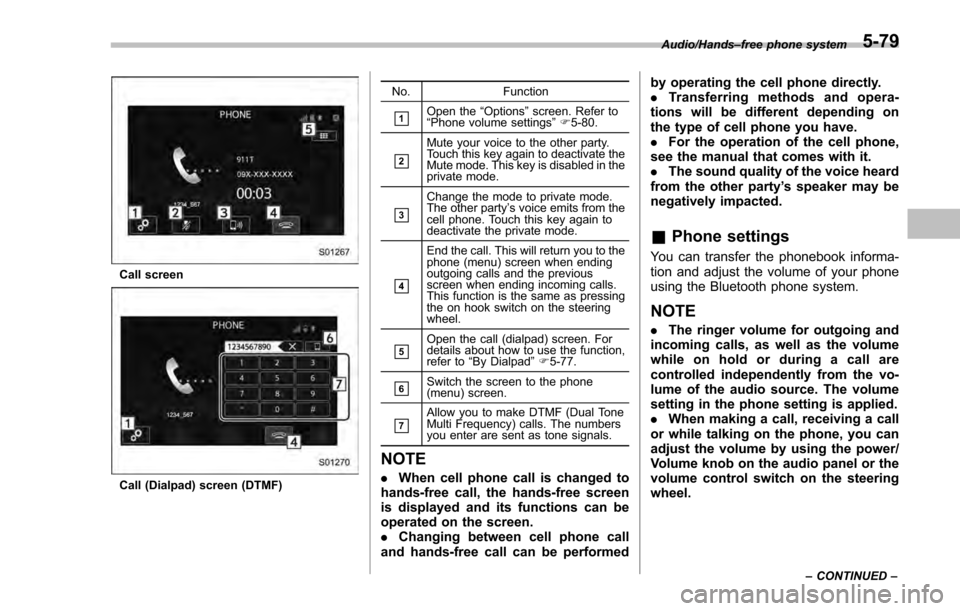
Call screen
Call (Dialpad) screen (DTMF)No. Function
&1Open the
“Options ”screen. Refer to
“ Phone volume settings ”F 5-80.
&2
Mute your voice to the other party.
Touch this key again to deactivate the
Mute mode. This key is disabled in the
private mode.
&3
Change the mode to private mode.
The other party ’s voice emits from the
cell phone. Touch this key again to
deactivate the private mode.
&4
End the call. This will return you to the
phone (menu) screen when ending
outgoing calls and the previous
screen when ending incoming calls.
This function is the same as pressing
the on hook switch on the steering
wheel.
&5Open the call (dialpad) screen. For
details about how to use the function,
refer to “By Dialpad ”F 5-77.
&6Switch the screen to the phone
(menu) screen.
&7Allow you to make DTMF (Dual Tone
Multi Frequency) calls. The numbers
you enter are sent as tone signals.
NOTE
. When cell phone call is changed to
hands-free call, the hands-free screen
is displayed and its functions can be
operated on the screen.
. Changing between cell phone call
and hands-free call can be performed by operating the cell phone directly.
.
Transferring methods and opera-
tions will be different depending on
the type of cell phone you have.
. For the operation of the cell phone,
see the manual that comes with it.
. The sound quality of the voice heard
from the other party’ s speaker may be
negatively impacted.
& Phone settings
You can transfer the phonebook informa-
tion and adjust the volume of your phone
using the Bluetooth phone system.
NOTE
. The ringer volume for outgoing and
incoming calls, as well as the volume
while on hold or during a call are
controlled independently from the vo-
lume of the audio source. The volume
setting in the phone setting is applied.
. When making a call, receiving a call
or while talking on the phone, you can
adjust the volume by using the power/
Volume knob on the audio panel or the
volume control switch on the steering
wheel.
Audio/Hands –free phone system
–CONTINUED –5-79
Page 351 of 594
Audio/Hands–free phone system
! Phone volume settings
The call and ringtone volume can be
adjusted. A ringtone can be selected.
1. Display the “PHONE”screen. Refer to
“How to change the hands-free phone
system ”F 5-74.
2. Touch the
key.
3. Select the desired item to be set.
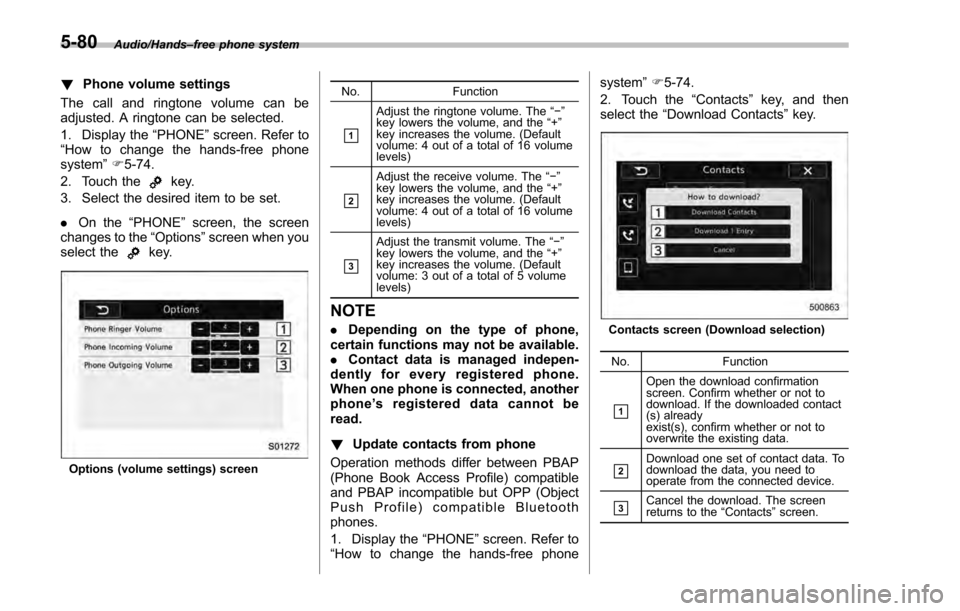
. On the “PHONE ”screen, the screen
changes to the “Options”screen when you
select the
key.
Options (volume settings) screen No. Function
&1
Adjust the ringtone volume. The
“−”
key lowers the volume, and the “+”
key increases the volume. (Default
volume: 4 out of a total of 16 volume
levels)
&2
Adjust the receive volume. The “− ”
key lowers the volume, and the “+”
key increases the volume. (Default
volume: 4 out of a total of 16 volume
levels)
&3
Adjust the transmit volume. The “−”
key lowers the volume, and the “+”
key increases the volume. (Default
volume: 3 out of a total of 5 volume
levels)
NOTE
. Depending on the type of phone,
certain functions may not be available.
. Contact data is managed indepen-
dently for every registered phone.
When one phone is connected, another
phone ’s registered data cannot be
read.
! Update contacts from phone
Operation methods differ between PBAP
(Phone Book Access Profile) compatible
and PBAP incompatible but OPP (Object
Push Profile) compatible Bluetooth
phones.
1. Display the “PHONE ”screen. Refer to
“How to change the hands-free phone system
”F 5-74.
2. Touch the “Contacts”key, and then
select the “Download Contacts ”key.Contacts screen (Download selection)
No. Function
&1
Open the download confirmation
screen. Confirm whether or not to
download. If the downloaded contact
(s) already
exist(s), confirm whether or not to
overwrite the existing data.
&2Download one set of contact data. To
download the data, you need to
operate from the connected device.
&3Cancel the download. The screen
returns to the “Contacts ”screen.
5-80
Page 352 of 594

NOTE
.If your cell phone is neither PBAP
nor OPP compatible, the contacts can-
not be transferred.
. When you are transferring the con-
tacts data, you may have to operate the
cell phone, depending on the type of
cell phone.
. Depending on the type of cell phone,
some functions may not be supported.
!For PBAP compatible Bluetooth
phones
1. Select the “Download Contacts ”or
“Download 1 Entry” key. Contacts are
transferred automatically.
2. Check that a confirmation screen is
displayed when the operation is complete.
.This operation may be unnecessary
depending on the type of cell phone.
. If another Bluetooth device is con-
nected when transferring contact data,
depending on the phone, the con-
nected Bluetooth device may need to
be disconnected. !
For PBAP incompatible but OPP
compatible Bluetooth phones
1. Select the “Download 1 Entry ”key.
2. Transfer the contact data to the sys-
tem using a Bluetooth phone. .This operation may be unnecessary
depending on the type of cell phone.
. To cancel this function, select the
“Cancel” key.
3. Check that a confirmation screen is
displayed when the operation is complete.
NOTE
To download all items, you may need to
change the settings in your cell phone
beforehand.
! Deleting the contact data
You can delete the phonebook data stored
in the audio set.
1. Display the “PHONE ”screen. Refer to
“How to change the hands-free phone
system ”F 5-74.
2. Touch the “Contacts”key, and then
select the “Delete All”key.
3. Select the “OK”key when the con-
firmation screen appears.
NOTE
. Manual transfer operation cannot be
performed while driving.
. If your cell phone is neither PBAP
nor OPP compatible, the contacts can-
not be transferred.
. Depending on the type of Bluetooth
phone:
–It may be necessary to perform
additional steps on the phone when
transferring contact data.
Audio/Hands –free phone system5-81
Page 353 of 594
Audio/Voice command system
Voice command system
The voice command system enables the
audio, hands-free phone system, etc. to
be operated using voice commands.
Refer to the“Command list ”F 5-85 for
samples of voice commands.
Voice commands can be used even when
you set the system to another language.
For details about setting language, refer to
“ General settings” F5-20.
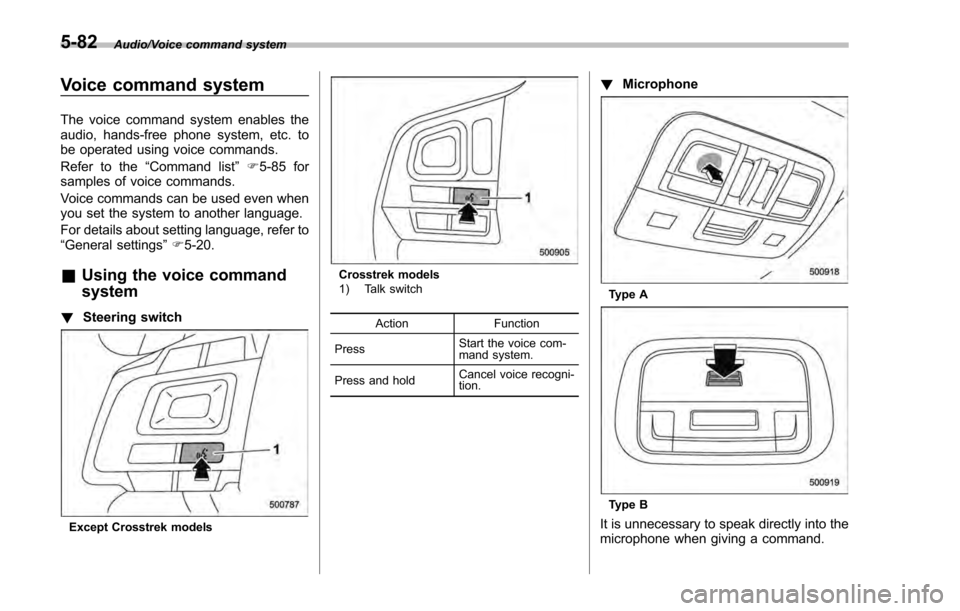
& Using the voice command
system
! Steering switch
Except Crosstrek models
Crosstrek models
1) Talk switch
Action Function
Press Start the voice com-
mand system.
Press and hold Cancel voice recogni-
tion.
!
Microphone
Type A
Type B
It is unnecessary to speak directly into the
microphone when giving a command.
5-82