instrument panel SUBARU IMPREZA 2018 Quick Guide
[x] Cancel search | Manufacturer: SUBARU, Model Year: 2018, Model line: IMPREZA, Model: SUBARU IMPREZA 2018Pages: 33, PDF Size: 3.01 MB
Page 3 of 33
2-5 Getting Started
6-7 Instrument Panel
8-11 Gauges
12-13 Personalize
14-19 Controls
20-21 While Operating
22-23 Safety/In Case of Emergency
24-26 Additional Information
Table of Contents
3220513_18b_Impreza_QRG_091217.indd 59/12/17 3:49 PM
Page 5 of 33
3
Getting
Started
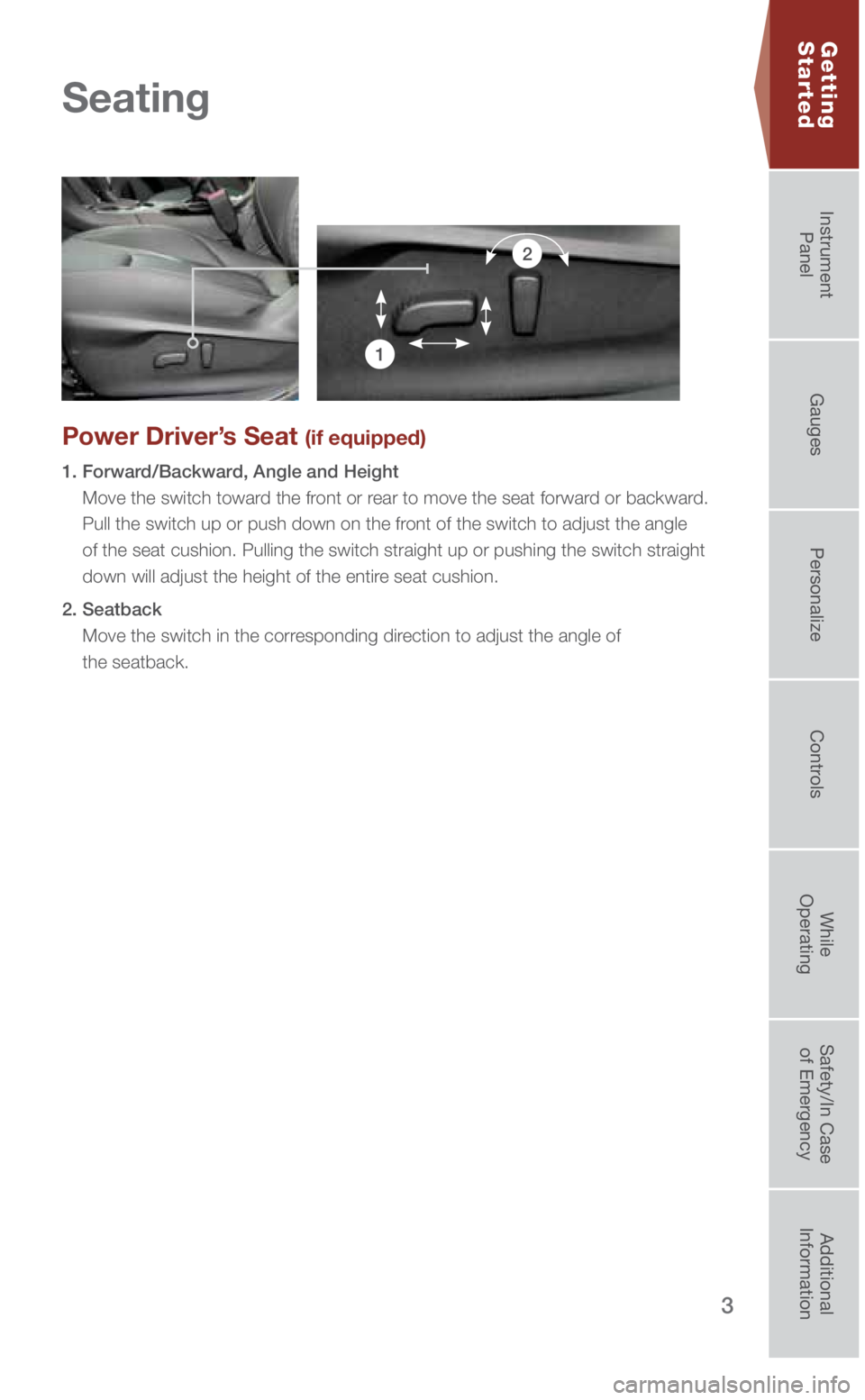
Power Driver’s Seat (if equipped)
1. Forward/Backward, Angle and Height
Move the switch toward the front or rear to move the seat forward or backward.
Pull the switch up or push down on the front of the switch to adjust the angle
of the seat cushion. Pulling the switch straight up or pushing the switc\
h straight
down will adjust the height of the entire seat cushion.
2. Seatback Move the switch in the corresponding direction to adjust the angle of
the seatback.
1
2
Seating
3220513_18b_Impreza_QRG_091217.indd 39/12/17 3:49 PM
Getting
StartedInstrument
Panel Gauges
Personalize ControlsWhile
Operating Safety/In Case
of Emergency Additional
Information
Page 7 of 33
5
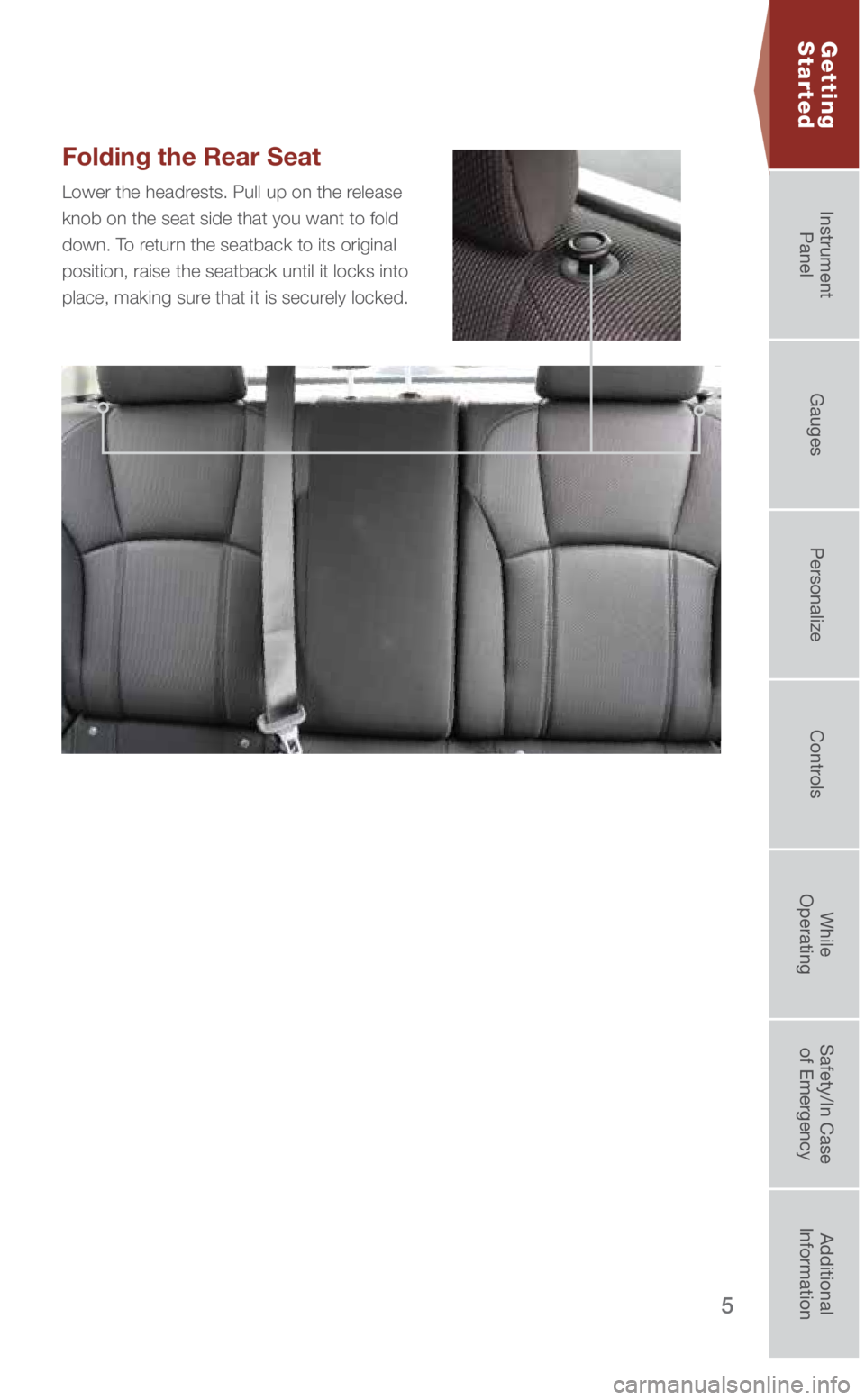
Folding the Rear Seat
Lower the headrests. Pull up on the release
knob on the seat side that you want to fold
down. To return the seatback to its original
position, raise the seatback until it locks into
place, making sure that it is securely locked.
Getting
Started
3220513_18b_Impreza_QRG_091217.indd 59/12/17 3:49 PM
Getting
StartedInstrument
Panel Gauges
Personalize ControlsWhile
Operating Safety/In Case
of Emergency Additional
Information
Page 8 of 33
6
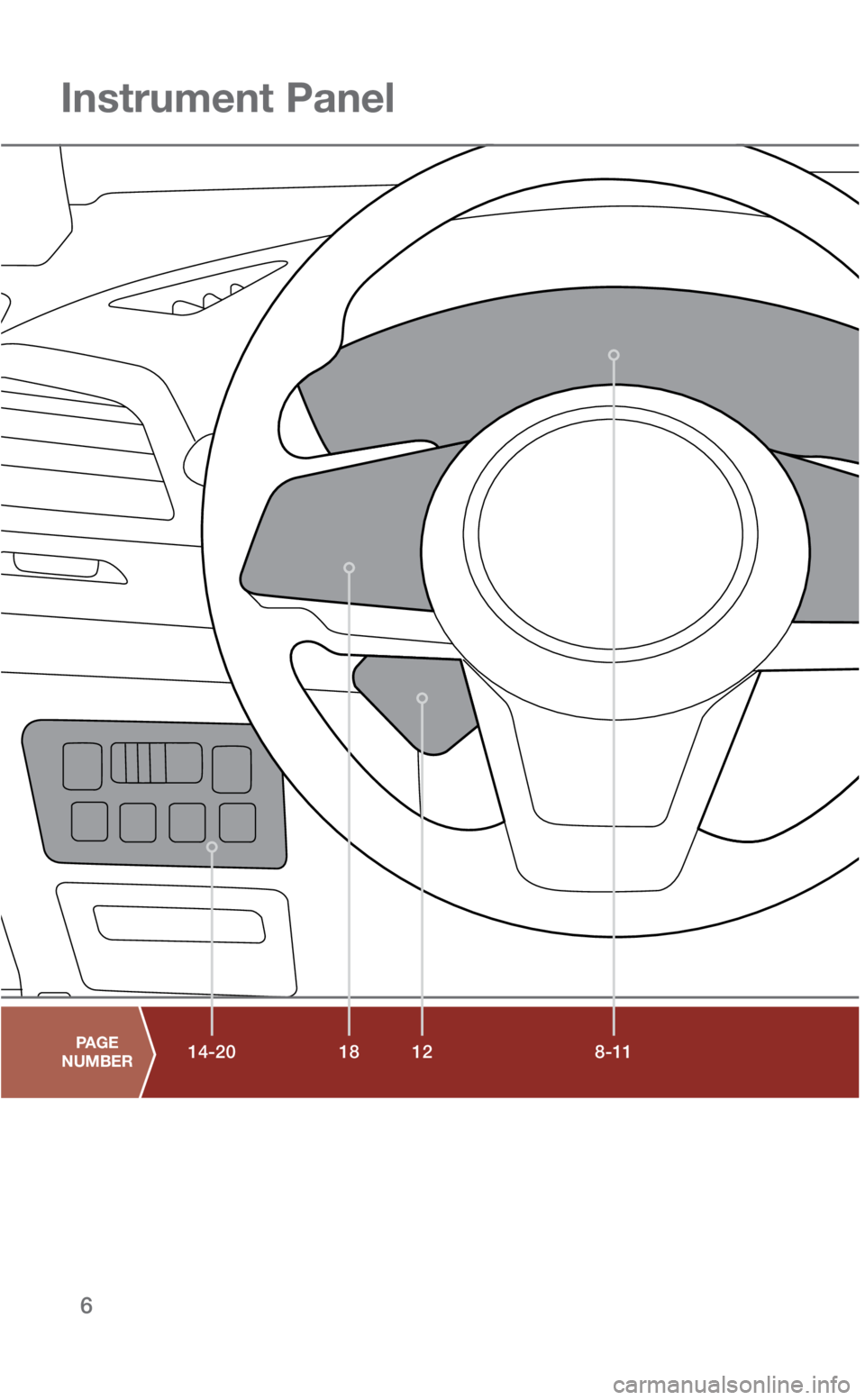
8-11
18 12
14-20
Instrument Panel
PAGE
NUMBER
3220513_18b_Impreza_QRG_091217.indd 69/12/17 3:49 PM
Page 9 of 33
7
16-17
19
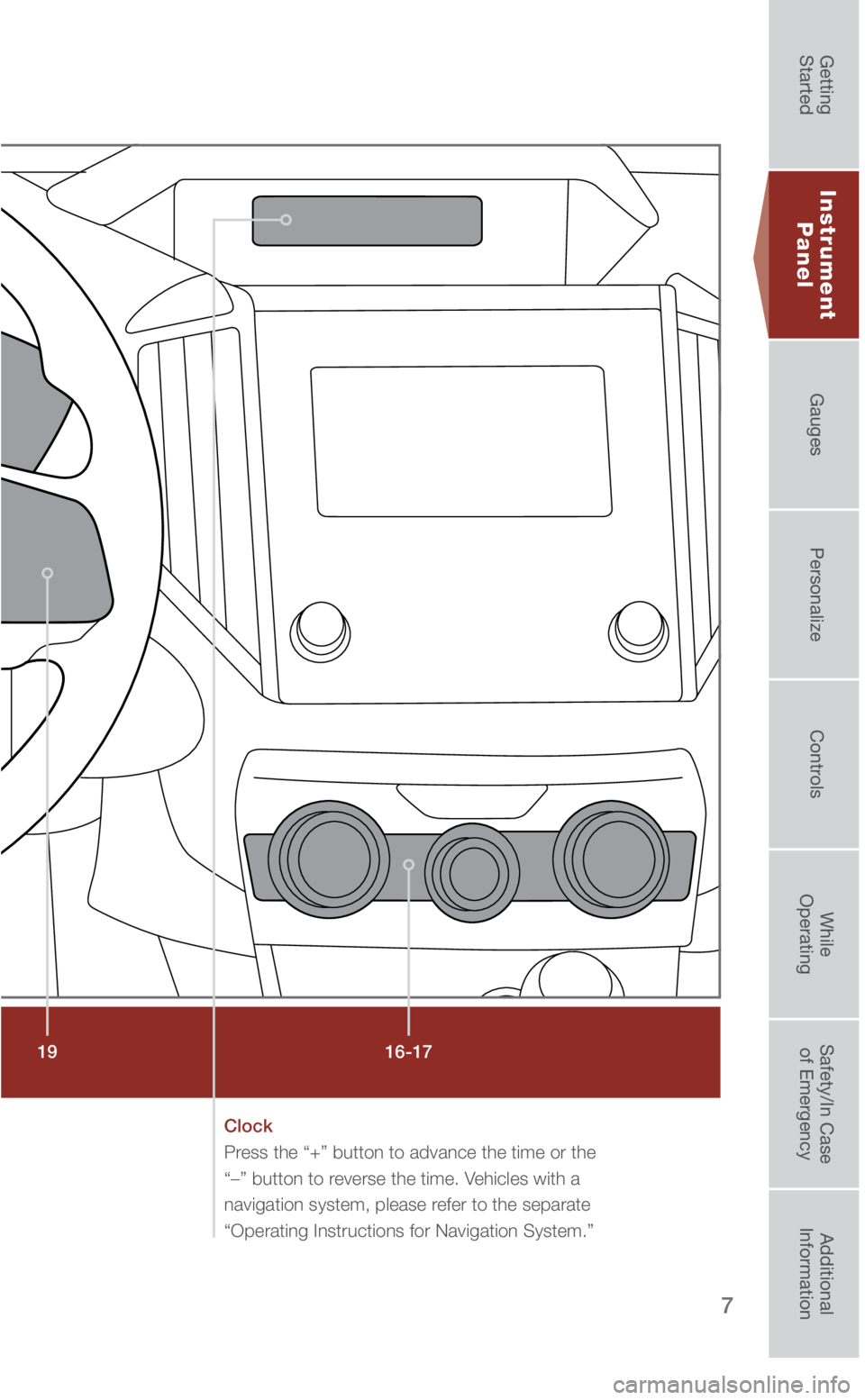
Clock
Press the “+” button to advance the time or the
“–” button to reverse the time. Vehicles with a
navigation system, please refer to the separate
“Operating Instructions for Navigation System.”
Instrument
Panel
3220513_18b_Impreza_QRG_091217.indd 79/12/17 3:49 PM
Getting
StartedInstrument
Panel Gauges
Personalize ControlsWhile
Operating Safety/In Case
of Emergency Additional
Information
Page 11 of 33
9
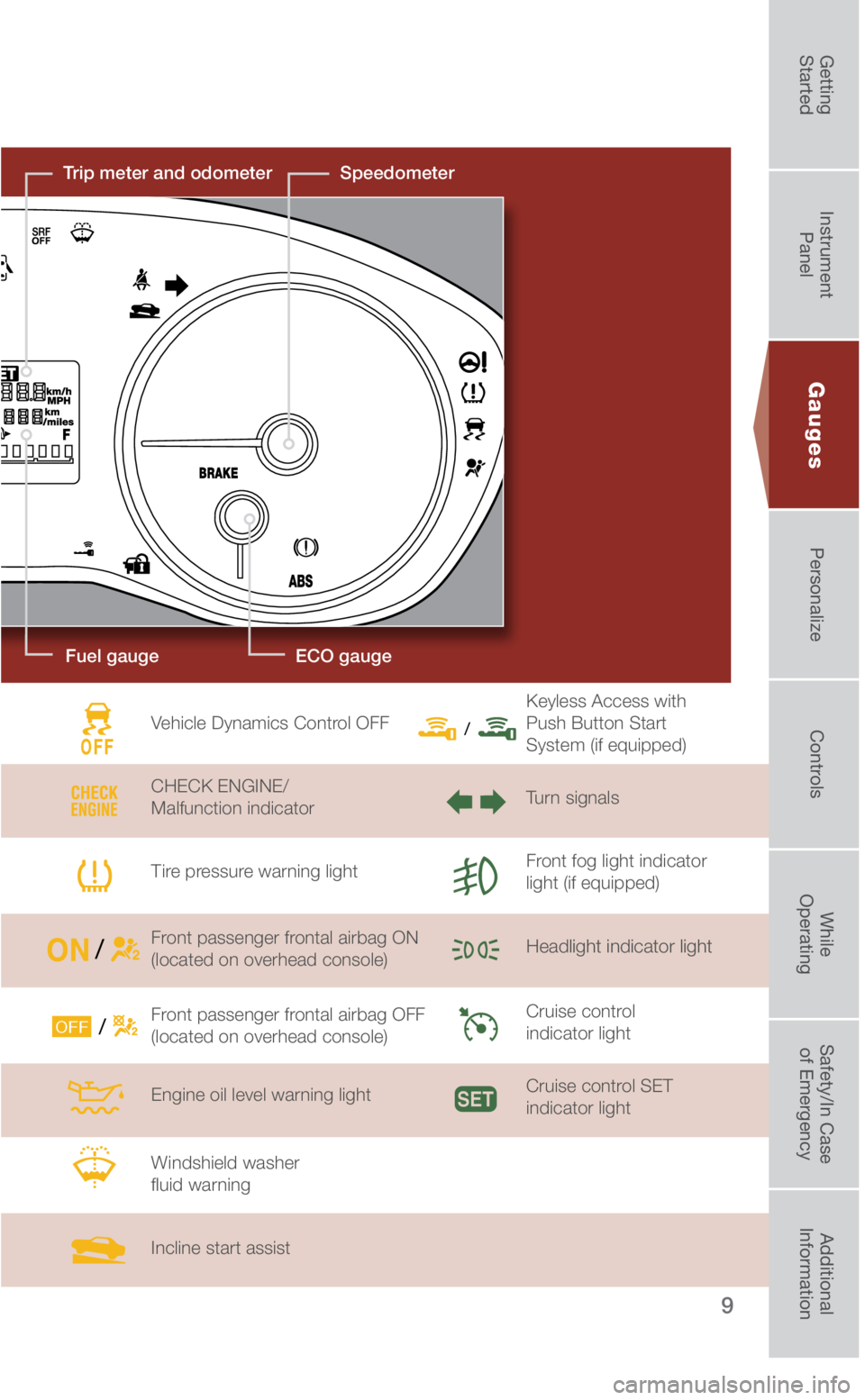
Fuel gauge
Speedometer
Trip meter and odometer
Vehicle Dynamics Control OFF
CHECK ENGINE/
Malfunction indicator
Tire pressure warning light
Front passenger frontal airbag ON
(located on overhead console)
Front passenger frontal airbag OFF
(located on overhead console)
Engine oil level warning light
Windshield washer
fluid warning
Incline start assist Keyless Access with
Push Button Start
System (if equipped)
Turn signals
Front fog light indicator
light (if equipped)
Headlight indicator light
Cruise control
indicator light
Cruise control SET
indicator light
Gauges
ECO gauge
3220513_18b_Impreza_QRG_091217.indd 99/12/17 3:49 PM
Getting
StartedInstrument
Panel Gauges
Personalize ControlsWhile
Operating Safety/In Case
of Emergency Additional
Information
Page 13 of 33
11
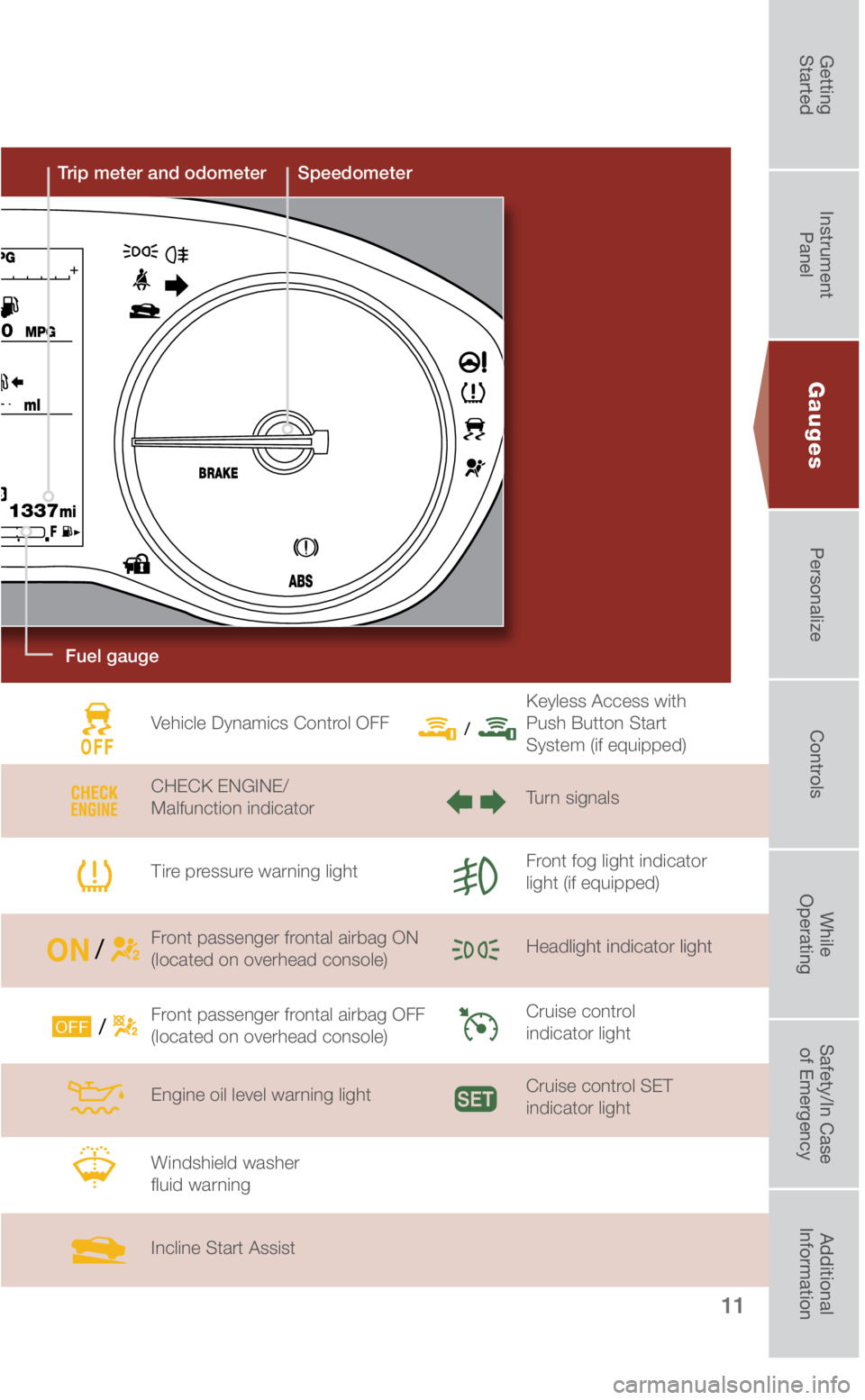
SpeedometerTrip meter and odometer
Gauges
Vehicle Dynamics Control OFF
CHECK ENGINE/
Malfunction indicator
Tire pressure warning light
Front passenger frontal airbag ON
(located on overhead console)
Front passenger frontal airbag OFF
(located on overhead console)
Engine oil level warning light
Windshield washer
fluid warning
Incline Start Assist Keyless Access with
Push Button Start
System (if equipped)
Turn signals
Front fog light indicator
light (if equipped)
Headlight indicator light
Cruise control
indicator light
Cruise control SET
indicator light
Fuel gauge
3220513_18b_Impreza_QRG_091217.indd 119/12/17 3:49 PM
Getting
StartedInstrument
Panel Gauges
Personalize ControlsWhile
Operating Safety/In Case
of Emergency Additional
Information
Page 15 of 33
13
Personalize
Power Moonroof (if equipped)
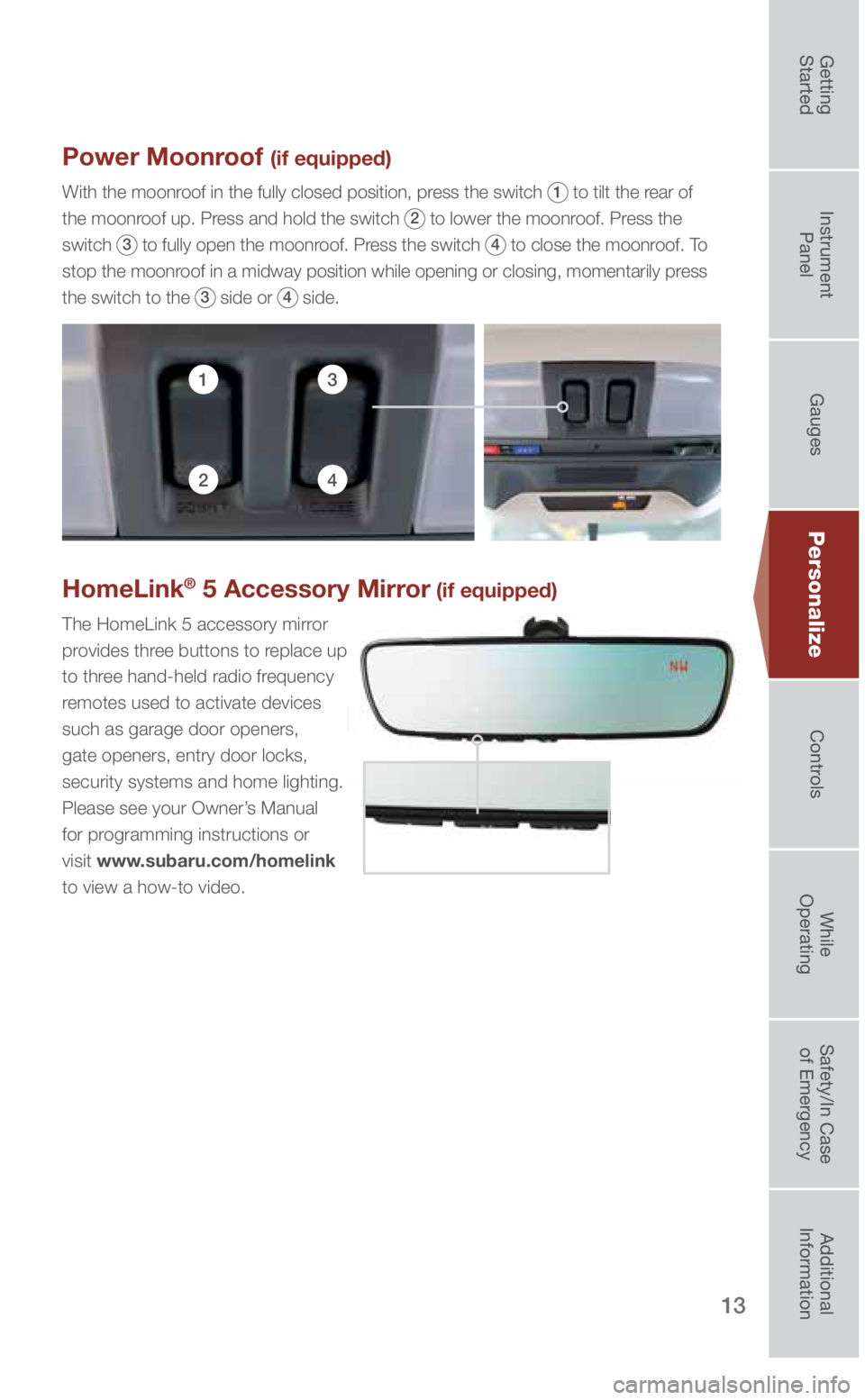
With the moonroof in the fully closed position, press the switch 1 to tilt the rear of
the moonroof up. Press and hold the switch
2 to lower the moonroof. Press the
switch
3 to fully open the moonroof. Press the switch 4 to close the moonroof. To
stop the moonroof in a midway position while opening or closing, momentarily press
the switch to the
3 side or 4 side.
13
24
HomeLink® 5 Accessory Mirror (if equipped)
The HomeLink 5 accessory mirror
provides three buttons to replace up
to three hand-held radio frequency
remotes used to activate devices
such as garage door openers,
gate openers, entry door locks,
security systems and home lighting.
Please see your Owner’s Manual
for programming instructions or
visit www.subaru.com/homelink
to view a how-to video.
3220513_18b_Impreza_QRG_091217.indd 139/12/17 3:50 PM
Getting
StartedInstrument
Panel Gauges
Personalize ControlsWhile
Operating Safety/In Case
of Emergency Additional
Information
Page 16 of 33
14
Controls
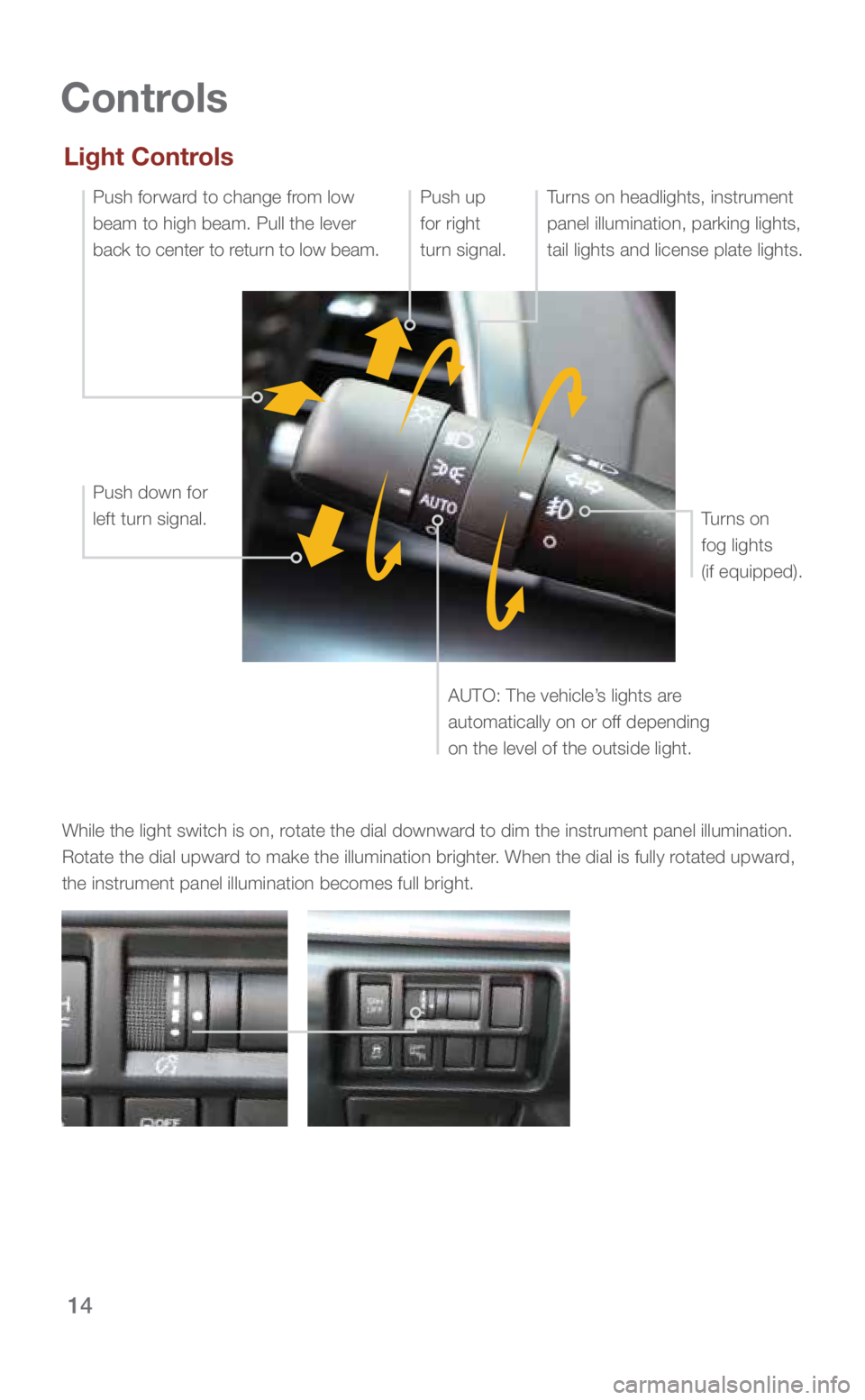
While the light switch is on, rotate the dial downward to dim the instrument panel illumination.
Rotate the dial upward to make the illumination brighter. When the dial is fully rotated upward,
the instrument panel illumination becomes full bright.
Light Controls
Turns on headlights, instrument
panel illumination, parking lights,
tail lights and license plate lights.
Push up
for right
turn signal.
Push down for
left turn signal.Push forward to change from low
beam to high beam. Pull the lever
back to center to return to low beam.
Turns on
fog lights
(if equipped).
AUTO: The vehicle’s lights are
automatically on or off depending
on the level of the outside light.
3220513_18b_Impreza_QRG_091217.indd 149/12/17 3:50 PM
Page 17 of 33
15
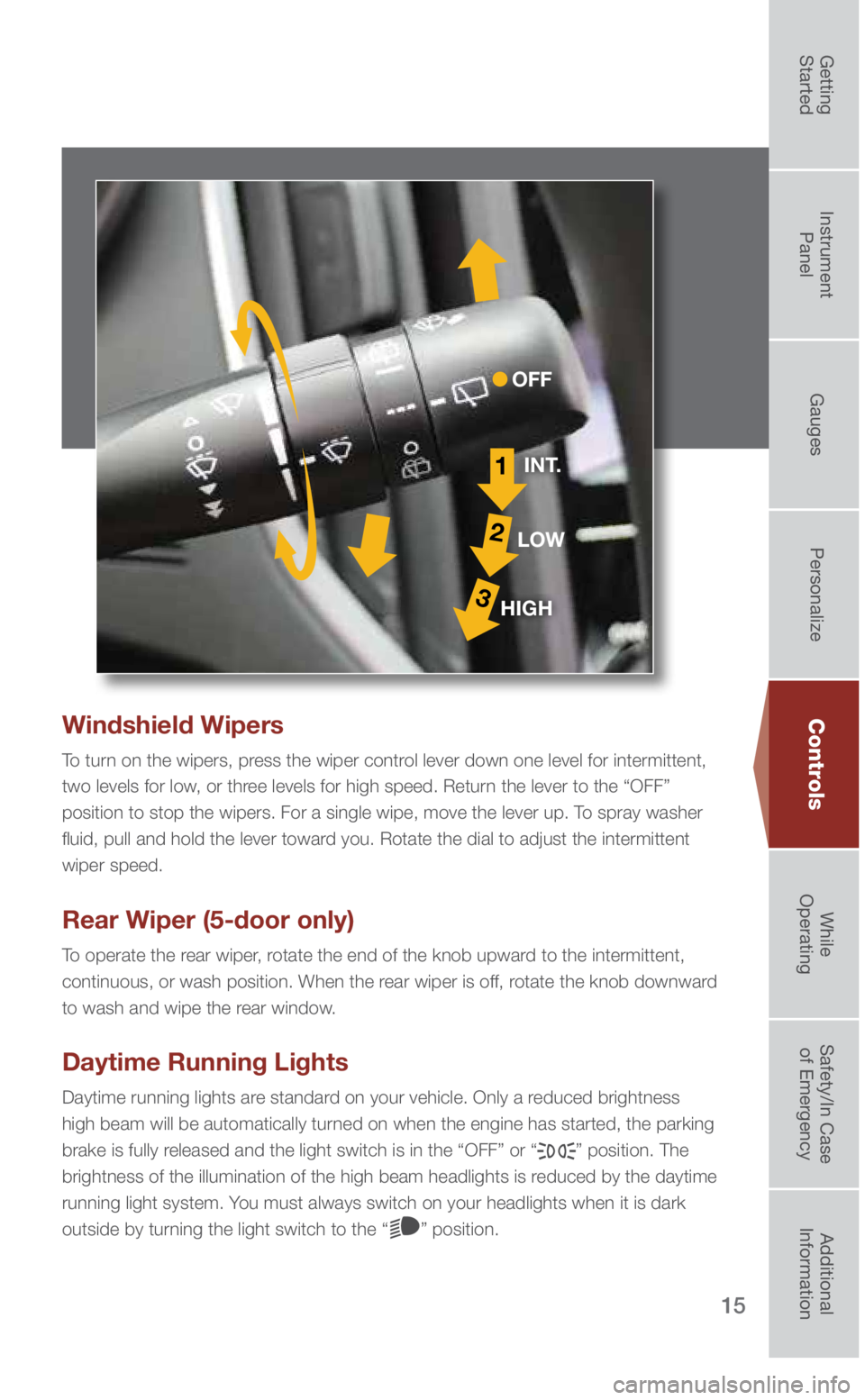
Windshield Wipers
To turn on the wipers, press the wiper control lever down one level for intermittent,
two levels for low, or three levels for high speed. Return the lever to the “OFF”
position to stop the wipers. For a single wipe, move the lever up. To spray washer
fluid, pull and hold the lever toward you. Rotate the dial to adjust the intermittent
wiper speed.
Rear Wiper (5-door only)
To operate the rear wiper, rotate the end of the knob upward to the intermittent,
continuous, or wash position. When the rear wiper is off, rotate the knob downward
to wash and wipe the rear window.
Daytime Running Lights
Daytime running lights are standard on your vehicle. Only a reduced brightness
high beam will be automatically turned on when the engine has started, the parking
brake is fully released and the light switch is in the “OFF” or “
” position. The
brightness of the illumination of the high beam headlights is reduced by the daytime
running light system. You must always switch on your headlights when it is dark
outside by turning the light switch to the “
” position.
1
2
3
INT.
LOW
HIGH OFF
Controls
3220513_18b_Impreza_QRG_091217.indd 159/12/17 3:50 PM
Getting
StartedInstrument
Panel Gauges
Personalize ControlsWhile
Operating Safety/In Case
of Emergency Additional
Information