sensor SUBARU IMPREZA WRX 2004 2.G User Guide
[x] Cancel search | Manufacturer: SUBARU, Model Year: 2004, Model line: IMPREZA WRX, Model: SUBARU IMPREZA WRX 2004 2.GPages: 491, PDF Size: 5.93 MB
Page 182 of 491
3-45
Instruments and controls
– CONTINUED –
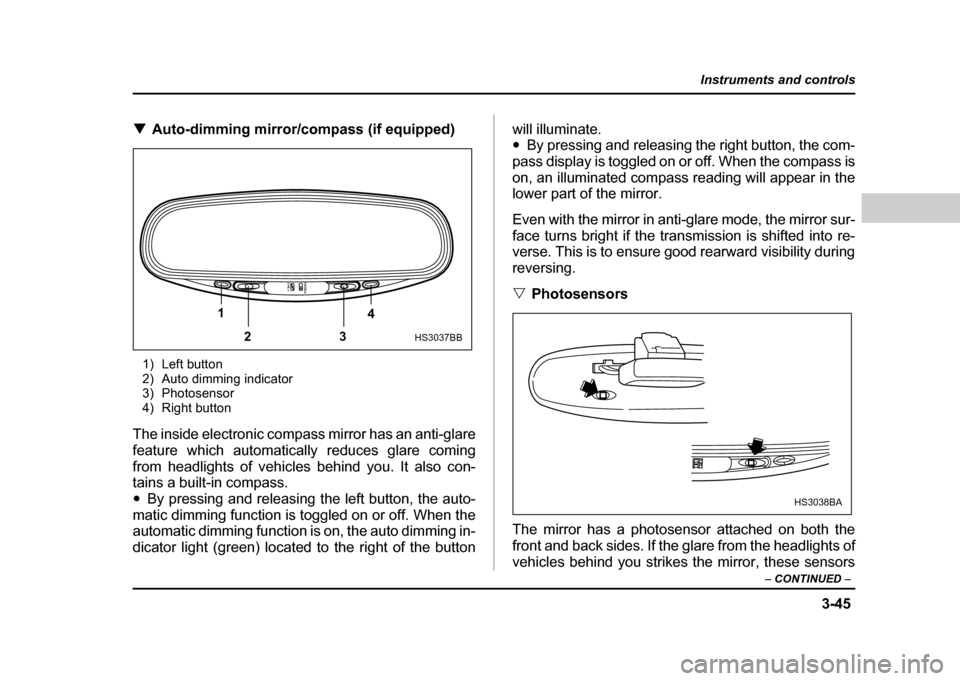
!Auto-dimming mirror/compass (if equipped)
1) Left button
2) Auto dimming indicator
3) Photosensor
4) Right button
The inside electronic compass mirror has an anti-glare
feature which automatically reduces glare coming
from headlights of vehicles behind you. It also con-
tains a built-in compass." By pressing and releasing the left button, the auto-
matic dimming function is toggled on or off. When the
automatic dimming function is on, the auto dimming in-
dicator light (green) located to the right of the button will illuminate. "
By pressing and releasing the right button, the com-
pass display is toggled on or off. When the compass is
on, an illuminated compass reading will appear in the
lower part of the mirror.
Even with the mirror in anti-glare mode, the mirror sur-
face turns bright if the transmission is shifted into re-
verse. This is to ensure good rearward visibility during reversing. " Photosensors
The mirror has a photosensor attached on both the
front and back sides. If the glare from the headlights of
vehicles behind you strikes the mirror, these sensors
1 23 4
HS3037BB
HS3038BA
Page 183 of 491
3-46
Instruments and controls
detect it and make the reflection surface of the mirror
dimmer to help prevent you from being blinded. For
this reason, use care not to cover the sensors with
stickers, or other similar items. Periodically wipe the
sensors clean using a piece of dry soft cotton cloth or
an applicator. "
Compass calibration
1. For optimum calibration, switch off all nonessential
electrical accessories (rear window defogger, heater/
air conditioning system, spotlight, etc.) and ensure all
doors are shut.
2. Drive to an open, level area away from large metal-
lic objects or structures and make certain the ignition
switch is in the “ON” position.
3. Press and hold the left button for 3 seconds then re-
lease, and the compass will enter the calibration
mode. “CAL” and direction will be displayed.
4. Drive slowly in a circle until “CAL” disappears from
the display (about two or three circles). The compass
is now calibrated.
5. Further calibration may be necessary should out-
side. Influences cause the mirror to read inaccurately.
You will know that this has occurred if your compass
begins to read in only limited directions. Should you
encounter this situation, return to step one of the
above procedure and recalibrate the mirror. "
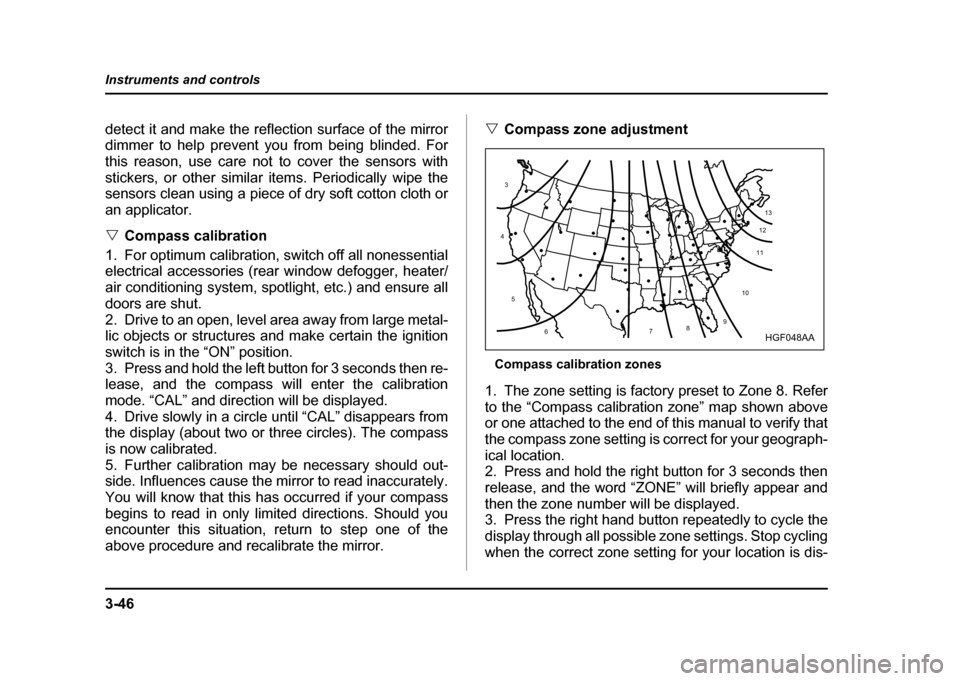
Compass zone adjustment
Compass calibration zones
1. The zone setting is factory preset to Zone 8. Refer
to the “Compass calibration zone” map shown above
or one attached to the end of this manual to verify that
the compass zone setting is correct for your geograph-ical location.
2. Press and hold the right button for 3 seconds then
release, and the word “ZONE” will briefly appear and
then the zone number will be displayed.
3. Press the right hand button repeatedly to cycle the
display through all possible zone settings. Stop cycling
when the correct zone setting for your location is dis-
10
9
8
7
6
5
4
3
1112
13
HGF048AA
Page 190 of 491

4-1
4
Climate control
Ventilator ....................................................... 4-2 Air flow selection .............................................. 4-2
Center and side ventilators .............................. 4-3
Manual climate control system (if equipped) 4-4 Control panel ..................................................... 4-4
Heater operation ............................................... 4-6
Air conditioner operation (if equipped) .......... 4-9
Semi-automatic climate control system (if equipped) ............................................... 4-11Control panel ..................................................... 4-11
Operating method ............................................. 4-14
Temperature sensors ....................................... 4-18
Operating tips for heater and air conditioner 4-19 Cleaning ventilation grille ................................ 4-19
Efficient cooling after parking in direct sunlight ........................................................... 4-19
Lubrication oil circulation in the refrigerant
circuit .............................................................. 4-19
Checking air conditioning system before summer season .............................................. 4-19
Cooling and dehumidifying in high humidity and low temperature weather conditions .... 4-20
Air conditioner compressor shut-off when
engine is heavily loaded ................................ 4-20
Refrigerant for your climate control system .. 4-20
Air filtration system (if equipped) ................ 4-20 Replacing an air filter ....................................... 4-21
Page 207 of 491
4-18
Climate control
!
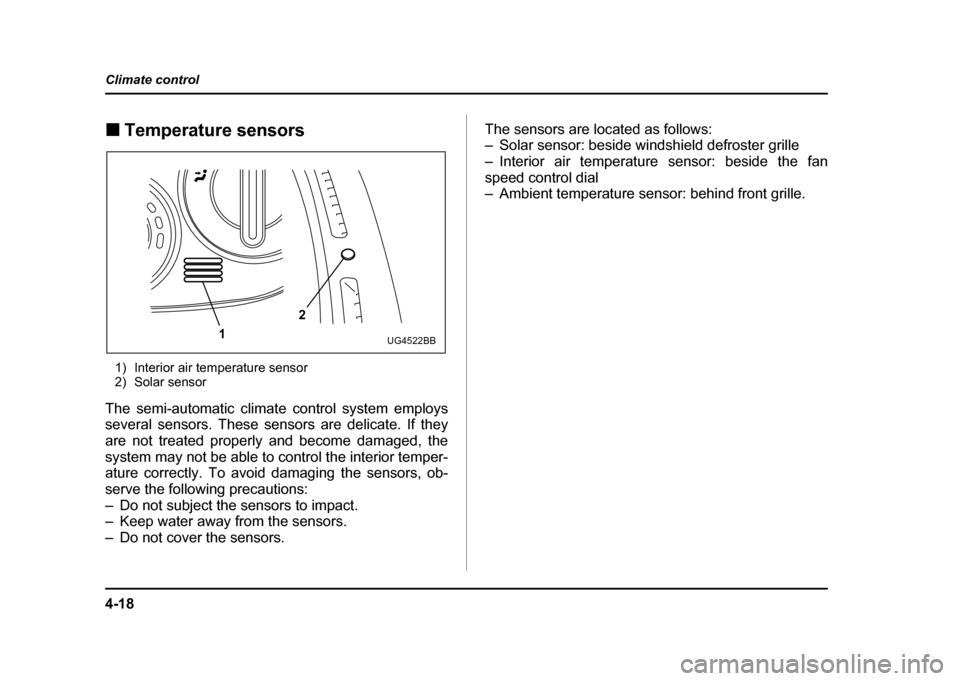
Temperature sensors
1) Interior air temperature sensor
2) Solar sensor
The semi-automatic climate control system employs
several sensors. These sensors are delicate. If they
are not treated properly and become damaged, the
system may not be able to control the interior temper-
ature correctly. To avoid damaging the sensors, ob-
serve the following precautions:
– Do not subject the sensors to impact.
– Keep water away from the sensors.
– Do not cover the sensors. The sensors are located as follows:
– Solar sensor: beside windshield defroster grille
– Interior air temperature sensor: beside the fan
speed control dial
– Ambient temperature sensor: behind front grille.
2
1
UG4522BB
Page 237 of 491

5-24
Audio
!
Tape program sensor button (TPS)
" Blank skip
When the “TPS” button (13) is pressed, the “TPS” in-
dicator will come on and the player will automatically
skip any blank portion of 15 second or more and play
the next program, even if it is on the other side. To
cancel blank skip mode, press the “TPS” button again. " Blank search
Press “TPS” button (13) during playback to return to
the beginning of the current selection or to skip to the
beginning of the next selection. To use this function,
press the “TPS” button to turn on the “TPS” indicator.
If the fast-forward button “FF” (15) is then pressed, the
player advances the tape to the beginning of the next
selection and starts playing it. If the rewind button
“REW” (17) is pressed instead, the player rewinds the
tape to the beginning of the current selection and
starts replaying it. The “TPS” function may not operate
properly under the following conditions: " When the recording level is low.
" When there are long pauses in the middle of a se-
lection." When the tape contains verbal material such as
conversations. " When the blanks between selections are shorter
than five seconds. "
When there are no blanks between selections (live
concerts, etc.). ! Repeat button (RPT)
Push the “RPT” button (11) to repeat the piece of mu-
sic being listened to. To use this function, push the
“RPT” button while the piece you want to hear again is
being played. “RPT” will be indicated on the display.
When the selection ends, the cassette player automat-
ically rewinds to the beginning of the piece and the se-
lection begins again. To cancel the repeat function,
push the “RPT” button again. Until the repeat function
is cancelled, the same piece of music will be repeated
indefinitely. The “RPT” function may not operate prop-
erly under the following conditions:" When the recording level is low.
" When there are long pauses in the middle of a se-
lection." When the tape contains verbal material such as
conversations." When the blanks between selections are shorter
than five seconds. " When there are no blanks between selections (live
concerts, etc). ! Dolby B NR button ( )
Press “ ” button (14) when playing tapes recorded
using the Dolby NR system*. The “ ” indicator will
Page 238 of 491

5-25
Audio
– CONTINUED –
light up and high-frequency noise on the tape will be
reduced for clearer sound reproduction.
*: Noise reduction system manufactured under license from
Dolby Laboratories Licensing Corporation. “Dolby” and the
double-D Symbol are trade marks of Dolby Laboratories Li-
censing Corporation. "Auto metal sensor
The cassette player automatically adjusts for metal or
CrO 2 tape.
Page 380 of 491
10-3
Appearance care
– CONTINUED –
flush the suspension and axle parts, as they are par-
ticularly prone to mud and sand buildup. Do not use a
sharp-edged tool to remove caked mud.
NOTE
Be careful not to damage brake hoses, sensor har-
nesses, and other parts when washing suspen-
sion components. !Using a warm water washer
" Keep a good distance of 12 in (30 cm) or more be-
tween the washer nozzle and the vehicle. " Do not wash the same area continuously.
" If a stain will not come out easily, wash by hand.
Some warm water washers are of the high tempera-
ture, high pressure type, and they can damage or de-
form the resin parts such as mouldings, or cause wa-
ter to leak into the vehicle. ! Waxing and polishing
Always wash and dry the vehicle before waxing and
polishing.
Use a good quality polish and wax and apply them ac-
cording to the manufacturer’s instructions. Wax or pol-
ish when the painted surface is cool.
Be sure to polish and wax the chrome trim, as well as
the painted surfaces. Loss of wax on a painted surface leads to loss of the original luster and also quickens
the deterioration of the surface. It is recommended
that a coat of wax be applied at least once a month, or
whenever the surface no longer repels water.
If the appearance of the paint has diminished to the
point where the luster or tone cannot be restored,
lightly polish the surface with a fine-grained com-
pound. Never polish just the affected area, but include
the surrounding area as well. Always polish in only
one direction. A No. 2000 grain compound is recom-
mended. Never use a coarse-grained compound.
Coarser grained compounds have a smaller grain-size
number and could damage the paint. After polishing
with a compound, coat with wax to restore the original
luster. Frequent polishing with a compound or an in-
correct polishing technique will result in removing the
paint layer and exposing the undercoat. When in
doubt, it is always best to contact your SUBARU deal-
er or an auto paint specialist.
NOTE
Be careful not to block the windshield washer noz-
zles with wax when waxing the vehicle. !
Cleaning aluminum wheels
" Promptly wipe the aluminum wheels clean of any
kind of grime or agent. If dirt is left on too long, it may