clock SUBARU IMPREZA WRX STI 2012 User Guide
[x] Cancel search | Manufacturer: SUBARU, Model Year: 2012, Model line: IMPREZA WRX STI, Model: SUBARU IMPREZA WRX STI 2012Pages: 463, PDF Size: 7.69 MB
Page 200 of 463
Black plate (154,1)
北米Model "A1130BE-A" EDITED: 2011/ 6/ 7
3-36
Instruments and controls
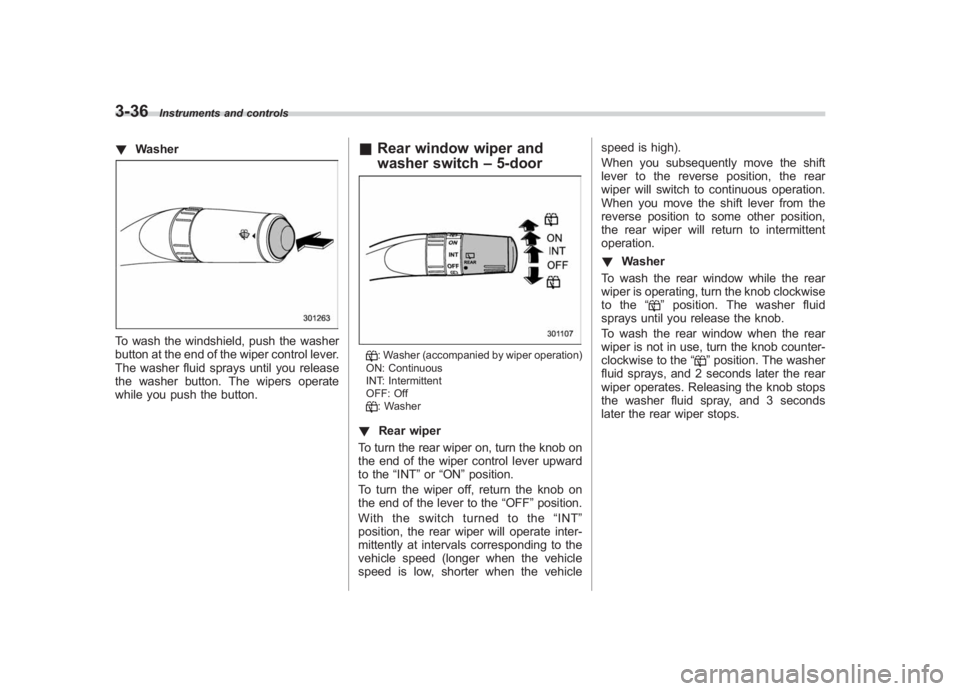
! WasherTo wash the windshield, push the washer
button at the end of the wiper control lever.
The washer fluid sprays until you release
the washer button. The wipers operate
while you push the button.
&Rear window wiper and
washer switch –5-door
: Washer (accompanied by wiper operation)
ON: Continuous
INT: Intermittent
OFF: Off: Washer
! Rear wiper
To turn the rear wiper on, turn the knob on
the end of the wiper control lever upward
to the “INT”or “ON ”position.
To turn the wiper off, return the knob on
the end of the lever to the “OFF”position.
With the switch turned to the “INT ”
position, the rear wiper will operate inter-
mittently at intervals corresponding to the
vehicle speed (longer when the vehicle
speed is low, shorter when the vehicle speed is high).
When you subsequently move the shift
lever to the reverse position, the rear
wiper will switch to continuous operation.
When you move the shift lever from the
reverse position to some other position,
the rear wiper will return to intermittent
operation.
!
Washer
To wash the rear window while the rear
wiper is operating, turn the knob clockwise
to the “
”position. The washer fluid
sprays until you release the knob.
To wash the rear window when the rear
wiper is not in use, turn the knob counter-
clockwise to the “
”position. The washer
fluid sprays, and 2 seconds later the rear
wiper operates. Releasing the knob stops
the washer fluid spray, and 3 seconds
later the rear wiper stops.
Page 221 of 463
Black plate (177,1)
北米Model "A1130BE-A" EDITED: 2011/ 6/ 7
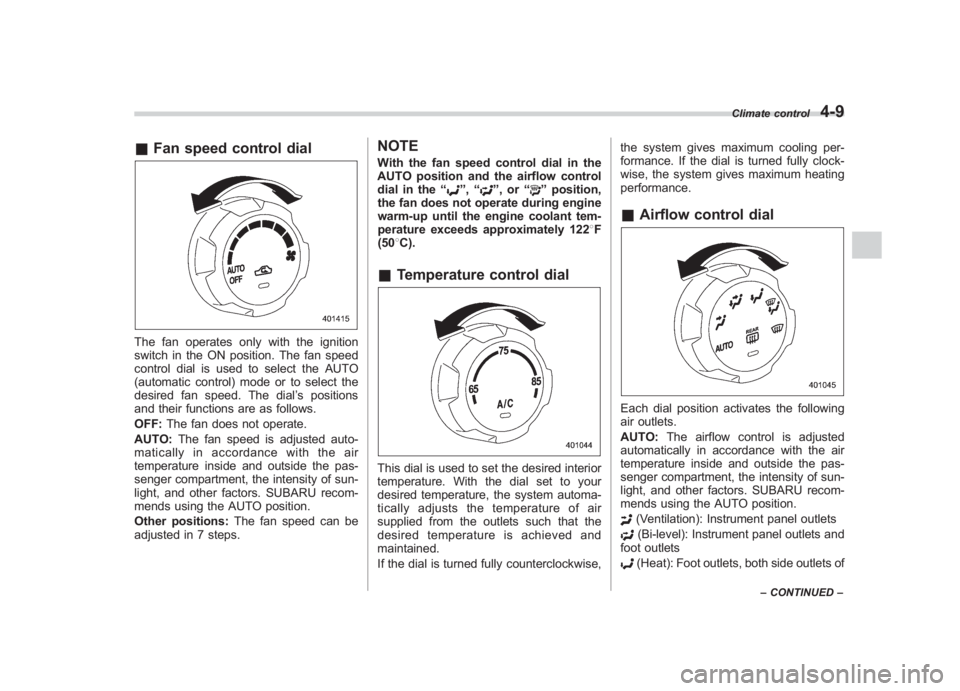
& Fan speed control dialThe fan operates only with the ignition
switch in the ON position. The fan speed
control dial is used to select the AUTO
(automatic control) mode or to select the
desired fan speed. The dial ’s positions
and their functions are as follows.
OFF: The fan does not operate.
AUTO: The fan speed is adjusted auto-
maticallyinaccordancewiththeair
temperature inside and outside the pas-
senger compartment, the intensity of sun-
light, and other factors. SUBARU recom-
mends using the AUTO position.
Other positions: The fan speed can be
adjusted in 7 steps.
NOTEWith the fan speed control dial in the
AUTO position and the airflow control
dial in the “
”, “
”,or “
”position,
the fan does not operate during engine
warm-up until the engine coolant tem-
perature exceeds approximately 1228 F
(50 8C).
& Temperature control dialThis dial is used to set the desired interior
temperature. With the dial set to your
desired temperature, the system automa-
tically adjusts the temperature of air
supplied from the outlets such that the
desired temperature is achieved and
maintained.
If the dial is turned fully counterclockwise, the system gives maximum cooling per-
formance. If the dial is turned fully clock-
wise, the system gives maximum heating
performance.
&
Airflow control dialEach dial position activates the following
air outlets.
AUTO: The airflow control is adjusted
automatically in accordance with the air
temperature inside and outside the pas-
senger compartment, the intensity of sun-
light, and other factors. SUBARU recom-
mends using the AUTO position.
(Ventilation): Instrument panel outlets(Bi-level): Instrument panel outlets and
foot outlets(Heat): Foot outlets, both side outlets of
Climate control
4-9
– CONTINUED –
4
Page 237 of 463
Black plate (193,1)
北米Model "A1130BE-A" EDITED: 2011/ 6/ 7
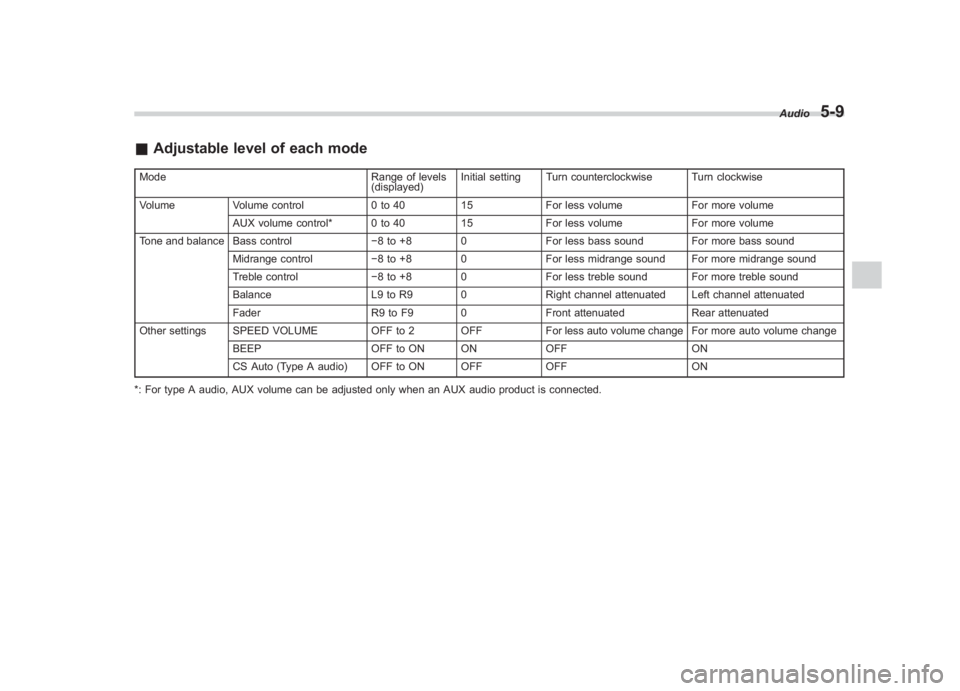
& Adjustable level of each modeMode Range of levels
(displayed)Initial setting Turn counterclockwise Turn clockwise
Volume Volume control 0 to 4015For less volume For more volume
AUX volume control* 0 to 40 15For less volume For more volume
Tone and balance Bass control 8 to +8 0For less bass sound For more bass sound
Midrange control 8 to +8 0 For less midrange sound For more midrange sound
Treble control 8 to +8 0 For less treble sound For more treble sound
Balance L9 to R9 0 Right channel attenuated Left channel attenuated
Fader R9 to F9 0 Front attenuatedRear attenuated
Other settings SPEED VOLUME OFF to 2 OFF For less auto volume change For more auto volume change
BEEP OFF to ON ON OFFON
CS Auto (Type A audio) OFF to ON OFF OFFON
*: For type A audio, AUX volume can be adjusted only when an AUX audio product is connected. Audio
5-9
5
Page 238 of 463
Black plate (194,1)
北米Model "A1130BE-A" EDITED: 2011/ 6/ 7
5-10
Audio
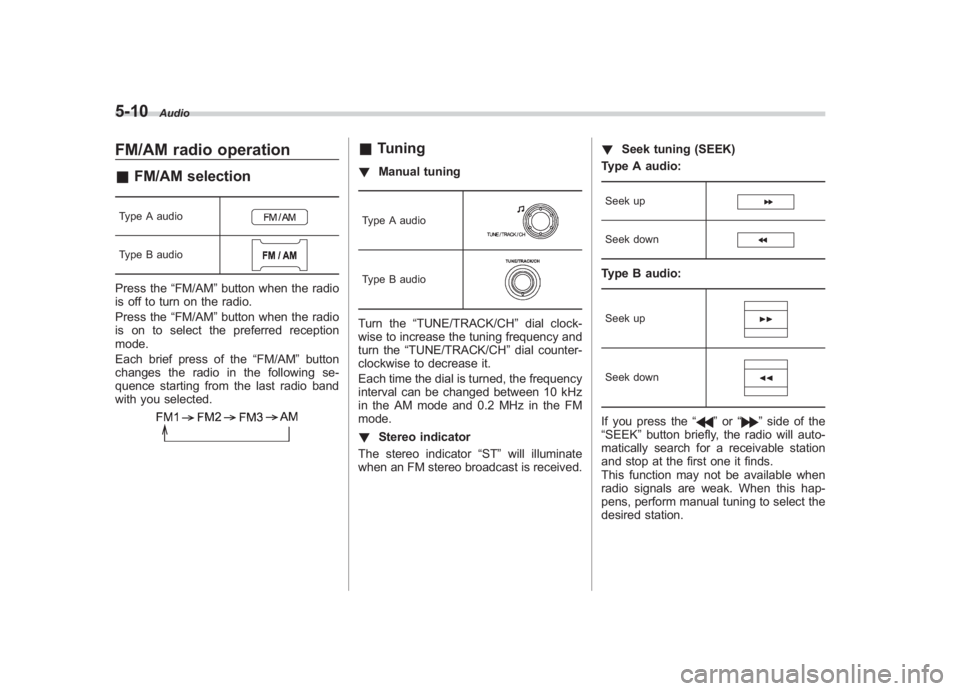
FM/AM radio operation& FM/AM selectionType A audioType B audioPress the “FM/AM”button when the radio
is off to turn on the radio.
Press the “FM/AM”button when the radio
is on to select the preferred reception
mode.
Each brief press of the “FM/AM”button
changes the radio in the following se-
quence starting from the last radio band
with you selected.
& Tuning! Manual tuningType A audioType B audioTurn the “TUNE/TRACK/CH ”dial clock-
wise to increase the tuning frequency and
turn the “TUNE/TRACK/CH ”dial counter-
clockwise to decrease it.
Each time the dial is turned, the frequency
interval can be changed between 10 kHz
in the AM mode and 0.2 MHz in the FM
mode.
! Stereo indicator
The stereo indicator “ST”will illuminate
when an FM stereo broadcast is received. !
Seek tuning (SEEK)
Type A audio:
Seek upSeek downType B audio:Seek upSeek downIf you press the “
”or “
”side of the
“SEEK ”button briefly, the radio will auto-
matically search for a receivable station
and stop at the first one it finds.
This function may not be available when
radio signals are weak. When this hap-
pens, perform manual tuning to select the
desired station.
Page 243 of 463
Black plate (199,1)
北米Model "A1130BE-A" EDITED: 2011/ 6/ 7
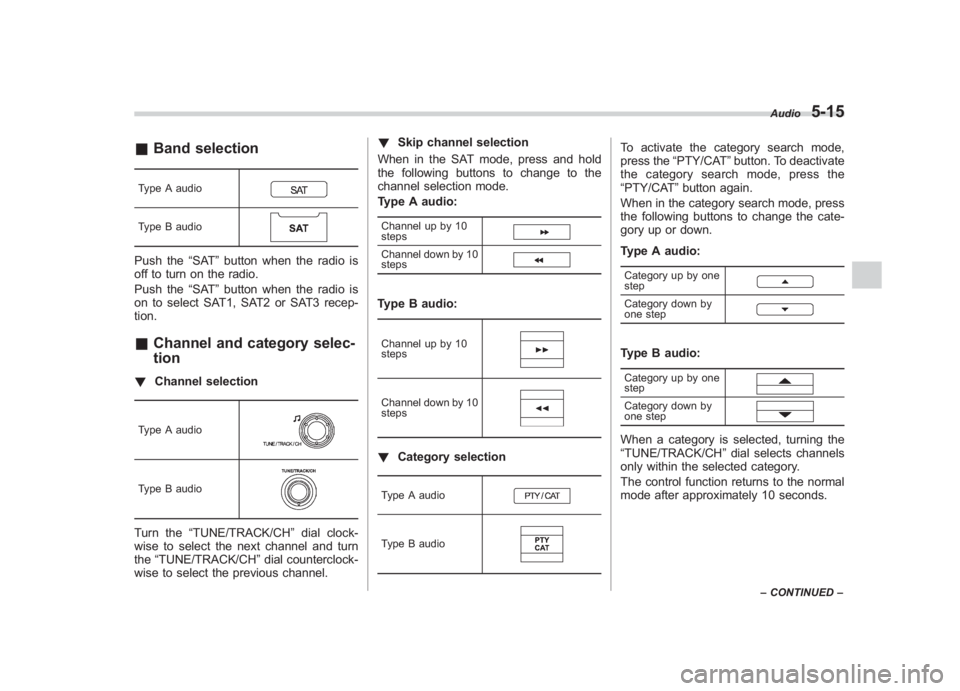
& Band selectionType A audioType B audioPush the “SAT”button when the radio is
off to turn on the radio.
Push the “SAT”button when the radio is
on to select SAT1, SAT2 or SAT3 recep-
tion.& Channel and category selec-
tion! Channel selectionType A audioType B audioTurn the “TUNE/TRACK/CH ”dial clock-
wise to select the next channel and turn
the “TUNE/TRACK/CH ”dial counterclock-
wise to select the previous channel. !
Skip channel selection
When in the SAT mode, press and hold
the following buttons to change to the
channel selection mode.
Type A audio:
Channel up by 10
stepsChannel down by 10
stepsType B audio:Channel up by 10
stepsChannel down by 10
steps! Category selectionType A audioType B audio
To activate the category search mode,
press the “PTY/CAT ”button. To deactivate
the category search mode, press the
“PTY/CAT ”button again.
When in the category search mode, press
the following buttons to change the cate-
gory up or down.
Type A audio:Category up by one
stepCategory down by
one stepType B audio:Category up by one
stepCategory down by
one stepWhen a category is selected, turning the
“TUNE/TRACK/CH ”dial selects channels
only within the selected category.
The control function returns to the normal
mode after approximately 10 seconds.
Audio
5-15
– CONTINUED –
5
Page 246 of 463
Black plate (202,1)
北米Model "A1130BE-A" EDITED: 2011/ 6/ 7
5-18
Audio
! Loading all the magazine (full disc
loading mode)
1. If you press and hold the
button,
the player will produce beep sound and
will enter the full disc loading mode.
2. When the disc number indicator
flashes and “ALL LOAD” indicator illumi-
nates, insert a disc within 15 seconds. If a
disc is successfully loaded during this
period, the disc number indicator will stop
blinking and will steadily light.
3. When the loading of a disc is com-
plete, the next disc number indicator will
blink. Then repeat step 2.
4. When the magazine is filled with discs
by repeating steps 2 and 3, the player will
start playback of the discs, beginning with
the one inserted first.
If you fail to insert any disc during each 15
seconds interval, the full disc loading
mode will be canceled, and the player will
start playback of the disc inserted first.
& How to insert a CD (type B)Hold the disc with a finger in the center
hole while gripping the edge of the disc,
then insert it into the slot (with the label
side up) and the player will automatically
pull the disc into position.
NOTEDO NOT INSERT TWO DISCS INTO THE
DISC INSERTION SLOT AT THE SAME
TIME.&How to play back a CD! When there is no CD inserted
Properly insert a CD. Refer to “How to
insert a CD(s) (type A) ”F 5-17/ “How to
insert a CD (type B) ”F 5-18.
When a CD is loaded, the player will start
playback of the CD, beginning with the
first track.
! When there are CDs loaded (type A)
Press the preferred disc select button
(from
to
). If a disc is loaded
in any slot, the corresponding disc number
indicator will be constantly illuminated.
The player will then start playback of the
selected CD, beginning with the first track.
If a disc that the player cannot read has
been loaded, the player will display the
message “CHECK DISC ”.
! When CD is in the player (type B)
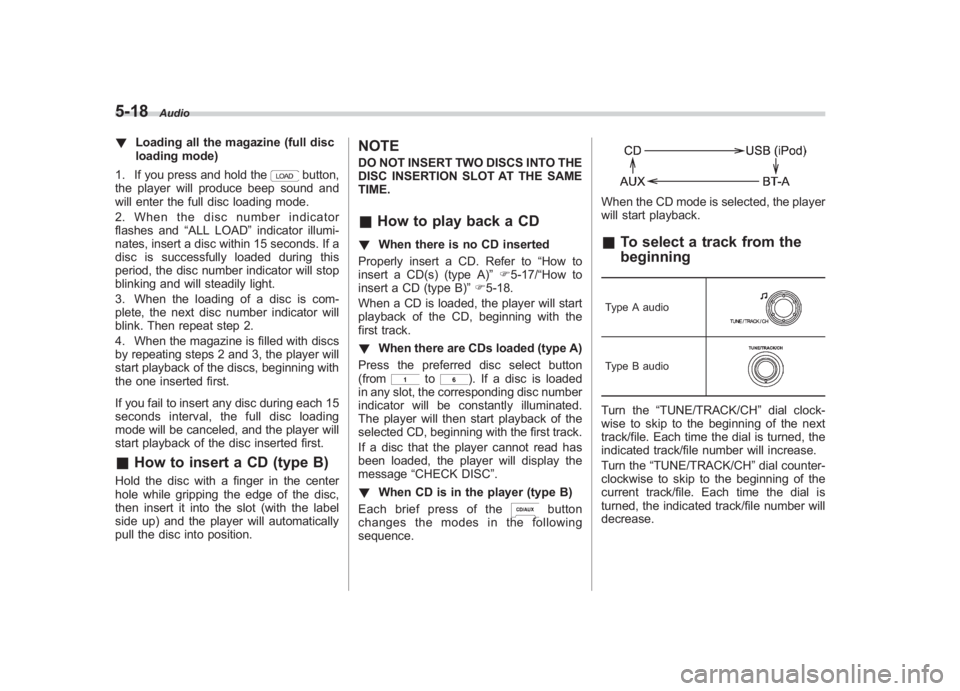
Each brief press of the
button
changes the modes in the following
sequence.
When the CD mode is selected, the player
will start playback.& To select a track from the
beginningType A audioType B audioTurn the “TUNE/TRACK/CH ”dial clock-
wise to skip to the beginning of the next
track/file. Each time the dial is turned, the
indicated track/file number will increase.
Turn the “TUNE/TRACK/CH ”dial counter-
clockwise to skip to the beginning of the
current track/file. Each time the dial is
turned, the indicated track/file number will
decrease.
Page 258 of 463
Black plate (214,1)
北米Model "A1130BE-A" EDITED: 2011/ 6/ 7
5-30
Audio
iPod
®. It randomly repeats all of the
tracks on the iPod
®.
. When an iPod®
is connected, the
files are played back at random by the
shuffle function of the iPod
®. There-
fore, iPod
®operation may be different
depending on the model of the con-
nected iPod®.
. When an audiobook or a podcast is
playing, the mode does not change
even if you press and hold the
button.
To cancel the random playback mode,
press and hold the
button and select
CANCEL. The “RDM”indication will turn
off, and the normal playback mode will
resume.
& SCAN (only when connecting
USB storage device)Scan is operated in the same way as for a
CD. For details, refer to “Scan”F5-20.NOTEWhen an iPod
®
is connected, you
cannot select the SCAN mode.
& Selecting category (only
when connecting iPod
®)
When the
button is pressed briefly,
the iPod
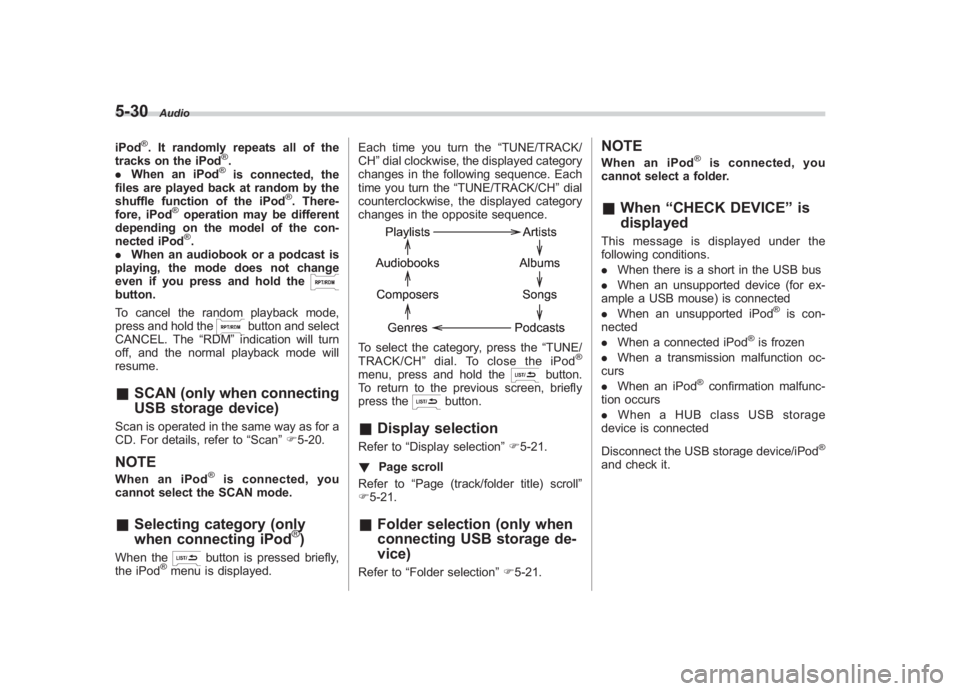
®menu is displayed. Each time you turn the
“TUNE/TRACK/
CH ”dial clockwise, the displayed category
changes in the following sequence. Each
time you turn the “TUNE/TRACK/CH ”dial
counterclockwise, the displayed category
changes in the opposite sequence.
To select the category, press the “TUNE/
TRACK/CH ”dial. To close the iPod
®
menu, press and hold the
button.
To return to the previous screen, briefly
press the
button.
& Display selectionRefer to “Display selection” F5-21.
! Page scroll
Refer to “Page (track/folder title) scroll ”
F 5-21.& Folder selection (only when
connecting USB storage de-
vice)Refer to “Folder selection ”F 5-21.
NOTEWhen an iPod
®
is connected, you
cannot select a folder.
& When “CHECK DEVICE” is
displayedThis message is displayed under the
following conditions.
. When there is a short in the USB bus
. When an unsupported device (for ex-
ample a USB mouse) is connected
. When an unsupported iPod
®is con-
nected
. When a connected iPod
®is frozen
. When a transmission malfunction oc-
curs
. When an iPod
®confirmation malfunc-
tion occurs
. When a HUB class USB storage
device is connected
Disconnect the USB storage device/iPod
®
and check it.
Page 281 of 463
Black plate (239,1)
北米Model "A1130BE-A" EDITED: 2011/ 6/ 7
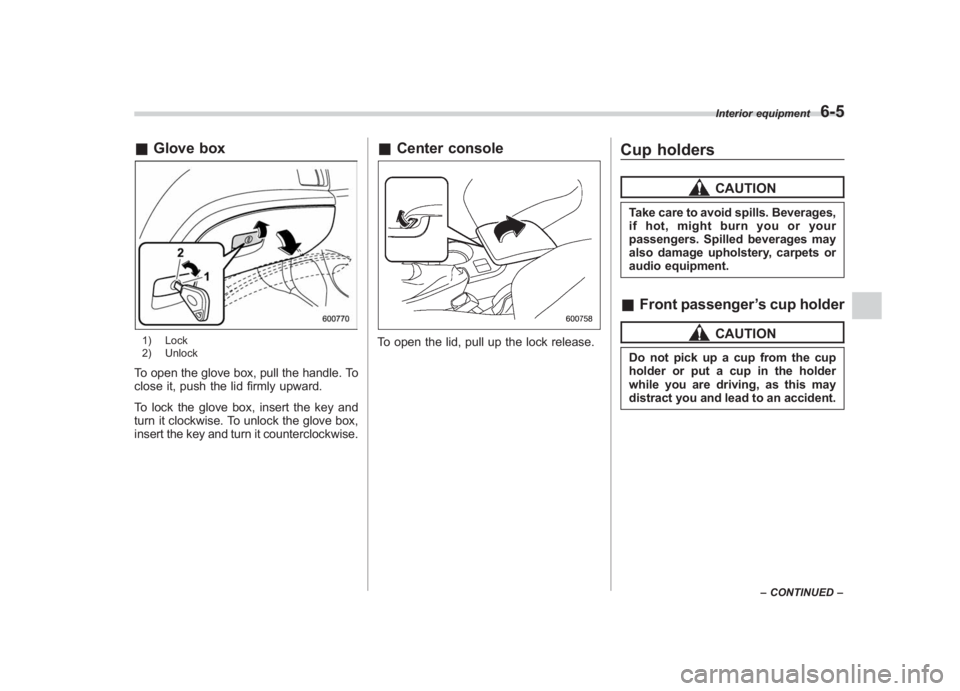
& Glove box1) Lock
2) UnlockTo open the glove box, pull the handle. To
close it, push the lid firmly upward.
To lock the glove box, insert the key and
turn it clockwise. To unlock the glove box,
insert the key and turn it counterclockwise.
&Center consoleTo open the lid, pull up the lock release.
Cup holders
CAUTION
Take care to avoid spills. Beverages,
if hot, might burn you or your
passengers. Spilled beverages may
also damage upholstery, carpets or
audio equipment.&Front passenger ’s cup holder
CAUTION
Do not pick up a cup from the cup
holder or put a cup in the holder
while you are driving, as this may
distract you and lead to an accident.
Interior equipment
6-5
– CONTINUED –
6
Page 295 of 463
Black plate (255,1)
北米Model "A1130BE-A" EDITED: 2011/ 6/ 7
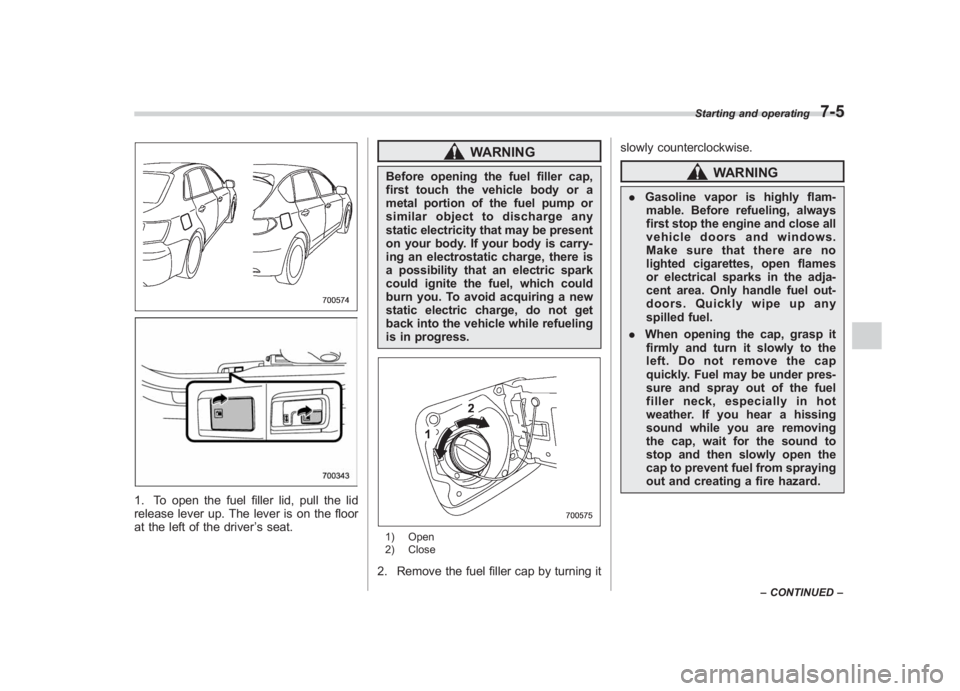
1. To open the fuel filler lid, pull the lid
release lever up. The lever is on the floor
at the left of the driver ’s seat.
WARNING
Before opening the fuel filler cap,
first touch the vehicle body or a
metal portion of the fuel pump or
similar object to discharge any
static electricity that may be present
on your body. If your body is carry-
ing an electrostatic charge, there is
a possibility that an electric spark
could ignite the fuel, which could
burn you. To avoid acquiring a new
static electric charge, do not get
back into the vehicle while refueling
is in progress.1) Open
2) Close2. Remove the fuel filler cap by turning it slowly counterclockwise.
WARNING
.
Gasoline vapor is highly flam-
mable. Before refueling, always
first stop the engine and close all
vehicle doors and windows.
Make sure that there are no
lighted cigarettes, open flames
or electrical sparks in the adja-
cent area. Only handle fuel out-
doors. Quickly wipe up any
spilled fuel.
. When opening the cap, grasp it
firmly and turn it slowly to the
left. Do not remove the cap
quickly. Fuel may be under pres-
sure and spray out of the fuel
filler neck, especially in hot
weather. If you hear a hissing
sound while you are removing
the cap, wait for the sound to
stop and then slowly open the
cap to prevent fuel from spraying
out and creating a fire hazard.
Starting and operating
7-5
– CONTINUED –
7
Page 296 of 463
Black plate (256,1)
北米Model "A1130BE-A" EDITED: 2011/ 6/ 7
7-6
Starting and operating
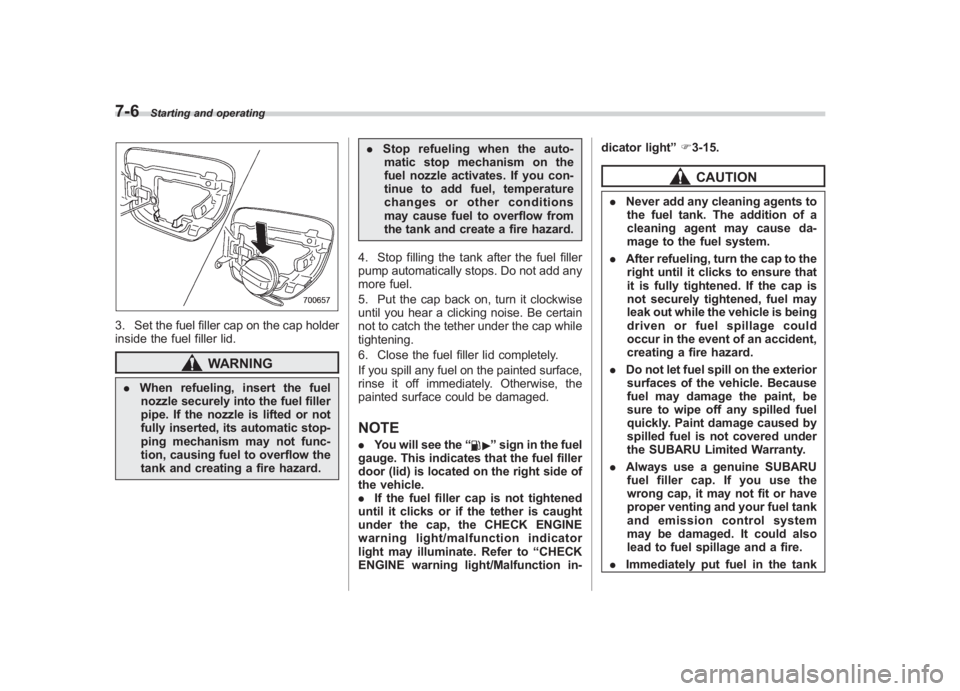
3. Set the fuel filler cap on the cap holder
inside the fuel filler lid.
WARNING
. When refueling, insert the fuel
nozzle securely into the fuel filler
pipe. If the nozzle is lifted or not
fully inserted, its automatic stop-
ping mechanism may not func-
tion, causing fuel to overflow the
tank and creating a fire hazard. .
Stop refueling when the auto-
matic stop mechanism on the
fuel nozzle activates. If you con-
tinue to add fuel, temperature
changes or other conditions
may cause fuel to overflow from
the tank and create a fire hazard.
4. Stop filling the tank after the fuel filler
pump automatically stops. Do not add any
more fuel.
5. Put the cap back on, turn it clockwise
until you hear a clicking noise. Be certain
not to catch the tether under the cap while
tightening.
6. Close the fuel filler lid completely.
If you spill any fuel on the painted surface,
rinse it off immediately. Otherwise, the
painted surface could be damaged.
NOTE. You will see the “
”sign in the fuel
gauge. This indicates that the fuel filler
door (lid) is located on the right side of
the vehicle.
. If the fuel filler cap is not tightened
until it clicks or if the tether is caught
under the cap, the CHECK ENGINE
warning light/malfunction indicator
light may illuminate. Refer to “CHECK
ENGINE warning light/Malfunction in- dicator light
”F 3-15.
CAUTION
. Never add any cleaning agents to
the fuel tank. The addition of a
cleaning agent may cause da-
mage to the fuel system.
. After refueling, turn the cap to the
right until it clicks to ensure that
it is fully tightened. If the cap is
not securely tightened, fuel may
leak out while the vehicle is being
driven or fuel spillage could
occur in the event of an accident,
creating a fire hazard.
. Do not let fuel spill on the exterior
surfaces of the vehicle. Because
fuel may damage the paint, be
sure to wipe off any spilled fuel
quickly. Paint damage caused by
spilled fuel is not covered under
the SUBARU Limited Warranty.
. Always use a genuine SUBARU
fuel filler cap. If you use the
wrong cap, it may not fit or have
proper venting and your fuel tank
and emission control system
may be damaged. It could also
lead to fuel spillage and a fire.
. Immediately put fuel in the tank