key SUBARU LEGACY 2004 4.G Workshop Manual
[x] Cancel search | Manufacturer: SUBARU, Model Year: 2004, Model line: LEGACY, Model: SUBARU LEGACY 2004 4.GPages: 525, PDF Size: 5.68 MB
Page 261 of 525

6-16
Interior equipment
(flat tire, out of gas, or engine trouble), just call OnStar.
We will contact your vehicle manufacturer’s roadside
service provider for the help you need to get you quick-
ly back on the road.
*3: There will be no charge for Roadside Assistance as long
as the basic limited warranty on your vehicle has not expired. T
Stolen vehicle location
OnStar doesn’t just protect you, it protects your vehi-
cle, too. If your vehicle is ever stolen, just contact On-
Star. We will put you in touch with the authorities and
aid them in locating your vehicle. Ask your insurance
carrier about possible premium discounts. T AccidentAssist
AccidentAssist provides step-by-step guidance about
what to do in case of an accident. Working with leading
insurance companies we have developed a “best
practices” list to assist you through most accident sit-
uations. OnStar AccidentAssist can make the process
of completing a police report and/or insurance claim
less stressful. T Remote door unlock/vehicle alert
If you’ve locked your keys in your vehicle, just call On-
Star at 1-888-466-7827 (888-4ONSTAR) and an Advi-
sor will send a signal to attempt to unlock your door. If
you’re having trouble locating your vehicle, OnStar can flash your lights and sound your horn for you. This
feature is disabled 48 hours after the vehicle is parked
in order to maintain battery charge. T
OnStar MED-NET *4
OnStar MED-NET securely stores your personal med-
ical information (e.g., physician’s name, emergency
contacts, medications, chronic conditions) and in an
emergency, can quickly send it to a medical facility.
This important information can help assist with diagno-
sis and treatment.
*4: Requires activation and additional fee for Safe & Sound
and Directions & Connections subscribers. To enroll or for
more OnStar Med-Net information, call 1-800-320-3991. T Route support
With OnStar Route Support, an Advisor can help you
find your way, no matter how far off course you are.
You can get exact street directions, or guidance to
nearby gas stations, restaurants, hotels or ATMs. T RideAssist
If you need a lift, anytime of the day or night, just call
OnStar. We’ll contact a transportation provider and
send them right to you. T Information and convenience services
Our Advisors have access to over six million service
Page 283 of 525
7-10
Starting and operating
Starting the engine
Do not operate the starter motor continuously
for more than ten seconds. If the engine fails to
start after operating the starter for five to ten
seconds, wait for ten seconds or more before
trying again.
„ Starting the engine for a manual trans-
mission vehicle
1. Apply the parking brake.
2. Turn off unnecessary lights and accessories.
3. Press the clutch pedal to the floor and shift the shift
lever into neutral.
Hold the clutch pedal to the floor while starting the en-
gine. The starter motor will only operate when the
clutch pedal is pressed fully to the floor.
4. Turn the ignition switch to the “ON” position and
check the operation of the warning and indicator lights.
Refer to the “Warning and indicator lights” section
(chapter 3).
5. Turn the ignition switch to the “START” position
without depressing the accelerator pedal. Release the key immediately after the engine has started.
If the engine does not start within ten seconds, wait a
while and then turn the ignition switch to the “START”
position again while depressing the accelerator pedal
half way down.
6. Confirm that all warning and indicator lights have
gone off after the engine has started. The fuel injection
system automatically lowers the idle speed as the en-
gine warms up.
„ Starting the engine for an automatic
transmission vehicle
If you restart the engine while the vehicle is
moving, shift the selector lever into the “N” po-
sition. Do not attempt to place the selector lever
of a moving vehicle into the “P” position.
1. Apply the parking brake.
2. Turn off unnecessary lights and accessories.
3. Shift the selector lever to the “P” or “N” position
(preferably “P” position). The starter will only operate
when the select lever is at the “P” or “N” position.
4. Turn the ignition switch to the “ON” position and
Page 284 of 525

7-11
Starting and operating
– CONTINUED –
check the operation of the warning and indicator lights.
Refer to the “Warning and indicator lights” section
(chapter 3).
5. Turn the ignition switch to the “START” position
without depressing the accelerator pedal. Release
the key immediately after the engine has started.
If the engine does not start within ten seconds, wait a
while and then turn the ignition switch to the “START”
position again while depressing the accelerator pedal
half way down.
6. Confirm that all warning and indicator lights have
gone out after the engine has started. The fuel injec-
tion system automatically lowers the idle speed as the
engine warms up.
While the engine is warming up, make sure that the
selector lever is at the “P” or “N” position and that the
parking brake is applied. „ Starting the engine during cold weath- er below –4 °F (–20 °C)
If the engine is difficult to start using the normal meth-
od (without depressing the accelerator pedal), turn the
ignition switch to the “START” position while slightly
depressing the accelerator pedal. „
Starting a flooded engine
If the engine does not start, it may be flooded (exces-
sive fuel in the engine).
In case of a flooded engine, turn the starter motor for
five seconds with the accelerator pedal fully de-
pressed. Repeat this two or three times until the en-
gine starts. Release the ignition switch and accelera-
tor pedal as soon as the engine starts.
Page 309 of 525
7-36
Starting and operating
driving off where the brake pedal seems to exhibit
a jolting motion. This too is a consequence of the
VDC operational check and is normal. y
In the circumstances listed below, the vehicle
may be more unstable than it feels to the driver.
The Vehicle Dynamics Control System may there-
fore operate. Such operation does not indicate a
system fault.
yon gravel-covered or rutted roads
y on unfinished roads
y when the vehicle is towing a trailer
y when the vehicle is fitted with snow tires or
winter tires
y Activation of the VDC system will cause opera-
tion of the steering wheel to feel slightly different
compared to that for normal conditions. y Even if the vehicle is equipped with a VDC sys-
tem, it is important that winter tires be used when
driving on snow-covered or icy roads. (All four
wheels should be fitted with tires of the same size
and brand). y It is always important to reduce speed when ap-
proaching a corner, even if the vehicle is equipped with VDC. y All four wheels should be fitted with tires of the
same size, type, and brand; furthermore, the
amount of wear should be the same for all four tires. If these precautions are not observed and
non-matching tires are used, it is quite possible
that the VDC system will be unable to operate cor-
rectly as intended. y
Always turn off the engine before replacing a
tire as failure to do so may render the VDC system
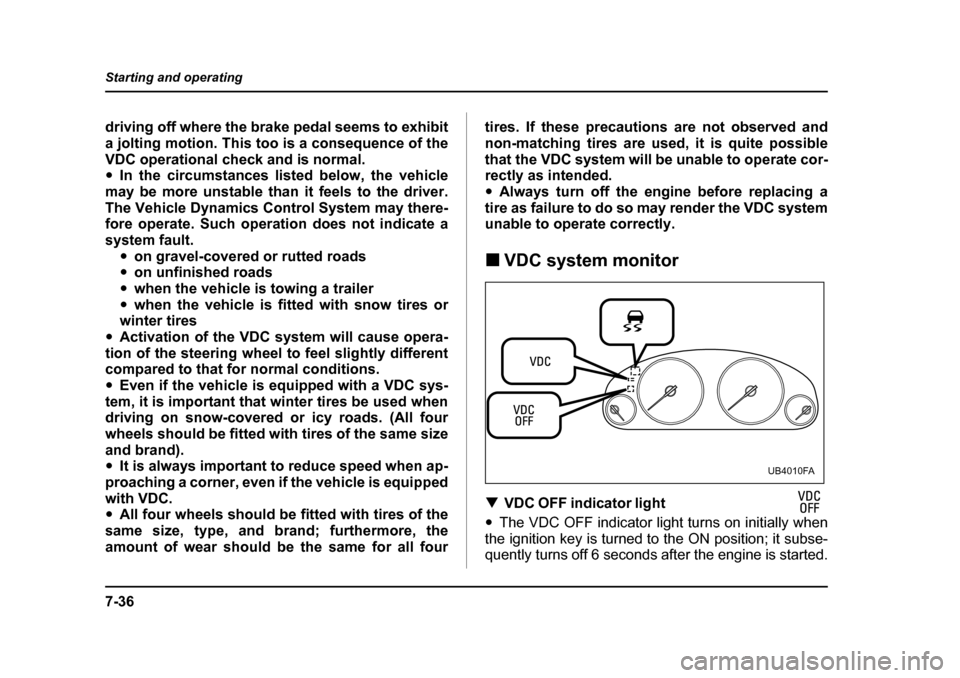
unable to operate correctly. „ VDC system monitor
T V D C O F F i n d i c a t o r l i g h t
y The VDC OFF indicator light turns on initially when
the ignition key is turned to the ON position; it subse-
quently turns off 6 seconds after the engine is started.
UB4010FA
Page 310 of 525
7-37
Starting and operating
– CONTINUED –
yThis light turns on to indicate that the VDC system
is in non-operation mode. This does not constitute fail- ure of the VDC system.
NOTE y The VDC OFF indicator light may stay on for a
while after the engine has been started, especially
in cold weather. This occurs because the engine
has not yet warmed up and is completely normal.
The light will turn off when the engine has reached
a suitable operating temperature. y When an engine problem occurs and the CHECK
ENGINE warning light turns on, the VDC OFF indi-
cator light will also turn on.
The following two situations could indicate malfunction
of the VDC system; if either should occur, have an au-
thorized SUBARU dealer carry out an inspection of
that system at the first available opportunity. y The VDC OFF indicator light does not turn on when
the ignition key is turned to the ON position. y The VDC OFF indicator light fails to turn off after the
engine is started, even when several minutes have
passed to allow the engine to heat up sufficiently. T VDC operation indicator light
The VDC operation indicator light turns on when the
ignition key is turned to the ON position; it turns off ap- proximately two seconds later. This indicator light
flashes during activation of the skid suppression func-
tion and is illuminated steadily during activation of the
traction control function.
The following two situations could indicate a malfunc-
tion of the VDC system; if either should occur, have an
authorized SUBARU dealer carry out an inspection of
that system at the first available opportunity.y
The VDC operation indicator light does not turn on
when the ignition key is turned to the ON position.y The VDC operation indicator light does not turn off
approximately two seconds after the ignition key has
been turned to the ON position. T V D C w a r n i n g l i g h t
The VDC warning light turns on when the ignition key
is turned to the ON position and off when the engine is
started. This lighting pattern indicates that the VDC
system is operating normally.
The following situations could indicate a malfunction of
the VDC system; if any should occur, have an autho-
rized SUBARU dealer carry out an inspection of the
system at the first available opportunity. y The VDC warning light does not turn on when the ig-
nition key is turned to the ON position. y The VDC warning light does not turn off either when
the engine is started or when the vehicle reaches a
Page 312 of 525
7-39
Starting and operating
– CONTINUED –
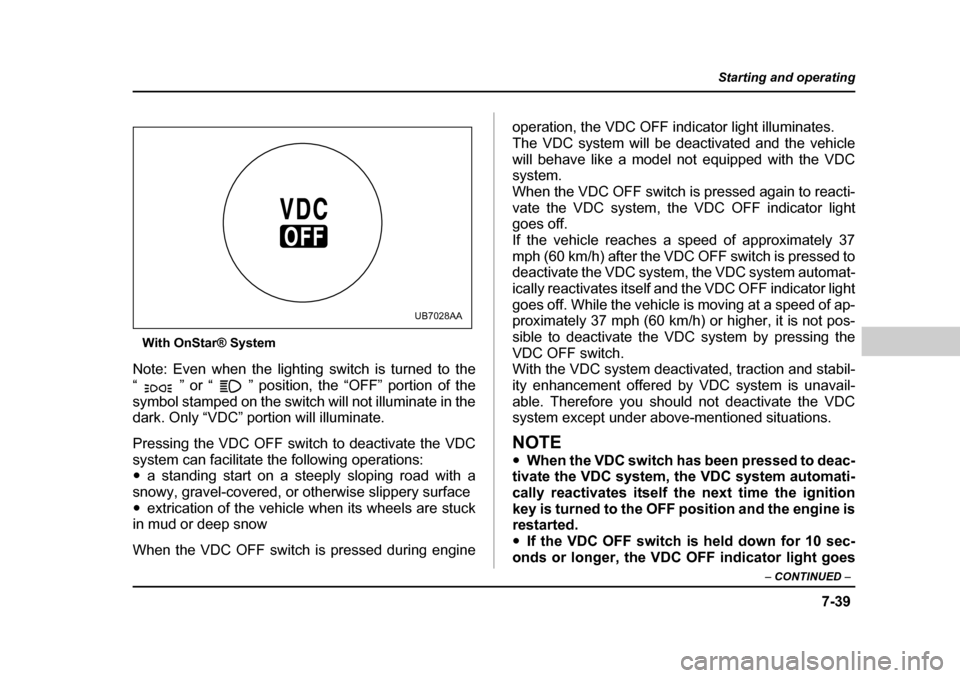
With OnStar® System
Note: Even when the lighting switch is turned to the
“ ” or “ ” position, the “OFF” portion of the
symbol stamped on the switch will not illuminate in the
dark. Only “VDC” portion will illuminate.
Pressing the VDC OFF switch to deactivate the VDC
system can facilitate the following operations: y a standing start on a steeply sloping road with a
snowy, gravel-covered, or otherwise slippery surface y extrication of the vehicle when its wheels are stuck
in mud or deep snow
When the VDC OFF switch is pressed during engine operation, the VDC OFF indicator light illuminates.
The VDC system will be deactivated and the vehicle
will behave like a model not equipped with the VDC system.
When the VDC OFF switch is pressed again to reacti-
vate the VDC system, the VDC OFF indicator light
goes off.
If the vehicle reaches a speed of approximately 37
mph (60 km/h) after the VDC OFF switch is pressed to
deactivate the VDC system, the VDC system automat-
ically reactivates itself and the VDC OFF indicator light
goes off. While the vehicle is moving at a speed of ap-
proximately 37 mph (60 km/h) or higher, it is not pos-
sible to deactivate the VDC system by pressing theVDC OFF switch.
With the VDC system deactivated, traction and stabil-
ity enhancement offered by VDC system is unavail-
able. Therefore you should not deactivate the VDC
system except under above-mentioned situations.
NOTE y
When the VDC switch has been pressed to deac-
tivate the VDC system, the VDC system automati-
cally reactivates itself the next time the ignition
key is turned to the OFF position and the engine is
restarted. y If the VDC OFF switch is held down for 10 sec-
onds or longer, the VDC OFF indicator light goes
UB7028AA
Page 313 of 525
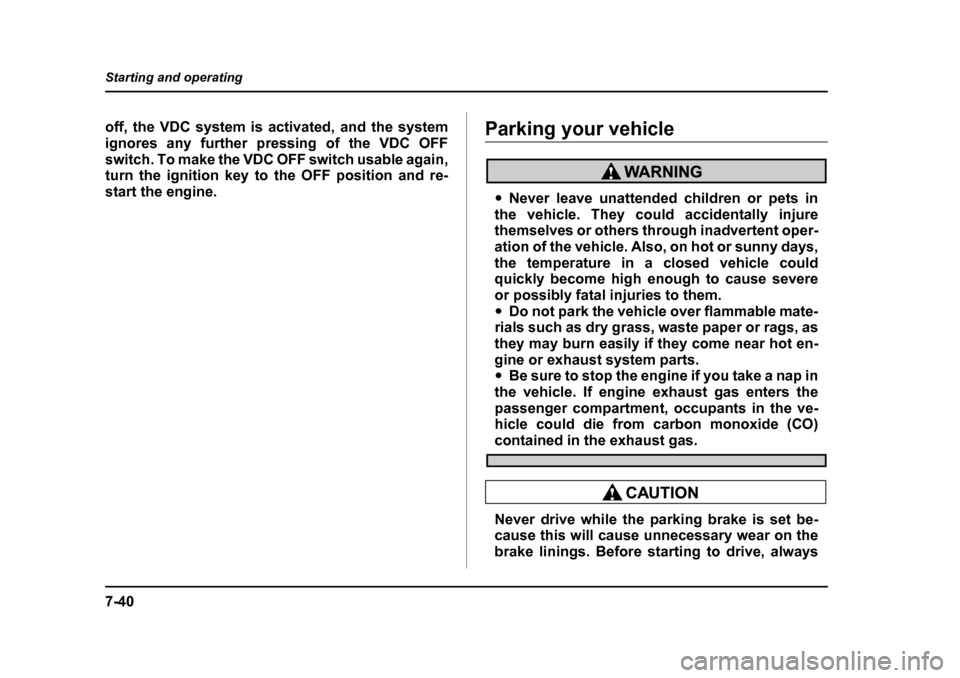
7-40
Starting and operating
off, the VDC system is activated, and the system
ignores any further pressing of the VDC OFF
switch. To make the VDC OFF switch usable again,
turn the ignition key to the OFF position and re-
start the engine.Parking your vehicle
y
Never leave unattended children or pets in
the vehicle. They could accidentally injure
themselves or others through inadvertent oper-
ation of the vehicle. Also, on hot or sunny days,
the temperature in a closed vehicle could
quickly become high enough to cause severe
or possibly fatal injuries to them. y Do not park the vehicle over flammable mate-
rials such as dry grass, waste paper or rags, as
they may burn easily if they come near hot en-
gine or exhaust system parts.y Be sure to stop the engine if you take a nap in
the vehicle. If engine exhaust gas enters the
passenger compartment, occupants in the ve-
hicle could die from carbon monoxide (CO)
contained in the exhaust gas.
Never drive while the parking brake is set be-
cause this will cause unnecessary wear on the
brake linings. Before starting to drive, always
Page 405 of 525
11 - 4
2Maintenance and service
the materials in the vehicle may be hazardous if
improperly used or handled, for example, bat-tery acid. y
Your vehicle should only be serviced by per-
sons fully competent to do so. Serious person-
al injury may result to persons not experienced
in servicing vehicles. y Always use the proper tools and make certain
that they are well maintained. y Never get under the vehicle supported only
by a jack. Always use a safety stands to sup-
port the vehicle. y Never keep the engine running in a poorly
ventilated area, such as a garage or other
closed areas. y Do not smoke or allow open flames around
the fuel or battery. This will cause a fire. y Because the fuel system is under pressure,
replacement of the fuel filter should be per-
formed only by your SUBARU dealer.y Wear adequate eye protection to guard
against getting oil or fluids in your eyes. If
something does get in your eyes, thoroughly
wash them out with clean water. y Do not tamper with the wiring of the SRS air-
bag system or seatbelt pretensioner system, or
attempt to take its connectors apart, as that may activate the system or it can render it inop-
erative. The wiring and connectors of these
systems are yellow for easy identification. NEV-
ER use a circuit tester for these wiring.
If your SRS airbag or seatbelt pretensioner
needs service, consult your nearest SUBARU
dealer.
„ Before checking or servicing in the en-
gine compartment
yAlways stop the engine and set the parking
brake firmly to prevent the vehicle from mov-
ing. y Always let the engine cool down. Engine
parts become very hot when the engine is run-
ning and remain hot for some time after the en-
gine is stopped.y Do not spill engine oil, engine coolant, brake
fluid or any other fluid on hot engine compo-
nents. This may cause a fire.y Always remove the key from the ignition
switch. When the ignition switch is in the “ON”
position, the cooling fan may operate suddenly
Page 487 of 525
12-6
Specifications
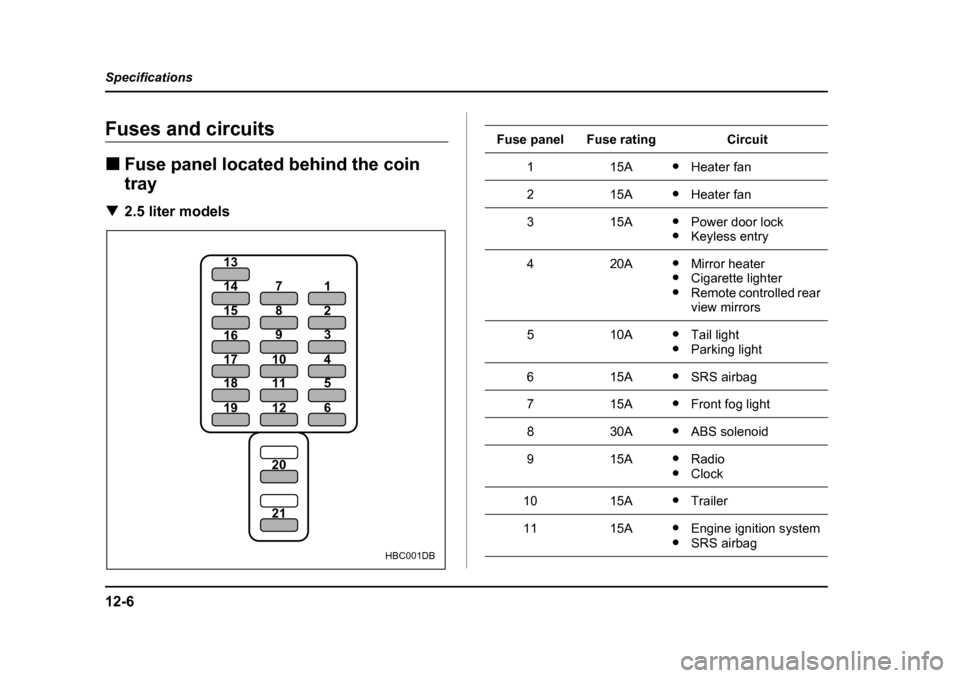
Fuses and circuits „
Fuse panel located behind the coin tray
T 2.5 liter models
19
18
17
16
20 21
15
14
12
11
10 9
8
7
6
5
4
3
2
1
13
HBC001DB
Fuse panelFuse ratingCircuit
115Ay
Heater fan
215AyHeater fan
315AyPower door lock
y Keyless entry
420AyMirror heater
y Cigarette lighter
y Remote controlled rear
view mirrors
510AyTail light
y Parking light
615AySRS airbag
715AyFront fog light
830AyABS solenoid
915AyRadio
y Clock
1015AyTrailer
1115AyEngine ignition system
y SRS airbag
Page 489 of 525
12-8
Specifications
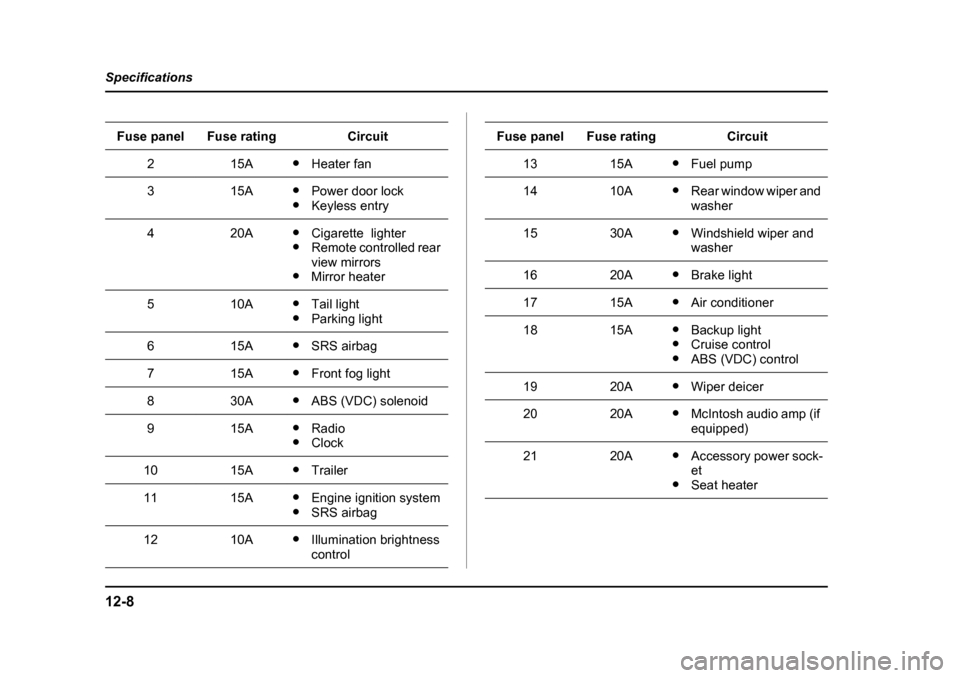
215Ay
Heater fan
315AyPower door lock
y Keyless entry
420AyCigarette lighter
y Remote controlled rear
view mirrors
y Mirror heater
510AyTail light
y Parking light
615AySRS airbag
715AyFront fog light
830AyABS (VDC) solenoid
915AyRadio
y Clock
1015AyTrailer
1115AyEngine ignition system
y SRS airbag
1210AyIllumination brightness control
Fuse panelFuse ratingCircuit
1315AyFuel pump
1410AyRear window wiper and
washer
1530AyWindshield wiper and
washer
1620AyBrake light
1715AyAir conditioner
1815AyBackup light
y Cruise control
y ABS (VDC) control
1920AyWiper deicer
2020AyMcIntosh audio amp (if
equipped)
2120AyAccessory power sock- et
y Seat heater
Fuse panelFuse ratingCircuit