buttons SUBARU LEGACY 2005 4.G User Guide
[x] Cancel search | Manufacturer: SUBARU, Model Year: 2005, Model line: LEGACY, Model: SUBARU LEGACY 2005 4.GPages: 627, PDF Size: 6.42 MB
Page 312 of 627
5-57
Audio
– CONTINUED –
*: The frequency last received in the selected waveband will
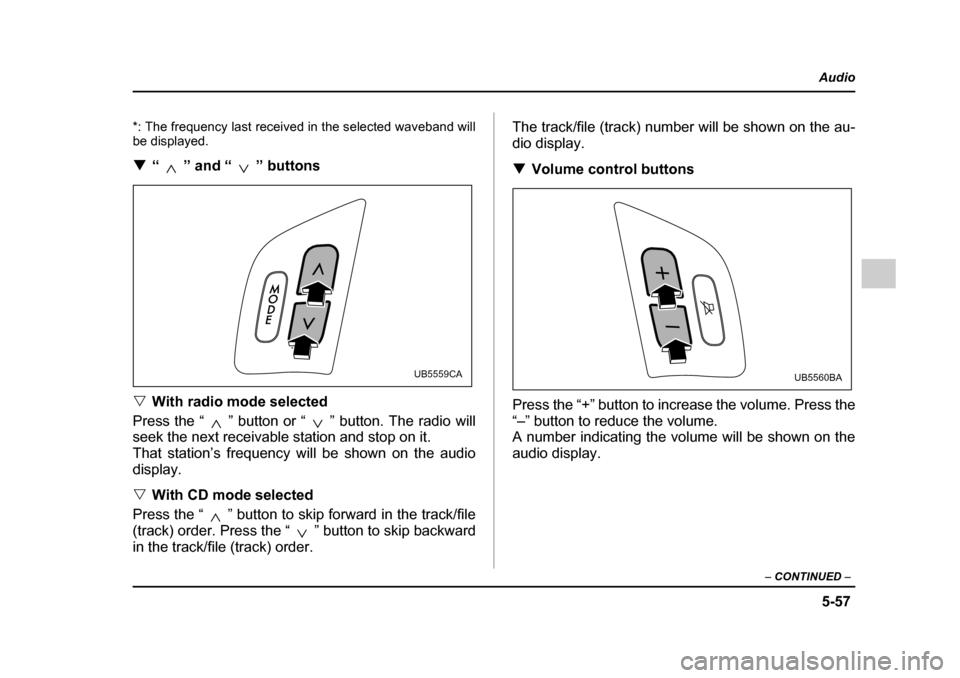
be displayed. !“ ” and “ ” buttons
" With radio mode selected
Press the “ ” button or “ ” button. The radio will
seek the next receivable station and stop on it.
That station’s frequency will be shown on the audiodisplay. " With CD mode selected
Press the “ ” button to skip forward in the track/file
(track) order. Press the “ ” button to skip backward
in the track/file (track) order. The track/file (track) number will be shown on the au-
dio display. !
Volume control buttons
Press the “+” button to increase the volume. Press the
“–” button to reduce the volume.
A number indicating the volume will be shown on the
audio display.
UB5559CAUB5560BA
Page 348 of 627
6-31
Interior equipment
– CONTINUED –
!Station wagon
Hang the hook provided on the underside of the lid on
the rear edge of the roof to keep the lid open. HomeLink® Wireless Control System
(if equipped)
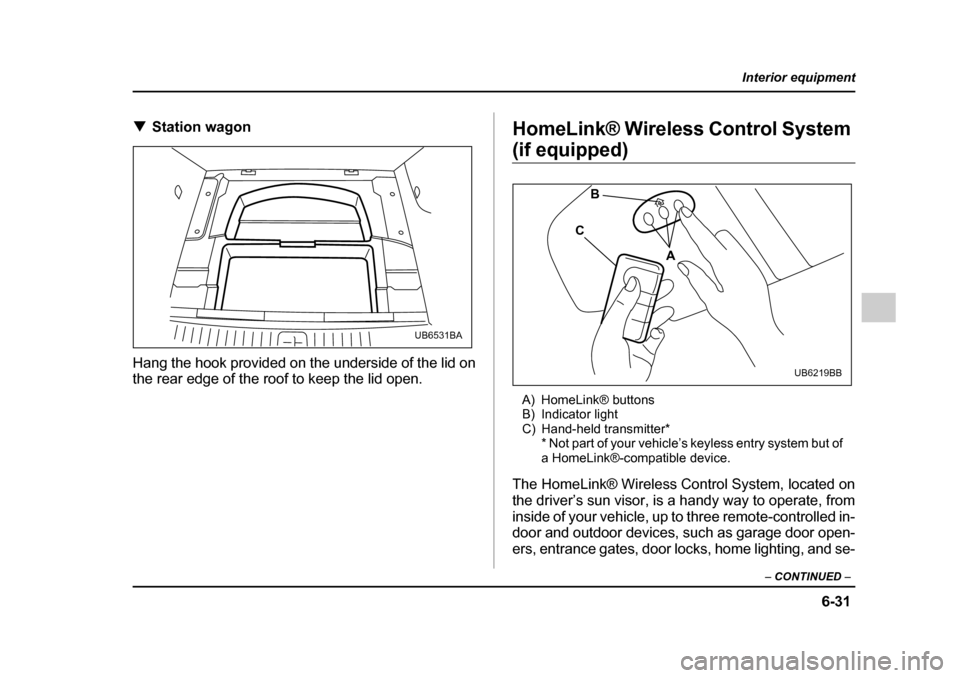
A) HomeLink® buttons
B) Indicator light
C) Hand-held transmitter* * Not part of your vehicle’s keyless entry system but of
a HomeLink®-compatible device.
The HomeLink® Wireless Control System, located on
the driver’s sun visor, is a handy way to operate, from
inside of your vehicle, up to three remote-controlled in-
door and outdoor devices, such as garage door open-
ers, entrance gates, door locks, home lighting, and se-
UB6531BA
A
B
C
UB6219BB
Page 349 of 627
6-32
Interior equipment
curity systems. There are three HomeLink® buttons
on the sun visor, each of which you can program for
operation of one desired device. For details on the de-
vice types which can be operated by this system, con-
sult HomeLink website at www.homelink.com or call 1-
800-355-3515.
Note of the following about this system:
If your vehicle is equipped with the HomeLink® Wire-
less Control System, it complies with Part 15 of the
Federal Communication Commission Rules in the U.S.
and the RSS- 210 of Ind ustry Ca nad a in C anad a.
Its operation is subject to the following two conditions:
(1) this device may not cause harmful interference,
and (2) this device must accept any interference re-
ceived, including interference that may cause undes-
ired operation.
Changes and modifications to this system by anyone
other than an authorized service facility could void au-
thorization to use this equipment.
" When programming the HomeLink® Wireless
Control System, you may be operating a garage
door opener or other device. Make sure that
people and objects are out of the way of the ga- rage door opener or other device to prevent po-
tential harm or damage."
Do not use the HomeLink® Wireless Control
System with any garage door opener that
lacks the safety stop and reverse feature as re-
quired by applicable safety standards. A ga-
rage door opener which cannot detect an ob-
ject, signaling the door to stop and reverse,
does not meet these safety standards. Using a
garage door opener without these features in-
creases risk of serious injury or death. Formore information, consult HomeLink website
at www.homelink.com or call 1-800-355-3515.
When programming the HomeLink® Wireless
Control System to operate a garage door open-
er or an entrance gate, unplug the device’s mo-
tor from the outlet during programming to pre-
vent motor burnout.
NOTE
" After programming your HomeLink® Wireless
Control System for the desired devices, retain the
Page 350 of 627
6-33
Interior equipment
– CONTINUED –
hand-held transmitters for further programming or
device testing in the event of a problem."It is recommended to insert a new battery in the
hand-held transmitter of a device to ensure cor-
rect programming. ! Garage door opener programming in the U.S.A.
NOTE
When programming the HomeLink® Wireless
Control System for a garage door opener, it is sug-
gested that you park the vehicle outside the ga-
rage.
1. Unplug the motor of the garage door opener from
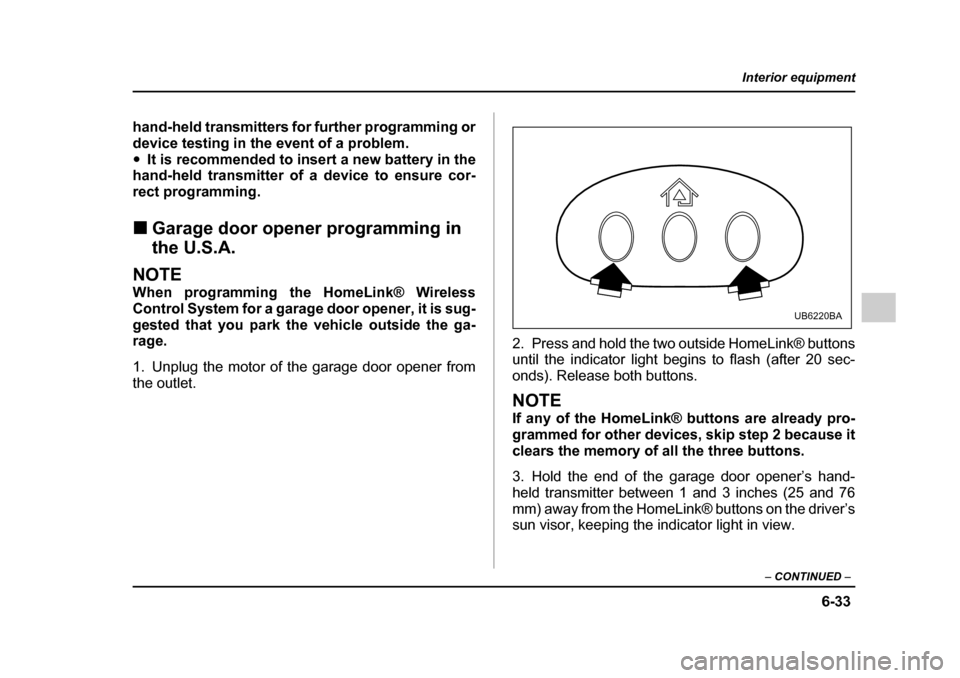
the outlet. 2. Press and hold the two outside HomeLink® buttons
until the indicator light begins to flash (after 20 sec-
onds). Release both buttons.
NOTE
If any of the HomeLink® buttons are already pro-
grammed for other devices, skip step 2 because it
clears the memory of all the three buttons.
3. Hold the end of the garage door opener’s hand-
held transmitter between 1 and 3 inches (25 and 76
mm) away from the HomeLink® buttons on the driver’s
sun visor, keeping the indicator light in view.
UB6220BA
Page 351 of 627
6-34
Interior equipment
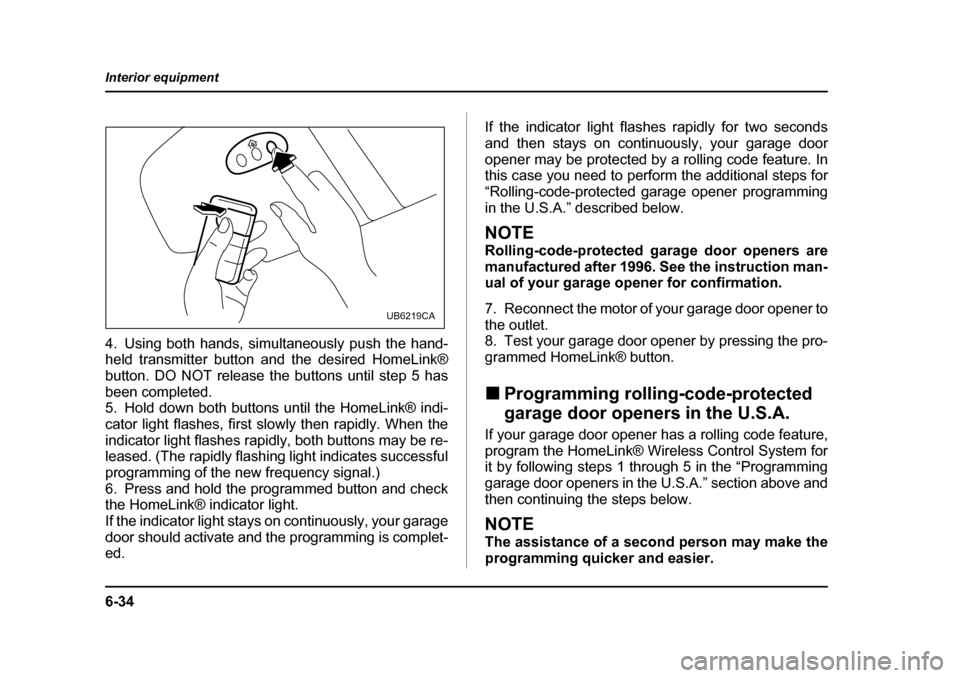
4. Using both hands, simultaneously push the hand-
held transmitter button and the desired HomeLink®
button. DO NOT release the buttons until step 5 has
been completed.
5. Hold down both buttons until the HomeLink® indi-
cator light flashes, first slowly then rapidly. When the
indicator light flashes rapidly, both buttons may be re-
leased. (The rapidly flashing light indicates successful
programming of the new frequency signal.)
6. Press and hold the programmed button and check
the HomeLink® indicator light.
If the indicator light stays on continuously, your garage
door should activate and the programming is complet-
ed.
If the indicator light flashes rapidly for two seconds
and then stays on continuously, your garage door
opener may be protected by a rolling code feature. In
this case you need to perform the additional steps for
“Rolling-code-protected garage opener programming
in the U.S.A.” described below.
NOTE
Rolling-code-protected garage door openers are
manufactured after 1996. See the instruction man-
ual of your garage opener for confirmation.
7. Reconnect the motor of your garage door opener to
the outlet.
8. Test your garage door opener by pressing the pro-
grammed HomeLink® button. !
Programming rolling-code-protected
garage door openers in the U.S.A.
If your garage door opener has a rolling code feature,
program the HomeLink® Wireless Control System for
it by following steps 1 through 5 in the “Programming
garage door openers in the U.S.A.” section above and
then continuing the steps below.
NOTE
The assistance of a second person may make the
programming quicker and easier.
UB6219CA
Page 353 of 627
6-36
Interior equipment
4. The garage door opener should now recognize the
HomeLink® Wireless Control System and your garage
door opener should activate when the HomeLink®
button is pressed. !
Programming for entrance gates and
garage door openers in Canada
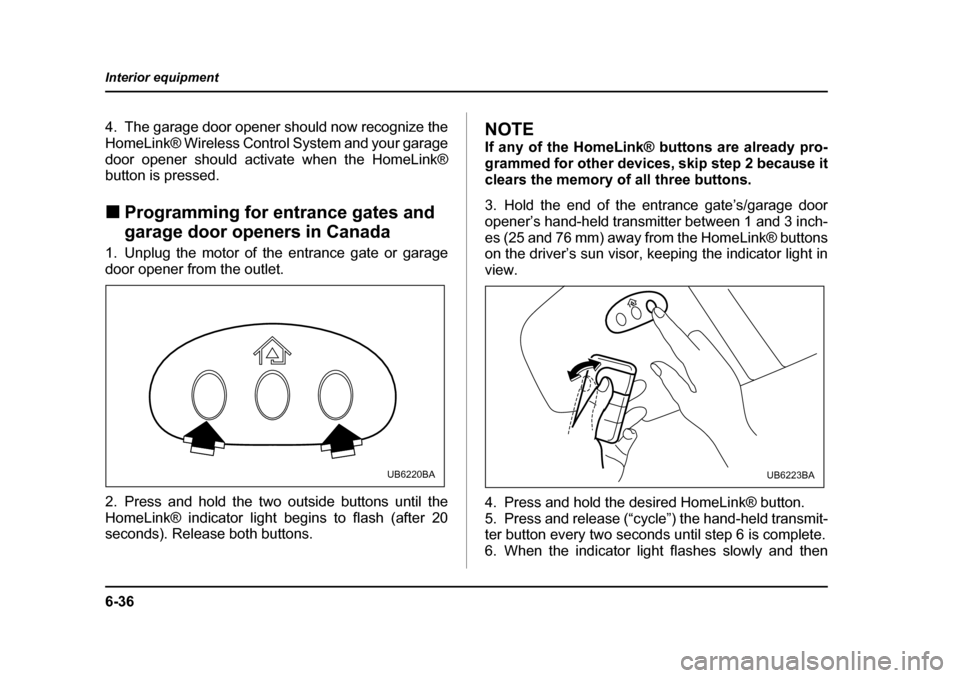
1. Unplug the motor of the entrance gate or garage
door opener from the outlet.
2. Press and hold the two outside buttons until the
HomeLink® indicator light begins to flash (after 20
seconds). Release both buttons.NOTE
If any of the HomeLink® buttons are already pro-
grammed for other devices, skip step 2 because it
clears the memory of all three buttons.
3. Hold the end of the entrance gate’s/garage door
opener’s hand-held transmitter between 1 and 3 inch-
es (25 and 76 mm) away from the HomeLink® buttons
on the driver’s sun visor, keeping the indicator light in view.
4. Press and hold the desired HomeLink® button.
5. Press and release (“cycle”) the hand-held transmit-
ter button every two seconds until step 6 is complete.
6. When the indicator light flashes slowly and then
UB6220BAUB6223BA
Page 354 of 627
6-37
Interior equipment
– CONTINUED –
rapidly after several seconds, release both buttons.
7. Plug the motor of the entrance gate/garage door
opener to the outlet.
8. Test your entrance gate/garage door opener by
pressing the programmed HomeLink® button. !Programming other devices
To program other devices such as door locks, home
lighting and security systems, contact HomeLink at
www.homelink.com or call 1-800-355-3515. ! Operating the HomeLink® Wireless
Control System
Once programmed, the HomeLink® Wireless Control
System can be used to remote-control the devices to
which its buttons are programmed. To activate a de-
vice, simply press the appropriate button. The indica-
tor light illuminates, indicating that the signal is being
transmitted. ! Reprogramming a single HomeLink® button
1. Press and hold the HomeLink® button you wish to
reprogram. DO NOT release the button until step 4
has been completed. 2. When the HomeLink® indicator light begins to flash
slowly (after 20 seconds), position the hand-held
transmitter of the device for which you wish to program the button at 1 to 3 inches (25 to 76 mm) away from
the HomeLink® button surface.
3. Press and hold the hand-held transmitter button.
The HomeLink® indicator light will flash, first slowly
and then rapidly.
4. When the indicator light begins to flash rapidly, re-
lease both buttons.
The programming for the previous device is now
erased and the new device can be operated by push-
ing the HomeLink® button. !
Erasing HomeLink® button memory
NOTE "Performing this procedure erases the memory
of all the preprogrammed buttons simultaneously.
The memory of individual buttons cannot be
erased. " It is recommended that upon the sale of the ve-
hicle, the memory of all programmed HomeLink®
buttons be erased for security purposes.
1. Press and hold the two outside buttons until the in-
dicator light begins to flash (after 20 seconds).
Page 355 of 627

6-38
Interior equipment
2. Release both buttons. !
In case a problem occurs
If you cannot activate a device using the correspond-
ing HomeLink® button after programming, contact
HomeLink at www.homelink.com or call 1-800-355-
3515 for assistance.