warning light SUBARU LEGACY 2010 5.G Workshop Manual
[x] Cancel search | Manufacturer: SUBARU, Model Year: 2010, Model line: LEGACY, Model: SUBARU LEGACY 2010 5.GPages: 448, PDF Size: 7.36 MB
Page 145 of 448
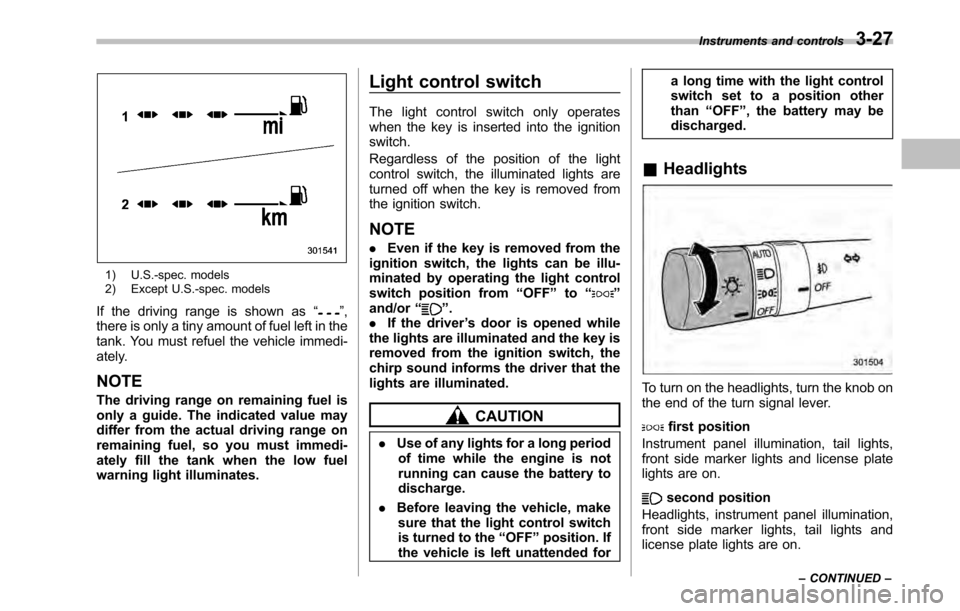
1) U.S.-spec. models
2) Except U.S.-spec. models
If the driving range is shown as “
”,
there is only a tiny amount of fuel left in the
tank. You must refuel the vehicle immedi-
ately.
NOTE
The driving range on remaining fuel is
only a guide. The indicated value may
differ from the actual driving range on
remaining fuel, so you must immedi-
ately fill the tank when the low fuel
warning light illuminates. Light control switch
The light control switch only operates
when the key is inserted into the ignitionswitch.
Regardless of the position of the light
control switch, the illuminated lights are
turned off when the key is removed from
the ignition switch. NOTE .
Even if the key is removed from the
ignition switch, the lights can be illu-
minated by operating the light control
switch position from “OFF ”to “
”
and/or “”.
. If the driver ’s door is opened while
the lights are illuminated and the key is
removed from the ignition switch, the
chirp sound informs the driver that the
lights are illuminated.
CAUTION
. Use of any lights for a long period
of time while the engine is not
running can cause the battery todischarge.
. Before leaving the vehicle, make
sure that the light control switch
is turned to the “OFF ”position. If
the vehicle is left unattended for a long time with the light control
switch set to a position otherthan
“OFF ”, the battery may be
discharged.
& Headlights
To turn on the headlights, turn the knob on
the end of the turn signal lever.
first position
Instrument panel illumination, tail lights,
front side marker lights and license plate
lights are on.
second position
Headlights, instrument panel illumination,
front side marker lights, tail lights and
license plate lights are on. Instruments and controls
3-27
– CONTINUED –
Page 147 of 448
&Daytime running light system
WARNING
The brightness of the illumination of
the high beam headlights is reduced
by the daytime running light system.
The light switch must always be
turned to the “
”position when it
is dark outside.
The high beam headlights will automati-
cally illuminate at reduced brightness
when the engine has started, under the
following conditions. . The parking brake is fully released.
. The light switch is in the “OFF ”or “
”
position. . The light switch is in the “AUTO ”
position and the headlights do not turn
on automatically. . The select lever is in a position other
than the “P ” position (AT and CVT mod-
els).
NOTE . When the light switch is in the “
”
position, the front side marker lights,
tail lights and license plate lights areilluminated.. After turning on the ignition switch
to the “ON ”position, even if the parking brake is applied, the daytime
running lights continue to illuminate
until the ignition switch is returned tothe
“LOCK ”position. Turn signal lever
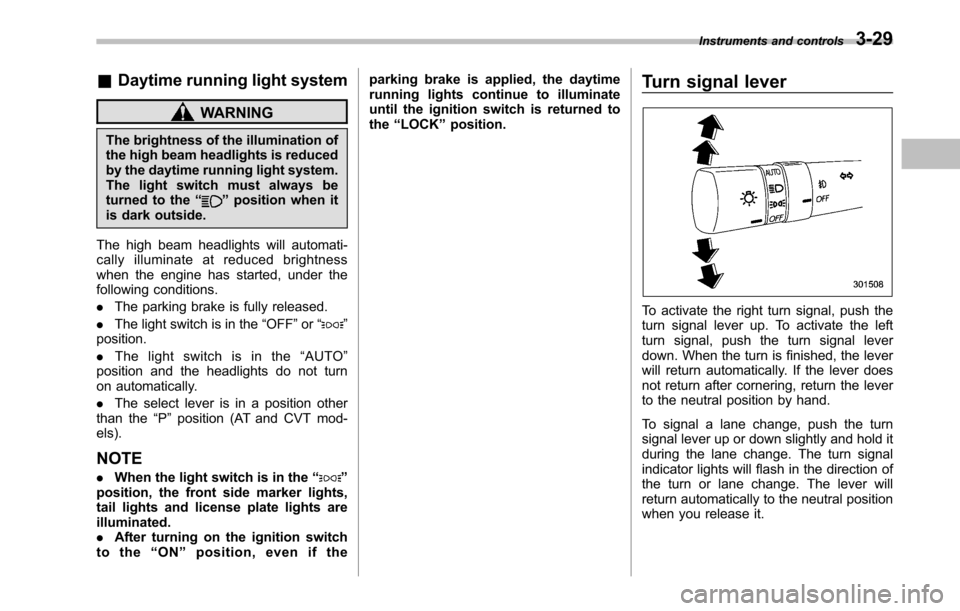
To activate the right turn signal, push the
turn signal lever up. To activate the left
turn signal, push the turn signal lever
down. When the turn is finished, the lever
will return automatically. If the lever does
not return after cornering, return the lever
to the neutral position by hand.
To signal a lane change, push the turn
signal lever up or down slightly and hold it
during the lane change. The turn signal
indicator lights will flash in the direction of
the turn or lane change. The lever will
return automatically to the neutral position
when you release it.Instruments and controls
3-29
Page 149 of 448
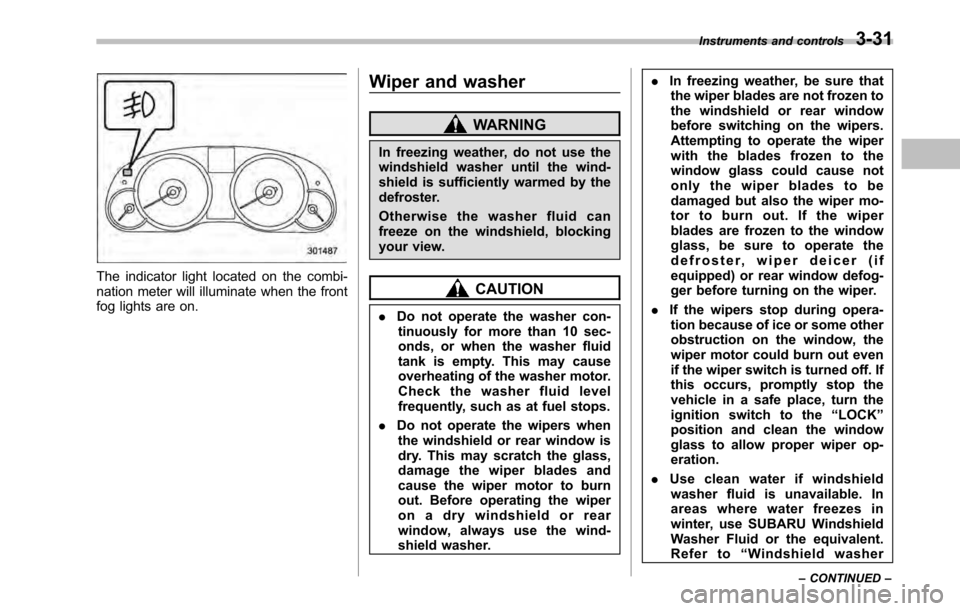
The indicator light located on the combi-
nation meter will illuminate when the front
fog lights are on.Wiper and washer
WARNING
In freezing weather, do not use the
windshield washer until the wind-
shield is sufficiently warmed by the
defroster.
Otherwise the washer fluid can
freeze on the windshield, blocking
your view.
CAUTION
. Do not operate the washer con-
tinuously for more than 10 sec-
onds, or when the washer fluid
tank is empty. This may cause
overheating of the washer motor.
Check the washer fluid level
frequently, such as at fuel stops.
. Do not operate the wipers when
the windshield or rear window is
dry. This may scratch the glass,
damage the wiper blades and
cause the wiper motor to burn
out. Before operating the wiper
on a dry windshield or rear
window, always use the wind-
shield washer. .
In freezing weather, be sure that
the wiper blades are not frozen to
the windshield or rear window
before switching on the wipers.
Attempting to operate the wiper
with the blades frozen to the
window glass could cause not
only the wiper blades to be
damaged but also the wiper mo-
tor to burn out. If the wiper
blades are frozen to the window
glass, be sure to operate the
defroster, wiper deicer (if
equipped) or rear window defog-
ger before turning on the wiper.
. If the wipers stop during opera-
tion because of ice or some other
obstruction on the window, the
wiper motor could burn out even
if the wiper switch is turned off. If
this occurs, promptly stop the
vehicle in a safe place, turn the
ignition switch to the “LOCK ”
position and clean the window
glass to allow proper wiper op-eration.
. Use clean water if windshield
washer fluid is unavailable. In
areas where water freezes in
winter, use SUBARU Windshield
Washer Fluid or the equivalent.
Refer to “Windshield washer
Instruments and controls
3-31
– CONTINUED –
Page 151 of 448
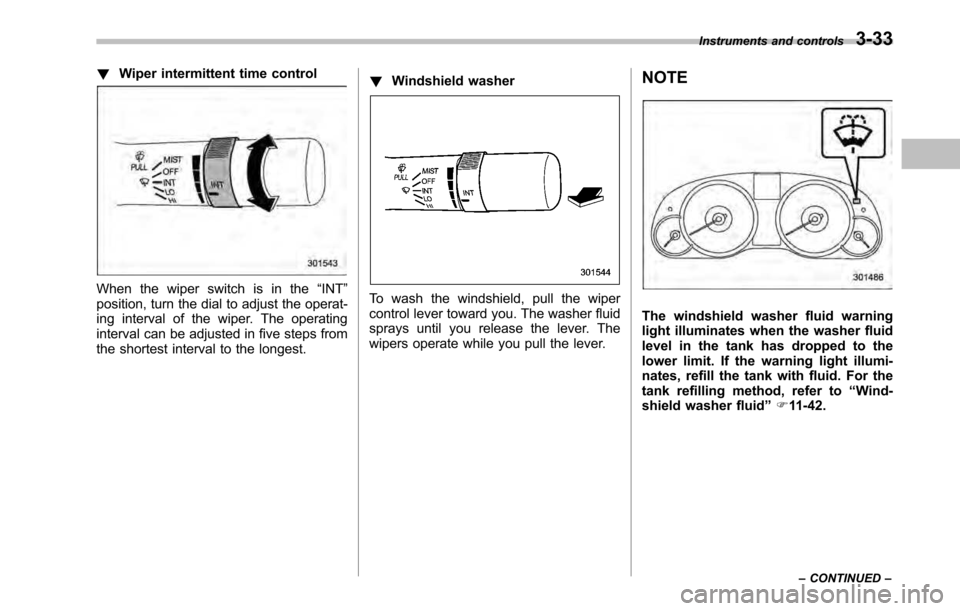
!Wiper intermittent time control
When the wiper switch is in the “INT ”
position, turn the dial to adjust the operat-
ing interval of the wiper. The operating
interval can be adjusted in five steps from
the shortest interval to the longest. !
Windshield washerTo wash the windshield, pull the wiper
control lever toward you. The washer fluid
sprays until you release the lever. The
wipers operate while you pull the lever. NOTE
The windshield washer fluid warning
light illuminates when the washer fluid
level in the tank has dropped to the
lower limit. If the warning light illumi-
nates, refill the tank with fluid. For the
tank refilling method, refer to
“Wind-
shield washer fluid ”F 11-42.
Instruments and controls
3-33
– CONTINUED –
Page 164 of 448
4-6Climate control
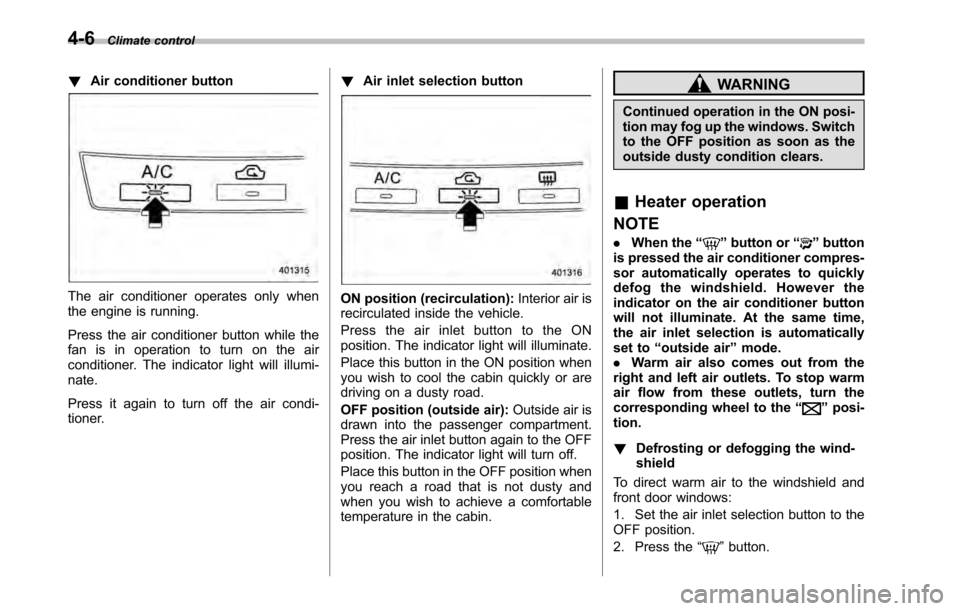
!Air conditioner button
The air conditioner operates only when
the engine is running.
Press the air conditioner button while the
fan is in operation to turn on the air
conditioner. The indicator light will illumi-nate.
Press it again to turn off the air condi-
tioner. !
Air inlet selection buttonON position (recirculation): Interior air is
recirculated inside the vehicle.
Press the air inlet button to the ON
position. The indicator light will illuminate.
Place this button in the ON position when
you wish to cool the cabin quickly or are
driving on a dusty road.
OFF position (outside air): Outside air is
drawn into the passenger compartment.
Press the air inlet button again to the OFF
position. The indicator light will turn off.
Place this button in the OFF position when
you reach a road that is not dusty and
when you wish to achieve a comfortable
temperature in the cabin.
WARNING
Continued operation in the ON posi-
tion may fog up the windows. Switch
to the OFF position as soon as the
outside dusty condition clears.
& Heater operation
NOTE . When the “
”button or “”button
is pressed the air conditioner compres-
sor automatically operates to quickly
defog the windshield. However the
indicator on the air conditioner button
will not illuminate. At the same time,
the air inlet selection is automatically
set to “outside air ”mode.
. Warm air also comes out from the
right and left air outlets. To stop warm
air flow from these outlets, turn the
corresponding wheel to the “
”posi-
tion. ! Defrosting or defogging the wind- shield
To direct warm air to the windshield and
front door windows:
1. Set the air inlet selection button to the
OFF position.
2. Press the “
”button.
Page 165 of 448
3. Turn the temperature control dial all
the way to the right.
4. Set the fan speed control dial to the
highest speed. !Heating and defrosting
To direct warm air toward the floor and the windshield:
1. Set the air inlet selection button to the
OFF position.
2. Press the “
”button.
3. Set the temperature control dial to the
most comfortable level.
4. Set the fan speed control dial to the
desired speed. ! Heating
To direct warm air toward the floor:
1. Set the air inlet selection button to the
OFF position.
2. Press the “
”button.
3. Set the temperature control dial to the
most comfortable level.
4. Set the fan speed control dial to the
desired speed. ! Bi-level heating
This setting allows you to direct air of
different temperatures from the instrument
panel and foot outlets. The air from the foot outlets is slightly warmer than from
the instrument panel outlets.
1. Set the air inlet selection button to the
OFF position.
2. Press the
“
”button.
3. Set the temperature control dial to the
desired temperature level.
4. Set the fan speed control dial to the
desired speed.
Setting the temperature control dial fully
turned to the red area or blue area
decreases the temperature difference
between the air from the instrument panel
outlets and the air from the foot outlets. ! Ventilation
To force outside air through the instrument
panel outlets:
1. Set the air inlet selection button to the
OFF position.
2. Press the “
”button.
3. Set the temperature control dial all the
way left.
4. Set the fan speed control dial to the
desired speed.
When driving on a dusty road, set the air
inlet control button to the ON position.
WARNING
Continued operation in the ON posi-
tion may fog up the windows. Switch
to the OFF position as soon as the
outside dusty condition clears.
& Air conditioner operation
! Cooling or dehumidifying
For cooling and dehumidification of the
passenger compartment, air flows through
the instrument panel outlets:
1. Set the air inlet selection button to the
OFF position.
2. Press the “
”button.
3. Set the air conditioner button to the “ ON ”position.
4. Set the temperature control dial to the
blue side.
5. Set the fan speed control dial at the
desired speed. ! Defrosting or defogging
To direct warm air to the windshield and
front door windows:
1. Press the “
”button.
2. Set the temperature control dial to the
red side.
3. Set the fan speed control dial at the
highest speed. Climate control
4-7
– CONTINUED –
Page 171 of 448
Press the air inlet selection button to the
OFF position when the interior has cooled
to a comfortable temperature and the road
is no longer dusty. The indicator light will
turn off.
WARNING
Continued operation in the ON posi-
tion (recirculation) may fog up the
windows. Switch to the OFF position
(outside air) as soon as the outside
dusty condition clears.
NOTE
When driving on a dusty road or behind
a vehicle that emits unpleasant exhaust
gases, set the air inlet selection button
to the ON position (recirculation).
From time to time, return the air inlet
selection button to the OFF position
(outside air) to draw outside air into the
passenger compartment. &
Temperature sensors
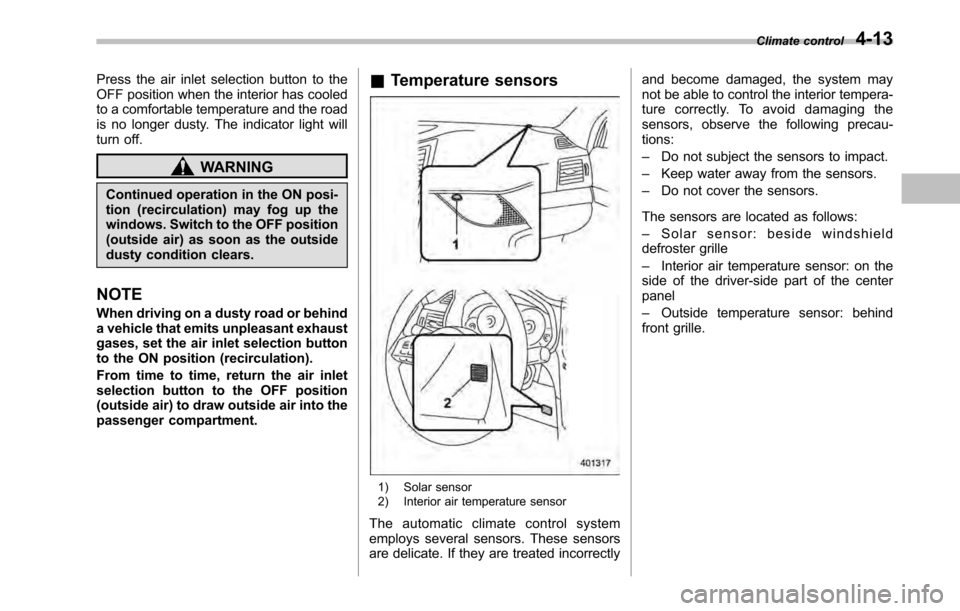
1) Solar sensor
2) Interior air temperature sensor
The automatic climate control system
employs several sensors. These sensors
are delicate. If they are treated incorrectly and become damaged, the system may
not be able to control the interior tempera-
ture correctly. To avoid damaging the
sensors, observe the following precau-tions: –
Do not subject the sensors to impact.
– Keep water away from the sensors.
– Do not cover the sensors.
The sensors are located as follows:– Solar sensor: beside windshield
defroster grille– Interior air temperature sensor: on the
side of the driver-side part of the center panel – Outside temperature sensor: behind
front grille. Climate control
4-13
Page 233 of 448
CAUTION
Make sure the driver ’s floor mat is
placed back in its proper location
and correctly secured on its retain-
ing pin. Also, do not use more than
one floor mat. If the floor mat slips
forward and interferes with the
movement of the pedals during
driving, it could cause an accident. Cargo area cover
(if equipped)
The cargo area cover is provided for
covering the cargo area and to protect its
contents from direct sunlight. This cover is
detachable to make room for additionalcargo. &
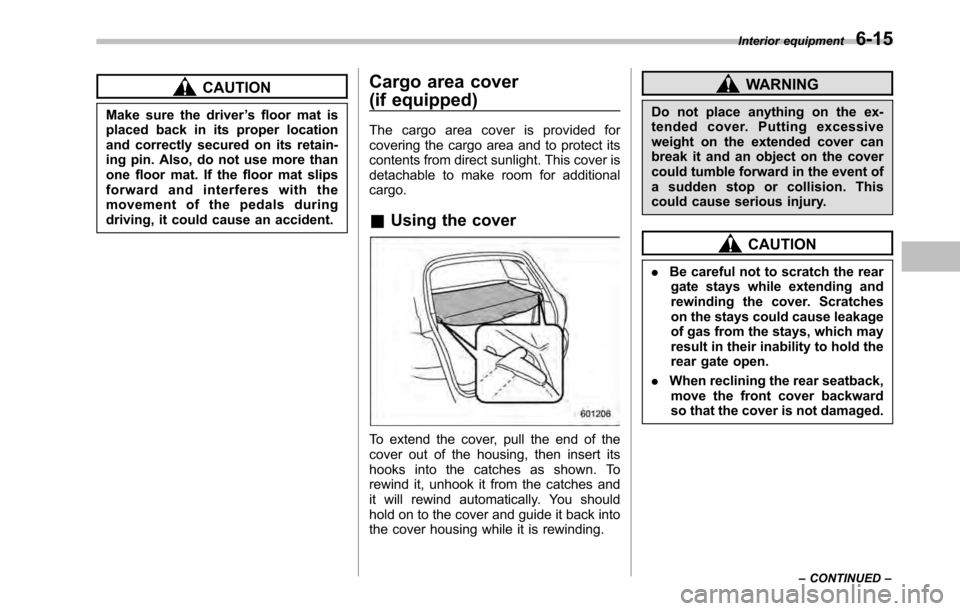
Using the cover
To extend the cover, pull the end of the
cover out of the housing, then insert its
hooks into the catches as shown. To
rewind it, unhook it from the catches and
it will rewind automatically. You should
hold on to the cover and guide it back into
the cover housing while it is rewinding.
WARNING
Do not place anything on the ex-
tended cover. Putting excessive
weight on the extended cover can
break it and an object on the cover
could tumble forward in the event of
a sudden stop or collision. This
could cause serious injury.
CAUTION
. Be careful not to scratch the rear
gate stays while extending and
rewinding the cover. Scratches
on the stays could cause leakage
of gas from the stays, which may
result in their inability to hold the
rear gate open.
. When reclining the rear seatback,
move the front cover backward
so that the cover is not damaged. Interior equipment
6-15
– CONTINUED –
Page 243 of 448

Fuel...................................................................... 7-2
Fuel requirements ............................................... 7-2
Fuel filler lid and cap ........................................... 7-3
State emission testing (U.S. only) ...................... 7-6
Preparing to drive ............................................... 7-7
Starting the engine .............................................. 7-8
MT models .......................................................... 7-8
AT and CVT models ............................................. 7-9
Stopping the engine ........................................... 7-10
Remote engine start system (dealer option) ................................................. 7-10
Starting your vehicle .......................................... 7-11
Remote start safety features ............................... 7-11
Entering the vehicle while it is running via remote start ................................................................. 7-12
Remote start confirmation transmitter feature ............................................................. 7-12
Entering the vehicle following remote engine start shutdown ......................................................... 7-13
Pre-heating or pre-cooling the interior of the vehicle ............................................................. 7-13
Service mode ..................................................... 7-14
Remote transmitter program ............................... 7-14
System maintenance .......................................... 7-14
Manual transmission .......................................... 7-16
Selecting reverse gear ........................................ 7-16
Shifting speeds .................................................. 7-17
Driving tips ........................................................ 7-17
Automatic transmission/Continuously variable transmission ..................................... 7-18
Select lever ........................................................ 7-19 Shift lock function
............................................. 7-20
Selection of manual mode .................................. 7-21
Driving tips ........................................................ 7-23
Power steering ................................................... 7-23
Braking ............................................................... 7-23
Braking tips ....................................................... 7-23
Brake system .................................................... 7-24
Disc brake pad wear warning indicators ............. 7-24
ABS (Anti-lock Brake System) .......................... 7-25
ABS system self-check ...................................... 7-25
ABS warning light .............................................. 7-25
Electronic Brake Force Distribution (EBD) system ............................................................. 7-26
Steps to take if EBD system malfunctions ..... ..... 7-27
Vehicle Dynamics Control system .................... 7-28
Vehicle Dynamics Control system monitor..... ..... 7-29
Vehicle Dynamics Control OFF switch ................ 7-31
Tire pressure monitoring system (TPMS) (if equipped) .................................................... 7-32
Parking your vehicle ......................................... 7-33
Electronic parking brake .................................... 7-34
Parking tips ....................................................... 7-37
Cruise control .................................................... 7-38
To set cruise control .......................................... 7-38
To temporarily cancel the cruise control ............. 7-39
To turn off the cruise control .............................. 7-39
To change the cruising speed .. .......................... 7-40
Cruise control indicator light .............................. 7-41
Cruise control set indicator light ........................ 7-41
Starting and operating
7
Page 244 of 448

7-2Starting and operating
Fuel
CAUTION
Use of a fuel which is low in quality
or use of an inappropriate fuel
additive may cause engine damage.
& Fuel requirements
! Non-turbo models
The non-turbo engine is designed to
operate using unleadedgasoline with an
octane rating of 87 AKI or higher .
! Turbo models
The engine is designed to operate at
maximum performance using unleaded
gasoline with an octane rating of 93 AKI
or higher . If 93 AKI fuel is not readily
available in your area, unleaded gasoline
with an octane rating of 91 AKI may be
used with no detriment to engine durability
or driveability. However, you may notice a
slight decrease in maximum engine per-
formance while using 91 AKI fuel. Use of
91 AKI fuel will not affect your warranty
coverage. If premium unleaded gasoline is
not available, regular unleaded gasoline
with an octane rating of 87 AKI or higher
may be temporarily used. For optimum engine performance and driveability, it is
required that you use premium grade
unleaded gasoline.
NOTE
Be sure to use premium unleaded
gasoline of 91 AKI or higher for a turbo
engine model. If other gasoline (lower
than 91 AKI) is used, knocking, re-
duced output and poor accelerator
response will result. ! Fuel octane rating
This octane rating is the average of the
Research Octane and Motor Octane
numbers and is commonly referred to as
the Anti Knock Index (AKI).
Using a gasoline with a lower octane
rating can cause persistent and heavy
knocking, which can damage the engine.
Do not be concerned if your vehicle
sometimes knocks lightly when you drive
up a hill or when you accelerate. See your
dealer or a qualified service technician if
you use a fuel with the specified octane
rating and your vehicle knocks heavily or
persistently. ! Unleaded gasoline
The neck of the fuel filler pipe is designed
to accept only an unleaded gasoline filler
nozzle. Under no circumstances should
leaded gasoline be used because it will damage the emission control system and
may impair driveability and fuel economy. !
California fuel
If your vehicle was certified to California
Emission Standards as indicated on the
underhood tune-up label, it is designed to
optimize engine and emission control
system performance with gasoline that
meets the clean burning low-sulfur Cali-
fornia gasoline specifications. If you live in
any other state than California, your
vehicle will operate on gasoline meeting
Federal specifications. Gasoline sold out-
side California is permitted to have higher
sulfur levels, which may affect the perfor-
mance of your vehicle ’s catalytic converter
and may produce a sulfur exhaust odor or
smell. SUBARU recommends that you try
a different brand of unleaded gasoline
having lower sulfur to determine if the
problem is fuel related before returning
your vehicle to an authorized dealer for
service. The CHECK ENGINE warning
light/malfunction indicator lamp may also
turn on. If this occurs, return to your
authorized SUBARU dealer for diagnosis.
If it is determined that the condition is
caused by the type of fuel used, repairs
may not be covered by your warranty.