VOICE RECOGNITION SYSTEM OPERATION
255
Siri/VOICE RECOGNITION SYSTEM
9
VOICE RECOGNITION SYSTEM OPERATION
VOICE RECOGNITION SYSTEM
The voice recognition system enables the navigation,
audio, hands-free systems, etc. to be operated using voice
commands.
Refer to the command list for samples of voice commands.
��:3�����
USING THE VOICE RECOGNITION SYSTEM
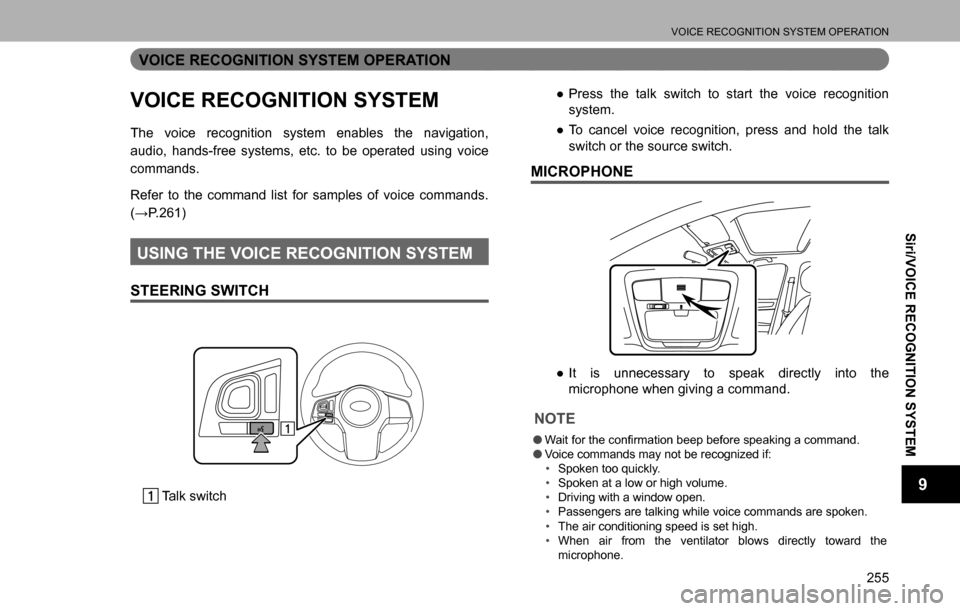
STEERING SWITCH
Talk switch
�”Press the talk switch to start the voice recognition
system.
�”To cancel voice recognition, press and hold the talk
switch or the source switch.
MICROPHONE
�”It is unnecessary to speak directly into the
microphone when giving a command.
NOTE
O:<0044004c0057000300490052005500030057004b0048000300460052005100bf0055005000440057004c0052005100030045004800480053000300450048004900520055004800030056005300480044004e004c0051004a00030044000300460052005000
500044005100470011>
OVoice commands may not be recognized if:
‡�Spoken too quickly.
‡�Spoken at a low or high volume.
‡�Driving with a window open.
‡�Passengers are talking while voice commands are spoken.
‡�The air conditioning speed is set high.
‡�When air from the ventilator blows directly toward the
microphone.
VOICE RECOGNITION SYSTEM OPERATION
257
Siri/VOICE RECOGNITION SYSTEM
9
�”With navigation function:
To use the voice recognition system for navigation
function, say the command to change to the
QDYLJDWLRQ�IXQFWLRQ�
VOICE RECOGNITION SYSTEM OPERATION
260
EXPRESSION EXAMPLES FOR EACH FUNCTION
Command Expression examples
Call by specifying
contactPhone the number of
.
Ring ’s
number.
Call by specifying
phone numberPhone .
Search artists to
listen to songPut on the artist .
Listen to the singer .
Search album names
to listen to songListen to album.
Play me the album .
Use navigation
function*Go to GPS.
Go to address entry.
*: With navigation function
COMMAND LIST
262 XCommands for changing the audio mode
Voice command Phrase Function
AM mode
changeplay AM, select AMSwitch to AM
mode
FM mode change play FM, select FMSwitch to FM
mode
SiriusXM radio
mode change play XM, select XMSwitch to SiriusXM
mode
CD mode change play CD, select CDSwitch to CD
mode
USB mode
changeplay USB, select USBSwitch to USB
mode
SD mode
change*play microSD, select
microSDSwitch to SD
mode
iPod mode
changeplay iPod, select iPodSwitch to iPod
mode
AUX mode
changeselect AUXSwitch to AUX
mode
Audio off mode
changeaudio off, turn off audio Turn off the Audio
Audio on mode
changeaudio on, turn on audio Turn on the Audio
*: With navigation function
XCommands for changing the mode
Voice command Phrase Function
Hands-free mode
change[go to] phone, phone
screen, phone menuSwitch to HF mode
Audio mode
changego to audioSwitch to audio
mode
aha mode
changego to ahaSwitch to aha
mode
Pandora*
1 mode
changego to PandoraSwitch to Pandora
mode
Climate mode
change[go to] AC, [go to]
climate controlSwitch to climate
mode
Navigation mode
change*
2
navigation,
go to navigation,
go to NAV systemSwitch to the voice
command on NAV
system
*1: Pandora is available in the United States, Australia, and New Zealand.
*2: With navigation function