CD player SUBARU LEGACY 2016 6.G User Guide
[x] Cancel search | Manufacturer: SUBARU, Model Year: 2016, Model line: LEGACY, Model: SUBARU LEGACY 2016 6.GPages: 572
Page 286 of 572
Audio/Audio set
!How to change the source
TheiPodoperationscreencanbe
reached by the following methods:
.Connect an iPod. Refer to“Connecting
and disconnecting a USB memory/porta-
ble device”F5-17.
.Select the“USB/iPod”key on the
source select screen. Refer to“Selecting
an audio source”F5-18.
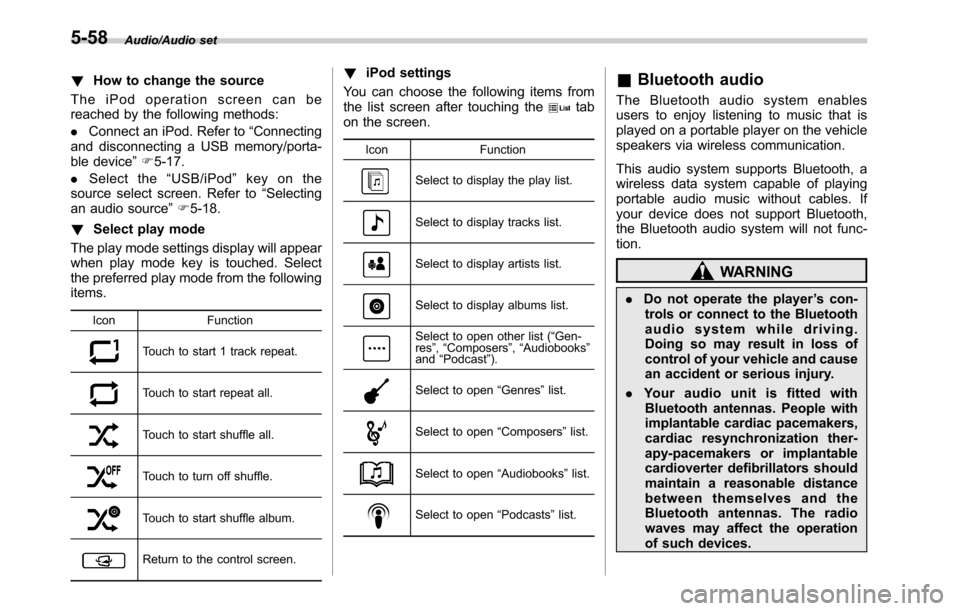
!Select play mode
The play mode settings display will appear
when play mode key is touched. Select
the preferred play mode from the following
items.
Icon Function
Touch to start 1 track repeat.
Touch to start repeat all.
Touch to start shuffle all.
Touch to turn off shuffle.
Touch to start shuffle album.
Return to the control screen.
!iPod settings
You can choose the following items from
the list screen after touching the
tab
on the screen.
Icon Function
Select to display the play list.
Select to display tracks list.
Select to display artists list.
Select to display albums list.
Select to open other list (“Gen-
res”,“Composers”,“Audiobooks”
and“Podcast”).
Select to open“Genres”list.
Select to open“Composers”list.
Select to open“Audiobooks”list.
Select to open“Podcasts”list.
&Bluetooth audio
The Bluetooth audio system enables
users to enjoy listening to music that is
played on a portable player on the vehicle
speakers via wireless communication.
This audio system supports Bluetooth, a
wireless data system capable of playing
portable audio music without cables. If
your device does not support Bluetooth,
the Bluetooth audio system will not func-
tion.
WARNING
.Do not operate the player’s con-
trols or connect to the Bluetooth
audio system while driving.
Doing so may result in loss of
control of your vehicle and cause
an accident or serious injury.
.Your audio unit is fitted with
Bluetooth antennas. People with
implantable cardiac pacemakers,
cardiac resynchronization ther-
apy-pacemakers or implantable
cardioverter defibrillators should
maintain a reasonable distance
between themselves and the
Bluetooth antennas. The radio
waves may affect the operation
of such devices.
5-58
Page 287 of 572
.Before using Bluetooth devices,
users of any electrical medical
device other than implantable
cardiac pacemakers, cardiac re-
synchronization therapy-pace-
makers or implantable cardiover-
ter defibrillators should consult
the manufacturer of the device
for information about its opera-
tion under the influence of radio
waves. Radio waves could have
unexpected effects on the opera-
tion of such medical devices.
CAUTION
Do not leave your portable player in
the vehicle. In particular, high tem-
peratures inside the vehicle may
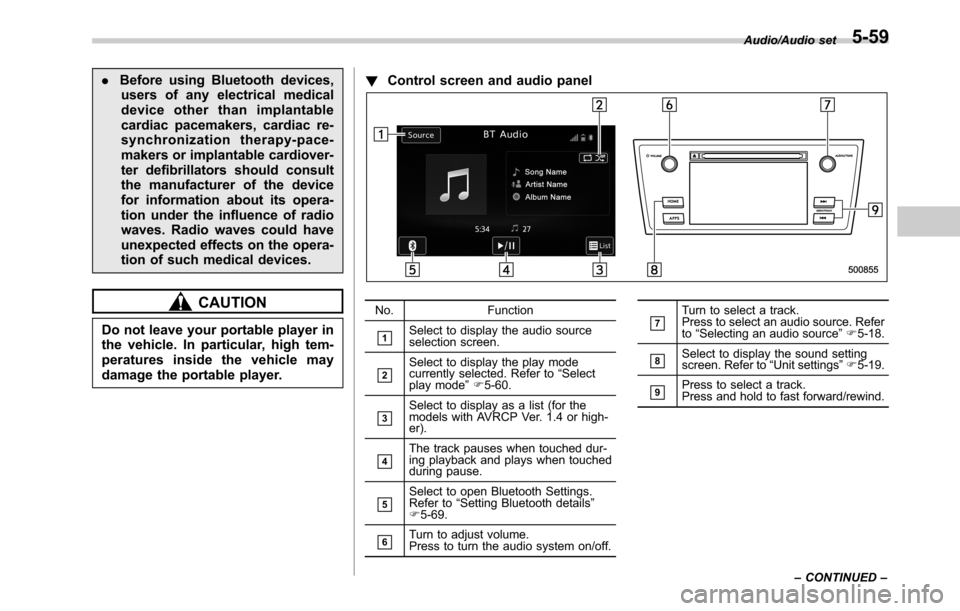
damage the portable player.!Control screen and audio panel
No. Function
&1Select to display the audio source
selection screen.
&2Select to display the play mode
currently selected. Refer to“Select
play mode”F5-60.
&3Select to display as a list (for the
models with AVRCP Ver. 1.4 or high-
er).
&4The track pauses when touched dur-
ing playback and plays when touched
during pause.
&5Select to open Bluetooth Settings.
Refer to“Setting Bluetooth details”
F5-69.
&6Turn to adjust volume.
Press to turn the audio system on/off.
&7Turn to select a track.
Press to select an audio source. Refer
to“Selecting an audio source”F5-18.
&8Select to display the sound setting
screen. Refer to“Unit settings”F5-19.
&9Press to select a track.
Press and hold to fast forward/rewind.Audio/Audio set
–CONTINUED–
5-59
Page 288 of 572

Audio/Audio set
NOTE
.Depending on the Bluetooth device
that is connected to the system, the
music may start playing when selecting
the
key while it is paused. Con-
versely, the music may pause when
selecting the
key while it is playing.
.In the following conditions, the sys-
tem may not function:
–The Bluetooth device is turned
off.
–The Bluetooth device is not con-
nected.
–The Bluetooth device has a low
battery.
.It may take time to connect the
phone when Bluetooth audio is being
played.
.For operating the portable player,
see the instruction manual that comes
with it.
.If the Bluetooth device is discon-
nected due to poor reception from the
Bluetooth network when the ignition
switch is in the“ACC”or“ON”posi-
tion, the system will automatically
reconnect to the portable player.
.If the Bluetooth device is discon-
nected on purpose, such as it was
turned off, this does not happen.
Reconnect the portable player manu-
ally..Bluetooth device information is re-
gistered when the Bluetooth device is
connected to the Bluetooth audio sys-
tem. When selling or disposing of the
vehicle, remove the Bluetooth audio
information from the system. Refer to
“Bluetooth®settings”F5-66.
!Connecting a Bluetooth device
To use the Bluetooth audio system, it is
necessary to register a Bluetooth device
with the system.
.Registering an additional device
1. Select the“Select Add”key on the
Bluetooth audio control screen.
2. For more information: Refer to“Regis-
tering/connecting Bluetooth
®device”F5-
66.
.Selecting a registered device
1. Select the“Select Device”key on the
Bluetooth audio control screen.
2. For more information: Refer to“BT
Devices Connection screen”F5-69.
!How to change the source
Select the“BT Audio”key on the source
select screen. Refer to“Selecting an audio
source”F5-18.
NOTE
Depending on the type of portable
player connected, some functions
may not be available and/or the screen
may look differently than shown in this
manual.
!Select play mode
The play mode settings display will appear
when play mode key is touched. Select
the preferred play mode from the following
items.
Icon Function
Touch to start 1 track repeat.
Touch to start repeat all.
Touch to repeat the tracks in the
group.
Touch to start shuffle all.
Touch to play tracks in the order
in which they are registered in
the audio device.
Touch to start shuffle group.
5-60
Page 289 of 572
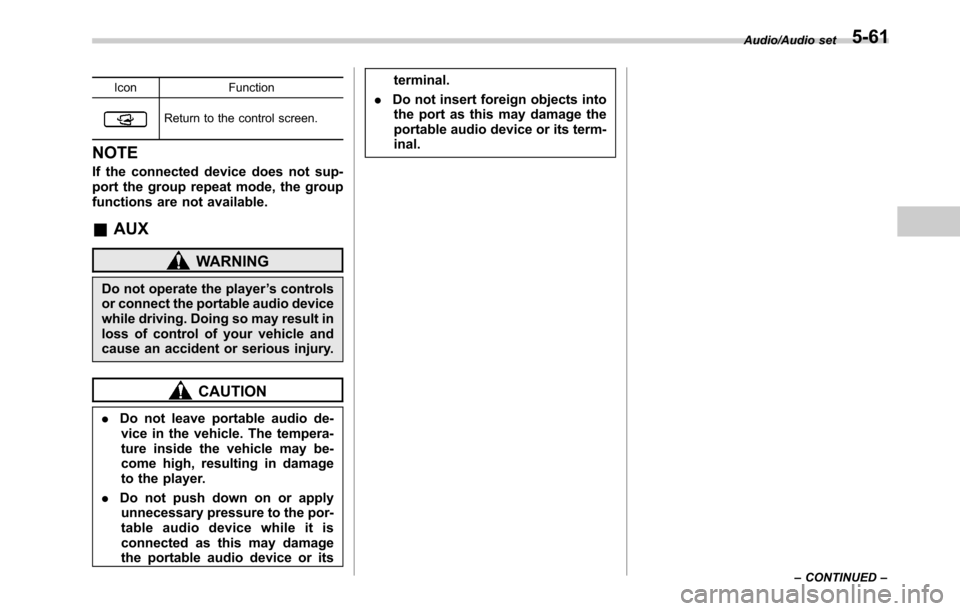
Icon Function
Return to the control screen.
NOTE
If the connected device does not sup-
port the group repeat mode, the group
functions are not available.
&AUX
WARNING
Do not operate the player’s controls
or connect the portable audio device
while driving. Doing so may result in
loss of control of your vehicle and
cause an accident or serious injury.
CAUTION
.Do not leave portable audio de-
vice in the vehicle. The tempera-
ture inside the vehicle may be-
come high, resulting in damage
to the player.
.Do not push down on or apply
unnecessary pressure to the por-
table audio device while it is
connected as this may damage
the portable audio device or itsterminal.
.Do not insert foreign objects into
the port as this may damage the
portable audio device or its term-
inal.
Audio/Audio set
–CONTINUED–5-61