keyless entry SUBARU LEGACY 2016 6.G User Guide
[x] Cancel search | Manufacturer: SUBARU, Model Year: 2016, Model line: LEGACY, Model: SUBARU LEGACY 2016 6.GPages: 572
Page 127 of 572
!Opening the trunk lid (Legacy)
Press and hold the trunk lid opener button
to open the trunk lid. An electronic chirp
will sound twice and the hazard warning
flashers will flash twice.
!Unlocking the rear gate (Outback)
Press the rear gate unlock button to
unlock the rear gate. An electronic chirp
will sound twice and the hazard warning
flashers will flash twice.
!Selecting audible signal operation
Using an electronic chirp, the system will
give you an audible signal when the doors
are locked or unlocked. If desired, you can
turn the audible signal off by operating the
multi information display. For details, refer
to“Keyless Entry System”F3-42.
Furthermore, the volume setting of the
audible signal can also be changed by a
SUBARU dealer. Consult your SUBARU
dealer for details.
!Selecting hazard warning flasher
operation
Using the hazard warning flasher, the
system will give you a visible signal when
the doors are locked or unlocked. If
desired, you can turn the hazard warning
flashers off by operating the multi informa-
tion display. For details, refer to“Keyless
Entry System”F3-42. The setting canalso be changed by a SUBARU dealer.
Consult your SUBARU dealer for details.
!Vehicle finder function
Use this function to find your vehicle
parked among many vehicles in a large
parking lot. Provided you are within 30 feet
(10 meters) of the vehicle, pressing the
lock/arm button three times in a 5-second
period will cause your vehicle’s horn to
sound once and its hazard warning
flashers to flash three times.
NOTE
If the interval between presses is too
short when you press the lock/arm
button three times, the system may
not respond to the signals from the
remote transmitter.
!Sounding a panic alarm
To activate the alarm, press the“PANIC”
button once.
The horn will sound and the hazard
warning flashers will flash.
To deactivate the panic alarm, press any
button on the remote transmitter. If a
button on the remote transmitter is not
pressed, the alarm will be deactivated
after approximately 30 seconds.
&Operating the transmitter
NOTE
The remote keyless entry system will
not be activated when the key is
inserted in the ignition switch.
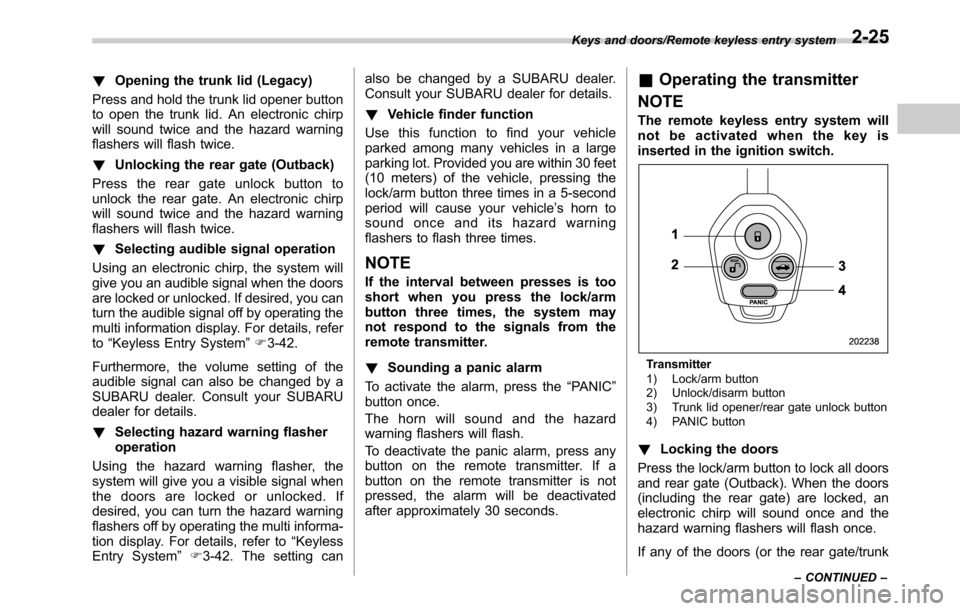
Transmitter
1) Lock/arm button
2) Unlock/disarm button
3) Trunk lid opener/rear gate unlock button
4) PANIC button
!Locking the doors
Press the lock/arm button to lock all doors
and rear gate (Outback). When the doors
(including the rear gate) are locked, an
electronic chirp will sound once and the
hazard warning flashers will flash once.
If any of the doors (or the rear gate/trunk
Keys and doors/Remote keyless entry system
–CONTINUED–2-25
Page 128 of 572

Keys and doors/Remote keyless entry system
lid) is not fully closed, the following will
occur to alert you that the doors (or the
rear gate/trunk lid) are not properly closed.
.an electronic chirp sounds five times.
.the hazard warning flashers flash five
times.
When you close the door, it will automa-
tically lock and then the following will
occur.
.an electronic chirp sounds once.
.the hazard warning flashers flash once.
!Unlocking the doors
Press the unlock/disarm button to unlock
the driver’s door. An electronic chirp will
sound twice and the hazard warning
flashers will flash twice. To unlock all
doors and the rear gate (Outback), briefly
press the unlock/disarm button a second
time within 5 seconds.
NOTE
If the interval between the first and
second presses of the unlock/disarm
button (for unlocking of all of the doors
and the rear gate) is extremely short,
the system may not respond.!Opening the trunk lid (Legacy)
Press and hold the trunk lid opener button
to open the trunk lid. An electronic chirp
will sound twice and the hazard warning
flashers will flash twice.
!Unlocking the rear gate (Outback)
Press the rear gate unlock button to
unlock the rear gate. An electronic chirp
will sound twice and the hazard warning
flashers will flash twice.
!Selecting audible signal operation
Using an electronic chirp, the system will
give you an audible signal when the doors
are locked or unlocked.
If desired, the audible signal ON/OFF
setting and the audible signal volume
can be customized by a SUBARU dealer.
Consult your SUBARU dealer for details.
!Selecting hazard warning flasher
operation
Using the hazard warning flasher, the
system will give you a visible signal when
the doors are locked or unlocked. If
desired, you can turn the hazard warning
flashers off by operating the multi informa-
tion display. For details, refer to“Keyless
Entry System”F3-42. The setting can
also be changed by a SUBARU dealer.
Consult your SUBARU dealer for details.!Vehicle finder function
Use this function to find your vehicle
parked among many vehicles in a large
parking lot. Provided you are within 30 feet
(10 meters) of the vehicle, pressing the
lock/arm button three times in a 5-second
period will cause your vehicle’s horn to
sound once and its hazard warning
flashers to flash three times.
NOTE
If the interval between presses is too
short when you press the lock/arm
button three times, the system may
not respond to the signals from the
remote transmitter.
!Sounding a panic alarm
To activate the alarm, press the“PANIC”
button once.
The horn will sound and the hazard
warning flashers will flash.
To deactivate the panic alarm, press any
button on the remote transmitter. If a
button on the remote transmitter is not
pressed, the alarm will be deactivated
after approximately 30 seconds.
&Replacing the battery
Refer to“Replacing battery”F11-49.
2-26
Page 129 of 572

&Replacing lost transmitters
If you lose a transmitter or want to
purchase additional transmitters (up to
four can be programmed), you should re-
program all of your transmitters for secur-
ity reasons. For details, contact your
SUBARU dealer and have the transmitters
programmed into the remote keyless entry
system.
&Certification for remote key-
less entry system
.U.S.-spec. models
FCC ID: CWTWB1U811
FCC ID: CWTWD1U848
CAUTION
FCC CAUTION
Changes or modifications not ex-
pressly approved by the party re-
sponsible for compliance could void
the user’s authority to operate the
equipment.
This device complies with Part 15 of the
FCC Rules. Operation is subject to the
following two conditions: (1) This device
may not cause harmful interference, and
(2) this device must accept any interfer-
ence received, including interference thatmay cause undesired operation.
.Canada-spec. models
This device complies with Industry
Canada licence-exempt RSS standard
(s). Operation is subject to the following
two conditions: (1) this device may not
cause interference, and (2) this device
must accept any interference, including
interference that may cause undesired
operation of the device.
Le présent appareil est conforme aux
CNR d’Industrie Canada applicables aux
appareils radio exempts de licence. L’ex-
ploitation est autorisée aux deux condi-
tions suivantes: (1) l’appareil ne doit pas
produire de brouillage, et (2) l’utilisateur
de l’appareil doit accepter tout brouillage
radioélectrique subi, même si le brouillage
est susceptible d’en compromettre le
fonctionnement..Mexico-spec. models
COFETEL RLVSUTW13-2405
COFETEL RLVSUTW13-2402
Keys and doors/Remote keyless entry system2-27
Page 130 of 572

Keys and doors/Alarm system
Alarm system
The alarm system helps to protect your
vehicle and valuables from theft. The horn
sounds and the hazard warning flashers
flash if someone attempts to break into
your vehicle.
For models with“keyless access with
push-button start system”:
The system can be armed or disarmed
with the keyless access function or access
key.
The system will not be activated when the
push-button ignition switch is in the“ACC”
or“ON”position.
For models without“keyless access
with push-button start system”:
The system can be armed and disarmed
with the remote transmitter.
The system will not be activated when the
key is inserted into the ignition switch.
Your vehicle’s alarm system has been set
for activation at the time of shipment from
the factory. You can set the system for
deactivation yourself or have it done by
your SUBARU dealer.
&System alarm operation
The alarm system will give the following
alarms when triggered.
.The vehicle’s horn will sound for 30
seconds.
.The hazard warning flashers will flash
for 30 seconds.
If any of the doors (or the rear gate/trunk
lid) remains open after the 30-second
period, the horn will continue to sound
for a maximum of 3 minutes. If the door (or
the rear gate/trunk lid) is closed while the
horn is sounding, the horn will stop
sounding with a delay of up to 30 seconds.
The alarm is triggered by:
.Opening any of the doors, rear gate or
the trunk lid
.Physical impact to the vehicle, such as
forced entry (only models with shock
sensors (dealer option))
NOTE
The alarm system can be set to trigger
the illumination of the following interior
lights.
.Map lights
.Dome light (illuminates only when
the dome light switch is in the“DOOR”
position)
.Cargo area light (Outback)The notifications regarding the map
lights, dome light and cargo area light
(Outback) are deactivated as the fac-
tory setting. A SUBARU dealer can
activate the system. Contact your
SUBARU dealer for details.
&Activating and deactivating
the alarm system
To change the setting of your vehicle’s
alarm system for activation or deactiva-
tion, do the following.
1. Disarm the alarm system. Refer to
“Disarming the system”F2-32.
2. Sit in the driver’s seat and shut all
doors (and the rear gate (Outback)).
3. Turn the ignition switch to the“ON”
position.
4. Hold down the REAR (UNLOCK) side
of the driver’s power door locking switch,
open the driver’s door within the following
1 second, and wait 10 seconds without
releasing the switch. The setting will then
be changed as follows:
If the system was previously activated:
The odometer screen displays“ALOF”
and the horn sounds twice, indicating that
the system is now deactivated.
2-28
Page 140 of 572
Keys and doors/Trunk lid (Legacy)
Trunk lid (Legacy)
WARNING
.To prevent dangerous exhaust
gas from entering the vehicle,
always keep the trunk lid closed
while driving.
.Help prevent children, adults or
animals from locking themselves
in the trunk. On hot or sunny
days, the temperature in the
trunk could quickly become high
enough to cause death or serious
heat-related injuries including
brain damage to anyone locked
inside, particularly for small chil-
dren.
.When leaving the vehicle, close
all windows and lock all doors.
Also make certain that the trunk
is closed.
&To open and close the trunk
lid from outside
The trunk lid can be opened using the
keyless access function or remote keyless
entry system. For details, refer to the
following section.
.For models with“keyless access with
push-button start system”, refer to“Open-
ing trunk (Legacy)”F2-16,“Opening the
trunk lid (Legacy)”F2-25 or“Opening the
trunk lid (Legacy)”F2-26.
.For models without“keyless access
with push-button start system”, refer to
“Opening the trunk lid (Legacy)”F2-25 or
“Opening the trunk lid (Legacy)”F2-26.
To close the trunk lid, lightly press the
trunk lid down until the latch engages.
NOTE
.Do not leave your valuables in the
trunk when you leave your vehicle.
.Even when the trunk lid cannot be
opened using the remote keyless entry
system, you can open the trunk lid by
using the key. Refer to“Trunk lid
(Legacy)–if the trunk lid cannot be
opened”F9-19.
&To open the trunk lid from
inside
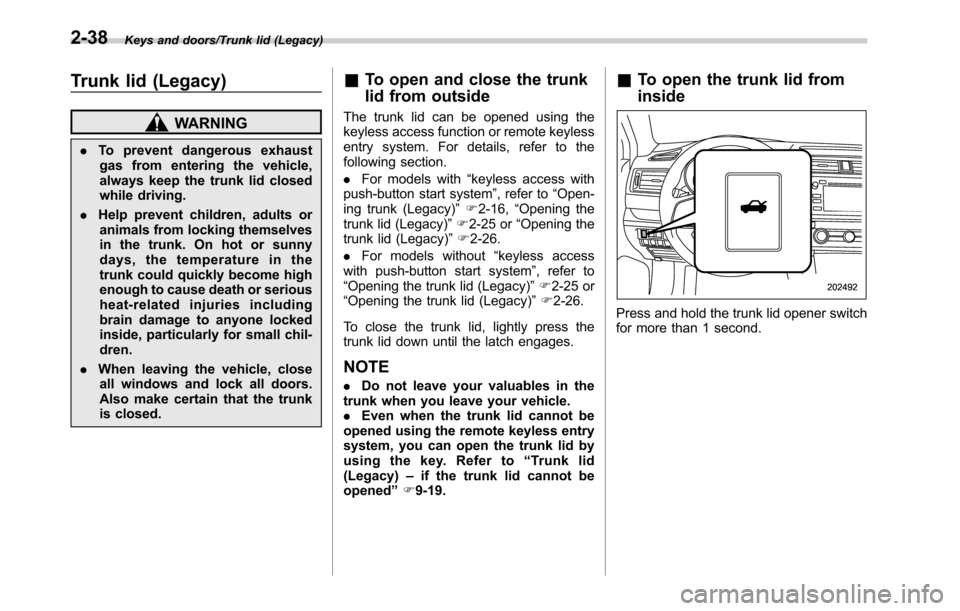
Press and hold the trunk lid opener switch
for more than 1 second.
2-38
Page 142 of 572
Keys and doors/Rear gate (Outback)
This places the latch in the locked posi-
tion.
3. Move the release handle, from outside
the vehicle, in the direction of the arrow to
check if the latch is released.If the latch is not released, contact your
SUBARU dealer.
In that case, use the key to release the
latch, then close the trunk lid.
Also, if the movement of the release
handle feels restricted or not entirely
smooth during operation, or the handle
and/or handle base is cracked, contact
your SUBARU dealer.
Rear gate (Outback)
&Manual rear gate (if
equipped)
The rear gate can be locked and unlocked
using any of the following systems.
.Power door locking switch: Refer to
“Power door locking switches”F2-9.
.Keyless access with the push-button
start system (if equipped): Refer to“Key-
less access with push-button start system”
F2-10.
.Remote keyless entry system: Refer to
“Remote keyless entry system”F2-23.
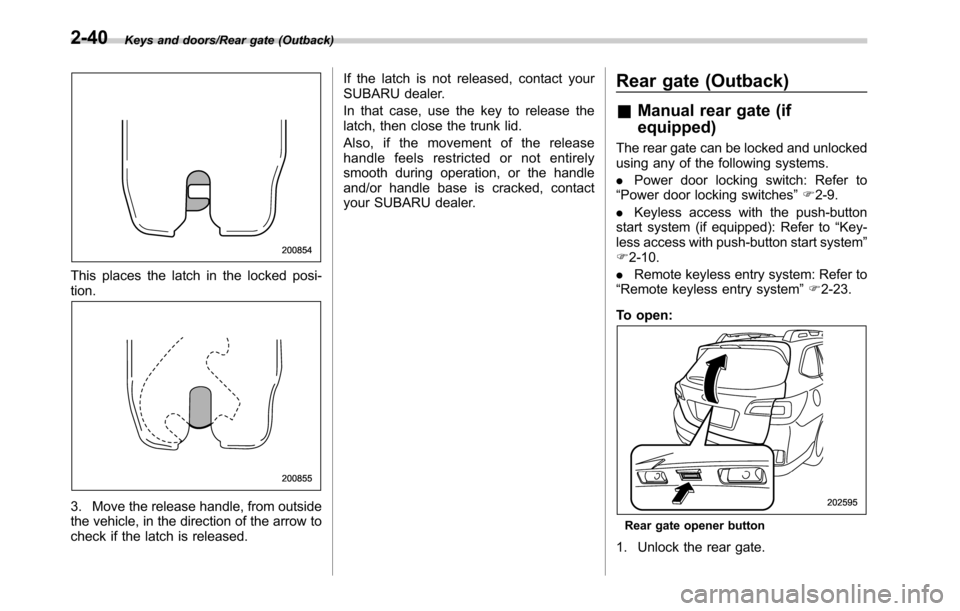
To open:
Rear gate opener button
1. Unlock the rear gate.
2-40
Page 150 of 572
Keys and doors/Moonroof
to“Keyless Entry System”F3-42.
The ON/OFF setting of the audible signal
also works as the audible signal settings
for the“remote keyless entry system”and
the“keyless access with push-button start
system”. However, for the warning chime
such as that caused by“Reverse function”
F2-46 or“Rear gate drop prevention
function”F2-47, it cannot be set as non-
operational.Moonroof (if equipped)
WARNING
Never let anyone’s hands, arms,
head or any objects protrude from
the moonroof. A person could be
seriously injured if the vehicle stops
suddenly or turns sharply or if the
vehicle is involved in an accident.
To avoid serious personal injury
caused by entrapment, you must
conform to the following instruc-
tions without exception.
.Before closing the moonroof,
make sure that no one’s hands,
arms, head or other objects will
be accidentally caught in the
moonroof.
.Before leaving the vehicle, al-
ways remove the key from the
ignition switch for safety (models
without“keyless access with
push-button start system”) and
never allow an unattended child
to remain in the vehicle. Failure
to follow this procedure could
result in injury to a child operat-
ing the moonroof..Never try to check the anti-en-
trapment function by deliberately
placing part of your body in the
moonroof.CAUTION
.Do not sit on the edge of the open
moonroof.
.Do not operate the moonroof if
falling snow or extremely cold
conditions have caused it to
freeze shut.
.The anti-entrapment function
does not operate when the moon-
roof is being tilted down. Be sure
to confirm that it is safe to do so
before tilting the moonroof down.
.If the moonroof does not close,
we recommend that you have the
system checked by a SUBARU
dealer.
The moonroof has both tilting and sliding
functions.
The moonroof operates only when the
ignition switch is in the“ON”position.
2-48
Page 156 of 572
Instruments and controls/Ignition switch (models without push–button start system)
while turning it (all models) and the select
lever is in the“P”position (CVT models).
&ACC
In this position the electrical accessories
(radio, accessory power outlet, etc.) can
be used.
&ON
This is the normal operating position after
the engine is started.
&START
CAUTION
Do not turn the ignition switch to the
“START”position while the engine
is running.
The engine is started in this position. The
starter cranks the engine to start it. When
the key is released (after the engine has
started), the key automatically returns to
the“ON”position.
If the engine does not start with your
registered key, pull out the key once (at
this time, the security indicator light will
blink), reinsert the key in the ignition
switch and then try to start the engine
again.
NOTE
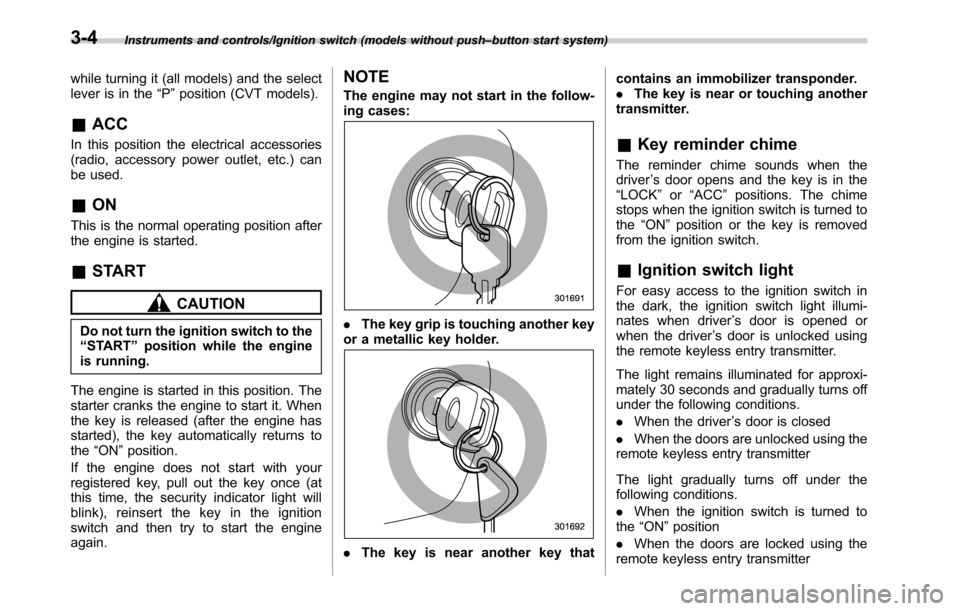
The engine may not start in the follow-
ing cases:
.The key grip is touching another key
or a metallic key holder.
.The key is near another key thatcontains an immobilizer transponder.
.The key is near or touching another
transmitter.
&Key reminder chime
The reminder chime sounds when the
driver’s door opens and the key is in the
“LOCK”or“ACC”positions. The chime
stops when the ignition switch is turned to
the“ON”position or the key is removed
from the ignition switch.
&Ignition switch light
For easy access to the ignition switch in
the dark, the ignition switch light illumi-
nates when driver’s door is opened or
when the driver’s door is unlocked using
the remote keyless entry transmitter.
The light remains illuminated for approxi-
mately 30 seconds and gradually turns off
under the following conditions.
.When the driver’s door is closed
.When the doors are unlocked using the
remote keyless entry transmitter
The light gradually turns off under the
following conditions.
.When the ignition switch is turned to
the“ON”position
.When the doors are locked using the
remote keyless entry transmitter
3-4
Page 187 of 572

as vehicle information, warning informa-
tion, etc., they will interrupt the current
screen, and appear on the display accom-
panied by a beep. If such a screen is
displayed, take proper action according to
the message shown on the screen.
The warning screen will return to the
original screen after a few seconds. While
the“
”information reminder is shown on
the display, it may be possible to display
the warning screen again. To recall the
message marked with“
”on the display,
pull the“/SET”switch on the steering
wheel toward you.
&Welcome screen and Good-
bye screen
When the driver’s door is opened and
closed after unlocking the door, the
welcome screen will appear on the multi
information display for approximately 20
seconds.
When the ignition switch is turned to the
“LOCK”/“OFF”position, the multi informa-
tion display gradually turns off (Good-bye
screen).
NOTE
.The basic screen will be shown
when the ignition switch is turned to
the“ON”position while the welcomescreen is displayed.
.Once the welcome screen appears,
it takes a certain period of time to
display it again.
.If the ignition switch is operated
after unlocking the driver’s door, the
welcome screen will not appear even
when the driver’s door is opened and
closed.
.The welcome screen will disappear
when you lock the driver’s door by
using the remote keyless entry system
(all models) or the keyless access
function (if equipped) while the wel-
come screen is displayed.
.If any of the doors (including the
rear gate) is opened while the welcome
screen is displayed, the door ajar
warning will appear.
.The welcome screen can be set to
on or off. For details, refer to“Welcome
Screen”F3-41.
.The Good-bye screen can be set to
on or off. For details, refer to“Good-
bye Screen”F3-41.
&Warning screen
Example of warning
If there is a warning message or a
maintenance notification, it will appear for
approximately 5 seconds. Take the appro-
priate actions based on the messages
indicated.
Instruments and controls/Multi information display
–CONTINUED–3-35
Page 192 of 572

Instruments and controls/Multi information display
First menuSecond menu
Third menu Settings
Vehicle Setting Keyless Entry System
Audible Signal*1ON/OFF
Hazard Warning FlasherON/OFF
Driver Door Unlock
*1 *2Driver Door Only, All
Rear Gate Unlock
*1 *2 *3Rear Gate Only, All
Defogger
—15 minutes/Continuous
Interior Light
—10 seconds–30 seconds, OFF
Auto Headlights
Light SensitivityMax/Mid/Low/Min
Wiper LinkON/OFF
Welcome Lighting
Approaching Time Set30 seconds–90 seconds, OFF
Leaving Time Set30 seconds–90 seconds, OFF
Default Settings OK To Reset?
—Yes/No
*1: The setting menu is available only for models with“keyless access with push-button start system”.
*2: The setting can only be changed for the“keyless access”entry function. For details, refer to“Door unlock selection function”F2-17.
*3: For Outback only
3-40